


 Video Converter Ultimate
 Skärminspelare
 Video reparation
 Säker nedladdning
Topp 3 sätt att konvertera FLV till MOV
På grund av vissa format som inte stöds eller av andra skäl kan du behöva konvertera FLV till MOV, särskilt när du använder en Mac.
Du bör veta att FLV-filer inte stöds inbyggt av QuickTime Player och iMovie. Alltså kan du inte öppna eller redigera FLV direkt på Mac. Oavsett orsak visar det här inlägget dig hur du konverterar FLV till MOV.

Lyckligtvis finns det många videokonverterare, inklusive många kostnadsfria onlineverktyg som kan hjälpa dig att ändra dina FLV-filer till MOV utan krångel. Det här inlägget introducerar 3 utmärkta FLV till MOV-konverterare. När du har laddat ner FLV‑videor från videosajter kan du använda dem för att göra videokonverteringen från FLV till MOV.
Del 1. Konvertera FLV till MOV Online Free
Som vi nämnde ovan finns det ett stort antal kostnadsfria FLV till MOV‑konverterare online på marknaden. Om du inte vet vilken du ska använda rekommenderar vi här uppriktigt den populära FVC Free Online Video Converter för att konvertera FLV till QuickTime MOV.
Steg 1: Öppna din webbläsare och gå till denna webbsida för FLV till MOV‑konvertering. Du kan använda den i alla webbläsare, inklusive Chrome, IE, Safari och Firefox.
Ladda ner Skrivbordsversionen för att konvertera filer i batch.
Steg 2: Klicka på knappen Add Files to Convert för att snabbt installera en startmodul för FLV‑konverteringen. Därefter visas ett popupfönster där du kan bläddra efter och ladda upp din FLV‑fil.

Steg 3: När du kommer in i huvudfönstret för konverteraren kan du se att flera populära videoformat som MP4, MOV, AVI, FLV, M4V, MKV, VOB, MPG, WMV och fler listas där. Här ska du välja MOV som utdataformat.
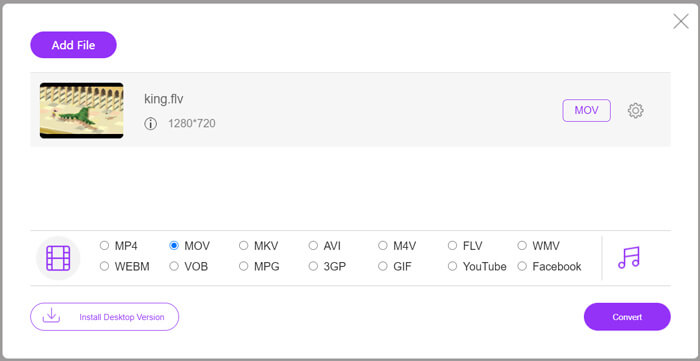
Steg 4: Före den slutliga FLV till MOV‑konverteringen kan du klicka på ikonen Settings för att anpassa fler video- och ljudinställningar som videoupplösning, kodare, bithastighet, bildfrekvens, ljudvolym, ljudkanal med mera. Därefter kan du klicka på knappen Convert för att börja konvertera FLV till MOV online.
Del 2. Ändra FLV till MOV med VLC
VLC är en mediaspelare med öppen källkod som även har vissa grundläggande konverteringsfunktioner. Om du har VLC Media Player installerad på din Mac eller Windows‑dator kan du använda den för att konvertera dina FLV‑filer.
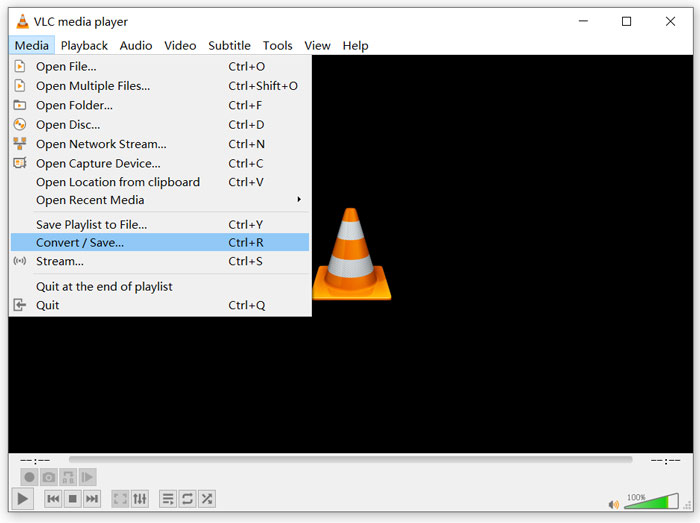
Steg 1: Öppna VLC Media Player på datorn och klicka på menyn Media. Välj alternativet Convert/Save i rullgardinsmenyn. Om du använder VLC på Mac ska du klicka på menyn File och sedan välja alternativet Convert/Stream.
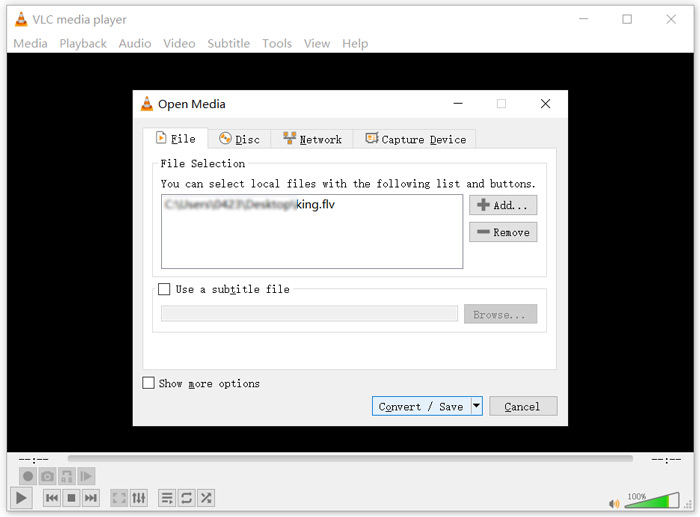
Steg 2: Nu är du i fönstret Open Media. Här kan du klicka på knappen Add för att importera FLV‑filen du vill konvertera. Klicka sedan på knappen Convert/Save för att fortsätta.
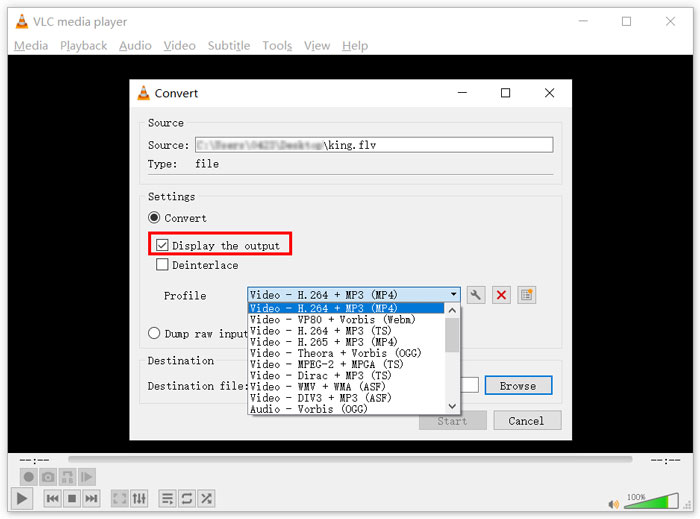
Steg 3: Välj ett lämpligt utdataformat i rullgardinsmenyn Profile. Här kan du konvertera FLV till MP4, TS, OGG, WebM, YouTube HD, MP3, FLAC med mera. Markera rutan framför alternativet Display the output. Klicka på knappen Browse för att välja en lämplig målmapp för den konverterade FLV‑filen. Under detta steg kan du ge utdatafilen filändelsen .mov.
Steg 4: Efter alla dessa åtgärder kan du klicka på knappen Start för att genomföra FLV‑konverteringen.
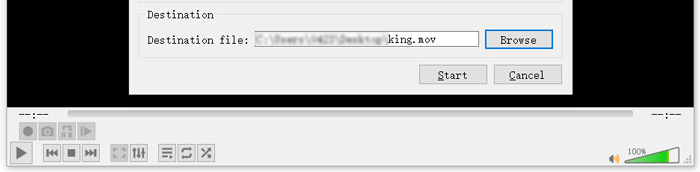
VLC Media Player börjar automatiskt spela upp utdatafilen. Du kan se indikationen Converting file högst upp i VLC. Stäng inte VLC helt förrän konverteringen är klar.
Del 3. Bästa sättet att konvertera FLV till MOV utan kvalitetsförlust
När du vill konvertera FLV till MOV kan du också vända dig till en professionell lösning. Här rekommenderar vi starkt den fullfjädrade FLV till MOV‑konverteringsprogramvaran Video Converter Ultimate till dig. Jämfört med en kostnadsfri FLV till MOV‑konverterare online och VLC har den fler funktioner och stöder fler format. Framför allt kan den konvertera FLV till MOV samtidigt som den behåller originalkvaliteten.
- 1. Konvertera vilken video som helst som MKV, AVI, MP4, WMV, FLV till MOV utan att förlora kvaliteten.
- 2. Konvertera 8K / 5K / 4K, 1080p / 720p HD och SD-videor till över 500 format som MOV, MP4, AVI, MP3 och mer.
- 3. Redigera video som klipp, rotera, beskära, slå samman, etc. och lägg till filter och effekter och förbättra kvaliteten.
- 4. Verktygslådan kan komprimera FLV, redigera FLV-metadatainformation, skapa GIF-filer från FLV och mer.
Gratis nedladdningFör Windows 7 eller senareSäker nedladdning
Gratis nedladdningFör MacOS 10.7 eller senareSäker nedladdning
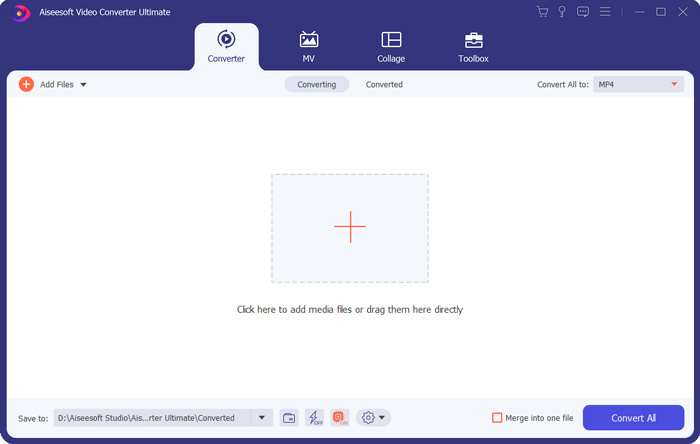
Steg 1: Installera och starta denna FLV till MOV‑konverterare kostnadsfritt på din Mac eller Windows‑dator. Se till att du använder funktionen Converter. Klicka sedan på den stora plus-ikonen för att lägga till din(a) FLV‑fil(er).
Steg 2: Klicka på ikonen format på höger sida om den importerade FLV‑filen. Välj MOV som utdataformat i rullgardinslistan.
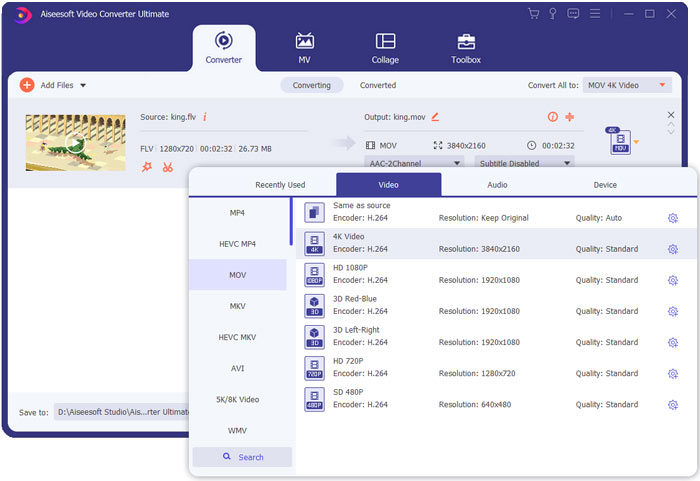
Steg 3: Som du kan se ovan är denna FLV‑konverterare utrustad med många redigeringsfunktioner. Så innan FLV till MOV‑konverteringen kan du redigera den, lägga till filter, effekter eller anpassa andra inställningar efter behov. Därefter kan du klicka på knappen Convert All för att starta konverteringsprocessen.
FLV kontra MOV
Adobe Flash Player använde FLV för att leverera videoinnehåll som filmer och TV-program. Numera utvecklar Adobe inte längre spelaren och rekommenderar användare avinstallera den av säkerhetsskäl. Du kan dock fortfarande använda FLV-formatet på många icke-Adobe/Macromedia-program.
MOV-formatet kan användas för att lagra en film, TV-program, kort videoklipp eller hemmafilm. Den sparas faktiskt i QuickTime File Format (QTFF), som introducerades av Apple 1991. MOV-filer används ofta när folk vill spara en video med hög kvalitet.
Del 4. Vanliga frågor om konvertering av FLV till MOV
FLV vs MOV, Vad är skillnaden mellan FLV och MOV?
FLV, Flash Video File, är en Flash‑kompatibel videofil som utvecklats av Adobe Systems. Den innehåller ett kort filhuvud, omväxlande video-, ljud- och metadatapaket. FLV är ursprungligen utformat för att bädda in videoströmmar i Adobe‑program. En FLV‑fil innehåller vanligtvis en videoström på 640x360 och en ljudström med 44,1 kHz, 2 kanaler, AAC.
MOV är standardvideoformatet för Apple‑enheter och relaterad programvara som QuickTime Player och iMovie. Det ligger till grund för MPEG‑4‑filformatet från International Organization for Standardization. En MOV‑fil kan lagra video, ljud, text, undertexter, bilder och andra filer.
FLV‑formatet stöds inte av Apple‑enheter, inklusive Mac, iPhone, iPad och iPod touch. Dessutom erbjuder FLV lägre videokvalitet jämfört med MOV.
Kan iMovie redigera FLV?
Nej. Som du kan lära dig ovan kan FLV inte stödjas av Apple-enheter och programvara. Som standardvideoredigerare för Mac- och iOS-enheter är iMovie inte heller kompatibel med FLV-filer.
Kan Windows Media Player öppna MOV-filer?
De flesta Windows Media Player-versioner stöder inte MOV-format. Men den senaste Windows Media Player 12.0 kan öppna MOV-filer.
Slutsats
Det här inlägget delar 3 enkla sätt att konvertera FLV till MOV. När dina FLV‑filer inte kan spelas upp eller redigeras kan du använda de rekommenderade konverterarna för att göra om dem till MOV eller MP4.
-
 Hur man konverterar dina FLV-videor till MP3-ljudfiler på skrivbordet och online
 Hur konverterar man en FLV till en MP3-fil? Allt du behöver göra är att läsa den här artikeln noggrant, hitta din favoritmetod och följa vår steg-för-steg-guide för att få vad du vill.
-
 10 bästa FLV-videospelare för Windows 10/8/7, Mac, iOS och Android du måste prova (2021 senaste)
 FLV-spelare hjälper dig enkelt att komma åt dina FLV-filer på din Windows-, Mac-, Android-, iOS-enhet. Kolla in de bästa FLV-filspelarna du kan ladda ner just nu.
-
 Hur man gratis konverterar MP4 till FLV Online / Mac / Windows
 Det här inlägget är den detaljerade guiden till MP4 till FLV-konvertering. Du kan ta de tre bästa gratisomvandlarna för att enkelt byta MP4 till FLV online, på Windows eller Mac-dator.

