


 Video Converter Ultimate
 Skärminspelare
 Video reparation
Släpp loss din kreativitet: Omfattande Luminar Neo-recension
Letar du efter en allt-i-ett‑lösning för bildförbättring och borttagning av bakgrunder? Då kan Luminar Neo vara det perfekta verktyget för dig. Med sitt lättnavigerade gränssnitt och kraftfulla AI‑drivna funktioner utmärker sig detta program som ett mångsidigt fotoredigeringsverktyg för alla typer av användare. Oavsett om du vill öka färgernas lyster, sömlöst byta bakgrunder eller helt enkelt finslipa detaljerna i dina bilder, erbjuder det här verktyget ett brett urval effektiva verktyg och funktioner som uppfyller dina kreativa behov. I denna Luminar Neo‑recension går vi igenom hur detta kraftfulla program utan ansträngning kan lyfta ditt fotograferande till nästa nivå och ge dig den information du behöver för att frigöra dina bilders fulla potential. Följ med när vi fördjupar oss i de funktioner och egenskaper som gör Luminar Neo till ett framstående val inom bildförbättring.

Del 1. Luminar Neo Review
Luminar Neo, en innovativ programvara för fotoredigering utvecklad av Skylum, är en riktig game‑changer för fotografer och visuella konstnärer som söker en komplett uppsättning verktyg för att lyfta sina bilder. I grunden använder detta program avancerad AI‑teknik för att förenkla komplexa redigeringsprocesser och göra dem tillgängliga för användare på alla nivåer. Förutom ett brett utbud av kreativa redigeringsverktyg och förinställningar utmärker sig Luminar Neo särskilt genom sina enastående funktioner för bilduppskalning och borttagning av bakgrunder. Bilduppskalaren ser till att dina fotografier behåller skärpa och detaljer även när de förstoras, medan bakgrundsborttagaren erbjuder en sömlös lösning för att ändra och finjustera bakgrunder utan ansträngning.
Viktigaste egenskaper
◆ Använd avancerad AI för exakta förbättringar, inklusive specialverktyg för himmel och hud.
◆ Olika verktyg och förinställningar för att lägga till unika detaljer till dina foton.
◆ Integration med populära redigeringsprogram som Photoshop för ett smidigt arbetsflöde.
◆ Snabb bearbetning för hantering av stora filer och komplexa redigeringar utan ansträngning.
◆ Bevara din originalbild medan du experimenterar med redigeringar.
◆ Användarvänligt gränssnitt.
◆ Bakgrundsborttagare.
Fördelar
- Anpassningsbart arbetsflöde.
- Starka AI-förmåga.
- Överkomlig prissättning.
- Lätt för nybörjare.
- Rabatter för Skylum-användare.
- 24/7 kundsupport.
Nackdelar
- Vissa funktioner behöver förbättras.
- Ingen mobilapp för fotoredigering.
Del 2. Luminar Neo vs Luminar AI
Här är en jämförelsetabell mellan Luminar Neo och Luminar AI.
| Funktion | Luminar Neo | Luminar AI |
| AI-driven redigering | Ja | Ja |
| Gränssnitt | Avancerat och anpassningsbart | Användarvänlig och förenklad |
| Redigeringsverktyg | Omfattande utbud av verktyg och förinställningar | AI-drivna mallar och smarta verktyg |
| Integration | Sömlös integration med andra redigeringsprogram | Effektiv prestanda, optimerad för AI-bearbetning |
| Målgrupp | Professionella fotografer och avancerade användare | Nybörjare och tillfälliga fotografer |
Det är viktigt att komma ihåg att valet mellan Luminar Neo vs Luminar AI handlar om dina individuella preferenser och redigeringskrav. Oavsett om du lutar åt de avancerade och anpassningsbara funktionerna i Luminar Neo eller föredrar den användarvänliga enkelheten hos Luminar AI, står båda verktygen som kraftfulla lösningar inom fotoredigering.
Del 3. Hur man använder Luminar Neo?
Så här kan du använda Luminar Neo för att uppskala bilder:
Steg 1. Öppna Luminar Neo som ett fristående program.
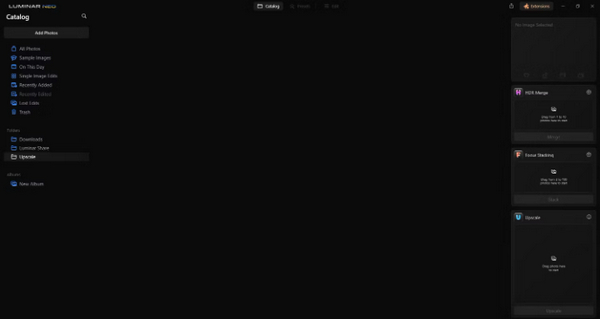
Steg 2. Klicka på Add Photos och välj sedan Add Image.
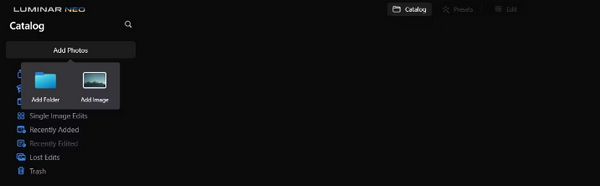
Steg 3. Välj önskad fil och klicka på Open.
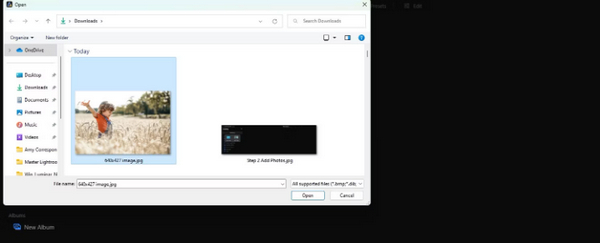
Steg 4. Klicka nu på Catalog högst upp i menyn.
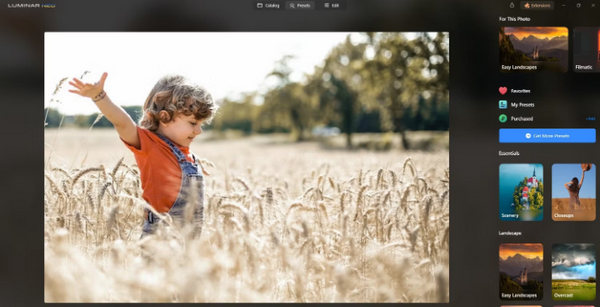
Steg 5. Dra bilden nedåt till rutan Upscale AI längst ned, märkt Drag photo here to start.
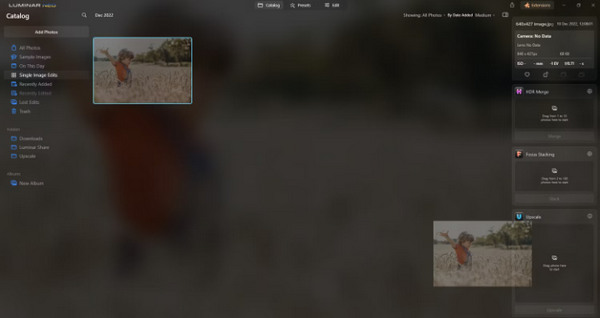
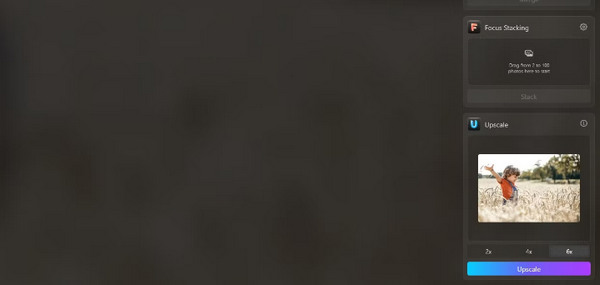
Steg 6. Slutför processen genom att välja den grad av uppskalning du föredrar; i den här demonstrationen valde vi till exempel en sexfaldig förstoring (6x).
Steg 7. Klicka slutligen på Upscale för att tillämpa den valda uppskalningsnivån på din bild.
Överför din nyuppskalade bild från din dator till din telefon utan ansträngning med Luminar Share.
Så här kan du använda Luminar Neo för att ta bort bildbakgrunden:
Steg 1. Börja med att importera fotot du vill redigera. Leta upp och klicka på knappen Add Photos längst upp till vänster på skärmen. När du har valt din bild, klicka på Open.
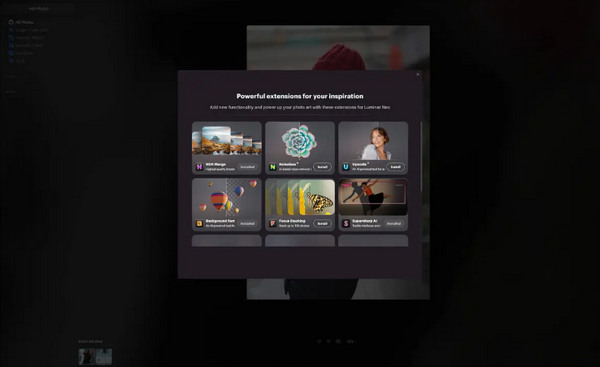
Steg 2. Detta är avgörande för förstagångsanvändare. Du måste ladda ner tillägget Background Removal AI från fliken Extensions längst upp till höger på skärmen. Efter nedladdning dubbelklickar du på ditt foto, klickar på Edit och börjar redigera.
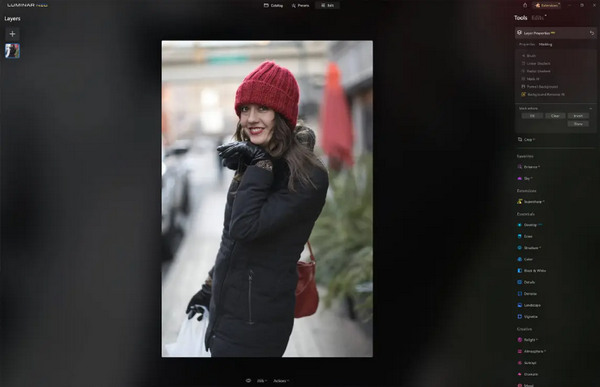
Steg 3. I redigeringsfältet på höger sida av skärmen går du till Layer Properties, sedan Masking, och väljer Background Removal AI. Detta gör att du kan välja ditt motiv. När det har markerats i rött trycker du på Remove för att magiskt ta bort bakgrunden. Använd finjusteringspenseln för eventuella korrigeringar i områden som AI:n kan ha missat.
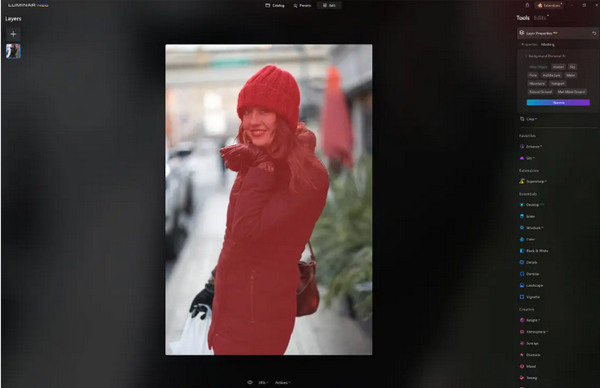
Det enda med Luminar Neo är att dess gratisversion inte innehåller den här funktionen. Ändå, om du har en budget och vill förbättra ditt foto till nästa nivå, är det här verktyget för dig.
Del 4. 2 bästa gratisalternativen till Luminar Neo
Luminar Neo kan vara dyrt för vissa och för komplext för att vara lätt att navigera, så om du letar efter alternativa verktyg för Luminar Neo, här är de bästa verktygen du kan kolla på.
FVC Online Image Upscaler
FVC Online Image Upscaler är en kostnadsfri bilduppskalare online. Ja, du läste rätt. Den är gratis, men underskatta ändå inte dess kapacitet. Det här verktyget är integrerat med AI‑teknik för att automatisera processen med sömlös bildförbättring. Du kan också förstora bilden upp till 8x utan att kompromissa med kvaliteten.
Så här kan du använda det här verktyget
Steg 1. Gå till deras officiella webbplats.
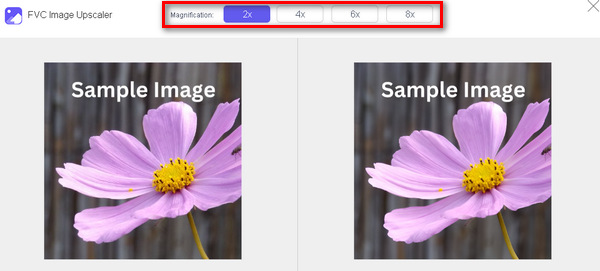
Steg 2. Klicka på Upload Photo och välj den bild du vill skala upp.

Steg 3. Därefter kommer verktyget att förhandsgranska din bild. Du kan använda alternativet Magnifier för att kontrollera bildens kvalitet.
Steg 4. Klicka på Spara för att ladda ned din bild.
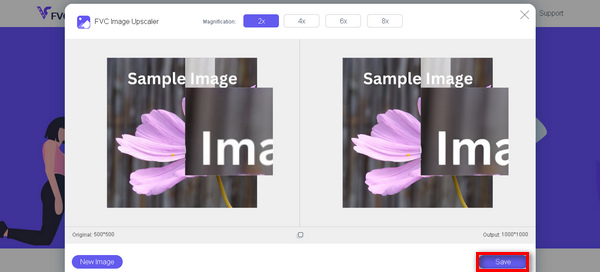
FVC Free Image Upscaler är det bästa alternativet till Luminar Neo när det kommer till uppskalning av bilder. Dessutom, med detta verktyg, kan användare enkelt förbättra sina bilder. Inget komplicerat gränssnitt, du behöver bara några få klick för att förbättra dina bilder perfekt.
FVC Online Background Remover
Samtidigt kan du använda FVC Online Background Remover som ett alternativ för att ta bort bakgrunder i bilder. Detta verktyg är mångsidigt och utformat för att automatisera processen för att ta bort bildbakgrunder. Det stöder flera populära bildformat som PNG, JPG och JPEG. Dessutom kan du anpassa resultatet av din bild: du kan ändra bakgrunden till solida färger, spegelvända motivet, flytta det och beskära det.
Här är stegen för hur du enkelt kan använda det här verktyget:
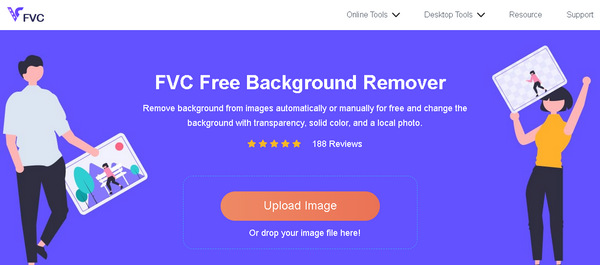
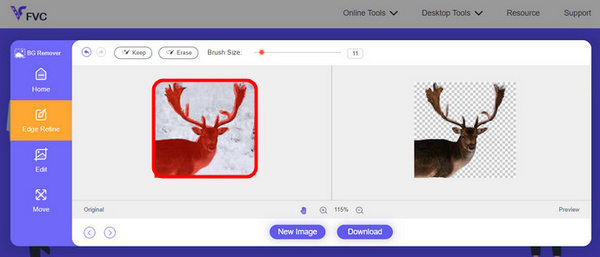
Steg 1. Gå först till deras officiella webbplats och klicka på Upload Image.
Steg 2. Efter att resultatet har genererats kan du redigera bilden genom att förfina kanterna och flytta motivet.
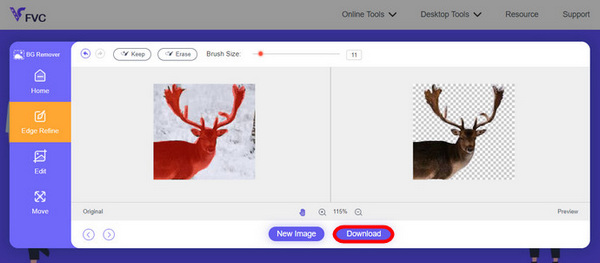
Steg 3. För att spara resultatet klickar du på knappen Download.
FVC Image Background Remover är verkligen ett bra verktyg för att klippa ut en bild och det bästa alternativet för Luminar Neo. Och förutom att det är gratis är verktyget lätt att navigera. Inga krångel, bara kvalitetsresultat.
Del 5. Vanliga frågor om Luminar Neo Review
Är Luminar Neo bättre än Lightroom?
Jämförelsen mellan Luminar Neo och Lightroom beror ofta på individuella preferenser och specifika behov. Lightroom är känt för sin sömlösa integration med Adobes Creative Cloud, vilket gör det till en favorit bland professionella fotografer. Å andra sidan erbjuder Luminar Neo avancerade AI-funktioner och ett flexibelt arbetsflöde. Valet mellan de två beror i slutändan på användarens redigeringsstil och arbetsflödeskrav.
Är Luminar Neo lika bra som Photoshop?
Luminar Neo och Photoshop tjänar olika syften inom fotoredigering. Photoshop är en industristandard som erbjuder en omfattande uppsättning avancerade verktyg för intrikat redigering och grafisk design. Luminar Neo, även om den är kraftfull, vänder sig mer till fotografer med sina AI-drivna funktioner. Lämpligheten av den ena över den andra beror på användarens specifika behov.
Är Luminar Neo bra för nybörjare?
Ja, Luminar Neo är designad för att vara användarvänlig, vilket gör den till ett utmärkt val för nybörjare. Dess intuitiva gränssnitt, tillsammans med avancerade AI-funktioner, tillåter användare att uppnå imponerande resultat utan en brant inlärningskurva. Programvarans omfattande utbud av förinställningar och kreativa verktyg ger också nybörjare möjlighet att utforska och förbättra sina foton med lätthet.
Är Luminar Neo ett engångsköp eller en prenumerationsmodell?
Luminar Neo följer en engångsköpmodell. Användare kan köpa programvaran och få tillgång till dess funktioner utan att behöva en återkommande prenumeration. Denna prisstruktur ger en enkel och kostnadseffektiv metod för användare som föredrar en engångsbetalning för sina fotoredigeringsbehov.
Slutsats
Sammanfattningsvis har denna Luminar Neo‑recension gett dig värdefulla insikter om detta kraftfulla men ändå användarvänliga fotoredigeringsverktyg. Med avancerade funktioner som AI‑driven uppskalning och bakgrundsborttagning vänder det sig både till proffs och nybörjare. Även om det finns utrymme för förbättring gör dess mångsidighet, starka AI och överkomliga pris det till ett övertygande val för att utveckla dina fotografiska färdigheter. Oavsett om du söker anpassningsmöjligheter eller enkelhet erbjuder Luminar Neo en heltäckande lösning för att förvandla dina bilder.
-
 Lägg till bakgrund till foto på iPhone, Android, dator, online
 Kan jag lägga till en vit bakgrund till fotot? Hur gör man det? Lär dig tre sätt att lägga till bakgrund till foton online, på datorn, iPhone eller Android.
-
 Canva Image Enhancer: Den nya bildkvalitetsförstärkaren? [Recension]
 Upptäck hur Canve Image Enhancer kan ta dina foton till nästa nivå. Kolla in vår detaljerade recension som täcker alla funktioner, för- och nackdelar med detta verktyg.
-
 Vance AI Image Enhancer: En djupgående recension [2024]
 Letar du efter ett kraftfullt och effektivt bildförbättringsverktyg? Läs vår djupgående recension av Vance AI Image Enhancer och se hur den kan förvandla dina foton.
