


 Video Converter Ultimate
 Skärminspelare
 Video reparation
 Säker nedladdning
Hur konverterar du MP4 till 3GP online och offline
MP4 är ett populärt videoformat som kan spelas på MP4-spelare, mobiltelefoner och surfplattor. Filmerna vi laddar ner från webbplatsen förblir vanligtvis i MP4-format. Men vissa mobiltelefoner stöder bara uppspelning av 3GP-videor. Den här artikeln visar 3 gratis MP4 till 3GP-omvandlare och du kan konvertera MP4 till 3GP utan krångel.

Del 1. Hur man konverterar MP4 till 3GP på Windows och Mac
Om du vill konvertera MP4 till 3GP offline kan du använda en skrivbordsbaserad MP4 till 3GP‑omvandlare. FVC Free FLV to 3GP Converter är en kostnadsfri och lättanvänd videokonverterare för Windows och Mac. Den kan konvertera olika videoformat som FLV, MP4, MOV, MKV, MTS, M2TS osv. till 3GP utan krångel. Dessutom erbjuder den redigeringsfunktioner för att lägga till teman samt justera upphovsman, tid och leverantör i början/slutet av videon.

- Konvertera videor i MP4, MKV, AVI, MOV, MP3, AAC, AIFF, etc. till 3GP.
- Exportera 3GP-videor och förlustfri ljudfil från MP4-fil med ett klick.
- Låt användare redigera leverantör, titel, författare, tid och lägga till tema.
- Batchkonvertera MP4 till 3GP för att spela på vissa mobiltelefoner.
Gratis nedladdningFör Windows 7 eller senareSäker nedladdning
Gratis nedladdningFör MacOS 10.7 eller senareSäker nedladdning
Steg 1. Ladda ner, installera och starta FVC Free FLV to 3GP Converter på din Windows- eller Mac‑dator. Klicka på knappen Add Files för att ladda MP4‑filerna från datorn. Du kan konvertera fler än en MP4‑fil åt gången.
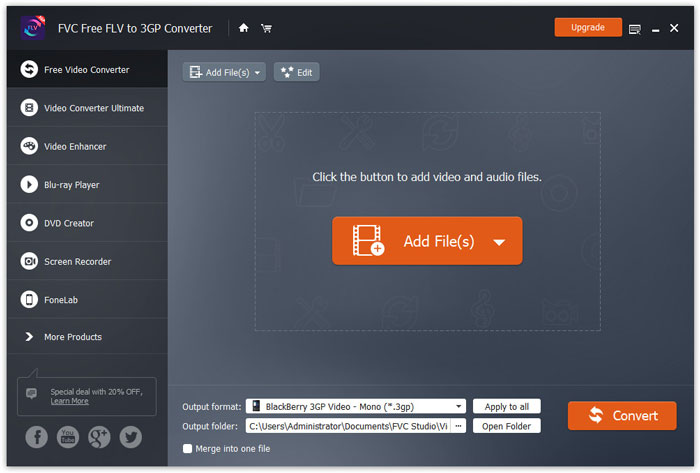
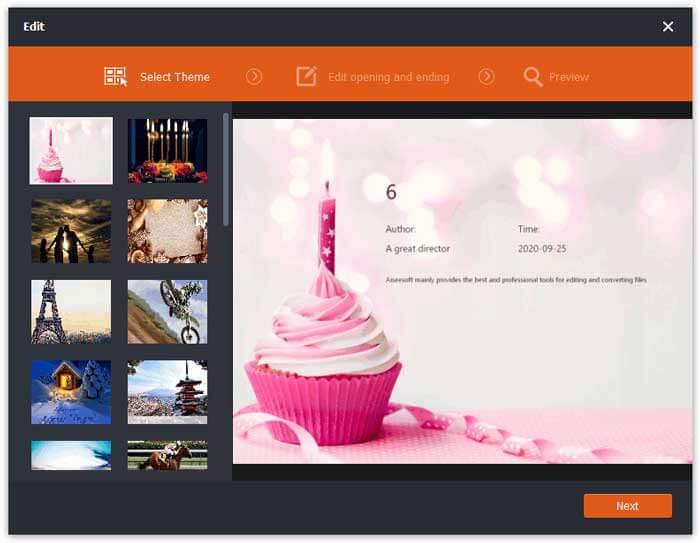
Steg 2. Klicka på din MP4‑fil och klicka på knappen Edit. Du kan lägga till ett tema till din MP4‑fil och redigera inlednings- och avslutningsdelen. Klicka sedan på Next för att förhandsgranska och spara ändringarna.
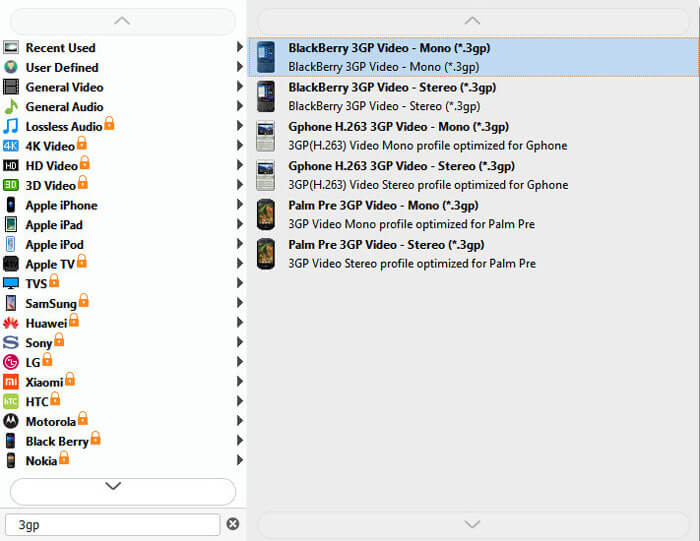
Steg 3. Välj 3GP i rullgardinslistan Output format längst ned. Du kan välja BlackBerry 3GP Video - Mono (*.3gp) eller något annat alternativ du vill ha.
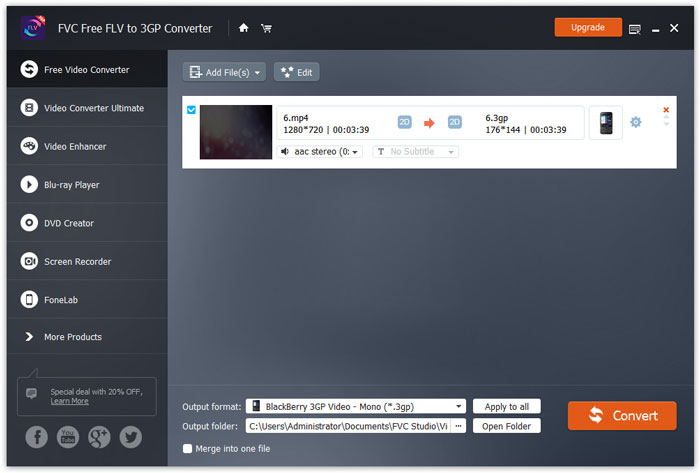
Steg 4. Bläddra slutligen till utdatamappen på datorn och klicka på knappen Convert för att börja konvertera MP4 till 3GP.
Del 2. Exportera 3GP från MP4 med 2 online 3GP-omvandlare
Jämfört med installation av en stationär 3GP-omvandlare är det mycket enklare och enklare att konvertera MP4 till 3GP med en webbaserad omvandlare. I den här delen delar vi 2 3GP-omvandlare online för att hjälpa dig att konvertera MP4 till 3GP utan problem.
1. FVC Free Online Video Converter
FVC Free Online Video Converter är en välkänd plattform för videokonvertering där du kan konvertera populära video- och ljudformat till 3GP, MKV, MOV, WMV, AVI, MP3 och mycket mer.
Steg 1. Gå till den officiella webbplatsen för FVC Free Video Converter. Klicka på knappen Add Files to Convert för att ladda ner och installera startprogrammet.
Ladda ner Skrivbordsversionen för att konvertera filer i batch.

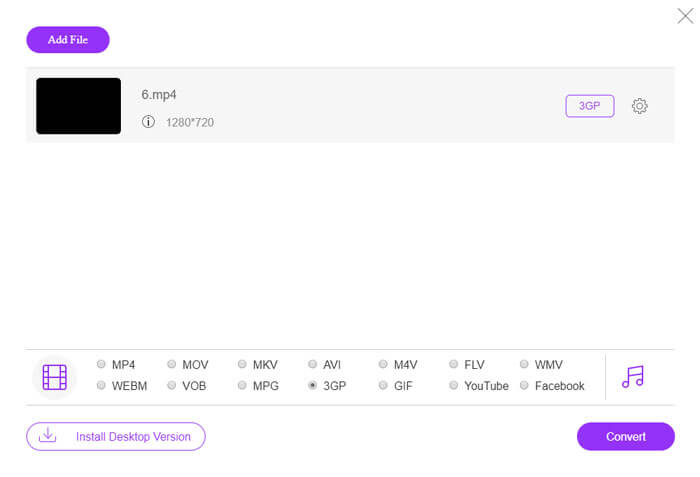
Steg 2. Välj MP4‑filerna från den lokala datorn. Du kan klicka på kugghjulsikonen för att justera videobithastighet, samplingsfrekvens, bildfrekvens, upplösning och volym.

Steg 3. Ställ in utdataformatet på 3GP längst ned. Klicka sedan på knappen Convert för att börja konvertera MP4 till 3GP. Du kan batchkonvertera flera MP4‑filer till 3GP samtidigt.
2. Zamzar
Zamzar är en onlinevideoomvandlare, ljudomvandlare, bildomvandlare och eBook-omvandlare. Det är bekvämt att konvertera MP4 till en mängd andra format med Zamzar. Följande är enkla steg för att konvertera MP4 till 3GP.
Steg 1. Gå till zamzar.com/convert/mp4-to-3gp/ och klicka på knappen Add Files för att ladda upp dina MP4‑filer.
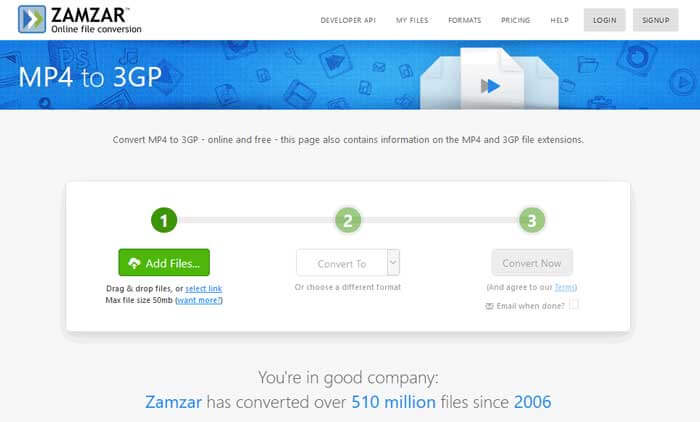
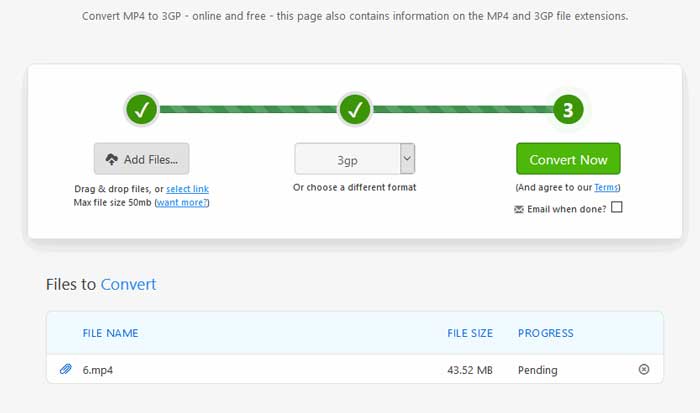
Steg 2. Du kan välja ett annat utdataformat. Vanligtvis ställs 3gp in som utdataformat som standard. Klicka på knappen Convert Now för att börja konvertera MP4 till 3GP.
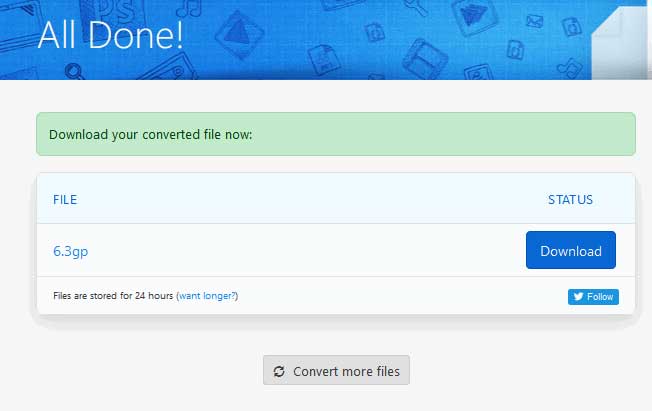
Steg 3. Sedan hoppar den till en annan sida. Du kan klicka på knappen Download för att spara den konverterade 3GP‑filen på din dator.
Vad händer om din MP4‑fil är väldigt stor? Se hur du komprimerar MP4‑filer här.
MP4 kontra 3GP
MP4-formatet släpptes av Moving Picture Experts Group (MPEG) 2001 och kan hjälpa dig att spara video-, ljud-, undertext- och bilddata i separata spår. Det är en förkortning för MPEG-4 Part 14. Dessutom är det ett av de mest populära formaten som används för att streama och dela videor.
The 3rd Generation Partnership Project (3GPP) producerade 3GP/3GPP-formatet som ett multimediacontainerformat. Det är faktiskt baserat på ISO-mediafilformatet. Vi använder det ofta för att spara video/ljudströmmar som överförs mellan 3G-mobiltelefoner och online.
Del 3. Vanliga frågor om konvertering av MP4 till 3GP
1. Är 3GP bättre än MP4?
3GP är utformat för mobiltelefoner med 3G‑nät. Du kan spela upp 3GP‑filer i spelare som QuickTime, VLC och RealPlayer. MP4 är betydligt mer kompatibelt än 3GP. Det stöds i stor utsträckning av många bärbara mediaspelare och smartphones.
2. Vad är 3GP?
3GP är ett multimediabehållarformat som definieras av 3rd Generation. Den kan lagra videor och ljudströmmar som spelas på 3G-mobiltelefoner, men kan också spelas på vissa 2G- eller 4G-telefoner.
3. Hur konverterar jag MP4 till FLV?
Med hjälp av FVC Free Online Video Converter kan du enkelt konvertera MP4 till FLV online. Gå till denna onlinetjänst och klicka på knappen Add Files to Convert för att installera startprogrammet. Välj sedan MP4‑filerna från datorn och markera FLV som utdataformat. Klicka på knappen Convert för att konvertera MP4 till FLV.
Slutsats
Vi pratade främst 3 metoder för att konvertera MP4 till 3GP på Windows och Mac. Om du föredrar en online-lösning kan du prova FVC Free Online Video Converter eller Zamzar online. Om du vill redigera din MP4-fil för ytterligare perfektion kan du istället använda Free FLV to 3GP Converter. Om du har några bättre lösningar, tveka inte att lämna en kommentar.
-
 Topp 3 gratis sätt att snabbt konvertera MP4 till VOB
 Hur konverterar jag MP4 till VOB på Windows PC och Mac? För att lösa detta problem kommer detta inlägg att dela de 3 bästa sätten att hjälpa dig att konvertera MP4 till VOB gratis.
-
 Gratis | De 3 bästa metoderna för att konvertera MP4 till WMV utan att förlora kvalitet
 Detta inlägg delar hur du konverterar MP4-video till WMV-format på Mac eller Windows. Vi kommer också att erbjuda dig flera alternativ, inklusive skrivbordsprogramvara och webbaserade omvandlare online. Redo att känna till de bästa MP4 till WMV-konverteringsverktygen?
-
 3 metoder för att konvertera MP3 till MP4 med bild
 Hur konverterar man MP3 till MP4 i hög kvalitet? Det här inlägget visar 3 effektiva och kostnadsfria metoder för att ändra MP3 till MP4 med bilder på Windows och Mac.

