


 Video Converter Ultimate
 Skärminspelare
 Video reparation
Hur man konverterar RAR till MP4: Packa upp och ändra RAR-filer till MP4 på rätt sätt
Om du är en teknikvan person vet du att RAR- och MP4-filer är vanliga i vardagen. I grunden är RAR-filer som komprimerade paket som kan innehålla allt möjligt – videor, bilder, you name it. Med det sagt, har du någonsin funderat på att göra om en RAR-fil till en MP4 för bättre kompatibilitet? Det är en fråga som dyker upp när du hämtar några filmer med RAR-tagg från webben eller får RAR-packade videor via e‑post, eller hur? För att göra om dem till MP4 måste du packa upp RAR-filen och sedan omvandla dessa videor till MP4-format. Häng därför kvar i det här inlägget för att ta reda på de två enkla sätten, offline och online, att genomföra denna RAR till MP4-konvertering.

Del 1. Konvertera RAR till MP4 Online med ezyZip
Börjar med den rekommenderade onlinekonverteraren som kan hantera RAR-filer effektivt. Ezyzip är din bästa allierade när du är i en kläm med filkonverteringar. Det är det bästa onlinevalet för att extrahera MP4-filer från ett RAR-arkiv på ett problemfritt sätt. Du behöver inte belamra din datorenhet med extra MP4-konverteringsprogram. Detta beror på att ezyZip fungerar direkt i din webbläsare, vilket sparar dig besväret med installationen. Dessutom är det här verktyget inte bara begränsat till att konvertera en RAR-fil till MP4 online gratis eftersom det stöder en mängd andra filextraherings- och konverteringsalternativ också.
Det som skiljer ezyZip från resten av onlinekonverterarna är dess unika tillvägagångssätt. Det håller dina filer säkra och sunda genom att bearbeta det hela lokalt i din webbläsare. Det betyder att ingen tråkig uppladdning eller nedladdning till externa servrar behövs, vilket resulterar i blixtsnabba konverteringar. Anmärkningsvärt nog kan du glömma storleksbegränsningar när du använder ezyZip eftersom det här verktyget inte sätter några gränser. Detta betyder också att din integritet förblir intakt eftersom dina filer aldrig lämnar din webbläsare! Nu släpper vi inte den här bilden utan att lära dig processen med ezyZip för att konvertera dina filer från RAR till MP4. Därför ges guiden nedan.
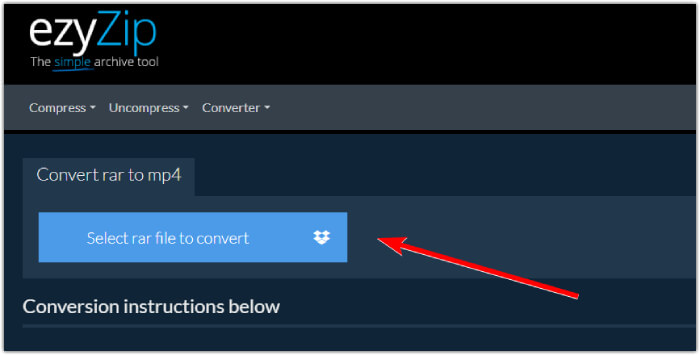
Steg 1. Gå till omvandlarens officiella webbplats och importera din RAR-fil genom att klicka på knappen Välj rar-fil att konvertera.
Steg 2. När filerna har lästs in kommer verktyget automatiskt att konvertera dem åt dig i RAR-arkivet. Klicka nu på knappen Spara för att spara varje MP4-fil till den målmapp du önskar.
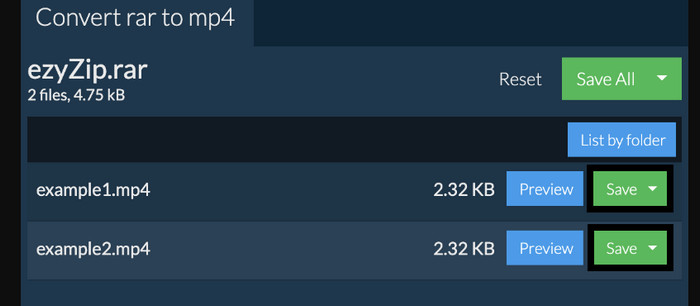
Steg 3. Om, i det fall att, knappen Spara är inaktiverad, ska du veta att webbläsaren du använder inte stöds av omvandlaren. När filerna däremot har sparats framgångsrikt får du ett alternativ att visa dina konverterade filer.
Del 2. Konvertera RAR till MP4 offline med WinRAR
Det finns fantastiska sätt offline att konvertera RAR till MP4 med WinRAR. WinRAR är en populär programvara designad speciellt för Windows-användare. Det är en programvara som erbjuder en rad användbara funktioner för att hantera komprimerade filer. Dessutom förenklar detta program processen att packa upp eller dekomprimera RAR-filer för att få dem att extraheras och nås. Dessutom fortsätter WinRAR eftersom det också ger möjlighet att konvertera RAR-filer till olika videoformat som MP4 eller M4V. Denna funktion visar sig vara ovärderlig för användare som behöver arbeta med multimediainnehåll lagrat i RAR-arkiv. Således, om du vill veta hur man packar upp och ändrar RAR-filer till MP4 med WinRar, fortsätt läsa för steg-för-steg-instruktioner nedan.
Steg 1. Ladda först ned det populära RAR-expertprogrammet på din dator. Använd en pålitlig källa när du laddar ned det. Starta det sedan snabbt efter installationen för att påbörja konverteringsprocessen.
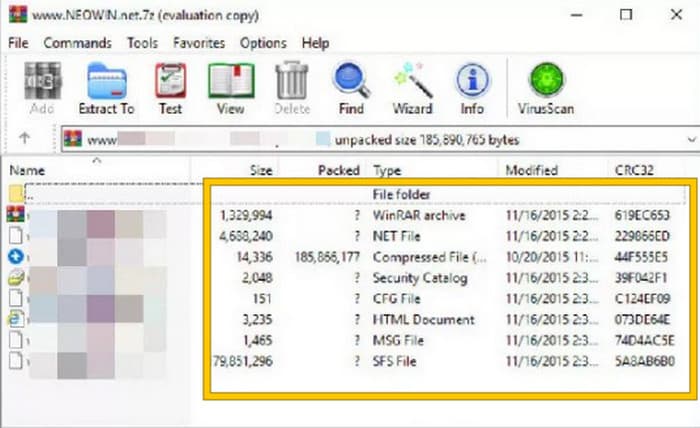
Steg 2. När programmet har startats kan du omedelbart öppna eller ladda upp RAR-filen som du vill konvertera till MP4. Du ser om filen är inläst eller inte, eftersom den visas i mitten av gränssnittet.
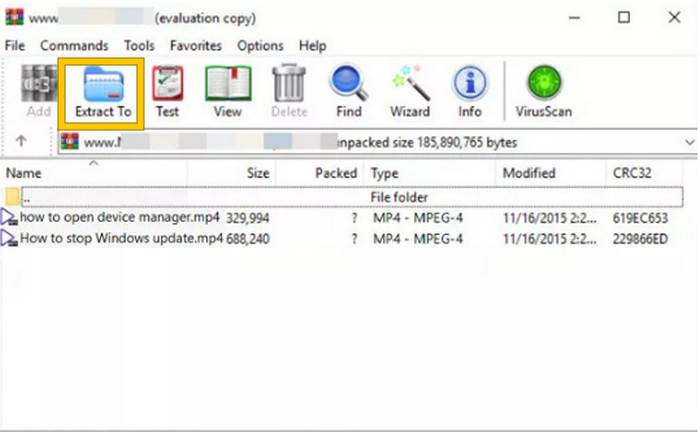
Steg 3. För att slutligen starta konverteringen eller uppackningen klickar du på knappen Extrahera till i menyraden. När det är klart kan du öppna de konverterade filerna direkt i gränssnittet.
Del 3. Bonustips: Bästa sättet att konvertera ljud/video till MP4 online
Låt oss ge dig ett bonustips där du kan konvertera vilken video- eller ljudfil som helst till MP4 på det bästa och snabbaste sättet! Möt FVC Free Video Converter Online, en omvandlare som gör det superenkelt och helt gratis att ändra dina video- och ljudfiler till olika format som MP4. Dessutom kan du snabbt växla dina högupplösta videor till populära format samtidigt som den ursprungliga kvaliteten eller skärpan bevaras. Vidare kommer du också att uppskatta dess blixtsnabba process, som låter dig konvertera flera filer på nolltid!
Det finns mer! Denna FVC Free Video Converter Online låter dig också justera dina videor och ljud så att du kan önska dig. Detta beror på att denna omvandlare låter dig justera saker som upplösning, bildhastighet, bithastighet och till och med ljudinställningar som volym och bithastighet till dina föredragna inställningar. Det betyder att du kan anpassa din media precis som du vill och exportera den lätt. Således, om du undrar hur du konverterar dina video- eller ljudfiler till MP4 online, följ de enkla stegen som visas nedan.
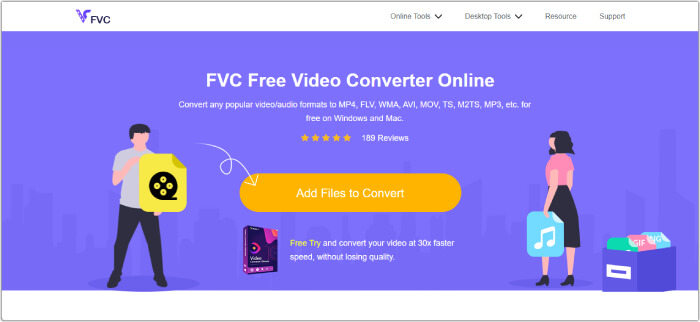
Steg 1. Starta processen genom att besöka den officiella webbplatsen för FVC Free Video Converter Online. När du kommit dit klickar du på knappen Lägg till filer för att konvertera för att hämta startprogrammet och ladda upp den första filen.
Steg 2. När filen har laddats upp kan du lägga till fler mediafiler genom att klicka på knappen Lägg till fil i huvudarbetsytan. Ställ sedan in dem på MP4 genom att klicka på filerna och sedan välja MP4-formatet längst ned.
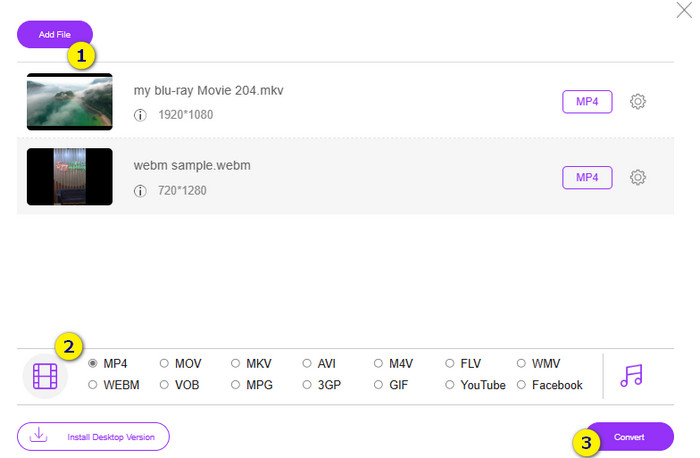
Steg 3. Därefter är det dags att starta den snabba konverteringen i bulk genom att klicka på knappen Konvertera längst ned.
Vidare läsning:
MOV VS MP4 – Vilket format väljer du?
Den bästa MP4-redigeraren för Windows och Mac 2025
Del 4. Vanliga frågor om RAR- och MP4-konvertering
Vad är en RAR-fil?
RAR-filer komprimeras i arkivfilformat. Det låter dig lagra flera filer i en enda behållare samtidigt som du minskar deras totala storlek.
Hur konverterar jag RAR till MP4 på Mac?
För att konvertera RAR till MP4 på Mac kan du använda videokonverteringsprogram som Unarchiver för att extrahera innehållet i RAR-arkivet. Sedan kan alla kompatibla videofiler i det extraherade innehållet konverteras till MP4-format med hjälp av en kraftfull omvandlare. För att göra detta kan du använda FVC Video Converter Ultimate.
Kan en RAR-fil innehålla videor?
En RAR-fil är som en zip-mapp som kan innehålla vilken typ av fil som helst. Så, ja, RAR-filen kan innehålla videor.
Slutsats
Det här inlägget passar perfekt för din uppgift att göra om RAR till MP4, eftersom det ger dig de bästa sätten att göra det på din enhet. Lyckligtvis finns den bästa onlineomvandlaren för video och ljud, som får dig att arbeta som ett proffs!
-
 Sätt att komprimera video online för att minska videofilstorleken
 Om du letar efter videokompressorer online, hitta inga fler eftersom vi har dig täckt! Här är några av de mest praktiska verktygen du kan använda.
-
 Hur komprimerar du en MP4-video till mindre storlek
 MP4-video är för stor för att kunna laddas upp? Vill du minska videostorleken? Här är tre effektiva sätt att komprimera en MP4-fil till mindre storlek utan begränsning.
-
 Hur komprimerar du videor gratis / prova dessa 7 videokompressorer online
 Läs och få 7 sätt att komprimera videor gratis på din dator eller telefon. Du kan enkelt minska stora videor till små filstorlekar för e-post, Twitter, Instagram, YouTube, WhatsApp och mer.
