


 Video Converter Ultimate
 Skärminspelare
 Video reparation
 Säker nedladdning
Hur man gratis konverterar SWF till MP4 på 3 sätt
To convert one of the hardest video formats, SWF, into MP4, you can use the free top 3 list of SWF to MP4 converter here.

SWF is an Adobe Flash file format used for multimedia, vector graphics and browsers using ActionScript. It is easy to open the SWF files via the Adobe Flash Player. However, only limited plugins such as Adobe Flash Player and Adobe Integrated Runtime can play SWF files generated by Adobe and other third-party programs. To play SWF files on more player, you need to convert SWF to MP4, the most popular video format adopted by almost any player.
Efter att ha provat några olika metoder och appar, och har kommit upp med denna gratis topp 3-lista.
Del 1. Gratis videokonverterare - Konvertera SWF till MP4 på PC / Mac
SWF, som webbformat, produceras med stor animationskvalitet och ljudkod som kan laddas upp var som helst. Som ett resultat är det svårt att hitta programvaran som kan öppna eller redigera SWF-fil utan Adobe-produkter. Ändå finns det gratis SWF till MP4-omvandlare.
Free Video Converter is the free SWF file converter, which can change SWF file into MP4, MOV, AVI, WMV, MKV, etc., on Windows and Mac computer.

Gratis FLV till MP4 Converter
30000+ nedladdningar- Batchkonvertera SWF och FLV till MP4 gratis på PC och Mac.
- Konvertera SWF till MP4 i H.264, MPEG4 och mer.
- Konvertera SWF till andra format som MOV, AVI, MP3, MKV, etc.
- Redigera SWF-fil innan du exporterar MP4-filer.
Gratis nedladdningFör Windows 7 eller senareSäker nedladdning
Gratis nedladdningFör MacOS 10.7 eller senareSäker nedladdning
Fördelar
- Batchkonvertera SWF till MP4.
- Stöd ett brett utbud av format.
- Konvertera SWF till enheter.
Nackdelar
- Redigeringsfunktionerna är svaga.
Stegen för att konvertera SWF till MP4 är ganska enkla.
Step 1. Add SWF files
Ladda ner den kostnadsfria programvaran för konvertering av SWF till MP4 på datorn genom att klicka på nedladdningslänken ovan. Starta omedelbart.
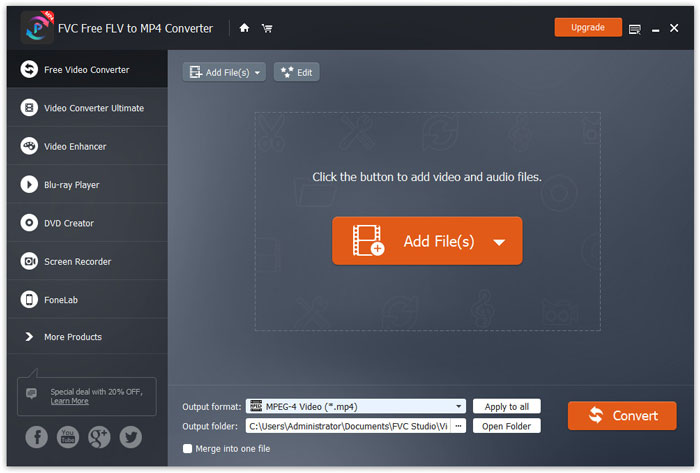
Click Add Files(s) button to load one or more SWF files into this program.
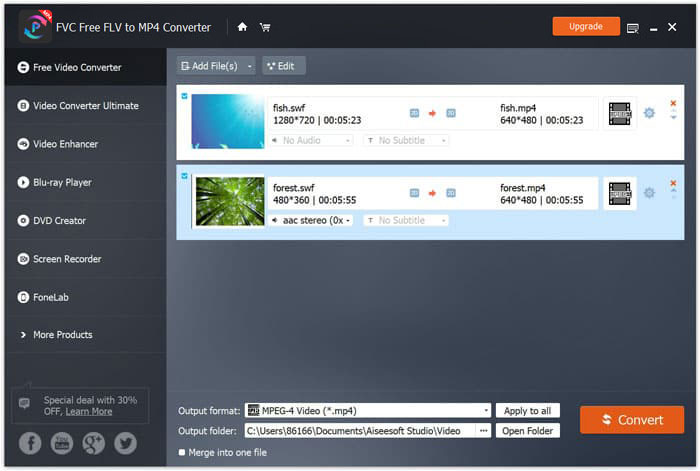
Step 2. Custom MP4
Select MP4 from the drop-down option of Output format on the bottom. Here, it also gives you the options to choose the device that can open SWF files like PSP, Avid Media Composer, Adobe Premiere, Apple iPhone, Samsung, PS3/4, Xbox, etc.

Dessutom låter du dig anpassa videokodeken, upplösningen, bithastigheten etc. genom att klicka på kugghjulsikonen bredvid MP4-utdata.
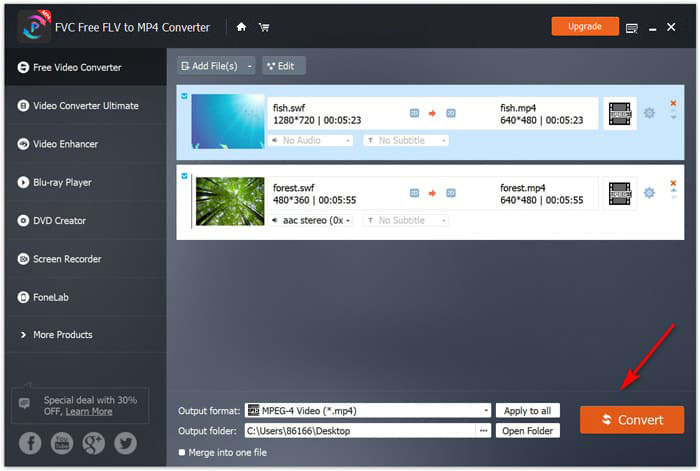
Step 3. Export SWF to MP4
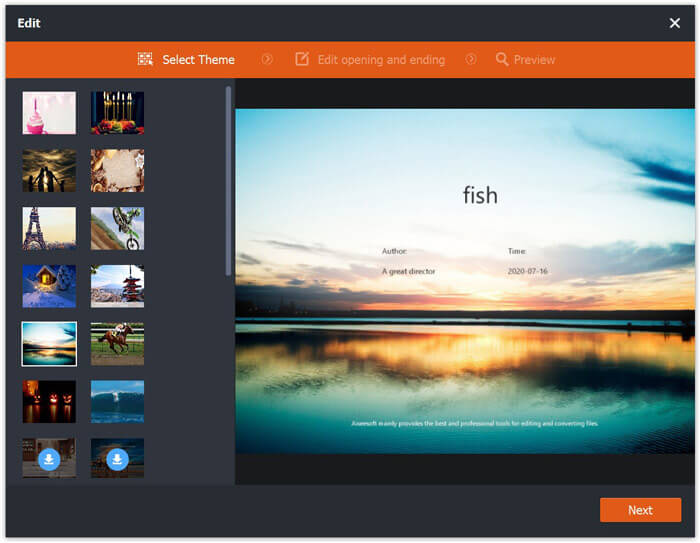
Optionally, the Edit button in the main interface enables you to edit the SWF file to add the opening and ending theme.
After everything is made well, select the destination at the bottom to save the converted MP4 files, and just click Convert button at the bottom-right corner to change SWF files into MP4 videos right now.
Del 2. Gratis online videoomvandlare - Konvertera SWF till MP4 online
Vill du inte installera någon programvara för att göra SWF till MP4? Försök bara med gratis onlinevideoomvandlaren.
Free Online Video Converter is the online conversion tool to change SWF to MP4 via the browser. It converts SWF and FLV into MP4 and other popular formats like MP4, AVI, MOV, etc. In addition, it can extract audio from SWF file to keep the background music.
Fördelar
- Konvertera SWF till Facebook och YouTube.
- Skapa GIF från SWF-filer.
- Anpassa videoupplösning, codec, etc.
Nackdelar
- Brist på redigeringsfunktioner.
Här är guiden för att använda den gratis onlinevideoomvandlaren för att förvandla SWF till MP4.
Step 1. Upload SWF files online
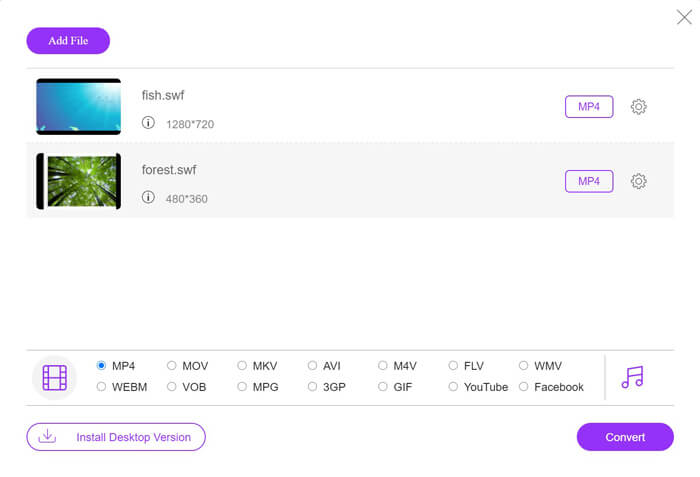
Open this free online SWF to MP4 converter via your browser. Click Add Files to Convert button, and a prompt window asks you to download and install the launcher.Do as it require, and an open-source window shows after the successful installation. Select the SWF files you want to convert to MP4 from local computer into this online site.
Step 2. Select MP4
Tick the checkbox of MP4 on the bottom. Apart from that, it also leaves other output formats like AVI, VOB, FLV, M4V, MKV, GIF, YouTube, MP3, WMA, etc. The Settings icon next to MP4 allows you to adjust the encoder, frame rate, resolution, bitrates, and other parameters.

Step 3. Convert SWF to MP4
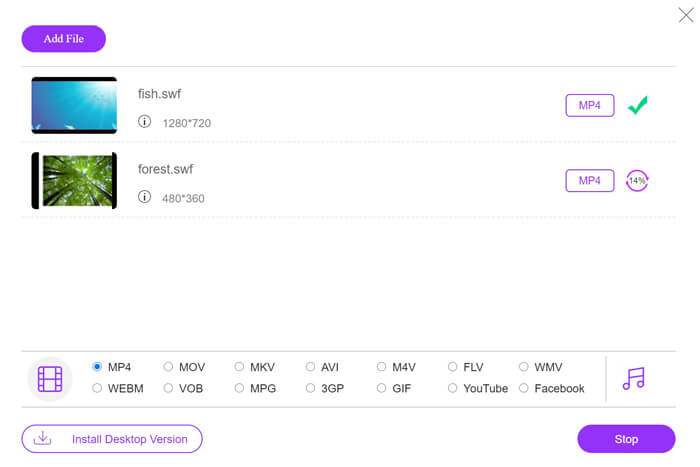
After all the settings are done, click the Convert button to pick up the location to save the converted MP4 files. Then click the Convert button again to transcode SWF to MP4 immediately.
Del 3. VLC - Ändra SWF till MP4 på Windows / Mac
VLC är känt för mediespelaren med öppen källkod för att spela SWF, FLV, MP4 och andra format. Det finns dock dolda funktioner som du kanske saknar, och att konvertera SWF till MP4 är en av dem. Med tanke på att den inte är utformad för videoomvandlare fungerar VLC lite annorlunda för att konvertera SWF till MP4.
Fördelar
- Konvertera SWF till MP4 i bulk.
- Konvertera SWF till MP4 gratis.
Nackdelar
- Inte vänligt att använda som SWF-omvandlare.
- Omvandlingshastigheten är långsam.
Den här korta handledningen visar hur du konverterar SWF till MP4 i VLC.
Step 1. Add SWF files into VLC
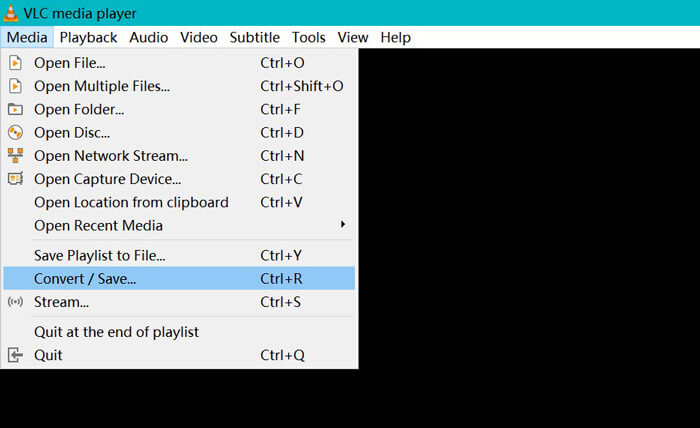
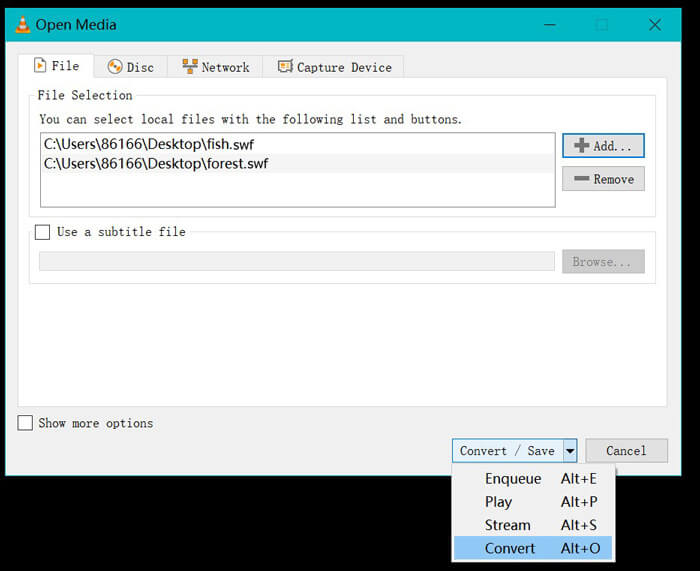
Run VLC on your computer (Windows, Mac, Linux, or Chrome). Find Media menu at the top and select Convert / Save from the drop-down option.
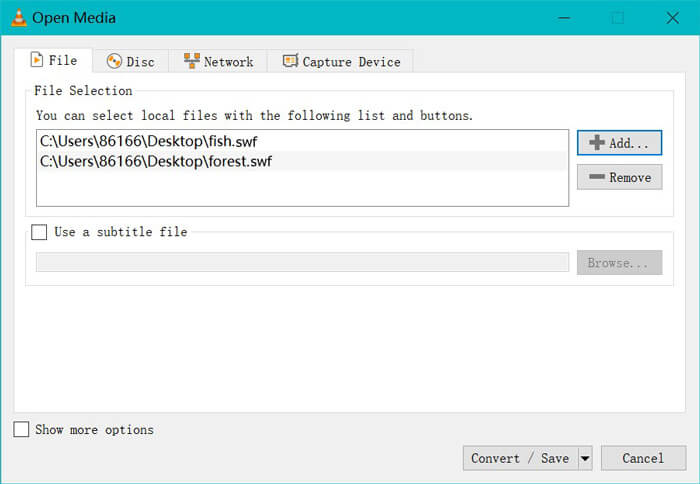
Click the Add button at the right side to load the SWF files on your computer.
Step 2. Choose MP4
Choose Convert from the drop-down list of Convert / Save at the bottom.
Then you are directed into the Convert window, where find MP4 from the drop-down option of Profile.
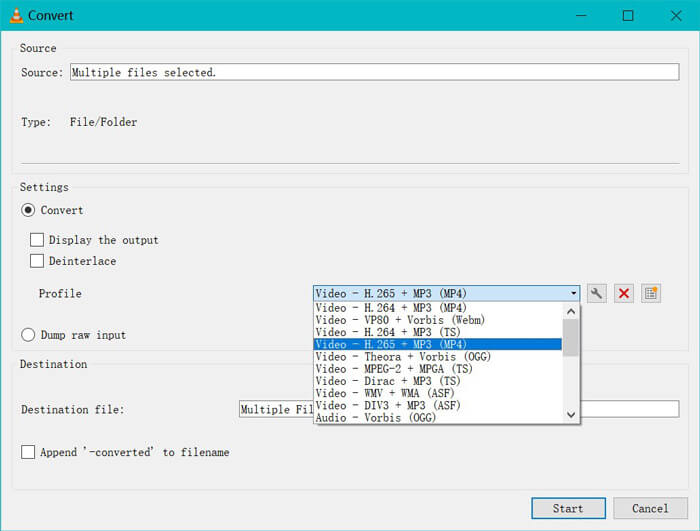
Inställningsikonen bredvid MP4-utdata gör att du kan justera inkapsling, videokodek, ljudkodek och undertexter.
Step 3. Convert SWF to MP4 in VLC
Välj sedan destinationen för att lagra de konverterade MP4-filerna, klicka på Start-knappen för att börja konvertera SWF till MP4 via VLC.
Du hittar framstegen i VLC-spelaren. VLC-konvertering använder inspelningsfunktionen för att slutföra konverteringsuppgiften, så att konverteringshastigheten är långsam.
Del 4. Vanliga frågor om SWF till MP4
Används SWF-filer fortfarande?
Adobe har officiellt upphört med SWF, vilket visar att det inte längre stöds eller utvecklas. HTML5-videostöd och CSS3-animationer har ersatt SWF.
Kommer PS3 att stödja SWF-filer?
Ja. Sony PlayStation Portable-konsoler kan spela begränsade SWF-filer i Sonys webbläsare, från och med firmwareversion 2.71. Båda PS3 kan köra SWF-filer via sina webbläsare.
Varför fungerar min MP4-video inte i VLC på min Android-telefon?
Konverteringsfunktionen i VLC är endast tillgänglig för datorer. Om du använder VLC på Android- eller iOS-enheter tillåter det dig inte att konvertera SWF till MP4.
Slutsats
Detta inlägg samlar de tre bästa open source SWF till MP4-omvandlarna, så att du kan förvandla SWF till MP4 för att spela på fler enheter. Vi listar också fördelar och nackdelar med den gratis omvandlaren som referens.
Vilken gratis SWF till MP4-omvandlare är din favorit?
Eller har du några bättre rekommendationer?
Hur som helst, låt mig veta genom att lämna dina kommentarer nedan.
-
 MOV VS MP4 - Vilken är bättre
 MOV VS MP4, vilken är bättre? Det här inlägget berättar skillnaden mellan MP4 och MOV, så att du kan få det bättre valet att använda för dina videofiler.
-
 7 sätt att konvertera MP4 till AVI på Windows / Mac / iPhone / Android / Online
 Vill du få alla gratis sätt att konvertera AVI till MP4-video? Du bör inte missa den här artikeln. Här är 7 sätt att konvertera AVI-filer till MP4 gratis på Windows, Mac, iPhone, Android och online.
-
 Hur man konverterar MTS-filer till MP4
 Vet inte hur man konverterar MTS-fil till MP4? I den här guiden hittar du 6 gratis och enkla sätt att ändra MTS-format till MP4 på Windows eller Mac utan kvalitetsförlust.
