


 Video Converter Ultimate
 Skärminspelare
 Video reparation
 Säker nedladdning
Ultimate guide till nedskalning av videor från 4K till 1080p
Idag handlar det inte bara om att skala upp videor för att förbättra vår tittarupplevelse. Vissa gör tvärtom och nedskalar sina videor av flera skäl. Kanske vill de minska filstorlekarna, göra videorna mer kompatibla med äldre enheter eller helt enkelt förenkla redigeringsprocessen. Om du letar efter sätt att nedgradera dina videor från 4K till 1080p har du kommit rätt. I den här artikeln går vi igenom 3 sätt som hjälper dig att smidigt konvertera högupplösta videor till ett mer hanterbart format utan att offra kvaliteten. Oavsett om du är innehållsskapare, filmskapare eller bara vill optimera ditt videobibliotek, har vi lösningarna du behöver. Låt oss dyka in och göra din resa med videonedskalning enklare!

Del 1. Varför behöver du konvertera videor från 4K till 1080p
Nedskalning av videor från 4K till 1080p är viktigt av flera anledningar. Följande förklarar varför:
Spara lagringsutrymme.
4K-videor tar upp betydligt mer lagringsutrymme än 1080p-videor. Genom att konvertera till 1080p kan du frigöra värdefullt lagringsutrymme på din enhet eller hårddisk.
Förbättra enhetskompatibiliteten.
Vissa enheter kan ha svårt att spela upp eller redigera 4K-videor smidigt. Konvertering till 1080p säkerställer kompatibilitet med ett bredare utbud av enheter, inklusive äldre datorer, smartphones och surfplattor.
Snabba upp redigeringsprocessen.
Att redigera 4K-videor kan vara mer resurskrävande och tidskrävande än att redigera 1080p-videor. Konvertering till 1080p kan påskynda redigeringsprocessen, vilket möjliggör smidigare uppspelning och snabbare renderingstider.
Förbättra uppspelningsflödet.
Videor med lägre upplösning är i allmänhet lättare att streama och spela upp utan buffring eller stamning, särskilt på långsammare internetanslutningar eller mindre kraftfulla enheter.
Optimera för delning online.
Många onlineplattformar och sociala medier komprimerar och optimerar automatiskt videor för uppspelning. Att konvertera dina videor till 1080p säkerställer att de uppfyller plattformens krav och bibehåller kvaliteten under delning.
Del 2. Hur man konverterar från 4K till 1080p med den bästa videokonverteraren
Det finns olika sätt du kan nedskala dina videor offline, och det är genom att använda skrivbordsprogram för videokonverterare. Följande är verktygen du kan använda:
FVC gratis 4K-omvandlare
FVC Free Video 4K Converter är ett verktyg som erbjuder en komplett lösning för användare som vill konvertera 4K till 1080p-video-upplösning. Med sin mångsidiga funktionalitet kan användare smidigt omvandla högupplösta 4K-videor till 1080p-format, vilket säkerställer kompatibilitet med populära enheter och plattformar. Dessutom bevarar programvaran kvaliteten på originalvideon under konverteringsprocessen och behåller visuell skärpa och detaljrikedom. Med sitt intuitiva, lättnavigerade gränssnitt och sin effektiva prestanda förenklar det här verktyget uppgiften att konvertera 4K-videor till 1080p för olika ändamål.
Steg 1. Ladda ner FVC Free 4K Converter och installera den på din enhet.
Gratis nedladdningFör Windows 7 eller senareSäker nedladdning
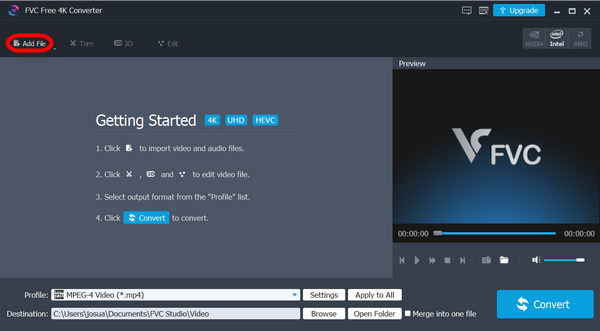
Steg 2. Kör verktyget och klicka på Add Files.
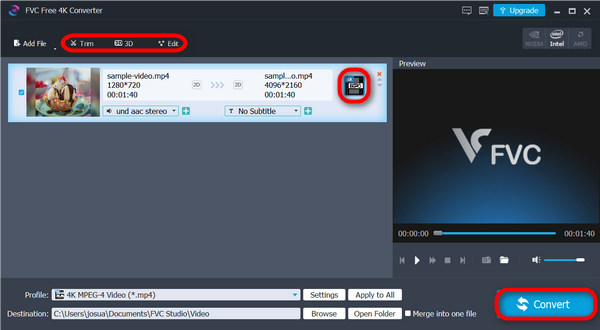
Steg 3. Nu kan du använda det övre hörnet för att redigera dina videor, medan du på högra sidan klickar på rullgardinsmenyn för att välja det uppskalade resultat du vill ha för din video. Den här gången ska du nedskala din video, så välj 1080p. När du är klar klickar du på knappen Convert.
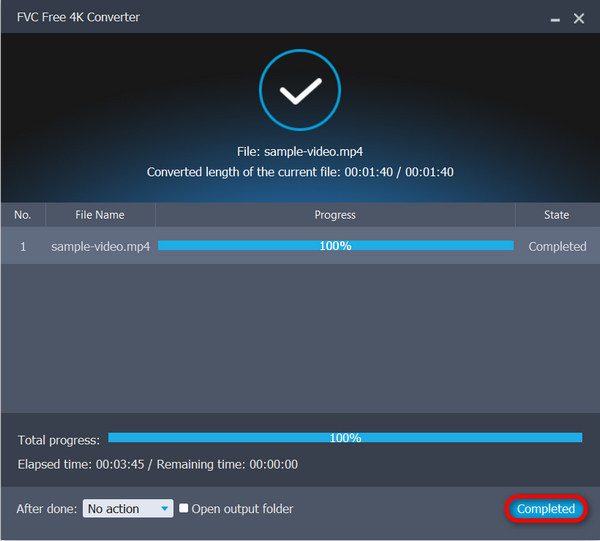
Steg 4. När konverteringen är klar får du ett meddelande om att processen är avslutad. Klicka bara på Complete.
Detta mångsidiga verktyg låter dig inte bara skala upp dina videor, utan det kan också hjälpa dig att skala ner dina videor från 4K till 1080p. Ett sådant bra verktyg för någon som letar efter ett dubbelt motsatt syfte.
FVC Video Converter Ultimate
FVC Video Converter Ultimate är en annan programvarulösning som erbjuder omfattande videokonverteringsmöjligheter, inklusive nedskalning från 4K till 1080p-upplösning. Med sina konverteringsfunktioner kan användare fritt och enkelt konvertera 4K till 1080p-videor genom att helt enkelt välja bland många förinställda utdataupplösningar och format i verktyget.
Steg 1. Ladda ner FVC Video Converter Ultimate till din enhet.
Gratis nedladdningFör Windows 7 eller senareSäker nedladdning
Gratis nedladdningFör MacOS 10.7 eller senareSäker nedladdning
Steg 2. Klicka på Converter.
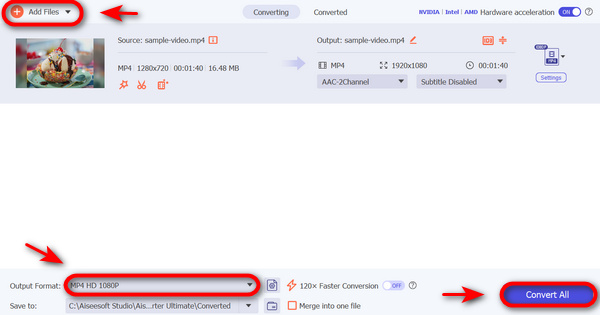
Steg 3. För att lägga till 4K-videon som du vill konvertera till 1080p klickar du på knappen Add Files.

Steg 4. Klicka nu på alternativet Output Format, gå till fliken Video och välj HD 1080p-video, till exempel 1080p MP4, 1080p MKV, 1080p AVI, 1080p WMV osv.
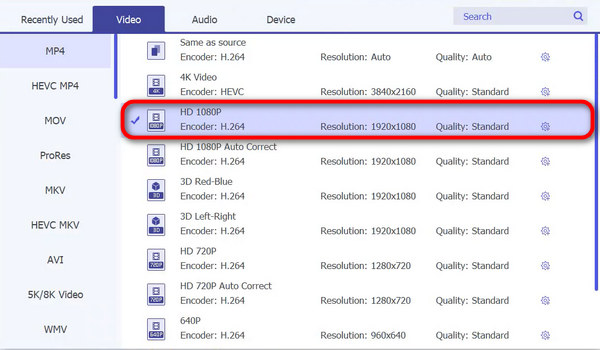
Steg 5. När du är klar klickar du på Convert.
Med FVC Video Converter Ultimate går det verkligen snabbt och enkelt att konvertera dina 4K-videor till 1080p.
VLC Media Player
VLC Media Player är känd för sitt breda utbud av filformat och uppspelningsmöjligheter som stöds. Även om det är främst känt för sin förmåga att spela olika ljud- och videoformat, innehåller det här verktyget också grundläggande videokonverteringsfunktioner, inklusive nedskalning från 4K till 1080p-upplösning. Även om den inte är lika robust som dedikerad videokonverteringsprogramvara som FVC Free Video 4K Converter eller FVC Video Converter Ultimate, erbjuder VLC Media Player ett bekvämt alternativ för användare som behöver enstaka videokonverteringsuppgifter utan behov av ytterligare programvaruinstallationer.
Steg 1. Ladda först ner VLC Media Player till din enhet och installera den.
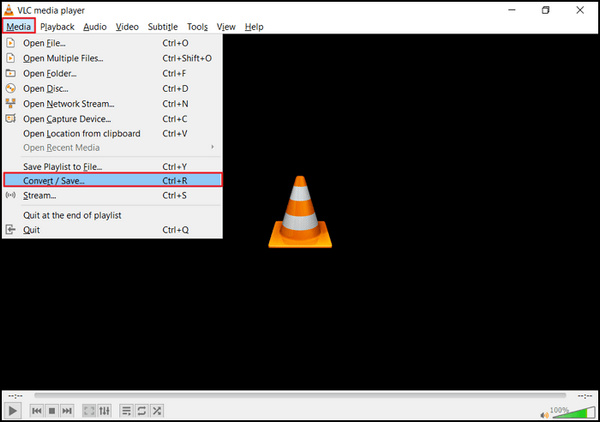
Steg 2. Kör verktyget och gå till fliken Media, välj sedan Convert/Save.
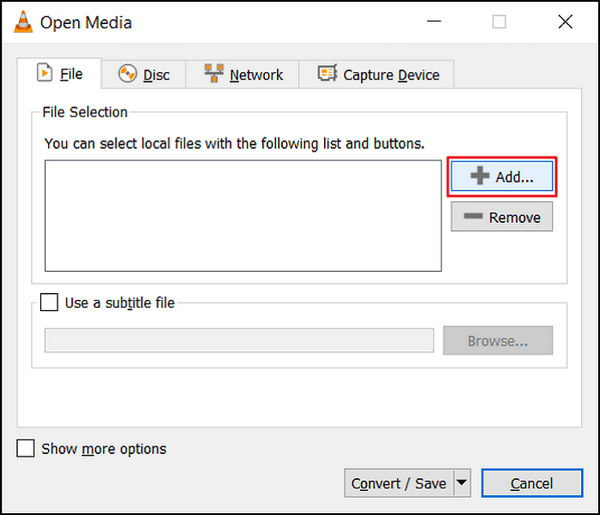
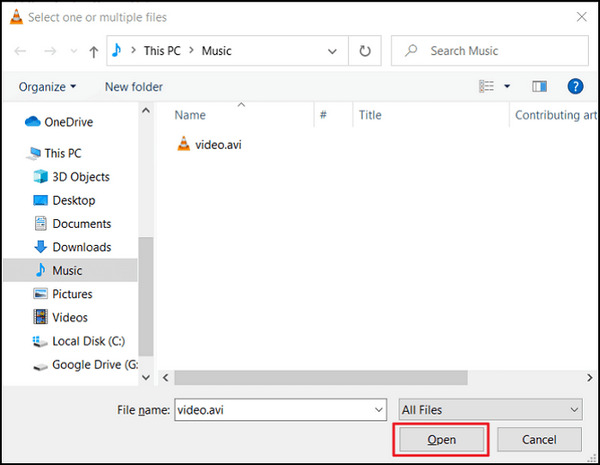
Steg 3. Klicka nu på knappen Add för att importera videon som du vill nedskala.
Steg 4. Ange filnamn och målplats i rutan Convert.
Steg 5. Välj Convert/Save och skriv in i Frame size bredden 1920p och 1080p som höjd innan du klickar på start. Kom ihåg att du ska nedskala dina videor, så välj din föredragna upplösning.
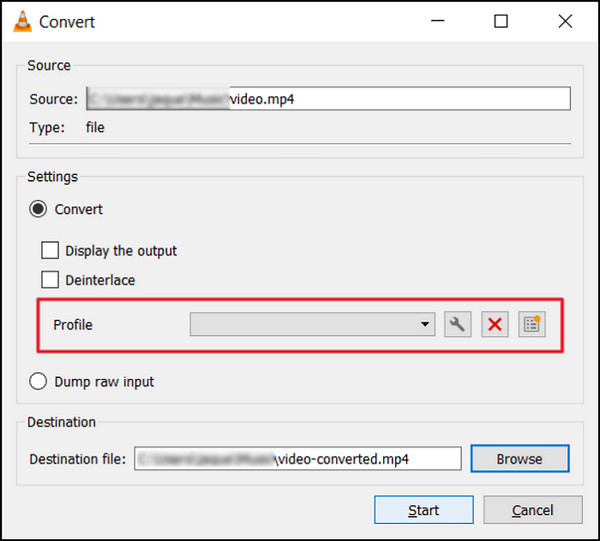
Steg 6. Klicka slutligen på Start för att starta konverteringsprocessen.
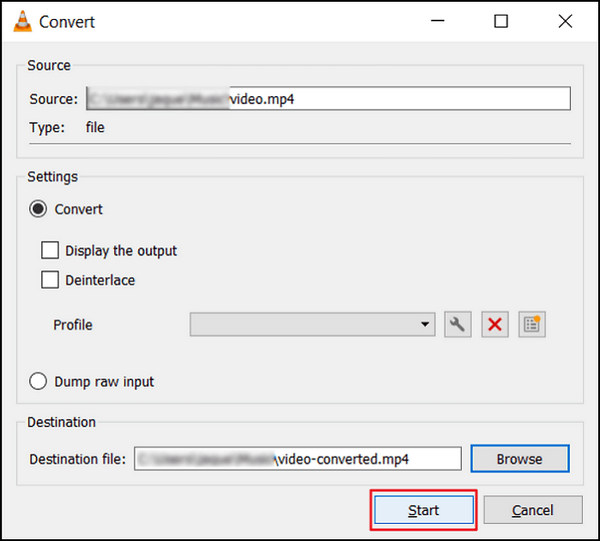
Även om VLC är ett bra verktyg, misslyckas detta på något sätt när det gäller att nedgradera videor från 4K till 1080p, men det gör det fortfarande. Men till skillnad från andra verktyg ovan är VLC inte redo att hantera komplexa videor för att nedskala dem.
Om du vill ha fler program som VLC kan du titta här.
Del 3. Hur man konverterar från 4K till 1080p online
Samtidigt, när du letar efter ett sätt att nedskala videor från 4K till 1080p online, är HD Convert det bästa för dig.
HD Convert Video är en onlinebaserad HD-videokonverterare som är perfekt för att konvertera videor till olika format, inklusive Full HD 1080p och 4K Ultra HD-kvalitet. Den erbjuder funktionen att nedskala videor från 4K till 1080p, vilket minskar filstorlekarna och förbättrar kompatibiliteten.
Steg 1. Gå först till deras officiella webbplats.
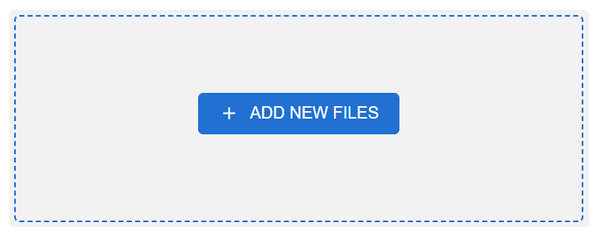
Steg 2. Klicka på knappen Add Files.
Steg 3. Välj utdataformat. Klicka på nästa och välj 1080p som din utdata-kvalitet.
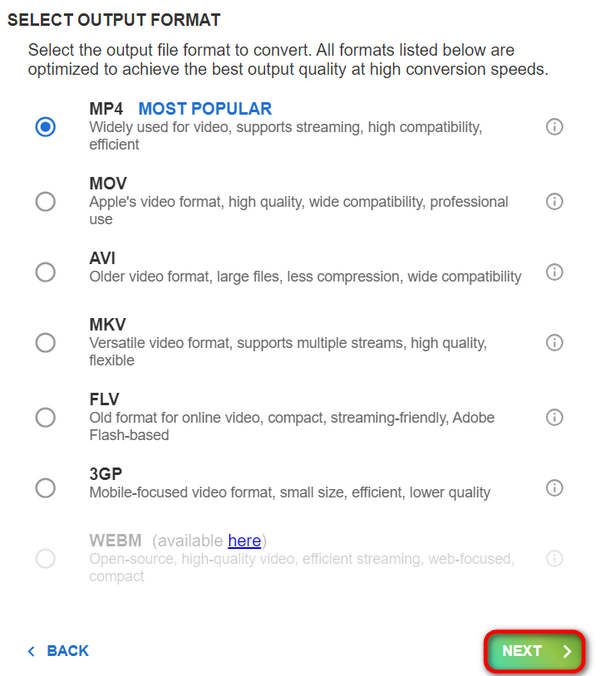
Steg 4. När allt är inställt klickar du på Next för att genomföra konverteringen.
Du kan inte skala ner till 1080p när ditt konto är gratis. Du måste prenumerera på deras kampanjer för att uppnå 4K till 1080p videokonvertering.
Del 4. Vanliga frågor om nedskalning av videor från 4K till 1080p
Varför skulle jag vilja nedskala mina videor från 4K till 1080p?
Nedskalning från 4K till 1080p kan vara fördelaktigt av flera skäl, inklusive att minska filstorlekarna för enklare lagring och delning, förbättra kompatibiliteten med äldre enheter eller plattformar och påskynda redigeringsprocessen genom att kräva mindre processorkraft.
Kommer nedskalade videor att förlora kvalitet jämfört med den ursprungliga 4K-filmen?
Medan nedskalade videor kommer att ha en lägre upplösning jämfört med den ursprungliga 4K-filmen, beror graden av kvalitetsförlust till stor del på nedskalningsmetoden och inställningarna som används. Med noggrann justering av parametrar, såsom bithastighet och komprimeringsinställningar, är det möjligt att minimera kvalitetsförlusten under nedskalningsprocessen.
Vilka verktyg eller programvara kan jag använda för att nedskala videor från 4K till 1080p?
Det finns olika verktyg och mjukvara tillgängliga för nedskalning av videor, allt från dedikerade videokonverterare som FVC Video Converter och HD Convert Video till multimediaspelare som VLC Media Player, som erbjuder nedskalningsfunktioner. Onlineplattformar som HDconvert.com erbjuder också praktiska alternativ för att minska videor till 1080p-upplösning.
Slutsats
Sammanfattningsvis ger nedskalning av videor från 4K till 1080p praktiska fördelar som att spara lagringsutrymme och förbättra kompatibiliteten. För att dra nytta av dessa fördelar kan du ladda ner FVC Video Converter Ultimate eller prova FVC Free 4K Converter för att uppgradera din videoupplevelse redan nu!
-
 Bästa gratis videoomvandlare för Windows 2025 recension
 Letar du efter en videokonverterare? Kolla inte vidare! Vi har listat de 10 bästa verktygen för att konvertera videor gratis i alla format till önskad utdata.
-
 Bästa gratis videoomvandlare för Mac [2025 Lista]
 Upptäck de enklaste och mest effektiva sätten att konvertera videor med våra topp 5 val för gratis videokonverterare för Mac. Ladda ner nu och börja konvertera!
-
 Hur man uppskalar 1080p till 4K [Online och Offline Ways]
 Vill du få dina videor att se ut som om de är inspelade i 4K-upplösning? Vi har dig! Lär dig hur du uppskalar 1080p till 4K med denna steg-för-steg-guide. Läs för mer!
