


 Video Converter Ultimate
 Skärminspelare
 Video reparation
 Säker nedladdning
Ta bort Dreamstime Watermark med de 4 sätten du behöver veta
Om du behöver färdiga bilder för din presentation eller ditt projekt kan du aldrig gå fel med att välja Dreamstime. Denna app kan ge dig royaltyfria stockfoton redo att användas när som helst. Det hjälper redan användare som letar efter en specifik bild med högkvalitativ utskrift till ett lågt pris. Även om du kan ladda ner 15 bilder gratis här, lämnar den här produkten ett vattenstämpel för att marknadsföra appen när du använder bilden du laddar ner här.
Vi kan inte förneka att dess användarvänlighet är utmärkt och att bildpriserna är låga, men alla av oss har inte råd att köpa krediter där. Oroa dig inte längre! För vi har dig täckt – informationen nedan visar olika sätt du kan följa för att ta bort Dreamstime-vattenstämpeln som finns kvar på den slutliga bilden.

Del 1. Hur man tar bort Dreamstime Watermark genom att köpa krediterna
Vi kan inte lämna inköpsalternativet bakom oss eftersom det är det mest effektiva Dreamstime-alternativet för borttagning av vattenstämplar du kan använda. Innan vi fortsätter måste du veta att Dreamstime behöver du ha så att du kan köpa en bild utan vattenstämpel. Namnet är en Dreamstime-valuta; den använder riktiga pengar och konverterar dem till en digital som Dreamstime accepterar. Anta att du inte har en kredit på Dreamstime. I så fall kan du följa följande steg nedan för att köpa en kredit att ladda ner och ha bilden utan någon logotyp för produkterna kvar.
Steg 1. Öppna Dreamstimes officiella webbplats och skapa sedan ett konto innan du köper krediter på Dreamstime. Om du redan har ett konto här måste du först logga in för att kunna använda det på rätt sätt.
Steg 2. När du har loggat in på ditt Dreamstime-konto klickar du på Price and Download Plans och går sedan till Credit Package för att se vilka prisnivåer som finns tillgängliga där.
Steg 3. Fyll i all information som efterfrågas och klicka sedan på Complete Checkout för att genomföra betalningen i verktyget. Så enkelt är det nu att köpa krediter som valuta för att köpa bilder på Dreamstime.
Del 2. Hur man tar bort Dreamstime Watermark gratis på webben
FVC Free Watermark Remover Online
En av de mest kända Dreamstime-vattenmärkesborttagningarna online du kan använda är ingen annan än FVC Free Watermark Remover Online. Du kan dra nytta av det här verktyget för att ta bort vattenstämpeln som finns i bilden du har. Prestandamässigt är detta onlineverktyg mer kapabelt till vad du tycker, särskilt när det gäller att ta bort logotypen, vattenstämpeln, stämplarna, datumen, objektet etc. på bilden. Tvivlar du fortfarande inte på detta verktyg? Läs i så fall stegen vi lade till nedan, och du kan följa dem också för att ta bort vattenstämpeln som Dreamstime lade till.
Steg 1. Genom att klicka på denna länk öppnas en ny flik i din webbläsare.
Steg 2. Klicka på Upload Image för att importera de foton du har exporterat från Dreamstime med vattenstämpel.
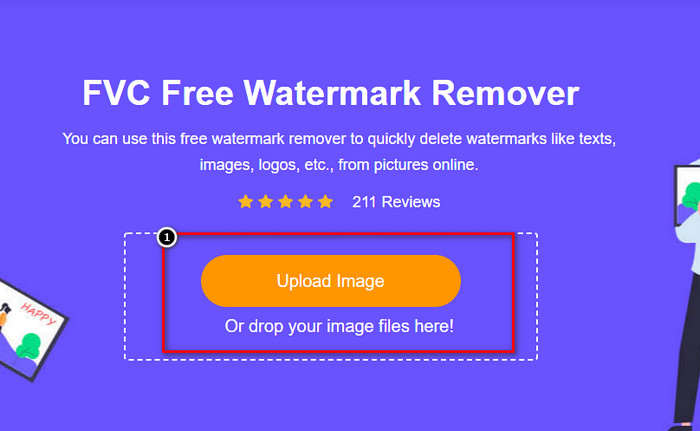
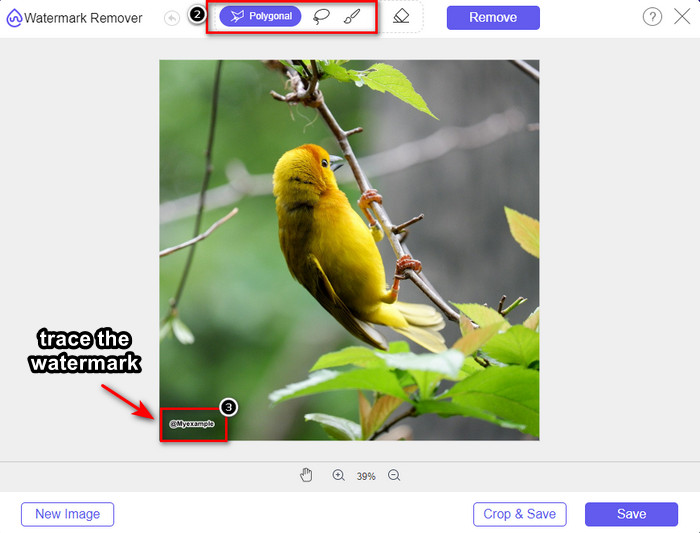
Steg 3. Du kan använda verktygen för att markera vattenstämpeln, välj ett av dem och rita sedan över vattenstämpeln med det.
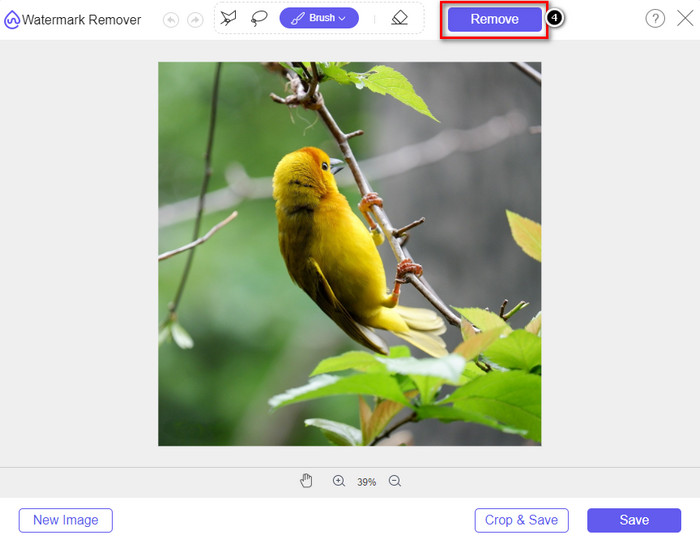
Steg 4. Klicka på ikonen Remove innan du går vidare med att exportera bilden.
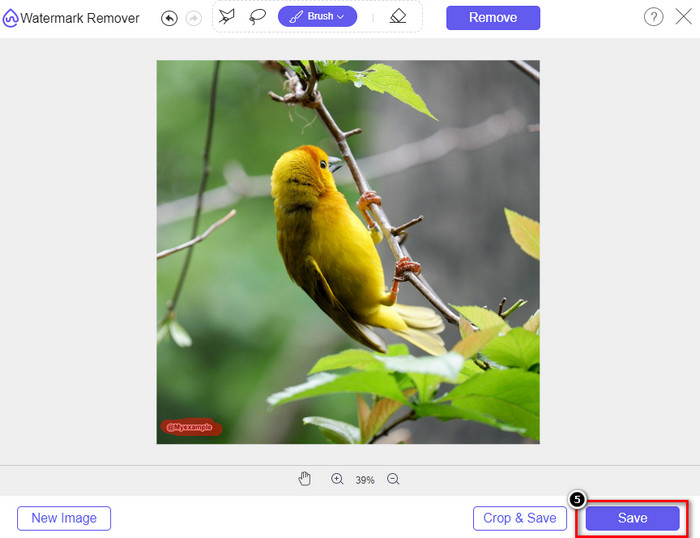
Steg 5. Klicka till sist på Download för att spara bilden utan den inbäddade vattenstämpel du markerade här.
WatermarkRemover.IO
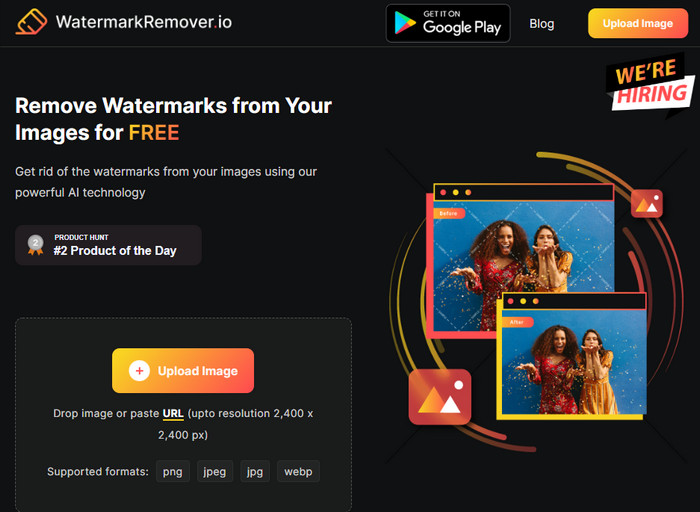
WatermarkRemover.io är ett verktyg för att ta bort vattenstämpel från Dreamstime-foton som du kan använda online och som kan hjälpa dig med detta. Detta verktyg är gratis att använda, precis som det förstnämnda webbaserade borttagningsverktyget. Du behöver inte oroa dig för att registrera något konto eftersom det fungerar i alla vanliga webbläsare. Det använder dessutom AI-teknik för att ta bort vattenstämpeln i dina bilder när du använder det. För att hjälpa dig att göra detta, fortsätt läsa informationen nedan.
Steg 1. Öppna den officiella webbplatsen för detta vattenstämpelborttagningsverktyg genom att söka efter det i din webbläsare.
Steg 2. Klicka på ikonen Upload Image för att ladda upp fotot med vattenstämpel som du vill ta bort.
Steg 3. När du har laddat upp bilden med vattenstämpel klickar du på Download Image, eftersom vattenstämpeln automatiskt tas bort från din bild.
Del 3. Hur man tar bort Dreamstime Watermark på videor med den ultimata lösningen
Du kan ladda ner ett Dreamstime-vattenstämpelborttagarprogram för videor, såsom det avancerade FVC Video Converter Ultimate. Det är det mest flexibla verktyget, alltid redo och klarar jobbet när som helst. Detta verktyg hanterar problem du kan stöta på med dina videor, såsom låg ljudkvalitet, upplösning, format som inte stöds och störande vattenstämplar. Jämfört med annan programvara du kan installera för att ta bort vattenstämplar är detta fenomenalt bra vad gäller prestanda, bearbetningshastighet och användarvänlighet. Häng med, för vi kommer att visa dig hur du tar bort vattenstämpeln i dina videor steg för steg.
Steg 1. Innan något annat behöver du ladda ner programvaran till din dator genom att klicka på nedladdningsknappen nedan. Välj rätt version att installera, gå igenom den snabba installationen och starta sedan programmet.
Gratis nedladdningFör Windows 7 eller senareSäker nedladdning
Gratis nedladdningFör MacOS 10.7 eller senareSäker nedladdning
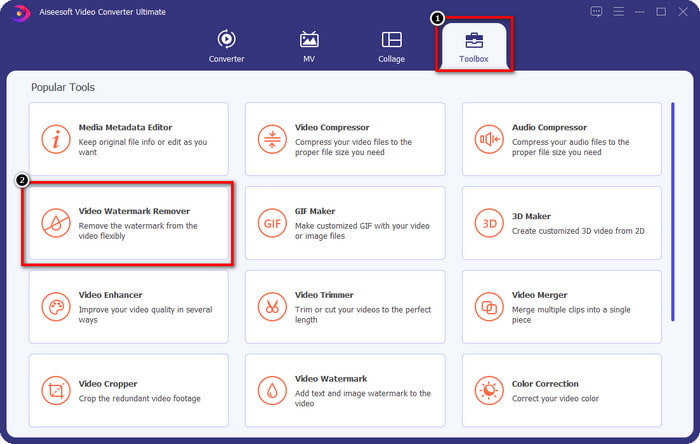
Steg 2. Öppna den multifunktionella Toolbox som denna programvara har och välj sedan Video Watermark Remover.
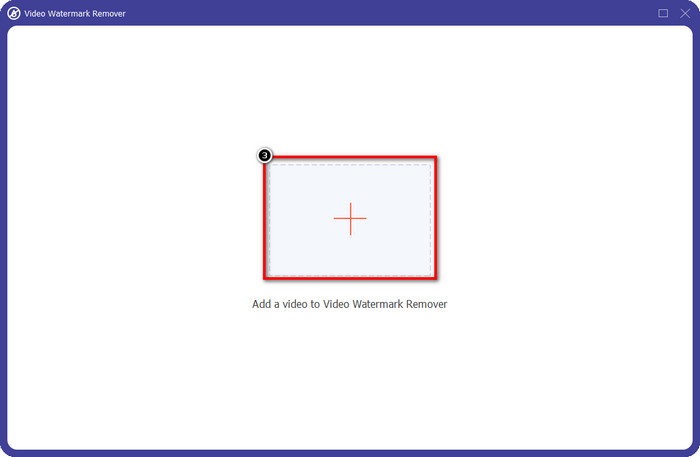
Steg 3. Klicka därefter på ikonen + för att ladda upp videon du har laddat ner och börja ta bort Dreamstime-vattenstämpeln.
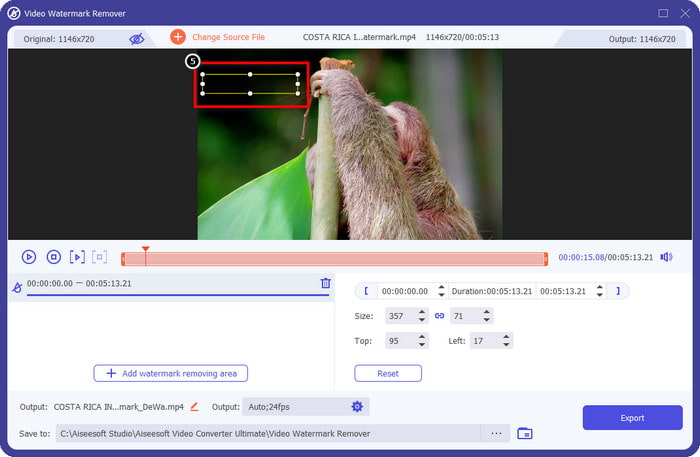
Steg 4. Klicka sedan på Add Watermark Removing Area för att placera markeringsrutan över vattenstämpeln.
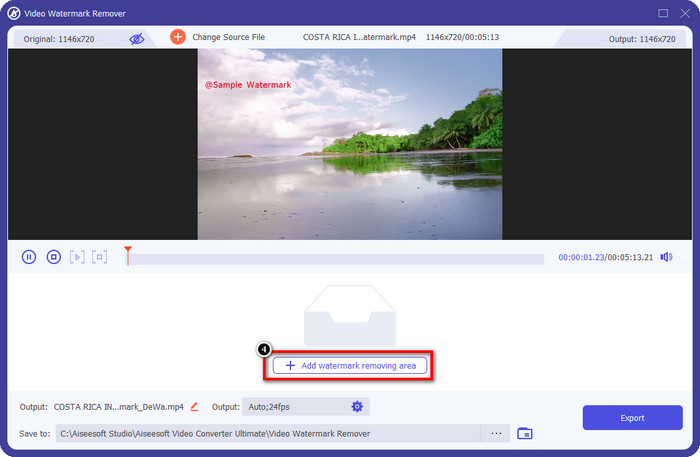
Steg 5. Efter att du klickat på Add Watermark Removing Area visas en rektangulär ruta på skärmen – placera den över vattenstämpeln för att ta bort den.
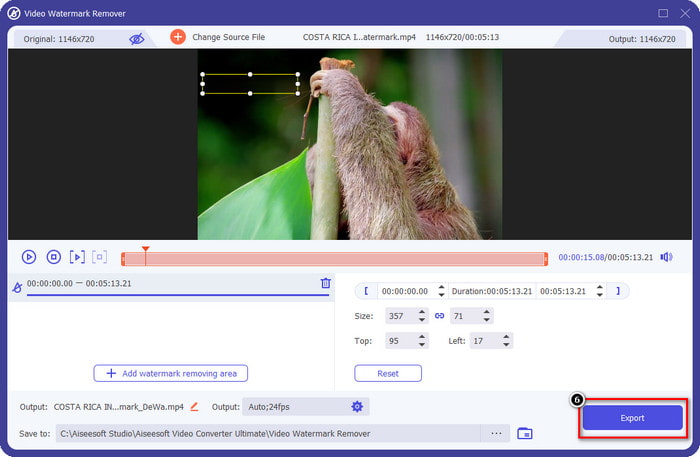
Steg 6. Klicka på Export-knappen för att ladda ner videon utan Dreamstime-vattenstämpeln.
Relaterat:
Ta bort vattenstämpel från PDF
Del 4. Vanliga frågor om hur man tar bort Dreamtime Watermark
Kan jag obegränsat ta bort vattenstämpeln på Dreamtime efter att jag köpt den?
Du kan inte om du köpte en kredit, men du kan fortsätta och scrolla ner lite mer, och du kommer att se att det finns obegränsad bildåtkomst som du kan använda dig av om du använder detta regelbundet. Dess pris är inte detsamma i olika regioner eller platser över hela världen.
Vilken typ av kort stöder Dreamstime?
Nu när du har bestämt dig för att köpa en kredit eller prenumerationsavgift här kan du använda ditt Master Card, Visa, AMEX och andra vanliga kreditkort; du kan kolla in det på den officiella hemsidan för att lära känna de andra.
Kan jag använda krediter på Dreamstime för att köpa videor utan vattenstämpel?
Du kan använda kredit för att köpa videon eller någon produkt som den här plattformen har. Syftet med kredit är inte bara för bilder och videor; du kan också använda den för att köpa ljud här.
Slutsats
Hur tar man bort Dreamstime-vattenstämpeln? Tja, du vet redan hur du hanterar vattenstämpeln i dina bilder med de två verktygen vi använder och videon med den ultimata vattenstämpelborttagaren du kan använda. Så om du har problem med vattenstämpeln på videor eller bilder kan du fritt använda programvaran ovan och följa handledningen vi lade till. Säg inte hejdå till problemet för det är löst!
-
 2 sätt att ta bort VSDC vattenmärke på Windows och Mac snabbt
 Letar du efter ett sätt att ta bort VSDC vattenstämpel på dina videor? Med den här artikeln tillhandahåller vi verktyg som du kan använda för att bli av med vattenstämpeln.
-
 Ta bort Animoto-vattenstämpeln på videor enkelt och effektivt
 Hur tar man bort Animoto-vattenstämpeln på videon? Fortsätt läsa den här artikeln eftersom vi gav en komplett handledning om hur man gör det.
-
 Hur man tar bort vattenstämpel från video med Final Cut Pro [Komplett guide]
 Har du problem med vattenstämpeln på videor? Sa inte mer, för vi gav en handledning om hur man tar bort vattenstämpel från video med Final Cut Pro.
