


 Video Converter Ultimate
 Skärminspelare
 Video reparation
 Säker nedladdning
Riktlinjer för att ta bort VSDC vattenstämpel på videor enkelt och effektivt
You can't go wrong in choosing the VSDC Video Editor for basic video editing on Windows. This non-linear can give the needs you are looking for a video editor. For it brings a set of editing features you can use to produce an excellent output at the end. With the rise of this tool, many users have a question about this tool, and one of the infamous right now is, does VSDC free video editor have a watermark? Do you have the same queries as the other audience on the web? To answer the questions a lot have been asking, we will give you the answer you need; keep reading it to know it better.

Del 1. Har VSDC Free Video Editor en vattenstämpel
Även om du använder gratisversionen av VSDC för att redigera de videor eller filmer du har, ingår inga VSDC-vattenstämplar när du exporterar dem. Så du kan njuta av videon du redigerar här utan vattenstämpeln på dem gratis. För att använda de andra videoredigeringsfunktionerna den har, bör du köpa verktyget för att låsa upp dem. Även om det är en gratis redigerare kan verktyget inte ta bort vattenstämpeln du lagt till i videon. Det är ett problem för vissa, och andra använder dess klyvnings- och skärfunktion för att ta bort vattenstämpeln, även om det är bra om det är på sidorna. Men om vattenstämpeln är i mitten, skulle du vilja använda en videoskärare? Självklart inte! Verktygen nedan kan hjälpa dig att enkelt ta bort VSDC-vattenstämpeln som finns i din video.
Del 2. Hur man tar bort vattenstämpel från video på VSDC med de 2 tillgängliga sätten
FVC Video Converter Ultimate – Ultimate Watermark Remover på Windows och Mac
FVC Video Converter Ultimate is the most advance and AI-powered software you can use to remove the VSDC watermark. This tool allows you to manually override the watermark removers feature it provides that many others software doesn't allow you. It precisely removes the watermark from the videos without leaving a trace of the removing area where the watermark originated.
Dessutom har detta verktyg också robusta funktioner och funktioner som du inte kan hitta på den andra programvaran. Även om det här verktyget stöder AI-teknik, behöver du inte oroa dig för din datorspecifikation eftersom verktyget fungerar på low-end Windows och macOS. Prestandamässigt är den överlägsen, använder låga specifikationer på datorer, fungerar på både Windows och Mac och har förhöjd prestanda vid import och export. Det finns inget kvar att söka efter annat än steg-för-steg-handledningen om hur man tar bort vattenstämpeln från videon i VSDC med hjälpen nedan.
Step 1. Download the software now on your desktop by clicking the below download button. After that, follow the installation and set-up process it requires, and click Start Now to open the tool on your desktop.
Gratis nedladdningFör Windows 7 eller senareSäker nedladdning
Gratis nedladdningFör MacOS 10.7 eller senareSäker nedladdning
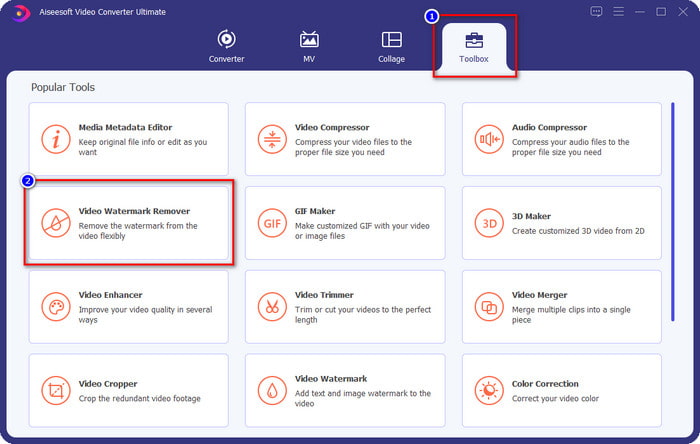
Step 2. After launching the software, go to the Toolbox section, and select the Video Watermark Remover to use the ultimate watermark remover of this software.
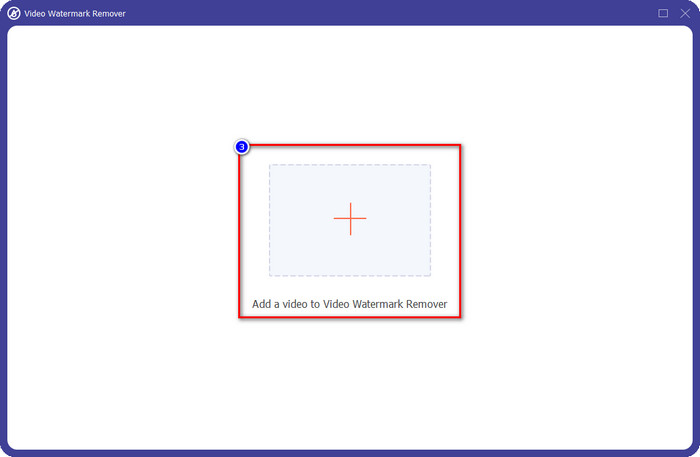
Step 3. On the window that will show on your screen, click the + icon to upload the video with a watermark.
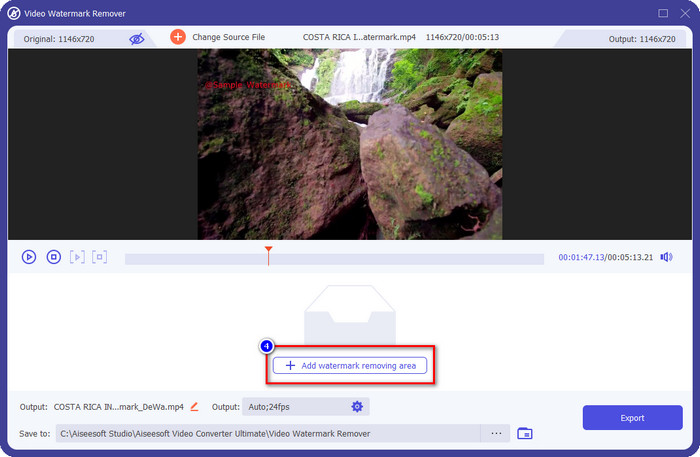
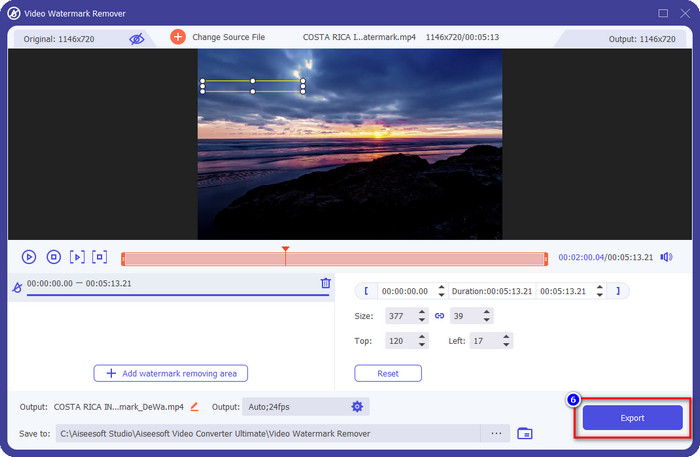
Step 4. To use the watermark remover, click the Add Watermark Removing Area.
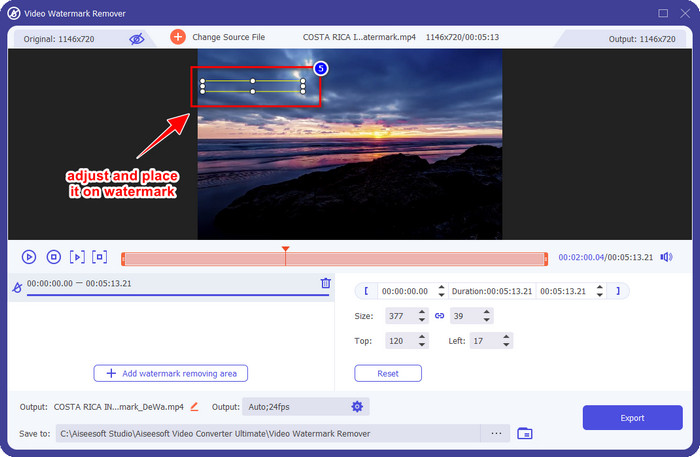
Step 5. Place the selection box in the area with a watermark, and ensure to cover it all so that when you export the video, you wouldn't see the watermark on the video and enjoy watching it.
Step 6. Now that the watermark is covered, click the Export button to save the video without the watermark.
Kapwing

One of the best ways to remove the VSDC free video editor watermark is by using Kapwing.com. This watermark editor allows you to quickly eliminate the pre-existing watermark on the video to make them look amazing. Though you aren't a pro at handling this task, there is no need to worry if you choose this because of its intuitive and complete interface. Learning how to use it became faster. The tool is the best choice, but there are drawbacks to using it; for example, the free version can't export video with 60 mins up, is limited, and needs to sign in to remove the Kapwing watermark once you export it.
Step 1. Open the web tool, and upload the file by dragging and dropping it here.
Step 2. After uploading the file, go to the elements and click the shape you want available here.
Step 3. Hold and place the shape to the watermark. Remember, this method doesn't work well if the video has multi-colors; it only works if the place of the video uses a single color palette.
Step 4. Click Export Video, then click Export MP4 to save the final output.
Relaterat:
How to Remove Photobucket Watermarks
How to Remove Watermark on GIF
Del 3. Vanliga frågor om Har VSDC Free Video Editor en vattenstämpel
Can I export a 4k video on VSDC?
Ja, det här verktyget kan exportera videor i 4k-upplösning om du vill. Processen tar dock längre tid än de andra videoupplösningarna, som 1080 och 720. Även om renderingen tar lika lång tid, kan verktyget fortfarande producera en ultrahögupplöst videokvalitet som 4k om det behövs.
How to remove the watermark in VSDC?
Ladda ner verktyget, starta det för att fortsätta, klicka på Lägg till objekt och klicka på Video under det. Öppna videofiltret; då visas alternativen; klicka på Filter; klicka på DeLogo. Med DeLogo kan du nu täcka över videons vattenstämpel på VSDC. Det fungerar bara med en endast nyuppdaterad version av verktyget; om du inte kan hitta den måste du uppdatera det du använder genom att ladda ner den senare versionen.
Is VSDC the best video editor to use?
Inte det bästa, men vi kan betrakta det som ett måste-testa verktyg eftersom det ger grundläggande redigeringsfunktioner du kan behöva för att göra en imponerande video. Även om det är brant att lära sig att använda det, tenderar andra användare att spendera tid på att lära sig den här programvaran snarare än att göra redigeringen. Även om det inte är bland de 10 bästa videoredigerarna, anses det fortfarande vara ett bra verktyg för sitt redigeringssyfte.
Slutsats
To remove the VSDC watermark, you will need to have a watermark remover you can depend on, like the two mentioned software in this article. With the provided steps on each, you can choose which do you think will fit your needs and be useful for removing the watermark on the video you have. But if you want a multi-purpose software you can use to remove and add watermark, edit video, convert, and do more, you must select the FVC Video Converter Ultimate. Why? It is simply the best all-around software you will need on your desktop. Did reading this article become beneficial for you? If so, you can give us five stars below if you are satisfied with this article.
-
 Guide om vad som är ett vattenstämpel på ett foto [Uppdaterad 2022]
 Vad är en vattenstämpel på ett foto? Behöver vi lägga till en? Hur kan vi ta bort det? Allt du behöver finns här så fortsätt att läsa den här bloggen.
-
 Hur man enkelt tar bort vattenstämpel från Wondershare DVD Creator
 Den här artikeln täcker information om hur du tar bort vattenstämpeln från Wondershare DVD Creator. För att få all information du behöver är det ett måste att läsa detta.
-
 Ta enkelt bort vattenstämpel från PDF med enkla steg
 Ta bort vattenstämpel från PDF genom att följa dessa enkla steg. Lär dig hur du enkelt tar bort vattenstämplar från din PDF-fil med dessa fantastiska verktyg.
