


 Video Converter Ultimate
 Skärminspelare
 Video reparation
 Säker nedladdning
Vad är en färgkorrigering och hur den utförs
Har du någonsin varit missnöjd med tråkiga eller otoniga bilder som inte gör din kreativitet rättvisa? Säg adjö till dina bekymmer! En AI-driven färgkorrigering har utvecklats exakt för att ge liv till dina videofilmer eller filmer, vilket säkerställer att varje färg, nyans och ton blir som du tänkt dig. Denna innovativa teknik är en banbrytande teknik som utrustar kraften hos artificiell intelligens för att förbättra och ge färgperfektioner i dina videor.
Oavsett om du vill justera färgfel, skapa en särskild stämning eller helt enkelt förfina den visuella helheten, gör en AI‑videofärgkorrigering processen smidigare och ger enastående resultat. Låt oss ge ditt videoinnehåll liv med levande, naturtrogna färger som fängslar din publik och lämnar ett bestående intryck. Gör dig redo att måla din värld med briljans när vi fördjupar oss i den här artikeln.
Del 1. Vad är en färgkorrigering på video?
Det är ganska enkelt att förstå vad färgkorrigeringsdefinitionen är i video. Det hänvisar till att förbättra och modifiera en videos färger och toner för att uppnå ett önskat utseende eller för att säkerställa noggrannhet och konsekvens. Det är som att finjustera färgerna i ett fotografi men för rörliga bilder. Föreställ dig att du tar ett foto och färgerna ser lite tråkiga ut, tråkiga eller alltför livfulla. Detta kan också hända i en video, men det finns ofta tusentals bildrutor. Färgkorrigering hjälper till att åtgärda dessa inkonsekvenser, vilket säkerställer att färgerna matchar bra genom hela videon. Om en scen till exempel spelades in en molnig dag kan färgerna verka lugna och blåaktiga. Färgkorrigering kan värma upp tonerna för att få dem att se mer naturliga ut eller få bluesen att poppa för konstnärlig effekt. Den kan också justera kontrast, mättnad, ljusstyrka och andra aspekter för att skapa en specifik stämning eller stil i en video.
Del 2. Olika situationer med färgkorrigering
Färgkorrigering är avgörande i en mängd olika situationer inom videoproduktion. Detta för att uppnå önskad visuell effekt och bibehålla konsekvens. Nedan finns några situationer som involverar färgkorrigering i en video.
Blandade ljusmiljöer – färgkorrigering är användbar när du filmar på platser med olika ljuskällor, såsom naturligt ljus, lysrör och glödlampor. Färgkorrigeringen hjälper till att balansera och enhetliggöra färgerna så att allt ser naturligt och konsekvent ut i alla klipp.
Problem med vitbalans – att korrigera vitbalansen säkerställer att vitt återges som riktigt vitt och inte får oönskade färgstick, något som ofta uppstår på grund av felaktiga kamerainställningar eller varierande ljusförhållanden.
Exponeringsproblem – videofärgkorrigering kan åtgärda överexponerat material, när det är för ljust, eller underexponerat material, när det är för mörkt, genom att plocka fram detaljer och behålla en korrekt balans mellan ljusa och mörka toner.
Color grading för estetik – färgkorrigering innefattar även color grading, där videons färger justeras för att skapa en specifik känsla eller stil. Det kan handla om att öka kontrast och mättnad eller ge videon ett vintageliknande utseende.
Återskapa tid på dygnet – att justera videofärger är användbart för att simulera en viss tidpunkt, till exempel att få en dagscen att se ut som om det regnar, är filmad vid solnedgång eller ändra färgerna för att förmedla morgon- eller kvällsljus.
Del 3. Hur gör man färgkorrigering på video?
Färgkorrigering i videoredigering är en avgörande process eftersom den förbättrar videons övergripande visuella kvalitet. Ett av de bästa verktygen du kan använda är Video Converter Ultimate. Det här kraftfulla verktyget med en palett för färgkorrigering gör att du snabbt kan korrigera färgerna i dina videor och förbättra deras visuella attraktionskraft och kvalitet. Med detta verktyg kan du experimentera med olika alternativ för färgkorrigering för att uppnå det utseende du vill ha på din video. Dess redigeringsfunktioner låter användare trimma, redigera, beskära och lägga till effekter i sina videor.
Dessutom möjliggör det sömlös konvertering mellan olika videoformat, vilket gör det enkelt att anpassa ditt videoinnehåll för olika enheter. En annan sak som är berömvärd med det här verktyget är att det är användarvänligt. Med Video Converter Ultimate kan du enkelt justera och korrigera färger för att göra din video mer tilltalande. Här är en steg-för-steg-guide för att veta hur du använder det här verktyget:
Steg 1: Ladda ner och installera Video Converter Ultimate
Om du inte har verktyget ännu kan du ladda ner och installera Video Converter Ultimate på din dator. För att göra det klickar du på en av knapparna för Free Download här nedan, beroende på vilket operativsystem din dator har, och följer installationsanvisningarna.
Gratis nedladdningFör Windows 7 eller senareSäker nedladdning
Gratis nedladdningFör MacOS 10.7 eller senareSäker nedladdning
Steg 2: Starta Video Converter Ultimate
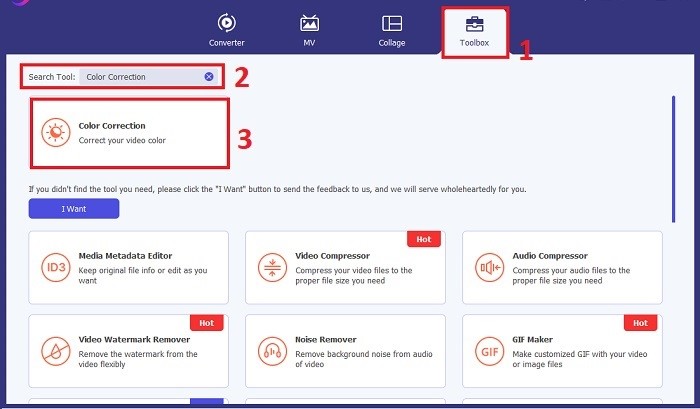
När programmet har installerats startar du videokorrigeringsprogrammet på din dator för att komma till huvudgränssnittet. Gå till Toolbox i den globala menyn. Här kan du hitta eller söka efter verktygets funktion Color Correction och klicka på den.
Steg 3: Importera videon som ska färgkorrigeras
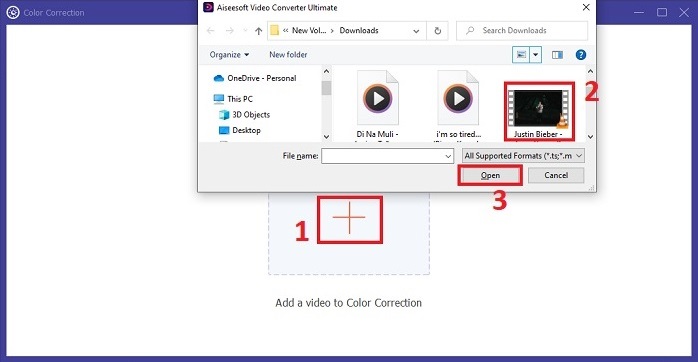
Klicka på knappen med Plus för att importera videon du vill färgkorrigera. Leta upp videofilen på datorn och klicka på Open för att importera den till programmet.
Steg 4: Justera videons färgparametrar
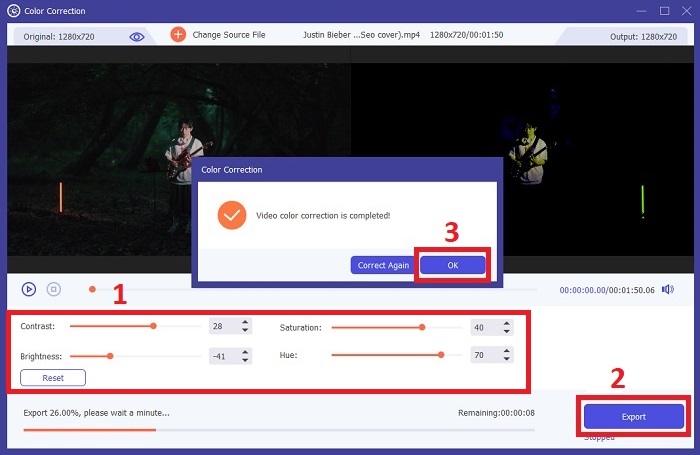
När videon har importerats justerar du parametrar som ljusstyrka, kontrast, mättnad och nyans för att uppnå den färgkorrigering du vill ha. När du redigerar videon i verktyget kan du förhandsgranska ändringarna i realtid i panelen till höger. När du är nöjd med färgjusteringarna klickar du på Export. Låt verktyget bearbeta videon och spara resultatet på den plats du önskar.
Vidare läsning:
Videofilter: Förbättra din video med filter och effekter på dator
Vad är 3D? Allt du behöver veta om 3D och hur du skapar det
Del 4. Vanliga frågor om videofärgkorrigering
Hur vet jag om jag behöver en färgkorrigering?
Är du inte säker på om din video behöver färgkorrigering? Färgkorrigering är nödvändig om färgerna ser ojämna, udda ut eller inte matchar din videofilms önskade stämning eller motiv.
Är färgkorrigering verkligen nödvändig?
Absolut! En AI-videofärgkorrigering är väsentlig i videoproduktion för att garantera att färgerna är korrekta och visuellt tilltalande. Det förbättrar visuell enhetlighet och kan lyfta en anständig video till en extraordinär.
Vad är en färgkorrigerare i film?
En färgkorrigerare i film är ett verktyg, antingen hårdvara eller mjukvara, som används i efterproduktion för att modifiera och balansera färger. Det hjälper filmskapare att uppnå ett visst utseende, humör eller atmosfär, vilket gör bilder mer engagerande och enhetliga i berättelsen.
Slutsats
Sammanfattningsvis är videofärgkorrigering nyckeln till en fängslande visuell upplevelse. Det handlar om att finjustera färger och toner så att de stämmer med din kreativa vision och ser till att varje bildruta återger den avsedda briljansen. Med AI‑driven färgkorrigering förvandlas dina videor genom levande, naturtrogna färger som skapar ett minnesvärt intryck. Från att korrigera blandade ljusförhållanden till att forma specifika stämningar lyfter denna innovation din berättelse till en ny nivå. Video Converter Ultimate blir en kraftfull partner som förenklar färgkorrigeringsprocessen och frigör din kreativa potential.
-
 Vad är FPS? Allt du behöver veta om det
 Vad är FPS? Lär dig all information du behöver om Frame Per Seconds (FPS) och vad den kan göra i olika situationer. Läs den här artikeln för fullständig information.
-
 Top Photo Color Enhancer-appen på din Android och iOS gratis
 Vill du ha en app för fotofärgförstärkare på din telefon? Tja, välj vilka förstärkare du tror passar dina behov bäst.
-
 Den ultimata guiden för att ändra videoupplösning tillgänglig på flera plattformar
 Behöver du ändra videoupplösningen för videon? Om så är fallet, lär dig de olika sätten du enkelt kan göra för att ändra videoupplösningen för videon du tittar på.
