


 Video Converter Ultimate
 บันทึกหน้าจอ
 ซ่อมวิดีโอ
ดาวน์โหลดเครื่องมือที่ดีที่สุด 5 อย่างสำหรับสร้างวิดีโอเร็วขึ้น 2 เท่าในไม่กี่คลิก
บางครั้งคุณอาจจำเป็นต้องเร่งความเร็ววิดีโอ เช่น เพิ่มเป็นความเร็ววิดีโอ2x เนื่องจากมีบางช่วงที่คุณอยากข้ามไป หรือคุณต้องการให้วิดีโอเล่นเร็วขึ้นเพื่อลดระยะเวลาในการรับชม ดังนั้น หากคุณอยากเรียนรู้วิธีทำให้วิดีโอของคุณเล่นเร็วขึ้น ให้ลองอ่านบทความนี้ต่อไป เพื่อให้มีความเข้าใจและความรู้เพียงพอเกี่ยวกับวิธีทำ และเหตุผลว่าทำไมจึงควรใช้ความเร็ว 2x.

ส่วนที่ 1. วิดีโอ 2x คืออะไร?
การดูความเร็วเป็นการดูวิดีโอที่เร่งความเร็วเป็นความเร็วการเล่นตามธรรมชาติ เพียงแค่ปรับความเร็วของวิดีโอที่เรากำลังดูอยู่ สามารถช่วยเราได้ในรูปแบบต่างๆ ดังนั้น หากคุณต้องการทราบว่าประโยชน์ของการนำวิดีโอที่มีความเร็วตามธรรมชาติมาไว้ในความเร็ววิดีโอ 2x คืออะไร จากนั้นอ่านรายละเอียดด้านล่างเพื่อทราบข้อมูลเพิ่มเติม
ข้อดีของการดูวิดีโอแบบเร่งความเร็ว
◆หากคุณเล่นวิดีโอที่ความเร็ว 2x คุณสามารถระบุได้อย่างง่ายดายว่าวิดีโอนั้นควรค่าแก่การรับชมหรือไม่ นี้อาจใช้กับวิดีโอที่มีระยะเวลานานและส่วนใหญ่มักจะเบื่อที่จะดูทั้งหมดด้วยความเร็วปกติ
◆ช่วยให้เราประหยัดเวลาได้มากกว่าความเร็วในการเล่นปกติ ในกรณีนี้ หากคุณต้องดูวิดีโอตั้งแต่ 2 รายการขึ้นไปที่มีความยาว 15 นาที ควรรับชมให้เร็วขึ้น 2 เท่า เพื่อดูดซับรายละเอียดได้เร็วกว่าการรับชมด้วยความเร็วปกติ ดังนั้น แทนที่จะดูวิดีโอ 1 รายการใน 15 นาที คุณสามารถดู 2 รายการในช่วงเวลานั้นได้
◆คนส่วนใหญ่ที่ชื่นชอบการดูวิดีโอที่เล่นด้วยการเล่นที่รวดเร็วคือผู้ที่ชอบจดจำทุกสิ่งภายในหนึ่งนาที วิธีนี้ใช้ได้ผลดีที่สุดสำหรับผู้ที่มีงานยุ่งหรือผู้ที่เร่งรีบ
◆มันจะช่วยปรับปรุงและฝึกสมาธิและทักษะการฟังของคุณให้ดีขึ้นหากคุณเล่นวิดีโอด้วยความเร็ว 2x มากกว่าความเร็วปกติ ดังนั้นตอนนี้ คุณมีแนวคิดแล้วว่าข้อดีของการเร่งความเร็วของวิดีโอคืออะไร ตอนนี้เป็นเวลาที่เหมาะสมที่จะดำเนินการกับเครื่องมือที่จะช่วยให้คุณเพิ่มความเร็ววิดีโอของคุณ ส่วนต่อไปจะพูดถึงเครื่องมือต่าง ๆ ที่คุณจะต้องใช้
ส่วนที่ 2 วิธีการสร้าง 2x Videos
หากคุณต้องการทำให้วิดีโอเร็วขึ้นเป็น 2x ให้ลองใช้โปรแกรมตัดต่อวิดีโอสุดฮิตอย่าง Video Converter Ultimate เครื่องมือนี้ได้ช่วยผู้ใช้จำนวนมากแก้ปัญหาต่าง ๆ โดยเฉพาะการแปลงไฟล์ ทำ GIF การปรับคุณภาพ และอื่น ๆ ดังนั้น การทำให้การเล่นวิดีโอของคุณเร็วขึ้นจึงทำได้อย่างง่ายดายด้วยตัวช่วยนี้ อีกทั้งในขณะที่คุณเพิ่มความเร็ววิดีโอ คุณยังสามารถดูตัวอย่างความเร็ว 2x ด้านล่างได้ด้วย เพื่อเช็กว่าความเร็ววิดีโอนั้นเหมาะกับคุณหรือไม่ เอาล่ะ ตอนนี้มาดูวิธีเปลี่ยนความเร็วการเล่นวิดีโอของคุณได้เลย เพียงทำตามขั้นตอนด้านล่างนี้.
ขั้นตอนในการเร่งความเร็ววิดีโอให้เร็วขึ้น 2 เท่า
ขั้นตอนที่ 1 ดาวน์โหลดโปรแกรมลงในเดสก์ท็อปของคุณ จากนั้นติดตั้งหลังจากดาวน์โหลดเสร็จสิ้น.
ดาวน์โหลดฟรีสำหรับ Windows 7 หรือใหม่กว่าดาวน์โหลดอย่างปลอดภัย
ดาวน์โหลดฟรีสำหรับ MacOS 10.7 หรือใหม่กว่าดาวน์โหลดอย่างปลอดภัย
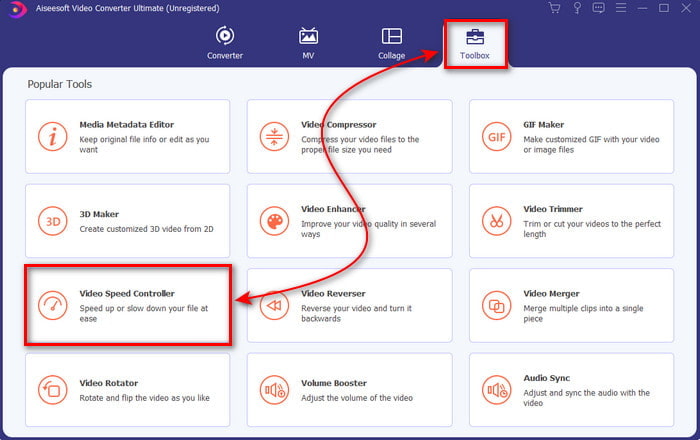
ขั้นตอนที่ 2 ไปที่เมนู Toolbox แล้วค้นหา Video Speed Controller
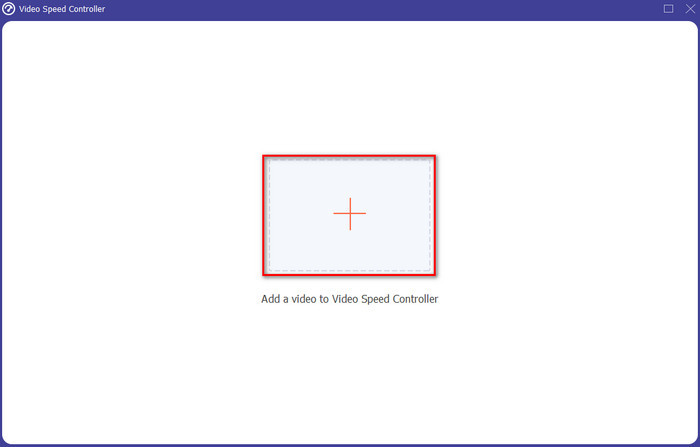
ขั้นตอนที่ 3 คลิกปุ่ม + เพื่อใส่ไฟล์ที่คุณต้องการดูด้วยความเร็ววิดีโอ 2x แล้วคลิก Open เพื่อดำเนินการต่อ.
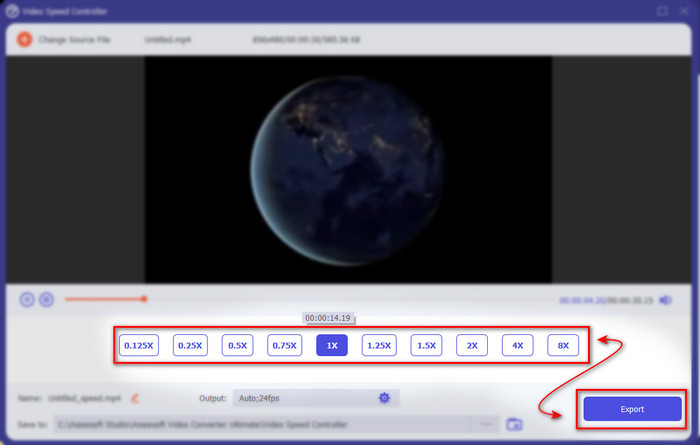
ขั้นตอนที่ 4 หลังจากใส่ไฟล์แล้ว ให้เลือก 2x จากรายการความเร็ววิดีโอที่มีอยู่ จากนั้นเพื่อบันทึกความเร็ววิดีโอ ให้คลิกปุ่ม Export.
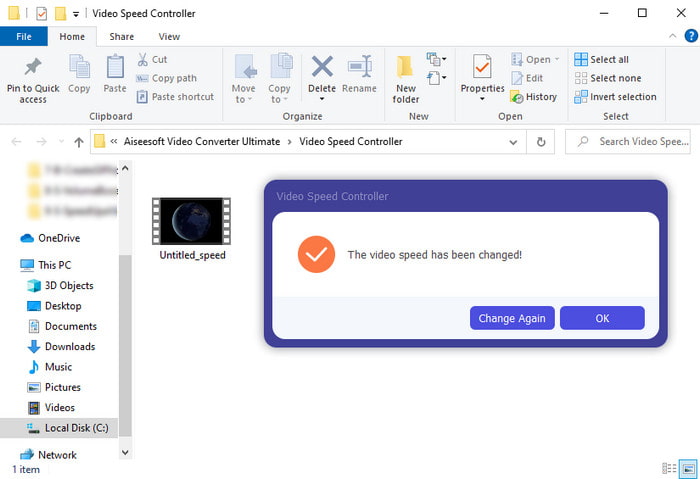
ขั้นตอนที่ 5 หลังจากส่งออกไฟล์เสร็จแล้ว จะมีโฟลเดอร์ปรากฏบนหน้าจอของคุณ ให้คลิกไฟล์นั้นเพื่อดูวิดีโอเวอร์ชันที่เร่งความเร็วแล้ว.
ส่วนที่ 3 วิธีเล่นวิดีโอด้วยความเร็ว 2x
1. VLC Media Player
โปรแกรมเล่นมีเดียที่มีชื่อเสียงที่สุดตัวหนึ่งซึ่งคุณสามารถดาวน์โหลดลง PC หรือ Mac ได้คือ VLC Media Player เครื่องมือบนเดสก์ท็อปนี้มักถูกใช้โดยผู้ที่ชื่นชอบการดูคลิปภาพยนตร์ นอกจากนี้ เครื่องมือนี้ยังรองรับรูปแบบไฟล์เกือบทั้งหมดที่เรารู้จักบนเว็บ อย่างไรก็ตาม วิดีโอบางไฟล์ที่ใช้โค้เด็กซับซ้อนอาจไม่สามารถเล่นได้ เช่น AVI หรือ MKV ดังนั้น หากคุณอยากรู้ว่าจะทำวิดีโอให้เป็นความเร็ว 2x ด้วย VLC Media Player ได้อย่างไร ให้ทำตามขั้นตอนด้านล่างนี้.
ขั้นตอนที่ 1 ดาวน์โหลด VLC ลงในเดสก์ท็อปของคุณแล้วเปิดโปรแกรม.
ขั้นตอนที่ 2 ลากและวางไฟล์ลงบนอินเทอร์เฟซ จากนั้นคลิกเลือกไฟล์วิดีโอที่คุณเพิ่งใส่เข้ามา.
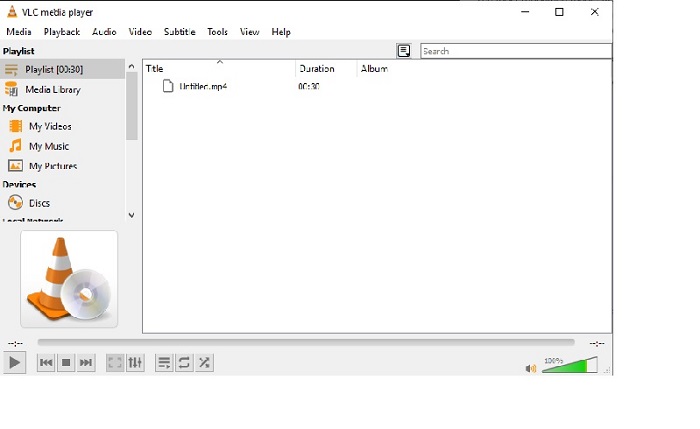
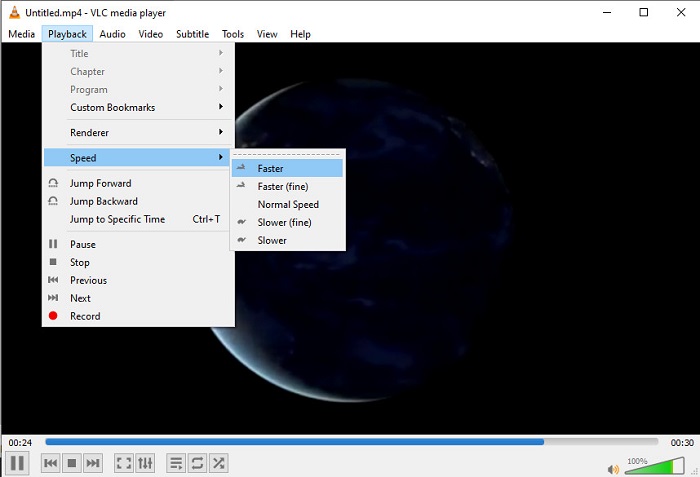
จากนั้นไปที่เมนู Playback และคลิก Speed เพื่อเปลี่ยนความเร็วปกติของวิดีโอ.
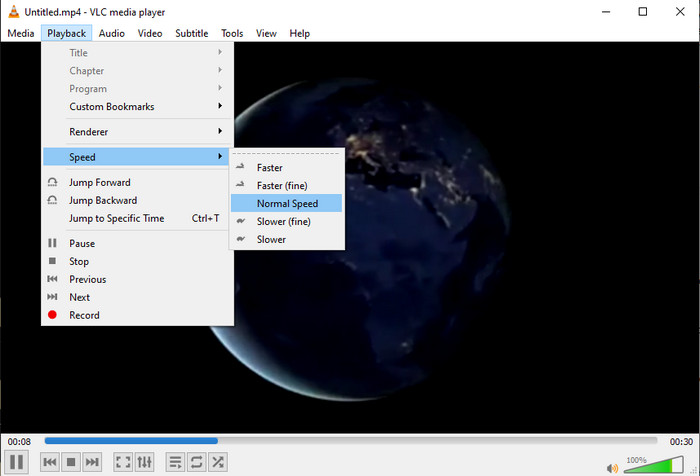
ขั้นตอนที่ 3 หากคุณต้องการให้วิดีโอกลับมาเล่นด้วยความเร็วปกติ ให้ไปที่ Playback แล้วคลิก Speed จากนั้นเลือกความเร็ว normal.
2. ผู้เล่น QuickTime
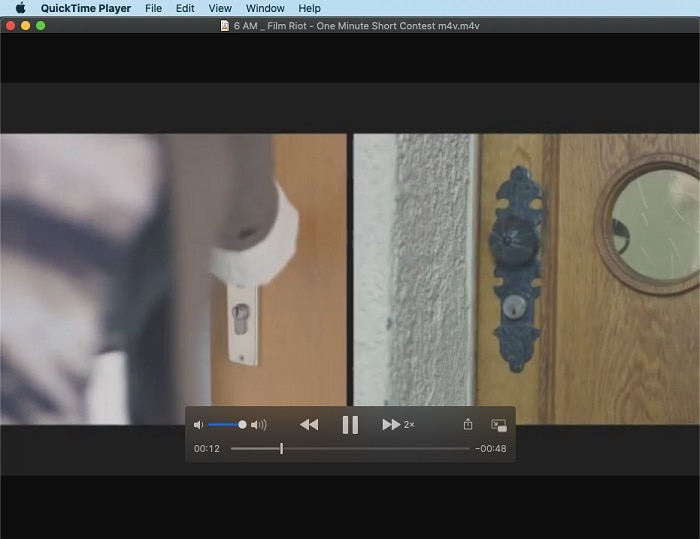
โปรแกรมเล่นมีเดียพื้นฐานของ Mac ก็สามารถช่วยให้คุณเล่นวิดีโอด้วยความเร็ว 2x ได้เช่นกัน QuickTime Player เป็นโปรแกรมเล่นมีเดียที่ติดตั้งมาให้ล่วงหน้าบน Mac ต่างจาก VLC โปรแกรมนี้ไม่จำเป็นต้องดาวน์โหลดเพิ่มลงในเดสก์ท็อปของคุณ น่าเสียดายว่าหากคุณเป็นผู้ใช้ Windows คุณจะไม่สามารถใช้เครื่องมือนี้ได้ เพราะมันไม่รองรับบนพีซี Windows แม้ว่าเครื่องมือนี้จะใช้งานบน Mac ได้ แต่ก็ยังมีฟีเจอร์อีกหลายอย่างที่ไม่รองรับ เช่น รูปแบบไฟล์ต่าง ๆ เพราะไฟล์ส่วนใหญ่ที่พัฒนาบน Windows ไม่สามารถเล่นบนโปรแกรมนี้ได้ ดังนั้น หากคุณใช้ Mac ลองทำตามขั้นตอนด้านล่างนี้.
ขั้นตอนที่ 1 ค้นหา QuickTime ใน Finder แล้วเปิดโปรแกรม จากนั้นคลิก File และ Open File เพื่อเลือกวิดีโอและเปิดไฟล์นั้น
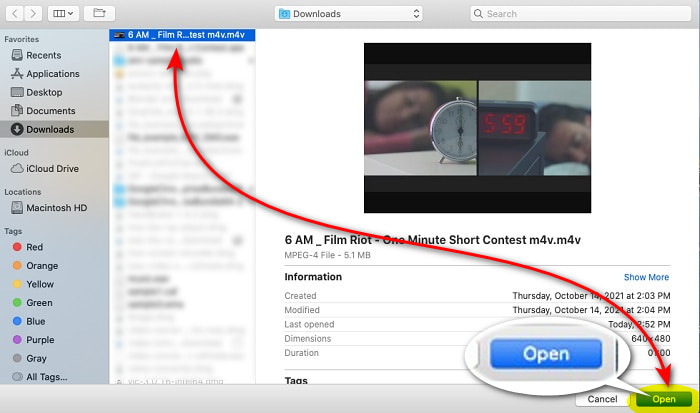
ขั้นตอนที่ 2 ระหว่างที่วิดีโอกำลังเล่น ให้คลิกปุ่ม fast-forward เพื่อเร่งความเร็ว.
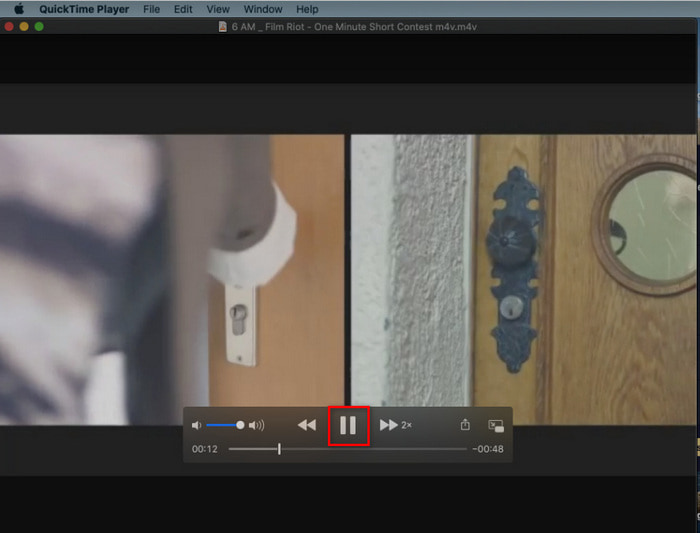
ขั้นตอนที่ 3 หากคุณต้องการหยุดการเร่งความเร็ว ให้คลิกปุ่ม pause/play.
3. Windows Media Player
หาก Mac มีโปรแกรมเล่นมีเดียที่ติดตั้งมาให้ล่วงหน้าแล้ว ฝั่ง Windows ก็มีโปรแกรมเล่นมีเดียเฉพาะของตัวเองเช่นกัน คือ Windows Media Player เช่นเดียวกับ QuickTime เครื่องมือนี้ถูกติดตั้งไว้แล้วบน Windows และพร้อมใช้งานสำหรับการดูวิดีโอและทำให้วิดีโอเร็วขึ้นเป็น 2x จากความเร็วปกติ อย่างไรก็ตาม เราถือว่าการเร่งความเร็วของเครื่องมือนี้แย่ที่สุด เพราะภาพจะหายไปเป็นช่วง ๆ และข้ามจากวินาทีหนึ่งไปอีกวินาทีหนึ่ง แทนที่จะเล่นแบบเร็วขึ้น แต่ถ้าคุณรับได้ ก็ลองทำตามขั้นตอนด้านล่างเพื่อดูวิธีเร่งความเร็ว.
ขั้นตอนที่ 1 เปิดโปรแกรมบนเดสก์ท็อป Windows ของคุณ
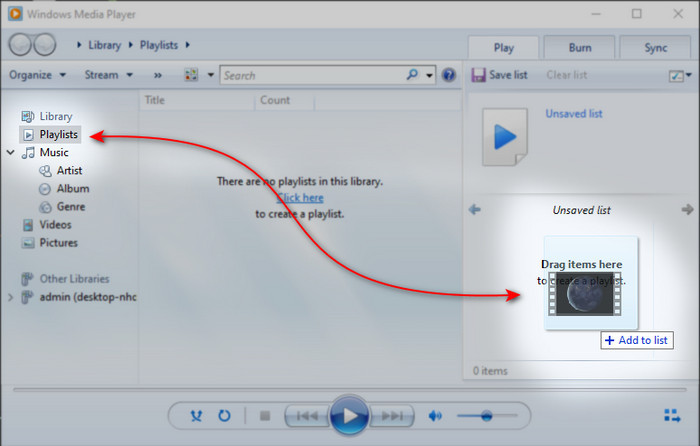
ขั้นตอนที่ 2 คลิก Playlist จากนั้นลากและวางไฟล์วิดีโอลงในช่องเล็ก ๆ ด้านขวา.
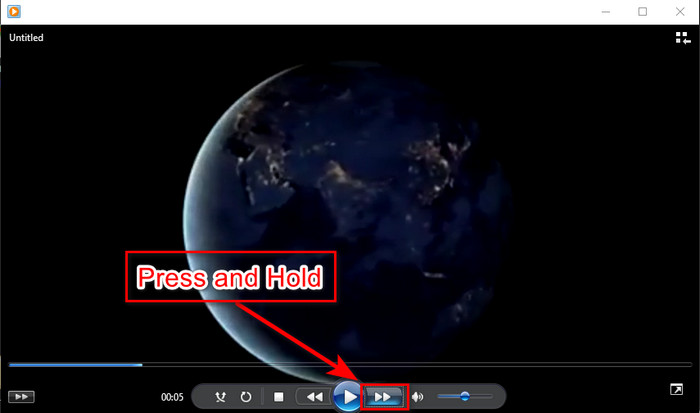
ขั้นตอนที่ 3 วิดีโอจะเล่นโดยอัตโนมัติ หากต้องการเร่งความเร็ว ให้กดปุ่ม fast-forward ค้างไว้ และปล่อยปุ่มเมื่อคุณต้องการหยุด.
ส่วนที่ 4. คำถามที่พบบ่อยเกี่ยวกับ 2x Video
ไหนดีกว่า: สโลว์โมชั่นหรือเร่งความเร็ว?
อันที่จริง มันขึ้นอยู่กับสถานการณ์ที่คุณควรจะใช้งาน แม้ว่าการปรับทั้งสองอย่างจะช่วยคุณได้ ดังนั้น หากคุณกำลังดูบทช่วยสอนหรือต้องการเปิดเผยเคล็ดลับของนักมายากล ให้ใช้สโลว์โมชั่น อย่างไรก็ตาม หากคุณเร่งรีบและต้องการดูคลิปวิดีโอจำนวนมาก คุณจำเป็นต้องดูเพื่อเร่งการเล่น
ฉันสามารถบันทึกเป็นการเล่นภาพเคลื่อนไหวที่เร็วมากได้หรือไม่?
ได้ คุณสามารถใช้ไทม์แลปส์เพื่อสร้างวิดีโอที่มีความยาวหนึ่งชั่วโมงให้เป็นนาทีหรือวินาทีได้ แต่ต่างจากการเร่งความเร็ว เวลาล่วงเลยเร็วกว่าการเร่งความเร็วปกติ 2x, 4x, 8x มาก
ข้อเสียของการดูวิดีโอที่ความเร็ว 2x คืออะไร?
แม้ว่าการดูวิดีโอด้วยความเร็วแบบนี้สามารถช่วยคุณได้มาก แต่ก็มีข้อเสียมากมายที่การเล่นความเร็วนั้นอาจเกิดขึ้นกับคุณ ตัวอย่างเช่น หากการเล่นวิดีโอกลายเป็นนิสัย ความเร็วปกติของวิดีโอจะช้าลง
สรุป
ตอนนี้คุณได้รู้จักเครื่องมือต่าง ๆ ที่ใช้ดูวิดีโอด้วยความเร็ว 2x แล้ว ก็ถึงเวลาที่จะเลือกว่าคุณชอบแบบไหน หวังว่าบทความนี้จะช่วยให้คุณตัดสินใจได้ว่าอะไรดีกว่าสำหรับคุณ ไม่ว่าคุณจะเลือกใช้โปรแกรมเล่นมีเดียเพื่อปรับความเร็ว หรือใช้โปรแกรมตัดต่ออย่าง Video Converter Ultimate วิธีใดก็ตามที่คุณเลือก ต่างก็สามารถใช้งานได้อย่างดีสำหรับคุณในฐานะผู้ใช้.
-
 ผู้เล่น VOB ที่ดีที่สุด 4 อันดับแรกสำหรับมือถือ Android สำหรับการใช้งานที่แตกต่างกัน
 เมื่อคุณดาวน์โหลดวิดีโอ VOB และต้องการรับชมบน Android คุณสามารถเลือกวิดีโอที่เหมาะสมที่สุดจากเครื่องเล่น VOB 4 อันดับแรกต่อไปนี้ในบทความนี้
-
 ทางเลือก Windows Media Player ที่ดีที่สุด 5 อันดับแรกสำหรับมือถือ Android
 เนื่องจากคุณไม่สามารถดาวน์โหลด Windows Media Player สำหรับ Android ได้ คุณควรอ่านบทความนี้และเรียนรู้เกี่ยวกับ 5 ทางเลือกที่ดีที่สุดสำหรับ Windows Media Player
-
 เครื่องเล่นวิดีโอที่ดีที่สุด 5 อันดับแรกสำหรับ iPhone ที่คุณไม่ควรพลาดในปี 2025
 หากต้องการเล่นวิดีโอในทุกรูปแบบและมีประสบการณ์การรับชมที่ดีขึ้นบน iPhone ของคุณ คุณควรอ่านบทความนี้และเรียนรู้เกี่ยวกับเครื่องเล่นวิดีโอ 5 รายการที่ดีที่สุดสำหรับ iPhone 12/11/X/8/7/6
