


 Video Converter Ultimate
 บันทึกหน้าจอ
 ซ่อมวิดีโอ
ในบทวิจารณ์โดยละเอียดเกี่ยวกับแอพเครื่องขยายเสียงที่สามารถเข้าถึงได้ 5 อันดับแรก
ผู้คนทุกคนในจักรวาลล้วนรักดนตรี ไม่ว่าจะเป็นป๊อป เมทัล ร็อก แจ๊ส ฯลฯ อย่างไรก็ตาม ไม่ใช่ลำโพงทุกตัวที่จะให้เสียงออกมาดีจนเราขนลุกได้ และการซื้อแอมป์เสียงสักตัวก็มักมีราคามากกว่าร้อยดอลลาร์ หรือแย่กว่านั้นอาจสูงถึงหลักพัน แพงใช่ไหมล่ะ? แต่เราสามารถเลี่ยงการเสียเงินจำนวนมากได้ หากลองใช้แอมป์เสียงที่ดีที่สุดเหล่านี้ซึ่งมีให้ใช้บนแพลตฟอร์มต่าง ๆ และตอนนี้ ถ้าคุณอยากใช้แอปขยายเสียง ลองอ่านรายชื่อด้านล่างนี้ ซึ่งใช้เงินน้อยกว่าที่กล่าวไปข้างต้น แต่ยังให้ประสิทธิภาพการขยายเสียงได้ยอดเยี่ยม.

ส่วนที่ 1 แอมพลิฟายเออร์เสียงมหัศจรรย์พร้อมใช้งานบนพีซีและ Mac
หากคุณอยากได้เสียงแบบ 8D หรือ 16D โดยไม่ต้องเสียเงินจำนวนมากไปกับอุปกรณ์แอมป์เสียง ลองใช้ Video Converter Ultimate แทนอุปกรณ์แอมป์เสียงทั้งหลาย เครื่องมือนี้ทำให้คุณจ่ายน้อยกว่า แถมไม่ต้องตั้งค่าซับซ้อนหรืออ่านคู่มือเล่มหนา ๆ เพื่อเรียนรู้การใช้งาน นอกจากนี้ ซอฟต์แวร์เดสก์ท็อปตัวนี้ยังยอดเยี่ยมในการปรับปรุงวิดีโอ เสียง ไฟล์ GIF และอื่น ๆ อีกมากมาย แม้ว่าโปรแกรมนี้จะเป็นแบบเสียเงิน แต่ก็ใช้งานได้ดีไม่ยุ่งยาก พร้อมฟีเจอร์ขั้นสูงที่คุณสามารถใช้กับวิดีโอและเสียงได้อย่างง่ายดาย ดังนั้น หากคุณอยากรู้วิธีใช้ซอฟต์แวร์นี้ จำเป็นต้องทำตามขั้นตอนที่ให้ไว้ด้านล่าง.
ขั้นตอนการใช้ตัวเพิ่มเสียง (Volume Booster) ใน Video Converter Ultimate:
ขั้นตอนที่ 1. ก่อนอื่น ดาวน์โหลดซอฟต์แวร์ลงในไดรฟ์ PC หรือ Mac ของคุณ จากนั้นติดตั้งลงในคอมพิวเตอร์และทำการตั้งค่าแบบง่าย ๆ ด้วยตนเอง.
ดาวน์โหลดฟรีสำหรับ Windows 7 หรือใหม่กว่าดาวน์โหลดอย่างปลอดภัย
ดาวน์โหลดฟรีสำหรับ MacOS 10.7 หรือใหม่กว่าดาวน์โหลดอย่างปลอดภัย
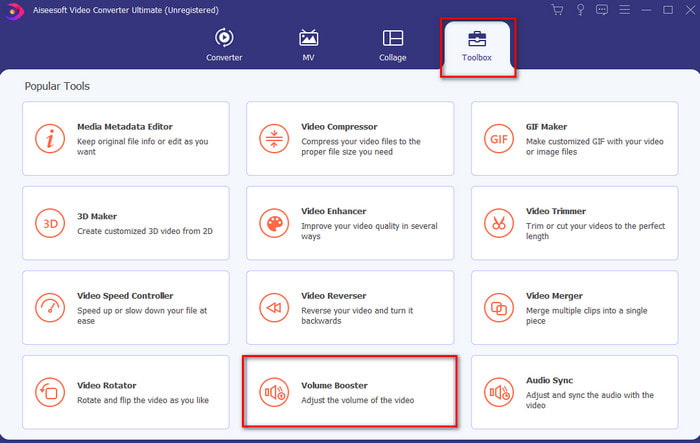
ขั้นตอนที่ 2. ที่ส่วน Toolbox ให้คลิก Volume Booster.
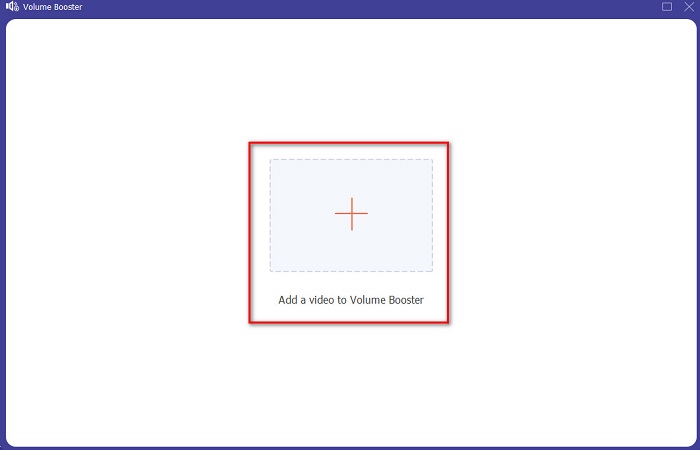
ขั้นตอนที่ 3. คลิกปุ่ม + เพื่อเลือกไฟล์ที่คุณต้องการขยายเสียง จากนั้นกด Open เพื่อดำเนินการต่อ.
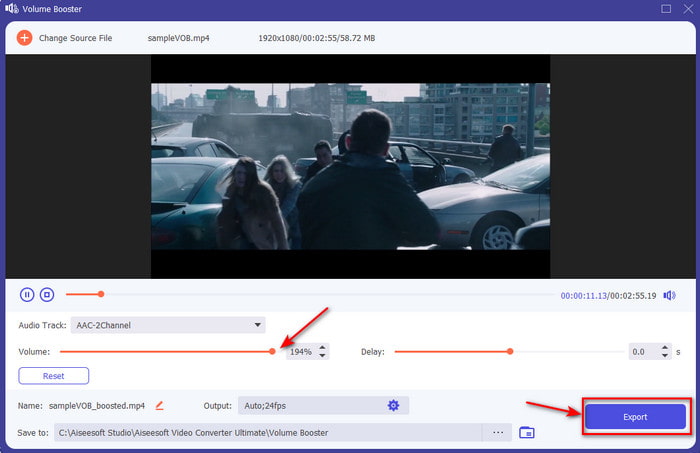
ขั้นตอนที่ 4. บนอินเทอร์เฟซ ตอนนี้คุณสามารถลากแถบเลื่อนระดับเสียง (volume slider) เพื่อเพิ่มความดังและความคมชัดของเสียงได้ หากปรับเสียงเสร็จแล้ว ให้คลิก Export.
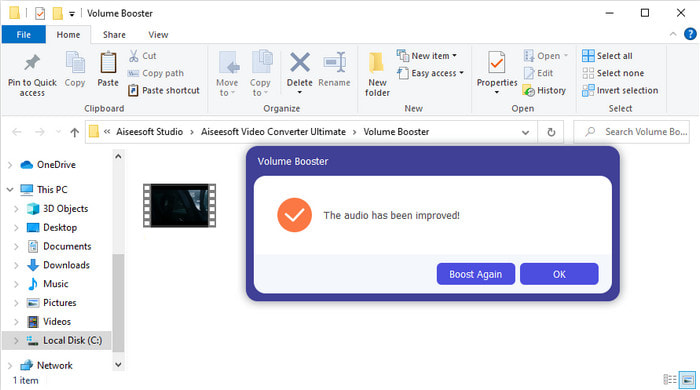
ขั้นตอนที่ 5. รอไม่กี่วินาทีให้กระบวนการเสร็จสิ้น เมื่อเสร็จแล้ว หน้าต่างตัวจัดการไฟล์จะปรากฏบนหน้าจอพร้อมไฟล์ที่คุณได้ขยายเสียง ให้คลิกไฟล์เพื่อฟังผลลัพธ์.
ข้อดี
- ซอฟต์แวร์นี้ใช้งานง่ายและสามารถทำให้เสียงของคุณเป็นปรากฎการณ์ได้
- ประสิทธิภาพของซอฟต์แวร์ได้รับการชื่นชมอย่างมากจากลูกค้า
- สามารถใช้ได้และพร้อมสำหรับการดาวน์โหลดบนพีซีและ Mac
จุดด้อย
- ซอฟต์แวร์นี้ไม่รองรับอุปกรณ์มือถือ
- เครื่องมือนี้ได้รับเงินแล้ว แต่ไม่แพงมากเมื่อเทียบกับเครื่องมือเดสก์ท็อปอื่นๆ
ที่เกี่ยวข้อง:
ส่วนที่ 2 4 ของแอพ Sound Amplifier ที่ดีที่สุดบนโทรศัพท์มือถือ iOS และ Android
1. Volume Boost – เครื่องขยายเสียง 4+ (iOS)
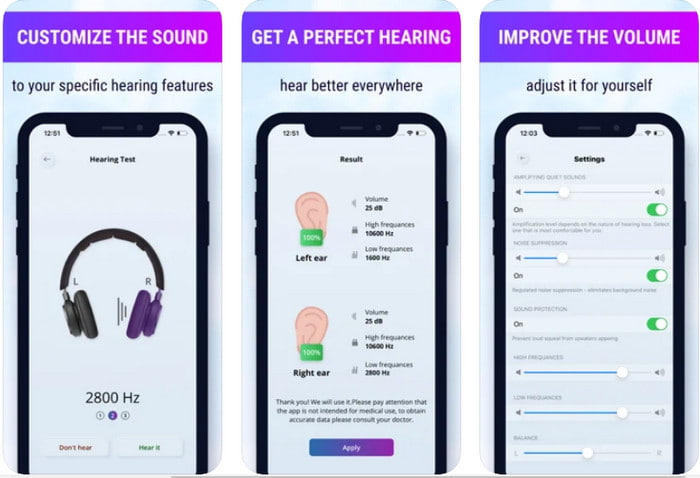
ผู้ใช้ iOS สามารถดาวน์โหลด Volume Boost- Sound Amplifier 4+ ได้ฟรีอย่างง่ายดาย แอปนี้สามารถขยายเสียงได้อย่างสะดวกด้วยการปรับอัตโนมัติ แต่คุณก็สามารถปรับเองแบบแมนนวลได้เช่นกัน นอกจากนี้ แอปนี้ยังเหมาะสำหรับใช้เป็นแอมป์เสียง อย่างไรก็ตาม แอปนี้ไม่ทำงานร่วมกับลำโพงบลูทูธและหูฟังไร้สาย/เอียร์บัด อีกทั้งคุณอาจพบปัญหาแอปเด้งบ่อยและโฆษณาที่หลีกเลี่ยงไม่ได้เมื่อเปิดใช้งาน ถึงแม้จะดาวน์โหลดฟรี แต่ก็มีการซื้อภายในแอปเพื่อเอาโฆษณาออกและปลดล็อกฟังก์ชันอื่น ๆ.
ข้อดี
- ดาวน์โหลดฟรีบนอุปกรณ์ iOS ใด ๆ
- ขยายเสียงของลำโพงของคุณอย่างง่ายดายสูงสุด 30db
- อินเทอร์เฟซและการตั้งค่าที่ใช้งานง่าย
จุดด้อย
- พบกับข้อขัดข้อง ค้าง และข้อบกพร่องมากมายในแอปนี้
- โฆษณาเป็นสิ่งที่ควรหลีกเลี่ยง
2. Extra Volume Booster - ลำโพงเสียงดัง (Android)
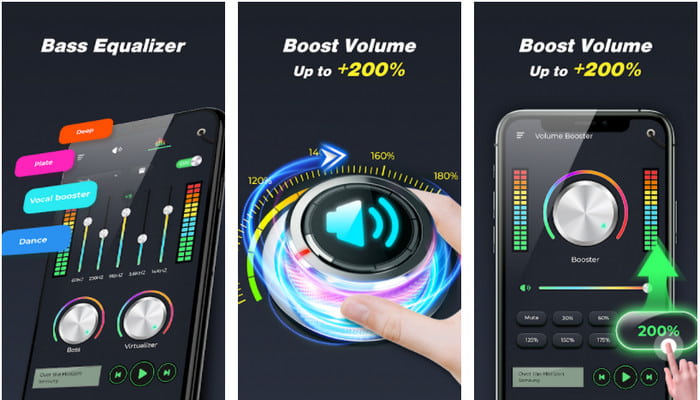
หากผู้ใช้ iOS มีแอปขยายเสียงในโทรศัพท์แล้ว ผู้ใช้ Android ก็ควรมีเช่นกัน อย่างเช่น Extra Volume Booster นอกจากนี้ ผู้ใช้จำนวนมากพึงพอใจกับประสิทธิภาพของแอปนี้ เพราะทำได้ดีทั้งด้านการขยายและการบูสต์เสียง อย่างไรก็ตาม เมื่อคุณเปิดแอปนี้ เสียงทุกอย่างที่ออกจากโทรศัพท์ เช่น เสียงเรียกเข้า สัญญาณเตือน การแจ้งเตือนต่าง ๆ ฯลฯ จะถูกขยายทั้งหมด หมายความว่าไม่มีการตั้งค่าแยกเฉพาะสำหรับแต่ละส่วน แม้ว่าเครื่องมือนี้จะฟรี แต่ก็ถือว่าดีมากเมื่อเทียบกับแอปแบบเสียเงินอื่น ๆ บน Android หรือแม้แต่บน iOS แต่อย่าลืมว่าหากคุณเร่งเสียงจนถึงระดับ 200% ให้คาดได้เลยว่า ลำโพงในตัวเครื่องหรือบลูทูธที่รับเสียงระดับ 200% ไม่ไหว อาจแตกลำโพงได้.
ข้อดี
- แอมพลิฟายเออร์เวอร์ชันย่อที่คุณดาวน์โหลดได้บนอุปกรณ์ Android
- แม้ว่าอินเทอร์เฟซของแอปจะไม่มากนัก แต่ก็ดีมาก
- แอพนี้มีการขยายและขยายสัญญาณที่แตกต่างกัน
จุดด้อย
- คาดว่าจะพบโฆษณามากมายในขณะที่ใช้แอพ
- ขณะใช้เครื่องมือนี้มีโอกาสที่ CPU หรือโทรศัพท์จะร้อนขึ้น
3. Speaker Boost: Volume Booster & Sound Amplifier 3D (Android)
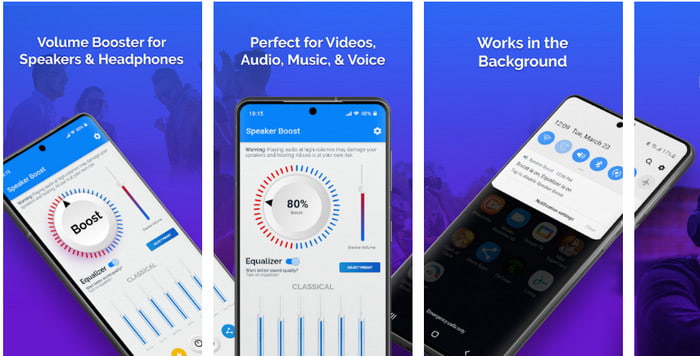
อีกหนึ่งแอป Android ที่ใช้แล้วให้เอฟเฟกต์เสียงรอบทิศทางและขยายเสียงได้ดีคือ Speaker Boost เช่นเดียวกับ Extra Volume Booster แอปนี้ใช้งานได้ตรงจุดและง่ายมาก แม้คุณจะไม่มีประสบการณ์ก็ใช้ได้อย่างสบาย นอกจากนี้ คุณสามารถดาวน์โหลดเครื่องมือนี้ได้ฟรี แต่จะมีการซื้อภายในแอปที่คุณอาจสนใจ เช่น การลบโฆษณาน่ารำคาญและฟีเจอร์อื่น ๆ แม้ว่าแอปนี้จะถือว่าใช้ได้ดี แต่การซื้อภายในแอปของตัวนี้มีราคาสูงกว่าโปรแกรมอื่น ๆ ในรายการ อีกประเด็นที่ผู้ใช้จำนวนมากกังวลคือ แอปสามารถทำงานหลังกำแพงโฆษณา (ad-blocker) ได้ และมีโอกาสที่แอปนี้อาจเป็นสปายแวร์.
ข้อดี
- ตรงจุดเพื่อเพิ่มเสียงได้อย่างง่ายดายแต่ยังทรงพลังในการใช้งาน
- ดาวน์โหลดเครื่องมือนี้ได้ฟรีโดยไม่ต้องยุ่งยากกับการขยายเสียง
- ทำการแทนที่แบบแมนนวลบนอีควอไลเซอร์
จุดด้อย
- เครื่องมือนี้ไม่สมบูรณ์ซึ่งโดยทั่วไปหมายความว่าอยู่ระหว่างการทดลอง
- เมื่อคุณเพิ่มเสียง จะมีการบิดเบือนบางอย่างที่คุณจะได้ยิน
4. Boom: Bass Booster & อีควอไลเซอร์ 4+ (iOS)
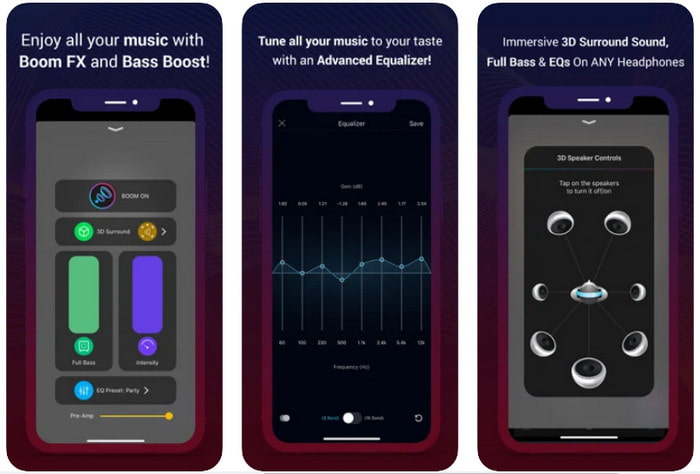
หากคุณกำลังมองหาแอปขยายเสียงขั้นสูงแล้วล่ะก็ Boom: Bass Booster ถือเป็นตัวเลือกที่ดี อย่างไรก็ตาม แอปนี้มีให้ใช้เฉพาะบนอุปกรณ์ iOS เท่านั้น คุณจะหาใช้บนอุปกรณ์ Android ไม่ได้ จนถึงตอนนี้ เครื่องมือนี้ได้รับเสียงชื่นชมจากผู้ใช้จำนวนมาก แต่ก็ยังมีบางรูปแบบไฟล์ที่ไม่รองรับการขยาย นอกจากนี้ เมื่อคุณใช้งานแอปนี้ อาจพบปัญหาบั๊กและแอปเด้งได้เป็นระยะ ๆ อีกทั้งตัวแอปยังอาจทำให้ผู้ใช้ใหม่เข้าใจผิดได้ แม้ว่าโดยรวมแล้วการทำงานของแอปจะถือว่ายอมรับได้ แต่ก็ยังต้องปรับปรุงเพื่อให้ดีขึ้น.
ข้อดี
- คุณลักษณะขั้นสูงบางอย่างมีให้ที่นี่
- แอมพลิฟายเออร์แบบพกพาที่คุณใช้งานได้ง่าย
- แอปได้รับ 4.1 ดาวจาก 5 ดาว
จุดด้อย
- ไม่ใช่ตัวเลือกที่ดีที่สุดสำหรับผู้เริ่มต้นเนื่องจากโครงสร้างอินเทอร์เฟซที่สับสน
- รูปแบบเสียงส่วนใหญ่ไม่ได้รับการสนับสนุนให้ขยายด้วยแอปนี้
- ปัญหาข้อบกพร่องและความล่าช้ายังคงเกิดขึ้นกับแอป
ส่วนที่ 3 คำถามที่พบบ่อยเกี่ยวกับเครื่องขยายเสียง
db คืออะไร?
Db หมายถึงเดซิเบลและนี่คือหน่วยวัดเพื่อแสดงความดังหรือพลังของคลื่นเสียง นอกจากนี้ ด้วยความช่วยเหลือของเดซิเบล เราสามารถระบุได้อย่างง่ายดายว่าเสียงใดที่เราได้ยินอย่างปลอดภัยในระยะเวลาอันยาวนาน และเสียงทั้งหมด 85 เดซิเบลด้านล่างนั้นปลอดภัยมากที่จะได้ยิน
เสียงดังมีข้อเสียอย่างไร?
เป็นเรื่องปกติมากสำหรับเราที่เมื่อเราสัมผัสกับเสียงดัง การได้ยินอาจเสียหายได้ แต่คุณรู้หรือไม่ว่าสิ่งนี้สามารถส่งผลให้เกิดอาการคลื่นไส้ ปวดหัว เครียด เหนื่อยล้า และอื่นๆ ดังนั้น หากคุณกำลังจะใช้เครื่องขยายเสียง ให้ใช้อย่างถูกต้องและอย่าใช้มากเกินไปเพื่อหลีกเลี่ยงผลกระทบที่เป็นอันตรายที่หลีกเลี่ยงไม่ได้
เหตุใดฉันจึงได้ยินเสียงแตกบนลำโพงของฉัน
ปัญหานี้เป็นเรื่องปกติสำหรับลำโพงที่มีเฮิรตซ์จำกัดมาก ดังนั้น หากคุณเพิ่มเสียง ตรวจสอบให้แน่ใจว่าลำโพงสามารถรองรับได้ และถ้าคุณได้ยินเสียงแตกคุณต้องลดเสียงลงทันที อย่างไรก็ตาม หากคุณได้ยินเสียงแตกแม้จะลดเสียงลง ก็ถือว่าสายเกินไป
สรุป
ซอฟต์แวร์และแอปทั้งหมดที่นำเสนอในที่นี้ต่างก็เหมาะสำหรับใช้เป็นเครื่องขยายเสียง แม้โปรแกรมที่กล่าวมาข้างต้นจะมีความแตกต่างกันบ้าง แต่ฟังก์ชันหลักก็คล้ายกัน อย่างไรก็ตาม หากคุณกำลังมองหาแอมป์เสียงที่ดีที่สุดสำหรับ PC และ Mac แล้วล่ะก็ Video Converter Ultimate น่าจะเป็นคำตอบ เพราะมีฟีเจอร์ขั้นสูงอันยอดเยี่ยมที่คุณสามารถใช้งานได้อย่างง่ายดาย ดังนั้น หากคุณกำลังลังเลว่านี่คือทางเลือกที่ดีที่สุดหรือไม่ ให้ลองดาวน์โหลดลงในคอมพิวเตอร์ของคุณก่อน แล้วทำตามขั้นตอนที่ให้ไว้ด้านบน.
ดาวน์โหลดฟรีสำหรับ Windows 7 หรือใหม่กว่าดาวน์โหลดอย่างปลอดภัย
ดาวน์โหลดฟรีสำหรับ MacOS 10.7 หรือใหม่กว่าดาวน์โหลดอย่างปลอดภัย
-
 [ง่าย] วิธีแก้ไขเสียงและวิดีโอที่ไม่ซิงค์
 สมมติว่าคุณกำลังจะกำหนดเวลาการสตรีมสำหรับวันพรุ่งนี้ แต่เมื่อคุณตรวจสอบการตั้งค่า เสียงและวิดีโอจะไม่ซิงค์กัน อ่านบทความนี้เพื่อให้คุณได้เรียนรู้เพิ่มเติมเกี่ยวกับข้อกังวลนี้
-
 7 ขั้นตอนง่าย ๆ ในการแก้ไขปัญหา OBS Audio Delay [แก้ไขแล้ว]
 คุณมีปัญหาในการดูวิดีโอคลิปของคุณหลังจากบันทึกเนื่องจากความล่าช้าของเสียงเมื่อใช้ OBS Studio หรือไม่? อ่านบทความด้านล่างเพื่อเรียนรู้วิธีแก้ไขเสียงไม่ซิงค์อย่างมีประสิทธิภาพ
-
 วิธีเพิ่มเสียงและเพลงลงในวิดีโอฟรีบนคอมพิวเตอร์ / โทรศัพท์ของคุณ
 บทความนี้แสดง 4 วิธีง่ายๆในการเพิ่มเสียงลงในวิดีโอฟรี ไม่ว่าคุณต้องการเพิ่มแทร็กเสียงใดลงในวิดีโอของคุณคุณสามารถรับผลลัพธ์ที่น่าพึงพอใจได้ที่นี่
