


 Video Converter Ultimate
 บันทึกหน้าจอ
 ซ่อมวิดีโอ
ในบทวิจารณ์โดยละเอียดเกี่ยวกับ 3 เว็บและเดสก์ท็อปตัวแปลงที่ใช้ในการแปลงไฟล์ WMV เป็น AVI
จะมีช่วงเวลาที่คุณต้องการแปลงไฟล์ของคุณเป็นไฟล์ใหม่เพราะไม่สามารถเล่นได้ ตัวอย่างที่ชัดเจนในสถานการณ์นี้คือรูปแบบไฟล์ WMV หากคุณเป็นผู้ใช้ Windows คุณคงเคยได้ยินรูปแบบนี้มาก่อน มันใช้เก็บไฟล์วิดีโอและเสียงหลายประเภทไว้ในคอนเทนเนอร์เดียว อย่างไรก็ตาม รูปแบบนี้ไม่ได้รับการรองรับจากโปรแกรมเล่นมีเดียส่วนใหญ่มากนัก ดังนั้นวิธีที่ดีที่สุดในการดูไฟล์วิดีโอที่เก็บในนามสกุลไฟล์ .wmv คือการแปลงไฟล์ หากคุณสงสัยเหมือนคนอื่น ๆ ว่า คุณสามารถแปลง WMV เป็น AVI ได้หรือไม่ ลองอ่านต่อด้านล่าง เพราะเราได้รวบรวมเครื่องมือออนไลน์ต่าง ๆ ที่คุณสามารถใช้งานได้พร้อมขั้นตอนประกอบให้แล้ว.
ส่วนที่ 1 ตัวแปลง 3 อันดับแรกฟรี แปลง WMV เป็น AVI ออนไลน์
ด้านบน 1. ตัวแปลงวิดีโอ FVC ฟรีออนไลน์
การแปลงไฟล์สามารถทำได้อย่างรวดเร็วหากคุณมีการเชื่อมต่ออินเทอร์เน็ตและใช้ FVC Free Video Converter Online ซอฟต์แวร์นี้รองรับการแปลงไฟล์ที่เร็วและมีประสิทธิภาพกว่าทูลออนไลน์อื่น ๆ และคุณไม่ต้องรออัปโหลดไฟล์นาน เพราะเครื่องมือนี้ไม่ต้องการให้คุณเสียเวลารอนาน อีกจุดเด่นของทูลออนไลน์นี้คือมีไลบรารีเก็บไฟล์วิดีโอที่แปลงแล้วมาให้ในตัว เพื่อให้คุณเข้าถึงวิดีโอหรือเสียงที่คุณแปลงได้อย่างมีประสิทธิภาพ อย่างไรก็ตาม หากคุณไม่มีอินเทอร์เน็ต คุณก็ไม่สามารถใช้มันได้เช่นเดียวกับทูลออนไลน์ตัวอื่นด้านล่าง นอกจากนี้ หากคุณอยากลองใช้ทูลนี้ นี่คือขั้นตอนที่คุณสามารถทำตามเพื่อแปลง WMV เป็น AVI ออนไลน์ฟรี.
ขั้นตอนที่ 1. ก่อนอื่น ไปที่หน้าเว็บไซต์หลักของ FVC โดยคลิกที่ลิงก์นี้.
ขั้นตอนที่ 2. จากนั้นคลิก Add Files to Convert เพื่อติดตั้งโปรแกรมเปิดใช้งาน (launcher) ของทูลบนเว็บ ไม่ต้องกังวลเพราะไฟล์มีขนาดเพียงไม่กี่ไบต์และปลอดภัย เมื่อไฟล์ติดตั้งอยู่ในไดรฟ์ของคุณแล้ว ให้คลิก Add Files to Convert อีกครั้ง เลือกไฟล์ .wmv ในโฟลเดอร์ แล้วคลิก Open.
ดาวน์โหลดเวอร์ชันเดสก์ท็อปเพื่อแปลงไฟล์แบบเป็นชุดได้.
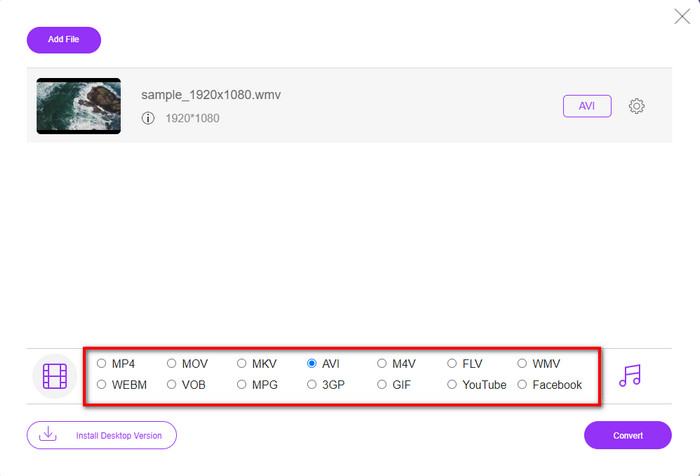
ขั้นตอนที่ 3. เมื่อไฟล์ WMV ปรากฏบนอินเทอร์เฟซแล้ว ให้คุณเลือกฟอร์แมต AVI จากตัวเลือกที่มีอยู่ด้านล่าง.
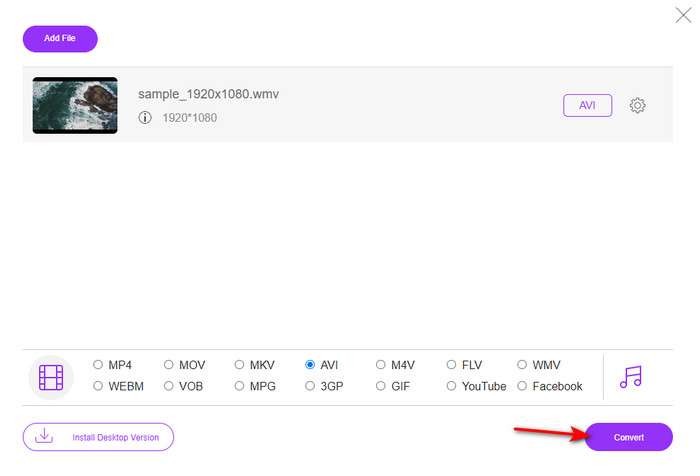
ขั้นตอนที่ 4. หลังจากเลือกฟอร์แมตเรียบร้อย ก็ถึงเวลาที่จะแปลงไฟล์โดยคลิกที่ Convert.
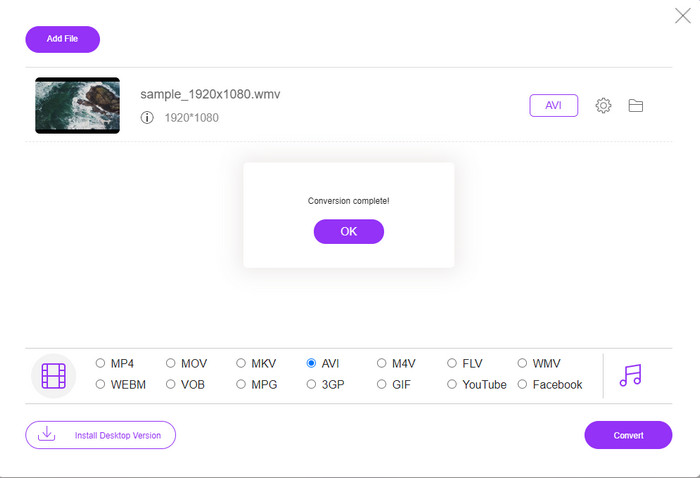
ขั้นตอนที่ 5. รอไม่กี่นาทีจนกระบวนการเสร็จสิ้น จากนั้นโฟลเดอร์ที่มีไฟล์ที่คุณแปลงแล้วจะปรากฏขึ้นบนหน้าจอ ให้คลิกเพื่อชมไฟล์ WMV รูปแบบใหม่ที่คุณสร้างด้วยเครื่องมือนี้.
อันดับ 2 Convertio
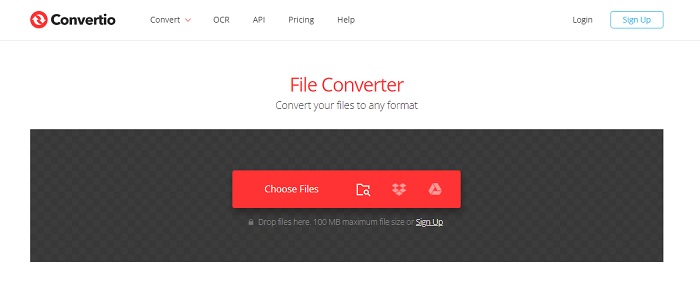
อีกหนึ่งตัวแปลงไฟล์ออนไลน์ที่คุณสามารถใช้แปลงไฟล์ WMV เป็น AVI ได้ฟรีคือ Convertio แตกต่างจากทูลออนไลน์ตัวแรก ตรงที่คุณไม่จำเป็นต้องใช้ตัวเรียกใช้งาน (launcher) เพื่อใช้งาน นอกจากนี้ คุณยังสามารถแปลงไฟล์ PDF รูปภาพ เสียง และอื่น ๆ ได้ในทูลนี้ อย่างไรก็ตาม ข้อเสียหลักคือการอัปโหลดและดาวน์โหลดไฟล์จะใช้เวลาค่อนข้างมาก อีกทั้งยังไม่มีไลบรารีเก็บไฟล์ที่คุณแปลงไว้ทั้งหมด ดังนั้นหากคุณต้องการใช้ทูลนี้เป็นตัวแปลงไฟล์ของคุณ ให้ทำตามขั้นตอนเหล่านี้.
ขั้นตอนที่ 1. เปิดเบราว์เซอร์ที่คุณใช้งานประจำ แล้วค้นหา Convertio.io.
ขั้นตอนที่ 2. คลิก Choose File และค้นหาไฟล์ WMV ที่คุณต้องการแปลงในโฟลเดอร์ จากนั้นคลิกปุ่ม drop-down และเลือก AVI.
ขั้นตอนที่ 3. กระบวนการอัปโหลดจะใช้เวลาของคุณ และให้คลิก Download เพื่อบันทึกไฟล์ฟอร์แมตที่แปลงแล้ว.
อันดับ 3 CloudConvert
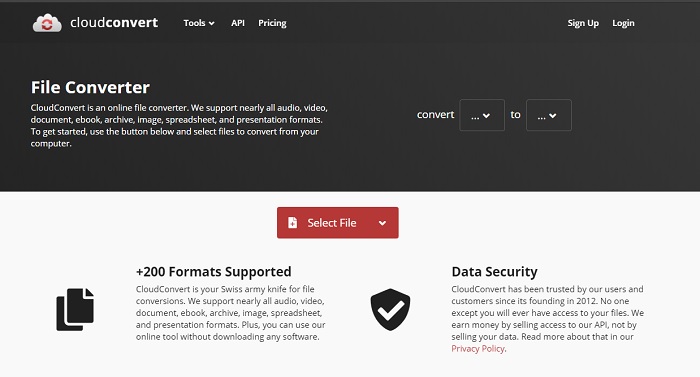
CloudConvert รองรับรูปแบบไฟล์ขนาดเล็กหลากหลายประเภทที่คุณสามารถเลือกแปลงได้ นอกจากนี้ กระบวนการแปลงไฟล์ในนี้มีความปลอดภัยและไม่เก็บบันทึกประวัติการแปลงไฟล์ของคุณ เช่นเดียวกับ Convertio ทูลนี้ก็ไม่มีไลบรารีเก็บไฟล์เช่นกัน และกระบวนการแปลงไฟล์ค่อนข้างช้ากว่า เนื่องจากไม่รองรับการเร่งความเร็วด้วยฮาร์ดแวร์เพื่อเพิ่มความเร็วในการแปลงไฟล์ หากคุณต้องการลองประสบการณ์การแปลง WMV เป็น AVI ออนไลน์ฟรี ให้ทำตามขั้นตอนด้านล่าง.
ขั้นตอนที่ 1. เปิดเว็บเบราว์เซอร์ของคุณและค้นหา CloudConvert.
ขั้นตอนที่ 2. กด Select File จากนั้นค้นหาไฟล์ .wmv ในโฟลเดอร์ที่จะแสดงบนหน้าจอของคุณ.
ขั้นตอนที่ 3. คลิก Convert to เลือกฟอร์แมต AVI คลิกปุ่ม Convert จากนั้นคลิก Download หลังจากการแปลงเสร็จสิ้น.
ส่วนที่ 2 วิธีการเปลี่ยน WMV เป็น AVI บน Mac & PC ด้วย Lightning Speed Converter
ซอฟต์แวร์ออนไลน์ที่กล่าวถึงด้านบนไม่สามารถเทียบกับสิ่งที่ FVC Video Converter Ultimate มอบให้กับผู้ใช้ได้ หากคุณกำลังมองหาเครื่องมืออเนกประสงค์ นี่น่าจะเป็นตัวเลือกที่ดีที่สุด นอกจากนี้ คุณสามารถใช้ซอฟต์แวร์นี้เป็นตัวแปลงไฟล์ เครื่องตัดต่อวิดีโอ โปรแกรมทำ GIF และอื่น ๆ อีกมากมาย ซอฟต์แวร์นี้ทำได้เกินความคาดหวังทั้งในด้านความสามารถและความเร็วในการทำงาน ประสิทธิภาพโดยรวมของทูลนี้ทำให้เราประทับใจ และหากคุณอยากรู้สึกประทับใจเช่นกัน ก็ให้ดาวน์โหลดตัวแปลงไฟล์สุดยอดนี้ลงในเดสก์ท็อปของคุณ ตอนนี้มาเริ่มขั้นตอนการแปลง WMV เป็น AVI บน Mac และ PC ด้วยขั้นตอนแบบทีละขั้นที่เราเตรียมไว้ด้านล่าง.
ขั้นตอนที่ 1. ก่อนที่คุณจะใช้งานทูลนี้ได้ คุณต้องดาวน์โหลดโปรแกรมก่อนและเลือกแพลตฟอร์มที่คุณใช้อยู่ จากนั้นติดตั้งซอฟต์แวร์ลงในเดสก์ท็อปของคุณ โดยการตั้งค่าอย่างรวดเร็วจะใช้เวลาไม่ถึงหนึ่งนาที.
ดาวน์โหลดฟรีสำหรับ Windows 7 หรือใหม่กว่าดาวน์โหลดอย่างปลอดภัย
ดาวน์โหลดฟรีสำหรับ MacOS 10.7 หรือใหม่กว่าดาวน์โหลดอย่างปลอดภัย
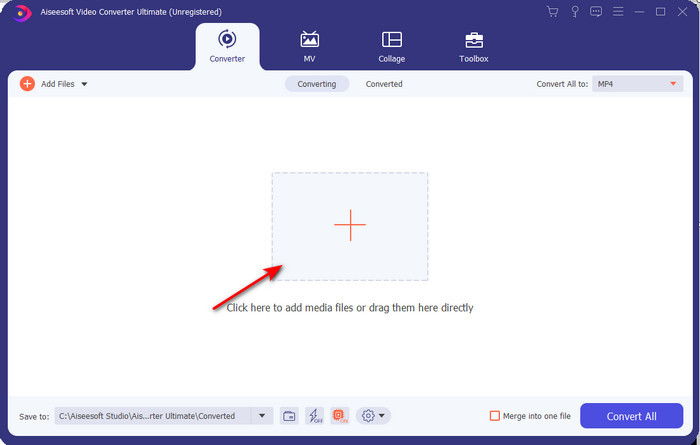
ขั้นตอนที่ 2. เปิดซอฟต์แวร์เพื่อไปยังขั้นตอนถัดไป หลังจากเปิดโปรแกรม คุณจะเห็นสัญลักษณ์ + ให้คลิกเพื่อเพิ่มไฟล์ จากนั้นเลือก Open.
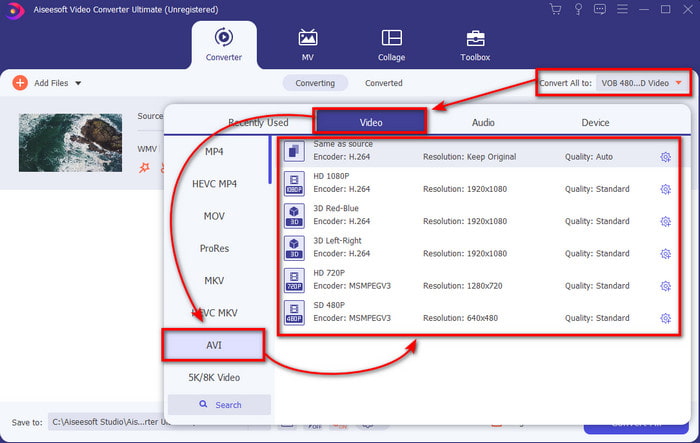
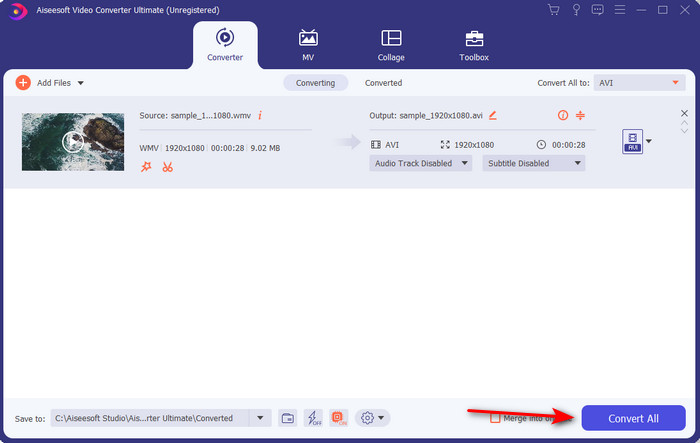
ขั้นตอนที่ 3. หากต้องการเปลี่ยนฟอร์แมต ให้คลิกเมนูดรอปดาวน์ของ Convert All to แล้วเลือก AVI ในเมนูย่อย.
ขั้นตอนที่ 4. ตอนนี้เพื่อแปลงไฟล์ WMV เป็น AVI ให้สำเร็จ ให้คลิก Convert All และรอไม่กี่วินาทีจนกระบวนการเสร็จสิ้น.
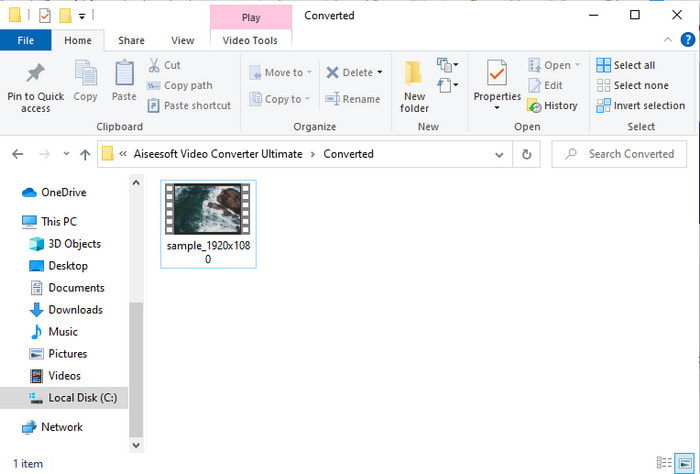
ขั้นตอนที่ 5. หลังจากแปลงไฟล์แล้ว จะมีโฟลเดอร์ปรากฏขึ้นบนหน้าจอของคุณพร้อมไฟล์ที่เพิ่งแปลงเมื่อสักครู่ เพื่อรับชม ให้คลิกไฟล์วิดีโอและเพลิดเพลินกับไฟล์ WMV ที่แปลงแล้วโดยไม่สูญเสียคุณภาพ.
ส่วนที่ 3 WMV VS AVI; รูปแบบใดทำงานได้ดีที่สุด
WMV และ AVI คือคอนเทนเนอร์ไฟล์วิดีโอระดับแนวหน้าที่คุณอยากใช้ รูปแบบที่กล่าวถึงทั้งสองรูปแบบสามารถมีวิดีโอและเสียงคุณภาพสูงได้ แต่ตอนนี้ มาพิจารณาความแตกต่างโดยการอ่านแผนภูมิเปรียบเทียบนี้
| WMV | AVI | |
| หรือที่เรียกว่า | Windows Media Video | ความเกี่ยวข้องของเสียงวิดีโอ |
| ใช้ดีที่สุดสำหรับ | มันเคยเปลี่ยนไฟล์ขนาดใหญ่เป็นไฟล์ที่เล็กกว่าสำหรับการสตรีมวิดีโอออนไลน์ที่มีโครงสร้างดี | ใช้เพื่อจัดเก็บวิดีโอและเสียงแยกจากกัน และเล่นพร้อมกันโดยไม่ชักช้า |
| พัฒนาโดย | Microsoft | Microsoft |
| ข้อเสียของรูปแบบ | ได้รับความสนใจและการสนับสนุนจากเครื่องเล่นสื่อน้อยลง | ต้องใช้ตัวแปลงสัญญาณเพื่อบีบอัดไฟล์ขนาดใหญ่นี้ให้มีขนาดเล็กลงมากแต่อยู่ในขอบเขตที่จำกัด |
WMV เทียบกับ AVI
ผลิตโดย Microsoft WMV เป็นหนึ่งในรูปแบบวิดีโอที่พบบ่อยที่สุดในยุค 2000 สามารถดูได้ทางเว็บและเล่นโดยโปรแกรมเล่นสื่อต่างๆ บน Windows และยังเป็นรูปแบบไฟล์วิดีโอเริ่มต้นของ Windows Media Player แต่รูปแบบอื่นๆ กลับถูกยึดครองไปเมื่อเร็วๆ นี้
ตามรูปแบบไฟล์การแลกเปลี่ยนทรัพยากร (RIFF) รูปแบบ AVI ถูกนำมาใช้โดย Microsoft ในปี 1992 สามารถบันทึกวิดีโอ/เสียงคุณภาพสูงได้ เนื่องจากใช้การบีบอัดน้อยกว่า แต่นั่นก็ทำให้ไฟล์ AVI มีขนาดใหญ่ขึ้นด้วย ซึ่งอาจเป็นปัญหาได้เมื่อมีเนื้อที่จำกัด
ส่วนที่ 4 คำถามที่พบบ่อยเกี่ยวกับ WMV และ AVI Format
การเปลี่ยน WMV เป็น AVI ส่งผลต่อคุณภาพหรือไม่
คุณภาพของไฟล์ WMV เมื่อคุณแปลงเป็น AVI จะต้องไม่เปลี่ยนแปลง อย่างไรก็ตาม สมมติว่า WMV ของคุณเปลี่ยนไปและคุณภาพลดลง ในกรณีนั้น ตัวแปลงที่คุณใช้ไม่รองรับพิกเซลคุณภาพสูงของวิดีโอของคุณ
ขนาดของ WMV ของฉันเปลี่ยนไปหลังจากที่ฉันแปลงแล้วหรือไม่
ขนาดไฟล์ของ WMV อาจแตกต่างจากขนาดไฟล์ดั้งเดิมเล็กน้อย มีเหตุผลว่าทำไมมันถึงเปลี่ยนไป สาเหตุหนึ่งคือ ไฟล์บีบอัดกลายเป็นแบบไม่บีบอัด ขนาดไฟล์จึงเปลี่ยนไป แต่การเปลี่ยนแปลงจะต้องใกล้เคียงกับขนาดไฟล์ดั้งเดิมและไม่ควรใหญ่หรือไกลขนาดนั้น
ฉันสามารถใช้ WMV เพื่อแนบวิดีโอกับอีเมลได้หรือไม่
ใช่ เหมาะที่จะใช้รูปแบบ WMV และแนบวิดีโอกับอีเมลเพราะสนับสนุนการบีบอัดที่ดีและเร็วกว่า MPEG-4 ตามที่ Microsoft กล่าว นอกจากนี้ยังเรียกว่ารูปแบบย่อส่วนเนื่องจากขนาดไฟล์มีขนาดเล็ก อย่างไรก็ตาม คุณภาพของวิดีโอยังคงอยู่
สรุป
เมื่อเราสิ้นสุด เราจะเข้าใจได้ง่ายขึ้นว่าไม่ใช่ทุกแพลตฟอร์มและซอฟต์แวร์ที่รองรับ WMV นอกจากนี้ Webtool ยังทำงานได้ดี แต่มีเครื่องมือหนึ่งที่สามารถแปลงไฟล์แบตช์ได้เร็วและง่ายขึ้นมาก: FVC Video Converter Ultimate สมมติว่าคุณต้องการสัมผัสประสบการณ์การแปลงที่น่าอัศจรรย์ของซอฟต์แวร์นี้ ในกรณีนั้น คุณต้องดาวน์โหลดตอนนี้บนเดสก์ท็อปและใช้งาน
-
 วิธีแปลง WMV เป็น MP4 ฟรี & ออนไลน์ [แก้ไขแล้ว]
 วิธีแปลงไฟล์ WMV เป็น MP4 นี่คือ 4 วิธีง่ายๆในการแปลง WMV เป็น MP4 บน Mac และ Windows ด้วยขั้นตอนง่ายๆ
-
 WMV เป็น MP3 – วิธีแปลงวิดีโอเป็นเสียงฟรี [เดสก์ท็อป/ออนไลน์ ]
 ขณะดูวิดีโอ WMV คุณพบว่าส่วนเสียงนั้นน่าสนใจ ดังนั้น คุณจึงต้องการเล่นบนเครื่องเล่น MP3 ของคุณ แต่แน่นอนว่าเครื่องเล่นของคุณไม่รองรับรูปแบบ WMV ที่ทำให้คุณสงสัยว่ามีวิธีแปลง WMV เป็น MP3 หรือไม่
-
 2 วิธีที่ง่ายที่สุดในการแปลงไฟล์ WMV เป็น FLV บน PC/Mac
 คุณจะแปลง WMV เป็น FLV ได้อย่างไร ประการแรก คุณต้องอ่านคำแนะนำของเราและค้นหาวิธีการที่คุณชอบ จากนั้นทำตามคำแนะนำของเราเพื่อทำงานอย่างรวดเร็ว

