


 Video Converter Ultimate
 บันทึกหน้าจอ
 ซ่อมวิดีโอ
วิธีต่างๆ ในการแปลง RMVB เป็น MOV สำหรับออฟไลน์และออนไลน์
เนื่องจากมีรูปแบบไฟล์วิดีโอที่สับสนมากมายบนอินเทอร์เน็ต ผู้ใช้จำนวนมากจึงประสบปัญหาในการเลือกว่าจะใช้โปรแกรมเล่นสื่อใดกับวิดีโอที่ได้รับ เชื่อหรือไม่ว่า การเล่นวิดีโอนั้นไม่ใช่เรื่องง่ายเหมือนตอนดาวน์โหลดเสมอไป บางรูปแบบไฟล์สามารถเล่นได้เฉพาะด้วยโปรแกรมของผู้พัฒนารูปแบบนั้นเท่านั้น ในขณะที่บางรูปแบบไฟล์ผู้ใช้สามารถเล่นได้แทบทุกที่ อย่างไรก็ตาม การรู้ว่าควรมองหารูปแบบไฟล์วิดีโอใดที่รองรับโดยโปรแกรมเล่นสื่อที่คุณมีอยู่ถือเป็นสิ่งสำคัญ แต่เราไม่ควรหยุดแค่นั้น การรู้วิธีแปลงรูปแบบไฟล์ที่คุณไม่ได้ใช้งานเป็นประจำคือวิธีที่ดีที่สุด ดังนั้น เราจึงรวบรวมทุกวิธีที่เป็นไปได้ในการแปลง RMVB เป็น MOV เพื่อให้คุณใช้งานได้อย่างสะดวกสบาย.
ส่วนที่ 1 ภาพรวม: RMVB และ MOV
RMVB และ MOV เป็นรูปแบบวิดีโอสองรูปแบบที่แตกต่างกันของบริษัทอื่นสองแห่งที่พัฒนารูปแบบดังกล่าว คุณควรทราบเกี่ยวกับไฟล์ RMVB ซึ่งย่อมาจาก RealMedia Variable Bitrate ซึ่งเป็นส่วนขยายบิตเรตตัวแปรที่พัฒนาโดย RealNetworks ในรูปแบบคอนเทนเนอร์ดิจิทัลมัลติมีเดีย RealMedia บางคนใช้ RMVB สำหรับสื่อมัลติมีเดียที่บันทึกไว้ในเครื่อง เนื่องจากมีขนาดไฟล์ที่เล็กกว่าและบิตเรตที่ต่ำกว่า แต่ด้วยคุณภาพที่ยอดเยี่ยมกว่า ไฟล์ RMVB จึงกลายเป็นรูปแบบยอดนิยมสำหรับภาพยนตร์อนิเมะและเอเชีย นามสกุลไฟล์ '.rmvb' ใช้สำหรับรูปแบบนี้
ในทางกลับกัน MOV เป็นรูปแบบไฟล์คอนเทนเนอร์มัลติมีเดียที่พัฒนาโดย Apple ซึ่งบันทึกในรูปแบบไฟล์ QuickTime (QTFF) รูปแบบคอนเทนเนอร์สามารถรองรับรูปแบบสื่อต่างๆ เพื่ออำนวยความสะดวกในการส่งมัลติมีเดียผ่านอุปกรณ์ ระบบปฏิบัติการ และแอปพลิเคชันต่างๆ ไฟล์มัลติมีเดีย QTFF เก็บไฟล์ .mov อย่างไรก็ตาม พวกเขาสามารถบันทึกเป็นไฟล์ .qt ได้
| นามสกุลไฟล์ | RMVB | MOV |
| ประเภทไฟล์ | ไฟล์บิตเรตตัวแปร RealMedia | ภาพยนตร์ Apple QuickTime |
| นักพัฒนา | RealNetworks | แอปเปิ้ล |
| ข้อดี | RMVB เป็นรูปแบบสำหรับจัดเก็บและแบ่งปันข้อมูลมัลติมีเดีย และมีชื่อเสียงโด่งดังในด้านการเผยแพร่เนื้อหาในเอเชีย เช่น รายการโทรทัศน์และภาพยนตร์ของจีน | ไฟล์ MOV อาจมีแทร็กข้อมูลจำนวนมาก โดยแต่ละไฟล์มีสตรีมมีเดียดิจิทัลหรือเกี่ยวข้องกับสตรีมในไฟล์อื่น ด้วยเหตุนี้ คุณสามารถเปลี่ยนไฟล์โดยไม่ต้องทำข้อมูลซ้ำในภายหลัง |
| ข้อเสีย | ไม่แพร่หลายเนื่องจากไม่เข้ากันกับเครื่องเล่นสื่ออื่นๆ | ไฟล์ MOV แต่ละไฟล์อาจมีตัวแปลงสัญญาณหลายตัว ทำให้เล่นได้ยาก |
| โปรแกรมรองรับไฟล์ | เครื่องเล่นสื่อ RealPlayer VLC iOrgSoft Video Converter | Microsoft Windows Media Player เครื่องเล่นสื่อ Apple QuickTime VideoLAN VLC |
ส่วนที่ 2 เข้าถึงได้และวิธีที่ดีที่สุดในการแปลง RMVB เป็น MOV [ออฟไลน์]
บางครั้งจำเป็นต้องแปลงวิดีโอจาก RMVB เป็น MOV ในเวลาและวันที่ไม่คาดคิด กระบวนการทั้งหมดส่วนใหญ่ต้องการการเชื่อมต่ออินเทอร์เน็ตซึ่งไม่สามารถให้บริการได้ทุกที่ ดังนั้น Video Converter Ultimate เป็นวิธีที่จะไปหากคุณต้องการแปลงวิดีโอของคุณให้อยู่ในรูปแบบที่เหมาะสมกับสถานการณ์ที่คุณอยู่ มันยังช่วยให้คุณแปลงวิดีโอหลายรายการพร้อมกันได้ ช่วยลดความยุ่งยากของกระบวนการที่ทำซ้ำๆ มันยังมีตัวเลือกต่างๆ ให้คุณด้วย เช่น การเลือกความละเอียด อัตราเฟรม และบิตเรตสำหรับวิดีโอของคุณ ตั้งชื่อความละเอียดและ Video Converter Ultimate จะมอบให้คุณ
ขั้นตอนที่ 1: ไปที่เว็บไซต์ จากนั้นคุณจะเห็นปุ่มที่ระบุว่า Free Download และ For Mac OS คลิกที่ปุ่มนั้นเพื่อดาวน์โหลดไฟล์ .exe คุณต้องติดตั้งซอฟต์แวร์และรอให้ติดตั้งจนเสร็จ เมื่อเสร็จแล้ว ให้เปิดไฟล์เพื่อดำเนินขั้นตอนการติดตั้งต่อไป.
ดาวน์โหลดฟรีสำหรับ Windows 7 หรือใหม่กว่าดาวน์โหลดอย่างปลอดภัย
ดาวน์โหลดฟรีสำหรับ MacOS 10.7 หรือใหม่กว่าดาวน์โหลดอย่างปลอดภัย
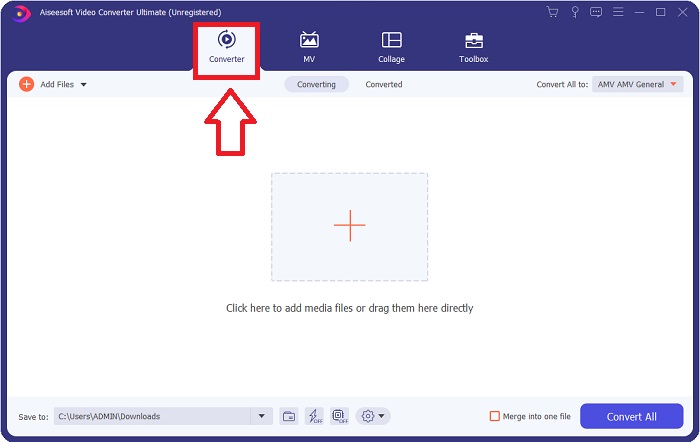
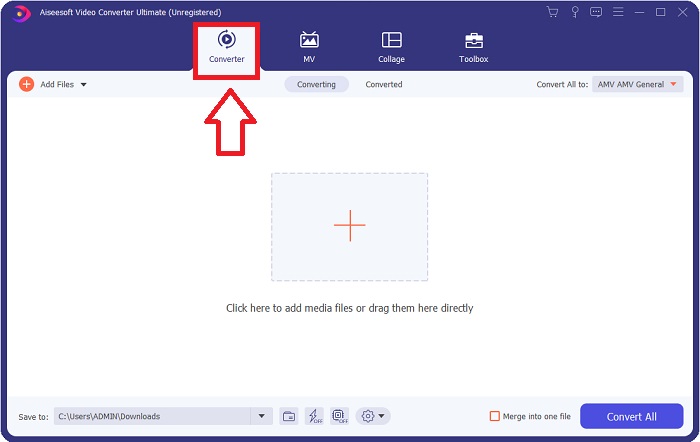
ขั้นตอนที่ 2: หลังจากติดตั้งเสร็จสมบูรณ์แล้ว ให้เปิดซอฟต์แวร์ขึ้นมา หน้าต่างหนึ่งจะปรากฏขึ้น แสดงอินเทอร์เฟซที่มีแท็บอยู่ด้านบน โดยเริ่มต้นคุณจะอยู่ที่แท็บ Converter หากไม่ใช่ ให้เลือกแท็บนี้.
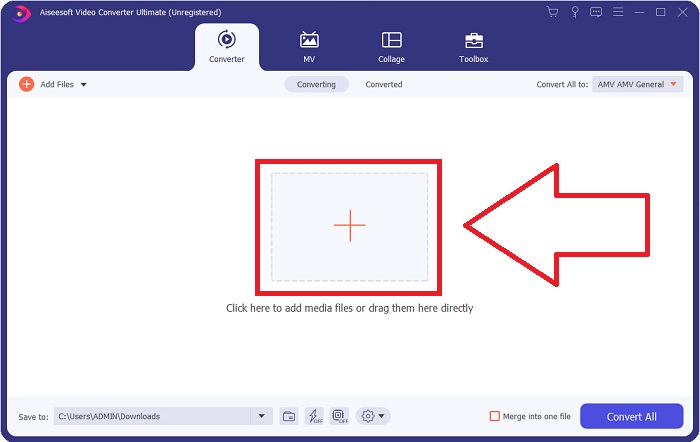
ขั้นตอนที่ 3: ในหน้าอินเทอร์เฟซ คุณจะเห็นปุ่มสี่เหลี่ยมที่มีไอคอนเครื่องหมายบวกอยู่ตรงกลาง คลิกที่ปุ่มนี้เพื่อนำเข้าไฟล์วิดีโอที่คุณต้องการแปลง หรือคุณสามารถลากและวางไฟล์เข้ามาได้อย่างสะดวกโดยไม่ยุ่งยาก.
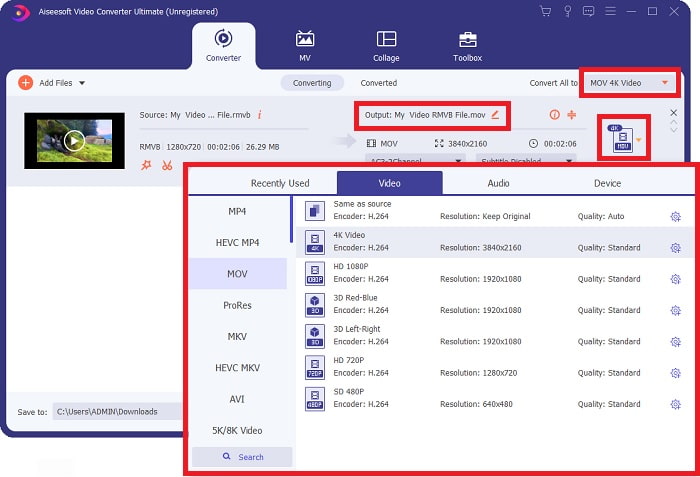
ขั้นตอนที่ 4: จะมีหน้าอินเทอร์เฟซใหม่แสดงตัวเลือกทั้งหมดสำหรับการแก้ไขวิดีโอของคุณปรากฏขึ้น ทางด้านขวาสุดคือส่วนที่คุณจะเลือกฟอร์แมตสำหรับวิดีโอที่แปลงแล้ว เพียงคลิกลูกศรดรอปดาวน์ แล้วระบบจะแสดงฟอร์แมตทั้งหมดที่มีให้เลือก.
ในกรณีนี้ ให้เลือก MOV นอกจากนี้ คุณยังสามารถคลิกไอคอนรูปเฟืองข้างความละเอียดที่คุณเลือก เพื่อแก้ไขการตั้งค่าต่าง ๆ เช่น อัตราเฟรมของวิดีโอและอัตราสุ่มตัวอย่างของเสียง เมื่อต้องการบันทึกการเปลี่ยนแปลง ให้คลิก Create New.
ขั้นตอนที่ 5: เมื่อคุณทำทุกอย่างเสร็จเรียบร้อยด้วยการตั้งค่าที่เปลี่ยนสำหรับวิดีโอของคุณแล้ว คุณก็สามารถเริ่มกระบวนการแปลงไฟล์ได้โดยคลิกปุ่ม Convert All ที่มุมขวาล่างของหน้าต่าง.
ส่วนที่ 3 อีกวิธีที่ยอดเยี่ยมในการแปลง RMVB เป็น MOV [ออนไลน์]
หากการดาวน์โหลดและติดตั้งซอฟต์แวร์ลงในคอมพิวเตอร์ไม่ใช่สิ่งที่คุณต้องการ และคุณต้องการแปลงไฟล์เพียงครั้งเดียวสำหรับภาพยนตร์ของคุณ นี่คือทางเลือกแบบออนไลน์ทั้งหมดที่คุณสามารถลองใช้ได้ FVC Free Video Converter Online เป็นเครื่องมือบนเว็บที่มีตัวเลือกการตั้งค่าวิดีโอและเสียงหลากหลาย พร้อมทั้งช่วยให้คุณไม่ต้องเสียเวลาติดตั้งโปรแกรม ตัวเครื่องมือใช้งานเพียงสามขั้นตอนง่าย ๆ ก็เสร็จเรียบร้อย:
ขั้นตอนที่ 1: เริ่มต้นด้วยการไปที่เว็บไซต์ ซึ่งคุณจะพบปุ่มสีเหลืองตรงกลางหน้า ซึ่งเขียนว่า Add Files to Convert คลิกปุ่มนี้เพื่อนำเข้าไฟล์วิดีโอที่คุณต้องการแปลง.
ดาวน์โหลดเวอร์ชันเดสก์ท็อปเพื่อแปลงไฟล์แบบเป็นชุดได้.
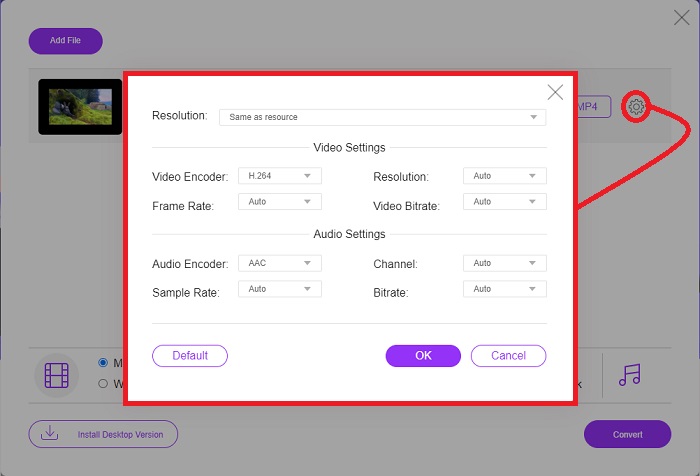
ขั้นตอนที่ 2: จะมีหน้าต่างป๊อปอัปขึ้นมา โดยด้านบนจะแสดงไฟล์วิดีโอที่คุณนำเข้า และด้านล่างจะแสดงฟอร์แมตทั้งหมดที่มีให้เลือก เนื่องจากคุณต้องการแปลงไฟล์ RMVB เป็น MOV ให้เลือก MOV สำหรับตัวเลือกเพิ่มเติม ให้คลิกไอคอนรูปเฟืองทางด้านขวาสุดเพื่อแก้ไขการตั้งค่าวิดีโอและเสียงสำหรับตัวเลือกที่เพิ่มเข้าไป เมื่อต้องการบันทึกการเปลี่ยนแปลง ให้คลิก OK.
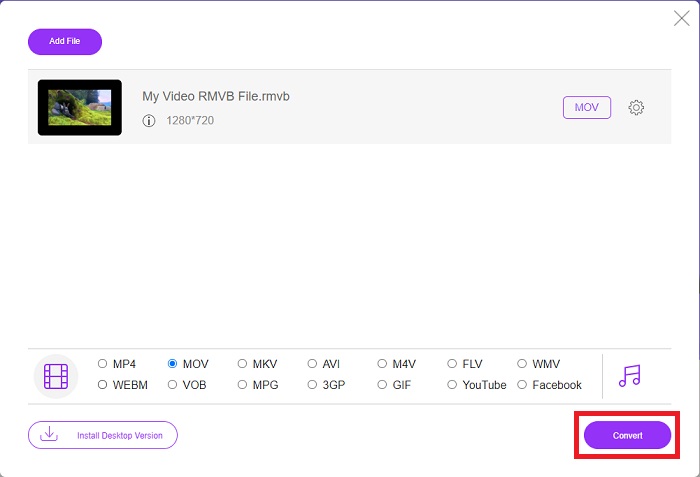
ขั้นตอนที่ 3: หากคุณพอใจกับการตั้งค่าทั้งหมดที่เปลี่ยนแปลงสำหรับวิดีโอแล้ว คุณก็สามารถเริ่มแปลงวิดีโอได้โดยคลิกปุ่ม Convert ที่มุมขวาล่างของหน้าต่าง เลือกโฟลเดอร์ที่คุณต้องการให้บันทึกไฟล์วิดีโอที่แปลงเสร็จแล้ว และรอจนกว่ากระบวนการจะเสร็จสิ้น.
RMVB เทียบกับ MOV
RMVB ซึ่งเป็นรูปแบบใหม่ของรูปแบบ Real Media มาตรฐาน (.RM) คือรูปแบบไฟล์วิดีโอ Real Media ที่บีบอัดโดยใช้บิตเรตแบบแปรผัน เป็นรูปแบบยอดนิยมสำหรับภาพยนตร์และอนิเมะในเอเชีย ไฟล์ RMVB มีขนาดเล็กกว่าและมีบิตเรตต่ำกว่า แต่คุณภาพดีกว่า
รูปแบบ MOV สามารถใช้สำหรับจัดเก็บภาพยนตร์ รายการทีวี คลิปวิดีโอสั้น หรือภาพยนตร์ที่บ้าน ไฟล์นี้ถูกบันทึกในรูปแบบไฟล์ QuickTime (QTFF) ซึ่งเปิดตัวโดย Apple ในปี 1991 ไฟล์ MOV มักถูกใช้เมื่อผู้คนต้องการบันทึกวิดีโอคุณภาพสูง
ส่วนที่ 4 คำถามที่พบบ่อยเกี่ยวกับ RMVB เป็น MOV Conversion
ไฟล์ RMVB คืออะไรกันแน่?
ไฟล์ RMVB ใดๆ เป็นไฟล์วิดีโอ Real Media ที่บีบอัดโดยใช้บิตเรตแบบแปรผันที่เหมาะสมที่สุดสำหรับเนื้อหาของวิดีโอ เป็นเวอร์ชันใหม่ของรูปแบบไฟล์พื้นฐานของ Real Media (.RM) ที่ให้การบีบอัดที่ดีกว่า
ไฟล์ RMVB เล่นอะไรได้บ้าง
เนื่องจากมีโปรแกรมหลายประเภทที่ใช้ไฟล์นามสกุล RMVB ด้วยเหตุผลที่แตกต่างกัน คุณจึงต้องมีซอฟต์แวร์ที่เข้ากันได้กับไฟล์เดียวกันกับที่คุณพยายามจะเปิด RealNetworks RealPlayer (Windows), VLC media player (ข้ามแพลตฟอร์ม) และ GRETSCH GOM Player (Windows) ล้วนเป็นโปรแกรมเล่นมีเดียฟรีที่สามารถเล่นไฟล์ RMVB ได้.
มีข้อผิดพลาดใด ๆ ที่เป็นไปได้กับไฟล์ .rmvb หรือไม่
หากคุณไม่มี Real Media Player หรือเครื่องมือเปิดไฟล์อื่นๆ ที่เหมาะสม คุณอาจประสบปัญหาในการเปิดไฟล์ .rmvb หากไฟล์เสียหายเนื่องจากเซกเตอร์มีข้อบกพร่องในฮาร์ดไดรฟ์หรือการดาวน์โหลดที่ผิดพลาด หากเกิดปัญหาขึ้นในรีจิสทรีของระบบ Windows ซึ่งข้อมูลการเชื่อมโยงไฟล์สำหรับไฟล์ .rmvb ถูกจัดเก็บไว้ ข้อผิดพลาดที่สามอาจเกิดขึ้น
สรุป
การเลือกว่าจะเก็บซอฟต์แวร์ไว้หรือเพียงแค่ใช้เครื่องมือออนไลน์เพื่อแปลงวิดีโอนั้นไม่ต้องกังวลว่าควรใช้ FVC หรือไม่ ทั้งซอฟต์แวร์และเวอร์ชันออนไลน์เสนอตัวเลือกที่ดีที่สุดสำหรับความต้องการในการแปลงของคุณ อย่างไรก็ตาม เราขอแนะนำอย่างยิ่งให้ดาวน์โหลด Video Converter Ultimate สำหรับกล่องเครื่องมือเพิ่มเติมที่ให้คุณเมื่อต้องการค้นหาการแก้ไขเพิ่มเติมสำหรับวิดีโอของคุณนอกเหนือจากการแปลงเพียงอย่างเดียว คุณไม่มีทางรู้ได้เลยว่าเมื่อคุณต้องการซอฟต์แวร์สำหรับผู้เริ่มต้นใช้งาน ดังนั้นจึงควรใช้คอมพิวเตอร์ของคุณอยู่เสมอ
-
 คำแนะนำเกี่ยวกับวิธีการแปลง RMVB เป็น MP4 บน Windows / Mac (3 วิธีฟรี)
 ต้องการแปลง RMVB เป็น MP4 เพื่อให้เล่นบนคอมพิวเตอร์หรือโทรศัพท์มือถือของคุณได้อย่างง่ายดายหรือไม่? คุณจะพบวิธีง่ายๆในการแปลงไฟล์ RMVB เป็น MP4 ในคู่มือนี้
-
 แอพ RMVB เป็น FLV Converter ฟรี 4 อันดับแรกบนเดสก์ท็อปหรือออนไลน์
 บทความนี้จะบอกคุณถึงซอฟต์แวร์ตัวแปลง RMVB เป็น FLV และเว็บแอปที่ดีที่สุดที่สามารถแปลงไฟล์ RMVB (RealMedia Variable Bitrate) เป็นวิดีโอ FLV
-
 วิธีการแปลง MP4 เป็น MOV บน Mac / PC / ออนไลน์
 วิธีแปลง MP4 เป็น MOV บน Mac มีวิธีฟรีในการแปลง MP4 เป็น MOV โดยไม่สูญเสียคุณภาพหรือไม่? โพสต์นี้แชร์ 4 วิธีง่ายๆที่จะช่วยคุณในการแปลงวิดีโอจาก MP4 เป็น MOV บน Mac, Windows PC และออนไลน์

