


 Video Converter Ultimate
 บันทึกหน้าจอ
 ซ่อมวิดีโอ
ขั้นตอนการแปลงออฟไลน์และออนไลน์: วิธีที่ดีที่สุดในการแปลง OGV เป็น FLV
เมื่อใช้วิดีโอ OGV รูปแบบไฟล์วิดีอบีบอัดแบบสูญเสียข้อมูลนี้อาจทำให้คุณหงุดหงิดได้ เพราะภาพจะเบลอหลังจากปรับแต่งต่าง ๆ อย่างไรก็ตาม สถานการณ์จะดีขึ้นหากคุณแปลง OGV เป็นรูปแบบ FLV ก่อนนำไปแชร์ออนไลน์ ปัญหาเดียวคือการหาโปรแกรมแปลงวิดีโอที่ทั้งใช้งานง่ายและทรงพลัง โชคดีที่เรามีตัวเลือกที่ดีที่สุดทั้งแบบออฟไลน์และออนไลน์ให้คุณใช้เพื่อแปลง OGV เป็น FLV ได้อย่างง่ายดาย เพียงทำตามขั้นตอนในบทความนี้เพื่อความสะดวกของคุณ.

ส่วนที่ 1 วิธีแปลง OGV เป็น FLV อย่างง่ายดาย [ออฟไลน์]
ต้องพูดตามตรงว่ามีโปรแกรมแปลงวิดีโอออนไลน์อยู่มากมาย แต่มีเพียงไม่กี่ตัวที่รองรับการแปลงไฟล์ OGV เนื่องจากรูปแบบนี้ไม่เป็นที่นิยมในหมู่ผู้ใช้วิดีโอทั่วไป ผู้พัฒนาโปรแกรมแปลงไฟล์จึงมักไม่ใส่ไว้ในรายการรูปแบบที่รองรับ ด้วยเหตุนี้เองที่ Video Converter Ultimate จึงมีประโยชน์เป็นอย่างมาก เพราะรองรับไฟล์ OGV อย่างสมบูรณ์และช่วยให้คุณแปลงไฟล์วิดีโอ OGV เป็น FLV ได้อย่างรวดเร็ว อีกทั้งยังสามารถปรับแต่งและแก้ไขวิดีโอ OGV ของคุณด้วยเครื่องมือที่ใช้งานได้จริง ทุกสิ่งที่คุณต้องการรวมอยู่ใน Video Converter Ultimate ดังนั้น เราจึงนำเสนอขั้นตอนที่ง่ายที่สุดให้คุณทำตามได้ดังนี้:
ขั้นตอนที่ 1: ก่อนที่คุณจะใช้งานซอฟต์แวร์ได้ คุณต้องติดตั้งลงในคอมพิวเตอร์ก่อน โดยให้คลิกหนึ่งในปุ่ม ดาวน์โหลดฟรี ด้านล่าง ตามระบบปฏิบัติการที่คุณใช้ รอให้ไฟล์ .exe หรือ .dmg ดาวน์โหลดให้เสร็จ จากนั้นเปิดไฟล์เพื่อติดตั้งโปรแกรม เมื่อการติดตั้งเสร็จสิ้น คุณสามารถเปิดใช้งานโปรแกรมได้ทันทีโดยคลิกที่ เริ่มตอนนี้.
ดาวน์โหลดฟรีสำหรับ Windows 7 หรือใหม่กว่าดาวน์โหลดอย่างปลอดภัย
ดาวน์โหลดฟรีสำหรับ MacOS 10.7 หรือใหม่กว่าดาวน์โหลดอย่างปลอดภัย
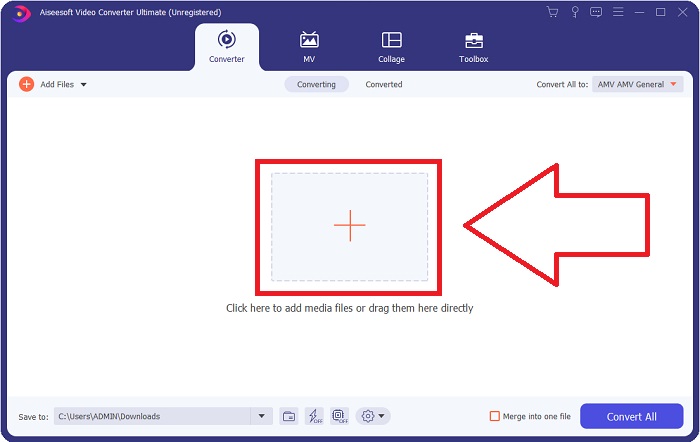
ขั้นตอนที่ 2: เมื่อหน้าต่างโปรแกรมเด้งขึ้นมา คุณจะเห็นอินเทอร์เฟซที่มีปุ่มเครื่องหมาย + อยู่ตรงกลาง หากต้องการนำเข้าวิดีโอที่คุณต้องการแปลง ให้คลิกปุ่มดังกล่าว หรือจะลากและวางไฟล์วิดีโอลงในโปรแกรมโดยตรงก็ได้.
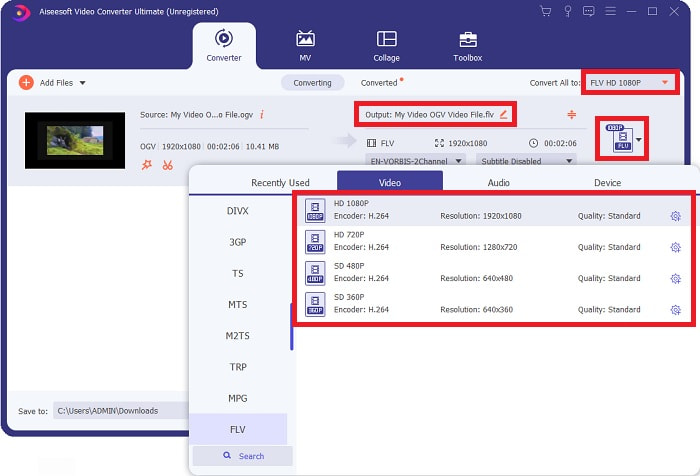
ขั้นตอนที่ 3: ทางด้านขวาจะมีการแสดงรูปแบบไฟล์ปัจจุบันของวิดีโอของคุณ ให้คลิกที่ส่วนนั้น แล้วระบบจะแสดงรูปแบบไฟล์ทั้งหมดที่คุณสามารถเลือกได้ ในกรณีนี้ให้เลื่อนลงมาและเลือก FLV หรือจะพิมพ์ค้นหาในช่องค้นหาด้านล่างก็ได้ จากนั้นทางด้านขวาของแท็บ คุณยังสามารถเลือกคุณภาพวิดีโอที่ต้องการสำหรับไฟล์ที่แปลงแล้วได้ด้วย.
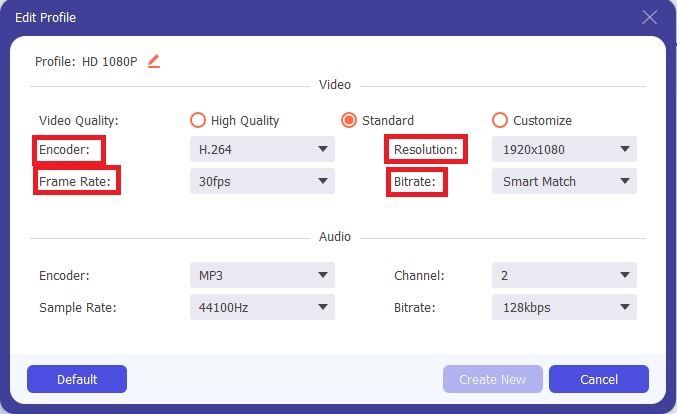
ขั้นตอนที่ 4: หากคุณต้องการตัวเลือกเพิ่มเติม ให้คลิกที่ไอคอนรูปเฟืองที่อยู่ข้างคุณภาพวิดีโอที่คุณเลือก ด้วยวิธีนี้ คุณสามารถปรับแต่งความละเอียดวิดีโอและตัวเลือกอื่น ๆ เช่น อัตราเฟรม (frame rate) อัตราการสุ่มตัวอย่าง (sample rate) บิตเรต (bitrate) และตัวเข้ารหัส (encoder) ได้ เมื่อปรับจนพอใจแล้ว ให้คลิกปุ่ม สร้างใหม่ ที่มุมขวาล่างเพื่อบันทึกการตั้งค่า.
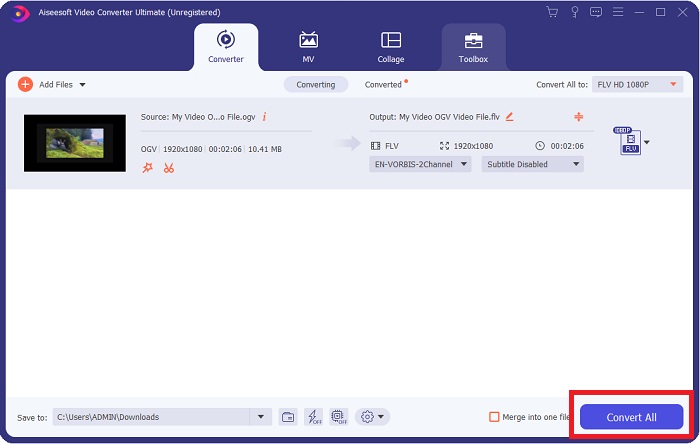
ขั้นตอนที่ 5: เมื่อคุณปรับทุกอย่างเรียบร้อยแล้ว ให้เริ่มการแปลงไฟล์อย่างเป็นทางการได้โดยคลิกปุ่ม แปลงทั้งหมด ที่มุมขวาล่าง แล้วรอจนกระบวนการเสร็จสิ้น.
ส่วนที่ 2 มีวิธีการอื่นในการแปลง OGV เป็น FLV [ออนไลน์]
หากคุณมีเวลาจำกัดและต้องแปลงไฟล์ OGV เป็น FLV ให้เร็วที่สุด ก็ไม่ต้องกังวล เพราะเรายังมีทางเลือกให้คุณใช้งานเช่นกัน คุณสามารถใช้เครื่องมือออนไลน์ที่เป็นคู่กันของซอฟต์แวร์ดังกล่าว ซึ่งยังคงมอบความสะดวกสูงสุดพร้อมขั้นตอนการแปลงที่ราบรื่น FVC Free Video Converter Online เป็นเครื่องมือบนเว็บที่สามารถแปลงไฟล์ OGV เป็น FLV ได้อย่างง่ายดาย พร้อมทั้งยังให้ตัวเลือกความละเอียดและคุณภาพเสียงเหมือนเดิม ในการใช้งาน คุณสามารถทำตามขั้นตอนดังต่อไปนี้:
ขั้นตอนที่ 1: คลิกที่ลิงก์นี้ แล้วระบบจะพาคุณไปยังหน้าเว็บของตัวแปลงออนไลน์ บริเวณกลางหน้าเว็บจะมีปุ่ม เพิ่มไฟล์เพื่อแปลง ให้คุณคลิกปุ่มดังกล่าวเพื่อดาวน์โหลดตัวเรียกใช้งาน (launcher) ที่จำเป็นสำหรับการนำเข้าไฟล์วิดีโอที่คุณต้องการแปลง.
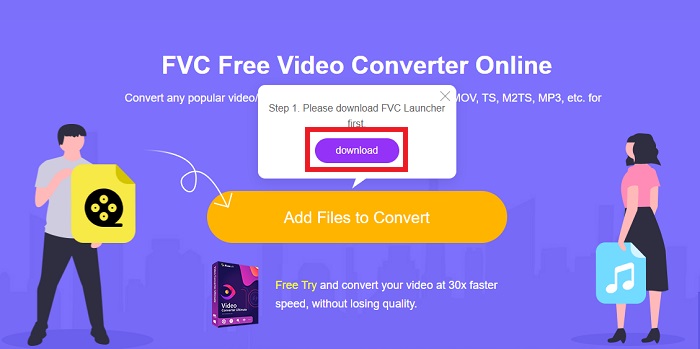
ขั้นตอนที่ 2: เมื่อดาวน์โหลดเสร็จแล้ว คุณสามารถอัปโหลดไฟล์ได้โดยคลิกปุ่มเดิมอีกครั้ง หากอัปโหลดสำเร็จ จะมีหน้าต่างอินเทอร์เฟซปรากฏขึ้น จากนั้นคุณสามารถเลือก FLV จากบรรดารูปแบบไฟล์ที่แสดงอยู่ด้านล่างของหน้าต่าง.
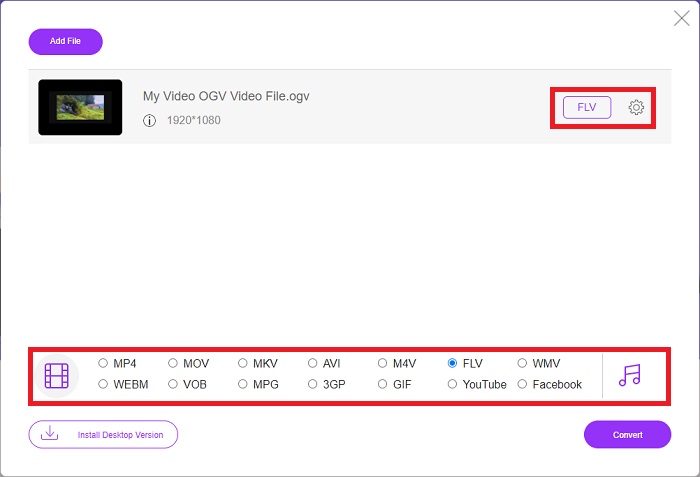
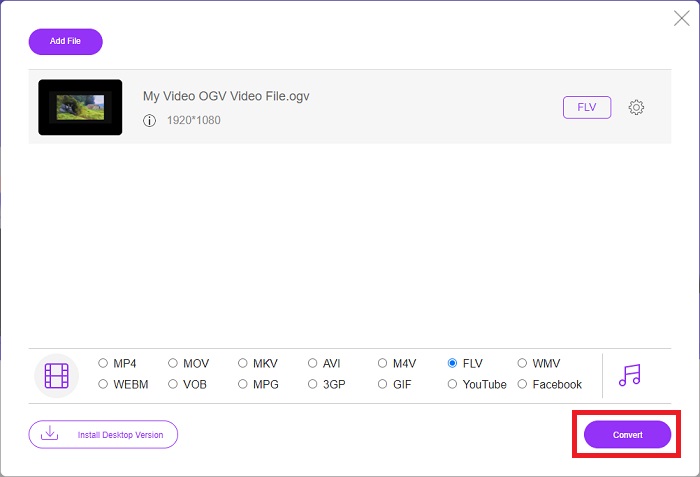
ขั้นตอนที่ 3: เช่นเดียวกัน คุณจะพบไอคอนเฟืองที่ด้านขวาสุด ซึ่งช่วยให้คุณปรับแต่งวิดีโอเพิ่มเติมได้ เมื่อคลิกแล้ว คุณจะพบการตั้งค่าวิดีโอและเสียงเพื่อปรับตัวเข้ารหัส ความละเอียด อัตราเฟรม และอื่น ๆ คลิก ตกลง แล้วคลิกปุ่ม แปลง ที่มุมขวาล่างเพื่อเริ่มกระบวนการแปลงไฟล์.
ส่วนที่ 3 ความรู้เพิ่มเติมเกี่ยวกับ OGV และ FLV
หากคุณต้องการทราบข้อมูลเพิ่มเติมเกี่ยวกับไฟล์ทั้งสองที่นำมาเปรียบเทียบ เราให้ข้อมูลที่จำเป็นทั้งหมดที่คุณอาจต้องการอ่านที่นี่:
วิธีเข้ารหัสวิดีโอ Ogg Vorbis ส่วนใหญ่มักจะเชื่อมโยงกับไฟล์ที่มีนามสกุลไฟล์ .ogv Ogg Vorbis เป็นรูปแบบการบีบอัดข้อมูลเสียงแบบโอเพนซอร์สที่ไม่ได้รับการจดสิทธิบัตร รูปแบบคอนเทนเนอร์สำหรับไฟล์เสียง วิดีโอ และข้อมูลเรียกว่า Ogg ในขณะที่เทคโนโลยีการบีบอัดเสียง Vorbis ได้รับการตั้งชื่อตาม รูปแบบไฟล์ OGV เป็นคอนเทนเนอร์สำหรับไฟล์วิดีโอ สตรีมวิดีโอที่เชื่อมโยงกับตัวแปลงสัญญาณวิดีโออย่างน้อยหนึ่งตัว เช่น Theora และ DivX อาจพบได้ในไฟล์ OGV ผู้ใช้อาจเล่นเนื้อหาที่บันทึกไว้ภายในไฟล์เนื้อหาบนอุปกรณ์สื่อต่างๆ โดยใช้ไฟล์เหล่านี้
ในทางกลับกัน ไฟล์วิดีโอที่จัดเก็บในรูปแบบคอนเทนเนอร์ Adobe Flash Video (FLV) จะเป็นไฟล์ FLV Adobe Flash Player ส่วนใหญ่ใช้เพื่อนำเสนอเนื้อหาวิดีโอออนไลน์ เช่น ภาพยนตร์และรายการทีวี นอกจากนี้ สิ่งสำคัญคือต้องทราบว่าเป็นรูปแบบเปิดที่สนับสนุนโดยแอปที่ไม่ใช่ Adobe/Macromedia ที่หลากหลาย สำหรับการเปรียบเทียบที่เฉพาะเจาะจงมากขึ้นของทั้งสอง เราได้จัดทำตารางสำหรับคุณโดยเฉพาะ
| อ็อกก์ วอร์บิส (OGV) | อะโดบีแฟลชวิดีโอ (FLV) | |
| นามสกุลไฟล์ | .ogv | .flv |
| นักพัฒนา | มูลนิธิ Xiph.Org | Adobe Systems Incorporated |
| โปรแกรมสนับสนุน | MPlayer Classic, VLC Media Player, Jriver Media Center, MPUI | RealPlayer, Apple QuickTime Player, Mplayer, VLC Media Player |
| ข้อดี | OGG มีประโยชน์ในการไม่มีสิทธิบัตร เป็นที่ยอมรับโดยทั่วไป และสนับสนุนโดยเบราว์เซอร์ส่วนใหญ่ ดังนั้น หากคุณต้องการอัปโหลดภาพยนตร์ไปยังเว็บไซต์ของคุณ รูปแบบนี้จึงเป็นตัวเลือกที่ดี | ข้อดีของ Flash ก็คือสามารถช่วยเหลือเว็บไซต์ที่ต้องการรวมเนื้อหาเคลื่อนไหวและโต้ตอบได้ ขั้นตอนตรงไปตรงมาและอาจส่งผลกระทบอย่างมีนัยสำคัญในท้ายที่สุด ทุกคนยังใช้ Flash สำหรับเกมพื้นฐานในยุคแรกๆ |
| ข้อเสีย | แม้จะมีการใช้งานอย่างแพร่หลาย แต่รูปแบบวิดีโอ OGG ก็มีข้อเสียอยู่เล็กน้อย ตัวอย่างเช่น Safari และ Internet Explorer รองรับเพียงบางส่วนเท่านั้น ดังนั้น ผู้ใช้อาจดูวิดีโอของคุณในเบราว์เซอร์เหล่านี้ไม่ถูกต้อง | ข้อเสียของหลักสูตรคือรูปแบบ FLV ไม่เป็นที่นิยมมากขึ้นในช่วงไม่กี่ปีที่ผ่านมา การสร้างเนื้อหา FLV อาจใช้เวลานานและมีราคาแพง ข้อเสียอีกประการหนึ่งคือเนื้อหา Flash ไม่สามารถเล่นบนอุปกรณ์ iOS ได้ ซึ่งจำกัดความสามารถในการดึงดูดผู้ติดตามใหม่อย่างรุนแรง |
ส่วนที่ 4 คำถามที่พบบ่อยเกี่ยวกับ OGV และ FLV Conversion
OGG และ OGV เหมือนกันหรือไม่
เป็นชุดย่อยที่เหมาะสมของประเภทสื่อวิดีโอ Ogg วิดีโอ/Ogg ที่มีนามสกุลไฟล์ ogv. แอป Ogg อื่นๆ ใช้นามสกุลไฟล์ ogv ด้วยแอปพลิเคชันประเภทสื่อ / ogg ตั้งแต่ ogx เป็น superset ของวิดีโอ/ogg
คุณภาพของ FLV ดีกว่า MP4 หรือไม่?
โดยทั่วไป MP4 ถือว่าเป็นรูปแบบไฟล์ที่เก็บการเข้ารหัสวิดีโอและเสียงดิจิทัลคุณภาพสูง ความคิดเห็นของผู้ใช้เกี่ยวกับ FLV อาจไม่ชัดเจนนัก แม้ว่าข้อดีและข้อเสียของ FLV มักจะไม่ได้เน้นไปที่คุณภาพของไฟล์ก็ตาม ด้วยอัตราการบีบอัดที่สูงกว่า MP4 จึงสูญเสียคุณภาพน้อยกว่า คุณสามารถดูวิธีการแปลงไฟล์ FLV เป็น MP4 ได้ที่นี่
FLV ไม่สูญเสียหรือสูญเสียเหมือน OGV หรือไม่
รูปแบบไฟล์ FLV สำหรับ Flash Video รองรับตัวแปลงสัญญาณการแชร์หน้าจอ (วิดีโอหน้าจอ) สองเวอร์ชัน ซึ่งเป็นวิธีการเข้ารหัส screencast รูปแบบเหล่านี้ใช้ไทล์บิตแมปและสูญเสียเมื่อความลึกของสีลดลงและบีบอัดโดยใช้ Zlib
สรุป
ไม่ว่าคุณจะมีเวลามากเพียงใดในการแปลงไฟล์วิดีโอของคุณ ทั้งซอฟต์แวร์และเครื่องมือออนไลน์ที่เทียบเท่ากันจะช่วยให้คุณสะดวกที่สุด ดังนั้น ในระยะสั้น Video Convert Ultimate และ Free Video Converter เป็นสิ่งแรกที่คุณนึกถึงเมื่อต้องแปลงวิดีโอเพื่อประหยัดเวลาในการท่องอินเทอร์เน็ตและค้นหาสิ่งที่ดีที่สุด ที่นี่เรามอบสิ่งที่ดีที่สุดให้กับคุณ
-
 วิธีที่ดีที่สุดในการแปลง VOB เป็น FLV [รวมฟรีและออนไลน์]
 ต้องการแปลงไฟล์ VOB เป็นไฟล์ FLV หรือไม่? คุณสามารถทำงานให้เสร็จสมบูรณ์ได้อย่างง่ายดายด้วยตัวแปลงเดสก์ท็อปหรือออนไลน์ อ่านคู่มือนี้และเรียนรู้วิธีแปลง VOB เป็น FLV อย่างง่ายดายและรวดเร็ว
-
 แอพ RMVB เป็น FLV Converter ฟรี 4 อันดับแรกบนเดสก์ท็อปหรือออนไลน์
 บทความนี้จะบอกคุณถึงซอฟต์แวร์ตัวแปลง RMVB เป็น FLV และเว็บแอปที่ดีที่สุดที่สามารถแปลงไฟล์ RMVB (RealMedia Variable Bitrate) เป็นวิดีโอ FLV
-
 วิธีบีบอัดไฟล์ OGV โดยไม่สูญเสียคุณภาพ
 ไม่สามารถส่งไฟล์ OGV ขนาดใหญ่ให้ผู้อื่นได้หรือไม่ บทความนี้จะแนะนำ 2 วิธีง่ายๆ ที่จะช่วยให้คุณบีบอัดไฟล์ OGV ได้อย่างง่ายดาย
