


 Video Converter Ultimate
 บันทึกหน้าจอ
 ซ่อมวิดีโอ
เรียนรู้วิธีแปลงไฟล์ MTV เป็นรูปแบบ MOV โดยไม่สูญเสียคุณภาพ
ไฟล์ MTV เป็นรูปแบบไฟล์ที่ใช้แทน MP4 บนอุปกรณ์เล่นสื่อแบบพกพาของจีน ถึงแม้รูปแบบนี้จะมีลักษณะเหมือนกับไฟล์ .amv ทุกประการ แต่เมื่อคุณจะโอนไฟล์ไปยังอุปกรณ์อย่าง iOS, iPod หรือ iPad และ Mac แล้ว แม้ไฟล์ .mtv จะถูกส่งไปได้ แต่จะไม่สามารถเปิดด้วยโปรแกรมเล่นสื่อเริ่มต้นของคุณได้ ต้องการรู้ว่าจะแก้ปัญหานี้อย่างไรใช่ไหม? งั้นลองอ่านบทความนี้เพื่อดูว่ามีตัวแปลงตัวไหนบ้างที่คุณสามารถใช้ในการแปลงไฟล์ MTV เป็น MOV แล้วเล่นบน iOS, iPod หรือ iPad และ Mac ได้.

ส่วนที่ 1 บทนำสำหรับ MTV และ MOV
รูปแบบ MTV สามารถเล่นได้ด้วยเครื่องเล่น MP4 ที่สร้างขึ้นในประเทศจีน รูปแบบไฟล์นี้รองรับการเล่นวิดีโอในเครื่องเล่น MP4 ราคาประหยัดที่ผลิตโดยชาวจีน แม้ว่าจะเป็นเครื่องเล่น MP4 ที่ยังคงเล่นวิดีโอในนามสกุลไฟล์ .mp4 แต่ก็ไม่ได้รับการสนับสนุนที่นี่ โดยเฉพาะอย่างยิ่ง หากคุณโอนไฟล์ในผลิตภัณฑ์ Apple บางประเภท รูปแบบจะไม่สามารถเล่นได้เนื่องจากความเข้ากันได้ นอกจากนี้ยังอนุญาตให้ผู้สร้างสร้างผู้เล่นได้มากขึ้นโดยมีค่าลิขสิทธิ์ลิขสิทธิ์น้อยลง
MOV เป็นหนึ่งในรูปแบบสื่อเริ่มต้นของการพัฒนาที่ทำโดย Apple รูปแบบสื่อนี้เป็นหนึ่งในตัวเลือกที่ดีที่สุดหากคุณต้องการแก้ไขวิดีโอโดยละเอียด นอกจากนี้ รูปแบบนี้ใช้ตัวเข้ารหัส MPEG-4 เพื่อทำให้ไฟล์มีขนาดเล็กลงโดยไม่ทำลายคุณภาพ ในด้านคุณภาพ ความเข้ากันได้ และการบีบอัด MOV นั้นดีกว่า MTV ในทุกคุณสมบัติที่กล่าวมา
MTV และ MOV เป็นคอนเทนเนอร์สำหรับไฟล์สื่อหรือข้อมูล เช่น วิดีโอ เสียง และข้อความ แต่ MOV ได้รับการสนับสนุนอย่างมากในอุปกรณ์ Apple ทุกเครื่อง ดังนั้น หากคุณต้องการโอนไฟล์ MTV บนเครื่องเล่นสื่อ MP4 ไปยัง Mac, iOS, iPad หรือ iPod คุณต้องแปลงไฟล์ก่อน ต้องการทราบวิธีการแปลงไฟล์ MTV เป็นรูปแบบ MOV? โดยไม่ชักช้าอีกต่อไป ไปที่ตัวแปลง MTV ที่คุณสามารถใช้ได้บนพีซี Mac และออนไลน์
ส่วนที่ 2 วิธีที่รวดเร็วและง่ายดายในการแปลง MTV เป็น MOV บน Mac
FVC Video Converter Ultimate เป็นโปรแกรมแปลงไฟล์ประสิทธิภาพสูงที่ผู้ใช้นับล้านเลือกใช้ในการแปลงไฟล์ให้เข้ากันได้กับอุปกรณ์ต่าง ๆ ซอฟต์แวร์ที่มีขนาดเล็กและใช้งานง่ายตัวนี้ทำให้การแปลงไฟล์ของคุณรวดเร็วเหลือเชื่อโดยไม่ทำให้ไฟล์สูญหาย อีกทั้งยังรองรับการเร่งความเร็วด้วยฮาร์ดแวร์เพื่อเพิ่มประสิทธิภาพการทำงานบนเดสก์ท็อป นอกจากนี้ยังมี Toolbox แบบมัลติฟังก์ชันที่ใช้สำหรับตัดต่อ รวมไฟล์ เพิ่มเสียง ทำวิดีโอ 3D สร้าง GIF และอื่น ๆ อีกมากมาย อยากรู้ไหมว่าเครื่องมือนี้มีฟีเจอร์อะไรบ้าง? ถ้าอย่างนั้นให้อ่านรายการคุณสมบัติเด่นเหล่านี้ที่คุณจะได้รับทันทีที่ดาวน์โหลด.

FVC Video Converter Ultimate
5,689,200+ ดาวน์โหลด- แปลงรูปแบบ MKV เป็น MOV, AVI, MP4, MKV และ 200+ รูปแบบโดยไม่สูญเสียคุณภาพ
- แปลงไฟล์หลายไฟล์พร้อมกันด้วยรูปแบบที่แตกต่างกัน
- คุณสมบัติขั้นสูงในการแก้ไข การรวม การครอบตัด การเพิ่มความเร็ว และอื่นๆ อีกมากมาย
- แปลงรูปแบบของคุณเร็วขึ้น 30x ด้วยเทคโนโลยีการเร่งด้วยฮาร์ดแวร์
- ใช้ได้กับทุกระบบปฏิบัติการ เช่น Windows หรือ macOS
ดาวน์โหลดฟรีสำหรับ Windows 7 หรือใหม่กว่าดาวน์โหลดอย่างปลอดภัย
ดาวน์โหลดฟรีสำหรับ MacOS 10.7 หรือใหม่กว่าดาวน์โหลดอย่างปลอดภัย
และตอนนี้เรารู้คุณสมบัติหลักของตัวแปลง MKTV แล้ว มาดูวิธีการแปลง MKV เป็น MOV โดยการอ่านและทำตามขั้นตอนต่อไป ไม่ต้องกังวลเพราะขั้นตอนที่เป็นลายลักษณ์อักษรทั้งหมดในที่นี่จะรับประกันว่าคุณจะประสบความสำเร็จในการแปลง
ขั้นตอนที่ 1. คลิกปุ่มดาวน์โหลดและเริ่มดาวน์โหลดลงใน Mac ของคุณ เมื่อดาวน์โหลดเสร็จแล้ว ให้คลิกไฟล์เพื่อติดตั้ง จากนั้นคลิก Start Now เพื่อเริ่มรันซอฟต์แวร์.
ดาวน์โหลดฟรีสำหรับ Windows 7 หรือใหม่กว่าดาวน์โหลดอย่างปลอดภัย
ดาวน์โหลดฟรีสำหรับ MacOS 10.7 หรือใหม่กว่าดาวน์โหลดอย่างปลอดภัย
ขั้นตอนที่ 2. เมื่อเครื่องมือเริ่มทำงานแล้ว ก็ถึงเวลาที่จะเพิ่มไฟล์ด้วยการคลิกปุ่ม + จากนั้นค้นหาไฟล์ .mtv ในโฟลเดอร์ที่แสดงบนหน้าจอ แล้วคลิก Open.
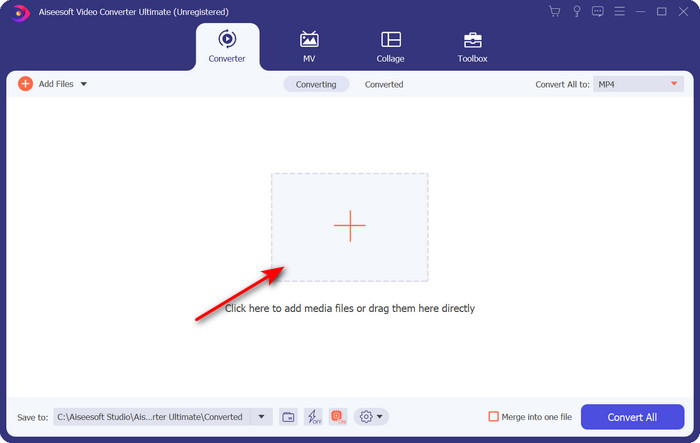
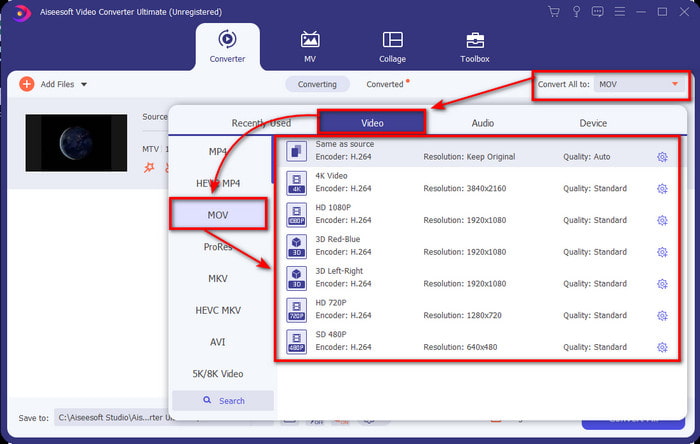
ขั้นตอนที่ 3. คลิกที่ Convert All to จากนั้นคุณก็สามารถค้นหาและเลือกฟอร์แมต MOV ได้.
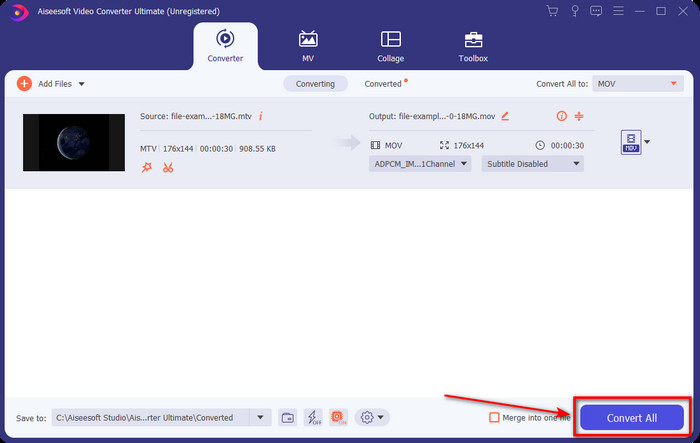
ขั้นตอนที่ 4. คลิก Convert All เพื่อเริ่มกระบวนการแปลงไฟล์ MTV ของคุณให้เป็นรูปแบบ MOV.
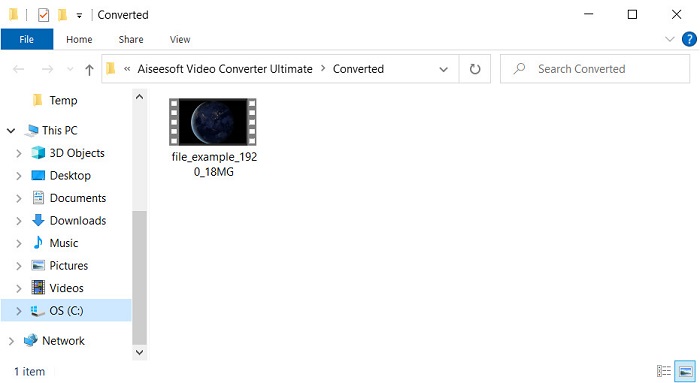
ขั้นตอนที่ 5. การแปลงไฟล์อาจใช้เวลาพอสมควร เมื่อเสร็จแล้วจะมีโฟลเดอร์เด้งขึ้นมาบนหน้าจอซึ่งภายในมีไฟล์ .mov ที่เพิ่งแปลงเสร็จ หากต้องการดูไฟล์ก็ให้คลิกเปิดได้เลย.
ส่วนที่ 3 ออนไลน์และฟรีวิธีแปลง MTV เป็น MOV
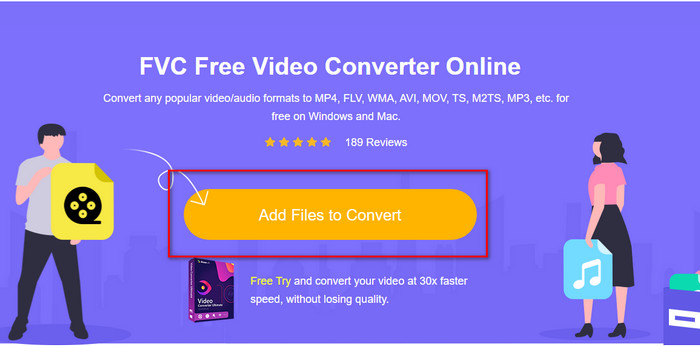
ไม่อยากดาวน์โหลดโปรแกรมแปลงไฟล์ MTV ลงบนอุปกรณ์เพราะอยากแก้ปัญหาแบบออนไลน์ใช่ไหม? ถ้าใช่ ให้ใช้ FVC Free Video Converter Online แทน ต่างจากซอฟต์แวร์ตัวแรก ตรงที่คุณสามารถเข้าใช้เครื่องมือนี้ผ่านเบราว์เซอร์ที่คุณชื่นชอบได้โดยไม่ต้องดาวน์โหลด อีกทั้งยังแปลงไฟล์ได้โดยไม่จำกัดขนาดไฟล์ แปลงได้ทุกที่ทุกเวลาในโลก ข้อเสียอย่างหนึ่งของเครื่องมือนี้คือจำเป็นต้องใช้อินเทอร์เน็ต หากไม่มีการเชื่อมต่ออินเทอร์เน็ตก็ไม่สามารถใช้งานได้ แต่ถ้าคุณมีอินเทอร์เน็ตในพื้นที่ของคุณและไม่มีเวลาจะดาวน์โหลดซอฟต์แวร์ด้านบน ก็ให้ทำตามขั้นตอนวิธีการแปลงไฟล์ MKV เป็น MOV ต่อไปนี้.
ขั้นตอนที่ 1. หากต้องการใช้เว็บทูลนี้ ให้คลิกที่ลิงก์ที่มีให้.
ขั้นตอนที่ 2. หลังจากคลิกลิงก์ จะมีหน้าเว็บไซต์ปรากฏขึ้น ให้คลิก Add Files to Convert แล้วจะมีหน้าต่างโฟลเดอร์แสดงบนหน้าจอของคุณ ค้นหาไฟล์ในโฟลเดอร์นั้น จากนั้นกด Open เพื่ออัปโหลด.
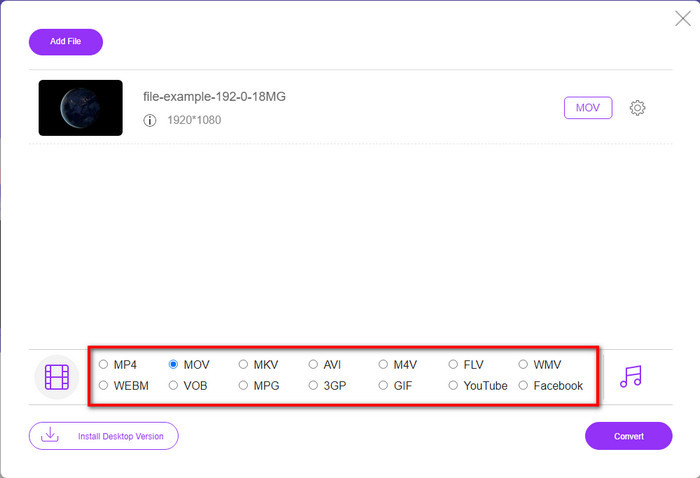
ขั้นตอนที่ 3. เมื่ออัปโหลดไฟล์เสร็จแล้ว ให้เลือกฟอร์แมต MOV จากรายการด้านล่าง.
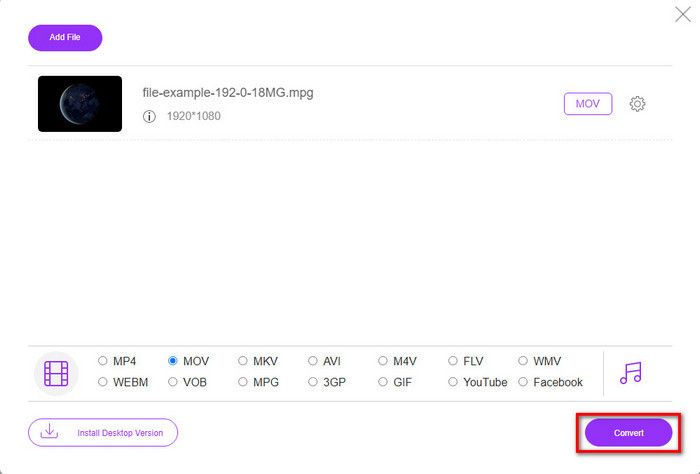
ขั้นตอนที่ 4. กด Convert เพื่อเริ่มกระบวนการแปลง.
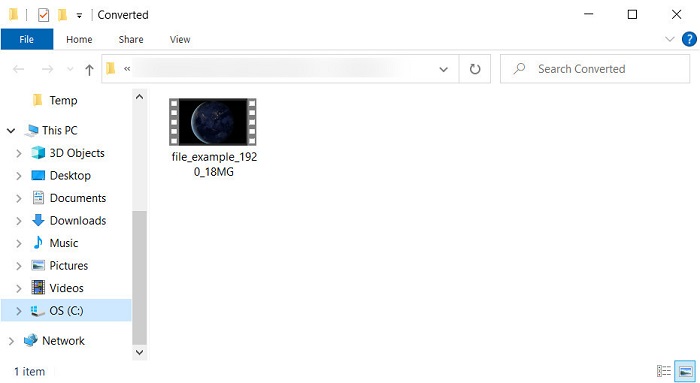
ขั้นตอนที่ 5. หลังจากแปลงเสร็จ โฟลเดอร์จะแสดงขึ้นมาพร้อมไฟล์ MOV ที่ถูกบันทึกไว้ในนั้น.
ข้อดี
- ใช้ได้กับทุกบราวเซอร์
- ตัวแปลงและส่วนต่อประสานที่ใช้งานง่าย
- ไม่มีโฆษณาที่น่ารำคาญหรือเข้าสู่ระบบเพื่อใช้
จุดด้อย
- จำเป็นต้องใช้อินเทอร์เน็ตเพื่อใช้งาน
- มีตัวแปลงขอบเขตปานกลาง
ส่วนที่ 4 คำถามที่พบบ่อยเกี่ยวกับการแปลง MTV และ MOV
ฉันสามารถแปลงไฟล์ MTV เป็น AVI ได้หรือไม่
แน่นอนว่าคุณก็สามารถแปลงไฟล์ MTV ของคุณให้เป็น AVI ได้เช่นกัน อยากรู้ว่าต้องทำอย่างไรใช่ไหม? ถ้าอย่างนั้นมาดูทั้งสามวิธีที่คุณสามารถใช้เพื่อแปลง MTV เป็น AVI กัน.
Quicktime Player รองรับไฟล์ .mtv หรือไม่
QuickTime เป็นโปรแกรมเล่นสื่อพื้นฐานบนอุปกรณ์ Apple ทุกเครื่อง แต่โปรแกรมนี้ไม่รองรับไฟล์ .mtv อย่างไรก็ตาม คุณสามารถอ่านบทความนี้เพื่อรู้จักตัวเล่นวิดีโอที่ใช้แทน QuickTime ซึ่งสามารถใช้เล่นไฟล์ .mtv ได้.
ทำไมวิดีโอ MTV ถึงเบลอ?
สาเหตุหนึ่งที่ทำให้วิดีโอในรูปแบบนี้เบลอก็เพราะว่ารองรับความละเอียดต่ำ เพื่อประหยัดพื้นที่บางส่วนและอัปโหลดไฟล์มีเดียจำนวนมากใน Chinese Portable MP4 Players และลดภาระในการประมวลผล
สรุป
เมื่อเรารู้แล้วว่าจะต้องแปลงไฟล์ .mtv อย่างไรและส่งไปยังอุปกรณ์ Apple ของเราได้อย่างไร ตอนนี้ก็ถึงเวลาที่ต้องเลือกแล้ว ไม่ว่าคุณจะเลือกตัวเลือกไหนก็เหมาะที่สุดสำหรับการแปลงไฟล์ทั้งแบบออนไลน์และออฟไลน์ ถ้าคุณต้องการโปรแกรมแปลงไฟล์ระดับมืออาชีพที่ให้คุณภาพยอดเยี่ยมและพลังการแปลงไฟล์สูงสุด ให้เลือกใช้ FVC Video Converter Ultimate แต่ถ้าคุณไม่อยากดาวน์โหลดซอฟต์แวร์ลงในอุปกรณ์และต้องการตัวแปลงไฟล์ออนไลน์ที่มีประสิทธิภาพและใช้งานได้จริง FVC Free Video Converter Online ก็เป็นตัวเลือกที่เหมาะสม.
-
 [ออนไลน์และฟรี] 3 วิธีในการแปลง MTV เป็น AVI Hassle-Free
 คุณเคยได้ยินรูปแบบวิดีโอเช่น MTV หรือไม่? เนื่องจากคุณไม่ทราบทุกอย่างเกี่ยวกับรูปแบบนี้ และต้องการแปลงวิดีโอ MTV เป็น AVI โปรดอ่านบทความนี้อย่างละเอียดเพื่อเรียนรู้เพิ่มเติมเกี่ยวกับปัญหานี้
-
 ตัวแปลง GIF ที่ดีที่สุดสำหรับการแปลง GIF เคลื่อนไหวเป็นรูปแบบ MOV [2025]
 แปลงไฟล์ GIF ของคุณเป็นรูปแบบ MOV ได้อย่างง่ายดายโดยไม่กระทบต่อคุณภาพของไฟล์วิดีโอ ด้วยขั้นตอนและเครื่องมือต่าง ๆ เช่นกัน
-
 วิธีแปลง AVI เป็น MOV ด้วยขั้นตอนและเครื่องมือง่ายๆ
 คุณต้องการทราบวิธีการแปลง AVI เป็น MOV ที่เล่นได้? คุณต้องทำตามบทความนี้เพื่อทราบวิธีการและเคล็ดลับในการแปลงที่ประสบความสำเร็จ
