


 Video Converter Ultimate
 บันทึกหน้าจอ
 ซ่อมวิดีโอ
 ดาวน์โหลดอย่างปลอดภัย
วิธีทำให้วิดีโอช้าลงใน Tiktok 2 วิธีที่ดีที่สุดและฟรี
ทุกวันนี้คุณจะพบว่ามีวิดีโอมากมายจาก TikTok เผยแพร่อยู่บนอินเทอร์เน็ต แอปนี้กำลังฮิตมาก มีฟีเจอร์และเครื่องมือให้สร้างคอนเทนต์วิดีโอได้หลากหลาย ทั้งมีมตลก ๆ วิดีโอให้ความรู้ คลิปเต้นคัฟเวอร์ และอื่น ๆ อีกมากมาย และถ้าคุณเพิ่งเริ่มใช้ TikTok คุณก็น่าจะอยากรู้วิธีทำวิดีโอให้ช้าลงใน TikTok โชคดีที่ TikTok มีเครื่องมือปรับความเร็วในตัว ซึ่งให้คุณทำวิดีโอสโลว์โมชันได้ คุณมาถูกทางแล้ว เพราะต่อไปคุณจะได้รู้ว่าวิธีทำวิดีโอให้ช้าลงใน TikTokต้องทำอย่างไร.

ส่วนที่ 1 ทำให้วิดีโอช้าลงใน Tiktok . อย่างง่ายดาย
แอพ Tiktok มีเครื่องมือ slow-mo ในตัว ซึ่งคุณสามารถใช้เพื่อทำให้วิดีโอช้าลงหรือเร็วขึ้น และถ้าคุณมีวิดีโอที่บันทึกไว้ในแกลเลอรีของคุณและต้องการให้โพสต์บน TikTok คุณยังสามารถทำให้วิดีโอช้าลงได้ในแอป Tiktok ในส่วนนี้ คุณจะรู้วิธีทำให้วิดีโอของคุณช้าลงบน TikTok
ทำให้วิดีโอของคุณช้าลงขณะบันทึก
นี่คือคำตอบหากคุณสงสัยว่าจะทำให้วิดีโอ TikTok ช้าลงขณะบันทึกได้อย่างไร ทำตามขั้นตอนง่าย ๆ ด้านล่างเพื่อบันทึกวิดีโอสโลว์โมชั่น
ขั้นตอนที่ 1. ก่อนอื่น เปิดแอป TikTok แล้วแตะสัญลักษณ์ + ตรงกลางหน้าจอของคุณ.
ขั้นตอนที่ 2. เมื่อเข้าสู่หน้าอินเทอร์เฟซของกล้องแล้ว ให้แตะตัวเลือก Speed.
ขั้นตอนที่ 3. จากนั้นเลือกความเร็วที่คุณต้องการ ค่า 0.3x และ 0.5x จะทำให้วิดีโอของคุณช้าลง ส่วน 2x และ 3x จะทำให้วิดีโอของคุณเร็วขึ้น.
จากนั้นเพียงแตะปุ่มบันทึกเพื่อเริ่มบันทึกวิดีโอ และเมื่อเสร็จแล้ว ให้แตะปุ่มหยุด คุณจะเห็นว่าความเร็วของวิดีโอที่คุณบันทึกเปลี่ยนไป
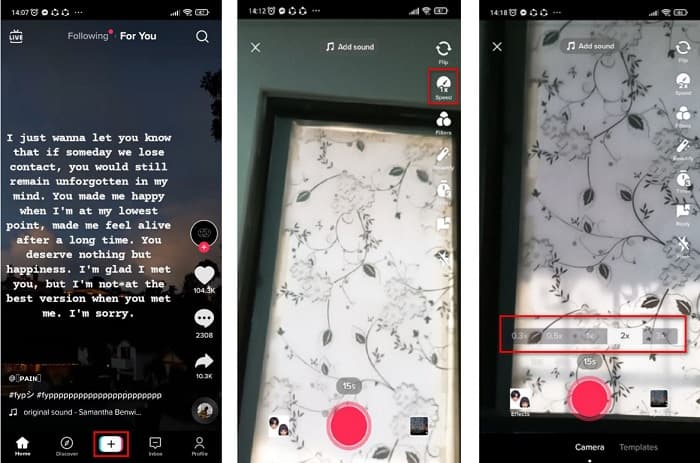
ทำให้วิดีโอที่บันทึกช้าลง
หากคุณมีวิดีโอที่บันทึกไว้แล้ว คุณยังสามารถทำให้วิดีโอของคุณช้าลงหรือเร็วขึ้นบน TikTok ได้ ทำตามขั้นตอนง่าย ๆ ด้านล่างเพื่อถ่ายวิดีโอที่บันทึกช้า อย่างไรก็ตาม เมื่อวิดีโอของคุณได้รับการบันทึกแล้ว ตัวเลือกเดียวของคุณคือทำให้วิดีโอของคุณช้าลงโดยไม่มีตัวเลือกความเร็ว
ขั้นตอนที่ 1. เปิดแอป TikTok แล้วแตะปุ่มสัญลักษณ์ + ตรงกลางอินเทอร์เฟซของโปรแกรม.
ขั้นตอนที่ 2. จากนั้นแตะตัวเลือก Upload ที่อยู่ข้างปุ่มอัดวิดีโอ แล้วเลือกวิดีโอที่คุณอัดไว้ จากนั้นคลิก Next.
ขั้นตอนที่ 3. สุดท้าย แตะ Effects แล้วแตะตัวเลือก Slow-mo จากนั้นปรับความเร็วตามที่คุณต้องการ.
หลังจากปรับความเร็วของวิดีโอแล้ว ให้แตะปุ่มบันทึกเพื่อบันทึกการบันทึกวิดีโอของคุณ
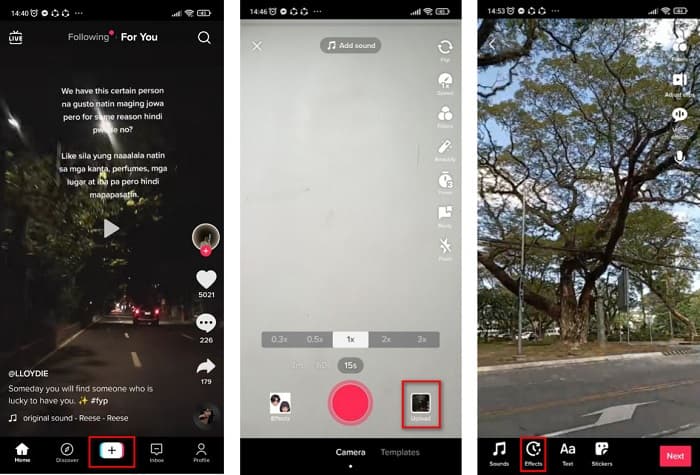
ง่ายใช่มั้ย? ด้วยการใช้แอพ Tiktok คุณสามารถมีวิดีโอสโลว์โมชั่นโดยไม่ต้องใช้เครื่องมืออื่น
ส่วนที่ 2 ทำให้วิดีโอ TikTok ที่บันทึกไว้ของคุณช้าลงโดยใช้เครื่องมือเปลี่ยนความเร็ววิดีโอที่ดีที่สุด
การใช้ตัวเปลี่ยนความเร็วของแอพ TikTok นั้นง่ายและไม่ยุ่งยาก อย่างไรก็ตาม มันสามารถทำให้วิดีโอของคุณช้าลงได้ถึงความเร็ว 0.3x และสามารถเร่งความเร็ววิดีโอของคุณได้ถึง 3x เท่านั้น หากคุณต้องการลดความเร็ววิดีโอของคุณได้ถึง 0.125x เรามีเครื่องมือออนไลน์และออฟไลน์ทางเลือก
FVC Video Converter Ultimate
FVC Video Converter Ultimate เป็นเครื่องมือออฟไลน์ที่ให้คุณเปลี่ยนความเร็วของวิดีโอได้ ด้วยเครื่องมือนี้ คุณสามารถทำให้วิดีโอช้าลงหรือเร็วขึ้นตามที่ต้องการ เครื่องมือนี้สามารถปรับความเร็ววิดีโอได้ที่ 0.125x, 0.25x, 0.5x, 0.75x, 1.25x, 1.5x, 2x, 4x และ 8x.
นอกจากนี้ เครื่องมือนี้มีอินเทอร์เฟซซอฟต์แวร์ที่ใช้งานง่าย ทำให้ง่ายสำหรับผู้เริ่มต้นใช้งาน เครื่องมือนี้น่าประทับใจเพราะมีฟีเจอร์ขั้นสูง เช่น โปรแกรมแก้ไขข้อมูลเมตาของสื่อ โปรแกรมบีบอัดวิดีโอ เครื่องมือสร้าง 3 มิติ และอื่นๆ อีกมากมาย นอกจากนั้น เมื่อคุณเปลี่ยนความเร็วของวิดีโอ คุณจะไม่สูญเสียคุณภาพของวิดีโอ ซึ่งแตกต่างจากเครื่องมืออื่นๆ ดังนั้น หากคุณสนใจที่จะใช้ตัวแปลงนี้ ให้ทำตามขั้นตอนด้านล่าง
ขั้นตอนที่ 1. ดาวน์โหลด FVC Video Converter Ultimate โดยคลิกปุ่ม Download ด้านล่าง ทำตามขั้นตอนการติดตั้ง จากนั้นเปิดโปรแกรม.
ดาวน์โหลดฟรีสำหรับ Windows 7 หรือใหม่กว่าดาวน์โหลดอย่างปลอดภัย
ดาวน์โหลดฟรีสำหรับ MacOS 10.7 หรือใหม่กว่าดาวน์โหลดอย่างปลอดภัย
ขั้นตอนที่ 2. จากนั้น บนหน้าอินเทอร์เฟซหลักของโปรแกรม ให้คลิกแถบ Toolbox บนอินเทอร์เฟซของแถบ Toolbox ให้คลิก Video Speed Controller.
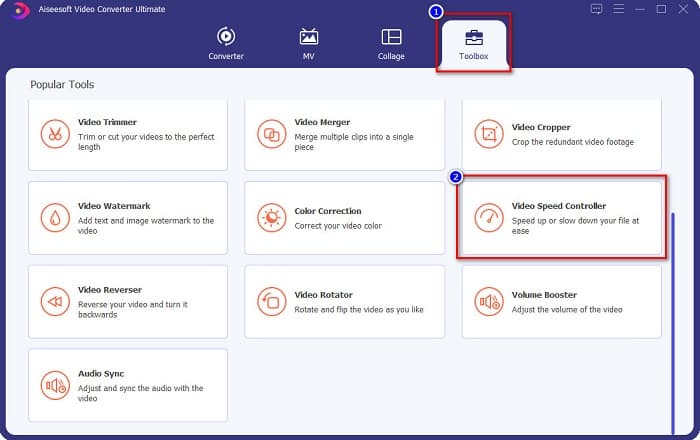
ขั้นตอนที่ 3. คลิกปุ่มสัญลักษณ์ + เพื่ออัปโหลดวิดีโอที่คุณต้องการทำให้ช้าลงในหน้าอินเทอร์เฟซถัดไป.
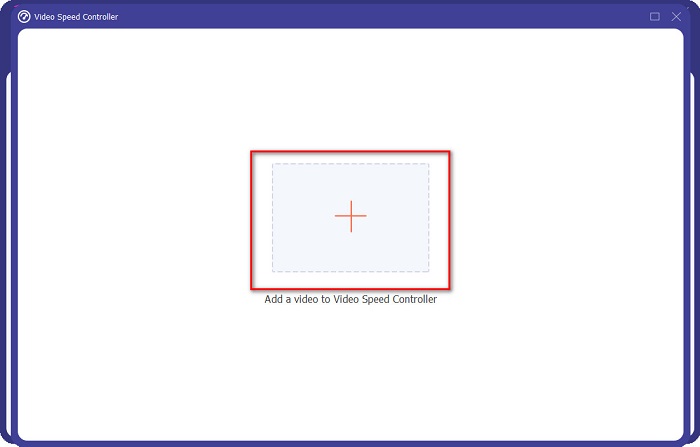
ขั้นตอนที่ 4. แล้วเลือกความเร็ววิดีโอที่คุณต้องการ จากนั้นไปยังขั้นตอนสุดท้าย.
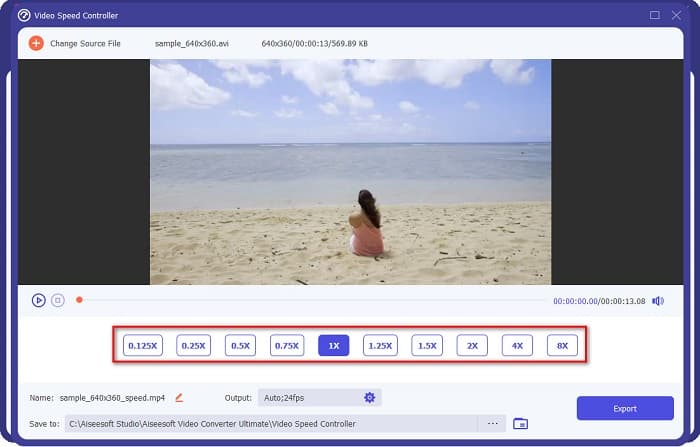
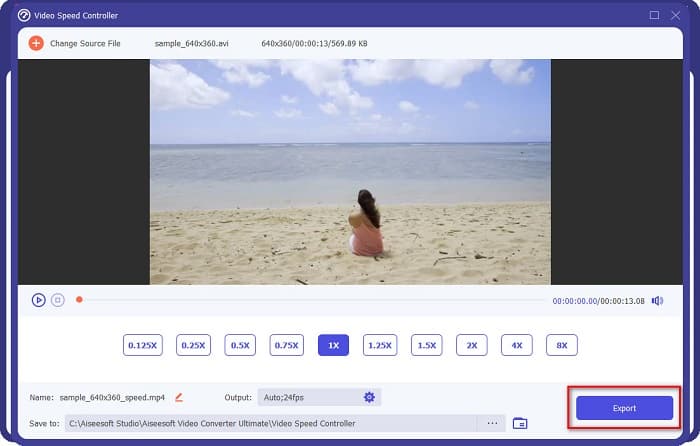
ขั้นตอนที่ 5. สุดท้าย คลิกปุ่ม Export เพื่อใช้ความเร็ววิดีโอกับไฟล์ของคุณ วิดีโอที่ส่งออกจะถูกบันทึกลงในโฟลเดอร์บนคอมพิวเตอร์ของคุณโดยอัตโนมัติ.
ข้อดี
- สามารถปรับความเร็วของวิดีโอได้ตั้งแต่ 0.125x ถึง 8x speed
- มีส่วนต่อประสานกับผู้ใช้ที่ใช้งานง่าย
- มีคุณสมบัติการแก้ไขขั้นสูง เช่น ตัวสร้าง GIF, ตัวสร้าง 3D, ลายน้ำวิดีโอ และอื่นๆ
- พร้อมใช้งานบนแพลตฟอร์มข้ามสื่อทั้งหมด รวมทั้ง Windows และ Mac
จุดด้อย
- คุณต้องซื้อแอปก่อนจึงจะเข้าถึงคุณลักษณะเฉพาะของแอปได้
Kapwing
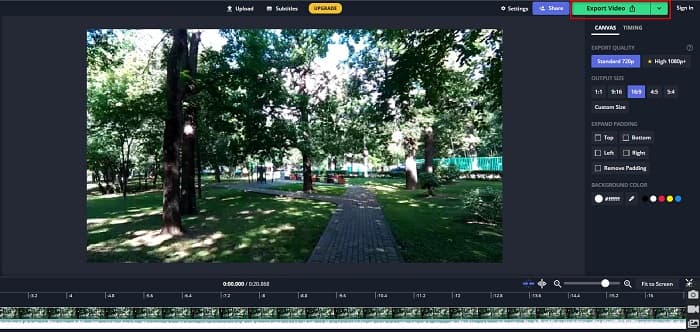
Kapwing เป็นเครื่องมือออนไลน์ที่ถือเป็นหนึ่งในตัวเปลี่ยนความเร็ววิดีโอที่มีคนใช้มากที่สุด เครื่องมือนี้มีหน้าตาอินเทอร์เฟซเรียบง่าย ใช้งานไม่ยาก นอกจากนี้ยังให้คุณตัดต่อและครอบวิดีโอได้อย่างง่ายดาย อีกทั้งยังสามารถเปลี่ยนความเร็ววิดีโอได้ตั้งแต่ 0.25x, 0.5x, 0.75x, 1.15x, 1.25x, 1.75x, 2x และ 4x นอกจากนี้ คุณยังสามารถเปลี่ยนขนาดเอาต์พุตของวิดีโอได้ อย่างไรก็ตาม เนื่องจากเป็นแอปบนเว็บ คุณอาจเจอปัญหาการโหลดช้าเมื่อใช้งานเครื่องมือนี้ ถึงอย่างนั้นก็ยังมีคนจำนวนมากใช้ตัวแปลงนี้เพื่อเปลี่ยนความเร็วของวิดีโอ.
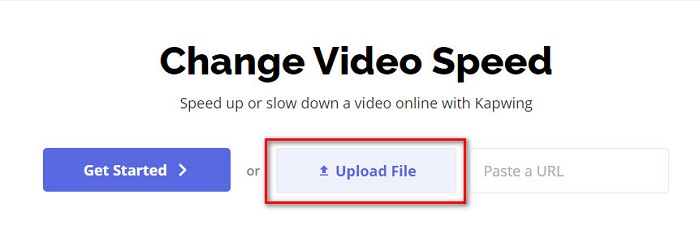
ขั้นตอนที่ 1. ก่อนอื่น ค้นหา Kapwing บนเบราว์เซอร์ของคุณ แล้วคลิกปุ่ม Upload File จากนั้นจะมีไฟล์ในคอมพิวเตอร์ของคุณแสดงขึ้นมา ให้เลือกวิดีโอที่คุณต้องการเปลี่ยนความเร็ว.
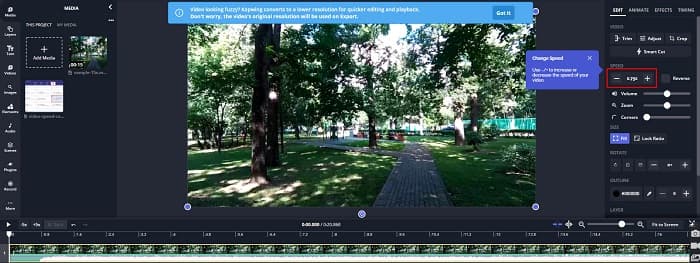
ขั้นตอนที่ 2. จากนั้นปรับความเร็ววิดีโอบนหน้าอินเทอร์เฟซถัดไป โดยคลิกสัญลักษณ์ - หรือ + บนแผงควบคุมความเร็ว.
ขั้นตอนที่ 3. คลิกปุ่ม Export เพื่อเปลี่ยนความเร็วของวิดีโอของคุณ จากนั้นรอสักครู่ เพียงเท่านี้ก็เรียบร้อย
ข้อดี
- มีอินเทอร์เฟซซอฟต์แวร์ที่ใช้งานง่าย
- ให้คุณตัดแต่งเอาต์พุตวิดีโอของคุณ
จุดด้อย
- เมื่อการเชื่อมต่ออินเทอร์เน็ตช้า กระบวนการโหลดของแอพจะช้า
ส่วนที่ 3 คำถามที่พบบ่อยเกี่ยวกับวิธีทำให้วิดีโอช้าลงใน Tiktok
การทำให้วิดีโอช้าลงใน Tiktok ทำให้คุณภาพลดลงหรือไม่?
ไม่ เนื่องจาก Tiktok มีตัวเปลี่ยนความเร็ววิดีโอในตัว จะไม่ส่งผลต่อคุณภาพของวิดีโอของคุณเมื่อคุณทำให้วิดีโอบน TikTok ช้าลง
การส่งออกวิดีโอสโลว์โมชั่นบน TikTok มีลายน้ำหรือไม่?
ใช่ วิดีโอทุกคลิปที่ส่งออกจาก TikTok จะมีลายน้ำติดมาด้วย แต่ถ้าคุณต้องการลบลายน้ำออกจากวิดีโอ TikTok ของคุณ ให้ลองอ่านบทความนี้เพื่อดูวิธีทำ.
คุณสามารถถ่ายวิดีโอ Tiktok ได้นานแค่ไหน?
การบันทึกวิดีโอ Tiktok ครั้งเดียวมีความยาวสูงสุด 15 วินาที อย่างไรก็ตาม หากคุณสตริงวิดีโอความยาว 15 วินาทีสี่รายการ วิดีโอนั้นมีความยาวสูงสุด 60 วินาที
สรุป
จากที่กล่าวมาทั้งหมด ปัญหาเรื่องวิธีทำวิดีโอให้ช้าลงใน TikTok ก็ได้รับการแก้ไขแล้ว และตอนนี้คุณก็รู้แล้วว่าทั้งวิธีทำวิดีโอให้ช้าลง หรือทำให้วิดีโอเร็วขึ้นบนแอป TikTok ต้องทำอย่างไร แต่ถ้าคุณอยากปรับความเร็ววิดีโออื่น ๆ ของคุณด้วย FVC Video Converter Ultimate ก็คือเครื่องมือที่จะช่วยคุณได้.
-
 ข้อมูลสำคัญที่คุณควรรู้เกี่ยวกับ QuickTime Slow Motion
 คุณได้ลองใช้ QuickTime Media Player เพื่อเล่นวิดีโอแบบสโลว์โมชั่นแล้วหรือยัง? อ่านบทความนี้เพื่อทราบข้อมูลเพิ่มเติมเกี่ยวกับบริการที่ยอดเยี่ยมของโปรแกรมเล่นสื่อนี้
-
 5 ผู้ผลิตวิดีโอสโลว์โมชั่นระดับมืออาชีพสำหรับ Windows/Mac/ออนไลน์
 คุณต้องการทราบวิธีทำให้วิดีโอของคุณเล่นแบบสโลว์โมชั่นได้อย่างไร? จากนั้นอ่านบทความนี้เพื่อค้นหาว่าผู้ผลิตวิดีโอสโลว์โมชั่นมืออาชีพ 5 รายคืออะไร
-
 วิธีที่ดีที่สุดในการใช้ iMovie ในการสร้างวิดีโอสโลว์โมชั่น [แก้ไขแล้ว]
 คุณเคยใช้แอพ iMovie เพื่อแปลงวิดีโอความเร็วปกติของคุณเป็นสโลว์โมชั่นหรือไม่? นี่เป็นโอกาสที่จะได้ทราบข้อมูลเพิ่มเติมเกี่ยวกับแอปพลิเคชันนี้ โปรดอ่านต่อ
