


 Video Converter Ultimate
 บันทึกหน้าจอ
 ซ่อมวิดีโอ
 ดาวน์โหลดอย่างปลอดภัย
แอพวิดีโอสโลว์โมชั่น 5 อันดับแรกเพื่อสร้างวิดีโอสโลว์โมชั่น
คุณเคยดูการแข่งขันกีฬาแล้วพลาดจังหวะไฮไลต์สวย ๆ ของผู้เล่นไหม? มันน่าหงุดหงิดตรงที่คุณไม่สามารถชื่นชมท่าทางอันสุดยอดของนักกีฬาได้ เพราะวิดีโอเล่นเร็วเกินไป และวิธีที่ดีที่สุดที่จะทำให้คุณดูวิดีโอได้อย่างเต็มอรรถรส คือการทำให้เป็นวิดีโอแบบสโลว์โมชั่น โชคดีที่เราได้รวบรวมเครื่องมือที่ดีที่สุดที่คุณสามารถใช้สร้างวิดีโอสโลว์โมชั่นได้ไว้ให้แล้ว เพียงเอนหลังและผ่อนคลายไปกับการทำความรู้จักแอปทำวิดีโอสโลว์โมชั่นที่ดีที่สุดเหล่านี้.

ส่วนที่ 1 แอพวิดีโอสโลว์โมชั่นฟรี 6 อันดับแรกสำหรับ Android และ iPhone
มีแอพสโลว์โมชั่นมากมายที่คุณสามารถหาได้ใน Appstore และ Google play Games และแอพทั้งหมดที่คุณจะพบใน Appstore และ Google play เกมมีคุณสมบัติที่แตกต่างกัน ดังนั้นเราจึงเลือกแอปวิดีโอสโลว์โมชั่นที่ดีที่สุดเพื่อให้คุณใช้ ต่อไปนี้คือแอปสโลว์โมชั่นที่โดดเด่นหกแอปโดยไม่ต้องกังวลใจอีกต่อไป
กล้องวิดีโอสโลว์โมชั่น FX
ราคา: ฟรี
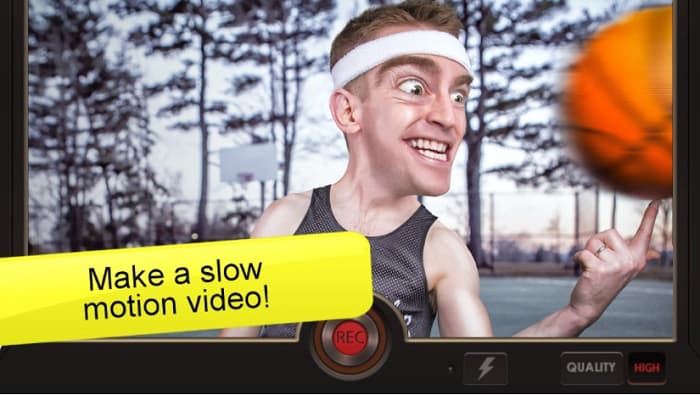
แอป Slow Motion Video เป็นหนึ่งในแอปสโลว์โมชั่นที่ถูกใช้งานมากที่สุดบน Android ด้วยการใช้แอปนี้ คุณสามารถทำให้วิดีโอเล่นช้ากว่าปกติได้ นอกจากนี้ หากคุณมีไฟล์บันทึกเสียงที่เล่นเร็วเกินไป ก็สามารถแปลงให้กลายเป็นเสียงแบบสโลว์โมชั่นได้เช่นกัน แอปนี้ยังมีอินเทอร์เฟซที่เรียบง่าย และขั้นตอนการบันทึกก็ไม่ยุ่งยาก อีกทั้งยังมีฟีเจอร์ขั้นสูงอย่างการเพิ่มจุดเวลา (time point) และปรับความเร็ววิดีโอตามจุดเวลาต่าง ๆ ที่แอปกำหนด อย่างไรก็ตาม บางครั้งวิดีโอที่ได้อาจถูกยืดจนเกินไป ทำให้คุณภาพของวิดีโอเสียไป ถึงอย่างนั้น ผู้ใช้จำนวนมากก็ยังเลือกใช้แอปสโลว์โมชั่นสำหรับ Android แอปนี้เป็นตัวเลือกแรก.
ข้อดี
- มี GUI ที่เรียบง่าย
- ช่วยให้คุณเปลี่ยนความเร็วของวิดีโอได้โดยใช้จุดเวลา
- ให้ผลผลิตที่มีคุณภาพดีเยี่ยม
จุดด้อย
- มันมีปัญหาบั๊ก
โปรแกรมตัดต่อวิดีโอสโลว์โมชั่น
ราคา: ฟรี
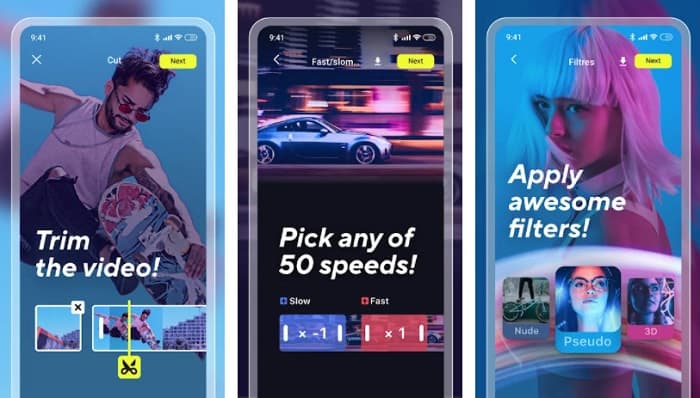
Slow Motion Video Editor เป็นแอปตัดต่อวิดีโอสโลว์โมชั่นที่ใช้งานง่ายและให้ใช้ได้ฟรี คุณสามารถสร้างวิดีโอสโลว์โมชั่นและแชร์ไปยังโซเชียลมีเดียอื่น ๆ ได้อย่างสะดวกผ่านแอปนี้ นอกจากนี้ยังมีฟีเจอร์ตัดต่อขั้นสูง เช่น ตัดคลิป เพิ่มเอฟเฟกต์ และใส่ฟิลเตอร์ให้กับวิดีโอของคุณ อีกทั้งยังสามารถสร้างวิดีโอสโลว์โมชั่นที่ลื่นไหล ซึ่งเป็นจุดที่ผู้ใช้หลายคนชื่นชอบแอปนี้.
ข้อดี
- ใช้งานได้ฟรี 100%
- มีส่วนต่อประสานผู้ใช้ที่ใช้งานง่าย
- มันมีคุณสมบัติที่น่าทึ่ง เช่น การตัดแต่ง การตัดต่อขนาดวิดีโอ เพิ่มเพลง และอื่นๆ
จุดด้อย
- หลังจากผ่านไปสองสามวัน ผู้ใช้บางคนไม่สามารถจัดเก็บวิดีโอของตนบนอุปกรณ์ของตนได้
SloPro
ราคา: ฟรี
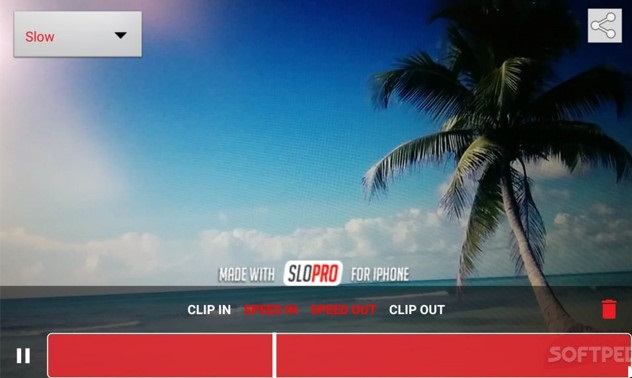
SloPro เป็นอีกหนึ่งแอปที่สามารถทำให้วิดีโอของคุณช้าลงและกลายเป็นวิดีโอสโลว์โมชั่น แอปนี้สามารถใช้งานได้บนอุปกรณ์ iPhone นอกจากนี้ยังมีอินเทอร์เฟซการประมวลผลที่รวดเร็ว ทำให้เป็นเครื่องมือที่ใช้งานง่าย และด้วยการใช้ออปติคอลโฟลว์ มันสามารถสร้างภาพเคลื่อนไหวเสมือน 500fps และ 1000fps ได้ สิ่งที่ผู้ใช้ชอบมากที่สุดเกี่ยวกับแอปนี้คือ คุณสามารถตัดต่อวิดีโอไปพร้อมกับการถ่ายทำได้ อีกทั้งยังสามารถแชร์วิดีโอสโลว์โมชั่นของคุณได้อย่างง่ายดายด้วยแอปสโลว์โมชั่นสำหรับ iPhone ตัวนี้.
ข้อดี
- มีส่วนต่อประสานกับผู้ใช้ที่ใช้งานง่าย
- ใช้งานได้ฟรี
- มันสามารถกระตุ้นวิดีโอ 500ps และ 1,000 fps
จุดด้อย
- คุณอาจพบปัญหาบั๊กขณะใช้แอป
TruSloMo
ราคา: ฟรี (เวอร์ชัน Pro: 0.99 ดอลลาร์สหรัฐฯ)
หนึ่งในแอปวิดีโอสโลว์โมชั่นยอดนิยมบน App Store คือ TruSloMo แอปนี้ถูกสร้างมาสำหรับ iPhone, iPad และ iPod Touch นอกจากนี้ยังให้คุณสร้างวิดีโอสโลว์โมชั่นจากวิดีโอในคลังรูปภาพ (Camera Roll) ของคุณได้ และผ่าน TruSloMo คุณสามารถเลือกจุดเริ่มต้นและจุดสิ้นสุดของช่วงสโลว์โมชั่นที่ต้องการใช้กับวิดีโอได้เอง อีกทั้งยังไม่ทำให้คุณภาพวิดีโอเสียไปหลังจากแปลงเป็นสโลว์โมชั่นแล้ว.
ข้อดี
- มันเป็นแอพที่ใช้งานได้ฟรี
- มีอินเทอร์เฟซที่ตรงไปตรงมา
- รองรับอุปกรณ์ iOS ทั้งหมดตั้งแต่ iOS 7 ขึ้นไป
จุดด้อย
- คุณต้องซื้อเวอร์ชันโปรเพื่อให้มีส่วนสโลว์โมหลายส่วนในวิดีโอเดียว
วิดีโอสโลว์โมชั่น: การแก้ไขภาพช้า
ราคา: ฟรี
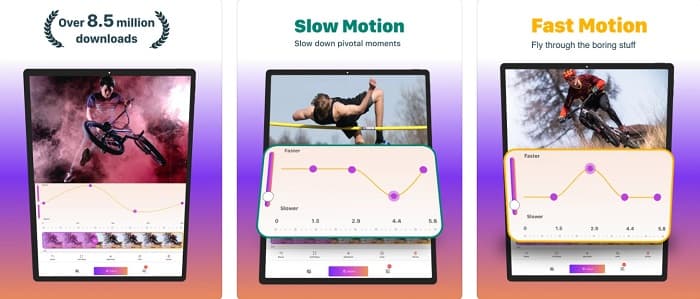
แอพสุดท้ายที่เราจะแสดงให้คุณเห็นก็คือแอพที่สามารถเปลี่ยนวิดีโอของคุณให้เป็นวิดีโอสโลว์โมชั่น ช่วยให้คุณเลือกเฟสเฉพาะที่คุณจะทำการสโลว์วิดีโอของคุณ แอพนี้ยังมีการตั้งค่าความเร็วล่วงหน้าที่หลากหลาย นอกจากนี้ แอพนี้ยังรับรองความเป็นส่วนตัวของข้อมูลของคุณ
ข้อดี
- มีส่วนต่อประสานผู้ใช้ที่เรียบง่าย
- มีการป้องกันความเป็นส่วนตัว
- ช่วยให้คุณเลือกวิดีโอจากม้วนฟิล์มเพื่อเพิ่มเอฟเฟกต์สโลว์โมชั่น
จุดด้อย
- คุณต้องซื้อแอปก่อนจึงจะเข้าถึงคุณสมบัติอื่นๆ ของแอปได้
Videoshop-โปรแกรมตัดต่อวิดีโอ
ราคา: ฟรี
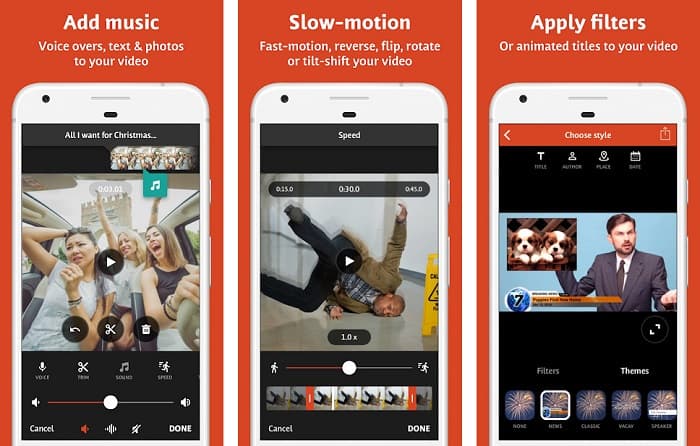
Videoshop-Video Editor ก็เป็นหนึ่งในแอปสโลว์โมชั่นที่ดีที่สุดสำหรับ Android เช่นกัน หลายคนใช้แอปนี้เพราะเป็นเครื่องมือที่เหมาะกับมือใหม่และมีอินเทอร์เฟซที่เรียบง่าย นอกจากนี้ยังให้คุณใช้ฟีเจอร์ต่าง ๆ ที่น่าสนใจ เช่น ทรานซิชัน, การเล่นย้อนกลับ และการตัดแต่งวิดีโอ และหากคุณกำลังมองหาแอปฟรีที่สามารถสร้างวิดีโอความละเอียดสูงได้ แอปนี้ก็ตอบโจทย์คุณได้ดีที่สุด อีกทั้งยังให้คุณแชร์วิดีโอที่เสร็จแล้วไปยังแพลตฟอร์มโซเชียลมีเดียอื่น ๆ ได้ อย่างไรก็ตาม คุณจำเป็นต้องซื้อเวอร์ชันพรีเมียมเพื่อปลดล็อกฟีเจอร์พิเศษทั้งหมด.
ข้อดี
- มีอินเทอร์เฟซซอฟต์แวร์ที่ใช้งานง่าย
- ดาวน์โหลดฟรี
- มันมีคุณสมบัติขั้นสูงมากมาย เช่น ทริมเมอร์ การรวม การเพิ่มตัวกรอง ฯลฯ
จุดด้อย
- คุณต้องซื้อเวอร์ชันพรีเมียมก่อนที่จะใช้ฟีเจอร์อื่นๆ
ส่วนที่ 2 ตัวแก้ไขวิดีโอสโลว์โมชั่นที่ดีที่สุดสำหรับคอมพิวเตอร์ของคุณ
หากคุณกำลังมองหาโปรแกรมตัดต่อวิดีโอสโลว์โมชั่นและใช้งานบน PC หรือ Mac อยู่ เรามีตัวช่วยให้แล้ว FVC Video Converter Ultimate เป็นซอฟต์แวร์ชื่อดังที่ให้คุณแปลงวิดีโอให้กลายเป็นวิดีโอสโลว์โมชั่นได้ เครื่องมือนี้มีอินเทอร์เฟซที่เรียบง่าย ทำให้คุณสามารถปรับความเร็ววิดีโอให้ช้าลงได้ไม่ยุ่งยาก และหากคุณต้องการเปลี่ยนวิดีโอให้เป็นสโลว์โมชั่น คุณสามารถเลือกค่าความเร็วสำเร็จรูปได้จาก 0.125x, 0.25x, 0.5x และ 0.75x.
นอกจากนี้ แอปพลิเคชันซอฟต์แวร์นี้ยังมีคุณสมบัติที่ยอดเยี่ยม เช่น ตัวสร้าง 3D ตัวบีบอัดวิดีโอ ตัวสร้าง GIF และอีกมากมาย ยิ่งไปกว่านั้น เมื่อคุณเปลี่ยนความเร็วของวิดีโอโดยใช้เครื่องมือนี้ มันจะไม่ทำลายคุณภาพของวิดีโอ อ่านคำอธิบายด้านล่างเพื่อทราบข้อมูลเพิ่มเติมเกี่ยวกับเครื่องมือนี้

FVC Video Converter Ultimate
5,689,200+ ดาวน์โหลด- ช่วยให้คุณสร้างวิดีโอสโลว์โมชั่นได้อย่างง่ายดาย
- มีคุณสมบัติขั้นสูงมากมายที่จะใช้
- รองรับรูปแบบไฟล์มากมาย รวมถึง MP4, WMV, WMA, MOV, MKV, AVI และอีกกว่า 1,000 รายการ
- ดาวน์โหลดได้ทุกแพลตฟอร์มสื่อ เช่น Windows และ Mac
ดาวน์โหลดฟรีสำหรับ Windows 7 หรือใหม่กว่าดาวน์โหลดอย่างปลอดภัย
ดาวน์โหลดฟรีสำหรับ MacOS 10.7 หรือใหม่กว่าดาวน์โหลดอย่างปลอดภัย
ส่วนที่ 3 คำถามที่พบบ่อยเกี่ยวกับแอปวิดีโอสโลว์โมชั่น
มันจะทำลายคุณภาพของวิดีโอของคุณหากคุณทำเป็นสโลว์โมชั่นหรือไม่?
เครื่องมือบางอย่างส่งผลต่อคุณภาพในการทำให้วิดีโอของคุณเป็นแบบสโลว์โมชั่น แต่ถ้าคุณกำลังมองหาเครื่องมือที่จะไม่ทำลายคุณภาพวิดีโอของคุณ ให้ใช้ FVC Video Converter Ultimate
iPhone มีเครื่องมือ slow-mo ในตัวหรือไม่?
ไม่มี. iPhone ไม่มีเครื่องมือ slow-mo ในตัว อย่างไรก็ตาม iPhone มีคุณสมบัติมาตรฐานในการสร้างวิดีโอสโลว์โมชั่นโดยใช้กล้อง
คุณแปลงวิดีโอสโลว์โมเป็นวิดีโอธรรมดาได้ไหม
ได้ คุณสามารถเปลี่ยนวิดีโอสโลว์โมชั่นให้กลับมาเป็นความเร็วปกติได้ โดยใช้แอปรูปภาพ (Photos) บน iPhone ของคุณ.
สรุป
สิ่งที่คุณต้องรู้เกี่ยวกับแอปวิดีโอสโลว์โมชั่นอยู่ที่นี่แล้ว และแอปสโลว์โมชั่นทั้งหมดได้รับการพิสูจน์แล้วว่าดีที่สุดและเป็นที่นิยมมากที่สุดบนอินเทอร์เน็ต อย่างไรก็ตาม หากคุณต้องการเครื่องมือแอปวิดีโอสโลว์โมชั่นที่มีประสิทธิภาพและให้ผลลัพธ์คุณภาพเยี่ยม ให้ดาวน์โหลด FVC Video Converter Ultimate และใช้งานฟรี
-
 5 เครื่องมือสร้างวิดีโอสโลว์โมชั่นระดับมืออาชีพสำหรับ Windows/Mac/ออนไลน์
 คุณต้องการทราบวิธีทำให้วิดีโอของคุณเล่นแบบสโลว์โมชั่นได้อย่างไร? จากนั้นอ่านบทความนี้เพื่อค้นหาว่าผู้ผลิตวิดีโอสโลว์โมชั่นมืออาชีพ 5 รายคืออะไร
-
 วิธีที่ดีที่สุดในการใช้ iMovie ในการสร้างวิดีโอสโลว์โมชั่น [แก้ไขแล้ว]
 คุณเคยใช้แอพ iMovie เพื่อแปลงวิดีโอความเร็วปกติของคุณเป็นสโลว์โมชั่นหรือไม่? นี่เป็นโอกาสที่จะได้ทราบข้อมูลเพิ่มเติมเกี่ยวกับแอปพลิเคชันนี้ โปรดอ่านต่อ
-
 3 กล้องสโลว์โมชั่นที่ดีที่สุดที่คุณควรพิจารณาซื้อ
 คุณมีช่วงเวลาที่ยากลำบากในการเลือกกล้องที่ดีที่สุดเพื่อสร้างวิดีโอสโลว์โมชั่นหรือไม่? อ่านต่อและพิจารณาตัวเลือกกล้องสโลว์โมชั่นที่ดีที่สุดสำหรับคุณ
