


 Video Converter Ultimate
 บันทึกหน้าจอ
 ซ่อมวิดีโอ
 ดาวน์โหลดอย่างปลอดภัย
2 วิธีง่ายๆในการบีบอัด MXF ด้วยขนาดไฟล์ที่เล็กลง
MXF เป็นรูปแบบไฟล์มาตรฐานในอุตสาหกรรมที่รองรับทั้งไทม์โค้ดและเมทาดาต้าอย่างสมบูรณ์ รูปแบบนี้ถูกออกแบบมาสำหรับการใช้งานวิดีโอระดับมืออาชีพเป็นหลัก โดยเฉพาะในงานออกอากาศโทรทัศน์ MXF เป็นฟอร์แมตไฟล์คอนเทนเนอร์วิดีโอสำหรับเนื้อหาวิดีโอและเสียงระดับมืออาชีพตามมาตรฐาน SMPTE คุณสามารถได้ไฟล์วิดีโอ MXF คุณภาพสูงจากกล้องดิจิทัลของคุณได้อย่างง่ายดาย แต่อย่างไรก็ดี ไฟล์ MXF มักจะมีขนาดไฟล์ค่อนข้างใหญ่.
เมื่อคุณต้องการแชร์ไฟล์วิดีโอ MXF ขนาดใหญ่ จึงค่อนข้างจำเป็นที่จะต้องบีบอัดไฟล์ MXF ให้มีขนาดเล็กลง คำถามคือ คุณรู้หรือไม่ว่าควรบีบอัดไฟล์ MXF อย่างไร?

จริง ๆ แล้วมีโปรแกรมบีบอัดและตัดต่อวิดีโอมากมายในท้องตลาดที่สามารถช่วยคุณบีบอัดไฟล์ MXF และลดขนาดไฟล์ได้ บทความนี้จะแสดงวิธีบีบอัด MXF ด้วย Adobe Premiere Pro และตัวบีบอัดวิดีโอออนไลน์ฟรี.
ส่วนที่ 1 วิธีการบีบอัดไฟล์ MXF ออนไลน์ฟรี
หากต้องการบีบอัด MXF ให้มีขนาดไฟล์เล็กลง คุณสามารถเลือกใช้ซอฟต์แวร์บีบอัดวิดีโอ MXF ยอดนิยมอย่าง Free Video Compressor ได้ โปรแกรมนี้สามารถลดขนาดไฟล์วิดีโอ MXF ลงได้โดยยังคงคุณภาพของภาพและเสียงต้นฉบับไว้ ตัวบีบอัดวิดีโอนี้รองรับรูปแบบไฟล์วิดีโอที่ใช้กันทั่วไปเกือบทุกชนิด รวมถึง MXF, MP4, MOV, AVI, MKV, FLV และอื่น ๆ อีกมากมาย คุณสามารถใช้เพื่อบีบอัดไฟล์ MXF ได้ทั้งบน Windows PC และ Mac.
ขั้นตอนที่ 1. เมื่อคุณต้องการบีบอัดไฟล์ MXF ให้ไปที่เว็บไซต์ทางการของโปรแกรมบีบอัดไฟล์ MXF นี้ คลิกปุ่ม Add Files to Compress เพื่อติดตั้งตัวเรียกใช้งานขนาดเล็กสำหรับการบีบอัดไฟล์ MXF.

ขั้นตอนที่ 2. เลือกและเพิ่มไฟล์ MXF ที่คุณต้องการบีบอัดลงในตัวบีบอัดวิดีโอออนไลน์ฟรีตัวนี้ คุณสามารถปรับการบีบอัดวิดีโอได้อย่างอิสระตามความต้องการ นอกจากนี้ยังสามารถกำหนดความละเอียดวิดีโอ อัตราเฟรม บิตเรต และชื่อไฟล์วิดีโอได้เอง คุณยังสามารถเลือกฟอร์แมตเอาต์พุตอื่น เช่น MP4 สำหรับวิดีโอที่บีบอัดแล้วได้อีกด้วย.

ขั้นตอนที่ 3. จากนั้นเพียงคลิกปุ่ม Compress เพื่อเริ่มบีบอัดไฟล์ MXF ออนไลน์ฟรี.

แตกต่างจากโปรแกรมบีบอัดวิดีโอออนไลน์อื่น ๆ โปรแกรมบีบอัดวิดีโอฟรีนี้จะไม่เพิ่มลายน้ำใด ๆ ลงในไฟล์ MXF ที่บีบอัดของคุณ
ตอนที่ 2. วิธีบีบอัด MXF ใน Adobe Premiere Pro
Adobe Premiere Pro เป็นชุดโปรแกรมตัดต่อวิดีโอระดับมืออาชีพที่ใช้กันอย่างแพร่หลายสำหรับผู้ใช้ Mac และ Windows หากคุณติดตั้ง Premiere Pro อยู่ในคอมพิวเตอร์แล้ว คุณสามารถใช้มันในการบีบอัดไฟล์ MXF ได้.
ขั้นตอนที่ 1. เปิด Premiere Pro บนคอมพิวเตอร์ของคุณ เมื่อเข้าสู่หน้าหลักให้คลิก New Project เพื่อสร้างโปรเจกต์ใหม่ คุณสามารถกำหนดค่าต่าง ๆ ได้ในหน้าต่างนี้.
ขั้นตอนที่ 2. คลิก File, Import แล้วเลือก Media เพื่อเลือกและนำเข้าไฟล์ MXF ของคุณเข้ามา หากคุณต้องการบีบอัดไฟล์ MXF ที่อยู่ในกล้องดิจิทัล ที่นี่คุณสามารถเชื่อมต่อกล้องเข้ากับคอมพิวเตอร์ได้เช่นกัน หรือคุณจะลากและวางไฟล์วิดีโอ MXF จากโฟลเดอร์เข้ามาโดยตรงก็ได้.
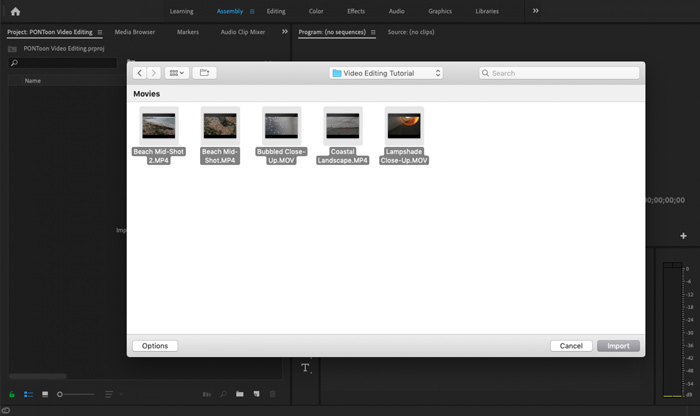
ขั้นตอนที่ 3. สลับไปที่พื้นที่ทำงาน Editing เพื่อให้เหมาะกับการบีบอัดไฟล์ MXF ของคุณมากขึ้น.
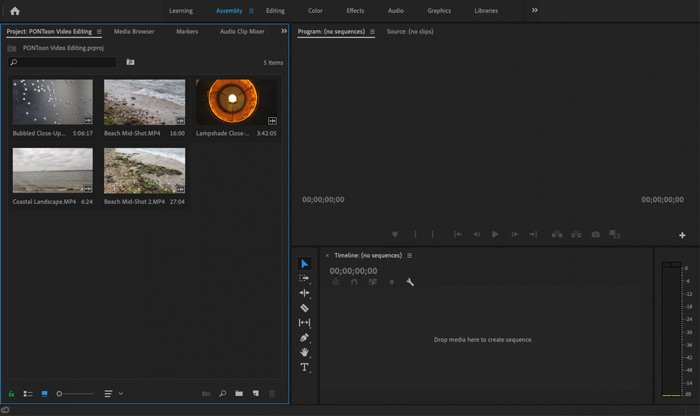
ขั้นตอนที่ 4. ตอนนี้คุณสามารถตัดต่อไฟล์ MXF บนไทม์ไลน์ได้แล้ว เพียงลากและวางคลิป MXF จากมีเดียที่นำเข้าไว้ลงบนไทม์ไลน์เพื่อสร้างซีเควนซ์ใหม่ จากนั้นคุณสามารถตัดแต่งไฟล์ MXF เพื่อลดขนาดไฟล์ได้.

คุณยังสามารถเลือกความละเอียดวิดีโอแบบกำหนดเองและอื่น ๆ เพื่อบีบอัดไฟล์ MXF นอกจากนี้คุณสามารถส่งออก MXF เป็นรูปแบบวิดีโอที่มีขนาดไฟล์เล็กลง
ส่วนที่ 3 คำถามที่พบบ่อยเกี่ยวกับการบีบอัดไฟล์ MXF
คำถาม 1. รูปแบบวิดีโอ MXF คืออะไร?
MXF ย่อมาจาก Material eXchange Format คือรูปแบบคอนเทนเนอร์ที่จัดเก็บวิดีโอเสียงและข้อมูลเมตา เป็นรูปแบบคอนเทนเนอร์วิดีโอสำหรับเนื้อหาวิดีโอและเสียงระดับมืออาชีพมาตรฐาน SMPTE กล้องวิดีโอดิจิตอลระดับมืออาชีพมากมายเช่น Sony, Panasonic, Canon และอื่น ๆ จัดเก็บวิดีโอในรูปแบบ MXF
คำถาม 2. วิธีการแปลง MXF เป็น MP4 ออนไลน์ฟรี?
MP4 เป็นฟอร์แมตที่ได้รับความนิยมมากที่สุดอย่างไม่ต้องสงสัย และสามารถรองรับได้เกือบทุกโปรแกรมเล่นวิดีโอ โปรแกรมตัดต่อ และอุปกรณ์ต่าง ๆ ดังนั้นในหลายกรณี คุณจำเป็นต้องแปลง MXF เป็น MP4 เพื่อการเล่นกลับหรือการตัดต่อที่ดียิ่งขึ้น คุณสามารถเลือกใช้ Free Online Video Converter เพื่อทำการแปลงไฟล์ MXF เป็น MP4 ได้อย่างง่ายดาย.
คำถามที่ 3. MXF เป็นรูปแบบวิดีโอแบบไม่สูญเสียข้อมูลหรือไม่?
MXF สามารถจัดเก็บฟุตเทจ RAW แบบไม่สูญเสียซึ่งนำเสนอสตูดิโอหลังการถ่ายทำระดับมืออาชีพความสามารถขั้นสูงในขั้นตอนการทำงานสำหรับการจัดระดับสีและการตัดต่อวิดีโอ รูปแบบ MXF สามารถรองรับรหัสเวลา SMPTE ได้อย่างสมบูรณ์
สรุป
ในบทความนี้เราได้พูดถึงวิธีบีบอัดไฟล์ MXF เป็นหลัก คุณต้องยอมรับว่าการบีบอัดไฟล์ MXF ด้วย Adobe Premiere Pro นั้นมีขั้นตอนค่อนข้างซับซ้อน ดังนั้นจึงขอแนะนำให้คุณใช้ Free Video Compressor ตามที่ได้แนะนำไว้ เพื่อช่วยลดขนาดไฟล์ MXF ของคุณ.
-
 วิธีบีบอัดวิดีโอ MP4 ให้มีขนาดเล็กลง
 วิดีโอ MP4 ใหญ่เกินไปสำหรับการอัปโหลด? ต้องการลดขนาดวิดีโอหรือไม่? นี่คือ 3 วิธีที่มีประสิทธิภาพในการบีบอัดไฟล์ MP4 ให้มีขนาดเล็กลงโดยไม่มีขีด จำกัด
-
 บทแนะนำการบีบอัด GIF และลดขนาดไฟล์ด้วยคุณภาพสูง
 นี่คือ 2 วิธีง่ายๆในการบีบอัด GIF บนคอมพิวเตอร์หรือโทรศัพท์มือถือของคุณ คุณสามารถใช้ FVC Free Online Video Compressor และ Photoshop ลดขนาดไฟล์ GIF ในแง่มุมต่างๆ
-
 4 วิธีในการบีบอัดไฟล์ QuickTime MOV ขนาดใหญ่โดยไม่สูญเสียคุณภาพ
 บทความนี้แสดงวิธีการบีบอัดวิดีโอ QuickTime MOV บนโทรศัพท์หรือคอมพิวเตอร์ของคุณโดยละเอียด หากวิดีโอ MOV ของคุณมีขนาดใหญ่เกินไปที่จะส่งแชร์หรือบันทึกคุณสามารถรับ 4 วิธีแก้ปัญหาที่ใช้งานได้ที่นี่
