


 Video Converter Ultimate
 บันทึกหน้าจอ
 ซ่อมวิดีโอ
 ดาวน์โหลดอย่างปลอดภัย
เรียนรู้วิธีครอบตัดวิดีโอบน Snapchat เพื่อให้ดูสวยงามยิ่งขึ้น
อยากให้คอนเทนต์ของคุณโดดเด่นไม่เหมือนใครและสร้างความประทับใจให้ผู้ติดตามใช่ไหม? การครอปวิดีโอบน Snapchat คือคำตอบ เพียงแค่คุณเชี่ยวชาญเทคนิคง่าย ๆ แตทรงพลังนี้ ก็สามารถสร้างสแน็ปที่ดูเนี้ยบระดับมืออาชีพและดึงดูดสายตาผู้ชมได้ อ่านต่อเพื่อดูวิธีครอปวิดีโอบน Snapchatแบบมือโปร วิธีการที่เราจะแนะนำต่อไปนี้จะช่วยยกระดับการเล่าเรื่องของคุณไปอีกขั้น อย่าพลาดโอกาสในการปรับแต่ง Snapchat Stories หรือวิดีโอของคุณให้โดดเด่นบนแพลตฟอร์มโซเชียลมีเดียที่เต็มไปด้วยพลังนี้.

ส่วนที่ 1 วิธีการครอบตัดวิดีโอบน Snapchat
Snapchat เป็นแพลตฟอร์มโซเชียลมีเดียที่ทำให้โลกต้องตะลึงด้วยคุณสมบัติที่เป็นเอกลักษณ์และส่วนต่อประสานที่ใช้งานง่าย คุณสมบัติที่สำคัญที่สุดอย่างหนึ่งของเครื่องมือแก้ไขวิดีโอของ Snapchat คือความสามารถในการครอบตัดวิดีโอ ด้วยการครอบตัดวิดีโอของคุณ คุณจะสามารถโฟกัสไปที่เรื่องใดเรื่องหนึ่ง สร้างองค์ประกอบที่น่าสนใจมากขึ้น และเปลี่ยนไปมาระหว่างคลิปต่างๆ ได้อย่างราบรื่น ในทางกลับกัน ต่อไปนี้เป็นคำแนะนำแบบง่ายๆ เกี่ยวกับวิธีครอบตัดวิดีโอบน Snapchat
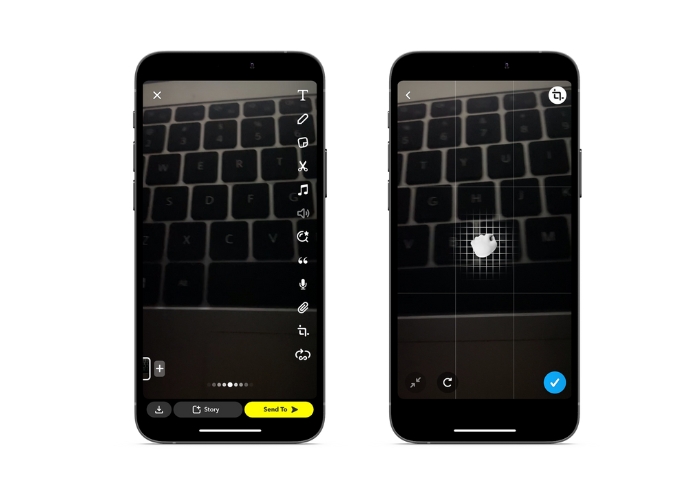
ขั้นตอนที่ 1. เปิด Snapchat จากนั้นกดปุ่มวงกลมสำหรับถ่ายภาพค้างไว้เพื่อบันทึกวิดีโอ.
ขั้นตอนที่ 2. เมื่อบันทึกวิดีโอเสร็จแล้ว ให้แตะที่ไอคอนครอปในเมนูด้านขวาเพื่อเปิดใช้เครื่องมือครอป.
ขั้นตอนที่ 3. ใช้สองนิ้วหยิกและลากบนวิดีโอเพื่อครอปให้ได้ขนาดและรูปทรงตามที่คุณต้องการ เมื่อคุณพอใจกับการครอปแล้ว ให้แตะไอคอนเครื่องหมายถูกเพื่อบันทึกการเปลี่ยนแปลง.
ขั้นตอนที่ 4. เพิ่มฟิลเตอร์ ข้อความ หรือเอฟเฟ็กต์อื่น ๆ ลงในวิดีโอ จากนั้นส่งให้ผู้ติดตามหรือเพิ่มลงในสตอรี่ของคุณ.
ส่วนที่ 2 วิธีการครอบตัดวิดีโอสำหรับ Snapchat
1. FVC Video Converter Ultimate
FVC Video Converter Ultimate ทำให้การแปลงและปรับแต่งวิดีโอของคุณเป็นเรื่องง่ายด้วยเพียงไม่กี่คลิก หนึ่งในฟีเจอร์ที่น่าสนใจของ FVC Video Converter Ultimate คือกล่องเครื่องมืออันทรงพลังที่รวบรวมเครื่องมือต่าง ๆ สำหรับตัดต่อและปรับปรุงวิดีโอของคุณ ตั้งแต่การเพิ่มซับไตเติลและลายน้ำ ไปจนถึงการปรับความสว่าง คอนทราสต์ และความอิ่มสี กล่องเครื่องมือนี้มีทุกอย่างที่คุณต้องการในการสร้างวิดีโอที่ดูเป็นมืออาชีพและโดดเด่น แต่หนึ่งในเครื่องมือที่มีประโยชน์ที่สุดในกล่องนี้ก็คือความสามารถในการครอปวิดีโอ คุณสามารถครอปวิดีโอเพื่อตัดส่วนที่ไม่ต้องการ ปรับอัตราส่วนภาพ หรือสร้างองค์ประกอบภาพที่น่าสนใจยิ่งขึ้น ทำตามคำแนะนำด้านล่างเพื่อเรียนรู้วิธีครอปวิดีโอสำหรับโพสต์ลง Snapchat.
ขั้นตอนที่ 1. ติดตั้งโปรแกรม
ในการเริ่มครอปวิดีโอด้วย FVC Video Converter Ultimate ก่อนอื่นคุณต้องดาวน์โหลดและติดตั้งโปรแกรมลงบนคอมพิวเตอร์ เพียงคลิกปุ่มดาวน์โหลดฟรีที่ตรงกับระบบปฏิบัติการของคุณ แล้วทำตามขั้นตอนการติดตั้ง.
ดาวน์โหลดฟรีสำหรับ Windows 7 ขึ้นไปดาวน์โหลดอย่างปลอดภัย
ดาวน์โหลดฟรีสำหรับ MacOS 10.7 ขึ้นไปดาวน์โหลดอย่างปลอดภัย
ขั้นตอนที่ 2. นำเข้าวิดีโอที่ต้องการครอป
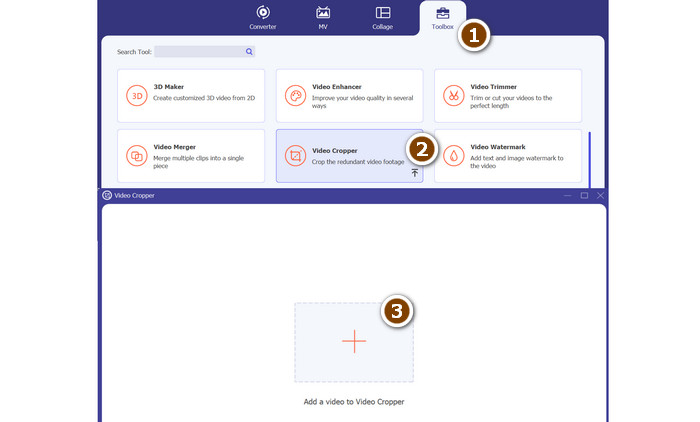
หลังจากติดตั้งโปรแกรมแล้ว ให้เปิดโปรแกรมขึ้นมา จากนั้นเข้าสู่กล่องเครื่องมือโดยคลิกแท็บToolbox แล้วเลือกตัวเลือกVideo Cropperเพื่อเปิดเครื่องมือครอปวิดีโอ เมื่อต้องการนำเข้าวิดีโอที่จะครอป ให้คลิกปุ่มสัญลักษณ์บวกในพื้นที่อัปโหลดของตัวเลือก Video Cropper.
ขั้นตอนที่ 3. ครอบตัดวิดีโอ
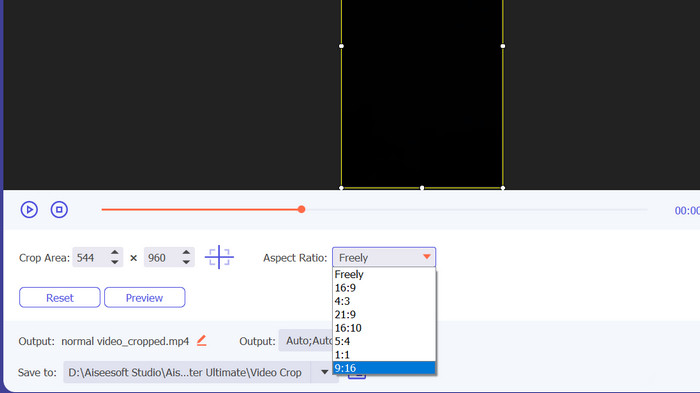
จากนั้น เลือกอัตราส่วนกว้างยาวที่คุณต้องการใช้สำหรับวิดีโอของคุณ สำหรับ Snapchat สัดส่วนภาพที่เหมาะคือ 9:16 (แนวตั้ง) คุณสามารถเลือกอัตราส่วนภาพที่คุณต้องการได้จากเมนูแบบเลื่อนลงที่อยู่ด้านล่างการแสดงตัวอย่างวิดีโอ หากต้องการครอบตัดวิดีโอของคุณ เพียงลากมุมของช่องครอบตัดเพื่อปรับขนาดและรูปร่างของวิดีโอ
ขั้นตอนที่ 4. ส่งออกวิดีโอที่ครอบตัดแล้ว
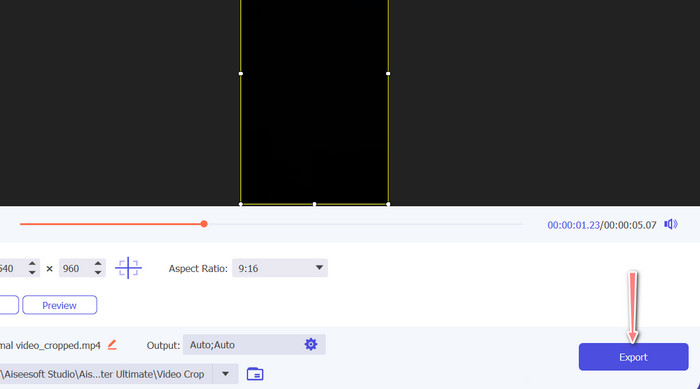
เมื่อคุณพอใจกับการครอปแล้ว ให้คลิกปุ่มExportที่มุมล่างขวาของหน้าต่างโปรแกรมเพื่อบันทึกไฟล์วิดีโอที่ครอปเรียบร้อย จากนั้นคุณสามารถแชร์ให้ผู้ติดตาม หรือโพสต์ลงบัญชี Snapchat ของคุณเพื่ออวดสกิลตัดต่อวิดีโอสุดเจ๋งได้เลย
2. วิด.ฟัน
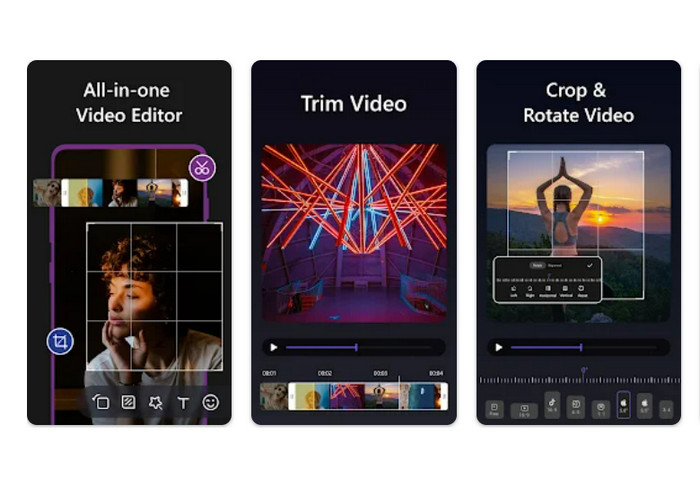
หากคุณใช้สมาร์ตโฟนหรือแท็บเล็ต แอป Vid.fun จะช่วยให้คุณครอปวิดีโอให้ได้ขนาดที่เหมาะสมกับ Snapchat ได้อย่างง่ายดาย หนึ่งในเครื่องมือที่มีประโยชน์ของแอปนี้คือฟีเจอร์ครอปวิดีโอที่ทรงพลัง ช่วยให้คุณปรับอัตราส่วนภาพของวิดีโอได้ด้วยการแตะเพียงไม่กี่ครั้ง นอกจากนี้ยังมีตัวเลือกอัตราส่วนภาพหลายแบบ ให้มั่นใจว่าวิดีโอ Snapchat ของคุณจะแสดงผลได้สวยงามอยู่เสมอ ด้านล่างคือคู่มือการครอปวิดีโอสำหรับ Snapchat.
ขั้นตอนที่ 1. เริ่มจากการดาวน์โหลด Vid.fun จาก Google Play Store แล้วเปิดแอปทันที ปุ่มCropสามารถเข้าถึงได้จากเมนูหลัก.
ขั้นตอนที่ 2. จากนั้นให้เพิ่มไฟล์มีเดียโดยเลือกจากแกลเลอรีในเครื่องของคุณ เลือกอัตราส่วนภาพที่ต้องการจากเมนูดรอปดาวน์ นอกจากนี้คุณยังสามารถใช้กรอบและจุดปรับตำแหน่งบนหน้าตัวอย่างวิดีโอเพื่อให้ได้ผลลัพธ์ตามที่ต้องการ.
ขั้นตอนที่ 3. ตรวจสอบผลลัพธ์ของวิดีโอที่ครอปแล้วให้แน่ใจว่าเป็นไปตามที่คุณต้องการ จากนั้นให้กดปุ่มExportที่มุมขวาบนเมื่อคุณครอปเสร็จเรียบร้อย.
อ่านเพิ่มเติม
วิธีทำให้วิดีโอบน Snapchat ช้าลงได้อย่างง่ายดายบนทุกอุปกรณ์
วิธีที่ง่ายที่สุดในการลบข้อความ Snapchat ออกจากภาพหน้าจอ
ส่วนที่ 3 คำถามที่พบบ่อยเกี่ยวกับการครอบตัดวิดีโอบน Snapchat
จะเปลี่ยนอัตราส่วนภาพใน Snapchat ได้อย่างไร?
Snapchat รองรับอัตราส่วนภาพหลายขนาดสำหรับวิดีโอ ได้แก่ 9:16 (แนวตั้ง), 16:9 (แนวนอน), 16:9 (แนวนอน) และ 4:5 (แนวตั้ง)
ฉันควรใช้อัตราส่วนเท่าใดสำหรับวิดีโอ Snapchat
อัตราส่วนภาพที่เหมาะสำหรับวิดีโอ Snapchat คือ 9:16 (แนวตั้ง) สิ่งนี้ทำให้มั่นใจได้ว่าวิดีโอของคุณจะแสดงเต็มหน้าจอบนอุปกรณ์มือถือและได้รับการปรับให้เหมาะสมสำหรับการดูบนแพลตฟอร์ม
เคล็ดลับในการครอบตัดวิดีโอสำหรับ Snapchat มีอะไรบ้าง
เมื่อครอบตัดวิดีโอสำหรับ Snapchat สิ่งสำคัญคือต้องเลือกอัตราส่วนภาพที่เหมาะสมกับหลักเกณฑ์ของแพลตฟอร์มและดูดีบนอุปกรณ์พกพา
สรุป
การครอปวิดีโอสำหรับ Snapchat เป็นขั้นตอนที่ง่ายแต่สำคัญ เพื่อให้คอนเทนต์ของคุณแสดงผลได้สวยที่สุดบนแพลตฟอร์มนี้ เพียงทำตามขั้นตอนที่กล่าวมาข้างต้นเกี่ยวกับวิธีครอปวิดีโอบน Snapchatหรือครอปสำหรับ Snapchat คุณก็สามารถครอปวิดีโอให้ได้อัตราส่วนภาพที่เหมาะสมและแชร์กับผู้ติดตามได้อย่างง่ายดาย.
-
 วิธีครอบตัดไฟล์ MP4 โดยไม่สูญเสียคุณภาพของวิดีโอ [2023]
 เรียนรู้วิธีการครอบตัด MP4 ด้วยขั้นตอนง่าย ๆ ที่มีให้สำหรับคุณเท่านั้น ดังนั้น ก้าวต่อไปเพราะเรานำเสนอเครื่องมือครอบตัดที่ดีที่สุดที่คุณอาจใช้ให้คุณ
-
 [ฟรี]4 วิธีง่ายๆ ในการครอบตัด GIF แบบเคลื่อนไหวทางออนไลน์และออฟไลน์
 ต้องการครอบตัด GIF อย่างง่ายดายหรือไม่ คุณสามารถทำได้ด้วยความช่วยเหลือของตัวครอบตัด GIF ที่มีอยู่ในบทความนี้ อ่านให้ดี และเรียนรู้วิธีการทำ
-
 6 ตัวเลือกที่ชื่นชอบ Snapchat ตัวกรอง Snapchat แบบเคลื่อนไหวบน Snapchat
 ต้องการทราบวิธีที่ดีที่สุดในการเพิ่มตัวกรองในวิดีโอ Snapchat หรือไม่? คุณสามารถคลิกที่นี่และเรียนรู้ตัวกรองต่างๆ ที่คุณสามารถใช้เพื่อนำไปใช้กับวิดีโอ Snapchat
