


 Video Converter Ultimate
 บันทึกหน้าจอ
 ซ่อมวิดีโอ
 ดาวน์โหลดอย่างปลอดภัย
เพิ่มพลังให้กับเกมดนตรีของคุณ: แปลง MP3 เป็น MIDI และ Remix Tunes
หากคุณเป็นนักดนตรีหรือนักผลิตเพลง คุณย่อมตระหนักดีว่า เครื่องมือที่เหมาะสมสามารถสร้างความแตกต่างอย่างมากต่อกระบวนการสร้างสรรค์ของคุณ หนึ่งในเครื่องมือที่ช่วยยกระดับดนตรีของคุณไปอีกขั้นได้ คือความสามารถในการแปลงไฟล์ MP3 เป็น MIDI แม้ไฟล์ MP3 จะเหมาะสำหรับการฟังเพลง แต่ไฟล์ MIDI กลับให้ความยืดหยุ่นและตัวเลือกในการปรับแต่งที่เหนือกว่าอย่างเทียบไม่ได้ ด้วยการแปลงไฟล์ MP3 ของคุณเป็น MIDI คุณสามารถปรับเปลี่ยนโน้ตแต่ละตัว เปลี่ยนจังหวะ (tempo) และคีย์ของเพลง และแม้แต่เพิ่มเครื่องดนตรีหรือเสียงใหม่ ๆ เข้าไปในแทร็กที่มีอยู่แล้วได้.
ด้วยเครื่องมือแปลงที่เหมาะสม ความเป็นไปได้ไม่มีที่สิ้นสุด ไม่ว่าคุณจะต้องการสร้างเพลงโปรดของคุณแบบรีมิกซ์ที่ไม่เหมือนใคร ถอดเสียงของเพลงสำหรับโน้ตเพลง หรือทดลองกับเสียงและการเรียบเรียงใหม่ การแปลง MP3 เป็น MIDI สามารถปฏิวัติเพลงของคุณและยกระดับความคิดสร้างสรรค์ของคุณไปอีกขั้น

ส่วนที่ 1 การเปรียบเทียบ MP3 กับ MIDI
หากคุณต้องการตรวจสอบการเปรียบเทียบเฉพาะของทั้งสองรูปแบบในด้านต่างๆ โปรดดูตารางด้านล่าง
| คุณสมบัติ | MP3 | มิดิ |
| ขนาดไฟล์ | ขนาดค่อนข้างใหญ่ | ขนาดเล็กมาก |
| คุณภาพเสียง | การบีบอัดที่สูญเสียคุณภาพสูง | คุณภาพต่ำ แต่ปรับแต่งได้ |
| แก้ไขได้ | แก้ไขได้ไม่ยาก | แก้ไขได้อย่างมาก |
| เครื่องมือวัด | เครื่องมือวัดคงที่ | เครื่องมือปรับแต่งได้ |
| การใช้งาน | ฟังเพลง | ตัดต่อและทำเพลง |
| การบีบอัด | การบีบอัดแบบสูญเสีย | ไม่มีการบีบอัด |
ส่วนที่ 2 วิธีแปลง MP3 เป็น MIDI หรือ MIDI เป็น MP3 บน Windows และ Mac
FVC Video Converter Ultimate เป็นเครื่องมือหลายฟังก์ชันสำหรับการแปลงวิดีโอ ช่วยให้คุณแปลงวิดีโอเป็นหลากหลายรูปแบบไฟล์ได้อย่างง่ายดาย ซอฟต์แวร์นี้รองรับไฟล์ได้หลายชนิด เช่น MP4, AVI, MOV, WMV และอื่น ๆ คุณสมบัตินี้ทำให้เป็นตัวเลือกที่น่าสนใจอย่างยิ่งสำหรับผู้ที่ต้องการแปลงไฟล์วิดีโอให้เหมาะกับอุปกรณ์หรือแพลตฟอร์มต่าง ๆ.
นอกเหนือจากฟังก์ชันการแปลงวิดีโอที่มีประสิทธิภาพแล้ว FVC Free Video Converter Ultimate ยังรวมคุณสมบัติที่ซับซ้อน เช่น การตัดต่อวิดีโอ การแปลงเป็นชุด และคุณสมบัติขั้นสูงอื่นๆ FVC นำเสนอการออกแบบที่เป็นมิตรต่อผู้ใช้และอินเทอร์เฟซที่ใช้งานง่ายซึ่งอำนวยความสะดวกในงานตัดต่อวิดีโอ เช่น การตัดแต่ง การครอบตัด การเพิ่มลายน้ำ และการปรับเอฟเฟกต์วิดีโอ ซอฟต์แวร์นี้ช่วยให้ผู้ใช้สามารถสร้างวิดีโอที่ปรับแต่งตามความต้องการเฉพาะของตนได้ นอกจากนี้ยังสามารถทำงานเป็นตัวแปลง MIDI เป็น MP3 เรียนรู้วิธีการใช้งานผ่านขั้นตอนทีละขั้นตอน
คุณสมบัติเด่น:
◆ ความเร็วในการแปลงที่รวดเร็ว: FVC ใช้เทคโนโลยีการแปลงขั้นสูง ส่งผลให้เวลาในการแปลงเร็วขึ้นเมื่อเทียบกับเครื่องมืออื่นที่คล้ายคลึงกัน
◆ ตัวเลือกการปรับแต่ง: FVC ช่วยให้คุณปรับแต่งการตั้งค่าการแปลง เช่น ตัวแปลงสัญญาณวิดีโอและเสียง บิตเรต อัตราเฟรม และความละเอียด
◆ อินเทอร์เฟซที่ใช้งานง่าย: FVC มีอินเทอร์เฟซที่ใช้งานง่ายและใช้งานง่าย
ขั้นตอนที่ 1. ดาวน์โหลดและติดตั้งโปรแกรม
ก่อนอื่น คุณจำเป็นต้องดาวน์โหลดและติดตั้งซอฟต์แวร์ FVC Video Converter Ultimate บนคอมพิวเตอร์ส่วนบุคคลของคุณ คลิกปุ่ม ดาวน์โหลดฟรี ด้านล่าง จากนั้นจึงเปิดใช้งานโปรแกรม.
ดาวน์โหลดฟรีสำหรับ Windows 7 ขึ้นไปดาวน์โหลดอย่างปลอดภัย
ดาวน์โหลดฟรีสำหรับ MacOS 10.7 ขึ้นไปดาวน์โหลดอย่างปลอดภัย
ขั้นตอนที่ 2. เพิ่มไฟล์ MIDI หรือ MP3 ลงในโปรแกรม
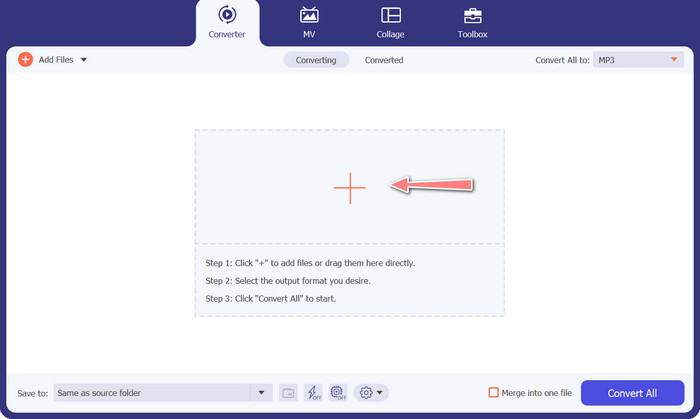
จากนั้นให้เพิ่มไฟล์เสียง MIDI หรือ MP3 ที่คุณต้องการจะแปลง คลิกปุ่ม Add Files เพื่ออิมพอร์ตไฟล์เสียงของคุณ หลังจากเพิ่มไฟล์เสียงลงในโปรแกรมสำเร็จแล้ว ภาพตัวอย่าง (thumbnail) ของไฟล์เสียงนั้นจะปรากฏให้เห็น.
ขั้นตอนที่ 3. เลือกรูปแบบเอาต์พุต
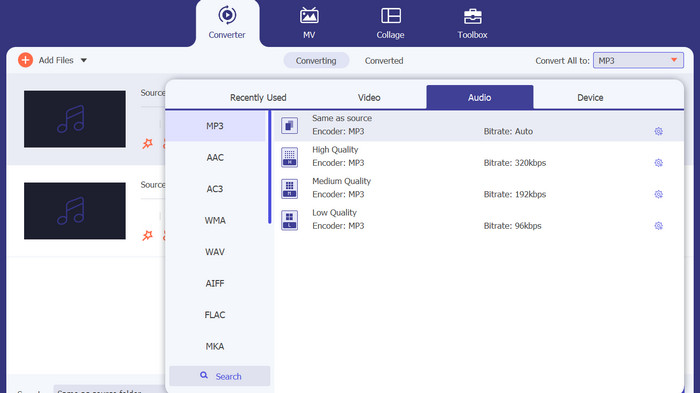
เมื่อดำเนินการตามขั้นตอนข้างต้นแล้ว ให้เลือกฟอร์แมตเอาต์พุตที่เหมาะสม เลือกรูปแบบ MP3 เป็นตัวเลือกเอาต์พุตจากเมนูดรอปดาวน์ที่อยู่ถัดจากส่วน Convert All to หากคุณต้องการปรับแต่งเพิ่มเติม สามารถตั้งค่าวิดีโอเอาต์พุตได้เองโดยคลิกปุ่ม Custom Profile.
ขั้นตอนที่ 4. เริ่มกระบวนการแปลงไฟล์
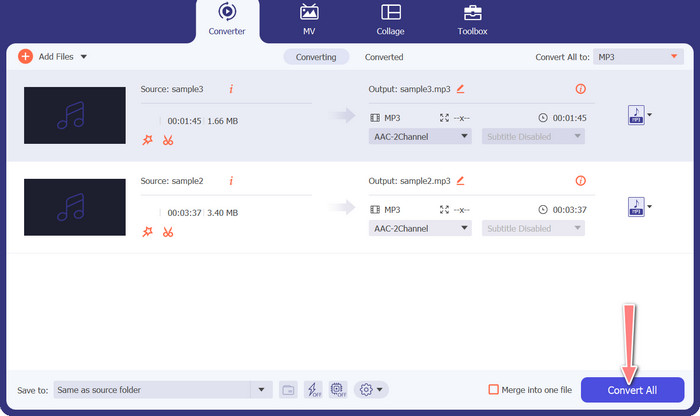
สุดท้าย เลือกตัวเลือก Convert All เพื่อเริ่มกระบวนการแปลงไฟล์ เมื่อการแปลงเสร็จสมบูรณ์แล้ว ไฟล์ MP3 จะถูกบันทึกไว้ในโฟลเดอร์ปลายทางที่กำหนดไว้.
2. แปลงเสียงออนไลน์ฟรี
อีกวิธีหนึ่งที่คุณสามารถใช้ได้คือ Free Audio Converter Online ตามชื่อของมัน นี่คือโปรแกรมออนไลน์ที่ทำงานผ่านเว็บโดยตรง ดังนั้นคุณไม่จำเป็นต้องมีแอปแปลงไฟล์ MP3 เป็น MIDI ติดตั้งในเครื่อง ทุกอย่างสามารถเข้าถึงและทำได้ผ่านเบราว์เซอร์ของคุณเพียงอย่างเดียว ฟังก์ชันต่าง ๆ ก็ไม่ได้ด้อยไปกว่ากัน คุณยังสามารถอัปโหลดไฟล์จำนวนมากหรือแปลงเป็นชุด (batch convert) และปรับแต่งโปรไฟล์ของไฟล์วิดีโอหรือไฟล์เสียงได้ ทำความรู้จักกับตัวแปลง MP3 เป็น MIDI ออนไลน์ที่ยอดเยี่ยมตัวนี้ได้โดยทำตามขั้นตอนด้านล่าง.
คุณสมบัติเด่น
◆ การเข้าถึงออนไลน์: ในฐานะที่เป็นเครื่องมือออนไลน์ ตัวแปลงเสียงออนไลน์ฟรีสามารถเข้าถึงได้จากทุกที่
◆ การแปลงเป็นชุด: เครื่องมือแปลงไฟล์ MIDI เป็น MP3 แบบออนไลน์ฟรีช่วยให้ผู้ใช้สามารถแปลงไฟล์เสียงหลายไฟล์พร้อมกันได้ ประหยัดเวลาและความพยายาม
◆ ความเร็วในการแปลงที่รวดเร็ว: เป็นเซิร์ฟเวอร์บนคลาวด์ที่สามารถจัดการกระบวนการแปลงได้ ทำให้สามารถแปลงได้เร็ว
ขั้นตอนที่ 1. เพื่อเริ่มใช้ Free Audio Converter Online ให้คุณเปิดเว็บเบราว์เซอร์ที่คุณชื่นชอบก่อน แล้วไปที่เว็บไซต์โดยตรง.
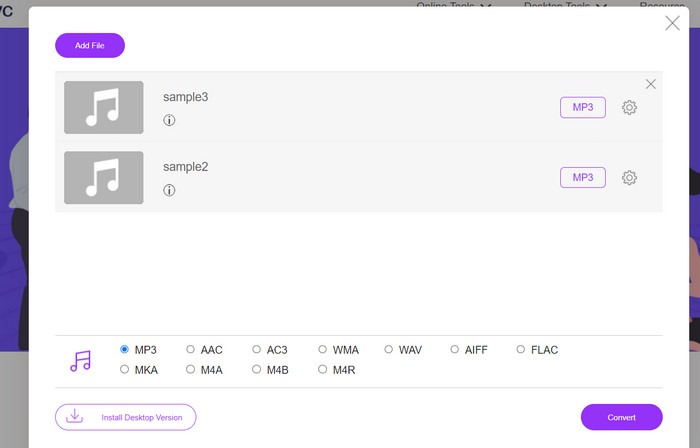
ขั้นตอนที่ 2. คลิกตัวเลือก Add Files to Convert จากนั้นเครื่องมือจะให้คุณดาวน์โหลดและติดตั้งตัวเรียกใช้งานขนาดเล็ก เมื่อการติดตั้งเสร็จสิ้น คุณก็สามารถอัปโหลดไฟล์ MIDI หรือ M3 ของคุณได้.
ขั้นตอนที่ 3. จากเมนู Audio format ให้เลือก MP3 เป็นรูปแบบสำหรับไฟล์เอาต์พุตสุดท้าย คุณสามารถปรับคุณภาพของไฟล์ MP3 ที่ได้ โดยการเลือกบิตเรตที่แตกต่างกัน.
ขั้นตอนที่ 4. สุดท้าย คลิกปุ่ม Convert เพื่อเริ่มกระบวนการแปลงไฟล์.
ส่วนที่ 3 แปลง MP3 เป็น MIDI หรือ MIDI เป็น MP3 บนมือถือ
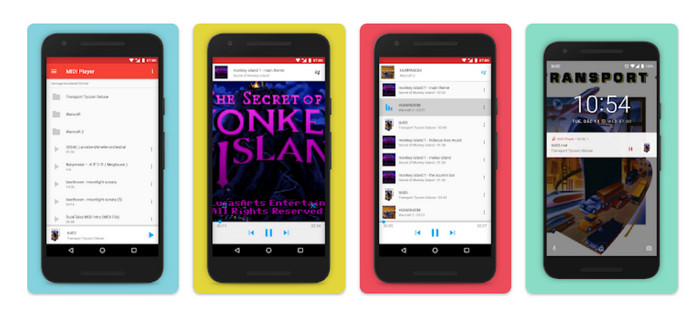
MIDI Player & Converter เป็นแอพมือถือที่ออกแบบมาสำหรับอุปกรณ์ Android และใช้สำหรับเล่นและแปลงไฟล์ MIDI เป็นรูปแบบเสียงอื่นเป็นหลัก โปรแกรมนี้ให้ดาวน์โหลดฟรีและมีส่วนต่อประสานที่ใช้งานง่าย คุณสมบัติหลักประการหนึ่งของ MIDI Player & Converter คือเครื่องเล่น MIDI ในตัว ซึ่งช่วยให้ผู้ใช้สามารถฟังไฟล์ MIDI ด้วยเสียงคุณภาพสูง นอกจากความสามารถในการเล่น MIDI แล้ว MIDI Player & Converter ยังมีเครื่องมือสำหรับแปลงไฟล์ MIDI เป็นรูปแบบเสียงอื่น ๆ เช่น MP3, WAV และ AAC
คุณสมบัติเด่น
◆ การแปลงเสียง: แอพนี้ให้ผู้ใช้แปลงไฟล์ MIDI เป็นรูปแบบเสียงอื่น ๆ รวมถึง MP3, WAV และ AAC
◆ การตั้งค่าเอาต์พุตที่ปรับแต่งได้: ผู้ใช้สามารถปรับคุณภาพเสียงเอาต์พุต อัตราตัวอย่าง และบิตเรตได้ตามต้องการ
◆ การปรับจังหวะและระดับเสียง: แอพนี้ยังมีเครื่องมือสำหรับปรับจังหวะและระดับเสียงของไฟล์เสียงในระหว่างกระบวนการแปลง
◆ การแปลงเป็นชุด: MIDI Player & Converter ช่วยให้ผู้ใช้สามารถแปลงไฟล์ MIDI หลายไฟล์เป็นรูปแบบเสียงได้พร้อมกัน
ขั้นตอนที่ 1. หากต้องการเปลี่ยนไฟล์ MIDI เป็น MP3 คุณสามารถดาวน์โหลดและติดตั้งแอป MIDI Player & Converter ผ่าน Google Play Store.
ขั้นตอนที่ 2. เปิดใช้งานแอปพลิเคชัน และเลือกฟังก์ชัน Convert จากเมนูหลัก.
ขั้นตอนที่ 3. ไปที่หมวด Source แล้วเลือกตัวเลือก MIDI จากนั้นเลือกไฟล์ MIDI ที่ต้องการจะแปลง ในหมวด Target ให้เลือกฟอร์แมต MP3 เป็นรูปแบบเอาต์พุต.
ขั้นตอนที่ 4. ปรับแต่งพารามิเตอร์ของเอาต์พุต เช่น คุณภาพเสียง อัตราการสุ่มตัวอย่าง (sample rate) และบิตเรต ให้ตรงตามความต้องการของคุณ ใช้เครื่องมือที่มีในตัวเพื่อปรับจังหวะ (tempo) และระดับเสียง (pitch) ของไฟล์เสียง จากนั้นเริ่มกระบวนการแปลงโดยเลือกตัวเลือก Convert.
อ่านเพิ่มเติม:
แปลง MP3 เป็น OGG เพื่อสัมผัสคุณภาพเสียงที่เหนือกว่า
FLAC vs. MP3: รูปแบบไฟล์เสียงใดคือที่สุด
ส่วนที่ 4 คำถามที่พบบ่อยเกี่ยวกับการแปลง MP3 เป็น MIDI
การแปลงไฟล์ MIDI เป็น MP3 ถูกกฎหมายหรือไม่
ความถูกต้องตามกฎหมายของการแปลงไฟล์ MIDI เป็น MP3 อาจแตกต่างกันไปขึ้นอยู่กับกฎหมายลิขสิทธิ์ในประเทศของคุณ หากคุณเป็นเจ้าของสิทธิ์ในไฟล์ MIDI หรือได้รับอนุญาตจากผู้ถือลิขสิทธิ์ การแปลงเป็น MP3 นั้นควรถูกกฎหมาย ในทางกลับกัน คุณควรตรวจสอบกฎหมายในภูมิภาคของคุณเสมอ เพื่อให้แน่ใจว่าคุณไม่ได้ละเมิดข้อบังคับด้านลิขสิทธิ์ใดๆ
ฉันสามารถปรับแต่งการตั้งค่าเอาต์พุตเมื่อแปลงไฟล์ MIDI เป็น MP3 ได้หรือไม่
ได้ เครื่องมือแปลงไฟล์ MIDI เป็น MP3 ส่วนใหญ่จะให้คุณปรับแต่งการตั้งค่าเอาต์พุต เช่น คุณภาพเสียง อัตราตัวอย่าง และบิตเรต ซึ่งอาจช่วยให้คุณได้คุณภาพเสียงและขนาดไฟล์ MP3 ที่ต้องการ
ฉันสามารถแปลง MP3 เป็น MIDI ในความกล้าได้หรือไม่
A: Audacity ไม่สามารถแปลงไฟล์ MP3 เป็นไฟล์ MIDI ได้โดยตรง แม้ว่า Audacity จะเป็นซอฟต์แวร์แก้ไขและบันทึกเสียงที่ทรงพลัง แต่ก็ไม่มีความสามารถจดจำและแยกโน้ตแต่ละรายการจากไฟล์ MP3 ซึ่งจำเป็นต่อการสร้างไฟล์ MIDI
สรุป
กระบวนการแปลงไฟล์MIDI เป็น MP3 หรือกลับกัน สามารถเป็นวิธีที่มีประโยชน์สำหรับการแบ่งปันและเล่นผลงานดนตรีบนแพลตฟอร์มหรืออุปกรณ์ต่าง ๆ มีเครื่องมือให้เลือกใช้มากมายเพื่อจุดประสงค์นี้ ไม่ว่าจะเป็นซอฟต์แวร์บนคอมพิวเตอร์เดสก์ท็อป ตัวแปลงไฟล์ออนไลน์ หรือแอปพลิเคชันบนอุปกรณ์พกพา.
-
 M4A vs MP3: ไฟล์เสียงรูปแบบไหนที่เหมาะกับคุณ?
 คุณขาดระหว่างรูปแบบเสียง M4A และ MP3 หรือไม่? การตรวจสอบและเปรียบเทียบ M4A กับ MP3 ที่ครอบคลุมของเราจะช่วยให้คุณเลือกประเภทไฟล์ที่ดีที่สุดสำหรับความต้องการของคุณ
-
 วิธีแปลง MP3 เป็น M4A เพื่อเพิ่มคุณภาพเสียง
 ปรับปรุงคุณภาพไฟล์เพลงของคุณด้วยการแปลง MP3 เป็น M4A ด้วยเคล็ดลับและคำแนะนำจากผู้เชี่ยวชาญของเรา คำแนะนำของเรามีคำแนะนำทีละขั้นตอนและซอฟต์แวร์ที่แนะนำ
-
 ตัวแปลง MP3 เป็น AIFF ที่ยอดเยี่ยมสำหรับ Windows และ Mac
 บทช่วยสอนนี้จะแนะนำคุณในแต่ละขั้นตอนของการแปลง MP3 เป็น AIFF โดยใช้เครื่องมือที่เชื่อถือได้ เยี่ยมชมพวกเขาเพื่อหาข้อมูลเพิ่มเติม
