


 Video Converter Ultimate
 บันทึกหน้าจอ
 ซ่อมวิดีโอ
 ดาวน์โหลดอย่างปลอดภัย
MOV เป็น MPG: คู่มือฉบับย่อเกี่ยวกับวิธีแปลงรูปแบบเหล่านี้ในปี 2023
โดยสรุปแล้ว ไฟล์ MOV ได้รับเสียงตอบรับที่ดีในปัจจุบัน เพราะถือเป็นหนึ่งในรูปแบบไฟล์ที่เหมาะสำหรับจัดเก็บภาพยนตร์ รูปแบบไฟล์นี้เป็นค่าเริ่มต้นที่ได้รับการยอมรับอย่างแพร่หลายสำหรับผลิตภัณฑ์ของ Apple เช่น iPhone, iPad และ MacBook อย่างไรก็ตาม เมื่อคุณพยายามอัปโหลดไฟล์ MOV บนอินเทอร์เน็ต คุณอาจประสบปัญหาเพราะไฟล์มีขนาดใหญ่กว่าเมื่อเทียบกับรูปแบบวิดีโออื่น ๆ เพื่อแก้ปัญหานี้ คุณสามารถเลือกแปลง MOV เป็น MPGได้ ดังนั้นโปรดติดตามคู่มือนี้ต่อไป แล้วเราจะช่วยให้คุณเรียนรู้วิธีจัดการขั้นตอนนี้ให้สำเร็จ.

ส่วนที่ 1 แปลง MOV เป็น MPG
1. Video Converter Ultimate
Video Converter Ultimate เป็นโซลูชันแบบออฟไลน์ที่ครบเครื่องในการตอบโจทย์ทุกความต้องการในการแปลง MOV เป็น MPG ภายในไม่กี่คลิก โปรแกรมนี้ช่วยให้คุณแปลงไฟล์ได้ทั้งขนาดเล็กและขนาดใหญ่ได้อย่างไม่มีปัญหา นอกจากนี้ เครื่องมือนี้ยังมีการตั้งค่าปรับแต่งผลลัพธ์ (Output Customization) ที่ช่วยให้ผู้ใช้ได้ไฟล์เอาต์พุตคุณภาพสูงตามต้องการ ด้านล่างคือคู่มือแบบย่อสำหรับการแปลง MOV เป็น MPG อย่างรวดเร็ว.
ขั้นตอนที่ 1 ติดตั้งโปรแกรม
เริ่มต้นโดยคลิกปุ่มดาวน์โหลดที่เหมาะกับอุปกรณ์ของคุณด้านล่าง จากนั้นคลิกไฟล์ติดตั้งและรันให้เสร็จสิ้นเพื่อเปิดโปรแกรมบนหน้าจอของคุณ.
ดาวน์โหลดฟรีสำหรับ Windows 7 หรือใหม่กว่าดาวน์โหลดอย่างปลอดภัย
ดาวน์โหลดฟรีสำหรับ MacOS 10.7 ขึ้นไปดาวน์โหลดอย่างปลอดภัย
ขั้นตอนที่ 2 อัปโหลดไฟล์ MOV เพื่อแปลง
หลังติดตั้งโปรแกรมแล้ว ให้เลือกปุ่มเครื่องหมายบวกตรงกึ่งกลางหน้าตาโปรแกรม เมื่อหน้าต่างไดเรกทอรีของคอมพิวเตอร์ปรากฏขึ้น ให้เลือกไฟล์ MOV ที่ต้องการอัปโหลด นอกจากนี้คุณยังสามารถอัปโหลดได้มากกว่าหนึ่งไฟล์เพื่อแปลงแบบจำนวนมากได้.
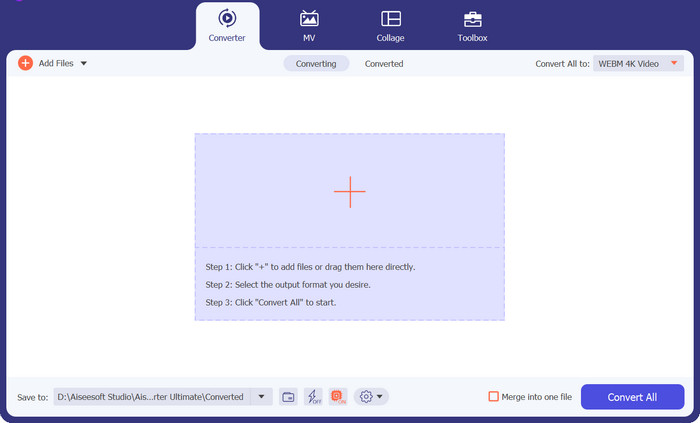
ขั้นตอนที่ 3 เลือกเอาต์พุต
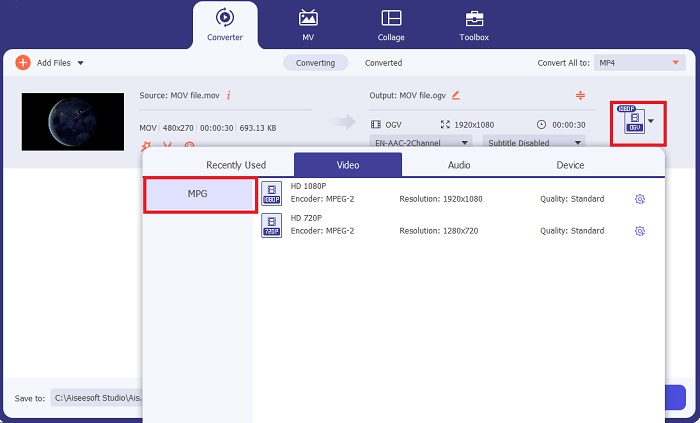
ภาพตัวอย่าง (thumbnail) ของไฟล์ MOV ของคุณจะแสดงบนโปรแกรม เพื่อยืนยันว่าอัปโหลดสำเร็จแล้ว หากต้องการเลือกไฟล์เอาต์พุต ให้ขยายแท็บOutputแล้วคลิกแผงVideo จากนั้นเลื่อนดูและเลือกMPG.
ขั้นตอนที่ 4 เริ่มการแปลง
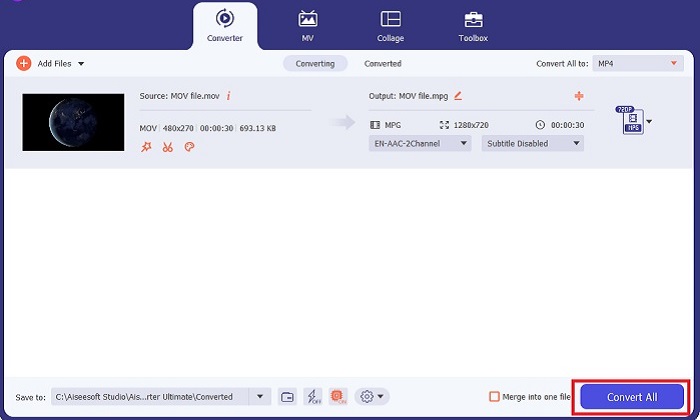
สุดท้าย ปรับคุณภาพของเอาต์พุตตามที่ต้องการโดยตั้งค่าพารามิเตอร์เอาต์พุตให้เหมาะสม เมื่อเรียบร้อยแล้ว ให้กดปุ่มConvertเพื่อเริ่มกระบวนการแปลงไฟล์จาก MOV เป็น MPG.
คุณสมบัติเด่น
◆ การแปลง MOV เป็น MPG ที่ราบรื่น: สิ่งหนึ่งที่เราชอบเกี่ยวกับ Video Converter Ultimate คือส่วนต่อประสานที่ใช้งานง่าย เครื่องมือนี้เหมาะที่สุดสำหรับทุกคน ไม่ว่าจะเป็นผู้เริ่มต้นหรือผู้ใช้ที่มีทักษะ
◆ ความเร็วในการแปลงเร็วขึ้น 50 เท่า: ด้วยความช่วยเหลือจากเทคโนโลยีการเข้ารหัส GPU Acceleration ทำให้ Video Converter Ultimate ฉลาดกว่าตัวแปลงออฟไลน์อื่นๆ เนื่องจากการแปลงที่รวดเร็วโดยไม่มีอาการแล็กและหยุดทำงาน
◆ คุณสมบัติการแปลงจำนวนมาก: ด้วย Video Converter Ultimate คุณยังสามารถแปลงโฟลเดอร์ของไฟล์ MOV ให้เลือกมากกว่า 100+ รูปแบบนอกเหนือจาก MPG
2. โปรแกรมแปลงวิดีโอออนไลน์ฟรี
Free Video Converter Online เป็นอีกหนึ่งซอฟต์แวร์ที่ช่วยยกระดับการแปลงรูปแบบไฟล์ แม้ว่าโปรแกรมออนไลน์นี้จะไม่มีเครื่องมือที่ครอบคลุมเหมือนซอฟต์แวร์ออฟไลน์ แต่ก็ถือว่าผ่านเกณฑ์ในฐานะโปรแกรมที่เชื่อถือได้สำหรับการแปลง MOV เป็น MPG ออนไลน์ เครื่องมือนี้รองรับการแปลงไฟล์แบบหลายไฟล์พร้อมกัน (bulk conversion) และยังให้คุณควบคุมการตั้งค่าเอาต์พุตได้อย่างเต็มที่.
ขั้นตอนที่ 1 ก่อนอื่น ให้ไปที่หน้าเว็บไซต์หลักของ Free Video Converter Online ก่อนอัปโหลดไฟล์ MOV ให้กดปุ่มAdd Files แล้วระบบจะขอให้คุณเปิดใช้งานเครื่องมือออนไลน์ก่อน.
ขั้นตอนที่ 2 หากต้องการอัปโหลดไฟล์ที่คุณต้องการแปลง ให้กดปุ่มAdd Filesอีกครั้งและอัปโหลดไฟล์ของคุณ คุณยังสามารถใช้ฟังก์ชันลากแล้วปล่อยได้ด้วย.
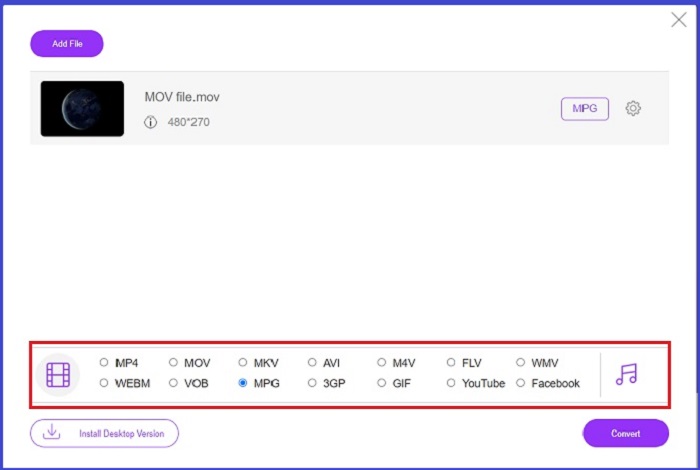
ขั้นตอนที่ 3 เมื่อไฟล์ต้นฉบับของคุณปรากฏขึ้นแล้ว ให้เลือกฟอร์แมตเอาต์พุตที่มุมล่างของหน้าจอ ในแผง Video คุณจะเห็นทุกรูปแบบที่เป็นไปได้ สำหรับกรณีนี้ให้เลือก MPG จากนั้นกดปุ่มConvertและรอให้ไฟล์ของคุณดาวน์โหลดเสร็จ.
คุณสมบัติเด่น
◆ เครื่องมือแปลงไฟล์ออนไลน์หลายแพลตฟอร์ม: ไม่ว่าคุณจะใช้โทรศัพท์ แท็บเล็ต หรือคอมพิวเตอร์ เครื่องมือนี้ทำงานได้ดีอย่างสมบูรณ์ ซึ่งทำให้การแปลงวิดีโอหรือเสียงเป็นไปได้
◆ การรับประกันความเป็นส่วนตัว: ใครอยากโดนบุกรุกข้อมูลส่วนตัว? ด้วย Free Video Converter Online คุณควรเผชิญกับปัญหาที่เป็นศูนย์เกี่ยวกับปัญหานี้ เครื่องมือออนไลน์นี้ช่วยให้ผู้ใช้สามารถแปลงไฟล์ MOV เป็น MPG ได้ฟรีโดยไม่ต้องมีขั้นตอนการสมัครใช้งาน
◆ ไม่มีข้อกำหนดในการติดตั้ง: เครื่องมือนี้เป็นอีกหนึ่งตัวแปลงที่ไม่ยุ่งยากที่จะช่วยให้คุณหลีกหนีจากการติดตั้งที่ยุ่งยาก โดยเฉพาะอย่างยิ่งหากคุณใช้พื้นที่ดิจิทัลไม่เพียงพอ
ส่วนที่ 2 แปลง MPG เป็น MOV
1. Video Converter Ultimate
ในครั้งนี้ Video Converter Ultimate ก็ยังคงเป็นโซลูชันที่ดีที่สุดที่เราขอแนะนำสำหรับการแปลงไฟล์ MOV เป็น MPG บนทั้ง Mac และ Windows เครื่องมือนี้รองรับรูปแบบวิดีโอและเสียงมากกว่า 1000+ รูปแบบ รวมถึงฟอร์แมตที่ออกแบบเฉพาะสำหรับอุปกรณ์ต่าง ๆ เช่น Samsung, Apple, Sony และอื่น ๆ ทำตามคู่มือด้านล่างเพื่อแปลงไฟล์ MPG ของคุณเป็น MOV.
ดาวน์โหลดฟรีสำหรับ Windows 7 หรือใหม่กว่าดาวน์โหลดอย่างปลอดภัย
ดาวน์โหลดฟรีสำหรับ MacOS 10.7 ขึ้นไปดาวน์โหลดอย่างปลอดภัย
ขั้นตอนที่ 1 กดปุ่มAdd Filesเพื่อเพิ่มไฟล์ MPG เข้าโปรแกรม.
ขั้นตอนที่ 2 หลังจากไฟล์ของคุณโหลดขึ้นบนหน้าจอแล้ว ให้เลือกเอาต์พุตโดยคลิกOutput > Video > MOV เพื่อให้ได้คุณภาพที่ดียิ่งขึ้น คุณสามารถปรับแต่งพารามิเตอร์วิดีโอเพิ่มเติมได้.
ขั้นตอนที่ 3 เลือกปุ่มConvertเพื่อสั่งให้โปรแกรมแปลงไฟล์จาก MPG เป็น MOV เมื่อการแปลงเสร็จสิ้น คุณสามารถตรวจสอบไฟล์เอาต์พุตได้ผ่านโปรแกรม.
2. AnyConv
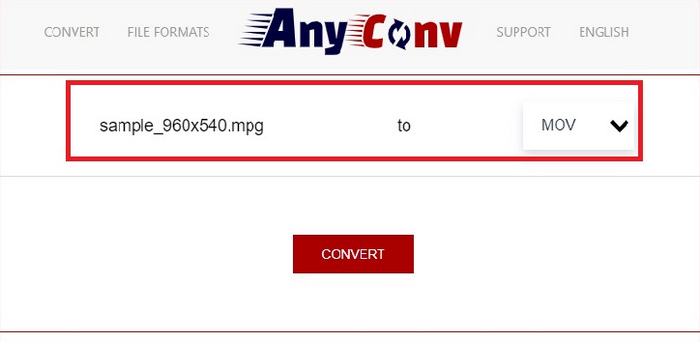
AnyConv เป็นตัวแปลง MPG เป็น MOV ฟรีทางออนไลน์ โปรแกรมนี้ทำงานได้ดีกับทุกอุปกรณ์และมีคุณสมบัติการลากและวางเมื่อคุณอัปโหลดไฟล์ MPG ยิ่งไปกว่านั้น โซลูชันออนไลน์นี้ยังรักษาความปลอดภัยข้อมูลของผู้ใช้ด้วยการลบไฟล์ที่แปลงแล้วหลังจากผ่านไปหนึ่งชั่วโมง นอกจาก MOV แล้ว คุณยังสามารถแปลงไฟล์ MPG เป็น 3GP, AVCHD, MP4, MKV และอีกมากมาย
ขั้นตอนที่ 1 ก่อนอื่น ให้เข้าเว็บไซต์ AnyConv เมื่อหน้าเว็บแสดงบนหน้าจอแล้ว ให้คลิกChoose Fileและเลือกไฟล์วิดีโอ MOV เป้าหมายที่คุณต้องการแปลง.
ขั้นตอนที่ 2 เมื่อไฟล์ MOV ของคุณอัปโหลดเสร็จแล้ว ให้เลือกMPGจากรายการฟอร์แมตเอาต์พุตในคอลัมน์ Output ตรงกึ่งกลางหน้า.
ขั้นตอนที่ 3 สุดท้าย คลิกปุ่มConvertและรอให้ไฟล์ของคุณดาวน์โหลดเสร็จ.
อ่านเพิ่มเติม:
3 วิธีที่ดีที่สุดในการแปลง MPG เป็น MP4 อย่างรวดเร็ว
5 ตัวแปลง MOV เป็น 3GP ที่ดีที่สุดที่คุณไม่ควรพลาด
ส่วนที่ 3 คำถามที่พบบ่อยเกี่ยวกับวิธีการแปลง MPG เป็น MOV
มีตัวแปลง MOV เป็น MPG ฟรีหรือไม่?
แน่นอนใช่! ตัวแปลงออนไลน์เป็นตัวเลือกอันดับต้น ๆ ของคุณในการป้องกันการจ่ายค่าธรรมเนียม คุณสามารถเลือก Free Online Video Converter เพื่อแปลง MOV เป็น MPG ได้ฟรี
MPG ดีกว่า MOV หรือไม่
MOV ดีกว่า MPG เนื่องจากความแตกต่างในประเภท MOV เป็นรูปแบบคอนเทนเนอร์ที่บันทึกข้อมูลต้นฉบับของคุณทั้งหมด ในขณะเดียวกัน MPG เป็นตัวแปลงสัญญาณบีบอัดที่ใช้เพื่อลดขนาดไฟล์ของวิดีโอเพื่อให้ถ่ายโอนไฟล์ผ่านอินเทอร์เน็ตได้เร็วขึ้น
ข้อดีของไฟล์ MOV คืออะไร?
ไฟล์ MOV เหมาะสำหรับการแก้ไขและถือเป็นมาตรฐานในการเลือกรูปแบบวิดีโอที่ดีที่สุด ข้อเสียอย่างหนึ่งของไฟล์นี้คือมีเดียเพลเยอร์เพียงไม่กี่ตัวเท่านั้นที่เปิดรูปแบบนี้
MOV เป็น MPG ลดคุณภาพหรือไม่
ใช่. การแปลงไฟล์ของคุณจาก MOV เป็น MPG จะไม่เพียงแต่ลดขนาดไฟล์วิดีโอของคุณ แต่ยังลดคุณภาพด้วย ทั้งสองไฟล์นั้นยอดเยี่ยมในทุก ๆ กรณีที่คุณต้องการ
ฉันสามารถเล่น MOV ใน Windows Media Player ได้หรือไม่
โชคดีที่ไฟล์ MOV บน Windows Media Player สามารถเล่นได้ตราบเท่าที่เป็นเวอร์ชัน 12 หรือสูงกว่า
สรุป
ข้างต้นคือวิธีต่าง ๆ ที่เป็นไปได้ในการแปลงMPG เป็น MOVหรือกลับกัน ทั้งสองฟอร์แมตสามารถตอบโจทย์ความต้องการที่แตกต่างกันของคุณได้ หากใช้ตัวแปลงออนไลน์ คุณจะได้กระบวนการแปลงที่ตรงไปตรงมา ในทางกลับกัน ถ้าคุณต้องการปรับแต่งไฟล์ด้วยการปรับคุณภาพหรือแม้แต่แก้ไขวิดีโอเพิ่มเติม เราขอแนะนำให้ใช้ Video Converter Ultimate.
-
 FLV เป็น MPG - วิธีการแปลง FLV เป็น MPG บน Mac, PC และออนไลน์ฟรี
 วิธีแปลง FLV เป็น MPEG ฉันสามารถแปลง FLV เป็น MPG ได้ฟรีหรือไม่ โพสต์นี้แชร์ตัวแปลงวิดีโอฟรี 3 รายการเพื่อช่วยคุณแปลง FLV เป็น MPG โดยไม่สูญเสียคุณภาพ
-
 วิธีแปลง MPG เป็น M4V บน Mac และใช้เครื่องมือออนไลน์
 คุณเป็นผู้ใช้ Mac รายใหม่และไม่ทราบวิธีแปลง MPG เป็น M4V หรือไม่ จากนั้น คุณสามารถอ่านบทความนี้เพื่อทราบข้อมูลเพิ่มเติมและค้นพบวิธีแปลงไฟล์โดยใช้ Mac ของคุณ
-
 8 เครื่องเล่น MOV ที่ดีที่สุดในการเล่นไฟล์ QuickTime MOV ด้วยคุณภาพดั้งเดิม
 เพียงเรียนรู้เพิ่มเติมเกี่ยวกับเครื่องเล่น MOV ที่ดีที่สุด 8 ตัวที่มีให้ทั้ง Windows และ Mac คุณสามารถเลือกไฟล์ที่ต้องการและเหมาะสมเพื่อเล่นไฟล์ MOV ด้วยคุณภาพดั้งเดิม
