


 Video Converter Ultimate
 บันทึกหน้าจอ
 ซ่อมวิดีโอ
 ดาวน์โหลดอย่างปลอดภัย
นี่คือสิ่งที่คุณต้องรู้เกี่ยวกับ MPG Converter เป็น MP4
การเลือกฟอร์แมตที่เหมาะสมที่สุดสำหรับวิดีโอของคุณเป็นเรื่องสำคัญมาก ฟอร์แมตที่ไม่รองรับอาจทำให้จังหวะการรับชมสะดุดหรือขัดจังหวะการทำงานของคุณได้ โดยเฉพาะอย่างยิ่งหากโปรแกรมเล่นวิดีโอในเครื่องไม่รู้จักไฟล์นั้น แม้ว่า MP4 และ MPG จะเป็นฟอร์แมตที่ค่อนข้างคล้ายกัน แต่ก็มีบางสถานการณ์เฉพาะที่คุณจำเป็นต้องเลือกใช้อย่างใดอย่างหนึ่ง MPG มักถูกใช้เมื่อจะเขียนวิดีโอลงแผ่น DVD หรือ CD แต่ใช้เทคโนโลยีการบีบอัดที่ไม่ทันสมัยเท่าไร อย่างไรก็ตาม หากคุณต้องการแก้ปัญหาความไม่เข้ากันของไฟล์และได้คุณภาพวิดีโอที่ดีขึ้น MP4 คือคำตอบที่ดีที่สุดสำหรับคุณ บทความนี้จะพาคุณไปรู้จักโปรแกรม แปลงไฟล์ MPG เป็น MP4 ที่ดีที่สุด ทั้งบนเดสก์ท็อป ออนไลน์ และแอปบนมือถือ.

เพื่อการตรวจวิเคราะห์ของคุณ คุณอาจดูตารางด้านล่างที่เปรียบเทียบโปรแกรมต่างๆ ในโพสต์นี้
| ขนาดการติดตั้ง | ผู้ใช้ที่ดีที่สุด | ราคา | |
| Video Converter Ultimate | 23.8 ลบ | เฉลี่ยถึงมืออาชีพ | $55.20/อายุการใช้งาน |
| แปลงวิดีโอใด ๆ | 55.7 ลบ | ผู้เริ่มต้นถึงค่าเฉลี่ย | $49.95/อายุการใช้งาน |
| แปลงวิดีโอออนไลน์ฟรี | ไม่มี | ผู้เริ่มต้น | ฟรี |
| CloudConvert | ไม่มี | เฉลี่ย | ฟรี |
| รูปแบบวิดีโอโรงงาน | 15 ลบ | ปานกลางถึงผู้เริ่มต้น | การซื้อในแอป |
| ตัวแปลงวิดีโอ | 28.43 ลบ | เฉลี่ย | การซื้อในแอป |
ส่วนที่ 2 ตัวแปลง MPG เป็น MP4 สำหรับ Windows และ Mac
1. Video Converter Ultimate
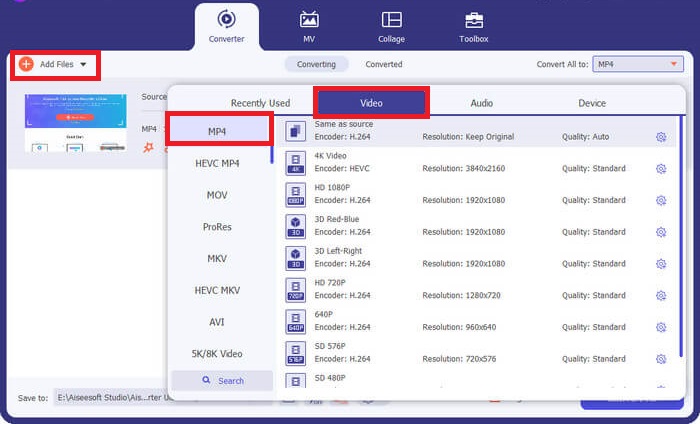
หากคุณต้องการใช้ศักยภาพการแปลงไฟล์ให้เต็มที่ Video Converter Ultimate อาจเป็นตัวเลือกที่เหมาะสำหรับคุณ โปรแกรมนี้รองรับความเร็วในการแปลงสูงสุดถึง 50 เท่า ด้วยการใช้คุณสมบัติการเร่งความเร็วด้วยฮาร์ดแวร์ GPU นอกจากนี้ยังเปิดโอกาสให้ผู้ใช้ปรับแต่งพารามิเตอร์คุณภาพเอาต์พุตให้ตรงกับคุณภาพวิดีโอที่ต้องการได้ อีกทั้ง Video Converter Ultimate ยังให้คุณเลือกใช้ฟอร์แมตเอาต์พุตได้หลากหลาย เช่น FLV, MOV รวมถึง MPG และ MP4 เพื่อความสะดวกของคุณ นี่คือวิธีใช้งานโปรแกรมแปลงไฟล์ MPG เป็น MP4 แบบย่อ ๆ.
ขั้นตอนที่ 1. เริ่มจากคลิกปุ่มดาวน์โหลดที่เหมาะสมด้านล่าง หากใช้ Mac ให้คลิกปุ่มด้านขวา และหากใช้ Windows ให้คลิกปุ่มด้านซ้าย จากนั้นรันซอฟต์แวร์และทำตามขั้นตอนการติดตั้งเพื่อเปิดใช้งานบนอุปกรณ์ของคุณ.
ดาวน์โหลดฟรีสำหรับ Windows 7 ขึ้นไปดาวน์โหลดอย่างปลอดภัย
ดาวน์โหลดฟรีสำหรับ MacOS 10.7 หรือใหม่กว่าดาวน์โหลดอย่างปลอดภัย
ขั้นตอนที่ 2. เมื่อต้องการนำเข้าไฟล์ MP4 ให้คลิกเครื่องหมาย บวก ตรงกึ่งกลางหน้าจอ เลือกไฟล์ MP4 หรือโฟลเดอร์ แล้วรอให้รูปตัวอย่างโหลดขึ้นมาบนหน้าจอให้เสร็จสิ้นกระบวนการอัปโหลด.
ขั้นตอนที่ 3. จากนั้นคลิกเมนูแบบเลื่อนลงที่ Profile เพื่อเข้าถึงรายชื่อฟอร์แมตเอาต์พุต จากตรงนี้ให้ไปที่แถบวิดีโอและเลือก MP4 คุณยังสามารถปรับคุณภาพได้ในเมนู Settings ตามต้องการ.
ขั้นตอนที่ 4. เมื่อกำหนดค่าที่ต้องการสำหรับเอาต์พุตเรียบร้อยแล้ว ให้ดำเนินการแปลงไฟล์ได้เลย เพื่อเริ่มกระบวนการให้คลิกปุ่ม Convert All.
คุณสมบัติเด่น
◆ ตัวแปลง MPG เป็น MP4 ที่ดีที่สุดนี้ช่วยให้ผู้ใช้เพลิดเพลินกับคุณสมบัติการแปลงจำนวนมาก
◆ มีรูปแบบเอาต์พุตเสียงและวิดีโอที่เลือกไว้ล่วงหน้ามากกว่า 1,000 รูปแบบ
◆ Video Converter Ultimate นำเสนอกล่องเครื่องมือสำหรับการแก้ไขไฟล์ดิจิทัล เช่น Video Enhancer, Compressor, GIF Makers และอื่นๆ
◆ โปรแกรมนี้มีตัวแปลง MPG เป็น MP4 ฟรีสำหรับ Windows 10 พร้อมเวอร์ชันทดลองใช้งาน 14 วัน
ข้อดี
- โปรแกรมนี้ดีที่สุดสำหรับผู้เริ่มต้น ผู้ใช้ทั่วไป และมืออาชีพ
- อินเทอร์เฟซมีความสวยงามในการนำทาง
จุดด้อย
- คุณสมบัติการตัดต่อวิดีโอของเครื่องมือมีเฉพาะฟังก์ชันพื้นฐานเท่านั้น
- ไม่สามารถแปลงวิดีโอผ่าน URL ได้
2. ตัวแปลงวิดีโอใด ๆ
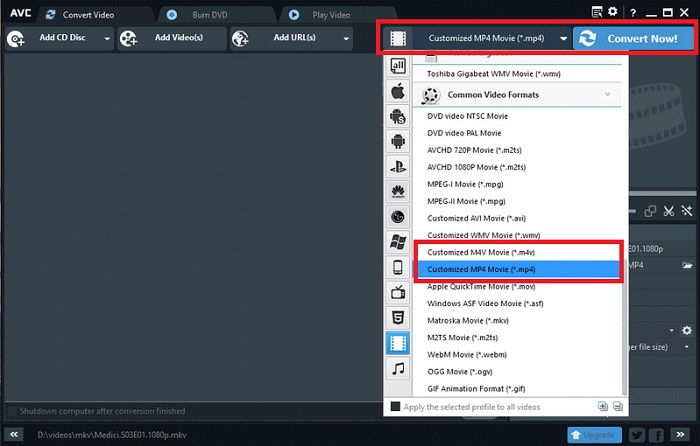
เครื่องมืออีกอย่างที่ควรค่าแก่การจดจำก็คือ Any Video Converter โปรแกรมนี้ใช้งานได้อย่างมหัศจรรย์เมื่อพูดถึงการแปลงวิดีโอที่คุณชื่นชอบ อย่างไรก็ตาม ผู้ใช้ที่อัปเกรดเป็นเวอร์ชันโปรจะสามารถเข้าถึงฟีเจอร์บันทึกหน้าจอได้ไม่จำกัดและเครื่องบันทึกเว็บแคมนอกเหนือจากการแปลงไฟล์ นี่คือรายละเอียดวิธีการแปลง MPG เป็น MP4 โดยใช้โปรแกรม
ขั้นตอนที่ 1. ก่อนอื่นให้ไปที่แถบ Convert Video เพื่อแปลงไฟล์ MPG ให้เป็น MP4 จากนั้นคลิกปุ่ม Add Video แล้วเลือกไฟล์ที่ต้องการ.
ขั้นตอนที่ 2. หลังจากนำเข้าไฟล์แล้ว ให้คลิกเมนูแบบเลื่อนลงที่ Output Profile แล้วเลือก MP4.
ขั้นตอนที่ 3. ขั้นตอนถัดไป ให้เลือกโฟลเดอร์สำหรับบันทึกเอาต์พุต สุดท้ายคลิก Convert Now เพื่อเริ่มกระบวนการแปลงไฟล์.
คุณสมบัติเด่น
◆ โปรแกรมเวอร์ชันฟรีไม่มีโฆษณาที่ไม่พึงประสงค์และน่ารำคาญ
◆ โปรแกรมแปลงวิดีโอใด ๆ มุ่งมั่นที่จะไม่ทิ้งร่องรอยของลายน้ำของแบรนด์บนเอาต์พุตที่แปลงแล้วของคุณ
ข้อดี
- โปรแกรมนี้มีเครื่องมือตัดต่อวิดีโอสำหรับไฟล์ MPG ของคุณ
จุดด้อย
- Video Converter ใด ๆ อาจใช้งานได้ยากสำหรับผู้เริ่มต้น
ส่วนที่ 3 แปลง MPG เป็น MP4 ออนไลน์
1. โปรแกรมแปลงวิดีโอออนไลน์ฟรี
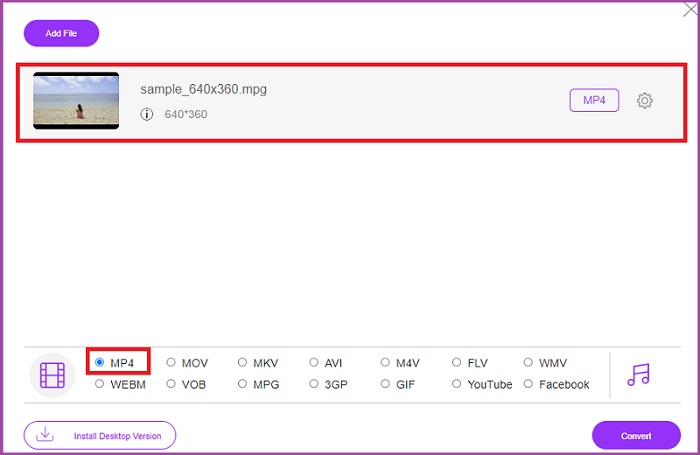
หากคุณมีพื้นที่จัดเก็บจำกัดสำหรับติดตั้งซอฟต์แวร์ เครื่องมือออนไลน์บางตัวก็ช่วยคุณได้เช่นกัน โดยตอนนี้ Free Video Converter Online เป็นโปรแกรมออนไลน์ที่ครอบคลุมความต้องการแปลงไฟล์วิดีโอ MPG เป็น MP4 ได้เป็นอย่างดี โปรแกรมนี้รองรับฟอร์แมตยอดนิยมมากกว่า 50 ชนิดที่เราคุ้นเคย นอกจากนี้ยังเปิดให้ผู้ใช้ควบคุมคุณภาพเอาต์พุตได้เองด้วยการปรับค่าพารามิเตอร์ หากต้องการใช้เครื่องมือแปลง MPG เป็น MP4 ออนไลน์ฟรีที่ยอดเยี่ยมตัวนี้ ให้ทำตามขั้นตอนง่าย ๆ ด้านล่าง.
ขั้นตอนที่ 1. เปิดโปรแกรมออนไลน์นี้ผ่านเครื่องมือค้นหา เมื่อหน้าเว็บปรากฏขึ้น ให้คลิกปุ่ม Add Files to Convert แล้วเปิดใช้งานโปรแกรม.
ขั้นตอนที่ 2. จากนั้นกดปุ่มเดิมอีกครั้งเพื่อเพิ่มวิดีโอต้นฉบับของคุณลงในโปรแกรม เมื่ออัปโหลดไฟล์เสร็จ ให้เลือก MP4 ในตัวเลือกฟอร์แมตเอาต์พุต.
ขั้นตอนที่ 3. สุดท้ายให้กดปุ่ม Convert และรอให้ไฟล์เอาต์พุตดาวน์โหลดลงมา.
ข้อดี
- ตัวแปลง MPG เป็น MP4 ออนไลน์นี้อนุญาตให้ใช้คุณสมบัติการแปลงจำนวนมาก
- สามารถรองรับไฟล์ขนาดใหญ่ได้ถึง 300 MB
จุดด้อย
- Free Online Video Converter ไม่มีเครื่องมือตัดต่อวิดีโอให้
2. CloudConvert
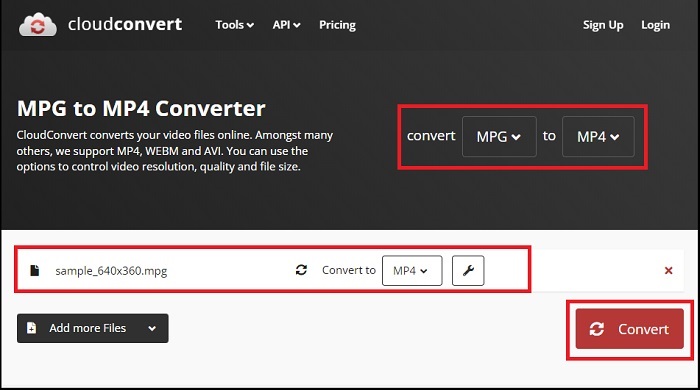
ด้วยรูปแบบเอาต์พุตที่รองรับมากกว่า 200 รูปแบบ CloudConvert จึงเป็นสิ่งที่เราถือว่าใช้งานได้หลากหลาย เครื่องมือนี้ไม่เพียงช่วยให้คุณแปลงวิดีโอเท่านั้น แต่ยังสามารถเปลี่ยน eBook ไฟล์เก็บถาวร รูปภาพ และไฟล์เสียงเป็นนามสกุลไฟล์อื่นได้อีกด้วย นอกจากนี้ โปรแกรมนี้ยังสามารถเปลี่ยนแปลงคุณภาพเพื่อให้ได้ผลลัพธ์ที่ดีที่สุดอีกด้วย ดูคำแนะนำที่เราสร้างไว้ด้านล่างเพื่อแปลงรูปแบบวิดีโอด้วยหนึ่งในโปรแกรมแปลงไฟล์ MPG เป็น MP3 ที่ดีที่สุดที่ดาวน์โหลดด้านล่าง
ขั้นตอนที่ 1. ไปที่เว็บไซต์ Convert Files โดยใช้เครื่องมือค้นหาของคุณ ตรงกึ่งกลางหน้า ให้คลิกปุ่ม Browse เพื่อเปิดดูโฟลเดอร์ในเครื่อง.
ขั้นตอนที่ 2. หลังจากอัปโหลดไฟล์แล้ว ให้คลิกเมนูแบบเลื่อนลงที่ช่อง Output Format แล้วเลือก MP4 จากรายการ.
ขั้นตอนที่ 3. ขั้นตอนสุดท้ายให้กด Convert แล้วรอให้ไฟล์ของคุณดาวน์โหลดเสร็จ.
ข้อดี
- มันมีการป้องกันความปลอดภัยของข้อมูลเพื่อปกป้องข้อมูลผู้ใช้
- โปรแกรมนี้นำเสนอรูปแบบเอาต์พุตสื่อมากกว่า 1,000 รูปแบบ
จุดด้อย
- การแปลงถูกขัดจังหวะเมื่ออินเทอร์เน็ตขาดการเชื่อมต่อ
ส่วนที่ 4 แอปแปลง MPG เป็น MP4 สำหรับ Android และ iOS
1. โรงงานวิดีโอเสียง
นวัตกรรมทางเทคโนโลยีทำให้การแปลง MPG เป็น MP4 สามารถใช้งานได้ในอุปกรณ์พกพาแบบพกพา ด้วย Audio Video Factory คุณสามารถแปลงรูปแบบเสียงและวิดีโอได้ในแอพพลิเคชั่นเดียว นอกจากนี้ยังช่วยให้คุณสามารถแก้ไขพารามิเตอร์วิดีโอ เช่น ตัวแปลงสัญญาณและบิตเรต ก่อนที่จะแปลงไฟล์ของคุณ
ขั้นตอนที่ 1. บนหน้าจอแอปพลิเคชัน ให้คลิกปุ่ม บวก แล้วเลือก Video เพื่อเข้าถึงโฟลเดอร์ไฟล์ของคุณ.
ขั้นตอนที่ 2. หลังจากเลือกไฟล์ MPG แล้ว ให้แตะปุ่ม Convert และคลิกขยายแท็บ Output เพื่อดูรายชื่อฟอร์แมตทั้งหมด.
ขั้นตอนที่ 3. เมื่อเลือก MP4 จากรายการแล้ว คุณสามารถแก้ไขข้อมูลอื่น ๆ ของไฟล์ได้ หลังจากนั้นให้แตะปุ่ม Convert เพื่อเริ่มการแปลงไฟล์.
ข้อดี
- แอปพลิเคชันครบวงจรสำหรับ Android และ iOS ที่ให้ผู้ใช้สามารถแก้ไขข้อมูลเมตาดาต้า เช่น ชื่อเพลง ปกอัลบั้ม และศิลปิน
- มีเครื่องเล่นสื่อพื้นเมืองเพื่อเล่นไฟล์ที่แปลงแล้วของคุณโดยตรง
จุดด้อย
- อินเทอร์เฟซจำเป็นต้องได้รับการอัปเกรดเมื่อเป็นเรื่องของการออกแบบ
2. แปลงวิดีโอโดย Technorazer
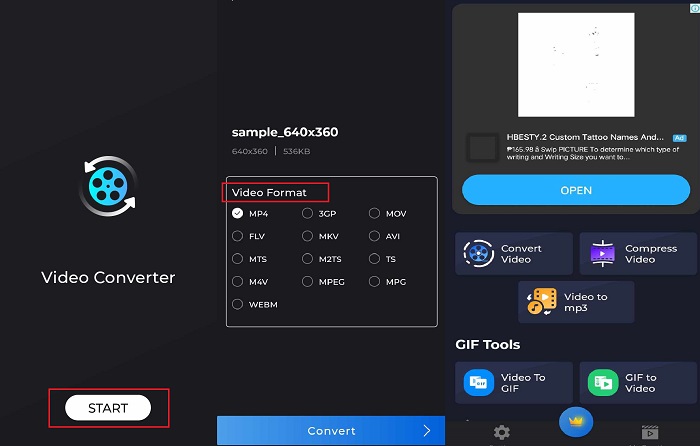
แปลง บีบอัด และเปลี่ยนวิดีโอให้เป็นเสียง - นี่คือคุณสมบัติอันทรงพลังที่ Video Converter มอบให้ แอปพลิเคชันที่ผลิตโดยบริษัท Technorazer มีบทวิจารณ์มากกว่า 4.8/5 รายการบน Playstore แอปพลิเคชั่นนี้ขยายความเร็วในการแปลงที่รวดเร็วสูงสุดถึงความเร็ว 70x นอกจากนี้ยังช่วยให้ผู้ใช้แปลง MPG เป็นรูปแบบใดก็ได้ เช่น VOB, MPP4, 3GP, FLV และอื่นๆ โดยไม่กระทบต่อคุณภาพ ยิ่งไปกว่านั้น Video Converter โดย Tehcnorazer ยังสามารถแตกไฟล์ GIF และสร้างเสียงเรียกเข้าจากเสียงของคุณโดยใช้เครื่องตัดแต่งในตัว
ขั้นตอนที่ 1. แตะปุ่ม Convert Video เพื่อเริ่มทำงานในโหมดนี้ จากนั้นแตะปุ่ม Select Video แล้วนำเข้าไฟล์ MPG ของคุณ.
ขั้นตอนที่ 2. เมื่อไฟล์โหลดขึ้นบนหน้าจอแล้ว ตัวเลือกฟอร์แมตเอาต์พุตจะปรากฏโดยอัตโนมัติ ให้เลือก MP4.
ขั้นตอนที่ 3. สุดท้ายให้แตะปุ่ม Convert เมื่อกระบวนการเสร็จสิ้น คุณสามารถเปลี่ยนชื่อไฟล์และบันทึกลงในโฟลเดอร์ภายในอุปกรณ์ของคุณได้.
ข้อดี
- อินเทอร์เฟซของสกินสีดำช่วยเพิ่มรูปลักษณ์ที่ทันสมัยให้กับโปรแกรม
- รองรับขนาดไฟล์วิดีโอไม่จำกัด
- เวอร์ชันที่ต้องชำระเงินมีคุณสมบัติวิดีโอย้อนกลับ
จุดด้อย
- เวอร์ชันฟรีมีโฆษณามากเกินไป
อ่านเพิ่มเติม:
การแปลง MPG เป็น MP3 อย่างง่ายดายเพื่อรักษาคุณภาพเสียง
ซอฟต์แวร์ที่ดีที่สุดสำหรับแปลง MKV เป็น MP4 ได้ง่ายภายในไม่กี่นาที
ส่วนที่ 5. คำถามที่พบบ่อยเกี่ยวกับตัวแปลง MPG เป็น MP4
ฉันสามารถแปลง MPG เป็น MP4 โดยไม่เสียค่าใช้จ่ายได้หรือไม่
แน่นอน ใช่แล้ว! หากคุณต้องการแปลงไฟล์วิดีโอเป็นรูปแบบอื่น แพลตฟอร์มออนไลน์หลายแห่งสามารถช่วยได้ เช่น Free Video Converter Online
MPG ดีกว่า MP4 หรือไม่
ในด้านคุณภาพ MP4 นั้นเหนือกว่า MPG แม้ว่าจะมีบิตเรตเท่ากันก็ตาม อย่างไรก็ตาม หากคุณต้องการรูปแบบที่มีประสิทธิภาพมากขึ้นในการเผยแพร่ไฟล์ของคุณทางอินเทอร์เน็ต MP4 ก็มีข้อได้เปรียบ
ข้อดีของ MP4 คืออะไร?
โปรดทราบว่า MP4 เป็นรูปแบบมาตรฐานของเรา รูปแบบนี้เป็นการบีบอัดข้อมูลแบบสูญเสียซึ่งมีจุดมุ่งหมายเพื่อลดขนาดไฟล์ของคุณ ในด้านคุณภาพ MP4 ถือว่าปานกลางและเข้ากันได้กับทุกแพลตฟอร์ม
การแปลง MPG เป็น MP4 ปลอดภัยหรือไม่
แน่นอน ใช่แล้ว! แพลตฟอร์มส่วนใหญ่ ไม่ว่าจะเป็นซอฟต์แวร์ออนไลน์หรือออฟไลน์ ไม่ต้องการข้อมูลส่วนบุคคลของผู้ใช้ก่อนการใช้งาน ในทางกลับกัน การแปลง MPG เป็น MP4 จะไม่ส่งผลให้เกิดปัญหาความไม่เข้ากันกับเครื่องเล่นสื่อ
เหตุใดฉันจึงไม่สามารถเล่นไฟล์ MPG ได้
ไฟล์ MPG เข้ากันได้กับเครื่องเล่นวิดีโอเกือบตลอดเวลา หากคุณประสบปัญหาใดๆ คุณสามารถตรวจสอบว่าเครื่องเล่นสื่อของคุณรองรับไฟล์ MPG หรือไฟล์ของคุณเสียหายหรือไม่
สรุป
ในบางสถานการณ์ ทั้ง MPG และ MP4 ต่างก็สามารถตอบโจทย์การใช้งานของคุณได้ ด้วยเครื่องมือต่าง ๆ ที่กล่าวมาข้างต้น เครื่องมือออฟไลน์สามารถแปลงฟอร์แมตวิดีโอได้ควบคู่กับการตัดต่อและบีบอัดไฟล์ ส่วนโปรแกรม แปลง MPG เป็น MP4 ฟรี แบบออนไลน์รองรับการแปลงไฟล์จำนวนมากในครั้งเดียวและการปรับแต่งพารามิเตอร์เสียง สำหรับแอปบนมือถือ จะได้เปรียบเมื่อต้องแปลงไฟล์ขนาดใหญ่เพียงไฟล์เดียว และคุณไม่จำเป็นต้องแก้ไขไฟล์เพิ่มเติม.
-
 เครื่องเล่น MPG/MPEG ที่ดีที่สุด 4 อันดับสำหรับ Windows/Mac/Android/iPhone [2025]
 หากคุณต้องการเล่นไฟล์ MPG หรือ MPEG ที่คุณชื่นชอบอย่างราบรื่นคุณสามารถเรียนรู้เพิ่มเติมเกี่ยวกับเครื่องเล่น MPG / MPEG 4 อันดับแรกสำหรับคอมพิวเตอร์และโทรศัพท์มือถือได้จากบทความนี้
-
 4 วิธีในการแปลง MPG เป็น MKV โดยใช้ตัวแปลงออนไลน์/ออฟไลน์
 คุณกำลังมองหาตัวแปลงที่ใช้งานง่ายซึ่งสามารถแปลงไฟล์ MPG เป็น MKV ได้หรือไม่? บทความนี้แสดงวิธีที่ดีที่สุดและง่ายที่สุดในการแปลงไฟล์ MPG เป็น MKV อย่างรวดเร็ว
-
 อันที่จริง: แนวทางปฏิบัติที่ดีที่สุดในการทำให้วิดีโอ MP4 ช้าลง
 นอกจากการเพิ่มความเร็วของวิดีโอแล้ว การชะลอตัวเป็นหนึ่งในแนวทางปฏิบัติมากมายที่จำเป็นเพื่อให้ได้ผลลัพธ์ที่ดีที่สุดจากวิดีโอของคุณ ปรารถนาที่จะเป็นบรรณาธิการที่ดีที่สุดโดยการอ่านบทความที่เหลือ
