


 Video Converter Ultimate
 บันทึกหน้าจอ
 ซ่อมวิดีโอ
 ดาวน์โหลดอย่างปลอดภัย
2 วิธีด่วนในการลดขนาดไฟล์ OGV ขนาดใหญ่ [ฟรีและออนไลน์]
ไฟล์ OGV มักถูกใช้สำหรับเล่นวิดีโอบนหน้าเว็บผ่านแท็ก HTML5

ส่วนที่ 1 วิธีออนไลน์ในการบีบอัดไฟล์ OGV ด้วย OGV Compressor
Free Video Compressor เป็นเครื่องมือบีบอัดไฟล์ OGV ออนไลน์ฟรีที่ได้รับความนิยมและมีประโยชน์สำหรับผู้ใช้ แตกต่างจากเครื่องมือออนไลน์ฟรีทั่วไปหลายตัว Free Video Compressor ไม่มีการจำกัดจำนวนไฟล์หรือขนาดไฟล์ที่อัปโหลด ที่สำคัญกว่านั้น ไม่มีลายน้ำบนไฟล์วิดีโอที่คุณส่งออก นอกจากนี้ยังช่วยให้คุณบีบอัดไฟล์วิดีโอรูปแบบอื่น ๆ ที่ใช้กันบ่อย เช่น MP4, AVI, WMV, MOV และอื่น ๆ ได้โดยไม่ทำให้คุณภาพเสียหาย.
วิธีบีบอัดไฟล์ OGV โดยใช้โปรแกรมบีบอัดวิดีโอฟรี
ขั้นตอนที่ 1. ไปที่เว็บไซต์ตัวบีบอัดวิดีโอ OGV ออนไลน์โดยเข้าใช้งานที่ https://www.free-videoconverter.net/free-video-compressor/.
ขั้นตอนที่ 2. หาและคลิกปุ่ม Add Files to Compress จากนั้นดาวน์โหลดตัวเรียกใช้งาน (launcher) เพื่อเปิดใช้งานบริการ ในหน้าต่างที่ปรากฏขึ้น ให้ไปเลือกไฟล์ OGV ของคุณแล้วกด Open เพื่อยืนยัน.

ขั้นตอนที่ 3. ต่อไป คุณต้องกำหนดการตั้งค่าการบีบอัดเพื่อทำให้ไฟล์มีขนาดเล็กลง คุณสามารถกำหนดขนาดวิดีโอ เปลี่ยนความละเอียด เลือกบิตเรต และอื่น ๆ ได้.

ขั้นตอนที่ 4. คลิกปุ่ม Compress เพื่อเริ่มกระบวนการ หลังจากเสร็จสิ้น ไฟล์จะถูกดาวน์โหลดไปยังคอมพิวเตอร์ของคุณโดยอัตโนมัติ.

นอกจากนี้โปรแกรมอัดวิดีโอฟรีนี้ยังช่วยคุณแก้ปัญหาการบีบอัดวิดีโออื่น ๆ เพียงตรวจสอบบทความต่อไปนี้:
วิธีบีบอัดวิดีโอสำหรับส่งทางอีเมล
วิธีบีบอัดไฟล์วิดีโอ AVCHD ฟรีบน Windows และ Mac
ส่วนที่ 2. วิธีการบีบอัดและเพิ่มประสิทธิภาพไฟล์ OGV ด้วย Clideo
Clideo เป็นชุดเครื่องมือวิดีโอแบบออลอินวันฟรี ใช้งานได้กับรูปแบบยอดนิยมทั้งหมดและบีบอัดได้อย่างรวดเร็วและไม่ต้องดาวน์โหลดใด ๆ ช่วยให้คุณสามารถบีบอัดไฟล์ OGV ได้ถึง 500MB ฟรี แต่ไม่มีการ จำกัด ปริมาณ ตอนนี้คุณสามารถทำตามขั้นตอนด้านล่างเพื่อลดขนาดไฟล์ OGV ของคุณ
ขั้นตอนที่ 1. ไปที่ https://clideo.com/compress-video แล้วคลิกปุ่ม Choose file.
ขั้นตอนที่ 2. อัปโหลดไฟล์ OGV ที่คุณต้องการบีบอัดจากคอมพิวเตอร์ คุณยังสามารถเลือกไฟล์จาก Dropbox หรือ Google Drive ได้โดยคลิกลูกศรสีฟ้าที่ชี้ลง.
ขั้นตอนที่ 3. เมื่ออัปโหลดไฟล์เสร็จ เครื่องมือจะเริ่มประมวลผลวิดีโอ ระยะเวลาในการประมวลผลขึ้นอยู่กับขนาดของวิดีโอ.
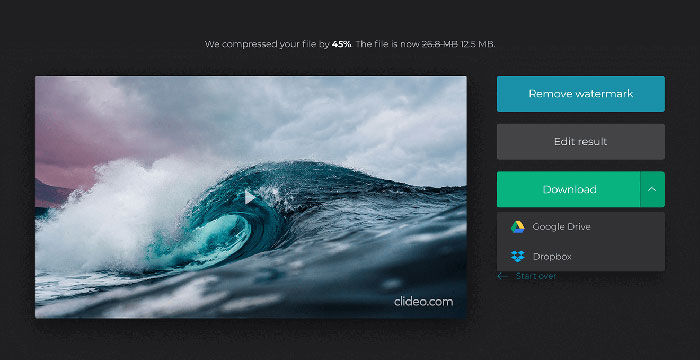
ขั้นตอนที่ 4. เมื่อการบีบอัดเสร็จสิ้น คุณจะเห็นขนาดไฟล์ก่อนและหลังการบีบอัด ตอนนี้คุณสามารถพรีวิวผลลัพธ์เพื่อให้แน่ใจว่าดูดี หากคุณพอใจกับผลลัพธ์แล้ว ให้คลิกปุ่ม Download เพื่อบันทึกไฟล์ไปยังอุปกรณ์หรือพื้นที่จัดเก็บบนคลาวด์ของคุณ.
ส่วนที่ 3 คำถามที่พบบ่อยเกี่ยวกับการบีบอัดไฟล์ OGV
ไฟล์ OGV คืออะไร
ไฟล์ OGV คือไฟล์วิดีโอที่บันทึกในรูปแบบโอเพนซอร์ส Ogg ของ Xiph.Org มีสตรีมวิดีโอที่อาจใช้ตัวแปลงสัญญาณที่แตกต่างกันอย่างน้อยหนึ่งตัวเช่น Theora, Dirac หรือ Daala ไฟล์ OGV สามารถเล่นได้โดยใช้เครื่องเล่นสื่อที่หลากหลาย
การบีบอัด OGV ทำงานอย่างไร?
เมื่อพูดถึงการบีบอัดไฟล์ OGV เป็นการบีบอัดอินเทอร์เฟรมที่นำไปสู่การลดขนาดไฟล์โดยการลบความคล้ายคลึงกันที่เกิดขึ้นระหว่างเฟรมวิดีโอ
ฉันจะบีบอัดรูปแบบ MP4 เป็น OGV ได้อย่างไร
คุณสามารถใช้เครื่องมือดังกล่าวข้างต้น - Free Video Compressor เพื่อบีบอัดไฟล์ MP4 ของคุณเป็น OGV หรือคุณสามารถเลือกแอปพลิเคชั่นแปลงวิดีโอเพื่อช่วยคุณทำมัน
สรุป
วิธีการออนไลน์ข้างต้นสามารถช่วยให้คุณบีบอัดวิดีโอ OGV ได้อย่างมีประสิทธิภาพ คุณชอบใช้อันไหน คุณสามารถแบ่งปันคำแนะนำของคุณในความคิดเห็นด้านล่าง!
-
 จาก 50MB ถึง 5MB - วิธีบีบอัดไฟล์ MP4 ในไม่กี่วินาที
 วิดีโอ MP4 ใหญ่เกินไปสำหรับการอัปโหลด? ต้องการลดขนาดวิดีโอหรือไม่? นี่คือ 3 วิธีที่มีประสิทธิภาพในการบีบอัดไฟล์ MP4 ให้มีขนาดเล็กลงโดยไม่มีขีด จำกัด
-
 บทช่วยสอน - 7 วิธีในการบีบอัดวิดีโอฟรีโดยไม่สูญเสียคุณภาพ
 อ่านและรับ 7 วิธีในการบีบอัดวิดีโอฟรีบนคอมพิวเตอร์หรือโทรศัพท์ของคุณ คุณสามารถลดขนาดวิดีโอขนาดใหญ่ให้เป็นไฟล์ขนาดเล็กสำหรับอีเมล, Twitter, Instagram, YouTube, WhatsApp และอื่น ๆ ได้อย่างง่ายดาย
-
 วิธีบีบอัดไฟล์ MOV บน Windows, Mac, iPhone และ Android
 บทความนี้แสดงวิธีการบีบอัดวิดีโอ QuickTime MOV บนโทรศัพท์หรือคอมพิวเตอร์ของคุณโดยละเอียด หากวิดีโอ MOV ของคุณมีขนาดใหญ่เกินไปที่จะส่งแชร์หรือบันทึกคุณสามารถรับ 4 วิธีแก้ปัญหาที่ใช้งานได้ที่นี่
