


 Video Converter Ultimate
 บันทึกหน้าจอ
 ซ่อมวิดีโอ
 ดาวน์โหลดอย่างปลอดภัย
วิธีลดขนาดไฟล์ SWF ออนไลน์โดยไม่ใช้ Flash Player
SWF เป็นรูปแบบไฟล์ Adobe Flash ที่ใช้สำหรับการสตรีมผ่านอินเทอร์เน็ต ไม่ว่าคุณจะดาวน์โหลดไฟล์ SWF หรือต้องการอัปโหลดวิดีโอ SWF ทางออนไลน์ขนาดไฟล์ที่ใหญ่ของ SWF จะเป็นเส้นที่ยาก
แต่ข้อดีคือคุณสามารถบีบอัดไฟล์ SWF เพื่อแก้ปัญหานี้ได้.

ในขั้นต้นโปรแกรมเล่น SWF อย่างเป็นทางการ Adobe Flash Player สามารถบีบอัดไฟล์ SWF ได้โดยเปลี่ยนบิตเรตและความละเอียด แต่จะไม่รองรับอีกต่อไปหลังจากวันที่ 31 ธันวาคม 2020
ไม่ต้องกังวลคุณมีทางเลือก!
บทความนี้จะแนะนำตัวบีบอัดไฟล์ SWF ออนไลน์ฟรี เพื่อช่วยคุณลดขนาดวิดีโอ SWF ให้เล็กลงได้อย่างง่ายดายบนพีซีและแม็ก.
ส่วนที่ 1 โปรแกรมบีบอัดไฟล์ SWF ออนไลน์ฟรีที่ดีที่สุด
เครื่องมือที่ดีเป็นสิ่งที่จำเป็น ในการบีบอัดไฟล์ SWF ตัวบีบอัดไฟล์ SWF คือเครื่องมือ
Free Online Video Compressor เป็นเครื่องมือออนไลน์ฟรีสำหรับลดขนาดไฟล์ SWF ให้เล็กลงได้บนเว็บ โดยไม่ต้องสมัครสมาชิก คุณสามารถทำขั้นตอนการบีบอัดไฟล์ SWF ได้ด้วยการคลิกไม่กี่ครั้ง สามารถบีบอัดแบนเนอร์แฟลช สไลด์โชว์ แอนิเมชัน เกม ภาพยนตร์ ฯลฯ เพื่อทำให้ไฟล์ SWF มีขนาดเล็กลงได้อย่างสะดวก นอกจากนี้ ตัวบีบอัด SWF ออนไลน์นี้ยังสามารถ:
- 1. ลดขนาดไฟล์ SWF ได้ถึง 95% โดยสูญเสียคุณภาพน้อยลงหรือเป็นศูนย์
- 2. บีบอัดวิดีโอมากกว่า 300 รูปแบบเช่น SWF, MP4, MOV, AVI, WebM, MKV และอื่น ๆ
- 3. ฟรีในการบีบอัดและแปลงรูปแบบวิดีโอโดยไม่มีลายน้ำ
- 4. รองรับ 1080p HD, 720p HD และความละเอียดวิดีโออื่น ๆ

เรามาที่นี่เพื่อแนะนำคุณเกี่ยวกับวิธีการบีบอัดไฟล์ SWF ในส่วนถัดไป
ตอนที่ 2. วิธีการบีบอัด SWF ออนไลน์ (ฟรี 100%)
ขั้นตอนการบีบอัดไฟล์ SWF ทางออนไลน์สามารถทำได้ในขั้นตอนง่ายๆ
ขั้นตอนที่ 1. เพิ่มไฟล์ SWF
เปิดตัวบีบอัดไฟล์ SWF ออนไลน์ฟรีนี้ผ่านเบราว์เซอร์บนคอมพิวเตอร์ Windows หรือ Mac จากนั้นคลิกปุ่ม Add Files to Compress แล้วระบบจะแจ้งให้คุณดาวน์โหลดและติดตั้งตัวเรียกใช้โปรแกรมบีบอัด.
หลังจากติดตั้งสำเร็จหน้าต่างโอเพนซอร์สจะปรากฏขึ้นและคุณควรค้นหาไฟล์ SWF ในคอมพิวเตอร์ของคุณและเพิ่มลงในเครื่องมือนี้

ขั้นตอนที่ 2. เลือกอัตราการบีบอัดและขนาด
ถัดจากหัวข้อ Size คุณจะเห็นขนาดไฟล์ SWF ปัจจุบัน ให้คลิกไอคอนลูกศรลงหรือขึ้นเพื่อปรับขนาดไฟล์ SWF เอาต์พุต หรือคุณจะเลื่อนแถบเลื่อนด้านขวาเพื่อลดขนาดไฟล์โดยกำหนดอัตราการบีบอัดก็ได้.
ถัดจากหัวข้อ Format คุณสามารถเลือกฟอร์แมตอื่น ๆ เช่น MP4, MOV, MKV, AVI, FLV เป็นต้น เพื่อแปลงไฟล์ SWF ไปเป็นฟอร์แมตอื่น.
การเลือกตัวเลือกเอาต์พุตที่มีความละเอียดต่ำลงก็จะช่วยให้ขนาดไฟล์ SWF เล็กลงได้เช่นกัน.
ในขณะที่คุณบีบอัดไฟล์ SWF ให้มีขนาดเล็กลงบิตเรตของไฟล์นี้จะลดลงตามลำดับในหน้าจอแสดงผล
ขั้นตอนที่ 3. บีบอัด SWF
คลิก Compress เพื่อเลือกโฟลเดอร์ปลายทางสำหรับจัดเก็บไฟล์ SWF ที่บีบอัดแล้ว และเริ่มกระบวนการลดขนาดไฟล์ SWF.
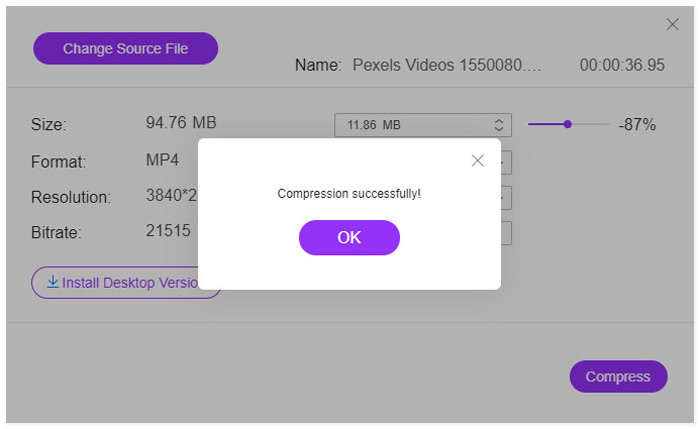
เมื่อกระบวนการบีบอัดเสร็จสิ้นคุณจะเห็นหน้าต่างป๊อปอัป จากนั้นคุณจะค้นหาไฟล์บีบอัดได้โดยไปที่ตำแหน่งที่คุณตั้งไว้
ขออธิบายให้ชัดเจน: ตัวบีบอัด SWF ออนไลน์ฟรีนี้จะทำการแปลงไฟล์ SWF ไปเป็นฟอร์แมตอื่นหลังจากบีบอัดแล้ว หากคุณต้องการบีบอัดไฟล์ SWF โดยยังคงฟอร์แมตเดิมไว้ หรือบีบอัดวิดีโอ 4K ขอแนะนำให้ดาวน์โหลดโปรแกรมเวอร์ชันเดสก์ท็อปของตัวบีบอัด SWF คือ Video Converter Ultimate.
ดาวน์โหลดฟรีสำหรับ Windows 7 หรือใหม่กว่าดาวน์โหลดอย่างปลอดภัย
ดาวน์โหลดฟรีสำหรับ MacOS 10.7 หรือใหม่กว่าดาวน์โหลดอย่างปลอดภัย
ส่วนที่ 3 คำถามที่พบบ่อยเกี่ยวกับการลดขนาดไฟล์ SWF ให้เล็กลง
โปรแกรมอะไรจะเปิดไฟล์ SWF?
เดิมทีไฟล์ SWF สามารถเปิดผ่านโปรแกรมเล่นอย่างเป็นทางการบนเบราว์เซอร์คือ Adobe Flash Player อย่างไรก็ตาม Adobe Flash Player ได้ยุติการให้บริการตั้งแต่เดือนมกราคม 2021 แล้ว โปรแกรมเล่น SWF อื่น ๆ เช่น VLC, Windows Media Player และซอฟต์แวร์เล่นไฟล์ SWF ตัวอื่น ๆ ยังสามารถเปิดไฟล์ SWF ได้.
SWF ถูกบีบอัดหรือไม่
SWF ใช้การบีบอัดแบบไม่สูญเสียเพื่อรักษาคุณภาพของภาพและนั่นหมายความว่าวิดีโอที่เก็บไว้ในไฟล์ SWF จะไม่ถูกบีบอัดและขนาดไฟล์ก็ใหญ่
เหตุใด Adobe Flash จึงปิดตัวลง
มาตรฐานแบบเปิดเช่น HTML5, WebGL และ WebAssembly ได้รับการพัฒนาอย่างต่อเนื่องในช่วงหลายปีที่ผ่านมาและเป็นทางเลือกที่เหมาะสมสำหรับเนื้อหา Flash นอกจากนี้ผู้จำหน่ายเบราว์เซอร์รายใหญ่กำลังรวมมาตรฐานแบบเปิดเหล่านี้เข้ากับเบราว์เซอร์ของตนและเลิกใช้งานปลั๊กอินอื่น ๆ ส่วนใหญ่ (เช่น Flash Player) ดังนั้น Adobe จึงตัดสินใจปิด Adobe Flash Player
สรุป
ไฟล์ SWF เป็นไฟล์แบบไม่สูญเสียข้อมูล (lossless) และใช้เนื้อที่มาก ไม่ว่าคุณต้องการประหยัดพื้นที่บนคอมพิวเตอร์สำหรับดาวน์โหลดไฟล์ SWF เพิ่มเติม หรืออัปโหลดไฟล์ SWF ออนไลน์ให้สำเร็จ การบีบอัดไฟล์ SWF จึงกลายเป็นเรื่องที่พบบ่อย บทความนี้จะแสดงคู่มือการลดขนาดไฟล์ SWF ฟรีด้วยตัวบีบอัด SWF ออนไลน์ใน 3 ขั้นตอน โดยไม่มีลายน้ำหรือการสมัครสมาชิก และคุณสามารถทำขั้นตอนการบีบอัดให้เสร็จได้อย่างรวดเร็ว.
ตอนนี้ถึงตาคุณแล้ว
คุณเข้าใจวิธีการลดขนาดวิดีโอ SWF แล้วหรือยัง?
หรือคุณมีคำแนะนำอื่น ๆ ในการบีบอัด SWF ให้เสร็จสมบูรณ์หรือไม่?
แจ้งให้เราทราบโดยแสดงความคิดเห็นของคุณด้านล่าง
-
 วิธีบีบอัดวิดีโอ MP4 ให้มีขนาดเล็กลง
 วิดีโอ MP4 ใหญ่เกินไปสำหรับการอัปโหลด? ต้องการลดขนาดวิดีโอหรือไม่? นี่คือ 3 วิธีที่มีประสิทธิภาพในการบีบอัดไฟล์ MP4 ให้มีขนาดเล็กลงโดยไม่มีขีด จำกัด
-
 2 วิธีในการบีบอัดวิดีโอสำหรับ YouTube
 วิดีโอ YouTube มีขนาดใหญ่และอัปโหลดช้า? เพียงบีบอัดขนาดไฟล์วิดีโอให้เล็กลงสำหรับ YouTube ได้ 2 วิธีทางออนไลน์และบนคอมพิวเตอร์
-
 วิธีการบีบอัดวิดีโอฟรีสำหรับ Facebook จาก GBs เป็น MBs
 หากคุณถูกห้ามไม่ให้อัปโหลดวิดีโอขนาดใหญ่บน Facebook ไม่ต้องกังวล เพียงบีบอัดวิดีโอขนาดใหญ่จาก GBs เป็น MBs ด้วยโปรแกรมอัดวิดีโอฟรี
