


 Video Converter Ultimate
 บันทึกหน้าจอ
 ซ่อมวิดีโอ
 ดาวน์โหลดอย่างปลอดภัย
เครื่องเล่นดีวีดีฟรี 5 อันดับแรกสำหรับ Windows 10
Windows 10 มาพร้อมกับโปรแกรมเล่นดีวีดีหรือไม่?
ในฐานะผู้ใช้พีซีระบบปฏิบัติการ Windows คุณอาจอัปเกรดระบบเป็น Windows 10 เวอร์ชันล่าสุดแล้ว อย่างไรก็ตาม Microsoft ได้ตัดความสามารถบางส่วนของ Windows Media Player บน Windows 10 ออก ทำให้ไม่สามารถเล่นแผ่น DVD ให้คุณได้อีกต่อไป คุณจึงต้องซื้อแอป Windows DVD Player เพื่อใช้เล่นดีวีดีบน Windows 10.

แน่นอนว่าคุณย่อมอยากเล่นดีวีดีบนพีซี Windows 10 ของคุณได้ฟรี ดังนั้นจึงเกิดคำถามว่า มี โปรแกรมเล่น DVD ฟรีสำหรับ Windows 10 หรือไม่? ในบทความนี้ เราได้รวบรวม 5 โปรแกรมเล่น DVD ฟรีที่ดีที่สุด สำหรับพีซี Windows 10 ไว้ให้คุณ หากคุณยังใช้ Windows 8, Windows 7 หรือเวอร์ชันก่อนหน้าอยู่ ก็ยังสามารถใช้โปรแกรมเหล่านี้เพื่อดูดีวีดีได้เช่นกัน.
ส่วนที่ 1. เครื่องเล่นดีวีดีฟรีสำหรับ Windows 10/8/7 PC และ Mac
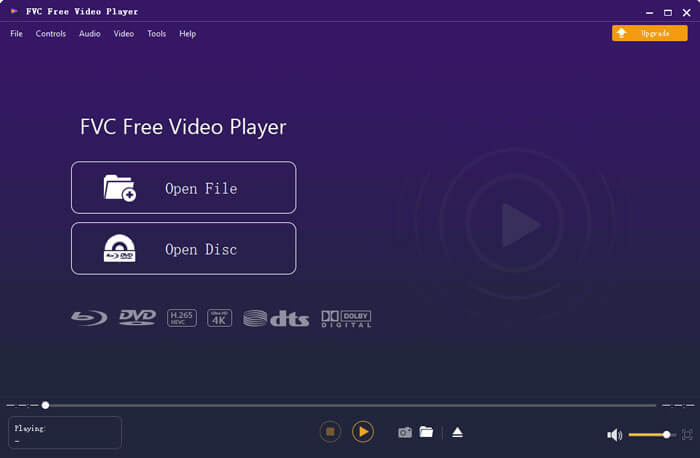
FVC Free DVD Player เป็นเครื่องมือเล่นดีวีดีออนไลน์ที่ให้ใช้งานได้ฟรีอย่างเต็มรูปแบบ ช่วยให้คุณรับชมแผ่น DVD โฟลเดอร์ DVD และไฟล์อิมเมจ DVD ISO ได้ด้วยคุณภาพสูง โดยไม่จำเป็นต้องติดตั้งโปรแกรมเล่นมีเดียขนาดใหญ่ลงในคอมพิวเตอร์เพื่อเล่นดีวีดี คุณสามารถเล่นดีวีดีของคุณได้โดยตรงผ่านเว็บเบราว์เซอร์.
เครื่องเล่นดีวีดีฟรีในภูมิภาคนี้เข้ากันได้กับ Windows 10, Windows 8, Windows 7 และ macOS ดังนั้นจึงไม่ใช่แค่เครื่องเล่นดีวีดีฟรีสำหรับ Windows 10 เท่านั้นคุณสามารถเปิดเบราว์เซอร์และใช้งานบนคอมพิวเตอร์เครื่องใดก็ได้

ซอฟต์แวร์เครื่องเล่นดีวีดีฟรีนี้ได้รับการออกแบบด้วยเทคโนโลยีการเข้ารหัสวิดีโอขั้นสูง สำหรับส่วนของการเล่นเสียงนั้นรองรับทั้ง DTS-HD และ Dolby TrueHD ช่วยให้คุณเพลิดเพลินกับภาพยนตร์ DVD ที่มีคุณภาพของภาพสูงและเอฟเฟกต์เสียงที่ไม่สูญเสีย
ในฐานะโปรแกรมเล่นดีวีดีฟรีสำหรับ Windows 10 เครื่องมือนี้มีฟังก์ชันการเล่นดีวีดีครบทุกอย่างที่คุณต้องการ นอกจากนี้ยังให้คุณจับภาพหน้าจอ ปรับและเลือกคำบรรยาย (ซับไตเติล) และแทร็กเสียงได้ เมื่อคุณต้องการเล่นแผ่นดีวีดี เพียงไปที่หน้า Free DVD Player แล้วคลิกปุ่ม Play Now จากนั้นทำตามคำแนะนำเพื่อดาวน์โหลดและติดตั้งไฟล์ตัวเรียกใช้งานขนาดเล็กสำหรับการเล่นดีวีดี หลังจากนั้นคุณก็สามารถเพลิดเพลินกับภาพยนตร์ดีวีดีและวิดีโอทั่วไปได้อย่างสะดวก.
ส่วนที่ 2 เครื่องเล่นดีวีดีโอเพนซอร์สสำหรับ Windows 10 และ Mac - VLC Media Player
VLC media player เป็นหนึ่งในซอฟต์แวร์เล่นวิดีโอและเสียงที่ได้รับความนิยมมากที่สุด มีให้ใช้ข้ามแพลตฟอร์มและรองรับ Windows 10/8/7, macOS และ Linux ในฐานะโปรแกรมโอเพนซอร์สที่มีฟังก์ชันครบถ้วน VLC ยังสามารถทำหน้าที่เป็นโปรแกรมเล่นดีวีดีฟรีสำหรับ Windows ได้อีกด้วย โดยรองรับการเล่นแผ่น DVD, VCD และ Audio CD.
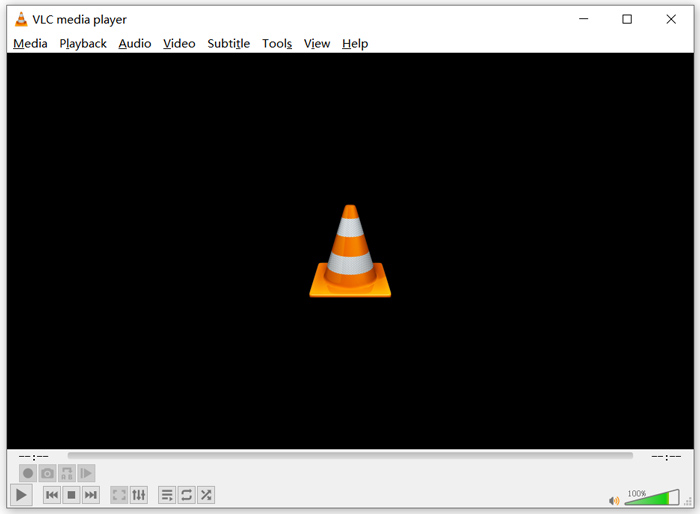
ในฐานะโปรแกรมเล่นดีวีดีฟรี VLC สามารถเข้าถึงเมนูดีวีดี แชปเตอร์ และเนื้อหาอื่น ๆ ที่เกี่ยวข้องได้ ฟีเจอร์ฮาร์ดแวร์ดีโค้ดดิ้งช่วยให้คุณรับชมภาพยนตร์ดีวีดีได้อย่างลื่นไหล นอกจากนี้ คุณยังสามารถควบคุมการเล่นดีวีดีได้อย่างละเอียด และสามารถจับภาพหน้าจอระหว่างเล่นดีวีดีได้อีกด้วย นอกเหนือจากภาพยนตร์ดีวีดีแล้ว VLC ยังรองรับการเล่นแผ่น Blu-ray ด้วย.
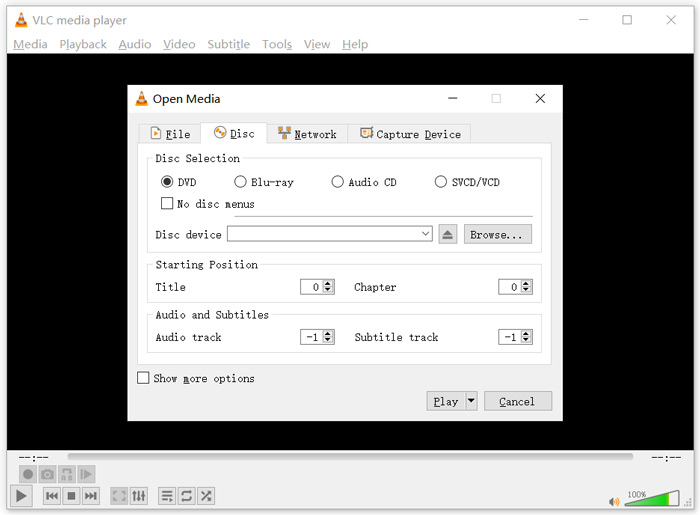
หากต้องการเล่นดีวีดีด้วย VLC media player ให้ใส่แผ่นดีวีดีลงในไดรฟ์ดีวีดีของคอมพิวเตอร์ จากนั้นเปิดโปรแกรม VLC แล้วเลือกเมนู Media ที่แถบเมนูด้านบน เลือกตัวเลือก Open Disc เลือก DVD แล้วคลิกปุ่ม Browse เพื่อเลือกไฟล์ดีวีดีที่ต้องการ จากนั้นคลิกปุ่ม Play เพื่อเริ่มรับชมดีวีดีของคุณ.
ส่วนที่ 3. ภูมิภาคเครื่องเล่นดีวีดีฟรีสำหรับ Windows 10 - PotPlayer
PotPlayer เป็นโปรแกรมเล่นมีเดียที่อัดแน่นด้วยฟีเจอร์และมีฟังก์ชันเล่นดีวีดีในตัว สามารถใช้เป็นโปรแกรมเล่นดีวีดีแบบไม่ล็อกโซน (region free) สำหรับพีซี Windows 10/8/7 ของคุณได้ ถูกออกแบบมาให้มีครบทุกอย่างที่ต้องการสำหรับการเล่นไฟล์ดีวีดี Blu-ray และไฟล์มีเดียทั่วไป นอกจากนี้ยังรองรับ OpenCodec ทำให้คุณสามารถเพิ่มโค้เดกที่ต้องการได้อย่างง่ายดาย.
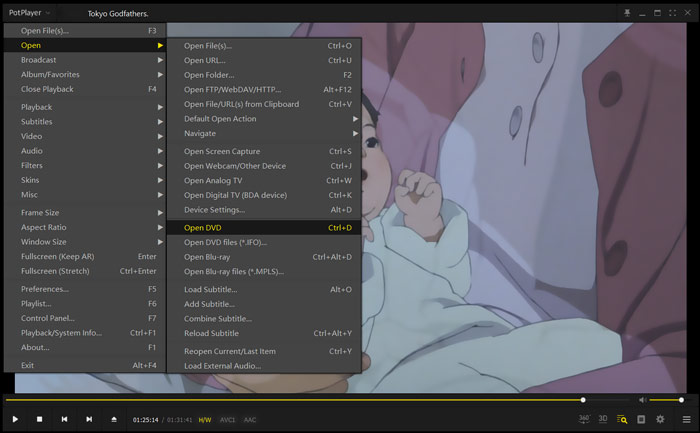
หากต้องการเล่นภาพยนตร์ดีวีดีด้วย PotPlayer ให้เปิดโปรแกรม แล้วคลิกขวาที่ PotPlayer ตรงมุมซ้ายบน จากรายการดรอปดาวน์ให้เลือก Open จากนั้นเลือก Open DVD แล้วเลือกไฟล์ดีวีดีที่คุณต้องการเล่น คุณสามารถปรับความเร็วในการเล่น เอฟเฟ็กต์วิดีโอ ปรับแต่งซับไตเติลและแทร็กเสียง รวมถึงตั้งค่าอื่น ๆ ได้อย่างสะดวก.
ส่วนที่ 4. ซอฟต์แวร์เครื่องเล่นดีวีดีฟรีสำหรับ Windows 10/8/7 และ Mac - KMPlayer
KMPlayer เป็นโปรแกรมเล่นวิดีโอยอดนิยมที่ช่วยให้คุณเล่นดีวีดีบนพีซี Windows 10/8/7 และ Mac ได้ รองรับไฟล์วิดีโอและเสียงยอดนิยมเกือบทุกประเภท เช่น MP4, MKV, FLV, MOV, MPG, VOB, MP3, AAC, WAV และอื่น ๆ อีกมากมาย KMPlayer ยังมีฟังก์ชันเล่นดีวีดีในตัว.
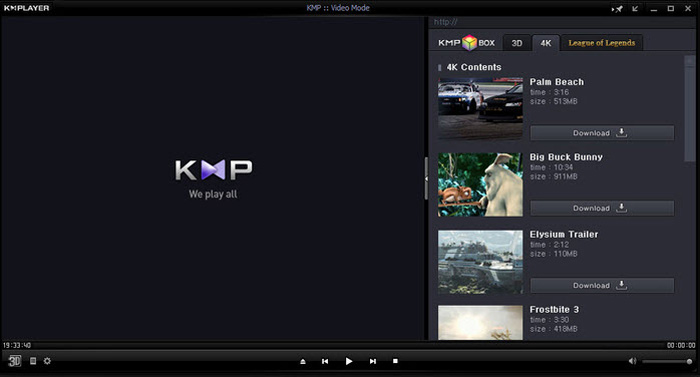
สำหรับการเล่นดีวีดี KMPlayer ให้คุณควบคุมการเลือกแผ่นดีวีดี เมนูดีวีดี แทร็กเสียงและคำบรรยาย รวมถึงการปรับเอฟเฟ็กต์ต่าง ๆ เช่น ความสว่าง คอนทราสต์ และอื่น ๆ เมื่อคุณต้องการชมภาพยนตร์ดีวีดี ให้เปิด KMPlayer คลิกขวาบนพื้นที่ว่างใด ๆ ในหน้าต่างโปรแกรม จากนั้นเลือกเมนู Open แล้วเลือก Open Folder เพื่อเล่นดีวีดี.
ส่วนที่ 5. เครื่องเล่นดีวีดีฟรีสำหรับ Windows 10/8/7 PC และ Mac - 5KPlayer
5KPlayer เป็นโปรแกรมตัวสุดท้ายที่เราแนะนำในลิสต์ 5 โปรแกรมเล่นดีวีดีฟรีที่ดีที่สุด เป็นโปรแกรมเล่นมีเดียที่ทรงพลังและมีฟังก์ชันเล่นดีวีดีในตัว นอกจากจะเป็นโปรแกรมเล่นดีวีดีฟรีสำหรับ Windows 10 แล้ว ยังรองรับ Windows เวอร์ชันอื่น ๆ และ macOS อีกด้วย นอกเหนือจากการเล่นดีวีดีและวิดีโอทั่วไปแล้ว 5KPlayer ยังให้คุณเล่นวิดีโอผ่านโปรโตคอล AirPlay และ DLNA แบบไร้สายได้ด้วย.
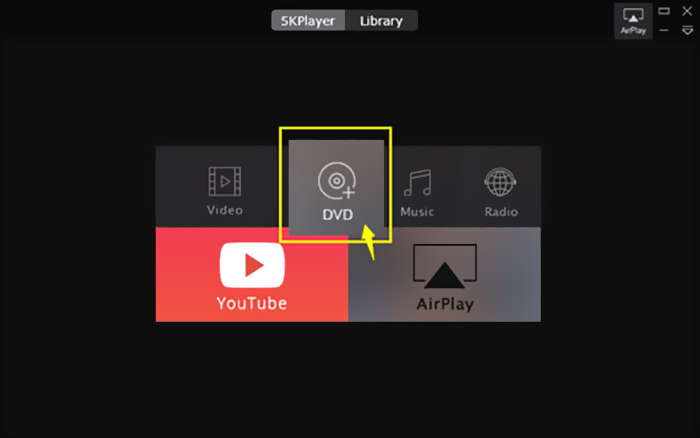
โปรแกรมเล่นดีวีดีฟรีนี้มีฟังก์ชัน AirPlay ในตัว ทำให้คุณสามารถเชื่อมต่อดีวีดีกับทีวีและรับชมภาพยนตร์ดีวีดีบนทีวีโดยตรงด้วยคุณภาพสูง หากต้องการเล่นดีวีดีด้วย 5KPlayer ให้เปิดโปรแกรมแล้วเลือกตัวเลือก DVD.
ส่วนที่ 6. คำถามที่พบบ่อยเกี่ยวกับเครื่องเล่นดีวีดีฟรีสำหรับ Windows 10
คำถาม 1. จะเล่นไฟล์ DVD ใน Windows Media Player ได้อย่างไร?
สำหรับไฟล์ DVD ที่คัดลอกคุณสามารถเล่นกับ Windows Media Player ในหลาย ๆ กรณีคุณต้องติดตั้งตัวกรอง AC3 และปลั๊กอินที่เรียกว่าตัวถอดรหัส MPEG-2 สำหรับการเล่นดีวีดี
คำถาม 2. ทำไมฉันไม่สามารถเล่นดีวีดีบน Windows 10 ได้?
ดังที่ได้กล่าวไว้ข้างต้น Microsoft ได้ลบการสนับสนุนการเล่นดีวีดีในตัวใน Windows 10 ดังนั้นการเล่นดีวีดีจึงเป็นเรื่องยุ่งยากกว่าบนพีซี Windows 10 คุณต้องซื้อเครื่องเล่นดีวีดีของ บริษัท อื่นหรือจ่าย $14.99 สำหรับเครื่องเล่นดีวีดี Windows
คำถามที่ 3. วิธีการริป DVD เป็น MP4?
ด้วยเหตุผลต่าง ๆ กันไป คุณอาจต้องการริปแผ่นดีวีดีให้เป็นไฟล์วิดีโอดิจิทัล เช่น MP4, MOV หรือ AVI คุณสามารถดาวน์โหลดโปรแกรมแปลง DVD เพื่อริปดีวีดีให้เป็น MP4 ได้โดยไม่สูญเสียคุณภาพ.
คำถามที่ 4. เครื่องเล่นดีวีดีสามารถรองรับรูปแบบวิดีโอใดได้บ้าง?
โดยทั่วไปเครื่องเล่นดีวีดีส่วนใหญ่ในตลาดสามารถเล่นวิดีโอในรูปแบบ MPEG-4, MPEG-2, MOV, DivX และรูปแบบไฟล์ที่ใช้บ่อยอื่น ๆ
สรุป
กำลังมองหา โปรแกรมเล่น DVD ฟรีสำหรับ Windows 10 อยู่หรือไม่? หลังจากอ่านหน้านี้แล้ว คุณจะได้รู้จักโปรแกรมเล่นดีวีดีฟรีที่ดีที่สุด 5 โปรแกรมสำหรับทั้งพีซี Windows 10/8/7 และ Mac คุณสามารถศึกษาฟีเจอร์หลักของแต่ละโปรแกรมเล่นดีวีดี แล้วค่อยตัดสินใจเลือกใช้งาน หากคุณยังมีคำถามเกี่ยวกับการเล่นดีวีดีอยู่ สามารถฝากข้อความถึงเราได้.
-
 VOB Player - 5 เครื่องเล่น VOB ที่ดีที่สุดสำหรับ Windows 10/8/7 PC และ Mac 2025
 จะเล่นไฟล์ VOB บน Windows 10 ได้อย่างไร? เครื่องเล่น VOB ที่ดีที่สุดคืออะไร? โพสต์นี้เป็นการทบทวนผู้เล่น VOB ที่ดีที่สุด 5 ตัวสำหรับคอมพิวเตอร์ Windows 10 และ Mac
-
 วิธีเบิร์นไฟล์วิดีโอ _TS ลงดีวีดีบน Mac / Windows 10
 ฉันจะแปลงและเบิร์นไฟล์ TS ไปยังแผ่น DVD ได้อย่างไร คำแนะนำทีละขั้นตอนนี้จะแสดงวิธีคัดลอกไฟล์และโฟลเดอร์ TS ไปยัง DVD บน Windows / Mac เพื่อให้คุณสามารถรับชมไฟล์ TS บนเครื่องเล่นดีวีดีหรือทีวีได้
-
 10 วิธีฟรีในการแปลงไฟล์ TS เป็น MP3, AIFF, ALAC, FLAC และอื่น ๆ
 วิธีการแปลงไฟล์ TS เป็น MP3 ฟรี ในคู่มือนี้คุณจะพบวิธีง่ายๆ 11 วิธีในการแยกเสียงจากไฟล์ TS ด้วย TS เป็นฟรีแวร์เสียงและเครื่องมือแปลงออนไลน์
