


 Video Converter Ultimate
 บันทึกหน้าจอ
 ซ่อมวิดีโอ
วิธีแปลง RAR เป็น MP4: แตกไฟล์และเปลี่ยนไฟล์ RAR เป็น MP4 อย่างถูกต้อง
If you are a tech-savvy person, you know that RAR and MP4 files are common in everyday routines. Essentially, RAR files are like compressed bundles that can hold all sorts of stuff - videos, images, you name it. That said, have you ever wondered about turning an RAR file into an MP4 for more compatibility? It's a question that pops up when you snag some movies with a RAR tag from the web or get RAR-packed videos via email, right? So, to switch them to MP4, you have to unpack or unzip the RAR and then transform those videos into MP4 format. Therefore, stick around this post to find out the two simple ways, offline and online, to make this RAR to MP4 conversion happen.

ส่วนที่ 1 แปลง RAR เป็น MP4 ออนไลน์ด้วย ezyZip
เริ่มต้นด้วยตัวแปลงออนไลน์ที่แนะนำซึ่งสามารถจัดการไฟล์ RAR ได้อย่างมีประสิทธิภาพ Ezyzip เป็นเพื่อนคู่ใจของคุณทุกครั้งที่คุณประสบปัญหาในการแปลงไฟล์ เป็นตัวเลือกออนไลน์ที่ดีที่สุดในการแยกไฟล์ MP4 จากไฟล์เก็บถาวร RAR ด้วยวิธีที่ไม่ยุ่งยาก คุณไม่จำเป็นต้องเกะกะอุปกรณ์คอมพิวเตอร์ของคุณด้วยซอฟต์แวร์แปลง MP4 เพิ่มเติม เนื่องจาก ezyZip ทำงานในเบราว์เซอร์ของคุณโดยตรง ช่วยให้คุณไม่ต้องยุ่งยากในการติดตั้ง นอกจากนี้ เครื่องมือนี้ไม่ได้จำกัดเพียงการแปลงไฟล์ RAR เป็น MP4 ออนไลน์ฟรีเท่านั้น เนื่องจากรองรับตัวเลือกการแยกไฟล์และการแปลงไฟล์อื่นๆ มากมายเช่นกัน
สิ่งที่ทำให้ ezyZip แตกต่างจากโปรแกรมแปลงไฟล์ออนไลน์อื่นๆ คือแนวทางที่เป็นเอกลักษณ์ มันทำให้ไฟล์ของคุณปลอดภัยโดยการประมวลผลสิ่งทั้งหมดภายในเบราว์เซอร์ของคุณ ซึ่งหมายความว่าไม่จำเป็นต้องอัปโหลดหรือดาวน์โหลดไปยังเซิร์ฟเวอร์ภายนอกที่น่าเบื่อ ซึ่งส่งผลให้เกิดการแปลงที่รวดเร็วปานสายฟ้า เป็นที่น่าสังเกตว่าคุณอาจลืมข้อจำกัดด้านขนาดเมื่อใช้ ezyZip เนื่องจากเครื่องมือนี้ไม่มีข้อจำกัดใดๆ นอกจากนี้ยังหมายความว่าความเป็นส่วนตัวของคุณยังคงเหมือนเดิมเนื่องจากไฟล์ของคุณไม่เคยออกจากเบราว์เซอร์ของคุณ! ตอนนี้ เราจะไม่ปล่อยสไลด์นี้ไปโดยไม่สอนขั้นตอนของ ezyZip เพื่อแปลงไฟล์ของคุณจาก RAR เป็น MP4 จึงมีคำแนะนำด้านล่างนี้
Step 1. Proceed to the converter's official website and import your RAR file by clicking the Select rar file to convert button.
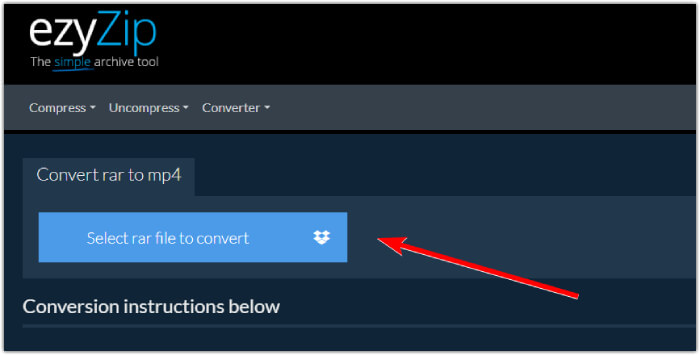
Step 2. When the files are loaded, the tool will automatically convert them for you in the RAR archive. Now click the Save button to save each MP4 file to your desired file destination.
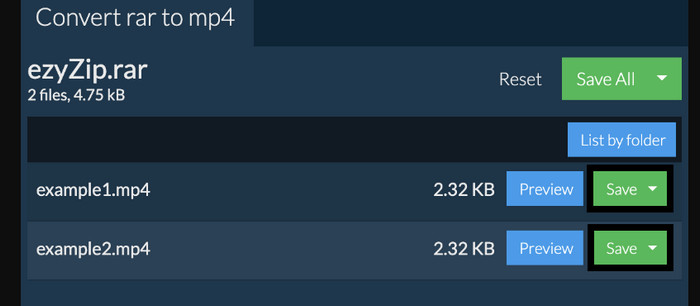
Step 3. If, just in case, the Save button is disabled, you must know that the browser you use is not supported by the converter. Otherwise, when the files are successfully saved, you will be given an option to view your converted files.
ส่วนที่ 2 แปลง RAR เป็น MP4 ออฟไลน์ด้วย WinRAR
มีวิธีออฟไลน์ที่ยอดเยี่ยมในการแปลง RAR เป็น MP4 ด้วย WinRAR WinRAR เป็นซอฟต์แวร์ยอดนิยมที่ออกแบบมาสำหรับผู้ใช้ Windows โดยเฉพาะ เป็นซอฟต์แวร์ที่มีคุณสมบัติที่มีประโยชน์มากมายสำหรับการจัดการไฟล์บีบอัด นอกจากนี้ โปรแกรมนี้ยังช่วยลดความยุ่งยากในกระบวนการคลายซิปหรือขยายขนาดไฟล์ RAR เพื่อให้แตกและเข้าถึงได้ ยิ่งไปกว่านั้น WinRAR ยังคงดำเนินต่อไปเพราะมันยังมีความสามารถในการแปลงไฟล์ RAR เป็นรูปแบบวิดีโอต่าง ๆ เช่น MP4 หรือ M4V ฟังก์ชั่นนี้พิสูจน์ได้ว่าล้ำค่าสำหรับผู้ใช้ที่ต้องการทำงานกับเนื้อหามัลติมีเดียที่จัดเก็บไว้ในไฟล์ RAR ดังนั้น หากคุณต้องการทราบวิธีแตกไฟล์และเปลี่ยนไฟล์ RAR เป็น MP4 ด้วย WinRar ให้อ่านคำแนะนำทีละขั้นตอนด้านล่าง
Step 1. Firstly, download the popular RAR expert program on your desktop. Use a reliable source when downloading it. Then, after the installation, quickly launch it to start the conversion process.
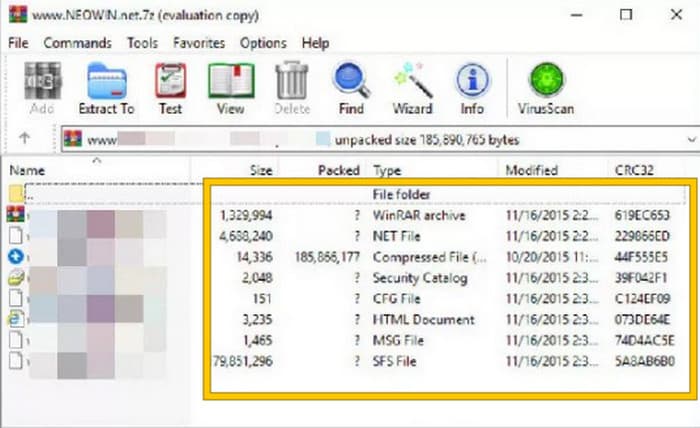
Step 2. Once the program is launched, you can immediately open or upload the RAR file that you want to convert to MP4. You will know whether the file is loaded or not, for it will show at the center of the interface.
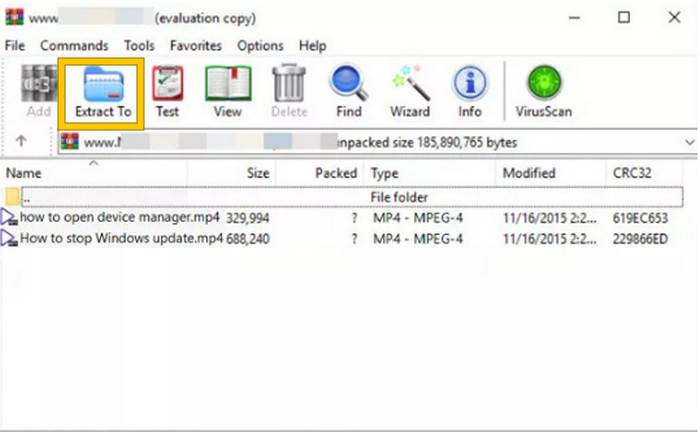
Step 3. Finally, to start the conversion or unpacking, click the Extract To button in the menu tab list. When done, you may directly open the converted files in the interface.
ส่วนที่ 3 เคล็ดลับโบนัส: วิธีที่ดีที่สุดในการแปลงเสียง/วิดีโอเป็น MP4 ออนไลน์
Allow us to give you a bonus tip where you can convert any video and audio file into MP4 in the best and most rapid way! Meet this FVC Free Video Converter Online, a converter that makes it super easy and totally free to change your videos and audio files into different formats like MP4. Besides, you can switch your high-definition videos into popular formats quickly while keeping their original quality or sharpness intact. Furthermore, you will also love its lightning-fast process, letting you convert multiple files in no time!
ยังมีอีก! โปรแกรมแปลงวิดีโอออนไลน์ฟรี FVC นี้ยังช่วยให้คุณปรับแต่งวิดีโอและเสียงของคุณให้ตรงใจได้อีกด้วย เนื่องจากตัวแปลงนี้ช่วยให้คุณสามารถปรับเปลี่ยนสิ่งต่างๆ เช่น ความละเอียด อัตราเฟรม บิตเรต และแม้แต่การตั้งค่าเสียง เช่น ระดับเสียงและบิตเรต ให้เป็นการตั้งค่าที่คุณต้องการ ซึ่งหมายความว่าคุณสามารถปรับแต่งสื่อของคุณได้ตามที่คุณต้องการและส่งออกได้อย่างสะดวกสบาย ดังนั้น หากคุณสงสัยว่าจะแปลงไฟล์วิดีโอหรือไฟล์เสียงของคุณเป็น MP4 ออนไลน์ได้อย่างไร ให้ทำตามขั้นตอนง่าย ๆ ที่แสดงด้านล่าง
Step 1. Kick off the process by visiting the official website of FVC Free Video Converter Online. Once you’ve arrived there, click the Add Files to Convert button to get the launcher and upload the initial file.

Step 2. Once the file is uploaded in, you can add more media files by clicking the Add File button in the main workspace. Then, set them to MP4 by clicking the files and then toggling the MP4 format at the bottom.
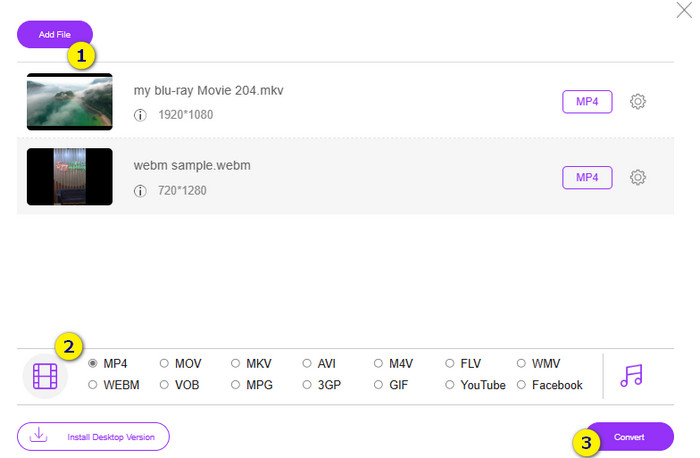
Step 3. Afterward, it’s time to start the fast and bulk conversion by clicking the Convert button at the bottom.
อ่านเพิ่มเติม:
MOV VS MP4 – Which One Do You Choose?
The Best MP4 Editor for Windows and Mac in 2025
ส่วนที่ 4 คำถามที่พบบ่อยเกี่ยวกับการแปลง RAR และ MP4
ไฟล์ RAR คืออะไร?
ไฟล์ RAR ถูกบีบอัดในรูปแบบไฟล์เก็บถาวร ช่วยให้คุณสามารถจัดเก็บไฟล์หลายไฟล์ในคอนเทนเนอร์เดียวในขณะที่ลดขนาดโดยรวมลง
ฉันจะแปลง RAR เป็น MP4 บน Mac ได้อย่างไร
To convert RAR to MP4 on Mac, you can then use video conversion software like Unarchiver to extract the contents of the RAR archive. Then, any compatible video files within the extracted contents can be converted to MP4 format using a powerful converter. To do this, you can use the FVC Video Converter Ultimate.
ไฟล์ RAR สามารถมีวิดีโอได้หรือไม่
ไฟล์ RAR ก็เหมือนกับโฟลเดอร์ zip ที่สามารถเก็บไฟล์ได้ทุกประเภท ใช่แล้ว ไฟล์ RAR สามารถมีวิดีโอได้
สรุป
This post is perfect for your RAR to MP4 conversion task as it provides you with the best ways to do it on your device. Fortunately, the best video and audio online converter that makes you work like a pro!
-
 วิธีบีบอัดวิดีโอออนไลน์เพื่อลดขนาดไฟล์วิดีโอ
 หากคุณกำลังมองหาโปรแกรมอัดวิดีโอออนไลน์ ไม่ต้องค้นหาอีกต่อไปแล้ว เพราะเราช่วยคุณได้! นี่คือเครื่องมือที่สะดวกที่สุดบางส่วนที่คุณสามารถใช้ได้
-
 วิธีบีบอัดวิดีโอ MP4 ให้มีขนาดเล็กลง
 วิดีโอ MP4 ใหญ่เกินไปสำหรับการอัปโหลด? ต้องการลดขนาดวิดีโอหรือไม่? นี่คือ 3 วิธีที่มีประสิทธิภาพในการบีบอัดไฟล์ MP4 ให้มีขนาดเล็กลงโดยไม่มีขีด จำกัด
-
 วิธีบีบอัดวิดีโอฟรี / ลองใช้โปรแกรมบีบอัดวิดีโอออนไลน์ 7 ตัวนี้
 อ่านและรับ 7 วิธีในการบีบอัดวิดีโอฟรีบนคอมพิวเตอร์หรือโทรศัพท์ของคุณ คุณสามารถลดขนาดวิดีโอขนาดใหญ่ให้เป็นไฟล์ขนาดเล็กสำหรับอีเมล, Twitter, Instagram, YouTube, WhatsApp และอื่น ๆ ได้อย่างง่ายดาย
