


 Video Converter Ultimate
 บันทึกหน้าจอ
 ซ่อมวิดีโอ
 ดาวน์โหลดอย่างปลอดภัย
M4A คืออะไร และจะแปลงเป็น MP3 หรือ WAV เพื่อการเข้าถึงที่มากขึ้นได้อย่างไร
เคยดาวน์โหลดเพลงหรือไฟล์เพลงมาแล้วเปิดไม่ได้บนเครื่องเล่นเพลงของคุณไหม? สาเหตุอาจเป็นเพราะไฟล์เหล่านั้นอยู่ในรูปแบบ M4A จริง ๆ แล้ว M4A เป็นรูปแบบไฟล์ยอดนิยมเพราะให้คุณภาพเสียงดีและขนาดไฟล์เล็ก อย่างไรก็ตาม เช่นเดียวกับรูปแบบไฟล์เสียงประเภทอื่น ๆ คุณก็จะเจอข้อจำกัดบางอย่างเมื่อใช้งานไฟล์ M4A แต่ไม่ต้องกังวล เพราะบทความแนะนำนี้จะมาช่วยคุณเอง! เรามาเจาะลึกกันว่าM4A คืออะไร เพื่อให้คุณเห็นทั้งข้อดีและข้อเสีย รวมถึงข้อมูลอื่น ๆ และสอนวิธีแปลงไฟล์เหล่านี้ให้เป็นรูปแบบที่เล่นได้บนอุปกรณ์ทุกชนิด เรารู้ว่าคุณสนใจ ดังนั้นไม่ให้เสียเวลา ไปเริ่มเรียนรู้ด้วยการอ่านเนื้อหาด้านล่างกันเลย.

ตอนที่ 1. M4A คืออะไร
รูปแบบ M4A หรือที่เรียกว่า MPEG-4 Audio เป็นรูปแบบเสียงดิจิทัลที่ใช้กันอย่างแพร่หลายในการจัดเก็บข้อมูลเสียงที่บีบอัด เป็นที่ทราบกันดีว่าให้เสียงคุณภาพสูงในขนาดไฟล์ที่เล็ก นอกจากนี้ ไฟล์ M4A ยังเชื่อมโยงกับอุปกรณ์ Apple และ iTunes และยังเก็บข้อมูลเมตา เช่น ข้อมูลศิลปินและอัลบั้ม นอกเหนือจากเสียงที่บีบอัด นี่คือเหตุผลที่ใน iTunes Store เพลงที่ดาวน์โหลดมักจะเป็นรูปแบบ M4A ในขณะที่เพลงที่ป้องกันการคัดลอกจะถูกบันทึกด้วยนามสกุล M4P อีกสิ่งหนึ่งที่คุณต้องรู้เกี่ยวกับการบีบอัด M4A คือรองรับตัวแปลงสัญญาณเสียงต่างๆ เพื่อให้แน่ใจว่าเข้ากันได้กับเครื่องเล่นสื่อและอุปกรณ์ต่างๆ มักจะเข้ารหัสด้วยตัวแปลง Advanced Audio Coding หรือ AAC ที่มีการสูญเสียข้อมูลเพื่อลดขนาดไฟล์ และไฟล์ M4A อาจใช้ตัวแปลง Apple Lossless Audio Codec หรือ ALAC ที่ไม่มีการสูญเสียข้อมูลก็ได้
เพื่อให้คุณเข้าใจ M4A ได้ชัดเจนยิ่งขึ้น เราจึงสร้างแผนภูมิด้านล่างนี้ขึ้นมา
| แง่มุมของ M4A | |
| นามสกุลไฟล์ | .m4a |
| รูปแบบคอนเทนเนอร์ | MPEG-4 |
| ตัวแปลงสัญญาณเสียง | • การเข้ารหัสเสียงขั้นสูง (AAC) • ตัวแปลงสัญญาณเสียง Apple Lossless (ALAC) |
| การใช้งานทั่วไป | • ดาวน์โหลดเพลงจาก iTunes Store • หนังสือเสียง • พอดแคสต์ • การแชร์เสียงดิจิทัลเนื่องจากขนาดไฟล์เล็กลง |
ส่วนที่ 2 ข้อดีและข้อเสียของ M4A
ข้อดี
- M4a มักจะมีคุณภาพสูง จึงเหมาะสำหรับการบันทึกเสียงและเพลงอื่นๆ
- ไฟล์ M4A ใช้ขั้นตอนการบีบอัดขั้นสูง ช่วยให้คุณประหยัดพื้นที่บนอุปกรณ์ได้มาก โดยไม่ต้องเสียสละคุณภาพเสียงมากนัก
- ไฟล์นี้ได้รับการรองรับอย่างกว้างขวางในแพลตฟอร์มและอุปกรณ์ต่างๆ โดยส่วนใหญ่คืออุปกรณ์ Apple, iTunes และเครื่องเล่นสื่ออื่นๆ อีกมากมาย
- ไฟล์เสียงรองรับข้อมูลเมตาที่ให้คุณฝังข้อมูลได้ ดังนั้น คุณสามารถฝังรายละเอียด เช่น ชื่อศิลปิน รายละเอียดเพลง และชื่ออัลบั้มลงในไฟล์ได้โดยตรง
จุดด้อย
- ไฟล์ M4A บางไฟล์อาจได้รับการปกป้องโดย DRM หรือการจัดการสิทธิ์ดิจิทัล ซึ่งจะจำกัดความสามารถในการแก้ไขหรือแชร์ไฟล์อย่างอิสระของคุณ
- ไฟล์เหล่านี้อาจมีขนาดใหญ่กว่าไฟล์เสียงรูปแบบอื่น เช่น MP3 โดยเฉพาะไฟล์เสียงคุณภาพสูง
- บางครั้ง การแก้ไขไฟล์ M4A อาจทำให้คุณภาพเสียงลดลง โดยเฉพาะหากคุณแก้ไขหรือเข้ารหัสไฟล์ซ้ำหลายครั้ง
ส่วนที่ 3 วิธีการแปลง M4A เป็น WAV และ MP3
หากคุณมีไฟล์ M4A สะสมอยู่จำนวนหนึ่ง แต่เห็นว่าสะดวกกว่าหากจะแปลง M4A เป็น MP3 หรือ WAV คุณอาจอยากสลับรูปแบบไฟล์เหล่านั้น ตอนนี้ถ้าสถานการณ์ของคุณต้องแปลงไฟล์แบบออนไลน์ และต้องการเครื่องมือที่ทรงพลังมากกว่าตัวแปลงพื้นฐาน ก็ขอแนะนำ FVC Free Audio Converter Online นี่คือเครื่องมือออนไลน์ที่ช่วยให้คุณเปลี่ยนไฟล์เสียงจากรูปแบบหนึ่งไปเป็นอีกรูปแบบได้อย่างสะดวก ด้วยตัวแปลงที่ยอดเยี่ยมนี้ คุณสามารถสลับรูปแบบเพลงของคุณระหว่าง M4A, MP3, WAV, WMA, AIFF, AAC, AC3, FLAC และอื่น ๆ ได้โดยไม่ยุ่งยาก.
สิ่งที่เจ๋งกว่าเกี่ยวกับ FVC Free Audio Converter ก็คือมันทำงานได้อย่างยอดเยี่ยมเพื่อให้เสียงของคุณฟังดูดี มันจะทำให้คุณไม่ต้องกังวลเพราะว่ามันจะไม่สูญเสียคุณภาพใดๆ ในกระบวนการแปลง ดังนั้นเสียงของคุณจะยังคงฟังดูยอดเยี่ยม ตอนนี้คุณสามารถฟังเพลงโปรดของคุณในรูปแบบ M4A บนอุปกรณ์ใดๆ หรือแชร์กับเพื่อนๆ ของคุณได้โดยไม่ต้องกังวลเรื่องความเข้ากันไม่ได้หากคุณเปลี่ยน M4A เป็น WAV หรือ MP3 นอกจากนี้ มันยังช่วยให้คุณดาวน์โหลดไฟล์ที่แปลงแล้วไปยังคอมพิวเตอร์ของคุณได้โดยตรงโดยไม่ต้องใช้ความพยายามพิเศษใดๆ ทำอย่างไร? เพียงทำตามขั้นตอนง่ายๆ ไม่กี่ขั้นตอน แล้วคุณก็พร้อมแล้ว
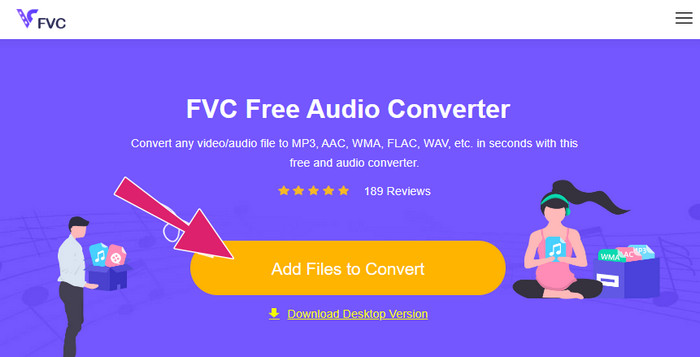
ขั้นตอนที่ 1 เริ่มต้นด้วยการติดตั้งตัวเรียกใช้งาน (launcher) อันทรงพลังของมันเพื่อสัมผัสความปลอดภัยและความมีประสิทธิภาพของตัวแปลงไฟล์ เพียงคลิกปุ่ม Add Files to Convert แล้วคลิกปุ่มดาวน์โหลดที่ปรากฏขึ้น.
ขั้นตอนที่ 2 หลังจากผ่านไปไม่กี่วินาที เครื่องมือก็จะพร้อมให้คุณอัปโหลดไฟล์ M4A ที่ต้องการแปลงได้ หากการนำเข้าในครั้งแรกให้คุณอัปโหลดได้เพียงหนึ่งไฟล์ คุณสามารถคลิกแท็บ Add File จากหน้าอินเทอร์เฟซหลักเพื่ออัปโหลดไฟล์ M4A เพิ่มเติมได้.
ขั้นตอนที่ 3 หลังการนำเข้าไฟล์ เครื่องมือนี้จะมีตัวเลือกประเภทไฟล์ผลลัพธ์ให้คุณหลายแบบซึ่งจะแสดงที่ด้านล่างของอินเทอร์เฟซ จากตรงนั้น คุณสามารถเลือกได้ว่าจะใช้ WAV หรือ MP3 สำหรับไฟล์ M4A ของคุณ.
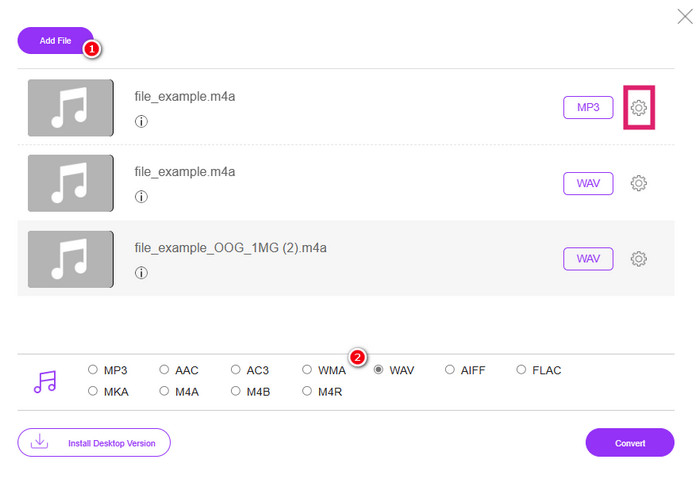
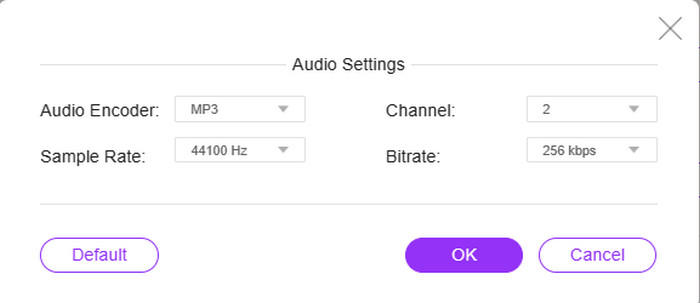
ขั้นตอนที่ 4 คุณสามารถทำตามขั้นตอนเสริมนี้เป็นส่วนหนึ่งของการตั้งค่าได้ หากคุณคลิกปุ่ม Setting ของแต่ละไฟล์ คุณจะมีโอกาสเข้าไปปรับแต่งตัวเข้ารหัสเสียง (audio encoder), อัตราสุ่ม (sample rate), ช่องสัญญาณ (channel) และบิตเรต (bitrate) ของไฟล์ได้.
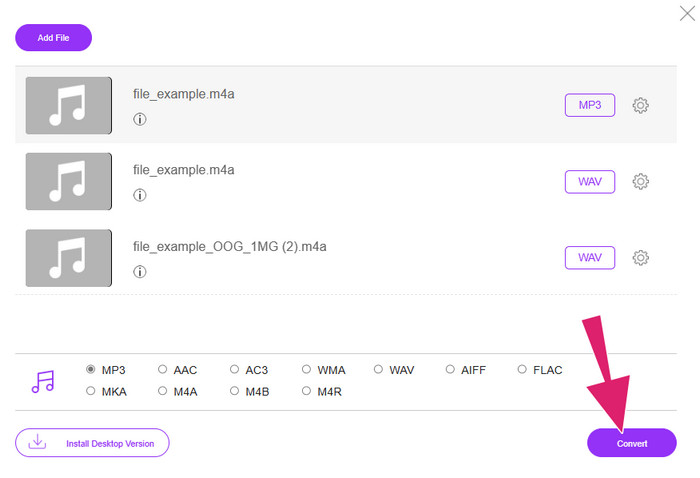
ขั้นตอนที่ 5 หรือหากคุณต้องการดำเนินการแปลงไฟล์อย่างรวดเร็วทันที ให้คลิกปุ่ม Convert แทน.
ส่วนที่ 4. คำถามที่พบบ่อยเกี่ยวกับ M4A
M4A และ MP3 แตกต่างกันอย่างไร?
สำหรับหัวข้อ M4A vs MP3 โดยทั่วไปไฟล์ M4A จะให้คุณภาพเสียงสูงกว่า MP3 แม้จะใช้บิตเรตเท่ากันก็ตาม M4A ยังรองรับฟีเจอร์อื่น ๆ อย่างภาพหน้าปกและการแท็กข้อมูลเมตาดาต้าอีกด้วย อย่างไรก็ตามไฟล์ MP3 นั้นรองรับการใช้งานได้กว้างขวางกว่าบนหลากหลายแพลตฟอร์มและอุปกรณ์.
ฉันสามารถแปลงไฟล์ M4A เป็นรูปแบบวิดีโอได้หรือไม่
ใช่ สามารถแปลงไฟล์เสียง M4A ให้เป็นไฟล์วิดีโอได้ เช่น M4A เป็น MP4 โดยการนำไฟล์เสียงไปผสานเข้ากับภาพนิ่งหรือคลิปวิดีโอด้วยซอฟต์แวร์ตัดต่อวิดีโอ.
ไฟล์ M4A ควรมีบิตเรตที่ดีที่สุดเท่าไร?
อัตราบิตเรตที่ดีที่สุดสำหรับไฟล์ M4A ขึ้นอยู่กับความชอบของคุณ คุณต้องพิจารณาคุณภาพเสียงและขนาดไฟล์ที่คุณต้องการ โดยทั่วไปแล้ว อัตราบิตที่สูงกว่าจะส่งผลให้คุณภาพเสียงดีขึ้นแต่ขนาดไฟล์จะใหญ่ขึ้น ในขณะเดียวกัน อัตราบิตคุณภาพทั่วไปหรือมาตรฐานสำหรับไฟล์ M4A จะอยู่ระหว่าง 128 kbps ถึง 256 kbps และ 320 kbps สำหรับเสียงคุณภาพสูง
สรุป
แล้วก็นี่แหละ! โพสต์นี้ได้ให้คำตอบกับคำถามที่ว่าM4A คืออะไร คุณได้เรียนรู้แล้วว่า M4A มอบประสบการณ์การฟังที่ยอดเยี่ยมด้วยคุณภาพเสียงที่เหนือกว่า ใช่ มันสามารถเล่นได้ด้วยโปรแกรมเล่นสื่อหลากหลายตัว แต่คุณก็ต้องไม่ลืมว่ายังมีบางตัวที่ไม่รองรับเช่นกัน นั่นจึงเป็นเหตุผลที่คุณมีตัวเลือกในการแปลงไฟล์ให้เป็นรูปแบบเสียงอื่น ๆ อย่าง MP3 และ WAV.
-
 MP4 คืออะไร: คำอธิบาย ข้อดี และอื่นๆ
 ก่อนที่คุณจะแปลง MP4 เป็นรูปแบบอื่น คุณต้องรู้บางอย่างเกี่ยวกับมันก่อน โพสต์นี้จะเปิดเผยทุกสิ่งที่คุณจำเป็นต้องรู้เกี่ยวกับ MP4 และทางเลือกอื่น ๆ
-
 เหตุใดวิดีโอ MP4 จึงไม่ปรากฏใน Premiere Pro [แก้ไขแล้ว]
 วิดีโอ MP4 ไม่แสดงใน Premiere Pro ซึ่งอาจเป็นเพราะไฟล์เสียหายหรือวางผิดที่ ตรวจสอบสาเหตุและวิธีแก้ไขที่เป็นไปได้ทั้งหมดที่นี่!
-
 ความแตกต่างระหว่าง M4V กับ MP4 คืออะไร
 สับสนเกี่ยวกับความแตกต่างระหว่างรูปแบบวิดีโอ M4V และ MP4 หรือไม่ เรียนรู้เกี่ยวกับรูปแบบวิดีโอเหล่านี้ได้ที่นี่ และเราจะแนะนำคุณว่ารูปแบบวิดีโอทั้งสองนี้แตกต่างกันอย่างไร และจะแปลงไฟล์วิดีโอเหล่านี้ได้อย่างไร
