


 Video Converter Ultimate
 บันทึกหน้าจอ
 ซ่อมวิดีโอ
 ดาวน์โหลดอย่างปลอดภัย
2 วิธีง่ายๆในการแปลง MTS เป็น MP3 ฟรี
สำหรับความต้องการที่แตกต่างกันคุณต้องการแยกแทร็กเสียงจากวิดีโอ ตัวอย่างเช่นคุณอาจต้องการแปลงวิดีโอเป็น MP3 เพื่อลดขนาดไฟล์ ในบางกรณีสิ่งที่คุณต้องมีคือเพลงประกอบของภาพยนตร์และคุณสามารถเลือกที่จะแยกเสียงออกมาได้

MTS เป็นรูปแบบวิดีโอความคมชัดสูงที่รองรับวิดีโอ HD ระดับ 720p และ 1080i โดยเป็นนามสกุลไฟล์ของ AVCHD (Advanced Video Coding High Definition) เมื่อคุณได้ไฟล์ MTS มา คุณจะไม่สามารถเปิดเล่นได้โดยตรงด้วยโปรแกรมเล่นสื่อ โปรแกรมตัดต่อวิดีโอ หรืออุปกรณ์พกพา iOS/Android ดังนั้นจึงจำเป็นอย่างยิ่งต้องแปลงไฟล์ MTS ให้เป็น MP3 หรือ MP4 เพื่อการเล่นหรือตัดต่อได้ราบรื่นยิ่งขึ้น ในบทความนี้เราจะมาแนะนำคุณว่าจะแปลง MTS เป็น MP3 ฟรีได้อย่างไร.
ส่วนที่ 1 วิธีการแปลง MTS เป็น MP3 ฟรีโดยไม่สูญเสียคุณภาพ
มีเครื่องมือแปลง MTS เป็น MP3 มากมายบนอินเทอร์เน็ตที่สามารถช่วยคุณแยกเสียง MP3 จากวิดีโอ MTS หรือ M2TS ได้ แต่คุณอาจสังเกตเห็นว่าหลายคนโดยเฉพาะไฟล์ฟรีบางไฟล์มีแนวโน้มที่จะส่งออกไฟล์ MP3 คุณภาพต่ำ
ด้วยเหตุนี้ ในส่วนแรกนี้ เราขอแนะนำซอฟต์แวร์ฟรีที่ดีที่สุดสำหรับแปลง MTS เป็น MP3 นั่นคือ Free Video Converter ให้กับคุณ โปรแกรมนี้สามารถแปลงไฟล์ AVCHD เป็น MP3 ได้โดยยังคงคุณภาพเสียงดั้งเดิมเอาไว้อย่างครบถ้วน ตอนนี้คุณสามารถดาวน์โหลดมาใช้งานได้ฟรี และทำตามคำแนะนำต่อไปนี้เพื่อดึงแทร็กเสียง MP3 ออกจากวิดีโอ MTS/M2TS ของคุณ.
ดาวน์โหลดฟรีสำหรับ Windows 7 หรือใหม่กว่าดาวน์โหลดอย่างปลอดภัย
ดาวน์โหลดฟรีสำหรับ MacOS 10.7 หรือใหม่กว่าดาวน์โหลดอย่างปลอดภัย
ขั้นตอนที่ 1 ก่อนอื่นให้ติดตั้งโปรแกรมแปลง MTS เป็น MP3 ฟรีตัวนี้บนคอมพิวเตอร์ของคุณ โดยเริ่มจากดับเบิลคลิกที่ปุ่มดาวน์โหลดด้านบน เมื่อเข้าสู่หน้าหลักของโปรแกรมแล้ว ให้คลิก Add File(s) เพื่อเพิ่มไฟล์ MTS ที่ต้องการแปลง.
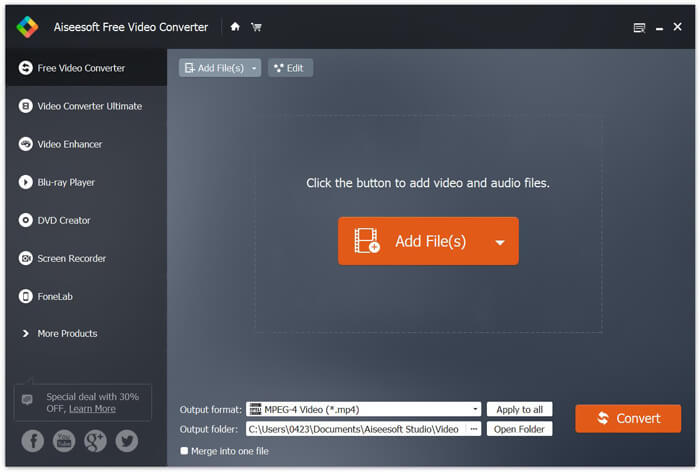
ขั้นตอนที่ 2 คลิก Output format จากนั้นเลือก MP3 เป็นรูปแบบไฟล์ปลายทาง ในขั้นตอนนี้คุณยังสามารถเลือกโฟลเดอร์ปลายทางสำหรับเก็บไฟล์เสียง MP3 ที่แปลงเสร็จแล้วได้ จากนั้นคลิกปุ่ม Convert เพื่อเริ่มแปลงไฟล์ AVCHD ของคุณเป็น MP3.
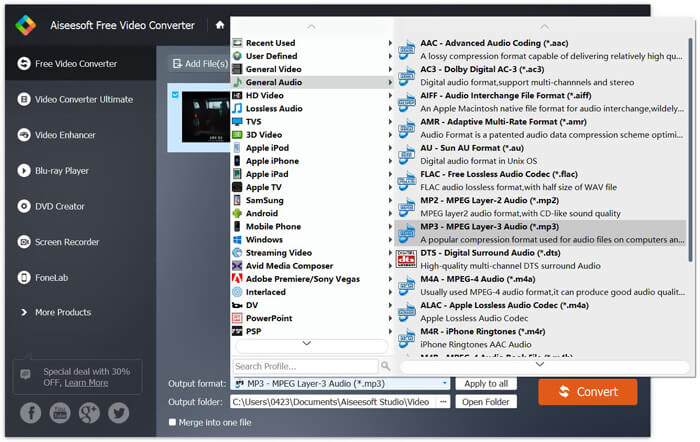
ด้วยการนำเทคโนโลยีเร่งความเร็วขั้นสูงมาใช้ทำให้สามารถแปลง MTS เป็น MP3 ได้อย่างรวดเร็ว ที่สำคัญกว่านั้นการแปลง MTS เป็น MP3 ฟรีนี้ช่วยให้คุณมั่นใจได้ว่าจะไม่มีการสูญเสียคุณภาพเสียงระหว่างการแปลง นอกจากนี้ยังออกแบบมาพร้อมกับฟังก์ชั่นการแก้ไขเพื่อช่วยคุณแก้ไขไฟล์เสียงวิดีโอและปรับเอฟเฟกต์เอาต์พุต
ตอนที่ 2. วิธีการแปลง MTS เป็น MP3 ฟรีด้วย Online Converter
หากคุณมีไฟล์ AVCHD ขนาดเล็กและต้องการดึงแทร็กเสียง MP3 ออกมา คุณสามารถใช้ตัวแปลงออนไลน์ฟรีได้ ดังที่กล่าวไปแล้วข้างต้น มีเครื่องมือแปลงไฟล์ออนไลน์มากมายที่ช่วยให้คุณแปลง MTS เป็น MP3 ได้ หากคุณยังไม่แน่ใจว่าจะใช้ตัวไหน เราขอแนะนำตัวแปลงไฟล์ MTS เป็น MP3 ออนไลน์ยอดนิยมตัวหนึ่ง คือ FVC Free Online Video Converter.
FVC Free Online Video Converter เป็นหนึ่งในเครื่องมือแปลงวิดีโอและเสียงที่ได้รับความนิยมมากที่สุดซึ่งสามารถช่วยให้คุณแปลง MTS เป็น MP3 ได้อย่างง่ายดาย นอกจากการแปลงไฟล์ AVCHD แล้วยังช่วยให้คุณทำการแปลงไฟล์มีเดียอื่น ๆ ขั้นตอนต่อไปจะแสดงวิธีการแปลง MTS เป็น MP3 ออนไลน์ด้วยตัวแปลงวิดีโอออนไลน์นี้
ขั้นตอนที่ 1 เปิดเบราว์เซอร์ของคุณและไปยังเว็บไซต์ทางการของ FVC Free Online Video Converter โดยมีหน้าพิเศษสำหรับแปลง MTS เป็น MP3 คือ https://www.free-videoconverter.net/free-online-video-converter/ คุณสามารถเข้าไปที่หน้านี้เพื่อทำการแปลงไฟล์ได้.
ขั้นตอนที่ 2 หาและคลิกปุ่ม Add Files to Convert เพื่อดาวน์โหลดและติดตั้งตัวเรียกใช้งาน (launcher) หลังจากเปิดใช้ตัวเรียกใช้งานแล้ว ให้อัปโหลดไฟล์ MTS ที่คุณต้องการแปลง.

ขั้นตอนที่ 3 ตรวจสอบให้แน่ใจว่ารูปแบบไฟล์ปลายทางเป็น MP3 จากนั้นคลิกปุ่ม Convert เพื่อเริ่มดึงเสียง MP3 จากไฟล์ AVCHD ของคุณ หลังจากนั้นโปรแกรมจะเริ่มแปลง MTS เป็น MP3 ให้อัตโนมัติ.

หลังจากอ่านหน้านี้แล้ว คุณจะได้ทราบ 2 วิธีง่ายและฟรีในการแปลง MTS เป็น MP3 หากคุณต้องการแปลงไฟล์ AVCHD ขนาดใหญ่เป็น MP3 โดยไม่สูญเสียคุณภาพเสียงเลย คุณสามารถใช้ Free Video Converter ได้ หรือคุณอาจเลือกใช้ FVC Free Online Video Converter เพื่อจัดการกับไฟล์วิดีโอ MTS/M2TS ขนาดเล็กที่ต่ำกว่า 100MB หากยังมีคำถามเพิ่มเติม สามารถฝากข้อความถามเราได้.
-
 วิธีการแปลง WMV เป็น MP3 บนเดสก์ท็อปและออนไลน์
 คุณสามารถค้นหาซอฟต์แวร์แปลงวิดีโอฟรีจาก FVC studio รองรับรูปแบบวิดีโอ / เสียงใด ๆ รวมถึง MP4, MOV, TS, AVI, WMV, FLAC, MP3 และอื่น ๆ
-
 4 วิธีที่ดีที่สุดในการแปลง M4A เป็น MP3 โดยไม่สูญเสียคุณภาพเสียง
 ไม่สามารถเล่น M4A และต้องแปลงเป็น MP3? มีวิธีใดในการแปลง M4A เป็น MP3 ออนไลน์ฟรีหรือไม่? โพสต์นี้แชร์ 4 วิธีฟรีที่จะช่วยคุณแปลง M4A เป็น MP3 ด้วย iTunes ตัวแปลงเสียงออนไลน์และมืออาชีพ
-
 วิธีการแปลงไฟล์ M2TS เป็น MP3 ฟรี
 ไฟล์ M2TS สามารถแปลงเป็น MP3 ได้หรือไม่? ในโพสต์นี้เราได้แสดงรายการวิธีฟรีและออนไลน์ 6 อันดับแรกเพื่อช่วยคุณแปลง M2TS เป็น MP3, AAC, AIFF และรูปแบบเสียงอื่น ๆ
