


 Video Converter Ultimate
 บันทึกหน้าจอ
 ซ่อมวิดีโอ
 ดาวน์โหลดอย่างปลอดภัย
3 ขั้นตอนในการแปลง FLV เป็น Xvid ด้วยตัวแปลง FLV เป็น Xvid ฟรี
FLV เป็นรูปแบบไฟล์คอนเทนเนอร์ที่โปรแกรมเล่นสื่อส่วนใหญ่รองรับอย่างแพร่หลาย เช่น Media Player Classic, MPlayer, RealPlayer, VLC media player เป็นต้น อย่างไรก็ตาม เมื่อคุณต้องการเล่นไฟล์ FLV บนเครื่องเล่น DVD หรือ CD คุณจะติดขัด เครื่องเล่น CD หรือ DVD ไม่รองรับการเล่น FLV โดยกำเนิด
วิธีแก้ปัญหานี้คือการแปลง FLV เป็น Xvid ซึ่งเป็นโค้덱ที่สามารถเขียนลงแผ่นซีดีหรือดีวีดีสำหรับเครื่องเล่นได้.
บทความสอนนี้จัดทำขึ้นเพื่อบอกวิธีเปลี่ยนไฟล์ FLV เป็น Xvid ด้วยโปรแกรมแปลง FLV เป็น Xvid ฟรี แบบง่าย ๆ เพียง 3 ขั้นตอน.

ส่วนที่ 1 3 ขั้นตอนในการแปลง FLV เป็น Xvid . ฟรี
การเปลี่ยน FLV เป็น Xvid เป็นเรื่องง่าย และขั้นตอนของการแปลง FLV เป็น Xvid จะเริ่มต้นตัวแปลง FLV เป็น Xvid ฟรี
FVC Free FLV Converter เป็นตัวช่วยในการแปลงไฟล์ FLV เป็นรูปแบบและโค้덱อื่น ๆ รวมถึง Xvid, Divx, MP4, MOV, MKV, WMV, AVI และอื่น ๆ.

FVC แปลง FLV ฟรี
155411+ ดาวน์โหลด- แปลงรูปแบบวิดีโอมากกว่า 300 รูปแบบรวมถึง FLV, Xvid เป็นต้น
- แปลงวิดีโอเป็น DVD VOB ใน NTSC, PAL และ SECAM
- แยกเสียงจาก FLV เพื่อบันทึกเพลงประกอบ
ดาวน์โหลดฟรีสำหรับ Windows 7 ขึ้นไปดาวน์โหลดอย่างปลอดภัย
ดาวน์โหลดฟรีสำหรับ MacOS 10.7 ขึ้นไปดาวน์โหลดอย่างปลอดภัย
ตอนนี้ มาดูขั้นตอนโดยละเอียดในการแปลง FLV เป็น Xvid ด้วยตัวแปลงนี้
ขั้นตอนที่ 1 เพิ่มไฟล์ FLV
ดาวน์โหลดตัวแปลง FLV เป็น Xvid ฟรีบนคอมพิวเตอร์ของคุณ ทำงานได้ทั้งบนคอมพิวเตอร์ Windows และ Mac ดาวน์โหลดและติดตั้งบนคอมพิวเตอร์ของคุณ
คลิกปุ่ม Add Files เพื่อเพิ่มไฟล์ FLV หลายไฟล์หรือทั้งโฟลเดอร์ FLV เข้าในโปรแกรมนี้.
คุณสามารถลากและวางไฟล์ FLV ไปยังซอฟต์แวร์นี้ได้โดยตรง

ขั้นตอนที่ 2 เลือกเอาต์พุตเป็น Xvid
เลือกจากรายการดรอปดาวน์ Output format จากนั้นค้นหา Xvid แล้วเลือกฟอร์แมต Xvid แบบ SD, HD หรือ 4K.
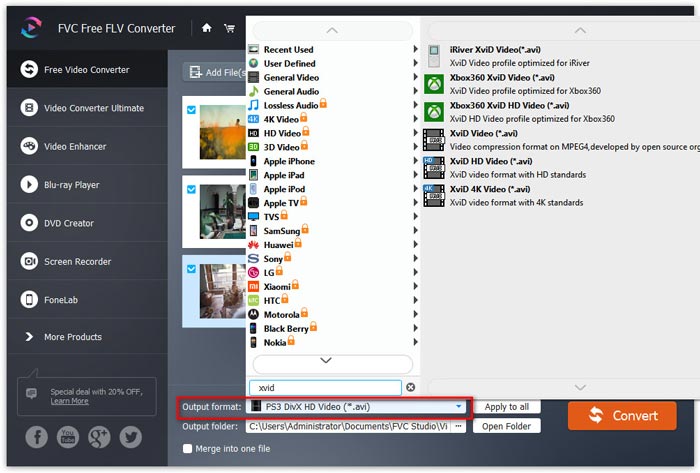
ขั้นตอนที่ 3 แปลง FLV เป็น Xvid
หลังจากเลือกฟอร์แมต Xvid แล้ว ให้คลิกปุ่มจุดสามจุดถัดจาก Output folder เพื่อระบุตำแหน่งและเลือกโฟลเดอร์ปลายทางสำหรับบันทึกไฟล์ Xvid ที่แปลงแล้ว.
สุดท้ายให้คลิกปุ่ม Convert ที่มุมขวาบนเพื่อเริ่มการแปลงไฟล์ FLV เป็น Xvid.
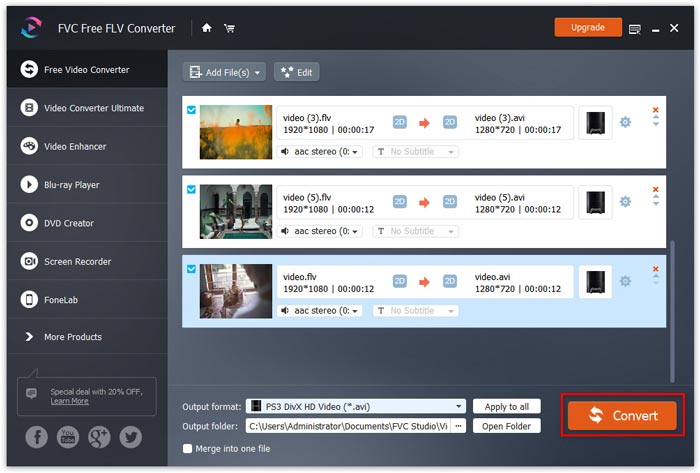
ซอฟต์แวร์นี้ยังช่วยให้คุณสามารถรวมไฟล์หลายไฟล์เป็นไฟล์เดียวได้โดยทำเครื่องหมายที่กล่องผสานเป็นไฟล์เดียว ไอคอนแก้ไขที่เมนูด้านบนทำให้คุณสามารถเพิ่มธีมเริ่มต้นและสิ้นสุดสำหรับการสร้างวิดีโอของคุณ
ส่วนที่ 2 FLV และ Xvid . คืออะไร
Xvid คืออะไร?
Xvid เดิมคือ XviD เป็นไลบรารีตัวแปลงสัญญาณวิดีโอตามมาตรฐานการเข้ารหัสวิดีโอ MPEG-4 ในฐานะที่เป็นคู่แข่งหลักของ DivX Pro Codec ซึ่งเป็นซอฟต์แวร์ที่เป็นกรรมสิทธิ์ Xvid เป็นซอฟต์แวร์ฟรีภายใต้สัญญาอนุญาตสาธารณะทั่วไปของ GNU
Xvid เป็นโปรแกรมที่ใช้การบีบอัดแบบ MPEG-4 Advanced Simple Profile ไฟล์ที่เข้ารหัสด้วย Xvid สามารถเขียนลงแผ่นซีดีหรือดีวีดีและเล่นบนเครื่องเล่นดีวีดีที่รองรับ DivX บางรุ่น และเครื่องเล่นสื่อ Xvid อื่น ๆ.
นอกจากนี้ Windows, Mac OS, Linux, BSD ยังสามารถเข้าถึงไลบรารี Xvid ได้โดยตรง
FLV คืออะไร?
FLV, Flash Video เป็นรูปแบบไฟล์คอนเทนเนอร์ ใช้เพื่อส่งเนื้อหาดิจิทัล เช่น รายการทีวี ภาพยนตร์ และอื่นๆ ทางอินเทอร์เน็ต
ก่อนหน้านี้ฟอร์แมตนี้สามารถรองรับได้โดยปลั๊กอินหรือแอปพลิเคชัน Adobe Flash Player บนเว็บหรือภายในเครื่อง อย่างไรก็ตาม Adobe ได้ประกาศยุติการพัฒนา Flash Player ตั้งแต่ปี 2021 แต่คุณยังสามารถเปิดไฟล์ FLV ได้บน Media Player Classic, MPlayer, RealPlayer, VLC Media Player และซอฟต์แวร์เล่นไฟล์ FLV อื่น ๆ.
แม้ว่าเครื่องเล่นส่วนใหญ่จะรองรับ FLC อย่างกว้างขวาง แต่ก็ไม่สามารถเปิดในเครื่องเล่นซีดีหรือดีวีดีได้
ส่วนที่ 3 คำถามที่พบบ่อยเกี่ยวกับการแปลง FLV เป็น Xvid
อะไรคือความแตกต่างระหว่าง Xvid และ AVI?
AVI เป็นรูปแบบคอนเทนเนอร์มัลติมีเดียที่มีทั้งวิดีโอและเสียง รองรับตัวแปลงสัญญาณเช่น DV, H.263, VP8, VP9, DivX เป็นต้น ไฟล์ AVI ที่เข้ารหัสด้วย DivX และ Xvid ใช้นามสกุล .avi เดียวกัน และเปิดใช้งานไฟล์ AVI ให้มีคุณภาพเทียบเท่าหรือดีกว่าดีวีดี
Xvid เหมือนกับ DivX หรือไม่
ไม่ ในเดือนมกราคม 2564 DivXNetworks ได้ก่อตั้ง OpenDivX เป็นตัวแปลงสัญญาณวิดีโอ MEPG-4 แบบโอเพนซอร์ส แต่เดิมนั้นอยู่ภายใต้ใบอนุญาตที่จำกัด และมีเพียงสมาชิกของ DivX Advanced Research Center (DARC) เท่านั้นที่มีสิทธิ์เข้าถึง CVS ของโครงการเป็นลายลักษณ์อักษร จากนั้นในเดือนกรกฎาคม พ.ศ. 2544 DARC ได้เปิดตัวโค้ด DivX 4 เชิงพาณิชย์แบบปิดเวอร์ชันเบต้าโดยอิงจาก encore2 และโค้ด OpenDivX ทั้งหมดถูกแทนที่ด้วย Xvid โดยใช้ encore2 เวอร์ชันล่าสุดที่ดาวน์โหลดมาก่อนที่จะถูกนำออก ไฟล์ที่เข้ารหัส Xvid สามารถเขียนลงในซีดีหรือดีวีดี และสามารถเล่นบนเครื่องเล่น DVD และเครื่องเล่นสื่อที่รองรับ DivX ได้ อย่างไรก็ตาม Xvid สามารถเลือกเข้ารหัสวิดีโอด้วยคุณสมบัติ MPEG-4 ขั้นสูงที่เครื่องเล่น set-top ที่ได้รับการรับรอง DivX ส่วนใหญ่ไม่รองรับ
FLV ยังคงใช้อยู่หรือไม่?
FLV เป็นรูปแบบไฟล์คอนเทนเนอร์ที่ใช้สำหรับส่งผ่านเนื้อหาวิดีโอดิจิทัลผ่านอินเทอร์เน็ต ใช้กันในวิดีโอ แบนเนอร์โฆษณา แอนิเมชัน สตรีม และอื่น ๆ ปัจจุบันมีรูปแบบไฟล์คอนเทนเนอร์ที่มีประสิทธิภาพมากกว่าแล้ว แต่ FLV ก็ยังคงถูกใช้งานและรองรับโดย Windows, HandBrake, FFmpeg, VLC เป็นต้น แม้อุปกรณ์ของคุณจะไม่รองรับ FLV คุณก็ยังสามารถแปลง FLV เป็น MP4, MOV, WMV ฯลฯ ซึ่งเป็นฟอร์แมตที่รองรับอย่างแพร่หลายได้.
สรุป
แม้ว่า FLV จะถูกใช้งานอย่างแพร่หลายบนเว็บ เดสก์ท็อป และอุปกรณ์พกพา แต่อย่างไรก็ตามมันไม่รองรับบนเครื่องเล่นซีดีหรือดีวีดี หากคุณต้องการชมไฟล์ FLV บนเครื่องเล่นซีดีหรือดีวีดี การแปลง FLV เป็น Xvid จึงเป็นทางออก ที่นี่มีคู่มือแบบละเอียด 3 ขั้นตอนในการแปลง FLV เป็น Xvid ด้วยโปรแกรมแปลง FLV เป็น Xvid ฟรี ช่วยให้คุณทำได้อย่างสะดวก โปรแกรมนี้สามารถแปลงไฟล์วิดีโอและเสียงส่วนใหญ่ได้ฟรีทั้งหมด หากคุณชอบเนื้อหานี้ โปรดแชร์ให้ผู้ติดตามของคุณด้วย.
-
 3 วิธีง่ายๆในการแปลง FLV เป็น AVI บนเดสก์ท็อปและออนไลน์
 1. แปลงวิดีโอ FLV เป็นรูปแบบมัลติมีเดียอื่น ๆ ได้อย่างง่ายดาย 2. รองรับรูปแบบวิดีโอเกือบทั้งหมด เช่น AVI, MP4, MKV ฯลฯ 3. แบทช์ประมวลผลไฟล์ FLV หลายร้อยไฟล์ต่อการแปลง
-
 3 วิธียอดนิยมในการแปลง FLV เป็น WMV บน Windows และ Mac
 กำลังมองหาวิธีที่ดีที่สุดในการแปลง FLV เป็น WMV โดยไม่สูญเสียคุณภาพบนพีซีหรือ Mac ใช่ไหม คุณโชคดีเพราะที่นี่เราแบ่งปันสามวิธีในการทำงานอย่างง่าย
-
 คำแนะนำที่เป็นรูปธรรมในการอัปโหลดวิดีโอ FLV ของคุณไปยัง YouTube
 อัปโหลด FLV ไปยัง YouTube แต่ล้มเหลว? คุณสามารถแก้ไขปัญหานี้ด้วยตัวเองและแปลงตัวแปลงสัญญาณ FLV เป็น YouTube ที่รองรับโดยทำตามคำแนะนำทีละขั้นตอนของเรา
