


 Video Converter Ultimate
 บันทึกหน้าจอ
 ซ่อมวิดีโอ
 ดาวน์โหลดอย่างปลอดภัย
วิธีการแปลง M2TS เป็นรูปแบบที่เข้ากันได้กับ iPad บน Windows / Mac / ออนไลน์
สามารถเล่นไฟล์ M2TS บน iPad ได้โดยตรงไหม? น่าเสียดายที่คำตอบคือไม่ เพราะ M2TS ไม่รองรับกับ iPad หากต้องการเล่นไฟล์ M2TS บน iPad คุณต้องติดตั้งแอปเล่นไฟล์ M2TS บน iPad หรือไม่ก็แปลงไฟล์ M2TS เป็นรูปแบบที่ใช้กับ iPad ได้ ซึ่งบทความนี้เลือกใช้วิธีหลัง เพียงอ่านต่อแล้วคุณจะรู้วิธีเปลี่ยนรูปแบบวิดีโอบน iPad จากไฟล์ M2TS ได้อย่างไร.

ส่วนที่ 1: วิธีการแปลง M2TS เป็น iPad บน Windows และ Mac
iPad รองรับรูปแบบใดบ้าง จริงๆแล้ว iPad ยอมรับรูปแบบวิดีโอทั่วไป H.264, MP4, M4V, MOV, MPEG-4 และ M-JPEG ในการวาง M2TS บน iPad คุณต้องแปลงรูปแบบวิดีโอ M2TS เป็น iPad ก่อน
วิธีแปลง M2TS เป็น iPad บน Windows ฟรี
FVC Free M2TS Converter เป็นโปรแกรมแปลงไฟล์ M2TS เป็น iPad แบบชุด (batch converter) ที่ให้ใช้งานได้ฟรีอย่างสมบูรณ์ คุณสามารถแปลงไฟล์ M2TS เป็นไฟล์สำหรับ iPad แบบเป็นชุดได้เร็วกว่าตัวแปลง M2TS ทั่วไปถึง 50 เท่า ดังนั้นต่อให้คุณต้องแปลงไฟล์วิดีโอ M2TS ขนาดใหญ่จำนวนมากไปยัง iPad ก็ไม่ใช่ปัญหา โปรแกรมแปลง M2TS เป็น iPad ฟรีตัวนี้สามารถจัดการได้อย่างสมบูรณ์แบบ.
นอกจากนี้ คุณยังสามารถรวมไฟล์ M2TS และเพิ่มธีมต่าง ๆ ได้ก่อนเริ่มแปลงไฟล์ M2TS เป็นไฟล์สำหรับ iPad หน้าต่างแสดงตัวอย่างแบบเรียลไทม์จะแสดงเอฟเฟกต์วิดีโอให้คุณเห็นทันที โดยสรุปแล้ว คุณสามารถตัดต่อและแปลงไฟล์ AVCHD M2TS เป็น iPad บน Windows ได้ฟรีแบบครบจบในที่เดียว.

ฟรี M2TS Converter
ดาวน์โหลด 113,456+ ครั้ง- แปลง M2TS เป็น iPad H.264, MP4, MOV, MPEG-4 และรูปแบบอื่น ๆ ที่เข้ากันได้
- เร็วขึ้น 50 เท่าด้วยการรองรับการแปลงแบทช์
- รักษาคุณภาพระดับสูงในขณะที่แปลงเป็น iPad จากกล้องวิดีโอ HD ทั้งหมด
- ตัวแปลง M2TS เป็น iPad ทำงานร่วมกับคอมพิวเตอร์ Windows 10/8/7
ดาวน์โหลดฟรีสำหรับ Windows 7 หรือใหม่กว่าดาวน์โหลดอย่างปลอดภัย
ดาวน์โหลดฟรีสำหรับ MacOS 10.7 หรือใหม่กว่าดาวน์โหลดอย่างปลอดภัย
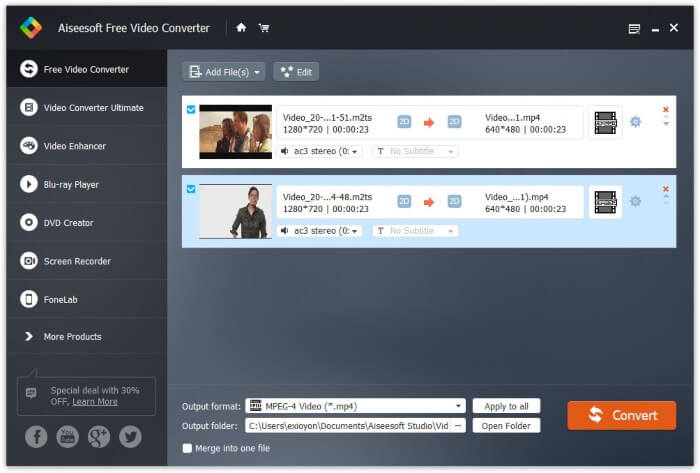
ขั้นตอนที่ 1: ดาวน์โหลด ติดตั้ง และเปิด FVC Free M2TS Converter จากนั้นลากและวางไฟล์ M2TS ลงในหน้าหลักของโปรแกรม.

ขั้นตอนที่ 2: คลิกรายการ รูปแบบเอาต์พุต (Output format) ใกล้กับด้านล่าง หากต้องการแปลง M2TS เป็นไฟล์สำหรับ iPad บน Windows คุณสามารถตั้งค่ารูปแบบเอาต์พุตจากหมวดหมู่ Apple iPad ได้โดยตรง.

ขั้นตอนที่ 3: คลิกไอคอนรูปเฟือง Settings เพื่อปรับตัวเข้ารหัสวิดีโอ (video encoder) อัตราเฟรม และค่าอื่น ๆ จากนั้นคลิก Convert เพื่อแปลงวิดีโอจาก M2TS เป็นรูปแบบที่ใช้กับ iPad ได้.
วิธีแปลง M2TS เป็น iPad บน Mac ฟรี
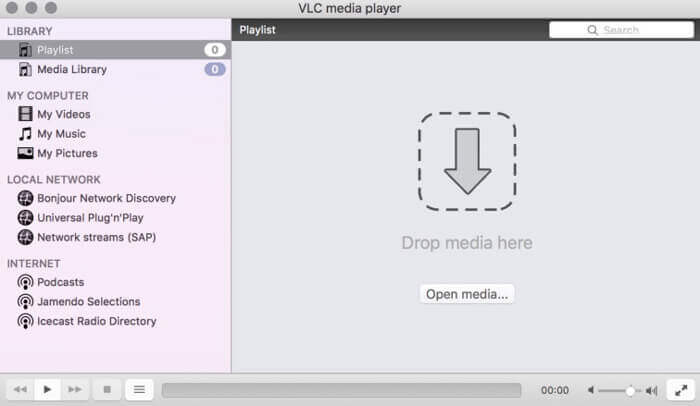
หากคุณต้องการแปลงวิดีโอ M2TS เป็น iPad บน Mac ฟรี VLC Media Player เป็นตัวเลือกที่ดีของคุณ เป็นเครื่องเล่นและตัวแปลง M2TS ฟรีและโอเพ่นซอร์สสำหรับหลายแพลตฟอร์ม
ขั้นตอนที่ 1: เปิด VLC Media Player บน Mac แล้วเลือก Convert/Save จากเมนูดรอปดาวน์ Media.
ขั้นตอนที่ 2: คลิก Add เพื่อเพิ่มไฟล์ M2TS จากนั้นเลือกไฟล์แล้วคลิก Open ด้านล่างเพื่อดำเนินการต่อ.
ขั้นตอนที่ 3: คลิก Convert/Save ที่ด้านล่างเพื่อไปยังหน้าต่างถัดไป.
ขั้นตอนที่ 4: เลือกรูปแบบสำหรับ iPad จากรายการดรอปดาวน์ Profile คุณสามารถคลิกไอคอน Tools ข้าง ๆ เพื่อปรับการตั้งค่าวิดีโอได้.
ขั้นตอนที่ 5: คลิก Start เพื่อเริ่มแปลงไฟล์ M2TS เป็นไฟล์สำหรับ iPad บน Mac ด้วย VLC.
ส่วนที่ 2: วิธีการแปลง M2TS เป็น iPad ออนไลน์
สำหรับผู้ใช้มือถือการใช้ตัวแปลง M2TS เป็น iPad แบบออนไลน์ก็เป็นทางเลือกที่ดีเช่นกัน คุณสามารถแปลงไฟล์ M2TS เป็น iPad ได้ฟรีโดยไม่ต้องดาวน์โหลดติดตั้งหรือลงทะเบียน
ขั้นตอนที่ 1: เปิดตัวแปลงไฟล์ M2TS เป็น iPad แบบออนไลน์ เช่น FVC Free Online Video Converter.

ขั้นตอนที่ 2: ดาวน์โหลด FVC launcher โดยคลิก Add Files to Convert แล้วติดตั้งให้เรียบร้อย.

ขั้นตอนที่ 3: ค้นหาไฟล์ M2TS ในคอมพิวเตอร์ของคุณเพื่อทำการแปลง และอย่าลืมเลือกรูปแบบไฟล์ปลายทาง.

ขั้นตอนที่ 4: คลิก Start Converting เพื่อแปลงไฟล์ M2TS เป็นไฟล์สำหรับ iPad ออนไลน์ได้ฟรี.
ส่วนที่ 3: คำถามที่พบบ่อยเกี่ยวกับการแปลง M2TS เป็น iPad
จะเกิดอะไรขึ้นที่จู่ๆก็ไม่มีเสียงในไฟล์ M2TS ใน iMovie
M2TS ไม่ได้รับการสนับสนุนโดยอุปกรณ์ Apple คุณต้องแปลง M2TS เป็นรูปแบบ Mac เพื่อแก้ปัญหา
ฉันจะเปิดไฟล์ M2TS บน iPhone และ iPad ได้อย่างไร
AVCHD M2TS เข้ากันไม่ได้กับอุปกรณ์ iOS หากคุณยืนยันที่จะเล่นวิดีโอ M2TS บน iPad คุณสามารถใช้แอป VLC Media Player เพื่อเล่นวิดีโอได้
แอพเครื่องเล่นวิดีโอที่ดีสำหรับ iPad?
คุณจะได้หน้าจอแสดงผลที่ใหญ่กว่าใน iPad มากกว่า iPhone ดังนั้นประสบการณ์การรับชมวิดีโอก็จะดีขึ้นเช่นกัน เครื่องเล่นวิดีโอที่แนะนำ ได้แก่ PlayerXtreme Media Player, KMPlayer, VLC, AirPlayer และอื่น ๆ คุณสามารถเลือกตัวใดก็ได้เพื่อรับการควบคุมวิดีโออย่างยืดหยุ่น
ทั้งหมดนี้คือวิธีการแปลงไฟล์ M2TS เป็น iPad ด้วยเครื่องมือออนไลน์และออฟไลน์ เครื่องมือแปลงไฟล์ M2TS เหล่านี้สามารถใช้งานได้ฟรีและปลอดภัย ไม่ว่าคุณจะต้องการแปลงไฟล์ M2TS จำนวนมากให้เป็นรูปแบบที่รองรับกับ iPad แค่ไหน คุณก็สามารถทำได้ด้วยความเร็วสูงสุดที่นี่.
-
 วิธีการแปลง M2TS เป็น MP4 โดยไม่ลดคุณภาพ
 ต้องการแปลงวิดีโอจากกล้องวิดีโอ HD เป็น MP4 ทั่วไปหรือไม่? ต่อไปนี้เป็น 4 วิธีที่ง่ายและไม่เสียค่าใช้จ่ายในการเปลี่ยนไฟล์ M2TS เป็น MP4 บน Windows และ Mac
-
 วิธีการแปลง M2TS เป็น MKV โดยไม่สูญเสียคุณภาพ
 ต้องการแปลง M2TS เป็น MKV โดยที่ยังคงคุณภาพเดิมไว้หรือไม่? โพสต์นี้แสดงวิธีการฟรีและออนไลน์ในการเปลี่ยน M2TS เป็น MKV โดยไม่สูญเสีย
-
 อะไรคือความแตกต่างระหว่าง MTS และ M2TS
 ไฟล์ MTS หรือ M2TS คืออะไร อะไรคือความแตกต่างระหว่าง M2TS และ MTS? ฉันจะดูไฟล์ MTS หรือ M2TS ของกล้องถ่ายวิดีโอได้อย่างไร? ค้นหาคำตอบทั้งหมดได้ในโพสต์นี้
