


 Video Converter Ultimate
 บันทึกหน้าจอ
 ซ่อมวิดีโอ
วิธีแปลง MTS เป็น MKV อย่างรวดเร็วฟรี
โดยสรุป สำหรับระบบ MPEG Transport System แล้ว ไฟล์ MTS เป็นรูปแบบไฟล์มาตรฐานที่รองรับวิดีโอความละเอียด 720p และ 1080i อย่างไรก็ตาม ขนาดไฟล์ที่ได้จากรูปแบบนี้อาจมีขนาดใหญ่มาก ดังนั้นคุณจึงควรแปลงให้เป็นรูปแบบไฟล์ที่รองรับอย่างแพร่หลายและมีขนาดเล็กกว่า เช่น รูปแบบ MKV และในบทความนี้ เราจะแนะนำวิธีที่ดีที่สุดในการแปลงไฟล์ MTS เป็น MKV ฟรี.

ส่วนที่ 1 2 เครื่องมือออนไลน์ฟรีที่ดีที่สุดที่แปลง MTS เป็น MKV
FVC โปรแกรมแปลงวิดีโอออนไลน์ฟรี
ปัจจุบันผู้คนนิยมใช้ตัวแปลงไฟล์ออนไลน์มากกว่าการติดตั้งโปรแกรมลงคอมพิวเตอร์ FVC Free Online Video Converter เป็นตัวแปลงไฟล์ออนไลน์ที่ให้คุณแปลงไฟล์อย่างเช่น MTS เป็น MKV, MP4, WMV, AVI, FLV และอื่น ๆ แม้จะเป็นตัวแปลงไฟล์ออนไลน์แบบฟรี แต่ก็ไม่ลดทอนคุณภาพไฟล์ของคุณระหว่างการแปลง นอกจากนี้ ยังมีฟีเจอร์ที่ให้คุณปรับความละเอียดวิดีโอ และบิตเรตของวิดีโอหรือเสียงได้.
นี่คือขั้นตอนในการแปลงไฟล์ MTS เป็น MKV โดยใช้เครื่องมือออนไลน์ฟรีนี้:
ขั้นตอนที่ 1 หากต้องการใช้ตัวแปลงนี้ ให้คลิกที่ ลิงก์ นี้เพื่อไปยังหน้าเว็บของพวกเขา.
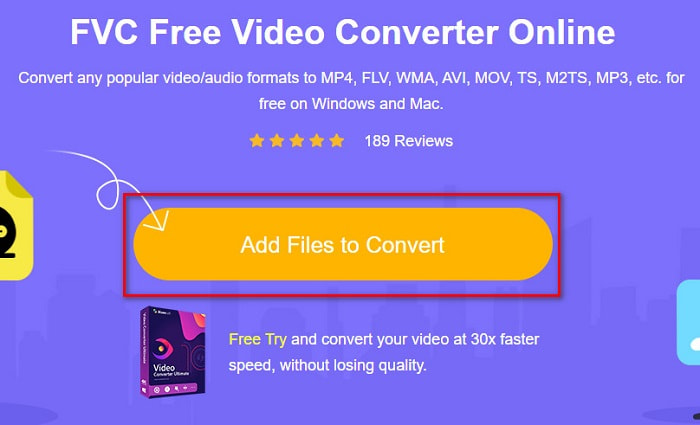
ขั้นตอนที่ 2 จากนั้นคลิกปุ่ม Add Files to Convert เพื่อดาวน์โหลดตัวเรียกใช้งาน (launcher) หลังจากดาวน์โหลดตัวเรียกใช้งานแล้ว หน้าต่างไฟล์บนคอมพิวเตอร์ของคุณจะปรากฏขึ้น จากนั้นเลือกไฟล์ MTS ที่ต้องการอัปโหลด.
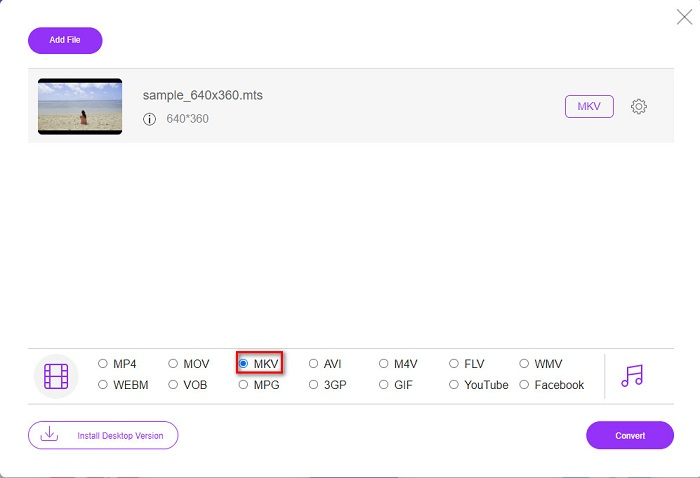
ขั้นตอนที่ 3 หลังจากเลือกไฟล์ MTS แล้ว ให้คลิกที่ไฟล์ MKV ด้านล่างอินเทอร์เฟซของซอฟต์แวร์.
ขั้นตอนที่ 4 สุดท้าย คลิกปุ่ม Convert เพื่อแปลงไฟล์ MTS ของคุณเป็นไฟล์ MKV จากนั้นรอจนกว่าไฟล์ของคุณจะแปลงเสร็จ.
โดยทำตามขั้นตอนง่าย ๆ เหล่านี้ คุณสามารถแปลง MTS เป็น MKV ได้ฟรีและออนไลน์
AnyConv
ตัวแปลงไฟล์ออนไลน์อีกตัวหนึ่งที่คุณสามารถใช้แปลงไฟล์โดยไม่สูญเสียคุณภาพได้คือ AnyConv File Converter ตัวแปลงนี้รองรับการแปลงไฟล์หลายรูปแบบ รวมถึง MTS เป็น MKV, AVI, MP4, MOV, MPEG และอื่น ๆ อย่างไรก็ตาม ฟีเจอร์ค่อนข้างจำกัด คุณไม่สามารถแก้ไขหรือเปลี่ยนความละเอียดของไฟล์ได้ อีกทั้งยังเป็นบริการบนเว็บ จึงอาจทำให้การแปลงไฟล์ช้าได้ อย่างไรก็ดี ผู้คนจำนวนมากยังคงใช้งานเพราะสะดวก.
ขั้นตอนในการใช้ AnyConv File Converter:
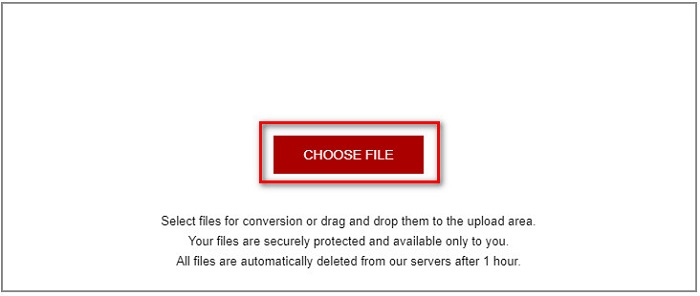
ขั้นตอนที่ 1 ค้นหา AnyConv File Converter บนเบราว์เซอร์ของคุณ หลังจากเข้าเว็บไซต์แล้ว ให้คลิกปุ่ม Choose Files เพื่อเลือกไฟล์ MTS จากไฟล์ในคอมพิวเตอร์ของคุณ.
ขั้นตอนที่ 2 หลังจากเลือกไฟล์ MTS แล้ว ให้คลิกปุ่ม drop-down และเลือกเป็นรูปแบบไฟล์ MKV.
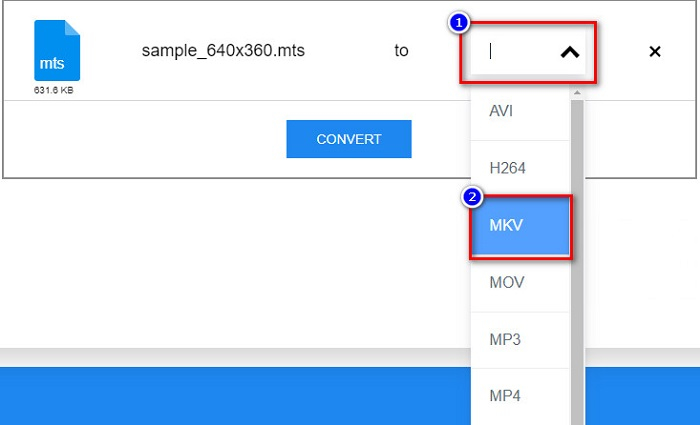
ขั้นตอนที่ 3 สุดท้ายคลิกปุ่ม Convert เพื่อเริ่มการแปลงไฟล์ MTS เป็นไฟล์ MKV.
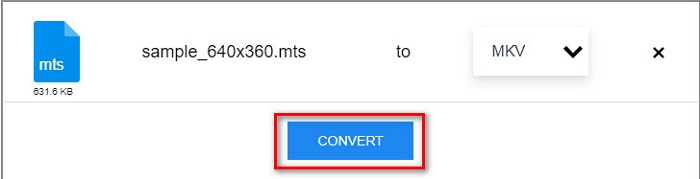
ส่วนที่ 2 แปลง MTS เป็น MKV บน Windows 10/11 โดยไม่สูญเสียข้อมูล
หากคุณกำลังมองหาตัวแปลงสำหรับ Windows 10/11 ของคุณ FVC Video Converter Ultimate เป็นเครื่องมือที่ดีที่สุดสำหรับคุณ รองรับไฟล์รูปแบบต่างๆ และสามารถแปลง MTS เป็น MKV, MP4, WebM, VOB, MPG, AVI และอีกมากมาย นอกจากนี้ ตัวแปลงนี้มีคุณลักษณะที่คุณสามารถสร้าง GIF และสร้างวิดีโอ 3 มิติได้ คุณยังสามารถแปลง MTS เป็น MKV ได้อย่างรวดเร็วและง่ายดายโดยไม่สูญเสียคุณภาพไฟล์ของคุณ

FVC Video Converter Ultimate
5,689,200+ ดาวน์โหลด- คุณสามารถแปลงไฟล์เป็นชุดได้ด้วยตัวแปลงนี้
- ช่วยให้คุณสามารถแปลงรูปแบบไฟล์ต่างๆ เช่น MTS, MKV, MP4, WMV เป็นต้น
- มีคุณสมบัติที่ช่วยให้คุณมีการแปลงที่รวดเร็วเป็นพิเศษ
ดาวน์โหลดฟรีสำหรับ Windows 7 หรือใหม่กว่าดาวน์โหลดอย่างปลอดภัย
ดาวน์โหลดฟรีสำหรับ MacOS 10.7 หรือใหม่กว่าดาวน์โหลดอย่างปลอดภัย
นี่คือวิธีที่คุณสามารถใช้ FVC Video Converter Ultimate ด้วยขั้นตอนง่ายๆ เหล่านี้:
ขั้นตอนที่ 1 อันดับแรก ดาวน์โหลดแอปโดยคลิกปุ่ม Download ด้านล่างสำหรับ Windows จากนั้นรันตัวโปรแกรมเพื่อต่อไปยังขั้นตอนถัดไป.
ดาวน์โหลดฟรีสำหรับ Windows 7 หรือใหม่กว่าดาวน์โหลดอย่างปลอดภัย
ดาวน์โหลดฟรีสำหรับ MacOS 10.7 หรือใหม่กว่าดาวน์โหลดอย่างปลอดภัย
ขั้นตอนที่ 2 หลังจากเปิดตัวแปลงไฟล์แล้ว ให้คลิกปุ่ม Add Files หรือคุณสามารถลากและวางไฟล์ของคุณไปที่ปุ่มสัญลักษณ์ + เพื่ออัปโหลดไฟล์ MTS จากนั้นไฟล์ของคุณจะถูกเพิ่มเข้าไปในรายการ.
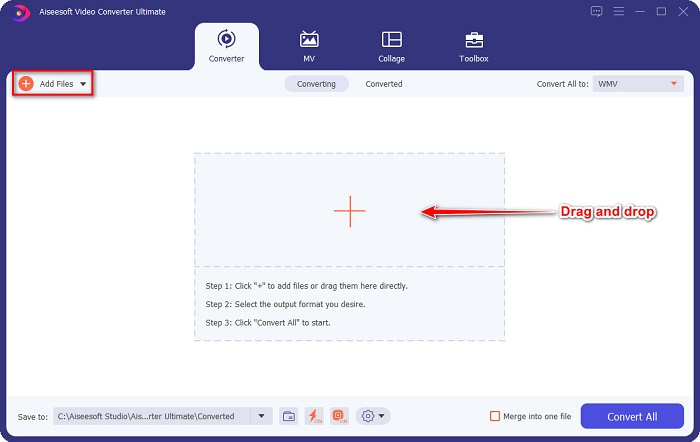
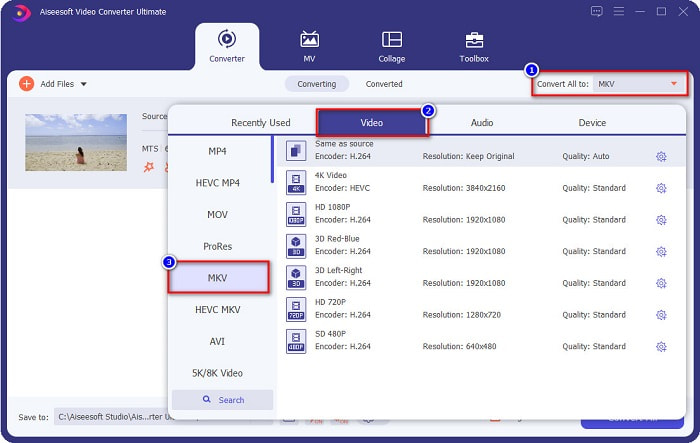
ขั้นตอนที่ 3 หากต้องการเลือกรูปแบบไฟล์ที่คุณต้องการแปลงไฟล์ MTS ให้คลิกปุ่ม Convert All to แล้วเลือกไฟล์ MKV.
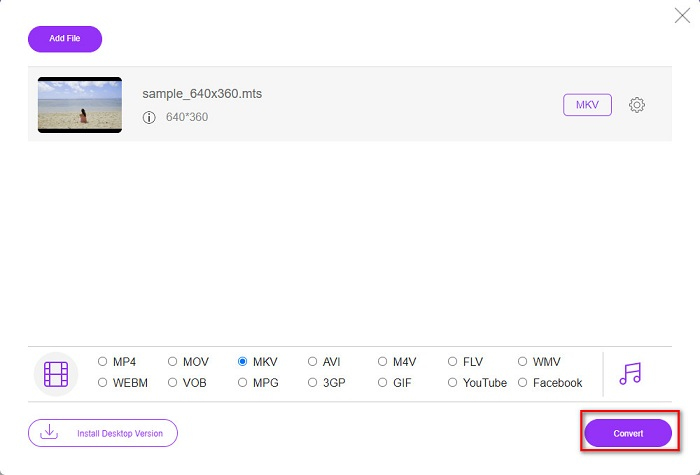
ขั้นตอนที่ 4 เพื่อให้เสร็จสิ้น ให้คลิกปุ่ม Convert All เพื่อเริ่มแปลงไฟล์ MTS ของคุณเป็นไฟล์ MKV แล้วเสร็จเรียบร้อย! ภายในไม่กี่วินาที ไฟล์ที่แปลงแล้วของคุณก็พร้อมใช้งาน.
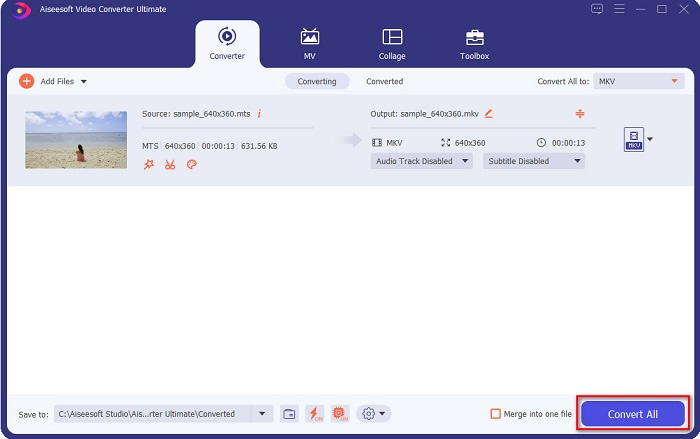
โดยทำตามขั้นตอนง่าย ๆ เหล่านั้น คุณสามารถแปลง MTS เป็น MKV ได้อย่างรวดเร็วด้วย 1-2-3!
ส่วนที่ 3 ทำไมต้องแปลงไฟล์ MTS เป็นรูปแบบไฟล์ MKV
ไฟล์ MTS ย่อมาจาก MPEG Transport System เป็นรูปแบบไฟล์มาตรฐานที่กล้องวิดีโอ SONY และ Panasonic HD ส่วนใหญ่ใช้ เป็นไฟล์ที่ใช้การบีบอัดวิดีโอ MPEG4/H.264 นอกจากนี้ยังรองรับวิดีโอ 720p และ 1080i ซึ่งรูปแบบไฟล์อื่นไม่รองรับ เนื่องจาก Panasonic และ Sony ได้พัฒนาไฟล์นี้ จึงใช้ไฟล์ Advanced Audio Coding File ที่เกี่ยวข้องกับรูปแบบไฟล์ AVCHD ในทางกลับกัน ไฟล์ MKV หรือ Matroska เป็นรูปแบบไฟล์มาตรฐานที่รองรับตัวแปลงสัญญาณเสียงและวิดีโอจำนวนมาก มักใช้ในการจัดเก็บคลิปวิดีโอสั้นและภาพยนตร์
นอกจากนี้ยังรองรับแทร็กคำบรรยาย นั่นคือเหตุผลที่แฟนซับจำนวนมากใช้รูปแบบไฟล์นี้ เหตุใดจึงต้องแปลง MTS เป็น MKV เพียงเพราะขนาดไฟล์ของ MKV มีขนาดเล็กกว่ารูปแบบไฟล์ MTS ที่มีอยู่
ส่วนที่ 4 แผนภูมิเปรียบเทียบเกี่ยวกับผู้แปลงออนไลน์และออฟไลน์
| คุณสมบัติ | ตัวแปลง FVC ออนไลน์ฟรี | โปรแกรมแปลงไฟล์ AnyConv | FVC Video Converter Ultimate |
| ความเร็วในการแปลง | ปกติ | ปกติ | เร็วมาก |
| รูปแบบไฟล์ที่จะแปลง | MKV, MP4, MTS, MPG, MOV, AVI, WMV, FLV และรูปแบบไฟล์อื่นๆ | MTS, MKV, AVI, MOV, MP4, MPEG และรูปแบบอื่นๆ | รองรับไฟล์มากกว่า 1,000 รูปแบบ |
| คุณสมบัติการแก้ไข | – | – |  |
| การแปลงแบทช์ | – | – | |
| การเชื่อมต่ออินเทอร์เน็ต | จำเป็น | จำเป็น | ไม่ต้องการ |
ส่วนที่ 5. คำถามที่พบบ่อยเกี่ยวกับการแปลง MTS เป็น MKV
คุณสามารถลดขนาดไฟล์ของไฟล์ MTS ได้หรือไม่?
ได้ คุณสามารถบีบอัดขนาดไฟล์ MTS ได้โดยใช้เครื่องมือบีบอัดที่มีให้ใช้งานทั้งออนไลน์และออฟไลน์ เช่น Free Video Compressor.
คุณสามารถเล่นรูปแบบไฟล์ MKV ได้ที่ไหน?
คุณสามารถเล่นไฟล์ MKV บน Windows Media Player, VLC Media Player, DivX Player, MX Player และอื่น ๆ ได้ นอกจากนี้คุณยังสามารถใช้ตัวแปลงรหัสสื่อ (codec) เพื่อเข้ารหัสและถอดรหัสไฟล์มีเดีย หรือจะแปลงไฟล์ MKV ของคุณเป็นรูปแบบไฟล์ MP4 ซึ่งเป็นรูปแบบที่นิยมใช้กันอย่างแพร่หลายก็ได้.
คุณสามารถแปลง MTS เป็น MKV ใน Handbrake ได้หรือไม่?
ใช่. ตัวแปลงนี้ยังช่วยให้คุณสามารถแปลงไฟล์ MTS เป็นรูปแบบไฟล์ MKV อย่างไรก็ตาม ไม่รองรับหลายไฟล์และไม่สามารถรวมเป็นไฟล์เดียวได้
สรุป
ปัจจุบันมีตัวแปลงไฟล์ออนไลน์และออฟไลน์ให้เลือกใช้มากมายในท้องตลาด และตัวแปลงไฟล์ที่เราแนะนำไว้ข้างต้นก็เป็นหนึ่งในตัวแปลงที่มีผู้ใช้จำนวนมาก และพิสูจน์แล้วว่าใช้งานได้ดีเยี่ยม นอกจากนี้ ตัวแปลงเหล่านี้ยังมีฟีเจอร์และความสามารถในการแปลงไฟล์ MTS เป็น MKV ฟรีออนไลน์ที่แตกต่างกันไป แต่หากคุณกำลังมองหาตัวแปลงที่ใช้งานสะดวกและมีประสิทธิภาพ เราขอแนะนำให้ใช้ FVC Video Converter Ultimate ตัวแปลงความเร็วสูงตัวนี้จะไม่ทำให้คุณผิดหวัง ดังนั้น หากคุณพร้อมที่จะแปลงไฟล์แล้ว ก็ดาวน์โหลดได้เลยตอนนี้!
-
 [ฟรี & ออนไลน์] 6 วิธีในการแปลง MTS เป็น MP4 คุณภาพสูง
 ไม่ทราบวิธีการแปลงไฟล์ MTS เป็น MP4? ในคู่มือนี้คุณจะพบ 6 วิธีที่ง่ายและฟรีในการเปลี่ยนรูปแบบ MTS เป็น MP4 บน Windows หรือ Mac โดยไม่สูญเสียคุณภาพ
-
 วิธีการแปลง MTS เป็น WMV โดยไม่สูญเสียคุณภาพ
 คุณกำลังดิ้นรนเพื่อดูรายการโปรดของคุณเพราะเครื่องเล่นสื่อของคุณไม่รองรับรูปแบบวิดีโอ MTS หรือไม่? พยายามแปลงเป็น WMV ด้วยตัวแปลงใหม่และดีที่สุดมีอยู่ในบทความนี้
-
 วิธีการแปลง MTS เป็น MP3 โดยไม่สูญเสียคุณภาพ (AVCHD เป็น MP3)
 มีความจำเป็นต้องแยกเสียง MP3 จากไฟล์ MTS แต่ไม่รู้ทำอย่างไร ตัวแปลง MTS เป็น MP3 ที่ดีที่สุดคืออะไร? โพสต์นี้แชร์ 2 วิธีง่ายๆที่จะช่วยคุณแปลง MTS / M2TS เป็น MP3 ด้วยคุณภาพเสียงระดับสูง
