


 Video Converter Ultimate
 บันทึกหน้าจอ
 ซ่อมวิดีโอ
 ดาวน์โหลดอย่างปลอดภัย
3 วิธีที่มีประสิทธิภาพในการแปลง FLV เป็น VOB ฟรี
หากคุณดาวน์โหลดวิดีโอจาก YouTube แล้วต้องการบันทึกลงแผ่น DVD คุณอาจสังเกตได้ว่าวิดีโอจากอินเทอร์เน็ตมักจะอยู่ในรูปแบบไฟล์ FLV หากต้องการเขียนลงแผ่น DVD คุณจำเป็นต้องแปลงไฟล์ FLV เป็น VOB ดังนั้นบทความนี้จึงจะแนะนำ 3 วิธีในการแปลง FLV เป็น VOB ได้ฟรี และคุณสามารถทำได้อย่างง่ายดายบนอุปกรณ์เดสก์ท็อปของคุณ.

ส่วนที่ 1 วิธีการส่งออก VOB จาก FLV ฟรี
FVC Free FLV Converter เป็นเครื่องมือที่เหมาะอย่างยิ่งสำหรับใช้แปลงไฟล์ FLV เป็น VOB ในฐานะตัวแปลงวิดีโอแบบครบวงจร มันช่วยให้คุณแปลง ผสาน และปรับแต่งไฟล์ FLV ได้ด้วยคุณภาพและความเร็วสูง คุณยังสามารถใส่ธีมตกแต่งวิดีโอของคุณ และแชร์บนอุปกรณ์ต่าง ๆ รวมถึง iPhone และ iPad ได้.

- แปลง FLV เป็น VOB และรูปแบบอื่น ๆ ได้ฟรีเพียงคลิกเดียว
- ให้คุณเลือกปิดการใช้งานหรือแก้ไขแทร็กเสียงได้
- เพิ่มธีมสำหรับวิดีโอ FLV ของคุณก่อนการแปลง
- เสนอวิธีแปลงไฟล์ FLV ฟรี รวดเร็วและง่ายดาย
ดาวน์โหลดฟรีสำหรับ Windows 7 ขึ้นไปดาวน์โหลดอย่างปลอดภัย
ดาวน์โหลดฟรีสำหรับ MacOS 10.7 ขึ้นไปดาวน์โหลดอย่างปลอดภัย
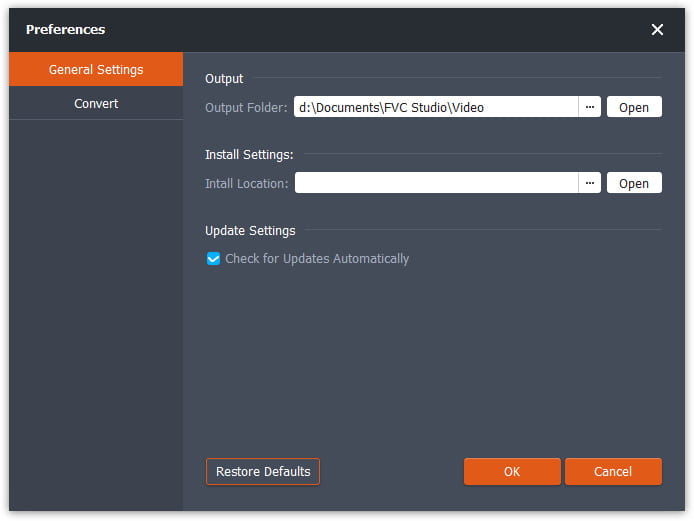
ขั้นตอนที่ 1 หลังจากดาวน์โหลดและเปิดใช้ Free FLV Converter แล้ว คุณสามารถเลือกโฟลเดอร์สำหรับบันทึกไฟล์ VOB ได้ ให้คลิกตัวเลือก Menu ด้านบนของหน้าต่างโปรแกรม แล้วไปที่ Preference จากนั้นในส่วน General Settings คุณสามารถเลือกโฟลเดอร์เอาต์พุตได้.
ขั้นตอนที่ 2 หากต้องการเพิ่มไฟล์ FLV ให้คลิกปุ่ม Add Files บนหน้าต่างโปรแกรม จากนั้นเลือกไฟล์ในหน้าต่างเลือกไฟล์ แล้วจึงคลิกช่อง Output Format และเลือกเป็นรูปแบบ VOB.

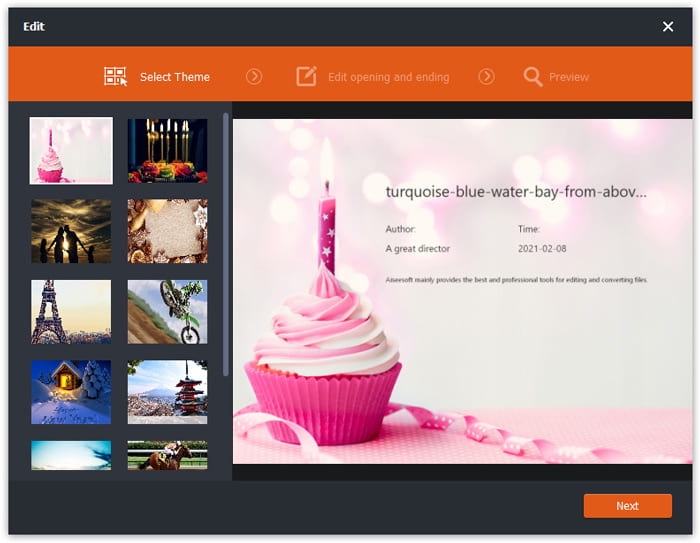
ขั้นตอนที่ 3 คุณสามารถเพิ่มธีมให้กับไฟล์วิดีโอก่อนไปสู่ขั้นตอนการแปลงได้ ให้คลิกปุ่ม Edit บนหน้าต่างโปรแกรม แล้วไปที่ Select Theme คุณสามารถเลือกธีม เช่น วันเกิด ครอบครัว หรือทิวทัศน์ สำหรับวิดีโอ FLV ของคุณ จากนั้นคุณสามารถดูตัวอย่างเอฟเฟกต์ของวิดีโอและบันทึกได้.
ขั้นตอนที่ 4 หากต้องการเริ่มการแปลง ให้คลิกปุ่ม Convert บนหน้าต่างหลัก โปรแกรมจะเปิดโฟลเดอร์ที่ตั้งค่าไว้ให้อัตโนมัติ และคุณสามารถหาไฟล์ VOB ได้ในนั้น.
ฟรี FLV Converter เป็นซอฟต์แวร์อเนกประสงค์ในการแปลงวิดีโอ FLV และคุณสามารถอัปเกรดวิดีโอของคุณด้วยคุณสมบัติการแก้ไขขั้นสูง
ส่วนที่ 2 วิธีการเปลี่ยน FLV เป็น VOB Online
FVC Free Online Video Converter เป็นเครื่องมือออนไลน์ฟรีสำหรับแปลง FLV เป็น VOB มีหน้าตาที่จัดวางอย่างเป็นระเบียบและชัดเจน ใช้งานง่ายสำหรับผู้ใช้ทุกคน และในเมื่อเป็นเครื่องมือออนไลน์ คุณจึงไม่จำเป็นต้องดาวน์โหลดหรือติดตั้งโปรแกรมใด ๆ.
- 1. คลิกเดียวเพื่อแปลง FLV เป็น VOB ในไม่กี่วินาทีโดยไม่สูญเสียคุณภาพ
- 2. ปรับแต่งไฟล์ FLV ก่อนการแปลง
- 3. ปลอดภัยและมั่นคงในการใช้งาน
ขั้นตอนที่ 1 ไปที่เว็บไซต์ Free Online Video Converter แล้วคลิกปุ่ม Add Files to Convert หน้าต่างเลือกไฟล์จะเด้งขึ้นมาให้คุณเพิ่มไฟล์ FLV.
ดาวน์โหลดเวอร์ชันเดสก์ท็อปเพื่อแปลงไฟล์แบบเป็นชุดได้.
ขั้นตอนที่ 2 หลังจากเพิ่มไฟล์แล้ว คุณต้องเลือกรูปแบบสำหรับส่งออกไฟล์ จะมีรูปแบบต่าง ๆ แสดงอยู่ด้านล่างหน้าต่าง ให้หา VOB และคลิกวงกลมที่อยู่ถัดจากตัวเลือกนั้น.
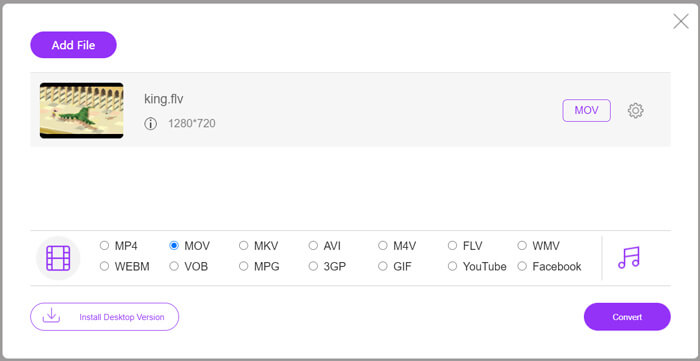
ขั้นตอนที่ 3 ก่อนการแปลง คุณสามารถคลิกไอคอนรูป Gear เพื่อปรับค่าพารามิเตอร์ต่าง ๆ เช่น ความละเอียดวิดีโอ ตัวเข้ารหัส (encoder) ระดับเสียง และช่องสัญญาณเสียงของไฟล์ FLV.
ขั้นตอนที่ 4 คลิกปุ่ม Convert เพื่อเริ่มการแปลง คุณสามารถหาไฟล์ VOB ได้ในโฟลเดอร์ที่คุณตั้งค่าไว้ เมื่อการแปลงเสร็จสมบูรณ์.
โดยสรุปแล้ว Free Online Video Converter เป็นเครื่องมือออนไลน์ที่สะดวกและมีประสิทธิภาพสำหรับการแปลง FLV เป็น VOB ฟรี นอกจากนี้ คุณยังสามารถบีบอัดไฟล์ FLV ได้ที่นี่ด้วย.
ส่วนที่ 3 วิธีใช้เบรกมือเพื่อแปลงรหัส FLV เป็น VOB
Handbrake เป็นทรานส์โค้ดเดอร์แบบโอเพ่นซอร์สฟรีที่คุณสามารถใช้เพื่อแปลง FLV เป็น VOB รองรับระบบ Windows และ Mac ต่อไปนี้เป็นขั้นตอนในการแปลง FLV เป็น VOB ด้วย Handbrake
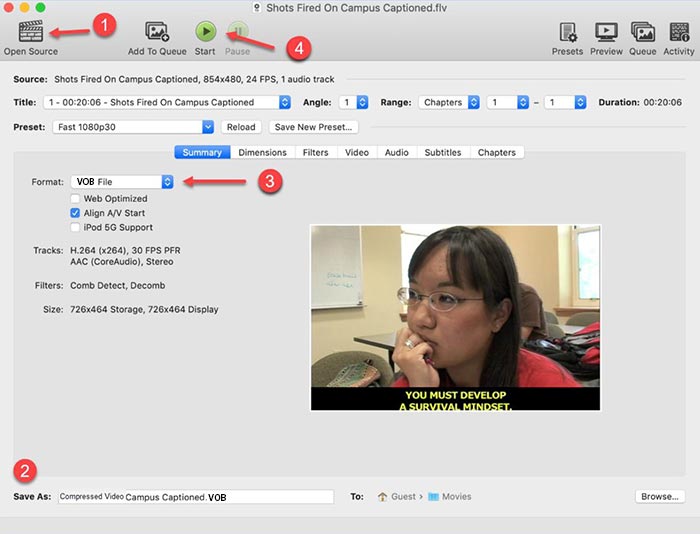
ขั้นตอนที่ 1 ดาวน์โหลดและเปิดใช้ Handbrake หากต้องการเพิ่มไฟล์ FLV ให้คลิกปุ่ม Open Source คุณสามารถหาไฟล์ FLV ได้ในหน้าต่างเลือกไฟล์.
ขั้นตอนที่ 2 จากนั้นตั้งค่าโฟลเดอร์สำหรับบันทึกไฟล์ VOB เอาต์พุต โดยคลิกช่อง Save As ที่ด้านล่างของหน้าต่างโปรแกรม.
ขั้นตอนที่ 3 จากนั้นเลือกเป็นรูปแบบ VOB ในช่อง Format.
ขั้นตอนที่ 4 คลิกปุ่ม Start เพื่อเริ่มการแปลง.
FLV เทียบกับ VOB
Adobe Flash Player ใช้ FLV เพื่อส่งเนื้อหาวิดีโอ เช่น ภาพยนตร์และรายการทีวี ปัจจุบัน Adobe ไม่ได้พัฒนาโปรแกรมเล่นอีกต่อไปและแนะนำให้ผู้ใช้ถอนการติดตั้งโปรแกรมดังกล่าวด้วยเหตุผลด้านความปลอดภัย อย่างไรก็ตาม คุณยังคงสามารถใช้รูปแบบ FLV ในโปรแกรมที่ไม่ใช่ Adobe/Macromedia จำนวนมากได้
รูปแบบ VOB มักใช้สำหรับจัดเก็บข้อมูลภาพยนตร์ของแผ่น DVD ซึ่งรวมถึงวิดีโอ เสียง คำบรรยาย เมนู DVD และเนื้อหาอื่นๆ โดยปกติแล้วจะจัดรูปแบบเป็นสตรีมระบบ MPEG-2 คุณสามารถเปิดไฟล์ VOB ในเครื่องมือเล่นวิดีโอต่างๆ ได้
ส่วนที่ 4 คำถามที่พบบ่อยเกี่ยวกับการแปลง FLV เป็น VOB
1. รูปแบบ FLV คืออะไร?
FLV (Flash Video) เป็นไฟล์ที่ใช้ Adobe Flash Player ในการส่งผ่านวิดีโอหรือเสียงผ่านทางอินเทอร์เน็ต เป็นรูปแบบมาตรฐานของวิดีโอบนแพลตฟอร์มและเว็บไซต์ต่าง ๆ เช่น YouTube และ Hulu (ค้นหาโปรแกรมเล่นไฟล์ FLV ได้ที่นี่)
2. เหตุใดฉันจึงควรแปลง FLV เป็น VOB
เมื่อคุณต้องการเก็บวิดีโอจากอินเทอร์เน็ตลงในดีวีดี คุณต้องแปลง FLV เป็น VOB VOB คือรูปแบบที่มีการสตรีมวิดีโอในรูปแบบ MPEG-2 และการสตรีมเสียงในหลายรูปแบบใน DVD
3. ฉันจะตัดไฟล์ FLV ก่อนแปลงได้อย่างไร
คุณสามารถใช้ซอฟต์แวร์ตัดต่อวิดีโอระดับมืออาชีพเพื่อตัดไฟล์ FLV เช่น Video Converter Ultimate ช่วยให้คุณสามารถตั้งค่าจุดเริ่มต้นและจุดสิ้นสุดบนไทม์ไลน์เพื่อตัดวิดีโอ
สรุป
บทความนี้นำเสนอ 3 วิธีที่ผ่านการยืนยันแล้วสำหรับการแปลง FLV เป็น VOB คุณสามารถใช้ FVC Free FLV Converter และ Free Online Video Converter เพื่อแปลงไฟล์ได้อย่างง่ายดายและฟรี นอกจากนี้ยังมีซอฟต์แวร์ฟรีอื่น ๆ ที่คุณสามารถใช้สำหรับการแปลงได้ เช่น Handbrake หรือ VLC Media Player คุณสามารถดาวน์โหลดมาลองใช้ดูเพื่อดูว่าสามารถแก้ปัญหาของคุณได้หรือไม่ หากคุณมีคำถามใด ๆ เกี่ยวกับการแปลง FLV เป็น VOB หรืออยากรู้ข้อมูลเพิ่มเติม โปรดแสดงความคิดเห็นไว้ด้านล่าง.
ดาวน์โหลดฟรีสำหรับ Windows 7 ขึ้นไปดาวน์โหลดอย่างปลอดภัย
ดาวน์โหลดฟรีสำหรับ MacOS 10.7 ขึ้นไปดาวน์โหลดอย่างปลอดภัย
-
 VLC ไม่เล่น DVD, วิธีแก้ไข
 VLC สามารถเล่น DVD ได้หรือไม่? ทำไม VLC ไม่เล่น DVD ของฉัน ฉันจะให้ VLC เล่น DVD บน Windows 10 ได้อย่างไร โพสต์นี้แบ่งปัน 3 เคล็ดลับในการแก้ไขปัญหา VLC ไม่เล่น DVD
-
 วิธีฟรี 3 อันดับแรกในการแปลง MP4 เป็น VOB อย่างรวดเร็ว
 จะแปลง MP4 เป็น VOB บน Windows PC และ Mac ได้อย่างไร เพื่อแก้ปัญหานี้โพสต์นี้จะแบ่งปัน 3 วิธีที่ดีที่สุดในการช่วยคุณแปลง MP4 เป็น VOB ได้ฟรี
-
 วิธีที่ดีที่สุดในการแปลง VOB เป็น FLV
 ต้องการแปลงไฟล์ VOB เป็นไฟล์ FLV หรือไม่? คุณสามารถทำงานให้เสร็จสมบูรณ์ได้อย่างง่ายดายด้วยตัวแปลงเดสก์ท็อปหรือออนไลน์ อ่านคู่มือนี้และเรียนรู้วิธีแปลง VOB เป็น FLV อย่างง่ายดายและรวดเร็ว

