


 Video Converter Ultimate
 บันทึกหน้าจอ
 ซ่อมวิดีโอ
 ดาวน์โหลดอย่างปลอดภัย
3 วิธีฟรีในการแปลง FLV เป็น WAV
อยากแยกเสียงออกจากวิดีโอที่ดาวน์โหลดมาแต่ไม่รู้วิธีทำอยู่หรือเปล่า? กำลังมองหาวิธีง่าย ๆ ในการแปลงไฟล์ FLV เป็น WAV หรือ MP3 อยู่ใช่ไหม?
ในบางกรณี คุณต้องการเพียงแทร็กเสียงหรือเพลงประกอบของวิดีโอเดียวเท่านั้น ดังนั้นคุณต้องแปลงวิดีโอเป็นเสียง โพสต์นี้จะกล่าวถึงวิธีการแปลง FLV เป็น WAV เป็นหลัก

ที่นี่มีการแนะนำ ตัวแปลง FLV เป็น WAV ที่ยอดเยี่ยม 3 ตัว เพื่อช่วยคุณแปลงไฟล์ FLV ของคุณ คุณสามารถเลือกวิธีที่ต้องการเพื่อแปลง FLV ให้กลายเป็นไฟล์เสียง WAV ได้.
ส่วนที่ 1 แปลง FLV เป็น WAV ออนไลน์
เมื่อคุณค้นหาวิธีแปลง FLV เป็น WAV บนอินเทอร์เน็ต คุณจะเห็นผลการค้นหามากมายที่เป็นตัวแปลงออนไลน์ฟรี เผื่อว่าคุณยังไม่แน่ใจว่าจะใช้ตัวไหน เราขอแนะนำ Free Online Video Converter ยอดนิยมให้คุณรู้จัก เครื่องมือนี้ถูกออกแบบมาเป็นพิเศษเพื่อแปลง FLV เป็นรูปแบบวิดีโอและเสียงที่ใช้บ่อย เช่น MP4, MOV, AVI, MP3, AAC, M4A และ WAV.
เมื่อเทียบกับตัวแปลง FLV เป็น WAV ออนไลน์อื่น ๆ มันรองรับรูปแบบอินพุตและเอาต์พุตที่มากกว่า และให้ความเร็วในการแปลงที่เร็วกว่า นอกจากนี้ยังไม่จำเป็นต้องลงทะเบียนหรือลงชื่อเข้าใช้บัญชี ช่วยให้คุณสามารถแปลงไฟล์ FLV ได้โดยไม่ จำกัด ขนาดไฟล์
ขั้นตอนที่ 1: ไปที่ เว็บไซต์ตัวแปลง FLV เป็น WAV ออนไลน์ฟรีนี้ บนเบราว์เซอร์ของคุณ เครื่องมือนี้รองรับเว็บเบราว์เซอร์หลักเกือบทั้งหมด เช่น Safari, IE, Chrome, Firefox และ Yahoo.
ขั้นตอนที่ 2: คลิก Add Files to Convert จากนั้นคลิกปุ่ม Download เพื่อติดตั้งตัวเรียกใช้งานสำหรับการแปลงไฟล์ FLV หลังการติดตั้งจะมีหน้าต่างป๊อปอัปให้คุณโหลดไฟล์ FLV ของคุณ.

ขั้นตอนที่ 3: เมื่อเข้าสู่หน้าต่างหลักของโปรแกรมแปลงไฟล์ คุณจะเห็นว่ามีรูปแบบวิดีโอยอดนิยมอย่าง MP4, MOV, AVI, FLV, MKV, VOB, MPG, WMV และอื่น ๆ แสดงอยู่ ในขั้นตอนนี้คุณต้องคลิกที่ไอคอน Audio เพื่อแสดงรูปแบบไฟล์เสียง เลือก WAV เป็นรูปแบบเอาต์พุต.
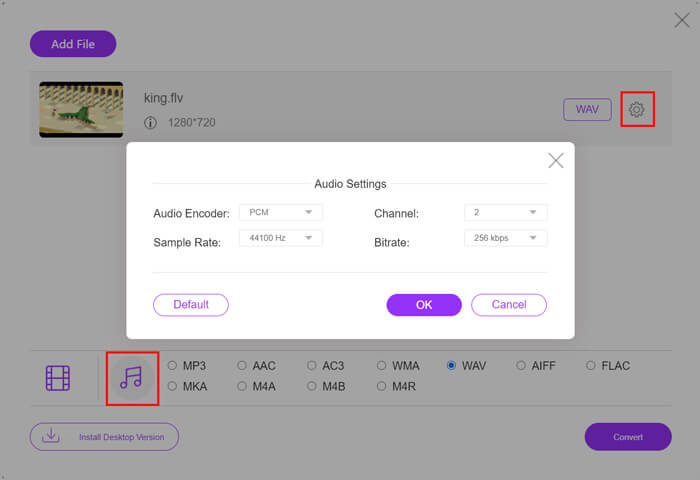
ขั้นตอนที่ 4: ก่อนแปลงไฟล์ FLV เป็น WAV คุณสามารถคลิกไอคอน Settings ที่อยู่ถัดจากรูปแบบเอาต์พุตเพื่อปรับการตั้งค่าเสียงเพิ่มเติม ที่นี่คุณสามารถตั้งค่า encoder เสียง, ช่องสัญญาณ, อัตราการสุ่มตัวอย่าง (sample rate) และบิตเรตได้ จากนั้นคลิกปุ่ม Convert เพื่อแปลงไฟล์ FLV ของคุณเป็นไฟล์เสียง WAV.
หากคุณต้องการแปลง FLV เป็นไฟล์เสียงอย่าง MP3, WMA, WAV เป็นต้น คุณควรคลิกที่แท็บเสียง (audio) เพื่อทำเครื่องหมายเลือก.
ส่วนที่ 2 ฟรีแปลง FLV เป็น WAV
นอกจากตัวแปลง FLV ออนไลน์แล้ว ยังมีโปรแกรมแปลงวิดีโอฟรีบางตัวที่ช่วยให้คุณแปลง FLV เป็น WAV ได้อย่างง่ายดาย สำหรับการใช้งานแบบนี้ คุณสามารถใช้ Free FLV Converter ได้.

โปรแกรมแปลง FLV เป็น WAV ฟรี
155321+ ดาวน์โหลด- แปลง FLV เป็น WAV, AAC, MP3, M4A, MP4, MOV, AVI และอื่นๆ
- รองรับรูปแบบวิดีโอและเสียงที่ใช้บ่อยทั้งหมด
- รองรับซีพียูแบบมัลติคอร์ล่าสุดและการเร่งความเร็ว GPU
- แปลงไฟล์ FLV หนึ่งไฟล์ขึ้นไปโดยไม่สูญเสียคุณภาพ
ดาวน์โหลดฟรีสำหรับ Windows 7 หรือใหม่กว่าดาวน์โหลดอย่างปลอดภัย
ดาวน์โหลดฟรีสำหรับ MacOS 10.7 หรือใหม่กว่าดาวน์โหลดอย่างปลอดภัย
มันมีคุณสมบัติการแปลงทั้งหมดที่คุณต้องการ คำแนะนำต่อไปนี้จะแสดงวิธีเปลี่ยน FLV เป็น WAV ด้วย
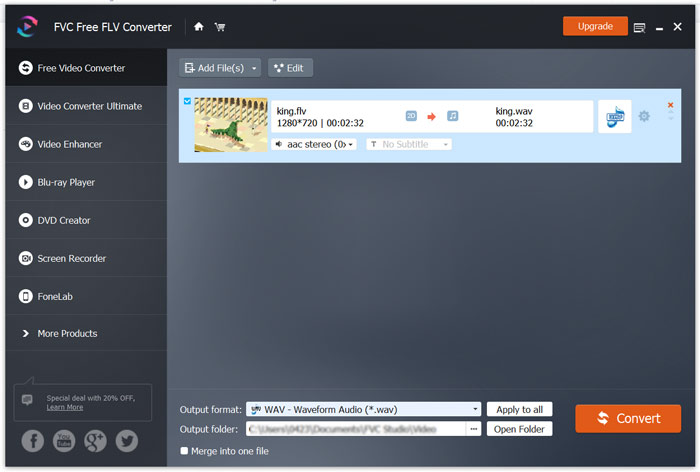
ขั้นตอนที่ 1: ดาวน์โหลด ติดตั้ง และเปิดใช้งานโปรแกรมแปลง FLV เป็น WAV ฟรีนี้บนคอมพิวเตอร์ของคุณ คลิก Add Files เพื่อเพิ่มไฟล์ FLV ของคุณ.

ขั้นตอนที่ 2: คลิก Output format และเลือก WAV เป็นรูปแบบเป้าหมาย จากนั้นเลือกโฟลเดอร์ปลายทางที่เหมาะสม.
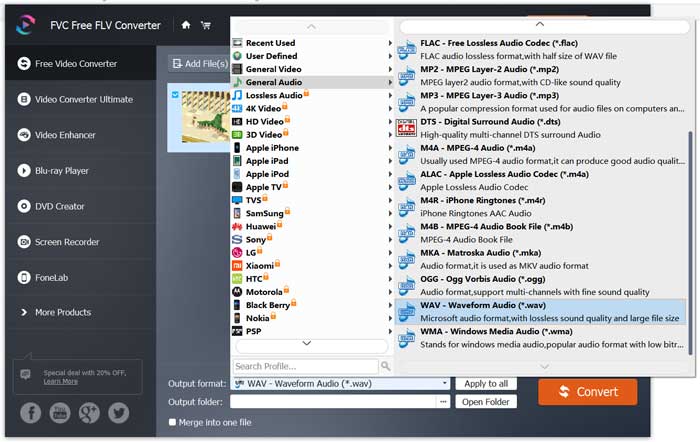
ขั้นตอนที่ 3: คลิกปุ่ม Convert เพื่อเริ่มการแปลง FLV เป็น WAV.
ส่วนที่ 3 แปลง FLV เป็น WAV ด้วย VLC
หากคุณติดตั้ง VLC Media Player ไว้ในคอมพิวเตอร์อยู่แล้ว คุณก็สามารถใช้ VLC เพื่อแปลง FLV เป็น WAV ได้เช่นกัน คุณควรรู้ว่า VLC เป็นโปรแกรมเล่นมีเดียยอดนิยมที่มีฟังก์ชันการแปลงและการตัดต่อพื้นฐานอยู่ด้วย.
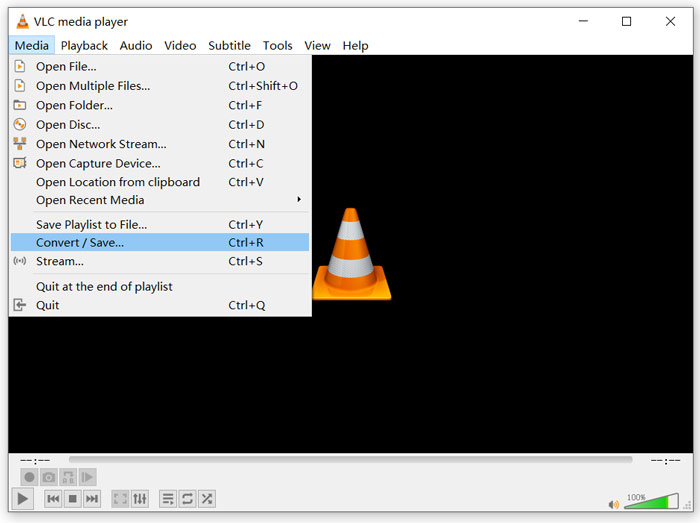
ขั้นตอนที่ 1: เปิด VLC Media Player บนคอมพิวเตอร์ของคุณ คุณสามารถดาวน์โหลดและติดตั้งได้ฟรีจากเว็บไซต์ VideoLAN คลิกเมนู Media แล้วเลือกตัวเลือก Convert/Save จากเมนูดรอปดาวน์.
ขั้นตอนที่ 2: ตอนนี้คุณจะเข้าสู่หน้าต่าง Open Media คลิกปุ่ม Add เพื่อเพิ่มไฟล์ FLV ที่คุณต้องการแปลง จากนั้นคลิกปุ่ม Convert/Save เพื่อเปิดหน้าต่าง Convert.
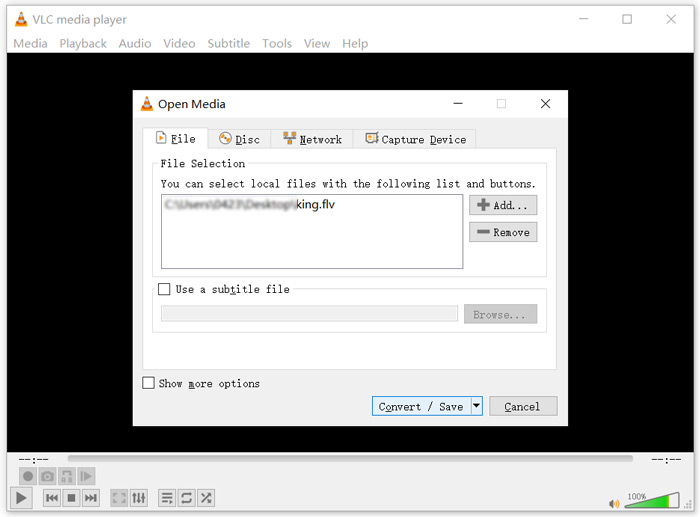
ขั้นตอนที่ 3: ทำเครื่องหมายที่ตัวเลือก Display the output ใต้แท็บ Convert จากนั้นเลือกฟอร์แมตเอาต์พุตที่เหมาะสมจากเมนูดรอปดาวน์ของ Profile คลิกปุ่ม Browse เพื่อเลือกโฟลเดอร์ปลายทางที่ต้องการ ในขั้นตอนนี้คุณสามารถเปลี่ยนชื่อไฟล์เอาต์พุตได้ด้วย.
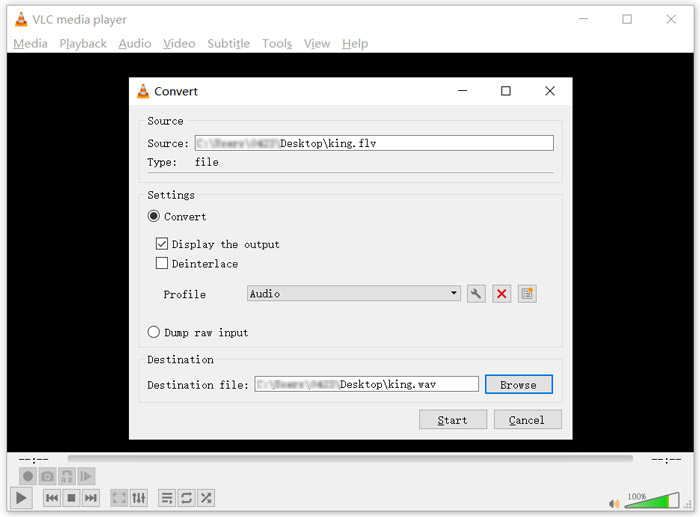
ขั้นตอนที่ 4: คลิกปุ่ม Start เพื่อเริ่มแปลงไฟล์ FLV ของคุณเป็น WAV หลังจากนั้น VLC จะเล่นไฟล์ WAV ที่แปลงเสร็จโดยอัตโนมัติ ระหว่างการแปลงคุณจะเห็นข้อความแจ้ง Converting file อย่าปิด VLC Media Player จนกว่าการแปลงจะเสร็จสมบูรณ์.
ส่วนที่ 4 คำถามที่พบบ่อยเกี่ยวกับการแปลง FLV เป็น WAV
FLV กับ WAV ความแตกต่างระหว่าง FLV และ WAV คืออะไร?
FLV หรือ Flash Video File เป็นไฟล์วิดีโอที่รองรับแฟลชซึ่งพัฒนาโดย Adobe Systems ภายในไฟล์จะมีส่วนหัวสั้น ๆ พร้อมวิดีโอ เสียง และแพ็กเก็ตข้อมูลเมตาแบบสลับกันไป FLV เดิมทีถูกออกแบบมาเพื่อฝังสตรีมวิดีโอในแอปพลิเคชันของ Adobe ไฟล์ FLV หนึ่งไฟล์จะมีสตรีมวิดีโอความละเอียด 640x360 และสตรีมเสียงที่ 44.1 KHz, 2 แชนเนล, AAC
ส่วนไฟล์ที่มีนามสกุล WAV คือไฟล์เสียงรูปแบบ Waveform Audio (WAV) ซึ่งเป็นคอนเทนเนอร์ที่จัดเก็บข้อมูลเป็นส่วน ๆ เดิมถูกพัฒนาโดย Microsoft และ IBM และใช้จัดเก็บเสียงแบบไม่บีบอัดคุณภาพไม่สูญเสีย (lossless) จึงทำให้มีขนาดไฟล์ค่อนข้างใหญ่ รูปแบบนี้ใช้คอนเทนเนอร์เพื่อเก็บข้อมูลเสียง หมายเลขแทร็ก อัตราการสุ่มตัวอย่าง (sample rate) และบิตเรต.
วิธีการแปลง FLV เป็น WAV โดยไม่ต้องใช้ซอฟต์แวร์?
หากคุณต้องการแปลง FLV เป็น WAV โดยไม่ต้องใช้ซอฟต์แวร์แปลงใดๆ คุณสามารถเลือกเปลี่ยนนามสกุลไฟล์จาก .flv เป็น .wav
จะดาวน์โหลด FLV เป็น WAV ได้อย่างไร?
มีเครื่องบันทึกหน้าจอจำนวนมากในตลาดที่สามารถช่วยคุณบันทึกวิดีโอเป็นไฟล์เสียงในคอมพิวเตอร์ของคุณ
สรุป
หลังจากอ่านบทความนี้แล้ว คุณจะได้เรียนรู้ 3 วิธีฟรีในการดึงไฟล์เสียง WAV ออกจากไฟล์ FLV เมื่อคุณต้องการแปลง FLV เป็น WAV คุณสามารถเลือกใช้ตัวแปลง FLV ที่คุณชอบได้.
-
 5 เครื่องเล่น WAV ฟรีที่ดีที่สุดสำหรับ Android, iOS และคอมพิวเตอร์
 จะเล่นไฟล์ WAV บนโทรศัพท์ Android ได้อย่างไร? เครื่องเล่นอะไรสามารถเล่น WAV ได้? โพสต์นี้แชร์ 5 เครื่องเล่น WAV ฟรีที่ดีที่สุดสำหรับ Android, iPhone, Mac และ PC
-
 10 สุดยอดเครื่องเล่นวิดีโอ FLV สำหรับ Windows 10/8/7, Mac, iOS และ Android ที่คุณต้องลอง
 เครื่องเล่น FLV ช่วยให้คุณเข้าถึงไฟล์ FLV บนอุปกรณ์ Windows, Mac, Android, iOS ได้อย่างง่ายดาย ตรวจสอบเครื่องเล่นไฟล์ FLV ที่ดีที่สุดที่คุณสามารถดาวน์โหลดได้ตอนนี้
-
 วิธีการแปลง WAV เป็น MP3 ด้วยตัวแปลงฟรี 5 อันดับแรก
 หน้านี้เป็นรายการตัวแปลง WAV เป็น MP3 ฟรี (iTunes, Audacity, VLC, Windows Media Player และ Free Audio Converter) เพื่อเปลี่ยน WAV เป็น MP3 บนคอมพิวเตอร์
