


 Video Converter Ultimate
 บันทึกหน้าจอ
 ซ่อมวิดีโอ
[2021] ข้อใดใน 4 อันที่ดีที่สุดฟรี AVI to MOV Converter ออนไลน์และออฟไลน์
AVI เป็นรูปแบบไฟล์ที่ไม่บีบอัดที่พัฒนาโดย Microsoft แม้ว่าไฟล์จะไม่มีการจำกัดสิทธิ์ แต่รูปแบบนี้ก็ยังไม่สามารถเล่นบน Mac ได้เพราะเป็นรูปแบบเฉพาะของ Microsoft ดังนั้นวิธีที่ดีที่สุดในการเล่นไฟล์ AVI คือแปลงให้เป็นไฟล์ MOV หากคุณอยากรู้ว่าจะแปลง AVI เป็น MOV ได้อย่างไร คุณต้องอ่านต่อไปเพื่อเรียนรู้ขั้นตอนและดูว่าเครื่องมือใดเหมาะสมที่สุดสำหรับงานนี้.

ส่วนที่ 1 วิธีขั้นสูงสุดในการแปลง AVI เป็น MOV
มีคนบอกว่า เริ่มต้นวันใหม่ด้วยกาแฟหรือชาจะทำให้วันของคุณเริ่มต้นได้ดี เช่นเดียวกันที่นี่ เรามาเริ่มกันด้วยโปรแกรมแปลงวิดีโอประสิทธิภาพสูงที่พัฒนาโดย FVC โปรแกรม Video Converter Ultimate สามารถแปลงไฟล์ได้ทุกฟอร์แมตเป็นฟอร์แมตใหม่ ตัวอย่างเช่น การแปลงไฟล์AVI เป็น MOV จะเป็นเรื่องง่ายมากหากคุณใช้เครื่องมือนี้ นอกจากนี้ คุณยังสามารถแปลงได้มากกว่าแค่หนึ่ง สอง หรือสามไฟล์ในเวลาเดียวกัน จริง ๆ แล้ว โปรแกรมนี้ไม่จำกัดจำนวนไฟล์ที่จะนำมาแปลง อีกทั้งคุณยังสามารถเพิ่มคุณภาพวิดีโอได้ในแถบเครื่องมือของโปรแกรมหลังจากแปลงเสร็จแล้ว ดังนั้น หากคุณกำลังมองหาเครื่องมือที่เหนือกว่าโปรแกรมแปลงไฟล์อื่น ๆ ในรายชื่อหรือบนการค้นหาทางเว็บ คุณอาจบอกกับตัวเองได้เลยว่าการค้นหานั้นจบลงแล้ว หากคุณยังมีข้อสงสัยเกี่ยวกับโปรแกรมนี้ คุณควรทดลองใช้ด้วยตัวเองก่อน และทำตามขั้นตอนเหล่านี้ในการใช้ตัวแปลงขั้นสุดยอดที่ให้การแปลงไฟล์ได้อย่างสมบูรณ์แบบ.
ขั้นตอนที่ 1. ดาวน์โหลดโปรแกรมและติดตั้งลงในฮาร์ดดิสก์ของคุณ ปรับการตั้งค่าโปรแกรม จากนั้นคลิก Finish เพื่อบันทึกการเปลี่ยนแปลงที่คุณทำ.
ดาวน์โหลดฟรีสำหรับ Windows 7 หรือใหม่กว่าดาวน์โหลดอย่างปลอดภัย
ดาวน์โหลดฟรีสำหรับ MacOS 10.7 หรือใหม่กว่าดาวน์โหลดอย่างปลอดภัย
ขั้นตอนที่ 2. หลังการติดตั้งและตั้งค่าเรียบร้อยแล้ว โปรแกรมจะเปิดขึ้นโดยอัตโนมัติ และอินเทอร์เฟซลักษณะนี้ควรจะแสดงบนหน้าจอของคุณ.
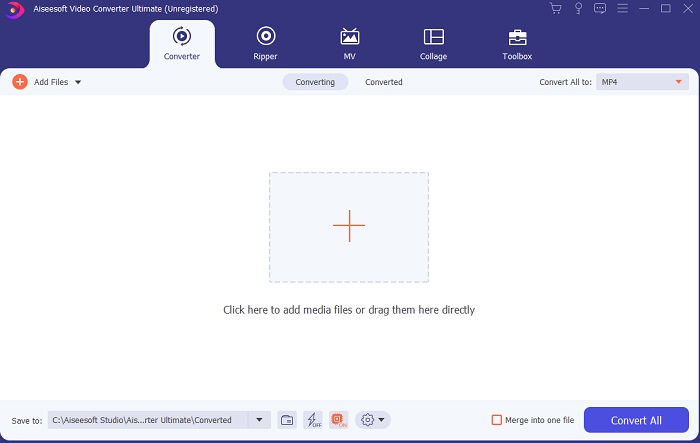
ขั้นตอนที่ 3. คลิกสัญลักษณ์บวกขนาดใหญ่ตรงกลางเพื่อเพิ่มไฟล์ที่จะแปลง AVI เป็น MOV หรือเป็นฟอร์แมตอื่น.
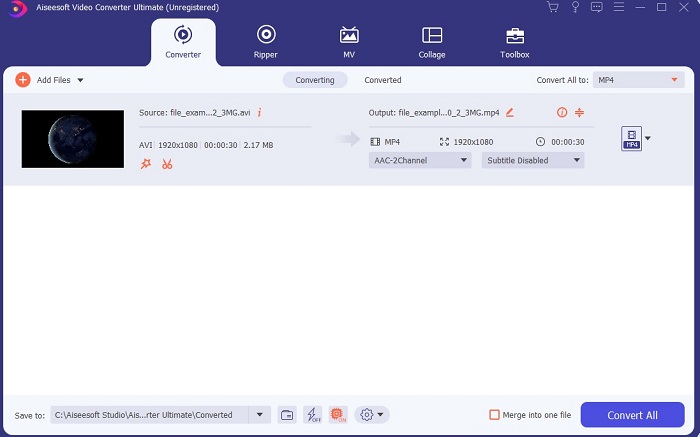
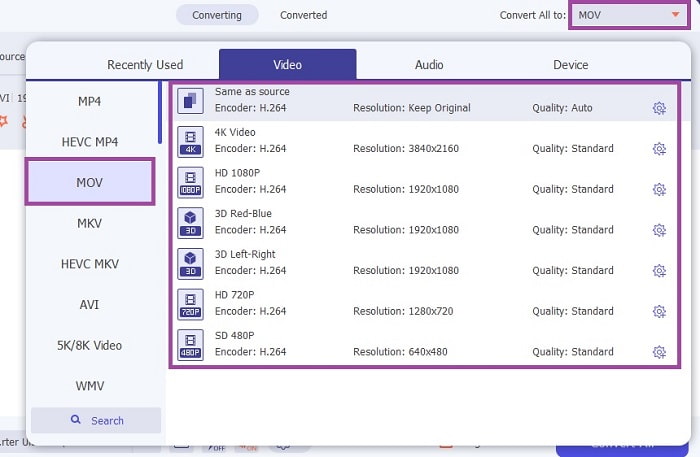
ขั้นตอนที่ 4. เปลี่ยนฟอร์แมตโดยการคลิกปุ่มดรอปดาวน์ แล้วเลือก MOV หรือฟอร์แมตอื่นที่คุณต้องการแปลง หากไฟล์พร้อมสำหรับการแปลงแล้ว ให้คลิก Convert All เพื่อเริ่มการแปลง.
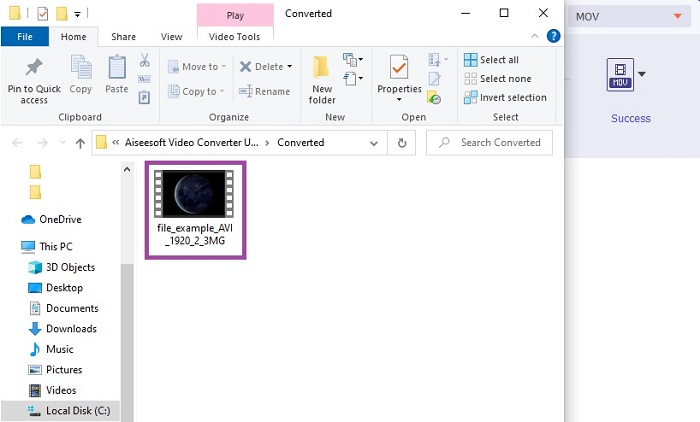
ขั้นตอนที่ 5. การแปลงจะใช้เวลาไม่ถึงหนึ่งนาที เมื่อเสร็จแล้ว หน้าต่าง File Explorer จะเด้งขึ้นมาบนหน้าจอของคุณ จากนั้นคลิกไฟล์ที่แปลงเสร็จเพื่อรับชม ต่อมาคุณสามารถปรับปรุงคุณภาพวิดีโอให้ดีขึ้นได้ด้วยแถบเครื่องมือ.
ส่วนที่ 2 วิธีที่เป็นไปได้อื่น ๆ ในการแปลง AVI เป็น MOV Online
1. FVC แปลงวิดีโอออนไลน์ฟรี
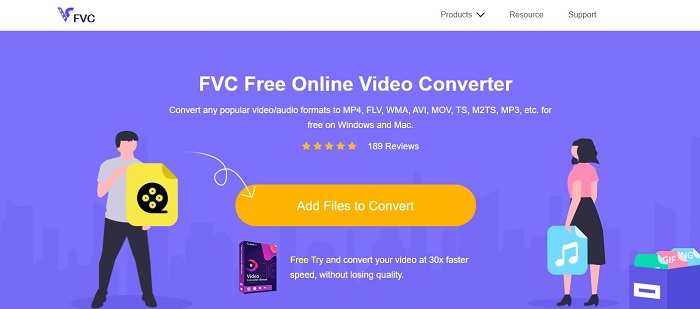
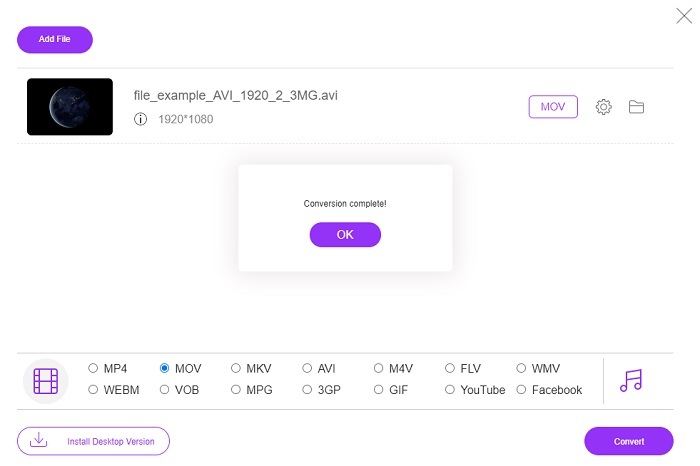
ต่างจากโปรแกรมด้านบน โปรแกรมนี้ใช้งานได้ฟรี FVC Free Video Converter เป็นเวอร์ชันฟรีของโปรแกรมข้างต้น แต่ฟีเจอร์หลักอย่างการเพิ่มคุณภาพวิดีโอและอื่น ๆ จะไม่มีให้ใช้หากคุณใช้เวอร์ชันนี้ อย่างไรก็ตาม ฟังก์ชันการแปลงพื้นฐานยังสามารถทำได้ด้วยโปรแกรมนี้ หากคุณอยากรู้ว่าตัวแปลง AVI เป็น MOV ออนไลน์ฟรี ตัวนี้ทำงานอย่างไร คุณควรทำตามขั้นตอนง่าย ๆ ด้านล่างเพื่อให้มั่นใจว่ากระบวนการแปลงจะเสร็จสมบูรณ์.
ขั้นตอนที่ 1. คลิกลิงก์นี้ ลิงก์ แล้วคลิก Add Files to Convert เพื่อเรียกใช้งานบน PC หรือ Mac ของคุณ.
ดาวน์โหลดเวอร์ชันเดสก์ท็อปเพื่อแปลงไฟล์แบบเป็นชุดได้.
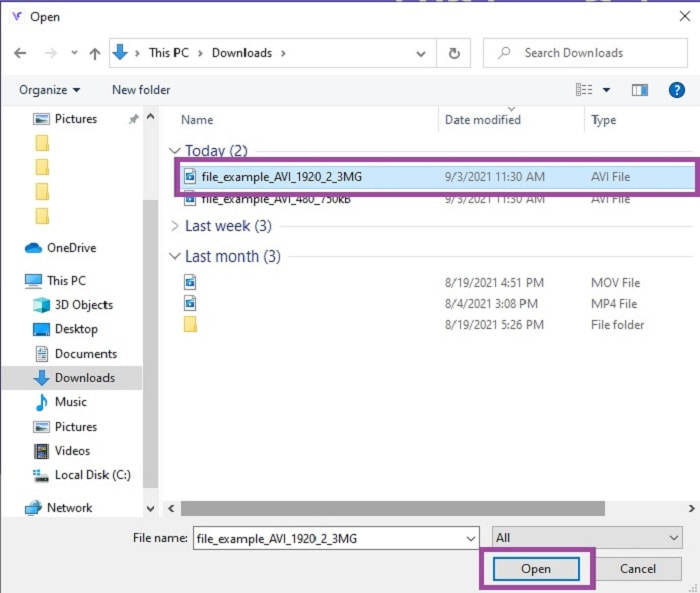
ขั้นตอนที่ 2. หลังจากคลิกแล้ว คุณต้องเลือกไฟล์ที่ต้องการแปลง จากนั้นคลิก Open เพื่อเริ่มต้น.
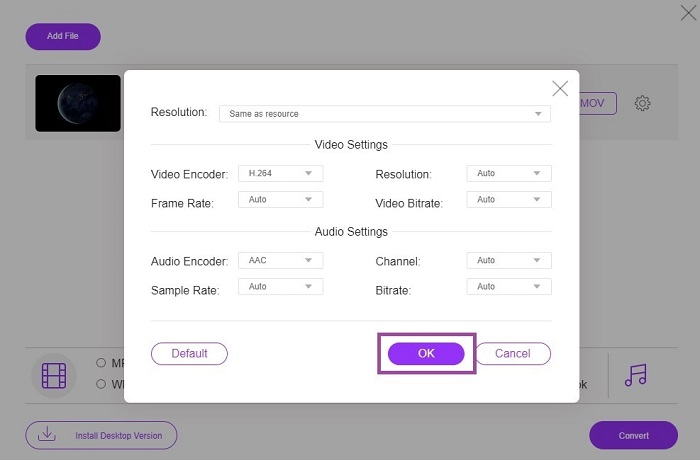
ขั้นตอนที่ 3. คลิกไอคอนเฟือง (cog) เพื่อเปลี่ยนการตั้งค่าวิดีโอและเสียงตามที่คุณต้องการ เพื่อบันทึกการเปลี่ยนแปลงที่ทำไว้ ให้คลิก OK.
ขั้นตอนที่ 4. หากไฟล์ปรากฏบนอินเทอร์เฟซแล้ว คุณต้องเลือกฟอร์แมตที่ต้องการแปลงให้เป็น เมื่อกลับไปยังหน้าหลัก ให้คลิก Convert เพื่อเริ่มกระบวนการ.
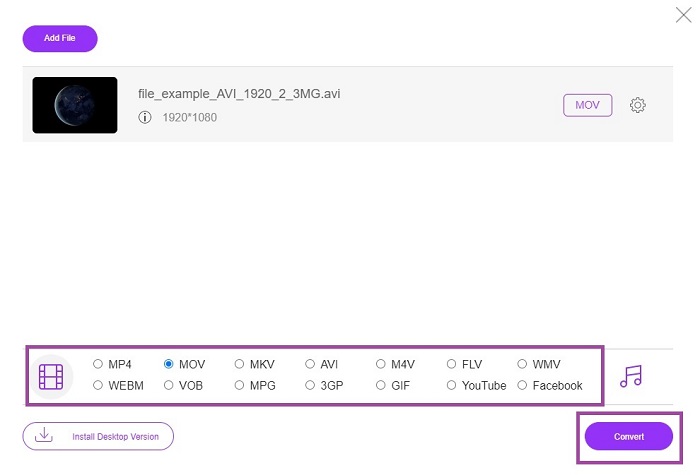
ขั้นตอนที่ 5. เมื่อการแปลงเสร็จสิ้น คุณสามารถไปตรวจสอบไฟล์ได้ในตัวจัดการไฟล์ภายหลัง.
2. CloudConvert
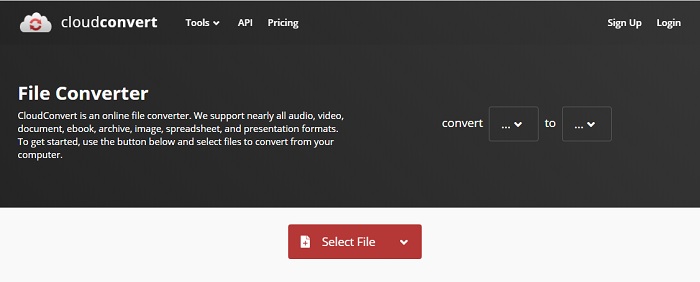
หากคุณกำลังมองหาตัวแปลง AVI เป็น MOV ออนไลน์สำหรับ Mac คุณอาจอยากลองใช้ CloudConvert เครื่องมือนี้ช่วยให้ผู้ใช้สามารถแปลงไฟล์วิดีโอ เสียง เอกสาร PDF และไฟล์ประเภทอื่น ๆ เป็นฟอร์แมตใหม่ได้ แต่ถึงแม้ว่าจะมีความสามารถในการแปลงไฟล์ที่ทรงพลัง โปรแกรมนี้ไม่มีฟีเจอร์แก้ไข ดังนั้นจึงแปลงวิดีโอโดยไม่สามารถปรับปรุงคุณภาพให้ดีขึ้นได้ อย่างไรก็ตาม โดยรวมถือว่าดีมากในการแปลงไฟล์ แต่ FVC Free Online Video Converter ก็ยังดีกว่าเครื่องมือนี้.
3. FreeConvert.com
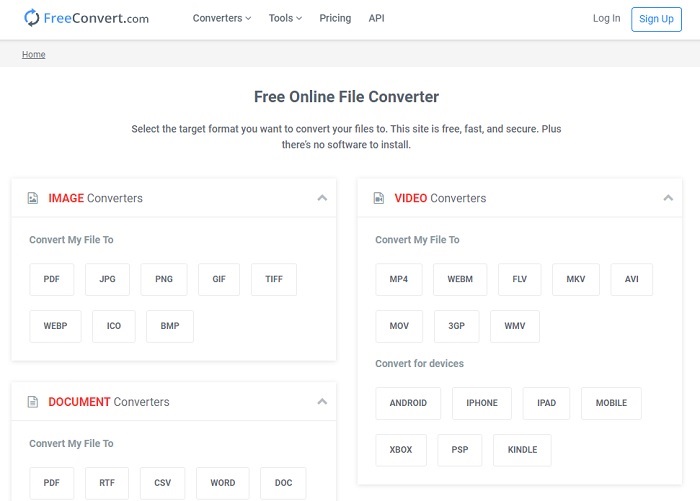
อีกหนึ่งเครื่องมือออนไลน์ที่น่าทึ่งสำหรับใช้แปลงไฟล์คือ FreeConvert.com หากเครื่องมือด้านบนมอบการบีบอัดไฟล์ที่ทรงพลัง เครื่องมือนี้ก็มีศักยภาพเพียงพอที่จะติดอันดับเช่นกัน นอกจากนี้ยังมีฟีเจอร์แก้ไขพื้นฐานอย่างการตัดต่อและครอปวิดีโอ การบีบอัดไฟล์ และการแปลงไฟล์ให้เหมาะกับอุปกรณ์ต่าง ๆ แต่ข้อเสียของเครื่องมือนี้คือรูปแบบไฟล์ที่รองรับมีค่อนข้างจำกัด คุณจึงไม่มีอิสระในการเลือกฟอร์แมตมากนักเพราะข้อจำกัดของฟังก์ชันที่มีให้.
อ่านเพิ่มเติม
AVI เทียบกับ MOV
ตามรูปแบบไฟล์การแลกเปลี่ยนทรัพยากร (RIFF) รูปแบบ AVI ถูกนำมาใช้โดย Microsoft ในปี 1992 สามารถบันทึกวิดีโอ/เสียงคุณภาพสูงได้ เนื่องจากใช้การบีบอัดน้อยกว่า แต่นั่นก็ทำให้ไฟล์ AVI มีขนาดใหญ่ขึ้นด้วย ซึ่งอาจเป็นปัญหาได้เมื่อมีเนื้อที่จำกัด
รูปแบบ MOV สามารถใช้สำหรับจัดเก็บภาพยนตร์ รายการทีวี คลิปวิดีโอสั้น หรือภาพยนตร์ที่บ้าน ไฟล์นี้ถูกบันทึกในรูปแบบไฟล์ QuickTime (QTFF) ซึ่งเปิดตัวโดย Apple ในปี 1991 ไฟล์ MOV มักถูกใช้เมื่อผู้คนต้องการบันทึกวิดีโอคุณภาพสูง
ส่วนที่ 3 คำถามที่พบบ่อยเกี่ยวกับ AVI เป็น MOV
QuickTime สามารถแปลง AVI เป็น MOV ได้หรือไม่
QuickTime เป็นโปรแกรมเล่นมีเดียที่มาพร้อมในระบบ Mac นอกจากนี้ยังสามารถแปลง AVI เป็น MOV บน QuickTime ได้ด้วย แม้ว่าจะไม่ใช่ตัวเลือกที่ดีที่สุดหรือเหมาะที่สุดในการแปลงฟอร์แมตมีเดีย แต่ก็สามารถทำงานนี้ได้.
อันไหนดีกว่า? AVI หรือ MOV?
แต่ละรูปแบบมีคุณลักษณะเฉพาะของตนเองเพื่อให้โดดเด่น แต่ทั้งสองรูปแบบนี้เป็นหนึ่งในรูปแบบที่ดีที่สุด AVI เป็นรูปแบบเฉพาะที่พัฒนาโดย Microsoft เพื่อซิงโครไนซ์การเล่นวิดีโอและคุณภาพที่ยอดเยี่ยมเช่นกัน แต่เนื่องจาก Apple ต้องการแข่งขันจึงพัฒนา MOV ซึ่งเป็นรูปแบบดั้งเดิมของ QuickTime เพื่อจัดเก็บแทร็กหลายแทร็กด้วยข้อมูล เช่น เสียง วิดีโอ และคำบรรยายแยกจากกัน แต่ในคอนเทนเนอร์เดียว
AVI และ MOV สูญเสียหรือสูญเสียหรือไม่?
ไม่ใช่การบีบอัดเพราะ AVI ถูกสร้างขึ้นเพื่อให้ไม่มีการบีบอัดดังนั้นจึงเป็นแบบไม่สูญเสีย แต่ MOV เป็นการสูญเสียที่บีบอัดและมีขนาดเล็กลง
สรุป
สุดท้ายแล้ว การแปลงไฟล์ AVI ไม่ใช่เรื่องเล่น ๆ คุณจึงต้องใส่ใจให้จริงจังเพราะไฟล์ประเภทนี้ไม่บีบอัด หากคุณเลือกโปรแกรมแปลงไฟล์ที่ไม่เหมาะสม มีโอกาสที่โค้ดบางส่วนของไฟล์จะสูญหายระหว่างกระบวนการ แต่ไม่ต้องกังวลเพราะFVC Video Converter Ultimate พร้อมช่วยคุณไว้ หากคุณต้องการให้กระบวนการแปลงไฟล์ประสบความสำเร็จ คุณต้องใช้โปรแกรมนี้เท่านั้น นอกจากจะรวดเร็วและปลอดภัยแล้ว โปรแกรมนี้ยังสามารถแปลงไฟล์ได้หลายไฟล์พร้อมกัน แทนที่จะต้องรอให้ไฟล์แรกแปลงเสร็จ คุณสามารถแปลงไฟล์ AVI ทั้งหมดให้กลายเป็นรูปแบบ MOV ได้พร้อมกัน หรือเป็นฟอร์แมตอื่น ๆ ที่คุณต้องการ.
-
 FLV เป็น MOV - วิธีการแปลง FLV เป็น MOV บน Mac / PC / ออนไลน์ฟรี
 วิธีแปลง FLV เป็น MOV? ฉันจะแปลง FLV เป็น MOV บน Mac ได้อย่างไร มีวิธีฟรีในการแปลง YouTube FLV เป็น MOV ออนไลน์หรือไม่ โพสต์นี้แชร์ตัวแปลง FLV เป็น MOV 3 รายการเพื่อเปลี่ยนไฟล์ FLV เป็น MOV
-
 5 วิธีการทำงานเพื่อแก้ไข QuickTime ไม่สามารถเปิดไฟล์ MOV
 รูปแบบ MOV ส่วนใหญ่สร้างขึ้นสำหรับการเล่นใน QuickTime Player อย่างไรก็ตาม บางครั้งคุณอาจพบว่าพวกเขาไม่เล่นด้วย เรียนรู้วิธีแก้ไข QuickTime จะไม่เล่นไฟล์ MOV จากโพสต์นี้
-
 คำแนะนำพิเศษเกี่ยวกับวิธีการเล่นไฟล์ MOV บนอุปกรณ์มือถือ Android
 มีปัญหาว่าทำไมไฟล์ MOV ของคุณไม่เล่นบนเครื่องเล่นสื่อ Android ของคุณ? จากนั้น อ่านบทความนี้ มันจะให้คุณ 2 วิธีในการแก้ไขไฟล์ MOV และทำให้เล่นได้

