


 Video Converter Ultimate
 บันทึกหน้าจอ
 ซ่อมวิดีโอ
ตัวแปลง MOV เป็น 3GP ออนไลน์และออฟไลน์ที่ดีที่สุดที่ควรค่าแก่การลอง
อุปกรณ์มือถือ 3G ไม่สามารถเล่นไฟล์ MOV ได้โดยตรง ดังนั้นหากคุณต้องการเล่นไฟล์ MOV บนอุปกรณ์มือถือ 3G คุณจำเป็นต้องมีเครื่องมือที่สามารถแปลง MOV เป็น 3GP และหากคุณกำลังมองหาตัวแปลงที่ดีที่สุดในการแปลงไฟล์ MOV ของคุณเป็น 3GP แสดงว่าคุณมาถูกทางแล้ว โชคดีที่เราได้รวบรวม ตัวแปลง MOV เป็น 3GP ทั้งออนไลน์และออฟไลน์ที่ดีที่สุดและใช้งานได้ฟรี ซึ่งคุณสามารถแปลงไฟล์ได้อย่างง่ายดาย.

ส่วนที่ 1 5 ตัวแปลงที่น่าทึ่งเพื่อแปลง MOV เป็น 3GP ได้อย่างง่ายดาย
การค้นหาตัวแปลงที่ดีที่สุดในการแปลงไฟล์ MOV เป็น 3GP ไม่ใช่เรื่องง่าย ดังนั้นเราจึงลองใช้ตัวแปลงออฟไลน์และออนไลน์ที่ดีที่สุด และเลือกตัวแปลงที่ดีที่สุดห้ารายการจากตัวแปลงที่เราลองใช้ เตรียมตัวให้พร้อมในขณะที่เราดื่มด่ำและรู้จักตัวแปลงที่ใช้งานง่ายที่สุดในการแปลงไฟล์ MOV เป็น 3GP ในท้ายที่สุด
FVC Video Converter Ultimate
หากคุณกำลังมองหาเครื่องมือที่สามารถแปลง MOV เป็น 3GP ได้ฟรีแบบออฟไลน์ และมีฟีเจอร์เด่นให้ใช้มากมาย เครื่องมือนี้อาจเหมาะที่สุดสำหรับคุณ FVC Video Converter Ultimate เป็นโปรแกรมออฟไลน์ที่สามารถแปลงไฟล์ได้หลายนามสกุล เช่น MOV, 3GP, MP4, AVI, MPG, FLV, MOV, WMV และอื่น ๆ อีกมากมาย นอกจากนี้ เครื่องมือออฟไลน์นี้ยังสามารถใส่เอฟเฟ็กต์ หมุนวิดีโอ และปรับปรุงคุณภาพไฟล์ของคุณได้อย่างมืออาชีพ คุณยังสามารถรวมไฟล์ MOV หลายไฟล์ให้เป็นไฟล์เดียวได้ เพราะมีฟีเจอร์แปลงไฟล์แบบเป็นชุด อีกทั้งยังมีให้ใช้ทั้งบน Windows และ Mac.
ข้อดี
- ให้คุณแก้ไข ปรับปรุง และ บีบอัดไฟล์ของคุณ.
- มันสามารถแปลงไฟล์ของคุณด้วยความเร็วสายฟ้า
- มีอินเทอร์เฟซซอฟต์แวร์ที่ใช้งานง่าย
- รองรับไฟล์รูปแบบต่างๆ รวมถึง MP4, AVI, MOV, 3GP, FLV, AVI, M4V และอีกกว่า 1,000 รายการ
จุดด้อย
- คุณต้องซื้อแอปเพื่อเข้าถึงคุณลักษณะเฉพาะของแอป
HDConvert
HDConvert เป็นตัวแปลง MOV เป็น 3GP ออนไลน์ที่สามารถแปลงไฟล์ได้ไม่จำกัดจำนวน การใช้ตัวแปลงนี้ยังช่วยให้คุณแปลงไฟล์ด้วยคุณภาพระดับความคมชัดสูงได้ อย่างไรก็ตาม เครื่องมือนี้ไม่สามารถทำให้วิดีโอคุณภาพต่ำมีคุณภาพดีขึ้นได้ แต่ถึงอย่างนั้น ตัวแปลงนี้ก็มีอินเทอร์เฟซที่เรียบง่าย ใช้งานไม่ยาก เหมาะสำหรับผู้เริ่มต้น.
ข้อดี
- มันเข้ากันได้กับอุปกรณ์ทั่วไปบางอย่างเช่น Mac และ Windows
- มี GUI ที่ใช้งานง่าย
- ไม่มีการจำกัดขนาดไฟล์
จุดด้อย
- ไม่สามารถปรับปรุงวิดีโอคุณภาพต่ำได้
- ความเร็วในการแปลงขึ้นอยู่กับอินเทอร์เน็ตของคุณ
โปรแกรมแปลงวิดีโอ ImToo
อีกหนึ่งเครื่องมือออนไลน์ที่คุณควรลองคือ ImToo Video Converter ตัวแปลงออนไลน์นี้สามารถแปลงไฟล์ MOV เป็น 3GP, AVI, MPEG, MP4, AVC เป็นต้น นอกจากนี้ยังสามารถแปลงวิดีโอ 2D และ 3D ได้โดยอัตโนมัติ อย่างไรก็ตาม มีความเสี่ยงด้านความปลอดภัยในการเข้าถึงเครื่องมือนี้ ดังนั้นโปรดคำนึงไว้ว่า คุณมีสิทธิ์ในการตัดสินใจเองว่าจะใช้ตัวแปลงนี้หรือไม่.
ข้อดี
- สามารถแปลงไฟล์ที่มีความคมชัดสูง
- เข้ากันได้กับอุปกรณ์มาตรฐานเช่น Ipad, Apple และ Blackberry
- มีโปรแกรมตัดต่อวิดีโอที่ใช้งานง่าย
จุดด้อย
- ไม่ปลอดภัยในการเข้าถึง
ตัวแปลง 3GP
อีกหนึ่งเครื่องมือสำหรับแปลงไฟล์ MOV เป็น 3GP ออนไลน์คือ 3GP Converter ตัวแปลงนี้มีอินเทอร์เฟซที่ใช้งานง่าย เนื่องจากซอฟต์แวร์มีหน้าตาเรียบง่าย ซึ่งหมายความว่าคุณไม่จำเป็นต้องมีทักษะด้านเทคนิคในการใช้งาน อย่างไรก็ตาม ตัวแปลงออนไลน์นี้สามารถแปลงไฟล์ 3GP ได้เพียงเป็น AVI, MPEG และ MOV เท่านั้น.
ข้อดี
- มีส่วนต่อประสานผู้ใช้ที่เรียบง่าย
- คุณยังสามารถดาวน์โหลดได้ฟรี
- คุณสามารถแปลงไฟล์ได้โดยไม่มีข้อจำกัด
จุดด้อย
- สามารถแปลงไฟล์ได้เพียงไม่กี่รูปแบบเท่านั้น
- ไฟล์ของคุณอาจเสียหายหากการเชื่อมต่ออินเทอร์เน็ตของคุณถูกขัดจังหวะ
FVC โปรแกรมแปลงวิดีโอออนไลน์ฟรี
หนึ่งในตัวแปลงไฟล์ออนไลน์ที่เป็นที่รู้จักมากที่สุดคือ FVC Free Video Converter Online เครื่องมือออนไลน์นี้ช่วยให้คุณแปลงไฟล์ได้หลายรูปแบบ รวมถึง MOV, 3GP, WMV, AVI, MP4, FLV, WebM, MKV และรูปแบบอื่น ๆ อีกมากมาย และหากคุณต้องการเปลี่ยนบิตเรตของวิดีโอและเสียงในไฟล์ของคุณ ตัวแปลงออนไลน์นี้ก็มีฟีเจอร์รองรับเช่นกัน นอกจากนี้ยังใช้งานง่าย คุณจึงไม่ลำบากแม้จะใช้เป็นครั้งแรก ดังนั้นหากคุณกำลังมองหาตัวแปลงไฟล์ออนไลน์ ลองใช้เครื่องมือนี้ดู.
ข้อดี
- มีคุณสมบัติในการเปลี่ยนบิตเรต ความละเอียด และอัตราเฟรมของไฟล์
- รองรับรูปแบบไฟล์มากมาย
- สามารถแปลงไฟล์ได้เร็วกว่าเครื่องมือออนไลน์อื่นๆ
จุดด้อย
- ไม่สามารถแปลงไฟล์โดยไม่ใช้อินเทอร์เน็ต
ส่วนที่ 2 วิธีการแปลง MOV เป็น 3GP บน Mac
ตอนนี้เมื่อคุณทราบแล้วว่าจะใช้ตัวแปลงออนไลน์หรือออฟไลน์ตัวใด ต่อไปเราจะอธิบายวิธีแปลงไฟล์ MOV ของคุณเป็น 3GP บน Mac โดยใช้ FVC Video Converter Ultimate ทำตามขั้นตอนง่าย ๆ ด้านล่างนี้เพื่อเปลี่ยน MOV เป็น 3GP ได้อย่างสะดวก.
ขั้นตอนที่ 1 ดาวน์โหลด FVC Video Converter Ultimate โดยคลิกปุ่ม ดาวน์โหลด ด้านล่างสำหรับ Mac ดำเนินการตามขั้นตอนการติดตั้ง จากนั้นเปิดโปรแกรม.
ดาวน์โหลดฟรีสำหรับ Windows 7 หรือใหม่กว่าดาวน์โหลดอย่างปลอดภัย
ดาวน์โหลดฟรีสำหรับ MacOS 10.7 หรือใหม่กว่าดาวน์โหลดอย่างปลอดภัย
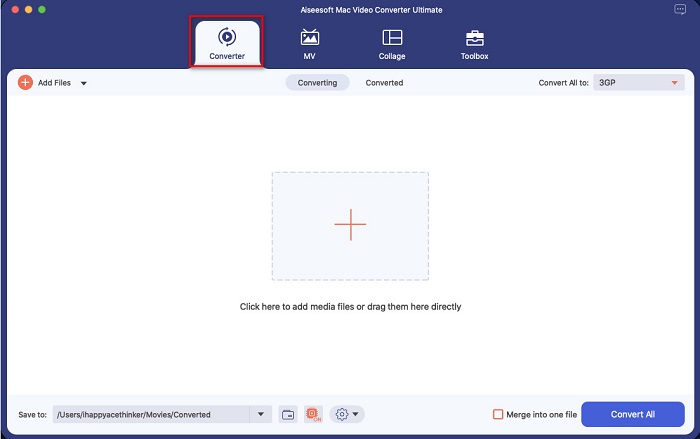
ขั้นตอนที่ 2 หลังจากเปิดโปรแกรมแล้ว ให้คลิกตัวเลือก Converter.
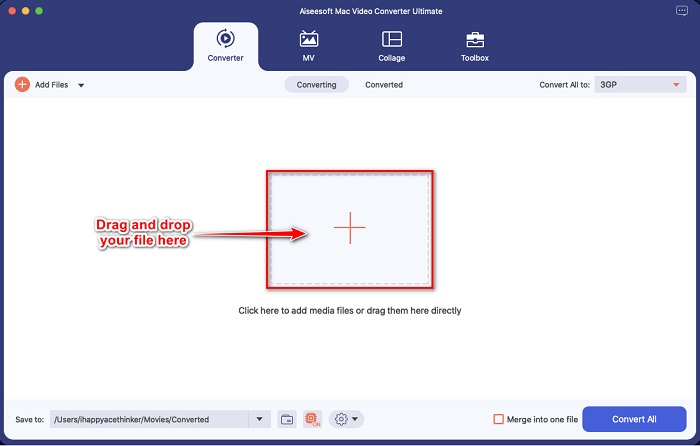
ขั้นตอนที่ 3 อัปโหลดไฟล์ MOV ของคุณโดยคลิกปุ่มสัญลักษณ์ + หรือ ลากแล้วปล่อยไฟล์จากเดสก์ท็อปของคุณ.
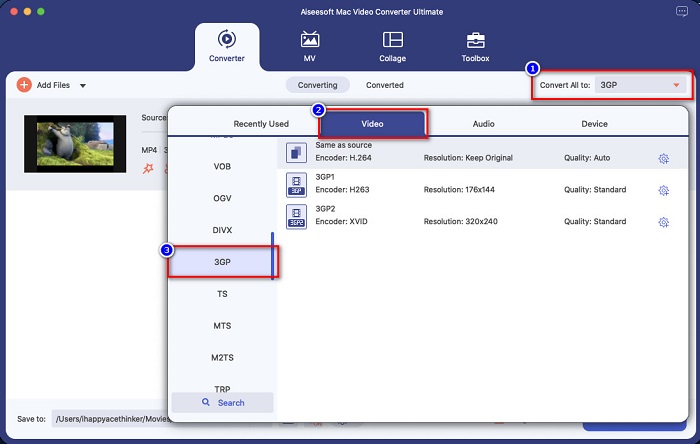
ขั้นตอนที่ 4 สำหรับขั้นตอนถัดไป ให้คลิกปุ่ม Convert All to เพื่อเลือกรูปแบบไฟล์เอาต์พุตที่คุณต้องการ ในกรณีนี้ให้คลิกรูปแบบ 3GP.
ขั้นตอนที่ 5 สำหรับขั้นตอนสุดท้าย ให้คลิกปุ่ม Convert All เพื่อเริ่มแปลงไฟล์ MOV ของคุณเป็น 3GP.
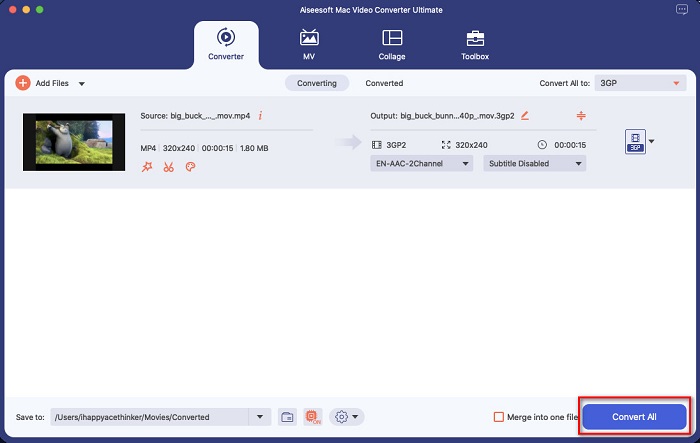
และนั่นแหล่ะ! การทำตามขั้นตอนง่าย ๆ เหล่านี้เป็นเรื่องง่ายเหมือน 1-2-3 แต่สามารถสร้างผลลัพธ์ที่น่าทึ่งได้
ส่วนที่ 3 4 มาตรฐานในการเลือกตัวแปลงที่ดีที่สุด
การเลือกตัวแปลงที่เหมาะสมเพื่อใช้เป็นการตัดสินใจที่สำคัญ คุณต้องพิจารณาบางสิ่งในการเลือกตัวแปลงที่ดีที่สุดสำหรับคุณ อย่างไรก็ตาม ในส่วนนี้ของบทความนี้ เราจะแสดงรายการมาตรฐานที่คุณต้องพิจารณาในการเลือกตัวแปลง MOV เป็น 3GP ที่ดีที่สุดที่จะใช้ ต่อไปนี้คือมาตรฐานสี่ประการโดยไม่ต้องกังวลใจ
ความปลอดภัยในการใช้งาน
เมื่อมองหาตัวแปลง ตรวจสอบให้แน่ใจว่าตัวแปลงที่คุณจะใช้นั้นปลอดภัยในการใช้งาน หากต้องการทราบว่าตัวแปลงปลอดภัยในการใช้งานหรือไม่ ให้ดูข้อมูลเว็บไซต์ที่อยู่ด้านข้างของช่องค้นหา
มีจำหน่าย
สิ่งสำคัญที่สุดอย่างหนึ่งที่ควรพิจารณาเมื่อเลือกตัวแปลงคือความพร้อมใช้งาน ตัวแปลงบางตัวอาจไม่พร้อมใช้งานในทุกแพลตฟอร์ม ดังนั้น เลือกตัวแปลงที่พร้อมใช้งานบนแพลตฟอร์มข้ามสื่อเกือบทั้งหมด
ความเร็วในการแปลง
หนึ่งในคุณสมบัติที่ดีที่สุดของตัวแปลงที่ดีที่สุดคือมันสามารถแปลงได้อย่างรวดเร็วในท้ายที่สุด พวกเราหลายคนต้องการตัวแปลงที่มีประสิทธิภาพที่สามารถแปลงไฟล์ได้ทันที
ไฟล์ที่รองรับ
คุณต้องตรวจสอบให้แน่ใจเสมอว่าตัวแปลงที่คุณจะใช้รองรับรูปแบบไฟล์ที่คุณต้องการแปลง ดังนั้นในการเลือกตัวแปลง ให้พิจารณาสนับสนุนรูปแบบไฟล์มากมาย
ส่วนที่ 4 คำถามที่พบบ่อยเกี่ยวกับการแปลง MOV เป็น 3GP
การแปลง MOV เป็น 3GP จะลดขนาดไฟล์ลงหรือไม่
ใช่. การแปลงไฟล์ MOV เป็นไฟล์ 3GP จะทำให้คุณมีขนาดไฟล์ที่เล็กลง
3GP เป็นรูปแบบวิดีโอมาตรฐานหรือไม่
น่าเสียดายที่ไม่มี MP4 เป็นรูปแบบวิดีโอมาตรฐานที่สุดที่คุณจะพบ เครื่องเล่นสื่อจำนวนมากรองรับรูปแบบไฟล์นี้ และสามารถรองรับวิดีโอความละเอียดสูงได้
คุณสามารถเล่น 3GP บนอุปกรณ์ 4G ได้หรือไม่?
ไม่สามารถทำได้ ไฟล์ 3GP ถูกออกแบบมาสำหรับอุปกรณ์ 3G เท่านั้น แต่หากคุณต้องการเล่นไฟล์ 3GP บนอุปกรณ์ 4G คุณสามารถแปลงไฟล์ 3GP ของคุณเป็น FLV ซึ่งอุปกรณ์ 4G สามารถเล่นได้ หากต้องการทราบวิธีแปลง 3GP เป็น FLV คลิกที่ ลิงก์ นี้.
สรุป
ในการสิ้นสุดการเดินทางของเรา คุณต้องเลือกตัวแปลง MOV เป็น 3GP ที่ดีที่สุดที่คุณจะใช้ มาตรฐานและตัวแปลงทั้งหมดที่นำเสนอข้างต้นจะช่วยให้คุณเลือกตัวแปลงที่ดีที่สุด อย่างไรก็ตาม หากคุณกำลังมองหาตัวแปลงที่มีคุณสมบัติขั้นสูง FVC Video Converter Ultimate คือเครื่องมือสำหรับคุณ ดาวน์โหลดเดี๋ยวนี้ และสนุกกับการแปลงไฟล์ของคุณอย่างง่ายดาย
-
 MOV เป็น GIF – วิธีแปลง MOV เป็น GIF แบบเคลื่อนไหวบน Mac, PC และออนไลน์ฟรี
 GIF คืออะไร? วิธีแปลงวิดีโอเป็น GIF จะเปลี่ยน MOV เป็น GIF แบบเคลื่อนไหวออนไลน์ได้อย่างไร โพสต์นี้บอก 3 วิธีในการแปลง MOV เป็น GIF ออนไลน์บน Mac/PC
-
 4 วิธีที่มีประสิทธิภาพในการแปลง MOV เป็น AVI บนพีซีและ Mac [2021]
 คุณต้องการที่จะรู้ว่าอะไรคือตัวแปลง MOV เป็น AVI ที่ดีที่สุดบนเว็บ? และเหตุใด FVC Ultimate Video Converter จึงเหมาะสำหรับคุณ
-
 แปลง MOV เป็น WMV อย่างง่ายดายโดยใช้ตัวแปลงที่น่าทึ่งเหล่านี้
 ต้องการแปลงไฟล์ MOV ของคุณเป็นไฟล์ WMV หรือไม่? ต่อไปนี้คือวิธีง่ายๆ ในการแปลง MOV เป็น WMV อย่างง่ายดายโดยใช้ตัวแปลงออนไลน์และออฟไลน์ที่เราแนะนำให้ใช้
