


 Video Converter Ultimate
 บันทึกหน้าจอ
 ซ่อมวิดีโอ
 ดาวน์โหลดอย่างปลอดภัย
แปลง MOV เป็น DivX ได้ฟรีอย่างเหลือเชื่อโดยใช้ตัวแปลงที่ดีที่สุด
ทุกวันนี้มีรูปแบบไฟล์มากมายเกิดขึ้น ทำให้การเลือกชนิดไฟล์ที่จะใช้บนแพลตฟอร์มของคุณเป็นเรื่องยาก และแต่ละไฟล์ก็มีฟังก์ชัน ตัวแปลงสัญญาณ (codec) และขนาดไฟล์ที่แตกต่างกัน บทความนี้จะเน้นทำความรู้จักไฟล์สองประเภทนี้ และสอนวิธีแปลงไฟล์ MOV ของคุณให้เป็นรูปแบบไฟล์ DivX ดังนั้นโปรดอ่านบทความนี้ให้จบเพื่อเรียนรู้วิธีแปลงMOV เป็น DivX ได้ฟรีบนทั้ง Mac และ Windows.

ส่วนที่ 1 ทำไมต้องแปลง MOV เป็น DivX
ไฟล์ MOV เป็นรูปแบบไฟล์มีเดียที่บันทึกในรูปแบบไฟล์ QuickTime (QTFF) เป็นรูปแบบที่ใช้กันทั่วไปเนื่องจากสามารถจัดเก็บภาพยนตร์ รายการทีวี และวิดีโอคลิปได้ นอกจากนี้ Apple ได้พัฒนารูปแบบไฟล์นี้ ทำให้สามารถเล่นได้บนเครื่องเล่นสื่อทั้งหมดที่ Mac รองรับ ดังนั้น หากคุณต้องการให้ไฟล์ MOV ของคุณสามารถเล่นได้บนเครื่องเล่นสื่อ Windows OS อื่น คุณต้องแปลงรูปแบบไฟล์ MOV เป็น DivX
ส่วนที่ 2 วิธีการแปลง MOV เป็น DivX บน Mac โดยใช้ Ultimate Converter
หนึ่งในโปรแกรมแปลงไฟล์ออฟไลน์ที่ถูกใช้งานมากที่สุดและถือว่าเป็นหนึ่งในตัวเลือกที่ดีที่สุดในท้องตลาดคือ FVC Video Converter Ultimate โปรแกรมนี้มีฟีเจอร์ยอดเยี่ยมมากมายให้คุณใช้งาน เช่น การใส่เอฟเฟกต์ให้ไฟล์ การครอปและหมุนวิดีโอ รวมถึงมีเครื่องมือสร้างวิดีโอ 3 มิติ อีกทั้งยังรองรับรูปแบบไฟล์จำนวนมาก เช่น MOV, DivX, XviD, AVI, MP4, MKV, FLV, WMV และอื่น ๆ กว่า 1000 รูปแบบ แม้ว่าโปรแกรมนี้จะแปลงไฟล์ MOV เป็น DivX ได้ในระดับมืออาชีพ แต่ก็มีอินเทอร์เฟซที่ใช้งานง่าย ทำให้เป็นเครื่องมือที่เป็นมิตรต่อผู้ใช้ อ่านคำอธิบายด้านล่างเพื่อรู้จัก FVC Video Converter Ultimate ให้มากขึ้น.
คุณสมบัติ:
◆ มันสามารถแปลงไฟล์ด้วยกระบวนการแปลงความเร็วฟ้าผ่า
◆ รองรับรูปแบบไฟล์มากกว่า 1,000 รูปแบบ รวมถึง MOV, DivX, XviD, MP4, AVI, WebM, M4V และอีกมากมาย
◆ มีการแปลงเป็นชุดเพื่อรวมรูปแบบไฟล์ต่างๆ เข้าเป็นไฟล์เดียว
◆ มีคุณสมบัติขั้นสูง เช่น การแก้ไข ปรับปรุง และบีบอัดไฟล์ของคุณ
◆ สามารถดาวน์โหลดได้บนแพลตฟอร์มข้ามสื่อทั้งหมด รวมทั้ง Mac และ Windows
ขั้นตอนง่ายๆ ในการแปลง MOV เป็น DivX โดยใช้ FVC Video Converter Ultimate
ขั้นตอนที่ 1. ดาวน์โหลด FVC Video Converter Ultimate โดยคลิกปุ่ม Download ด้านล่างสำหรับ Mac จากนั้นทำตามขั้นตอนการติดตั้ง.
ดาวน์โหลดฟรีสำหรับ Windows 7 หรือใหม่กว่าดาวน์โหลดอย่างปลอดภัย
ดาวน์โหลดฟรีสำหรับ MacOS 10.7 หรือใหม่กว่าดาวน์โหลดอย่างปลอดภัย
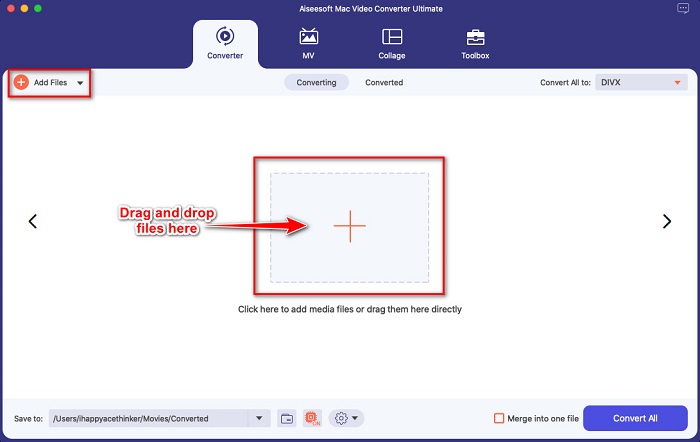
ขั้นตอนที่ 2. เมื่ออยู่ที่หน้าหลักของซอฟต์แวร์ ให้คลิกปุ่ม Add Files หรือ ลากและวางไฟล์ MOV ของคุณลงบนปุ่มสัญลักษณ์ +.
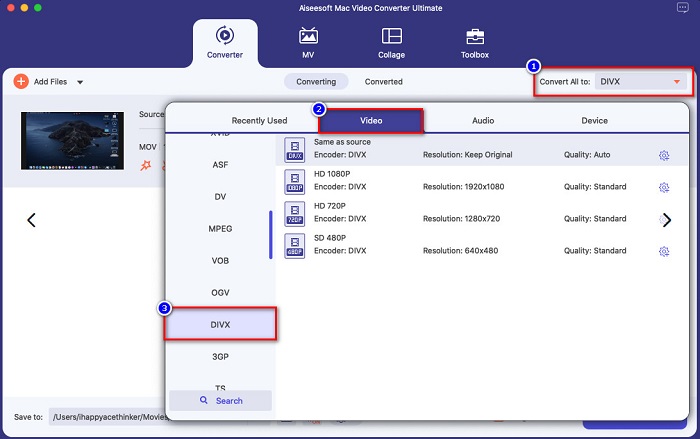
ขั้นตอนที่ 3. จากนั้นเลือกประเภทไฟล์เอาต์พุตโดยคลิกปุ่ม Convert All to แล้วเลือกประเภทไฟล์ Divx.
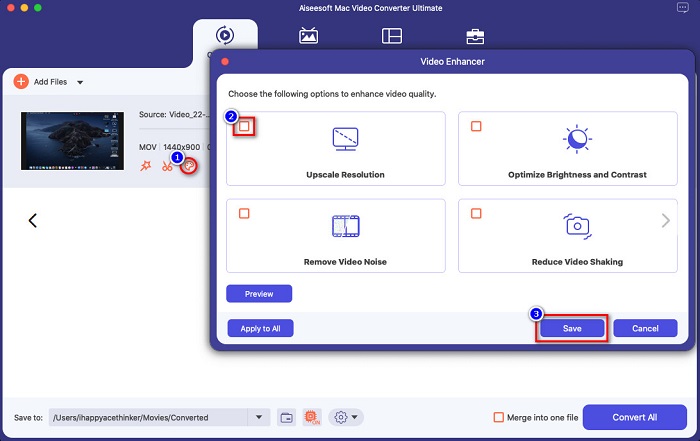
ตัวเลือกเสริม. หากคุณต้องการปรับแต่งหรือเสริมวิดีโอของคุณ ให้คลิกไอคอนรูป แปรงทาสี จากนั้นติ๊กถูกในช่องตัวเลือกต่าง ๆ ที่คุณต้องการปรับปรุงในไฟล์ แล้วคลิก Save เพื่อบันทึกการเปลี่ยนแปลง หากไม่ต้องการทำส่วนนี้ ให้ข้ามไปขั้นตอนถัดไปได้เลย.
ขั้นตอนที่ 4. สุดท้าย คลิกปุ่ม Convert All เพื่อเริ่มการแปลงไฟล์ MOV ของคุณเป็นรูปแบบไฟล์ DivX.
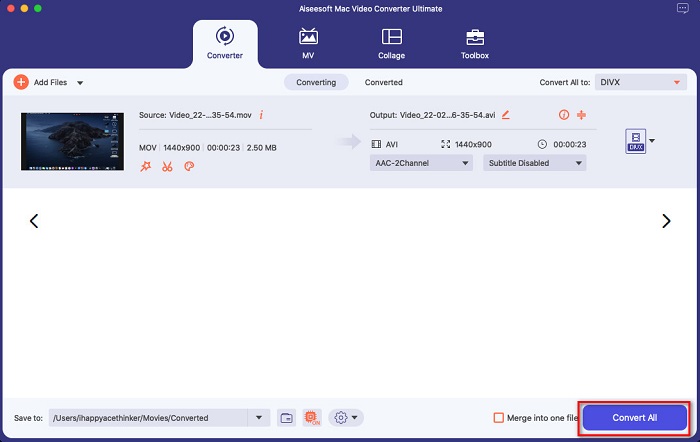
รอสักครู่ แค่นั้นเอง! คุณสามารถแปลงไฟล์ MOV เป็นไฟล์ DivX ได้ง่ายๆ เช่น ABC
ส่วนที่ 3 2 ตัวเลือกในการแปลง MOV เป็น DivX Online
หากคุณไม่ควรดาวน์โหลดสิ่งใดขณะแปลงไฟล์ MOV เป็น DivX เรามีสองทางเลือกให้คุณใช้ เราลองใช้ตัวแปลงที่มีชื่อเสียงซึ่งสามารถพบได้บนเว็บและเลือกสองตัวที่ดีที่สุดจากพวกเขา
ตัวเลือก 1 Convertio
คุณน่าจะเห็นโปรแกรมแปลงไฟล์นี้ในหน้าผลการค้นหาเมื่อคุณค้นหาเครื่องมือแปลง MOV เป็น DivX Convertio เป็นตัวแปลงไฟล์ออนไลน์ที่ให้คุณแปลง MOV เป็น DivX ได้ฟรีบนเว็บ รองรับรูปแบบไฟล์มากมาย เช่น MOV, DivX, MPG, WebM, M4V และอื่น ๆ อีกทั้งยังมีอินเทอร์เฟซที่ใช้งานง่าย ทำให้เหมาะสำหรับผู้เริ่มต้น อย่างไรก็ตาม เนื่องจากเป็นเครื่องมือที่ต้องใช้การเชื่อมต่ออินเทอร์เน็ต คุณอาจพบว่ากระบวนการแปลงไฟล์ค่อนข้างช้าได้.
ขั้นตอนที่ 1. ค้นหา Convertio บนเบราว์เซอร์ของคุณ บนหน้าหลักของเครื่องมือ ให้คลิกปุ่ม Choose Files ไฟล์ในคอมพิวเตอร์ของคุณจะแสดงขึ้นมา จากนั้นเลือกไฟล์ MOV ของคุณ.

ขั้นตอนที่ 2. จากนั้นคลิกปุ่ม drop-down เพื่อเลือกประเภทไฟล์เอาต์พุตที่คุณต้องการ คลิกที่แถบ Video แล้วเลือกประเภทไฟล์ DivX.

ขั้นตอนที่ 3. คลิกปุ่ม Convert เพื่อเริ่มกระบวนการแปลงไฟล์ในขั้นตอนสุดท้าย.

ตัวเลือก 2. อีวาโน
หากคุณใช้ Mac คุณอาจเคยเห็นโปรแกรมแปลงไฟล์ออนไลน์ตัวนี้มาก่อน Evano เป็นตัวแปลงไฟล์ออนไลน์ที่ให้คุณแปลง MOV เป็น DivX ได้ เครื่องมือนี้มีอินเทอร์เฟซที่เรียบง่าย และรองรับรูปแบบไฟล์เสียงและวิดีโอหลากหลาย นอกจากนี้ยังไม่มีโฆษณาเหมือนตัวแปลงไฟล์ออนไลน์อื่น ๆ.
ขั้นตอนที่ 1. บนเบราว์เซอร์ที่คุณไว้ใจ ค้นหาเครื่องมือแปลงไฟล์ออนไลน์ Evano จากนั้นในหน้าหลักของซอฟต์แวร์ ให้คลิกปุ่ม Choos File แล้วจะมีโฟลเดอร์ในคอมพิวเตอร์ของคุณแสดงขึ้นมา ให้เลือกโฟลเดอร์ที่มีไฟล์ MOV เพื่ออัปโหลด.
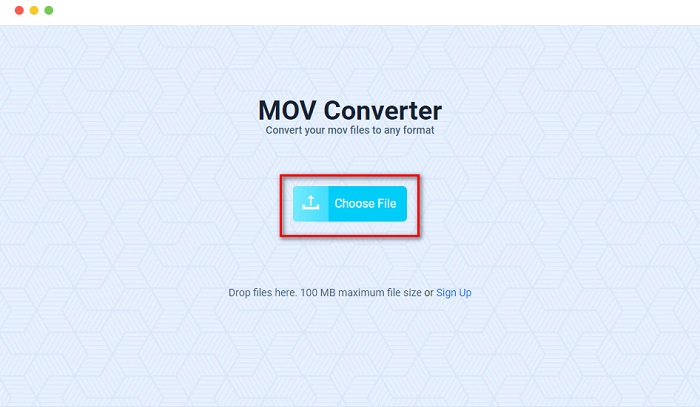
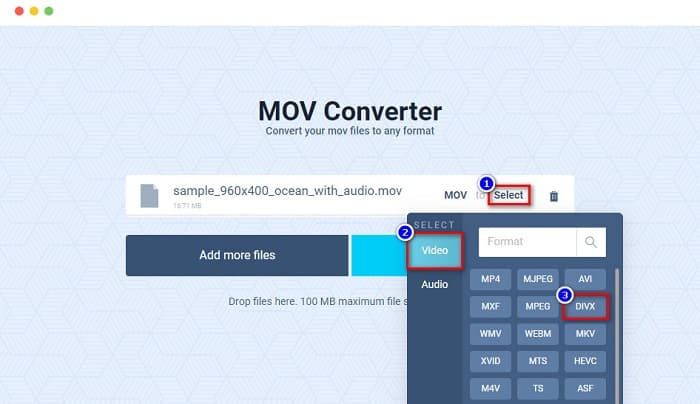
ขั้นตอนที่ 2. หลังจากอัปโหลดไฟล์แล้ว ให้คลิกตัวเลือก Select เพื่อเลือกประเภทไฟล์เอาต์พุตที่คุณต้องการ จากนั้นคลิกเลือกฟอร์แมต DivX.
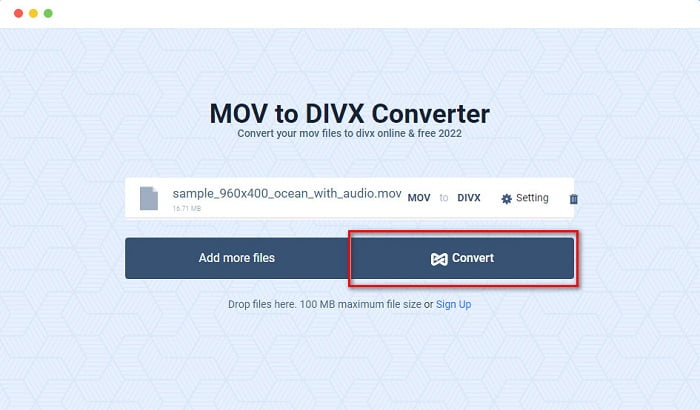
ขั้นตอนที่ 3. จากนั้นคลิกปุ่ม Convert เพื่อแปลงไฟล์ MOV เป็น DivX.
ส่วนที่ 4 วิธีการแปลงโดยใช้ Freeware Converter
อีกวิธีหนึ่งในการแปลงไฟล์ MOV ของคุณให้เป็นไฟล์ DivX คือการใช้โปรแกรมแปลงไฟล์แบบฟรีแวร์ หนึ่งในโปรแกรมฟรีแวร์ยอดนิยมคือ Prism Video File Converter โปรแกรมนี้ดาวน์โหลดได้ฟรีและมีให้ใช้ทั้งบน Windows และ Mac อีกทั้งยังปลอดภัยต่อการใช้งาน ทำให้มีผู้คนจำนวนมากใช้แอปนี้ในการแปลงไฟล์ อย่างไรก็ตาม บางคนใช้งานโปรแกรมนี้ได้ยากเพราะอินเทอร์เฟซค่อนข้างเข้าใจยาก ถึงอย่างนั้นมันก็ยังเป็นวิธีที่ดีในการแปลง MOV เป็น DivX ได้ฟรี.
ขั้นตอนที่ 1. ดาวน์โหลด Prism Video File Converter บนอุปกรณ์ Mac ของคุณ ทำตามขั้นตอนการติดตั้ง จากนั้นเปิดแอป แล้วคลิกปุ่ม Add File(s) เพื่ออัปโหลดไฟล์ MOV มายังหน้าหลักของซอฟต์แวร์.
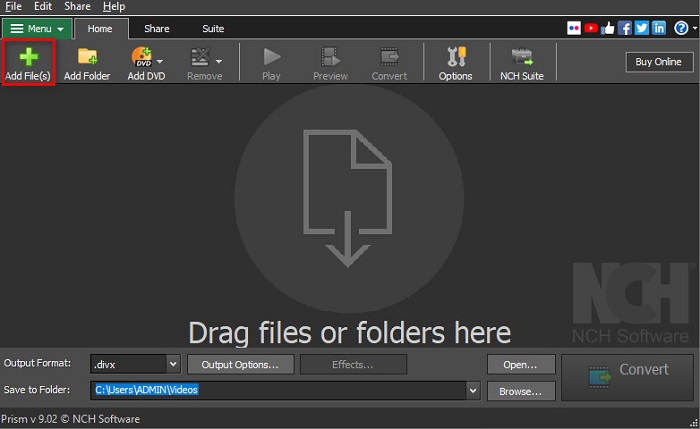
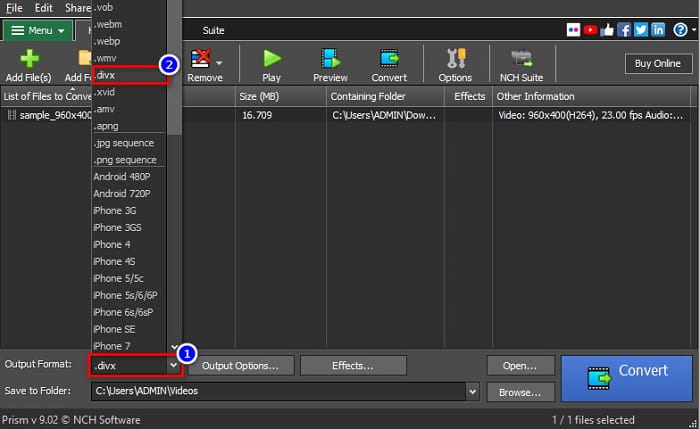
ขั้นตอนที่ 2. จากนั้นที่ปุ่ม drop-down ข้าง Output Format ให้คลิกเลือกประเภทไฟล์ DivX.
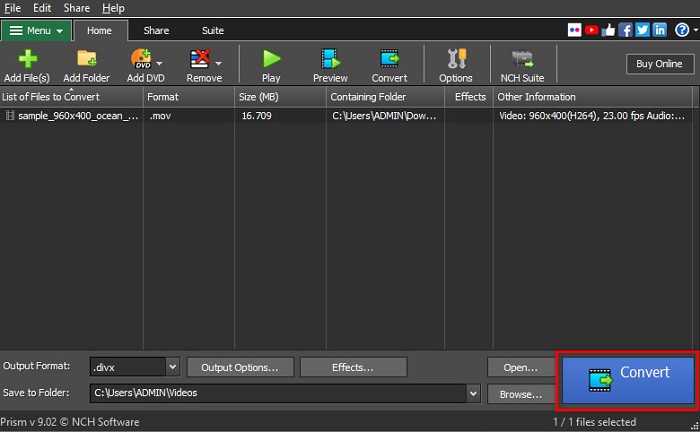
ขั้นตอนที่ 3. เพื่อสิ้นสุดกระบวนการ ให้คลิกปุ่ม Convert ซึ่งอยู่ที่มุมขวาล่างของอินเทอร์เฟซซอฟต์แวร์.
ส่วนที่ 5. การเปรียบเทียบ MOV และ DivX
| MOV | VS | DivX |
| รองรับเฉพาะอุปกรณ์ Apple | อุปกรณ์ที่รองรับ | รองรับอุปกรณ์เกือบทั้งหมดรวมถึง Mac และ Windows |
| ไม่บีบอัด | บีบอัด/ไม่บีบอัด | บีบอัด |
| ประกอบด้วยไฟล์ขนาดใหญ่ | ขนาดไฟล์ | มีขนาดไฟล์เล็ก |
| MOV คือการใช้งานที่ดีที่สุดสำหรับการตัดต่อวิดีโอ | ใช้ดีที่สุดสำหรับ | DivX เหมาะที่สุดในการบีบอัดขนาดไฟล์ได้สูงสุดถึงสิบสองของขนาดไฟล์ดั้งเดิม |
| วิดีโอ | ตัวแปลงสัญญาณ | วิดีโอ |
ส่วนที่ 6 คำถามที่พบบ่อยเกี่ยวกับการแปลง MOV เป็น DivX
คุณสามารถเล่น MOV บน Windows Media Player ได้หรือไม่
น่าเสียดายที่ไม่สามารถทำได้ Windows Media Player ไม่รองรับรูปแบบไฟล์ MOV แต่หากคุณต้องการเล่นไฟล์ MOV บน Windows Media Player คุณสามารถแปลง MOV เป็นไฟล์รูปแบบ WMV ได้ หากต้องการทราบวิธีแปลง MOV เป็น WMV เพิ่มเติม ให้คลิกที่ลิงก์นี้.
การแปลง MOV เป็น DivX ส่งผลต่อขนาดไฟล์หรือไม่
ใช่. ขนาดไฟล์จะเล็กลงเนื่องจากไฟล์ DivX สามารถบีบอัดได้มากถึงสิบสองของขนาดดั้งเดิม
QuickTime รองรับไฟล์ DivX หรือไม่
ไม่ QuickTime เป็นโปรแกรมเล่นสื่อ (media player) ที่มาพร้อมกับ mac โดยพื้นฐาน ซึ่งไม่รองรับไฟล์รูปแบบ DivX อย่างไรก็ตาม คุณสามารถแปลงไฟล์ DivX เป็น MKV ซึ่งเป็นรูปแบบที่ QuickTime รองรับได้.
สรุป
จบแล้ว คุณไม่จำเป็นต้องไปค้นหาวิธีแก้ปัญหาอื่นในการแปลง MOV เป็น DivX อีกต่อไป เพราะทุกอย่างที่คุณต้องการอยู่ที่นี่แล้ว โปรแกรมแปลงไฟล์แบบออฟไลน์ ออนไลน์ และฟรีแวร์ที่กล่าวถึงด้านบน ล้วนเป็นวิธีที่ยอดเยี่ยมในการแปลงไฟล์ MOV ของคุณเป็น DivX ตัวเลือกอยู่ในมือคุณว่าจะใช้โปรแกรมตัวไหน แต่หากคุณต้องการใช้โปรแกรมแปลงไฟล์ประสิทธิภาพสูงสุด ให้ดาวน์โหลด FVC Video Converter Ultimate ได้เลยตอนนี้.
-
 2 วิธีง่ายๆ ในการแปลงไฟล์ MOV เป็น FLV บน Windows/Mac
 วิธีแปลง MOV เป็น FLV ฟรี นี่คือตัวแปลงวิดีโอที่ดีที่สุดบนเดสก์ท็อปและออนไลน์เพื่อแปลงไฟล์ MOV ของคุณเป็น FLV ในไม่กี่วินาทีโดยไม่ต้องเสียเงิน
-
 MOV เป็น GIF – วิธีแปลง MOV เป็น GIF แบบเคลื่อนไหวบน Mac, PC และออนไลน์ฟรี
 GIF คืออะไร? วิธีแปลงวิดีโอเป็น GIF จะเปลี่ยน MOV เป็น GIF แบบเคลื่อนไหวออนไลน์ได้อย่างไร โพสต์นี้บอก 3 วิธีในการแปลง MOV เป็น GIF ออนไลน์บน Mac/PC
-
 4 วิธีที่มีประสิทธิภาพในการแปลง MOV เป็น AVI บนพีซีและ Mac [2021]
 คุณต้องการที่จะรู้ว่าอะไรคือตัวแปลง MOV เป็น AVI ที่ดีที่สุดบนเว็บ? และเหตุใด FVC Ultimate Video Converter จึงเหมาะสำหรับคุณ
