


 Video Converter Ultimate
 บันทึกหน้าจอ
 ซ่อมวิดีโอ
ตัวแปลงที่ดีที่สุดและใช้งานง่ายที่แปลง MOV เป็น WMV คุณต้องลอง!
Apple ได้สร้างไฟล์ MOV ขึ้นมา และมันเป็นหนึ่งในรูปแบบไฟล์วิดีโอที่ใช้กันบ่อยที่สุด ร่วมกับ WMV, MP4 และ AVI ไฟล์ MOV สามารถเล่นบนระบบ Windows ได้ผ่านโปรแกรม QuickTime ดังนั้น หากคุณต้องการแปลงไฟล์ MOV เราขอแนะนำให้แปลงเป็นไฟล์ WMV เนื่องจากระบบ Windows มักจะเล่นไฟล์รูปแบบนี้ได้เป็นหลัก ดังนั้นหากคุณต้องการรู้วิธีแปลง MOV เป็น WMV บทความนี้เหมาะสำหรับคุณอย่างยิ่ง.

ส่วนที่ 1 แปลง MOV ของคุณเป็น WMV โดยใช้ตัวแปลงออฟไลน์ที่ดีที่สุด
เมื่อพูดถึงการแปลงไฟล์แล้ว ไม่มีข้อสงสัยใด ๆ ว่า FVC Video Converter Ultimate จะทำได้ดีเยี่ยม โปรแกรมแปลงไฟล์นี้เป็นเครื่องมือออฟไลน์ที่ช่วยให้คุณแปลงไฟล์ MOV เป็น WMV, AVI, MP4, M4V, WebM และอื่น ๆ ได้ นอกจากนี้ยังมีฟีเจอร์ที่ยอดเยี่ยมให้คุณแก้ไข เพิ่มคุณภาพ รวมไฟล์ และบีบอัดไฟล์ MOV ได้อีกด้วย ยิ่งไปกว่านั้น โปรแกรมแปลงไฟล์นี้ยังมีฟังก์ชันเปิดใช้งานการแปลงความเร็วสูงพิเศษ ช่วยให้คุณแปลง MOV เป็น WMV ได้อย่างรวดเร็ว.
วิธีการแปลง MOV เป็น WMV โดยใช้ FVC Video Converter Ultimate:
ขั้นตอนที่ 1 ติดตั้ง FVC Video Converter Ultimate โดยคลิกไอคอน ดาวน์โหลดฟรี ด้านล่าง คุณสามารถดาวน์โหลดโปรแกรมนี้ได้ทั้งบน Windows และ macOS จากนั้นทำตามขั้นตอนการติดตั้ง แล้วเปิดโปรแกรมขึ้นมา.
ดาวน์โหลดฟรีสำหรับ Windows 7 หรือใหม่กว่าดาวน์โหลดอย่างปลอดภัย
ดาวน์โหลดฟรีสำหรับ MacOS 10.7 หรือใหม่กว่าดาวน์โหลดอย่างปลอดภัย
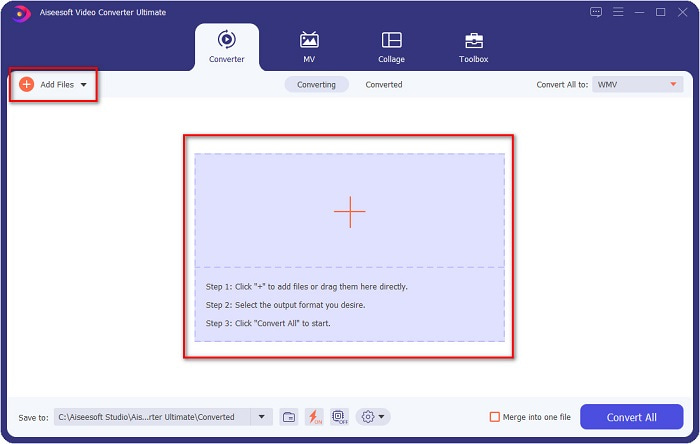
ขั้นตอนที่ 2 หลังจากเปิดโปรแกรม คุณจะเห็นหน้าต่างหลักของตัวแปลงไฟล์ ให้คลิก เพิ่มไฟล์ หรือคุณสามารถลากและวางไฟล์ MOV ของคุณไปที่สัญลักษณ์ + เพื่อเริ่มการแปลงไฟล์ MOV ของคุณให้เป็นไฟล์ WMV.
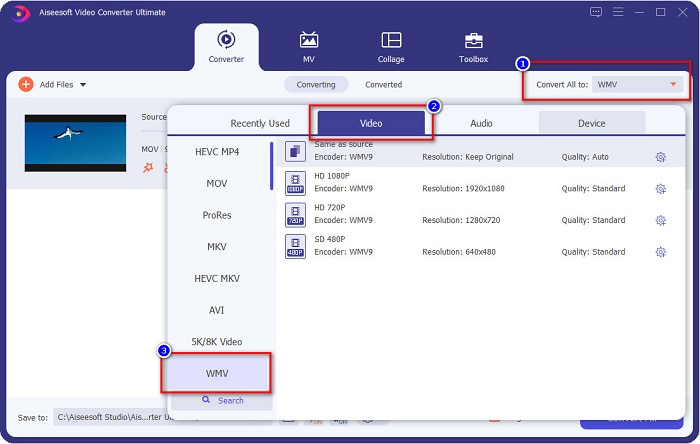
ขั้นตอนที่ 3 จากนั้นคลิกปุ่ม แปลงทั้งหมดเป็น รายการรูปแบบไฟล์จะปรากฏขึ้นเพื่อให้คุณเลือกประเภทไฟล์ที่ต้องการ แล้วคลิกเลือกรูปแบบไฟล์ WMV.
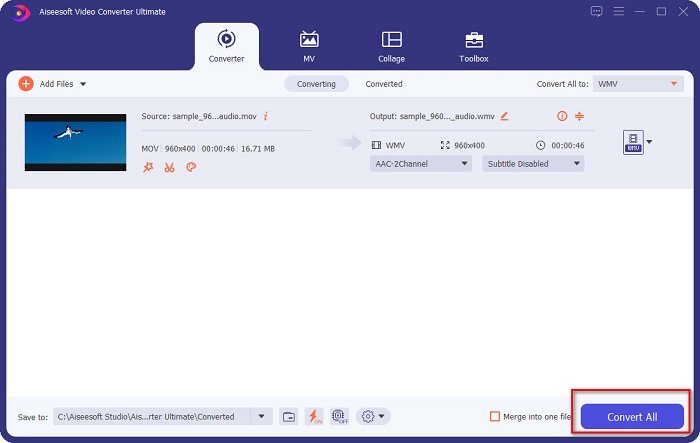
ขั้นตอนที่ 4 หลังจากที่คุณเลือกรูปแบบ WMV แล้ว ให้กดปุ่ม แปลงทั้งหมด ที่มุมล่างขวาเพื่อเริ่มการแปลง จากนั้นไฟล์ MOV ของคุณจะเริ่มแปลงเป็นไฟล์ WMV สุดท้ายรอเพียงไม่กี่วินาทีเท่านั้น ก็เรียบร้อย! แค่ทำตามขั้นตอนง่าย ๆ เหล่านี้ คุณก็สามารถแปลงไฟล์ MOV เป็น WMV ได้อย่างสบาย.
ข้อดี
- มีตัวเลือกที่คุณสามารถมีการแปลงที่รวดเร็วเป็นพิเศษ
- ให้คุณแก้ไข ปรับปรุง และบีบอัดไฟล์ของคุณ
- สามารถแปลงไฟล์รูปแบบต่างๆ รวมทั้ง MOV, WMV, AVI, MP4, M4V, VOB, MPG และอื่นๆ
จุดด้อย
- ในการเข้าถึงคุณสมบัติพิเศษ คุณต้องซื้อแอพก่อน
ส่วนที่ 2 แปลง MOC เป็น WMV โดยใช้ Freeware
เมื่อแปลงไฟล์ MOV เป็น WMV คุณยังสามารถใช้ฟรีแวร์ที่มีอยู่แล้วบนเดสก์ท็อปของคุณได้ หนึ่งในตัวแปลงฟรีแวร์ที่มีชื่อเสียงที่มีอยู่ในปัจจุบันคือการใช้โปรแกรมเล่นสื่อ VLC เป็นตัวแปลงของคุณ เครื่องเล่นสื่อ VLC เป็นเครื่องเล่นมัลติมีเดียที่ให้คุณเล่นรูปแบบสื่อต่างๆ นอกจากนี้ ฟรีแวร์นี้ยังสามารถแปลงไฟล์ได้ ดังนั้น อ่านขั้นตอนด้านล่างหากคุณต้องการแปลง MOV เป็น WMV ด้วยฟรีแวร์โดยใช้ VLC
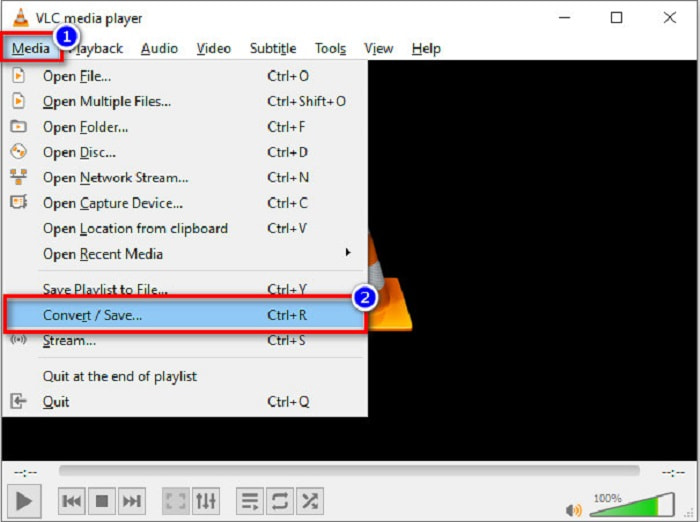
ขั้นตอนที่ 1 เปิดโปรแกรม VLC Media Player คลิกเมนู สื่อ (Media) ที่อยู่ด้านบนของหน้าต่างโปรแกรม แล้วเลือก แปลง/บันทึก (Convert/Save).
ขั้นตอนที่ 2 จากนั้นคลิกปุ่ม เพิ่ม เพื่อเลือกไฟล์รูปแบบ MOV ของคุณ ไฟล์จะปรากฏในรายการ แล้วคลิกปุ่ม แปลง/บันทึก (Convert/Save) เพื่อไปยังขั้นตอนถัดไป.
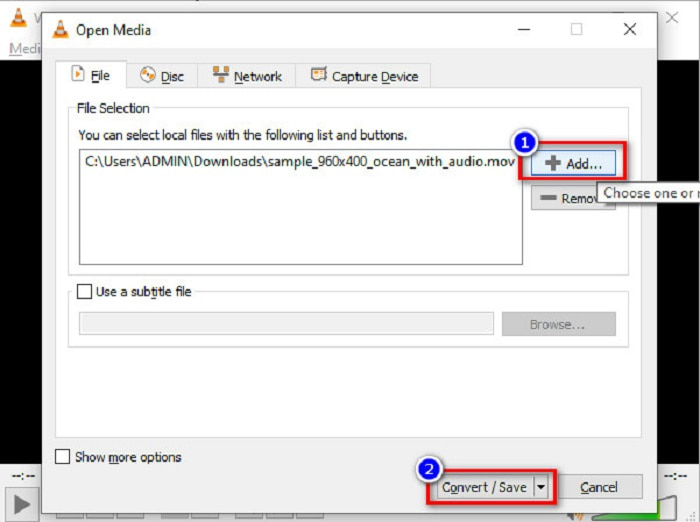
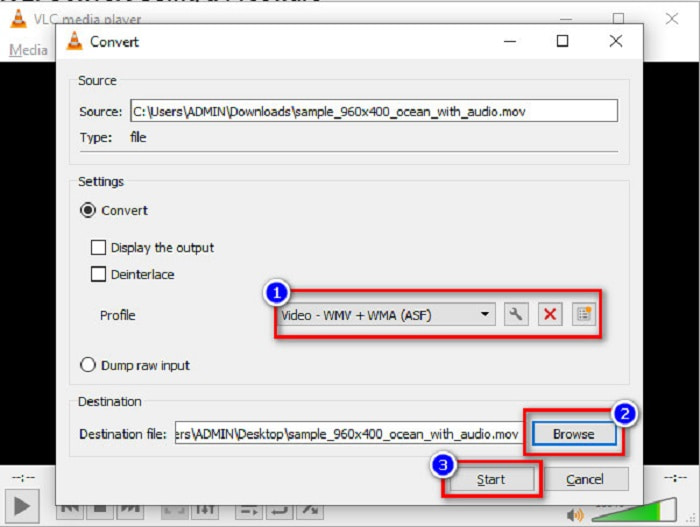
ขั้นตอนที่ 3 สุดท้าย เลือก WMV และเลือกโฟลเดอร์ปลายทางของไฟล์โดยคลิก เรียกดู (Browse) แล้วคลิกปุ่ม เริ่ม (Start) เพื่อเริ่มการแปลงไฟล์.
ส่วนที่ 3 แปลง MOV เป็น WMV โดยใช้ตัวแปลงออนไลน์
หากคุณสงสัยว่าจะแปลงไฟล์ MOV เป็นไฟล์ WMV แบบออนไลน์ได้อย่างไร เรามีเครื่องมือออนไลน์สำหรับคุณ นั่นคือ FVC Free Video Converter Online ซึ่งเป็นตัวแปลงไฟล์ออนไลน์ที่ให้คุณแปลงไฟล์ MOV เป็น WMV, MP4, AVI, MPG และอื่น ๆ ได้ เครื่องมือนี้ใช้งานง่าย ทำให้คุณไม่ยุ่งยากในการแปลงไฟล์ อย่างไรก็ตาม คุณอาจพบว่าการแปลงไฟล์ค่อนข้างช้าบ้างเพราะเป็นตัวแปลงแบบเว็บเบส ถึงอย่างนั้น มันก็ยังเป็นตัวแปลงที่มีประสิทธิภาพสำหรับการแปลงวิดีโอจาก MOV เป็น WMV ออนไลน์ และมีคนใช้งานจำนวนมาก.
นี่คือขั้นตอนเกี่ยวกับวิธีการแปลงโดยใช้ตัวแปลงออนไลน์นี้:
ขั้นตอนที่ 1 ก่อนอื่น ให้เปิดเบราว์เซอร์ของคุณ แล้วค้นหา FVC Free Video Converter Online.
ขั้นตอนที่ 2 หลังจากเปิดตัวแปลงไฟล์ในเบราว์เซอร์แล้ว คลิก เพิ่มไฟล์เพื่อแปลง จากนั้นตัวแปลงไฟล์จะเริ่มทำงาน และคุณจะถูกนำไปยังหน้าต่างเลือกไฟล์บนคอมพิวเตอร์ของคุณ เพื่อเลือกไฟล์ MOV ที่ต้องการแปลง.
ดาวน์โหลดเวอร์ชันเดสก์ท็อปเพื่อแปลงไฟล์แบบเป็นชุดได้.
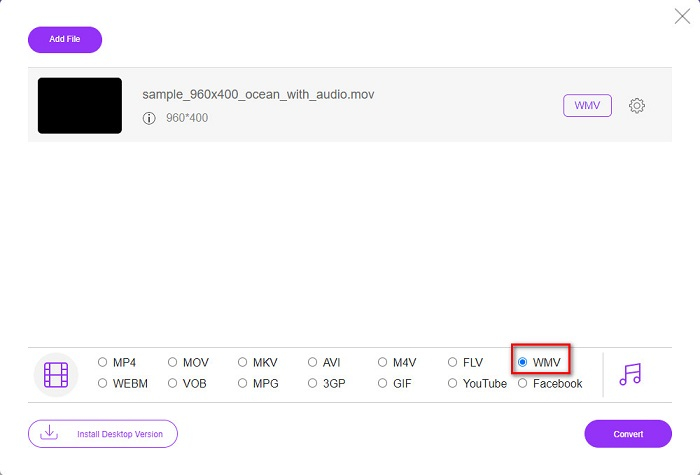
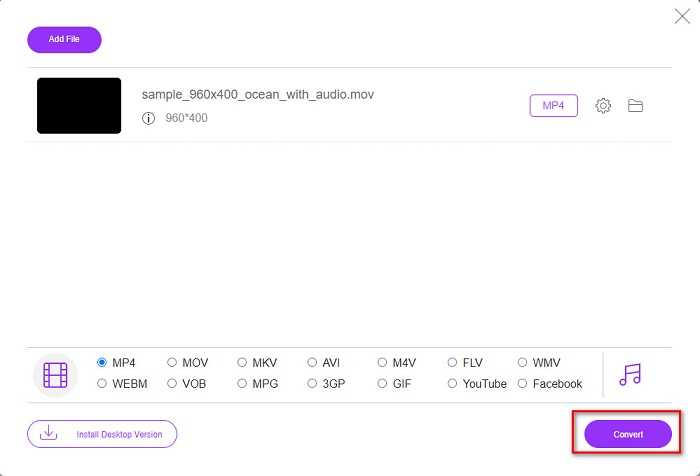
ขั้นตอนที่ 3 ในหน้าต่างถัดมาของโปรแกรม คุณจะเห็นรายการรูปแบบไฟล์ด้านล่าง ซึ่งคุณสามารถเลือกรูปแบบไฟล์ WMV ที่ต้องการได้.
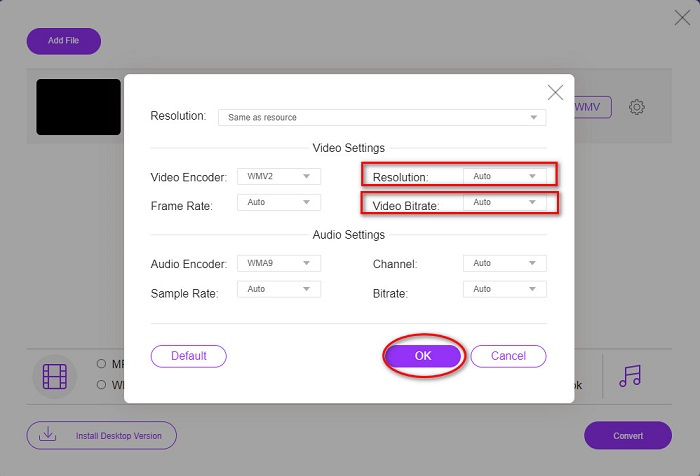
ตัวเลือกเพิ่มเติม โดยการคลิกปุ่มการตั้งค่า คุณสามารถเปลี่ยนความละเอียดและบิตเรตของวิดีโอในไฟล์ของคุณได้ จากนั้นคลิก ตกลง เพื่อยืนยันการปรับค่า.
ขั้นตอนที่ 4 หลังจากเลือกเป็นรูปแบบ WMV แล้ว ให้กดปุ่ม แปลง เพื่อแปลงไฟล์ MOV ของคุณเป็นไฟล์ WMV สุดท้ายรอให้กระบวนการแปลงเสร็จสิ้น เพียงเท่านี้คุณก็แปลง MOV เป็น WMV ได้อย่างง่ายดาย.
ส่วนที่ 4 ความรู้เพิ่มเติมเกี่ยวกับไฟล์ MOV และไฟล์ WMV
MOV เป็นรูปแบบไฟล์ที่ macOS ให้การรองรับอย่างกว้างขวาง แม้ว่าคุณจะสามารถเล่นไฟล์ MOV บน Windows ได้ แต่คุณก็ยังจำเป็นต้องใช้โปรแกรม QuickTime ช่วย นอกจากนี้ไฟล์ MOV ยังถูกบันทึกในรูปแบบไฟล์ QuickTime เนื่องจากได้รับการสนับสนุนหลักจาก QuickTime และแพลตฟอร์มของ Mac ทำให้มันกลายเป็นหนึ่งในรูปแบบไฟล์ที่ใช้กันมากที่สุดในปัจจุบัน ขณะที่ WMV หรือ Windows Media Video ได้รับการรองรับจากอุปกรณ์จำนวนมาก โดยเฉพาะอย่างยิ่งระบบ Windows นอกจากนี้ รูปแบบไฟล์นี้ยังใช้ตัวบีบอัดข้อมูลที่ช่วยให้คุณลดขนาดไฟล์ลงได้ โดยที่คุณภาพไม่ลดลงอย่างเห็นได้ชัด.
MOV เทียบกับ WMV
รูปแบบ MOV สามารถใช้สำหรับจัดเก็บภาพยนตร์ รายการทีวี คลิปวิดีโอสั้น หรือภาพยนตร์ที่บ้าน ไฟล์นี้ถูกบันทึกในรูปแบบไฟล์ QuickTime (QTFF) ซึ่งเปิดตัวโดย Apple ในปี 1991 ไฟล์ MOV มักถูกใช้เมื่อผู้คนต้องการบันทึกวิดีโอคุณภาพสูง
ผลิตโดย Microsoft WMV เป็นหนึ่งในรูปแบบวิดีโอที่พบบ่อยที่สุดในยุค 2000 สามารถดูได้ทางเว็บและเล่นโดยโปรแกรมเล่นสื่อต่างๆ บน Windows และยังเป็นรูปแบบไฟล์วิดีโอเริ่มต้นของ Windows Media Player แต่รูปแบบอื่นๆ กลับถูกยึดครองไปเมื่อเร็วๆ นี้
ส่วนที่ 5. คำถามที่พบบ่อยเกี่ยวกับวิธีการแปลง MOV เป็น WMV
การแปลง MOV เป็น WMV ส่งผลต่อคุณภาพไฟล์ของฉันหรือไม่
มีบางกรณีที่คุณภาพของไฟล์ของคุณจะได้รับผลกระทบ ขึ้นอยู่กับตัวแปลงที่คุณจะใช้ มีตัวแปลงที่ไม่รองรับวิดีโอพิกเซลคุณภาพสูง
QuickTime รองรับไฟล์ WMV หรือไม่
โปรแกรม QuickTime Player ไม่สามารถรองรับไฟล์ WMV ได้ อย่างไรก็ตาม คุณสามารถแปลงไฟล์ WMV ของคุณไปเป็นรูปแบบไฟล์ที่ QuickTime รองรับ เช่น MOV, MP4, M4V และอื่น ๆ หากต้องการข้อมูลเพิ่มเติมเกี่ยวกับการแปลง WMV เป็น MOV ให้คลิกลิงก์นี้.
คุณสามารถบีบอัดไฟล์ MOV?
การใช้ไฟล์ ZIP สามารถบีบอัดไฟล์ MOV และไฟล์อื่น ๆ ได้ อย่างไรก็ตาม การบีบอัดไฟล์ MOV ด้วย ZIP จะช่วยลดขนาดไฟล์ได้เพียงเล็กน้อยเท่านั้น ดังนั้น เราขอแนะนำให้คุณแปลงไฟล์ไปเป็นรูปแบบไฟล์ที่มีขนาดเล็กกว่า โดยใช้โปรแกรมแปลงไฟล์ที่ได้แนะนำไปข้างต้น.
สรุป
จากที่ได้นำเสนอไปข้างต้น จะเห็นว่ามีโปรแกรมแปลงไฟล์ให้เลือกใช้งานหลากหลายแบบ คุณสามารถเลือกได้ตามต้องการว่าจะใช้ตัวแปลงไฟล์แบบออนไลน์ แบบออฟไลน์ หรือซอฟต์แวร์ฟรีแวร์ เครื่องมือเหล่านี้มีจุดเด่นและฟีเจอร์ต่างกันที่คุณสามารถลองใช้งานได้ อย่างไรก็ตาม เราขอแนะนำให้ใช้ FVC Video Converter Ultimate เพราะมีฟังก์ชันมากกว่าตัวแปลงอื่น ๆ อีกทั้งยังแปลงไฟล์ได้เร็วและมีประสิทธิภาพมาก ดาวน์โหลดมาใช้งานตอนนี้เลย เพื่อสัมผัสฟีเจอร์ที่ยอดเยี่ยมที่โปรแกรมนี้มอบให้.
-
 [ฟรี & ออนไลน์] 4 วิธีในการแปลง MOV เป็น MP4
 ต้องการแปลงไฟล์ MOV (Apple QuickTime Movie) เป็น MP4 หรือไม่? โพสต์นี้แชร์ 4 วิธีฟรีในการแปลงไฟล์วิดีโอ MOV ของคุณเป็นรูปแบบ MP4 บน Windows 10/8/7 / XP และ Mac OS X
-
 4 วิธีที่ดีที่สุดในการแปลง MOV เป็น MP3 บน Windows และ Mac ได้อย่างง่ายดาย
 เมื่อคุณต้องการแยกไฟล์เสียง MP3 จากไฟล์ MOV คุณสามารถเรียนรู้เพิ่มเติมเกี่ยวกับตัวแปลง MOV เป็น MP3 ที่มีประสิทธิภาพสูงสุด 4 ตัวเพื่อให้ได้ไฟล์ที่ต้องการจากบทความ
-
 2 วิธีง่ายๆ ในการแปลงไฟล์ MOV เป็น FLV บน Windows/Mac
 วิธีแปลง MOV เป็น FLV ฟรี นี่คือตัวแปลงวิดีโอที่ดีที่สุดบนเดสก์ท็อปและออนไลน์เพื่อแปลงไฟล์ MOV ของคุณเป็น FLV ในไม่กี่วินาทีโดยไม่ต้องเสียเงิน

