


 Video Converter Ultimate
 บันทึกหน้าจอ
 ซ่อมวิดีโอ
3 วิธีในการแปลงไฟล์ MPG เป็น MOV บนเดสก์ท็อปหรือออนไลน์ของคุณ
การแปลงรูปแบบไฟล์เป็นสิ่งจำเป็น โดยเฉพาะเมื่อต้องพูดถึงความเข้ากันได้และวัตถุประสงค์ของรูปแบบไฟล์นั้น ๆ เช่นเดียวกับ MPG ที่เป็นรูปแบบไฟล์ซึ่งเก็บข้อมูลจากดีวีดีอย่างการสลับจัดเรียงเมทาดาทา เสียง และวิดีโอ แต่เมื่อริปไฟล์รูปแบบนี้จากดีวีดีแล้วนำไปเปิดบน QuickTime หรือแก้ไขบน iMovie จะไม่สามารถอัปโหลดได้เพราะรูปแบบไฟล์ไม่รองรับ อย่างไรก็ตาม คุณสามารถแปลงไฟล์ .mpg ให้เป็นรูปแบบที่รองรับอย่าง MOV ได้ บทความนี้จะแนะนำซอฟต์แวร์แปลงไฟล์ที่ดีที่สุดบางตัวที่คุณสามารถใช้ในการแปลง MPG เป็น MOV บน Mac ได้ฟรีโดยไม่ทำให้คุณภาพลดลง.

ส่วนที่ 1 วิธีการแปลง MPG เป็น MOV บน Mac และ Windows
อันดับแรกในลิสต์คือสุดยอดโปรแกรมแปลงไฟล์ที่คุณสามารถใช้และเรียนรู้วิธีแปลง MPG เป็น MOV บน Mac หรือ PC ได้ FVC Video Converter Ultimate ให้คุณภาพสูงสุดและความเร็วในการแปลงไฟล์สูงสุดที่ใช้เวลาไม่ถึงหนึ่งนาที นอกจากนี้ แนะนำให้ดาวน์โหลดหากคุณไม่มีประสบการณ์ในการแปลงไฟล์และไม่ต้องการผิดหวังตั้งแต่ครั้งแรก แต่หากคุณเป็นผู้ใช้ที่อยากใส่เอฟเฟกต์พิเศษ ตัดต่อ รวมไฟล์ และทำอย่างอื่นเพิ่ม ให้ลองดูที่ Toolbox ของโปรแกรมแปลงไฟล์นี้ นอกเหนือจากนั้น หากคุณกำลังมองหาซอฟต์แวร์ที่เชื่อถือได้ ใช้งานง่าย และได้ผลลัพธ์ที่ยอดเยี่ยมในทันที ให้ทำตามคำแนะนำด้านล่างนี้.
ขั้นตอนที่ 1 ดาวน์โหลดโปรแกรมแปลงไฟล์ MPG เป็น MOV ฟรีบน Mac หรือ PC ของคุณ จากนั้นติดตั้งไฟล์และตั้งค่าระบบอย่างรวดเร็ว.
ดาวน์โหลดฟรีสำหรับ Windows 7 หรือใหม่กว่าดาวน์โหลดอย่างปลอดภัย
ดาวน์โหลดฟรีสำหรับ MacOS 10.7 หรือใหม่กว่าดาวน์โหลดอย่างปลอดภัย
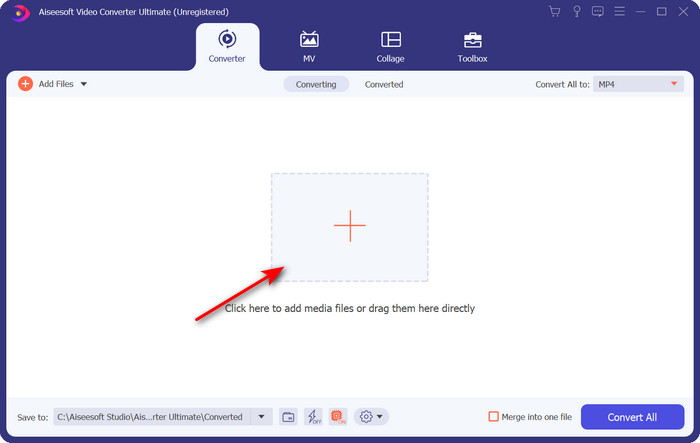
ขั้นตอนที่ 2 เพื่อเพิ่มไฟล์ ให้คลิกสัญลักษณ์ + ที่อยู่ตรงกลางหน้าต่างโปรแกรม ค้นหาไฟล์ .mpg ในโฟลเดอร์ที่ปรากฏขึ้น แล้วคลิก Open เพื่อไปต่อ.
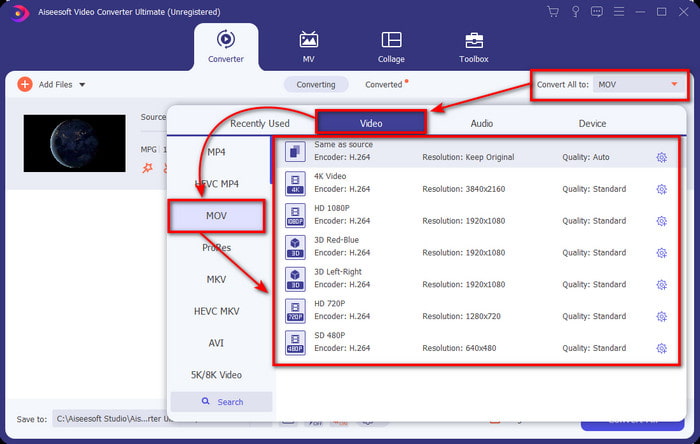
ขั้นตอนที่ 3 กดปุ่มดรอปดาวน์ แล้วเลือกเป็นรูปแบบ MOV หรือรูปแบบอื่น ๆ ที่มีให้ในรายการ.
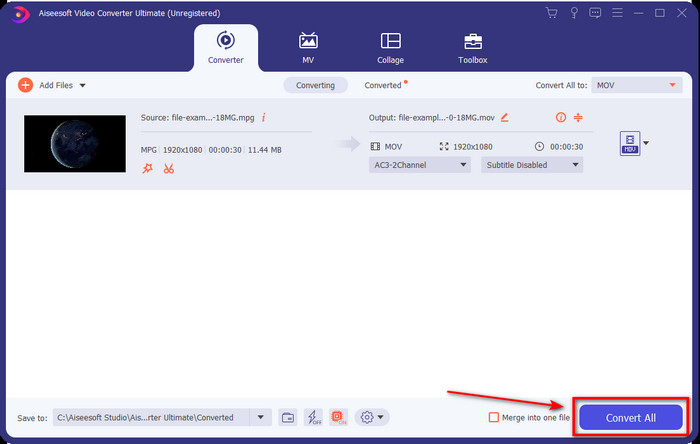
ขั้นตอนที่ 4 เมื่อคุณพร้อมเริ่มขั้นตอนการแปลงไฟล์แล้ว ให้คลิก Convert All.
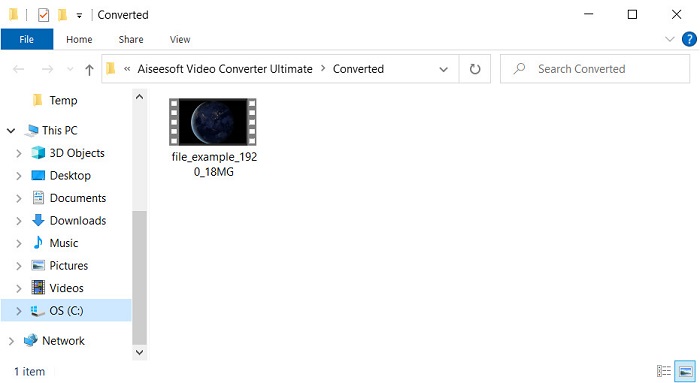
ขั้นตอนที่ 5 ไฟล์ .mov ของคุณจะพร้อมใช้งานในไม่กี่วินาที และหากมีโฟลเดอร์เด้งขึ้นมาบนหน้าจอ ให้ดับเบิลคลิกที่ไฟล์แรกเพื่อดูหรือแก้ไขบนอุปกรณ์ Apple ของคุณ.
ส่วนที่ 2 แปลง MPG เป็น MOV โดยใช้ Quicktime
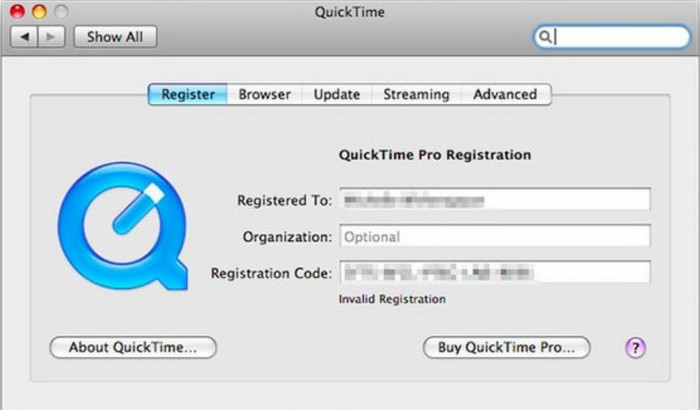
QuickTime Player เป็นโปรแกรมเล่นมีเดียพื้นฐานของอุปกรณ์ Apple ที่ใช้เล่นไฟล์วิดีโอและเสียงได้เกือบทุกประเภท แต่คุณรู้หรือไม่ว่าคุณยังสามารถใช้มันเป็นโปรแกรมแปลงไฟล์ได้ด้วย? อย่างไรก็ตาม ความสามารถในการแปลงไฟล์ของเครื่องมือนี้ยังละเอียดไม่เท่าตัวแรกที่กล่าวถึงไปแล้ว แต่ถ้าคุณมีอุปกรณ์ Apple และอยากแปลง MPG เป็น MOV ด้วย QuickTime Player ให้ทำตามขั้นตอนด้านล่างนี้.
ขั้นตอนที่ 1 เปิด QuickTime Player บน Mac ของคุณ คลิกเมนู File จากนั้นคลิก Open File ค้นหาไฟล์ .mkv ในโฟลเดอร์ แล้วกด Open.
ขั้นตอนที่ 2 คลิกเมนู File อีกครั้ง จากนั้นคลิก Export As แล้วเลือกระดับความละเอียด (พิกเซล) ที่มีให้ในรายการ.
ขั้นตอนที่ 3 เพื่อเริ่มแปลงไฟล์ใน QuickTime ให้คลิก Save.
ส่วนที่ 3 แปลง MPG เป็น MOV โดยใช้ MPG เป็น MOV Converter ออนไลน์ฟรี
หากคุณไม่อยากเสี่ยงดาวน์โหลดโปรแกรม แต่ต้องการใช้ตัวแปลง MPG เป็น MOV ออนไลน์ฟรีที่ดีที่สุดแล้วล่ะก็ ลองใช้ FVC Free Video Converter Online ได้เลย เครื่องมือนี้ใช้งานง่าย รองรับทุกเบราว์เซอร์ ปลอดมัลแวร์ และเชื่อถือได้ในฐานะโปรแกรมออนไลน์ คุณสมบัติที่โปรแกรมแปลงไฟล์พื้นฐานควรมีนั้นรวมอยู่ที่นี่ครบถ้วน ยิ่งไปกว่านั้น ซอฟต์แวร์นี้รองรับรูปแบบมีเดียจำนวนมาก และสามารถแปลงไฟล์ได้โดยไม่ต้องล็อกอินบัญชีของคุณ อยากใช้เครื่องมือนี้หรือไม่? ถ้าใช่ ให้ทำตามขั้นตอนง่าย ๆ ด้านล่างนี้.
ขั้นตอนที่ 1 คลิกลิงก์นี้เพื่อไปยังเว็บไซต์ทางการของ FVC Free Video Converter Online.
ขั้นตอนที่ 2 เมื่อเข้าสู่หน้าเว็บแล้ว ให้คลิก Add Files to Convert จากนั้นค้นหาไฟล์ .mpg ที่คุณต้องการแปลงในโฟลเดอร์ แล้วกด Open.
ดาวน์โหลดเวอร์ชันเดสก์ท็อปเพื่อแปลงไฟล์แบบเป็นชุดได้.
ขั้นตอนที่ 3 หลังจากอัปโหลดไฟล์แล้ว ให้เลือก MOV ในเมนูย่อย.
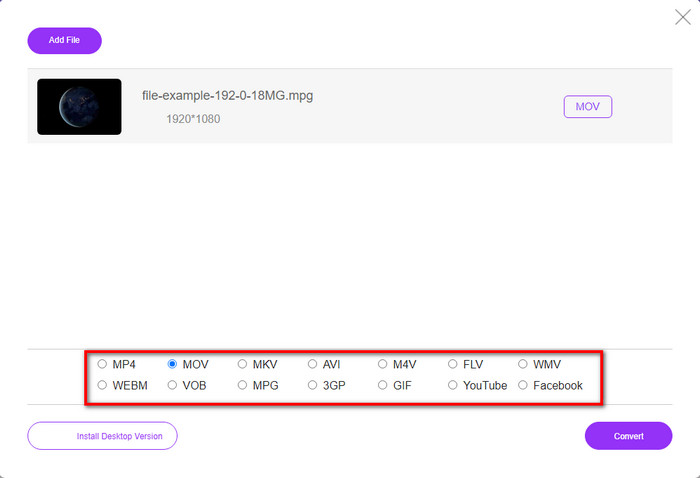
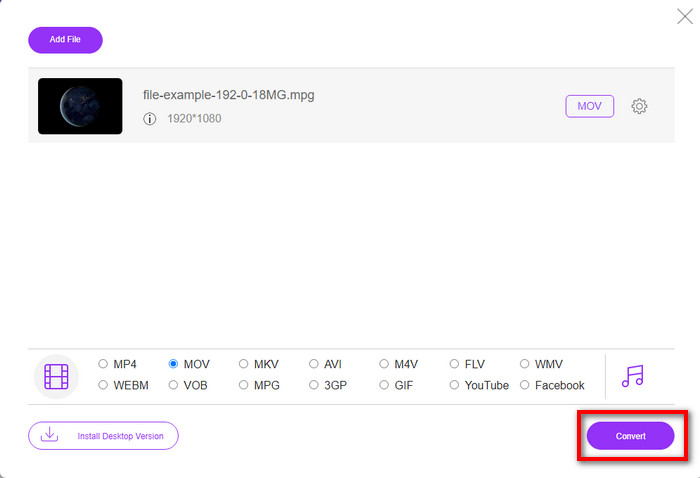
ขั้นตอนที่ 4 เมื่อคุณเลือก MOV แล้ว ให้ดาวน์โหลดไฟล์ได้เลยโดยกดปุ่ม Convert.
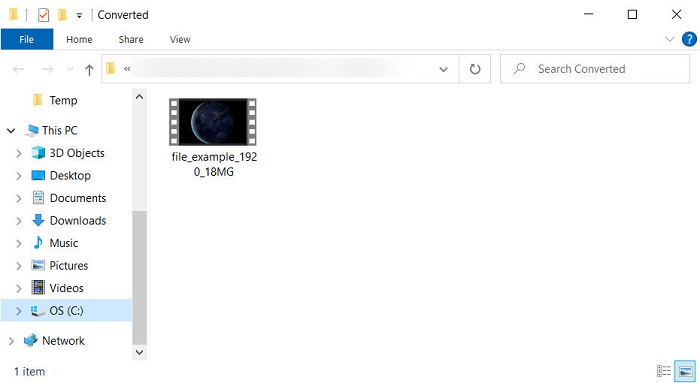
ขั้นตอนที่ 5 หลังการแปลง จะมีโฟลเดอร์ปรากฏขึ้นมาพร้อมไฟล์ .mov.
ส่วนที่ 4 ความรู้กว้างขวางเกี่ยวกับ MPG เป็น MOV และเหตุใดเราจึงต้องแปลงไฟล์
MPG เป็นรูปแบบสื่อที่รู้จักกันดีซึ่งใช้ MPEG เป็นรูปแบบวิดีโอมาตรฐานดิจิทัล ไฟล์ประเภทนี้มักใช้ MPEG-1 และ MPEG-2 เป็นตัวเข้ารหัสไฟล์มีเดีย ใช้คอมเพรสเซอร์สองตัวนี้เพื่อรองรับทุกข้อบกพร่องของคอมเพรสเซอร์ โดยเฉพาะอย่างยิ่งสำหรับการจัดเก็บวิดีโอที่มีความละเอียดสูงกว่า ดังที่กล่าวไว้ก่อนหน้านี้ รูปแบบนี้สามารถประกอบด้วยสามองค์ประกอบ: เสียง วิดีโอ และข้อมูลเมตาในสตรีมเดียวเพื่อการเผยแพร่ภาพยนตร์บนเว็บที่รวดเร็วยิ่งขึ้น
แต่ MOV สามารถจัดเก็บวิดีโอคุณภาพสูงและเสียงที่ชัดใสซึ่งมักใช้ในการตัดต่อวิดีโอ รูปแบบสื่อมัลติเพล็กซ์นี้แตกต่างจาก MPG ตรงที่สามารถติดตามข้อมูลสื่อต่างๆ เช่น วิดีโอ เสียง และคำบรรยาย แต่ตัวเข้ารหัสและตัวถอดรหัสของรูปแบบนี้ที่ใช้กันทั่วไปคือ MPEG-4
ทางที่ดีควรเปลี่ยน MPG เป็น MOV เพราะเมื่อคุณถ่ายโอนไฟล์ไปยังอุปกรณ์ Apple ไฟล์จะไม่เล่นบน Quicktime หรือแก้ไขบน iMovie แม้ว่า Quicktime Player และ iMovie จะรองรับ MPEG-1 และ MPEG-4 แต่ไม่รองรับ MPEG อื่นๆ เช่น MPEG-2 ที่ .mpg ใช้ เพื่อให้เข้ากันได้กับอุปกรณ์ Apple เป็นเหตุผลที่คุณต้องการแปลงไฟล์เป็น MOV
MPG เทียบกับ MOV
จัดทำโดยกลุ่มผู้เชี่ยวชาญด้านภาพเคลื่อนไหว (MPEG) MPG เป็นรูปแบบวิดีโอดิจิทัลทั่วไปสำหรับจัดเก็บข้อมูลวิดีโอ เสียง และข้อมูลเมตา มีประโยชน์มากเมื่อสร้างภาพยนตร์เพื่อแชร์บนอินเทอร์เน็ต ไฟล์เหล่านั้นใน MPG มักจะมีการบีบอัดวิดีโอ/เสียง MPEG-1 หรือ MPEG-2
รูปแบบ MOV สามารถใช้สำหรับจัดเก็บภาพยนตร์ รายการทีวี คลิปวิดีโอสั้น หรือภาพยนตร์ที่บ้าน ไฟล์นี้ถูกบันทึกในรูปแบบไฟล์ QuickTime (QTFF) ซึ่งเปิดตัวโดย Apple ในปี 1991 ไฟล์ MOV มักถูกใช้เมื่อผู้คนต้องการบันทึกวิดีโอคุณภาพสูง
ส่วนที่ 5. คำถามที่พบบ่อยเกี่ยวกับ MPG และ MOV Conversion
การแปลง MPG ใช้เวลานานเท่าใด
มีสองปัจจัยที่อาจส่งผลต่อกระบวนการแปลงของคุณ อย่างแรก หากคุณใช้ตัวแปลงออนไลน์ จะขึ้นอยู่กับความเร็วอินเทอร์เน็ตของคุณ กระบวนการนี้จะใช้เวลานานกว่าเมื่อเปรียบเทียบกับตัวแปลงอื่นที่ไม่ใช่ตัวแปลง และสุดท้าย ยิ่งขนาดไฟล์ใหญ่เท่าไหร่ก็ยิ่งใช้เวลาในการแปลงนานขึ้นเท่านั้น ดังนั้น หากไฟล์ .mpg ของคุณใหญ่ คุณมักจะรอให้มันสิ้นสุด
ฉันสามารถเล่นไฟล์ .mpg บน VLC ได้หรือไม่
VLC เป็นหนึ่งในเครื่องเล่นสื่อหลักที่คุณสามารถดาวน์โหลดบนอุปกรณ์ทั้งหมดเพื่อเล่นวิดีโอในรูปแบบที่ไม่สามารถเล่นได้บนเครื่องเล่นสื่อดั้งเดิมของคุณ คุณยังสามารถเล่นรูปแบบ MPEG-1, MPEG-2, MPEG-3 และ MPEG-4 ทั้งหมดได้ที่นี่
การบีบอัด MPG ส่งผลต่อคุณภาพหรือไม่?
การบีบอัดไฟล์ไม่ควรทำให้คุณภาพลดลง เพราะสิ่งที่คุณทำคือแค่ย่อขนาดไฟล์เท่านั้น แต่เมื่อคุณบีบอัดไฟล์ .mpg มากเกินไป คุณภาพของไฟล์อาจลดลงเล็กน้อย เพื่อหลีกเลี่ยงปัญหานี้ คุณควรอ่านบทความเกี่ยวกับ7 อันดับโปรแกรมบีบอัดวิดีโอที่ดีที่สุดที่คุณสามารถใช้งานได้.
สรุป
ในการสรุปข้อมูลโดยละเอียดทั้งหมดที่กล่าวถึงข้างต้น คุณสามารถแปลง MPG เป็น MOV หากคุณต้องการใช้วิดีโอบนอุปกรณ์ Apple แม้ว่าซอฟต์แวร์อย่าง Quicktime และ iMovie จะรองรับ MPEG-1 และ MPEG-4 แต่ก็ยังไม่รองรับ MPEG-2 และ MPEG-3 ดังนั้น เพื่อให้เข้ากันได้กับอุปกรณ์ Apple ของคุณ จึงเหมาะที่จะแปลง เครื่องมือทั้งหมดที่กล่าวมานี้มีประสิทธิภาพและใช้งานง่ายมากหากคุณแปลงไฟล์
-
 FLV เป็น MPG - วิธีการแปลง FLV เป็น MPG บน Mac, PC และออนไลน์ฟรี
 วิธีแปลง FLV เป็น MPEG ฉันสามารถแปลง FLV เป็น MPG ได้ฟรีหรือไม่ โพสต์นี้แชร์ตัวแปลงวิดีโอฟรี 3 รายการเพื่อช่วยคุณแปลง FLV เป็น MPG โดยไม่สูญเสียคุณภาพ
-
 วิธีแปลงไฟล์ MPG เป็นรูปแบบ GIF [ออนไลน์และออฟไลน์]
 ต้องการแสดงอารมณ์ที่ดีขึ้นหรือไม่? จากนั้นคุณต้องใช้ GIF แทน บทความนี้จะสอนวิธีแปลงไฟล์ MPG เป็น GIF เพื่อแสดงความรู้สึกของคุณได้ดีขึ้นมาก
-
 [2022] ตัวเลือกยอดนิยมของตัวแปลง MPG เป็น AVI เพื่อช่วยคุณแปลง MPG เป็น AVI
 คุณเคยสงสัยเกี่ยวกับการแปลง MPG เป็นไฟล์วิดีโอ AVI เพื่อเล่นบนเครื่องเล่นวิดีโอของคุณหรือไม่? นี่คือบทความที่ดีที่สุดที่คุณสามารถหาได้ซึ่งพูดถึงปัญหาข้างต้น

