


 Video Converter Ultimate
 บันทึกหน้าจอ
 ซ่อมวิดีโอ
ตัวแปลงฟรีและใช้งานง่ายยอดนิยมที่แปลง WMV เป็น MOV ที่คุณไม่ควรพลาด
Microsoft Windows Media Audio (WMA) และ Microsoft Windows Media Video (WMV) เป็นรูปแบบไฟล์เสียงและวิดีโอแบบบีบอัดที่พัฒนาโดย Microsoft อยู่ในคอนเทนเนอร์ ASF ทันทีที่ไฟล์ WMV หรือ WMA ถูกเข้ารหัสด้วยตัวแปลงสัญญาณ Windows Media Video และ Windows Media Audio ไฟล์เหล่านี้จะแสดงด้วยนามสกุล .asf รูปแบบวิดีโอทั้งสองแบบที่สร้างโดย Microsoft นี้สามารถเล่นได้เฉพาะกับโปรแกรมเล่นสื่อที่รองรับที่เลือกไว้ หรือแปลงได้กับซอฟต์แวร์หรือเว็บคอนเวอร์เตอร์บางตัวเท่านั้น แต่หากคุณกำลังมองหาตัวแปลงไฟล์ที่เชื่อถือได้ในการแปลง WMV เป็น MOV บทความนี้เหมาะสำหรับคุณ อ่านต่อเพื่อดูรายละเอียดเพิ่มเติม.

ส่วนที่ 1 บทนำโดยย่อของ WMV และ MOV
นามสกุลไฟล์ WMV หมายถึงไฟล์ Windows Media Video ซึ่งบีบอัดโดยใช้รูปแบบการบีบอัดวิดีโอของ Microsoft อย่างน้อยหนึ่งรูปแบบ ตัวอย่างเช่น โปรแกรมของบริษัทอื่นบางโปรแกรมใช้เพื่อจัดเก็บภาพเคลื่อนไหวสั้นๆ เนื่องจากเป็นรูปแบบทั่วไปสำหรับการจัดเก็บวิดีโอใน Windows แม้ว่าจะมีลักษณะคล้ายกับไฟล์ Windows Media Video แต่ไฟล์ Windows Media Audio จะประกอบด้วยข้อมูลเสียงเท่านั้นและไม่มีวิดีโอ นามสกุล WMA ใช้สำหรับไฟล์เหล่านี้
อย่างไรก็ตาม QuickTime File Format (QTFF) เป็นรูปแบบไฟล์คอนเทนเนอร์มัลติมีเดีย และไฟล์ MOV คือไฟล์ภาพยนตร์ที่บันทึกในรูปแบบ QuickTime File Format (QTFF) โดยจะจัดเก็บเป็นหนึ่งเทร็กหรือมากกว่า แต่ละเทร็กประกอบด้วยข้อมูลสื่อต่างชนิดกัน (เช่น วิดีโอ เสียง และข้อความ) (คำบรรยาย) ไฟล์ MOV มักใช้สำหรับเก็บภาพยนตร์และไฟล์วิดีโออื่น ๆ และหาได้ค่อนข้างง่าย.
ส่วนที่ 2 วิธีที่ดีที่สุดในการแปลง WMV เป็น MOV บน Mac และ Windows
บทความนี้แนะนำให้ใช้ Video Converter Ultimate สำหรับผู้ใช้ Mac ที่ต้องการแปลง WMV เป็น MOV ซอฟต์แวร์นี้มีทั้งเวอร์ชัน Windows และ Mac ให้ดาวน์โหลดฟรี อินเทอร์เฟซที่ใช้งานง่ายและเครื่องมือที่เข้าถึงได้ทำให้ซอฟต์แวร์นี้เหมาะกับผู้ใช้หลากหลายกลุ่ม ซอฟต์แวร์นี้มีฟังก์ชันตัวแปลงวิดีโอที่รองรับรูปแบบวิดีโอหลากหลาย และสามารถแปลงไฟล์ได้ภายในเวลาไม่ถึงหนึ่งนาที ต่างจากแอปและทรัพยากรบนเว็บอื่น ๆ นอกจากนี้ยังมีฟีเจอร์เพิ่มเติมอีกหลายอย่างที่จะช่วยให้คุณปรับปรุงวิดีโอได้มากยิ่งขึ้น เมื่อคุณอ่านคำอธิบายซอฟต์แวร์เรียบร้อยแล้ว มาเริ่มใช้งานกันเลย:
ขั้นตอนที่ 1. เพื่อเริ่มดาวน์โหลด ให้คลิกขวาที่ไอคอน Free Download ด้านล่างนี้ ซอฟต์แวร์นี้สามารถทำงานได้ทั้งบนเครื่อง Windows และ Macintosh หลังจากดาวน์โหลดแล้ว คุณสามารถติดตั้งและเริ่มใช้ซอฟต์แวร์ได้ทันทีโดยคลิกที่ตัวเลือก Start Now.
ดาวน์โหลดฟรีสำหรับ Windows 7 หรือใหม่กว่าดาวน์โหลดอย่างปลอดภัย
ดาวน์โหลดฟรีสำหรับ MacOS 10.7 หรือใหม่กว่าดาวน์โหลดอย่างปลอดภัย
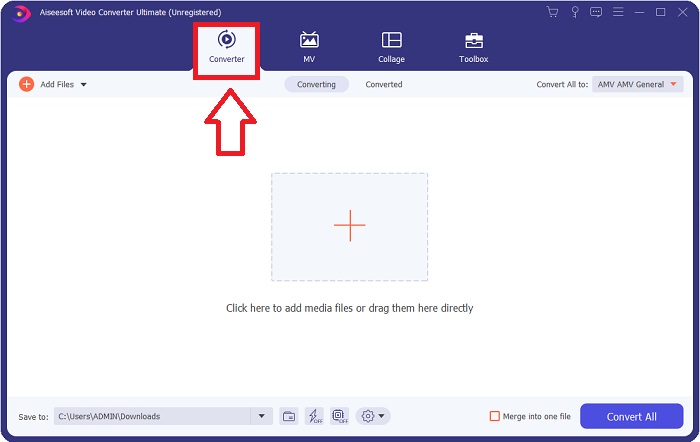
ขั้นตอนที่ 2. หลังจากดาวน์โหลดซอฟต์แวร์แล้ว ให้เปิดโปรแกรม ครั้งแรกที่เปิดใช้งานจะมีหน้าต่างข้อมูลแสดงขึ้นมา ป้อนไฟล์วิดีโอที่คุณต้องการแปลงเพื่อเริ่มกระบวนการแปลง.
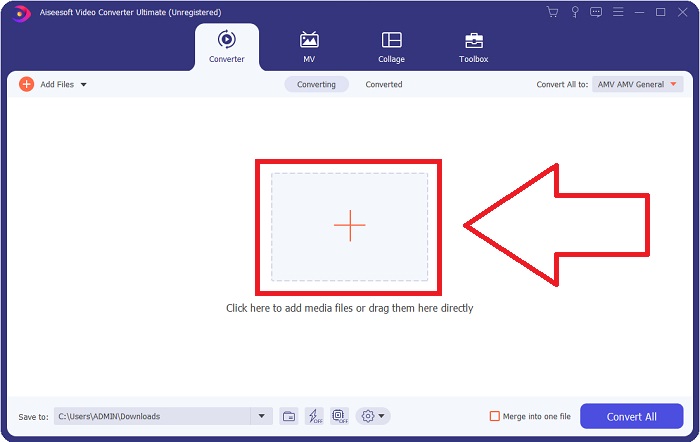
ขั้นตอนที่ 3. เริ่มจากการเพิ่มไฟล์ที่คุณต้องการแปลงลงในตัวแปลง โดยลากและวางไฟล์วิดีโอที่คุณต้องการแปลงลงที่สัญลักษณ์ + เพื่อเริ่มกระบวนการแปลง.
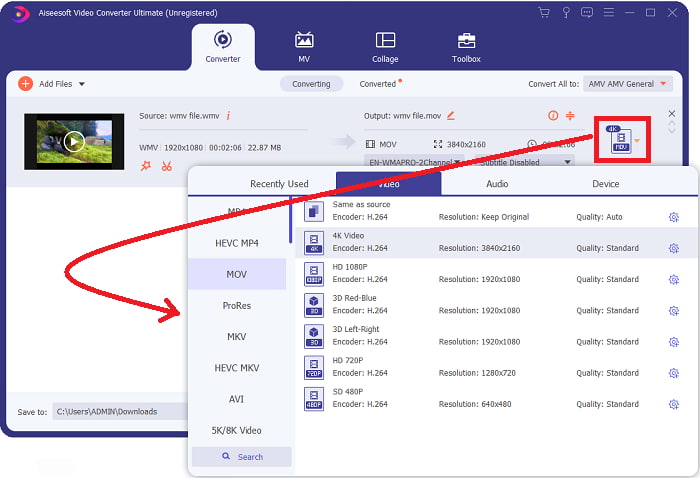
ขั้นตอนที่ 4: จะมีเมนูตัวเลือกปรากฏขึ้นที่บริเวณมุมขวาบนของหน้าจอ ซึ่งคุณสามารถเลือกประเภทไฟล์วิดีโอที่ต้องการเล่นได้ เลือก MOV เป็นรูปแบบวิดีโอจากเมนูดรอปดาวน์ที่ปรากฏขึ้น คุณสามารถเลือกระดับความละเอียดวิดีโอได้หลายแบบตามชนิดไฟล์ MOV ที่คุณเลือก หากรูปแบบเอาต์พุตที่ต้องการไม่มีให้เลือก คุณสามารถปรับการตั้งค่าคุณภาพใน Windows ได้ คุณยังสามารถปรับอัตราเฟรมของภาพและคุณภาพเสียงได้ด้วยการคลิกไอคอนรูปเฟืองที่มุมขวาบน ใช้ปุ่ม Create New เพื่อบันทึกการเปลี่ยนแปลงหลังจากตั้งค่าเรียบร้อยแล้ว.
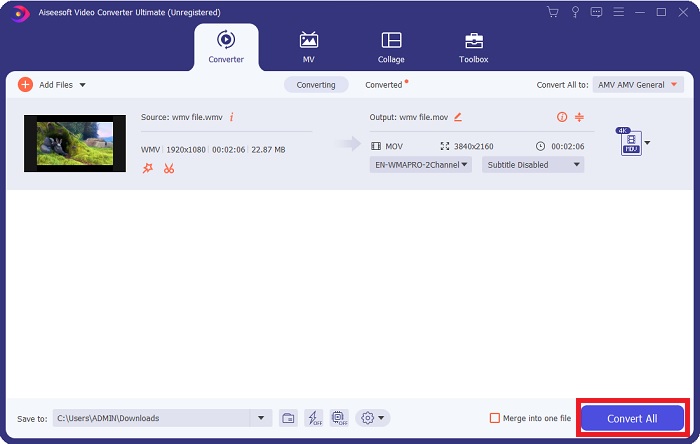
ขั้นตอนที่ 5. เมื่อคุณแก้ไขวิดีโอเสร็จและพร้อมจะแปลงแล้ว ให้คลิก Convert All เพื่อเริ่มกระบวนการแปลงไฟล์ทั้งหมด.
ส่วนที่ 3 วิธีอื่นที่มีประสิทธิภาพในการแปลง WMV เป็น MOV บน Mac และ Windows
วิธีที่ 1 ใช้โปรแกรมแปลงวิดีโอออนไลน์ฟรี
ด้วย FVC Free Video Converter Online คุณสามารถแปลงไฟล์มัลติมีเดียได้หลากหลายรูปแบบโดยไม่เสียค่าใช้จ่าย หากคุณมีวิดีโอความคมชัดสูง ก็สามารถแปลงเป็นรูปแบบต่าง ๆ เช่น MP4, FLV และ WMV ได้อย่างง่ายดายโดยไม่สูญเสียคุณภาพ และยังสามารถแปลงไฟล์วิดีโอหรือไฟล์เสียงจำนวนมากพร้อมกันได้โดยไม่สูญเสียคุณภาพเช่นกัน เครื่องมือแปลงวิดีโอออนไลน์ฟรีนี้ยังมีตัวเลือกการแก้ไขที่ครบถ้วน ให้ผู้ใช้ปรับแต่งวิดีโอได้ตามต้องการ มาเตรียมตัวทำตามขั้นตอนทั้งหมดกันเลย:
ขั้นตอนที่ 1: โปรดคลิกที่ลิงก์เพื่อเข้าสู่หน้าแรกของเว็บไซต์ตัวแปลง FVC และเริ่มแปลงไฟล์ของคุณออนไลน์.
ขั้นตอนที่ 2: เพื่อดาวน์โหลดตัวเรียกใช้งานสำหรับคอมพิวเตอร์ของคุณ ให้คลิกปุ่ม Add Files to Convert ที่ด้านขวาของหน้าจอ เมื่อดาวน์โหลดเสร็จ จะเริ่มทำงานโดยอัตโนมัติ เปิดไฟล์ในโฟลเดอร์ของคุณและเริ่มกระบวนการดาวน์โหลดอีกครั้ง.
ดาวน์โหลดเวอร์ชันเดสก์ท็อปเพื่อแปลงไฟล์แบบเป็นชุดได้.
ขั้นตอนที่ 3: ก่อนจะเริ่มกระบวนการแปลง ให้เลือกไฟล์รูปแบบ MOV ด้านล่าง.
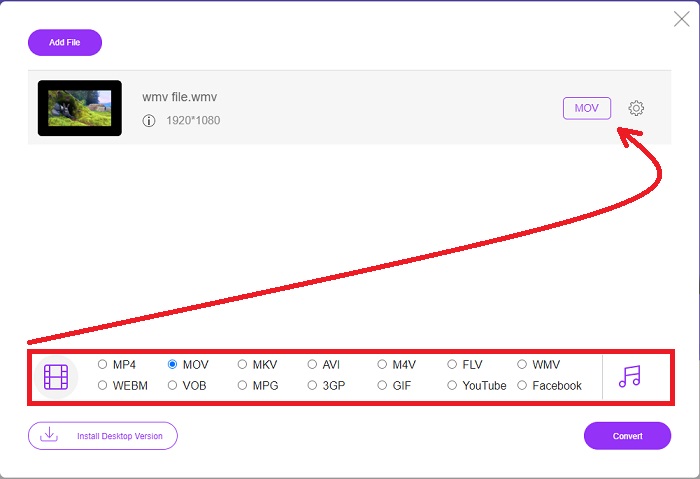
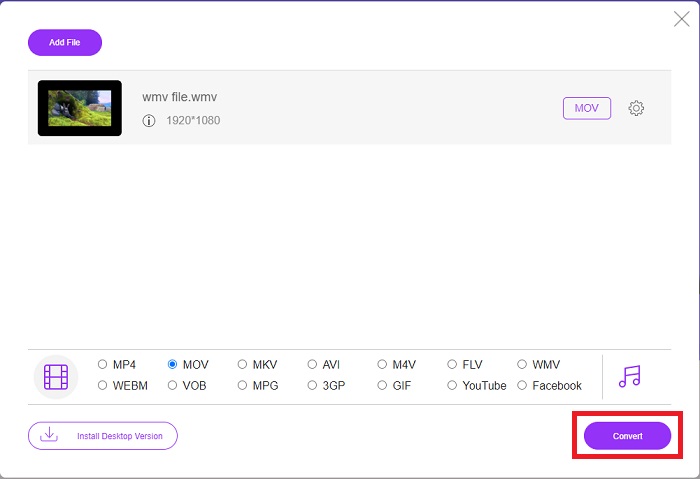
ขั้นตอนที่ 4: เมื่อคุณเลือกรูปแบบที่ต้องการแปลงแล้ว ให้คลิก Convert เพื่อเริ่มกระบวนการแปลง.
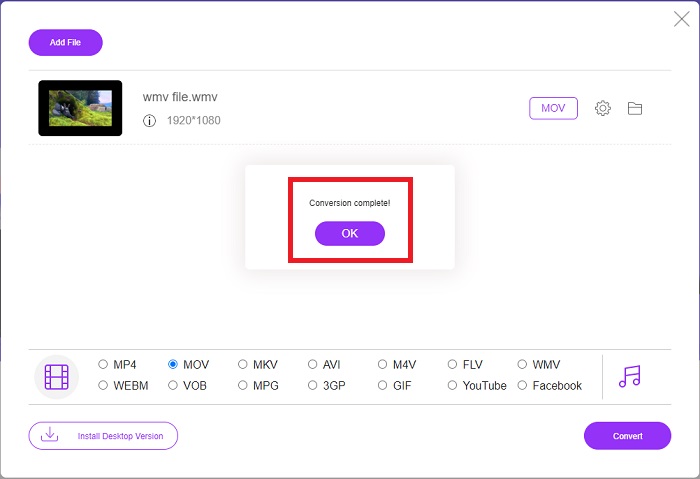
ขั้นตอนที่ 5: ผ่านไปไม่กี่นาที คุณจะเห็นโฟลเดอร์ที่มีไฟล์ที่แปลงแล้ว ซึ่งคุณสามารถเปิดและเริ่มรับชมได้ทันที.
วิธีที่ 2. ใช้ Video Converter
กำลังพยายามค้นหาตัวแปลง WMV เป็น MOV ฟรีอยู่ใช่หรือไม่ วิธีที่เร็วที่สุดคือการใช้บริการเว็บเพื่อแปลงไฟล์ WMV ของคุณเป็นรูปแบบ MOV เมื่อคุณทำวิดีโอเสร็จแล้ว คุณสามารถถ่ายโอนไปยังอุปกรณ์ใดก็ได้ และสนุกกับมันในภายหลังด้วยความช่วยเหลือของเครื่องมือแปลงสื่อออนไลน์นี้ นี่คือวิธีการ
ขั้นตอนที่ 1: โดยการคลิกปุ่ม Add Your Media คุณสามารถนำเข้าไฟล์ WMV จากคอมพิวเตอร์ Dropbox หรือ Google Drive เพื่อแปลงเป็น MOV ได้.
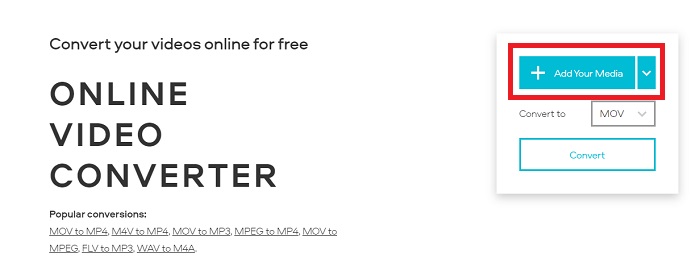
ขั้นตอนที่ 2: เลือก MOV เป็นรูปแบบเอาต์พุตที่ต้องการ ใช้การตั้งค่าขั้นสูงเพื่อปรับปรุงคุณภาพวิดีโอโดยรวม.
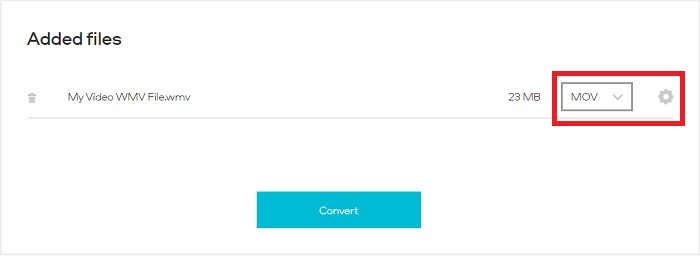
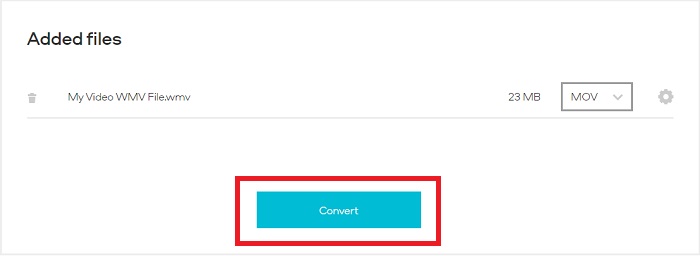
ขั้นตอนที่ 3: หลังจากปรับตั้งค่าทั้งหมดเรียบร้อยแล้ว คุณสามารถคลิกปุ่ม Convert ได้เลย.
WMV เทียบกับ MOV
ผลิตโดย Microsoft WMV เป็นหนึ่งในรูปแบบวิดีโอที่พบบ่อยที่สุดในยุค 2000 สามารถดูได้ทางเว็บและเล่นโดยโปรแกรมเล่นสื่อต่างๆ บน Windows และยังเป็นรูปแบบไฟล์วิดีโอเริ่มต้นของ Windows Media Player แต่รูปแบบอื่นๆ กลับถูกยึดครองไปเมื่อเร็วๆ นี้
รูปแบบ MOV สามารถใช้สำหรับจัดเก็บภาพยนตร์ รายการทีวี คลิปวิดีโอสั้น หรือภาพยนตร์ที่บ้าน ไฟล์นี้ถูกบันทึกในรูปแบบไฟล์ QuickTime (QTFF) ซึ่งเปิดตัวโดย Apple ในปี 1991 ไฟล์ MOV มักถูกใช้เมื่อผู้คนต้องการบันทึกวิดีโอคุณภาพสูง
ส่วนที่ 4 คำถามที่พบบ่อยเกี่ยวกับการแปลง WMV เป็น MOV
MOV และ WMV เหมือนกันหรือไม่
ไฟล์ MOV ใช้การเข้ารหัส MPEG-4 เพื่อเล่นกับ QuickTime สำหรับ Windows ซึ่งพัฒนาโดย Apple สำหรับ QuickTime Player นอกจากจะได้รับการสนับสนุนจาก Facebook และ YouTube แล้ว MOV ยังทำงานได้ดีสำหรับการดูโทรทัศน์ ไฟล์ WMV (Windows Media Viewer) เทียบได้กับ MOV (รูปแบบวิดีโอของ Mozilla) ในด้านคุณภาพและขนาด Microsoft สร้าง WMV เพื่อใช้ใน Windows Media Player
ข้อดีและข้อเสียของ MOV คืออะไร?
ไฟล์ MOV ส่วนใหญ่จะใช้ในงานตัดต่อ มากกว่าจะใช้ในเชิงปฏิบัติทั่วไป นอกเหนือจาก QuickTime Player แล้ว ยังมีเพียงโปรแกรมเล่นสื่อไม่กี่ตัวที่รองรับรูปแบบนี้ บรรดามืออาชีพด้านตัดต่อวิดีโอมักใช้ประโยชน์จากข้อดีนี้ ข้อเสียคือมีอุปกรณ์จริงที่รองรับไม่มากนัก.
WMV ยังคงใช้อยู่หรือไม่?
WMV พัฒนาโดย Microsoft และมักใช้กับโปรแกรมเล่นสื่อของ Windows ไฟล์วิดีโอ WMV มีขนาดเล็กและบีบอัดได้มากกว่าไฟล์ MP4 จึงเป็นตัวเลือกยอดนิยมสำหรับการสตรีมวิดีโอออนไลน์ แม้ว่า iPhone และ Mac จะสามารถใช้ Windows Media Player ได้ แต่ก็ยังไม่รองรับอุปกรณ์ของ Apple โดยตรง.
สรุป
จากที่แสดงไว้ข้างต้น จะเห็นได้ว่ามีตัวแปลงไฟล์ให้ดาวน์โหลดหรือใช้งานออนไลน์จำนวนมาก แต่หากพูดถึงประสิทธิภาพและการเลือกตัวแปลงไฟล์ที่ดีที่สุดในบรรดาตัวเลือกเหล่านั้น บทสรุปนี้ชี้ไปที่ Video Converter Ultimate ด้วยความสามารถในการแปลงวิดีโอและเสียงได้อย่างรวดเร็ว รองรับรูปแบบหลากหลายโดยไม่เสียค่าใช้จ่าย และใช้งานได้ทั้งบน Windows และ Mac แล้วคุณจะรออะไรอยู่? ดาวน์โหลดเลยตอนนี้!
ดาวน์โหลดฟรีสำหรับ Windows 7 หรือใหม่กว่าดาวน์โหลดอย่างปลอดภัย
ดาวน์โหลดฟรีสำหรับ MacOS 10.7 หรือใหม่กว่าดาวน์โหลดอย่างปลอดภัย
-
 3 วิธียอดนิยมในการแปลง FLV เป็น WMV บน Windows และ Mac
 กำลังมองหาวิธีที่ดีที่สุดในการแปลง FLV เป็น WMV โดยไม่สูญเสียคุณภาพบนพีซีหรือ Mac ใช่ไหม คุณโชคดีเพราะที่นี่เราแบ่งปันสามวิธีในการทำงานอย่างง่าย
-
 2 วิธีที่ง่ายที่สุดในการแปลงไฟล์ WMV เป็น FLV บน PC/Mac
 คุณจะแปลง WMV เป็น FLV ได้อย่างไร ประการแรก คุณต้องอ่านคำแนะนำของเราและค้นหาวิธีการที่คุณชอบ จากนั้นทำตามคำแนะนำของเราเพื่อทำงานอย่างรวดเร็ว
-
 [2 โซลูชั่น] วิธีแปลงวิดีโอ WMV เป็นไฟล์ GIF ฟรี
 ถ้าคุณต้องการตัดส่วนที่ยอดเยี่ยมของวิดีโอ WMV และสร้าง GIF จากวิดีโอ คุณสามารถเรียนรู้เกี่ยวกับวิธีการง่ายๆ 2 วิธีในการถ่ายโอนวิดีโอ WMV ไปยัง GIF ในบทความนี้

