


 Video Converter Ultimate
 บันทึกหน้าจอ
 ซ่อมวิดีโอ
 ดาวน์โหลดอย่างปลอดภัย
วิธีการโดยละเอียดเกี่ยวกับวิธีการแปลง DIVX เป็น MP4
DIVX เป็นหนึ่งในรูปแบบวิดีโอยอดนิยม แต่โชคร้ายที่รูปแบบนี้ไม่รองรับโดยโปรแกรมทั่วไปอื่น ๆ เช่น Windows Media Player, Apple QuickTime Player และอีกมากมาย วิธีที่ดีที่สุดในการเล่นไฟล์วิดีโอ DIVX ของคุณคือแปลงให้เป็นรูปแบบที่เกือบทุกโปรแกรมรองรับอย่างเช่น MP4 ดังนั้นหากคุณต้องการแปลงไฟล์ DIVX เป็น MP4 ให้ดูบทความนี้ แม้ว่าการแปลงไฟล์อาจดูยุ่งยาก เราจะสอนวิธีที่ง่ายที่สุดที่คุณสามารถนำไปใช้เพื่อแปลงไฟล์ DIVX ของคุณเป็นรูปแบบ MP4 ได้.

ส่วนที่ 1: วิธีที่ดีที่สุดในการแปลง DIVX เป็น MP4 บน Mac
วิธีที่มีประสิทธิภาพที่สุดในการแปลง DIVX เป็น MP4 บน Mac คือการใช้ Video Converter Ultimate แอปพลิเคชันนี้คุ้มค่ากับการใช้งานเพราะมีฟังก์ชันที่ยอดเยี่ยม คุณสามารถแปลงไฟล์จำนวนมากต่อเนื่องกันเป็นชุด ๆ ได้ทันทีเพราะมีฟีเจอร์แปลงแบบแบตช์ นอกจากนี้ การแปลง DIVX เป็น MP4 ก็ง่ายราวกับเด็กเล่น ด้วยอินเทอร์เฟซที่ใช้งานง่ายและคำแนะนำการแปลงขั้นพื้นฐาน อีกทั้งคุณยังสามารถแปลงวิดีโอได้หลายรูปแบบ รองรับมากกว่า 100 รูปแบบ เช่น AVI, FLV, MOV, AVI, M4V, MKV, WMV, VOB และอื่น ๆ นอกจากนี้ Video Converter Ultimate ยังมีความเร็วการแปลงสูงกว่าโปรแกรมแปลงไฟล์อื่นถึง 30 เท่า ด้วยกระบวนการแปลงที่รวดเร็วนี้ คุณจึงมั่นใจได้ว่าการแปลงไฟล์จำนวนมากจะใช้เวลาเพียงไม่นาน.
นอกจากนี้ ตัวแปลงนี้ไม่มีอคติในแง่ของผู้ใช้ ทุกคนสามารถใช้งานได้ แม้ว่าคุณจะเป็นผู้ใช้ขั้นสูงหรือมือใหม่ก็ตาม นอกจากนี้ แอปพลิเคชันนี้สามารถปรับปรุงวิดีโอ DIVX ของคุณได้เนื่องจากมีเครื่องมือตัดต่อวิดีโอมากมาย เช่น ตัวปรับคุณภาพวิดีโอ ตัวครอบตัด การแก้ไขสี และอื่นๆ นอกจากนี้ หากคุณต้องการสร้างมิวสิควิดีโอที่ยอดเยี่ยมด้วยการผสมผสานระหว่างรูปภาพและวิดีโอ คุณสามารถทำได้ โปรแกรมสร้างมิวสิกวิดีโอนี้มีธีมมากมายที่คุณสามารถใช้ได้ เช่น มีความสุข เรียบร้อย โรแมนติก คืนที่หิมะ ลายเส้นและคลื่น งานแต่งงาน กีฬา ช่วงเวลาเก่าๆ และอีกมากมาย
คุณสมบัติเด่น
◆ แปลงวิดีโอเป็นไฟล์ต่างๆ เช่น MP4, DIVX, M4V, AVI, MOV, FLV, MKV, VOB และอื่นๆ
◆ มีการแปลงเป็นชุด
◆ ตัดต่อวิดีโอโดยใช้ตัวเพิ่มคุณภาพวิดีโอ คอมเพรสเซอร์ ตัวลบลายน้ำ ทริมเมอร์ ตัวครอป ฯลฯ
◆ แปลงรูปแบบรูปภาพ เช่น BMP, JPG, PNG, TIF และอื่นๆ
ทำตามคำแนะนำด้านล่างเพื่อแปลง DIVX เป็น MP4 บน Mac โดยใช้ FVC Video Converter Ultimate
ขั้นตอนที่ 1: ดาวน์โหลด FVC Video Converter Ultimate บน Mac ของคุณโดยคลิกปุ่ม Download ด้านล่าง จากนั้นเปิดโปรแกรมหลังจากติดตั้งเสร็จสิ้น.
ดาวน์โหลดฟรีสำหรับ Windows 7 หรือใหม่กว่าดาวน์โหลดอย่างปลอดภัย
ดาวน์โหลดฟรีสำหรับ MacOS 10.7 หรือใหม่กว่าดาวน์โหลดอย่างปลอดภัย
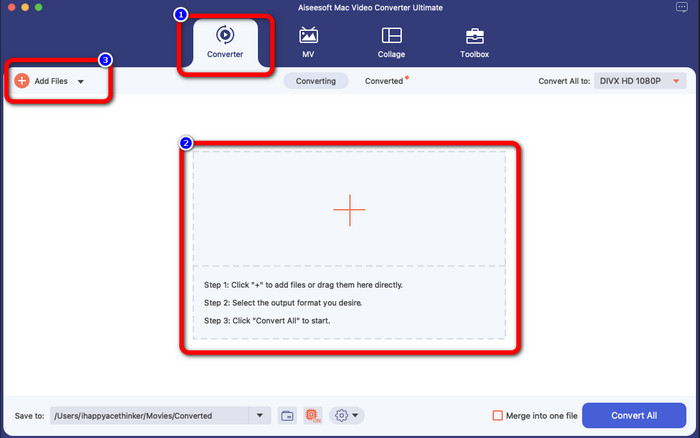
ขั้นตอนที่ 2: หลังจากเปิดโปรแกรมแล้ว อินเทอร์เฟซหลักจะปรากฏบนหน้าจอของคุณ ไปที่แถบ Converter แล้วคลิกไอคอน Plus หรือปุ่ม Add File เพื่อเพิ่มไฟล์วิดีโอ DIVX คุณยังสามารถลากไฟล์เข้ามาในช่องได้โดยตรง.
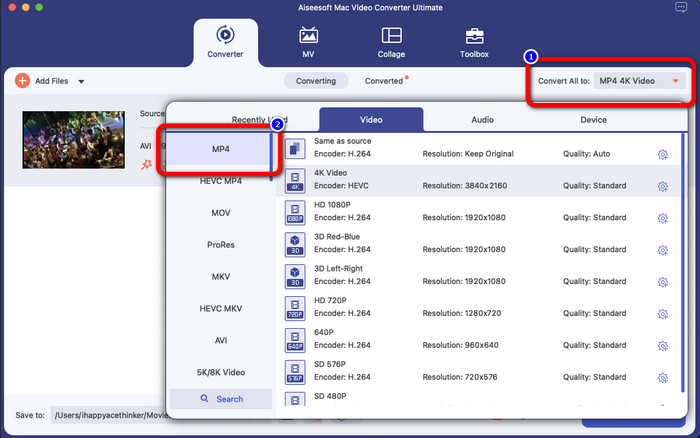
ขั้นตอนที่ 3: จากนั้นให้เปลี่ยนรูปแบบเอาต์พุต โดยคลิกปุ่ม Convert All to ตัวเลือกฟอร์แมตจะปรากฏบนหน้าจอ แล้วเลือกเป็นรูปแบบไฟล์ MP4 คุณสามารถเลือกระดับความละเอียดที่ต้องการได้สูงสุดถึงวิดีโอ 4K.
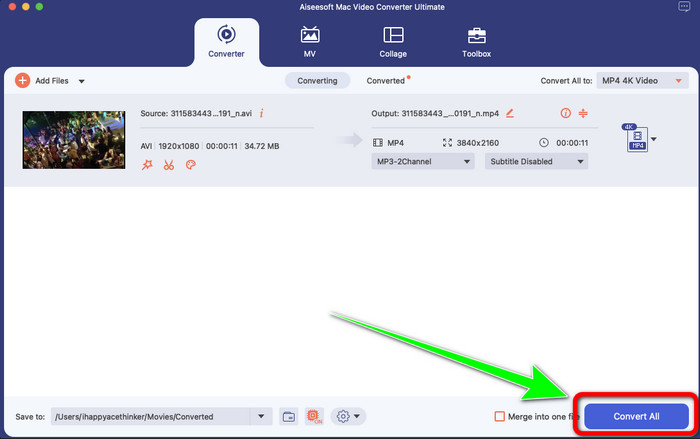
ขั้นตอนที่ 4: หลังจากเปลี่ยนรูปแบบเอาต์พุตแล้ว ให้คลิกปุ่ม Convert All เพื่อเริ่มการแปลง จากนั้นกระบวนการแปลงจะเริ่มขึ้น หลังจากเสร็จสิ้น วิดีโอของคุณก็จะแปลงจากไฟล์ DIVX เป็นรูปแบบ MP4 เรียบร้อยแล้ว.
ตอนที่ 2: วิธีง่ายๆ แปลง DIVX เป็น MP4 บนเบรกมือ
คุณต้องการใช้เบรกมือเพื่อแปลง DIVX เป็น MP4 หรือไม่ จากนั้นไม่ต้องกังวลอีกต่อไป ในส่วนนี้ เราจะสอนวิธีแปลงไฟล์ของคุณโดยใช้เบรกมือเป็นตัวแปลงบนคอมพิวเตอร์ของคุณ เครื่องมือนี้มีความน่าเชื่อถือในการแปลงไฟล์จำนวนมากเป็นรูปแบบอื่น เช่น M4V, MP4, MKV, WEBM และอื่นๆ อย่างไรก็ตาม การใช้เครื่องมือนี้จำเป็นต้องได้รับการชี้แจงเนื่องจากมีตัวเลือกมากมายที่คุณสามารถหาได้จากอินเทอร์เฟซ ในกรณีนี้ เราสามารถพูดได้ว่าตัวแปลงนี้ไม่เหมาะสำหรับผู้เริ่มต้น นอกจากนี้ยังมีบางครั้งที่แม้คุณต้องการแปลงไฟล์เป็น MP4 วิดีโอจะบันทึกเป็นไฟล์ M4V บางทีมันอาจจะผิดพลาดด้วยเหตุผลบางอย่าง แต่ยังคงทำตามขั้นตอนง่าย ๆ ด้านล่างเพื่อแปลง DIVX เป็น MP4 โดยใช้เบรกมือ
ขั้นตอนที่ 1: ดาวน์โหลดโปรแกรม Handbrake ลงในคอมพิวเตอร์ของคุณ จากนั้นเมื่อทำการติดตั้งโปรแกรมเสร็จแล้ว ให้เปิดโปรแกรม.
ขั้นตอนที่ 2: คลิกตัวเลือก File เพื่อเพิ่มไฟล์วิดีโอ DIVX.
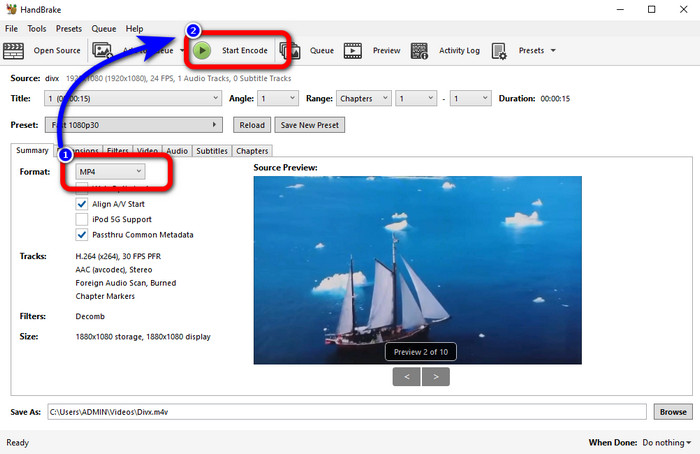
ขั้นตอนที่ 3: เลือกตัวเลือก Format แล้วเลือกฟอร์แมต MP4 หลังจากนั้นคลิกปุ่ม Start Encode เพื่อดำเนินกระบวนการแปลง เพียงเท่านี้คุณก็สามารถเล่นวิดีโอของคุณในรูปแบบไฟล์ MP4 ได้แล้ว ซอฟต์แวร์นี้ยังสามารถใช้แปลง DIVX เป็น 3GP ได้อีกด้วย.
ตอนที่ 3: ขั้นตอนง่าย ๆ ในการแปลง DIVX เป็น MP4 ผ่าน VLC
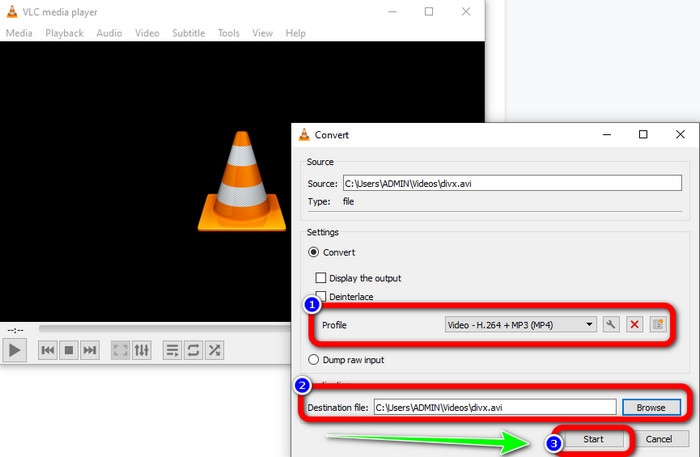
ตัวแปลงออฟไลน์อื่นที่คุณสามารถใช้ได้คือ VLC Media Player แอปพลิเคชั่นนี้สามารถแปลง DIVX เป็น MP4 ได้อย่างง่ายดาย สิ่งนี้ไม่เพียงดีสำหรับการเล่นวิดีโอ แต่ยังสำหรับการแปลง ด้วยความช่วยเหลือของเครื่องมือออฟไลน์นี้ คุณสามารถแปลงไฟล์เป็นรูปแบบไฟล์อื่นๆ เช่น MPEG, AVI, ASF, WMV และอื่นๆ อย่างไรก็ตาม ตัวแปลงนี้ไม่เหมาะสำหรับผู้ใช้ใหม่ เนื่องจากมีขั้นตอนการแปลงไฟล์ที่ซับซ้อน นอกจากนี้ การดาวน์โหลดแอปพลิเคชันยังยากและใช้เวลานานอีกด้วย ใช้ขั้นตอนด้านล่างเพื่อแปลง DIVX เป็น MP4 โดยใช้ VLC
ขั้นตอนที่ 1: ดาวน์โหลดและติดตั้ง VLC ลงในคอมพิวเตอร์ของคุณ.
ขั้นตอนที่ 2: ไปที่เมนู Media และเลือกปุ่ม Convert/Save เพื่อเพิ่มไฟล์วิดีโอ DIVX ที่คุณต้องการแปลง.
ขั้นตอนที่ 3: ที่ส่วนล่างของอินเทอร์เฟซ ให้คลิกปุ่ม Convert/Save อีกครั้ง.
ขั้นตอนที่ 4: ไปที่ตัวเลือก Profile แล้วเลือกฟอร์แมตไฟล์ MP4 จากนั้นคลิกปุ่ม Destination file เพื่อกำหนดตำแหน่งจัดเก็บที่คุณต้องการ สุดท้ายคลิกปุ่ม Start เพื่อแปลงไฟล์ DIVX เป็นรูปแบบ MP4 คุณยังสามารถใช้เครื่องมือนี้ในการแปลง MP4 เป็น DIVX ได้อีกด้วย.
ตอนที่ 4: วิธีที่มีประสิทธิภาพในการแปลง DIVX เป็น MP4 ออนไลน์
หลังจากได้รู้จักโปรแกรมแปลงไฟล์แบบออฟไลน์ทั้งหมดที่คุณสามารถใช้ได้แล้ว ในส่วนนี้เราจะมาแนะนำตัวแปลง DIVX เป็น MP4 แบบออนไลน์ที่ดีที่สุด ตัวแปลงที่โดดเด่นนี้คือ FVC Free Video Converter Online เครื่องมือนี้สามารถแปลงไฟล์ DIVX ของคุณเป็นรูปแบบ MP4 ได้อย่างง่ายดาย เพราะมีอินเทอร์เฟซที่ตรงไปตรงมาและขั้นตอนที่ไม่ซับซ้อน เครื่องมือนี้รองรับรูปแบบวิดีโอหลากหลาย เช่น FLV, WMA, AVI, MOV และอื่น ๆ นอกจากนี้คุณยังสามารถแปลงไฟล์ DIVX ได้โดยไม่สูญเสียคุณภาพวิดีโอ ซึ่งเป็นข้อดีอย่างยิ่งสำหรับผู้ใช้ ทำตามคำแนะนำอย่างละเอียดด้านล่างเพื่อแปลงไฟล์ของคุณอย่างง่ายดายด้วย FVC Free Video Converter Online.
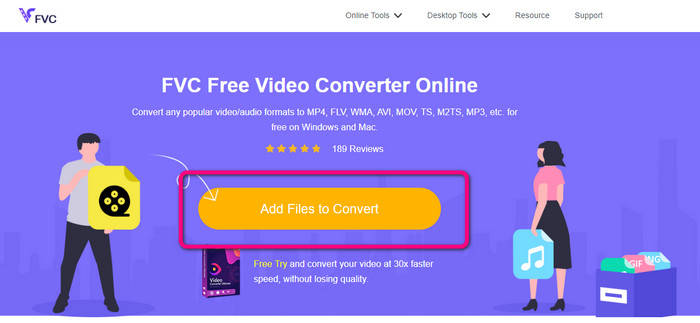
ขั้นตอนที่ 1: ไปที่เบราว์เซอร์ของคุณและไปที่ FVC โปรแกรมแปลงวิดีโอออนไลน์ฟรี เว็บไซต์. จากนั้นคลิก เพิ่มไฟล์เพื่อแปลง ปุ่มเพื่ออัปโหลดไฟล์ DIVX
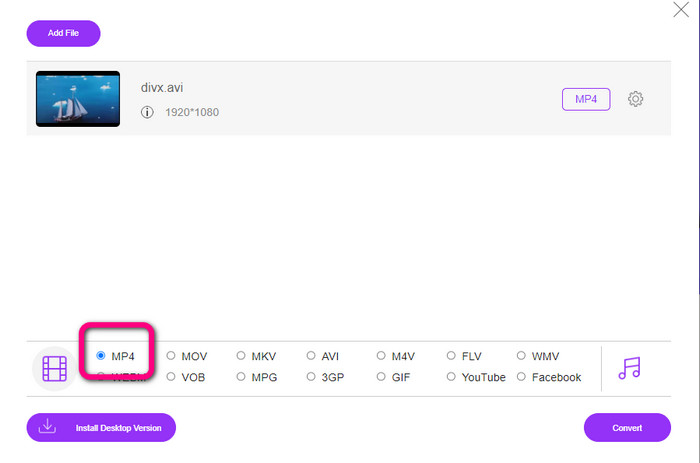
ขั้นตอนที่ 2: ที่ส่วนล่างของอินเทอร์เฟซ ให้เลือกฟอร์แมตไฟล์ MP4 จากตัวเลือกฟอร์แมต.
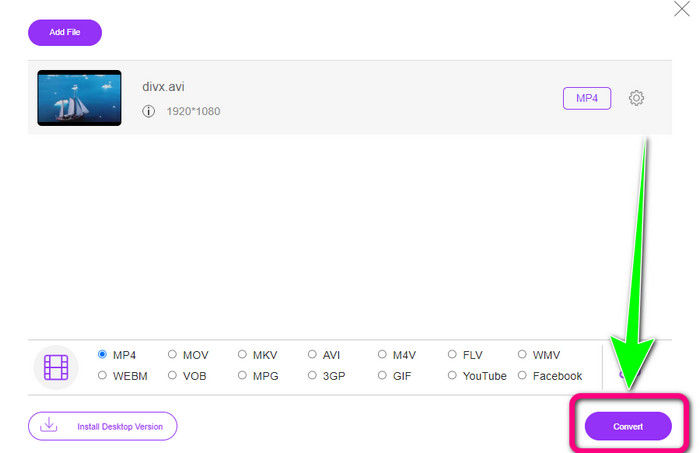
ขั้นตอนที่ 3: สำหรับขั้นตอนสุดท้าย ให้คลิกปุ่ม Convert เพื่อเริ่มกระบวนการแปลง จากนั้นบันทึกวิดีโอ MP4 ของคุณลงในอุปกรณ์.
ตอนที่ 5: DIVX กับ MP4
| DIVX | MP4 | |
| นามสกุลไฟล์ | .divx/.avi | .mp4 |
| คำอธิบาย | DivX, LLC พัฒนาตัวแปลงสัญญาณวิดีโอ DIVX ตัวแปลงสัญญาณนี้เข้ากันได้กับโปรแกรม Windows นอกจากนี้ยังสามารถใช้กับคอนโซลเกม เครื่องเสียงรถยนต์ และอื่นๆ นอกจากนี้ ยังมีตัวแปลงสัญญาณ DIVX สามตัว ได้แก่ ตัวแปลงสัญญาณวิดีโอความละเอียดสูง HEVC Ultra HD, H.264/MPEG-4 AVC DivX Plus และ MPEG-4 ตอนที่ 2 | เป็นคอนเทนเนอร์วิดีโอที่ใช้ QuickTime MOV แต่ MP4 รองรับคุณสมบัติ MPEG นอกจากนี้ MP4 ยังรองรับเสียง วิดีโอ และคำบรรยายอีกด้วย การผสมผสานตัวแปลงสัญญาณเหล่านี้ทำให้ MP4 มีความยืดหยุ่น |
| พัฒนาโดย | DivX Network Inc. | องค์การระหว่างประเทศเพื่อการมาตรฐาน |
| ประเภทไมม์ | วิดีโอ/divx | วิดีโอ/mp4 |
| โปรแกรมที่เกี่ยวข้อง | เอ็กซ์บ็อกซ์ 360 เครื่องเสียงติดรถยนต์ เครื่องเล่นดีวีดี/บลูเรย์ นาฬิกาปลุก | VLC Media Player โปรแกรมเล่น Apple QuickTime 5KPlayer Windows Media Player |
ส่วนที่ 6: คำถามที่พบบ่อยเกี่ยวกับการแปลง DIVX เป็น MP4
1. ใครใช้ DIVX
ผู้ที่ใช้ DIVX คืออุปกรณ์อิเล็กทรอนิกส์สำหรับผู้บริโภคที่ได้รับการรับรองจาก DIVX ซึ่งรวมถึงเครื่องเล่นวิดีโอแบบพกพา ดีวีดี และเครื่องเล่นบลูเรย์
2. MP4 ดีกว่า DIVX หรือไม่
ใช่. DIVX นั้นล้าสมัยไปแล้วเมื่อเทียบกับไฟล์ยอดนิยมในขณะนี้ ซึ่งก็คือ MP4 รูปแบบ MP4 เป็นหนึ่งในรูปแบบที่ใช้บ่อยที่สุด ดังนั้นจึงขอแนะนำอย่างยิ่งให้ใช้รูปแบบ MP4
3. ทำไม MP4 ถึงได้รับความนิยม?
รูปแบบ MP4 เป็นที่นิยมเนื่องจากรองรับโดยอุปกรณ์เกือบทั้งหมด เช่น Mac, Linux, Windows และอุปกรณ์พกพาต่างๆ ด้วยวิธีนี้ ผู้ใช้ทุกคนจะเปลี่ยนวิดีโอเป็นรูปแบบ MP4 ทำให้เข้าถึงได้มากขึ้นและพร้อมใช้งานสำหรับทุกคน
สรุป
การอ่านบทความนี้ทำให้คุณได้รับข้อมูลสำคัญเกี่ยวกับการแปลง DIVX เป็น MP4 มีตัวแปลงไฟล์ให้คุณลองใช้ 4 ตัว อย่างไรก็ตาม ตัวแปลงบางตัวใช้งานค่อนข้างยุ่งยาก ซึ่งไม่เหมาะสำหรับผู้เริ่มต้น ดังนั้นหากคุณต้องการแปลงไฟล์ได้ง่ายขึ้น คุณสามารถใช้ตัวแปลง 2 ตัวที่เราแนะนำ คือ FVC Video Converter Online และ Video Converter Ultimate.
-
 3 วิธีที่ดีที่สุดในการแปลง MPG เป็น MP4 . อย่างรวดเร็ว
 ต้องการแปลงรูปแบบไฟล์ MPG เป็น MP4 หรือไม่? ในบทความนี้ เราจะแสดงรายการตัวแปลง MPG ที่ดีที่สุดและเร็วที่สุดสำหรับคุณ!
-
 AMV Converter - 3 วิธีที่ดีที่สุดในการแปลง MP4 เป็น AMV บน Win / Mac
 ตัวแปลง MP4 เป็น AMV ที่ดีที่สุดในการเปลี่ยนวิดีโอเป็น Amine Music Video คืออะไรคุณสามารถเรียนรู้เพิ่มเติมเกี่ยวกับ 3 วิธีที่มีประสิทธิภาพสูงสุดเพื่อให้ได้วิดีโอที่ต้องการได้อย่างง่ายดาย
-
 WebM เป็น MP4 | ฟรีแปลง WebM เป็น MP4 (ออนไลน์และเดสก์ท็อป)
 วิธีดูไฟล์ WebM โดยไม่ใช้เว็บเบราว์เซอร์ คุณต้องแปลง WebM เป็น MP4 นี่คือตัวแปลง WebM เป็น MP4 ฟรี 10 อันดับแรกเพื่อเปลี่ยน WebM เป็น MP4 ออนไลน์และบนคอมพิวเตอร์ Mac และ Windows
