


 Video Converter Ultimate
 บันทึกหน้าจอ
 ซ่อมวิดีโอ
3 ตัวแปลง MPG เป็น MP4 ออนไลน์และออฟไลน์ คุณต้องลองแปลงไฟล์ MPG
MP4 เป็นหนึ่งในรูปแบบไฟล์วิดีโอที่พบได้บ่อยที่สุดบนอินเทอร์เน็ตในปัจจุบัน แม้ว่า MPG และ MP4 จะมีความคล้ายกันหลายอย่าง แต่ก็มีความแตกต่างกันอยู่เช่นกัน และหากคุณต้องการแปลงไฟล์ MPG ของคุณเป็นรูปแบบไฟล์ MP4 เราได้ทดสอบโปรแกรมแปลงวิดีโอที่กำลังได้รับความนิยมในตอนนี้แล้ว นอกจากนี้ เรายังได้คัดเลือกตัวแปลง MPG เป็น MP4 ที่ดีที่สุดมาให้คุณลองใช้อีกด้วย!

ส่วนที่ 1 ทำไมคุณต้องแปลง MPG เป็น MP4
ความสำคัญของการแปลงไฟล์ MPG เป็น MP4 คืออะไร? MPG และ MP4 เป็นรูปแบบไฟล์ที่มักใช้กับวิดีโอบนอินเทอร์เน็ต แต่ทั้งสองต่างกันอย่างไร? MPG หรือ MPEG เป็นรูปแบบดั้งเดิมที่ใช้ตัวแปลงรหัส (codec) แบบ MPEG ซึ่งเป็นตัวเข้ารหัสที่ให้ผลลัพธ์วิดีโอคุณภาพสูง.
ในทางกลับกัน MP4 เป็นรูปแบบไฟล์วิดีโอทั่วไปรูปแบบหนึ่งและใช้การบีบอัดวิดีโอที่ทันสมัย แล้วอันไหนดีกว่ากัน? ความสามารถในการบีบอัดที่สูงของ MP4 ช่วยให้สามารถบีบอัดไฟล์ในขนาดที่เล็กกว่ารูปแบบไฟล์วิดีโออื่นๆ เช่น MPG
ส่วนที่ 2 3 วิธีในการแปลง MPG เป็น MP4
ต่อไปนี้คือตัวแปลงวิดีโอที่ยอดเยี่ยมที่คุณสามารถใช้ได้ทั้งแบบออนไลน์และออฟไลน์ และเรียนรู้วิธีเปลี่ยน MPG เป็น MP4
1. ใช้ Video Converter Ultimate
Video Converter Ultimate เป็นโปรแกรมแปลงไฟล์มีเดียที่ช่วยให้คุณแปลงไฟล์ MPG เป็นรูปแบบไฟล์ MP4 ได้อย่างง่ายดาย โปรแกรมนี้มีอินเทอร์เฟซที่ใช้งานง่าย แต่ให้ผลลัพธ์ที่น่าประทับใจ มาพร้อมฟังก์ชันสำหรับตัดต่อ ปรับคุณภาพ และบีบอัดไฟล์ MPG ของคุณ นอกจากนี้ คุณยังสามารถแปลงไฟล์ MPG เป็น MP4 แบบเป็นชุดได้ในโปรแกรมนี้.
Video Converter Ultimate ยังมีตัวเลือกที่คุณสามารถตัดต่อภาพและวิดีโอได้ นอกจากนี้ หากคุณต้องการสร้าง GIF ตัวแปลงนี้มีคุณลักษณะดังกล่าว นอกจากนั้น เมื่อใช้ตัวแปลงนี้ คุณจะสามารถแปลงไฟล์ขนาดใหญ่ได้โดยไม่ทำลายคุณภาพ แม้ว่าคุณลักษณะต่างๆ จะดูเหมือนเป็นมืออาชีพ แต่คุณสามารถใช้งานได้อย่างรวดเร็วเนื่องจากใช้งานง่ายเท่านั้น
ขั้นตอนที่ 1. หากต้องการดาวน์โหลดโปรแกรมนี้ ให้คลิกปุ่มดาวน์โหลดด้านล่าง จากนั้นทำตามขั้นตอนการติดตั้งแล้วเปิดโปรแกรม.
ดาวน์โหลดฟรีสำหรับ Windows 7 หรือใหม่กว่าดาวน์โหลดอย่างปลอดภัย
ดาวน์โหลดฟรีสำหรับ MacOS 10.7 หรือใหม่กว่าดาวน์โหลดอย่างปลอดภัย
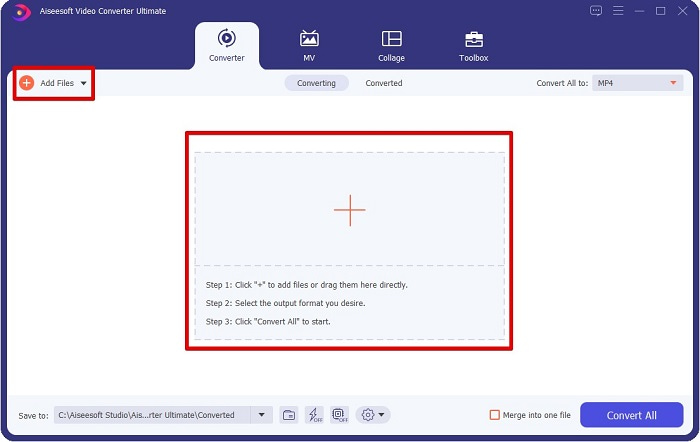
ขั้นตอนที่ 2. เมื่อเปิดโปรแกรมแปลงไฟล์แล้ว ให้คลิกปุ่ม Add Files หรือปุ่ม + เพื่ออัปโหลดไฟล์ MPG ของคุณ ไฟล์ในคอมพิวเตอร์ของคุณจะปรากฏขึ้น ให้ไปยังโฟลเดอร์ที่เก็บไฟล์นั้น แล้วคลิก Open เพื่อเพิ่มไฟล์เข้าสู่คิว.
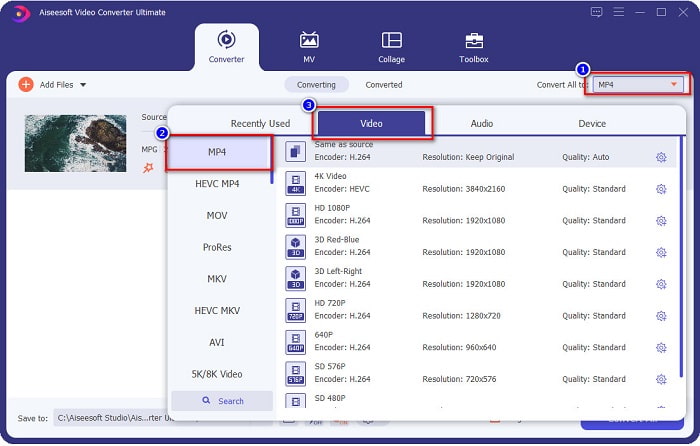
ขั้นตอนที่ 3. หากต้องการเปลี่ยนรูปแบบไฟล์ MPG ของคุณ ให้คลิก Convert All to ที่มุมขวาบนของหน้าจอ เมื่อเห็นรายการรูปแบบไฟล์แล้ว ให้เลือกเป็นไฟล์รูปแบบ MP4.
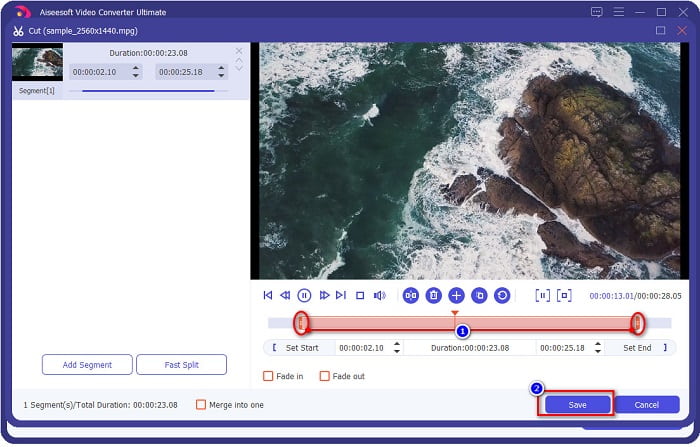
หากคุณต้องการตัดความยาววิดีโอ ให้คลิกปุ่มรูป กรรไกร เพื่อทำการตัดวิดีโอ คุณสามารถปรับความยาววิดีโอได้ด้วยการลากปุ่ม play head เพื่อกำหนดช่วงที่ต้องการ เมื่อตั้งค่าเสร็จแล้วให้คลิก Save.
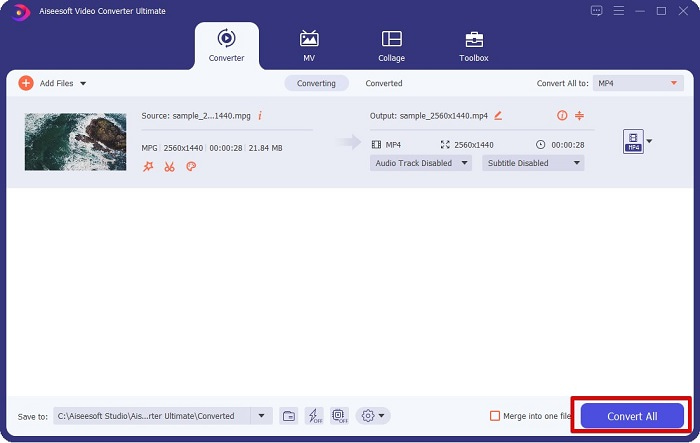
ขั้นตอนที่ 4. เมื่อคุณเลือกรูปแบบไฟล์ที่ต้องการแล้ว ให้คลิก Convert All เพื่อแปลงไฟล์ MPG ของคุณเป็นไฟล์ MP4 จากนั้นรอสักครู่ ไฟล์ MPG ของคุณก็จะถูกแปลงเป็นไฟล์ MP4 ด้วยขั้นตอนง่าย ๆ เหล่านี้ คุณก็แปลงไฟล์ MPG เป็น MP4 ได้เรียบร้อยแล้ว.
2. ใช้ตัวแปลงออนไลน์ฟรี
FVC Free Online Video Converter ช่วยให้คุณแปลงไฟล์ MPG เป็นรูปแบบไฟล์ MP4 ได้ฟรีโดยไม่ต้องสมัครสมาชิก เป็นโปรแกรมแปลงวิดีโอออนไลน์ฟรีที่ให้คุณแปลงไฟล์ได้โดยไม่จำกัด นอกจากนี้ คุณยังสามารถแปลงไฟล์ขนาดใหญ่แบบออนไลน์ได้ด้วยโปรแกรมนี้ และไม่จำเป็นต้องดาวน์โหลดโปรแกรมใด ๆ เพราะสามารถใช้งานผ่านออนไลน์ได้เลย อย่างไรก็ตาม ข้อเสียคือโปรแกรมนี้ต้องพึ่งพาอินเทอร์เน็ต กล่าวคือ ความเร็วในการแปลงไฟล์จะขึ้นอยู่กับความเร็วอินเทอร์เน็ต ถึงอย่างนั้น ผู้ใช้จำนวนมากก็ได้ลองใช้โปรแกรมนี้แล้ว และพิสูจน์แล้วว่าเป็นโปรแกรมแปลงวิดีโอที่ยอดเยี่ยม.
ต่อไปนี้คือรายการขั้นตอนในการแปลงใน FVC Free Online Video Converter:
ขั้นตอนที่ 1. เปิดเบราว์เซอร์ของคุณแล้วค้นหา FVC Free Online Video Converter.
ขั้นตอนที่ 2. เมื่อเข้าสู่หน้าเว็บแล้ว ให้คลิก Add Files to Convert จะมีกล่องข้อความปรากฏขึ้น ซึ่งคุณต้องดาวน์โหลดตัวเรียกใช้งาน (launcher) ก่อน เมื่อดาวน์โหลดตัวเรียกใช้งานเสร็จ ระบบจะพาคุณไปยังไฟล์ในเครื่อง จากนั้นให้เลือกไฟล์ MPG ที่คุณต้องการแปลง.
ดาวน์โหลดเวอร์ชันเดสก์ท็อปเพื่อแปลงไฟล์แบบเป็นชุดได้.
ขั้นตอนที่ 3. หลังจากเลือกไฟล์ MPG แล้ว คุณจะเห็นอินเทอร์เฟซแรก ซึ่งจะแสดงรายการรูปแบบวิดีโอที่ให้เลือก ให้เลือก MP4 ก่อนที่คุณจะแปลงไฟล์ MPG เป็น MP4 ออนไลน์.
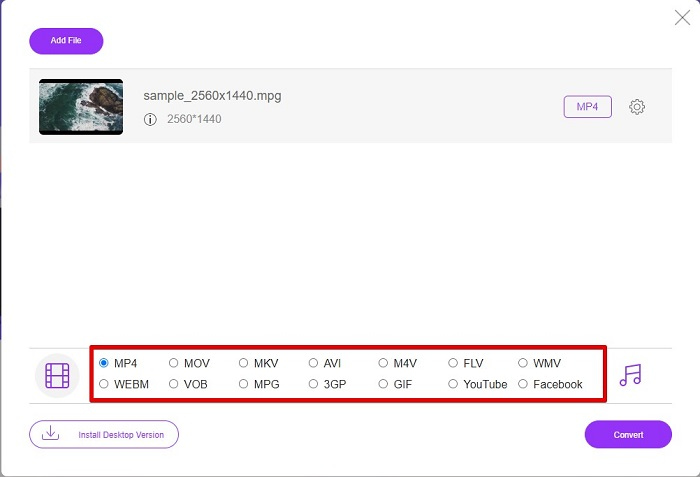
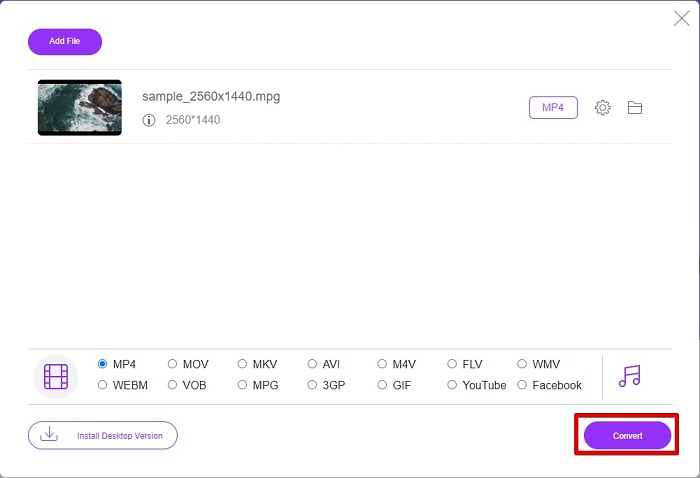
ขั้นตอนที่ 4. คลิกปุ่ม Convert เพื่อเริ่มการแปลง จะมีแท็บใหม่ปรากฏขึ้นให้คุณเลือกตำแหน่งจัดเก็บไฟล์ที่แปลงแล้วในคอมพิวเตอร์ จากนั้นคลิก select folder.
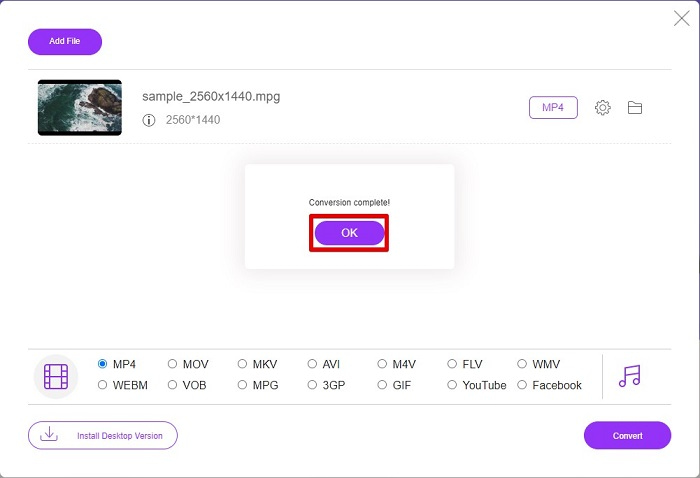
ขั้นตอนที่ 5. สุดท้าย ไฟล์ของคุณจะเริ่มแปลง เมื่อแปลงเสร็จแล้ว ให้คลิก OK เพื่อจบขั้นตอน เพียงเท่านี้! คุณก็แปลงไฟล์เสร็จแล้วง่าย ๆ แค่ 1-2-3!
3. ใช้ ConvertFiles.com
ConvertFiles.com เป็นแอปแปลงไฟล์ออนไลน์ฟรีสำหรับแปลงไฟล์ MPG เป็น MP4 ช่วยให้คุณสามารถแปลงรูปแบบไฟล์ได้มากถึง 300 รูปแบบไฟล์ และถ้าคุณกำลังมองหาโปรแกรมแปลงไฟล์ MPG เป็น MP4 ทางออนไลน์ ซึ่งจะช่วยให้คุณสามารถแปลงเอกสาร ภาพวาด วิดีโอ งานนำเสนอ และอื่นๆ ได้ อย่างไรก็ตาม ในการใช้ตัวแปลงออนไลน์นี้ คุณจะพบกับโฆษณาที่รบกวนคุณมากมาย อย่างไรก็ตาม โปรแกรมแปลงไฟล์ออนไลน์นี้ยังคงคุ้มค่าที่จะลองและได้รับการพิสูจน์แล้วว่ามีแนวโน้มดี
นี่คือวิธีที่คุณจะแปลงไฟล์ MPG ของคุณเป็นรูปแบบไฟล์ MP4:
ขั้นตอนที่ 1. ในเบราว์เซอร์ของคุณ ให้ค้นหา ConvertFiles.com เพื่อเข้าสู่หน้าเว็บโดยตรง.
ขั้นตอนที่ 2. เลือกไฟล์ MPG ของคุณโดยคลิกปุ่มสี่เหลี่ยม หรือปุ่ม Browse ข้างข้อความ Choose a local file จากนั้นไปยังตำแหน่งที่เก็บไฟล์ MPG แล้วเลือกไฟล์นั้น.
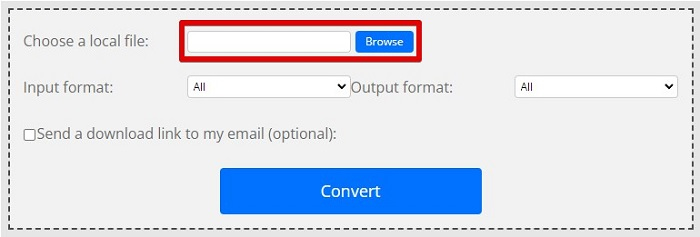
ขั้นตอนที่ 3. หลังจากเลือกไฟล์ MPG ที่ต้องการแปลงแล้ว ในส่วน output format ให้เลือกเป็นรูปแบบ .mp4 โดยการคลิกปุ่ม drop-down.
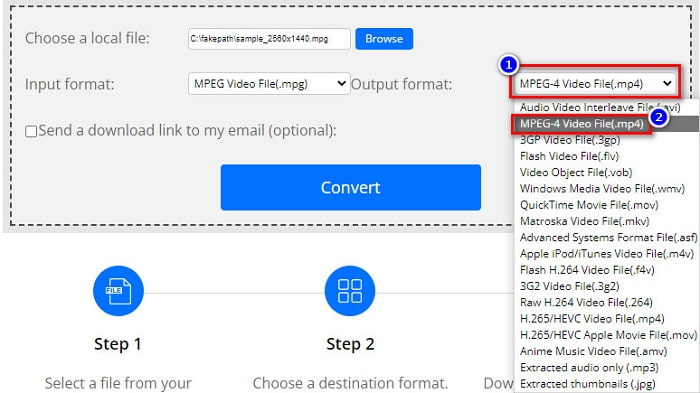
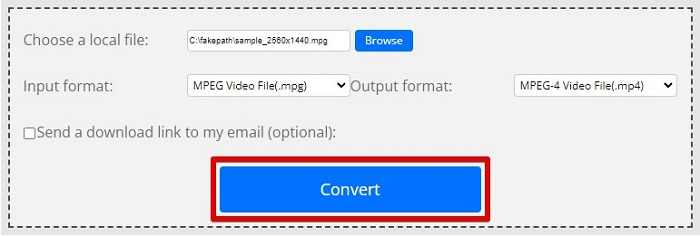
ขั้นตอนที่ 4. เมื่อคุณเลือกรูปแบบไฟล์ที่ต้องการแล้ว คุณสามารถแปลงไฟล์ได้ทันทีโดยการคลิก Convert.
MPG เทียบกับ MP4
จัดทำโดยกลุ่มผู้เชี่ยวชาญด้านภาพเคลื่อนไหว (MPEG) MPG เป็นรูปแบบวิดีโอดิจิทัลทั่วไปสำหรับจัดเก็บข้อมูลวิดีโอ เสียง และข้อมูลเมตา มีประโยชน์มากเมื่อสร้างภาพยนตร์เพื่อแชร์บนอินเทอร์เน็ต ไฟล์เหล่านั้นใน MPG มักจะมีการบีบอัดวิดีโอ/เสียง MPEG-1 หรือ MPEG-2
เผยแพร่โดยกลุ่มผู้เชี่ยวชาญด้านภาพเคลื่อนไหว (MPEG) ในปี 2544 รูปแบบ MP4 สามารถช่วยคุณบันทึกวิดีโอ เสียง คำบรรยาย และข้อมูลภาพในแทร็กแยกกัน ย่อมาจาก MPEG-4 Part 14 นอกจากนี้ยังเป็นหนึ่งในรูปแบบที่นิยมใช้มากที่สุดสำหรับการสตรีมและแชร์วิดีโอ
ส่วนที่ 3 คำถามที่พบบ่อยเกี่ยวกับรูปแบบ MPG และ MP4
ฉันสามารถแปลงไฟล์ MPG เป็น MP4 โดยไม่สูญเสียคุณภาพได้หรือไม่
ใช่. Video Converter Ultimate ให้คุณแปลงรูปแบบ MPG เป็น MP4 ได้โดยไม่สูญเสียคุณภาพ แม้จะมีขนาดไฟล์ก็ตาม
ฉันสามารถเล่นไฟล์ MPG ได้ที่ไหน?
ไฟล์ MPG นั้นรองรับอย่างกว้างขวาง ดังนั้นโปรแกรมเล่นมีเดียหลายตัวสามารถเปิดรูปแบบไฟล์นี้ได้ รวมถึง Microsoft Windows Media Player และ VideoLAN VLC Media Player คุณสามารถดูข้อมูลเพิ่มเติมได้จากบทความนี้ 4 โปรแกรมเล่นไฟล์ MPG/MPEG ที่ดีที่สุดสำหรับ Windows/Mac/Android/iPhone [2021]
ฉันสามารถแปลง MP4 เป็น MPG ได้หรือไม่
ใช่. คุณสามารถแปลงรูปแบบไฟล์ MPG เป็น MP4 โดยใช้ตัวแปลงไฟล์ที่เราได้ระบุไว้ข้างต้น
สรุป
โปรแกรมแปลงไฟล์ที่เราแนะนำข้างต้นได้รับการพิสูจน์แล้วว่าเชื่อถือได้ ใช้งานง่ายและฟรี! แต่หากคุณต้องการโปรแกรมแปลงไฟล์ที่สามารถแปลง MPG เป็น MP4 ได้ และยังมีฟีเจอร์ที่ยอดเยี่ยมในการเพิ่มคุณภาพไฟล์ของคุณ Video Converter Ultimate ก็คือทางเลือกที่ดีที่สุด นอกจากนี้ หากคุณต้องการตัวแปลงออนไลน์ที่ไม่มีโฆษณา และยังแปลงไฟล์ขนาดใหญ่ได้อย่างสบาย ลองใช้ FVC Free Online Converter.
-
 3 วิธีง่ายๆ ในการแปลงไฟล์ MPG เป็น MOV บน Mac/Windows/Online
 ต้องการแปลงไฟล์ MPG ของคุณและโอนย้ายในภายหลังบน iOS, iPod, iPad หรือ Mac ของคุณหรือไม่? บทความนี้จะช่วยหาวิธีแปลง MPG เป็น MOV ด้วยขั้นตอนต่างๆ
-
 วิธีแปลง MPG เป็น FLV โดยไม่สูญเสียคุณภาพ [พิสูจน์แล้ว]
 คุณต้องชมภาพยนตร์เรื่องโปรดด้วยเครื่องเล่นสื่อนี้ แต่ไม่รองรับ MPG ลองแปลงไฟล์ MPG ของคุณเป็น FLV โดยใช้ตัวแปลงเหล่านี้ในบทความนี้
-
 2 สุดยอดตัวแปลง MPG เพื่อแปลง MPG เป็น WMV ฟรี
 คุณต้องการแปลง MPG เป็น WMV ฟรีหรือไม่? ในกรณีนั้น คุณโชคดีเพราะเราพบว่ามีสองเครื่องมือที่คุณสามารถใช้เพื่อแปลงไฟล์ MPG ของคุณ

