


 Video Converter Ultimate
 บันทึกหน้าจอ
 ซ่อมวิดีโอ
 ดาวน์โหลดอย่างปลอดภัย
ฟรีและวิธีออนไลน์ในการแปลง RMVB เป็น MP4
RMVB (RealMedia Variable Bitrate) เป็นไฟล์วิดีโอรูปแบบ RealMedia ที่ไม่รองรับโดยโปรแกรมทั้งหมด หลายคนต้องการเปลี่ยนรูปแบบไฟล์จาก RMVB เป็น MP4 เพื่อให้เล่นบนโทรศัพท์มือถือได้สะดวก คู่มือนี้จะแนะนำวิธีออนไลน์ฟรี 3 วิธีในการแปลงไฟล์ RMVB เป็น MP4 อย่างรวดเร็ว เพื่อให้คุณสามารถรับชมวิดีโอต่อได้โดยไม่ยุ่งยาก.

ส่วนที่ 1 วิธีการแปลง RMVB เป็น MP4 ด้วย RMVB เป็น MP4 Converter
หากต้องการแปลง RMVB เป็น MP4 บน Windows 10 หรือ Mac การใช้โปรแกรมแปลงไฟล์ RMVB เป็น MP4 จะทั้งรวดเร็วและเชื่อถือได้ Free RMVB to MP4 Video Converter เป็นโปรแกรมแปลงวิดีโอฟรีที่มีฟังก์ชันครบครัน ช่วยให้คุณแปลงไฟล์จาก RMVB เป็น MP4 ได้อย่างรวดเร็ว นอกจากนี้ยังรองรับการแปลง RMVB เป็น AVI, FLV, MOV หรือรูปแบบอื่น ๆ อีกด้วย ด้านล่างนี้คือขั้นตอนการเปลี่ยน RMVB เป็น MP4.
ดาวน์โหลดฟรีสำหรับ Windows 7 หรือใหม่กว่าดาวน์โหลดอย่างปลอดภัย
ดาวน์โหลดฟรีสำหรับ MacOS 10.7 หรือใหม่กว่าดาวน์โหลดอย่างปลอดภัย
ขั้นตอนที่ 1. ก่อนเริ่มใช้งาน คุณต้องดาวน์โหลดและติดตั้งโปรแกรมฟรีตัวนี้ลงในคอมพิวเตอร์ จากนั้นเปิด Free RMVB to MP4 Converter แล้วนำเข้าไฟล์ RMVB เข้าสู่โปรแกรมโดยคลิกปุ่ม Add File(s) ทั้งนี้ โปรแกรมยังรองรับการแปลงแบบเป็นชุดในครั้งเดียว ช่วยให้คุณแปลงไฟล์ RMVB หลายไฟล์พร้อมกันได้.
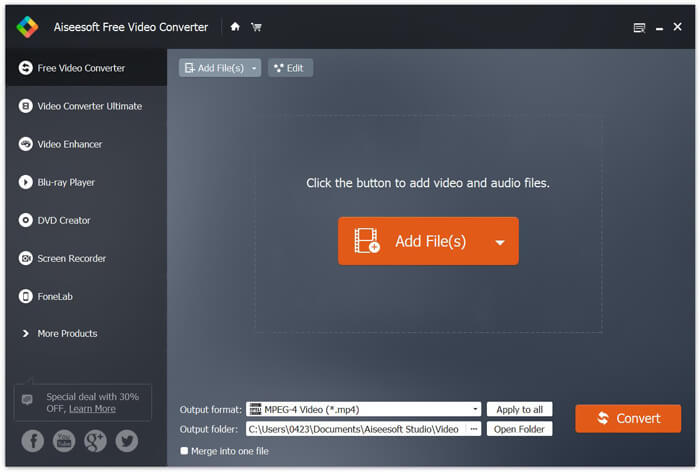
ขั้นตอนที่ 2. หลังจากเพิ่มไฟล์ลงในโปรแกรมแล้ว ให้ไปที่ Output format จากนั้นเลือกไฟล์รูปแบบ MP4.

ขั้นตอนที่ 3. คลิกปุ่ม Convert แล้วรอสักครู่ คุณก็จะได้ไฟล์ MP4 ตามที่ต้องการ.
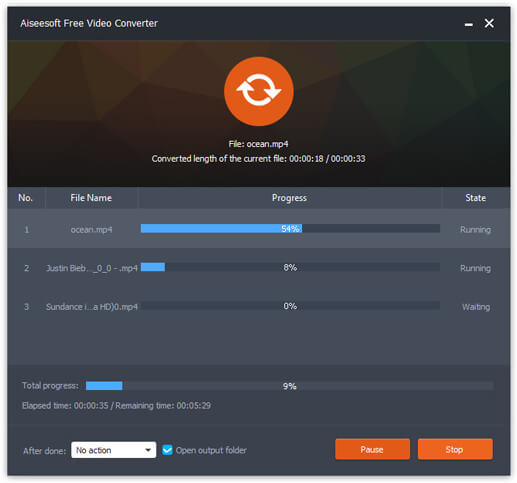
เมื่อได้ไฟล์ MP4 แล้ว คุณสามารถเปิดเล่นบนคอมพิวเตอร์หรืออุปกรณ์พกพาได้ นอกจากนี้ คุณยังสามารถใช้ Free RMVB to MP4 Converter ตัวนี้ในการแปลง RM เป็น MP4 หรือแปลง WMV เป็น MP4 ได้ด้วย.
ตอนที่ 2. วิธีการแปลง RMVB เป็น MP4 ด้วย VLC
VLC ยังทำงานเป็นเครื่องมือแปลงวิดีโอที่ใช้งานได้จริงและคุณสามารถแปลงไฟล์ RMVB ของคุณเป็น MP4 ด้วยคุณภาพสูงได้อย่างง่ายดาย เรามาดูวิธีการใช้ VLC เพื่อทำงานนี้
ขั้นตอนที่ 1. ก่อนอื่น คุณต้องดาวน์โหลดและติดตั้งโปรแกรม VLC Media Player ลงในคอมพิวเตอร์ จากนั้นเปิดโปรแกรม.
ขั้นตอนที่ 2. ไปที่เมนู Media จากนั้นเลือก Convert/Save เพื่อดำเนินการต่อ.
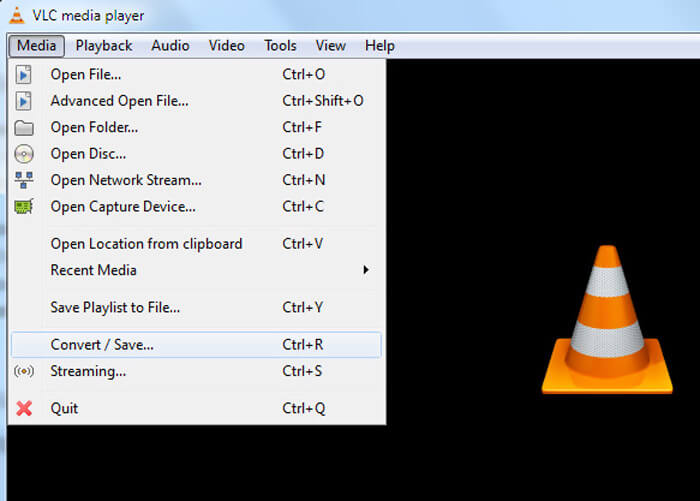
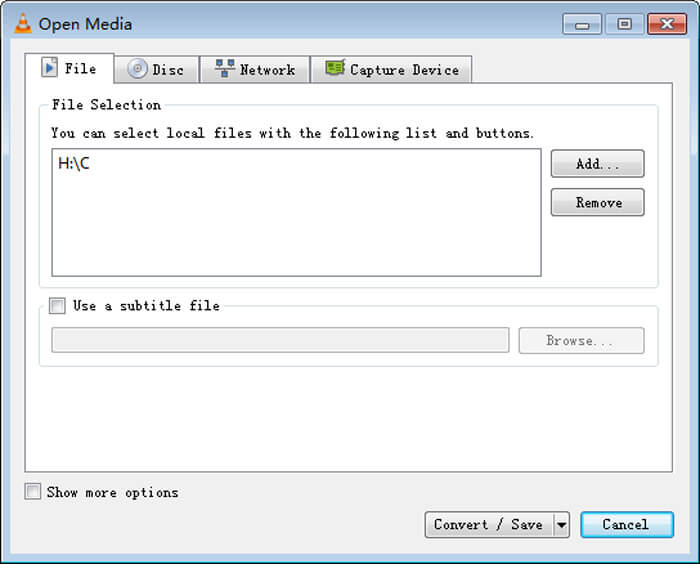
ขั้นตอนที่ 3. เมื่อหน้าต่าง Open Media ปรากฏขึ้น ให้เพิ่มไฟล์ RMVB ลงใน VLC โดยคลิกปุ่ม Add… ที่ตัวเลือก File จากนั้นคลิกปุ่ม Convert/Save ที่ด้านล่างของหน้าต่าง.
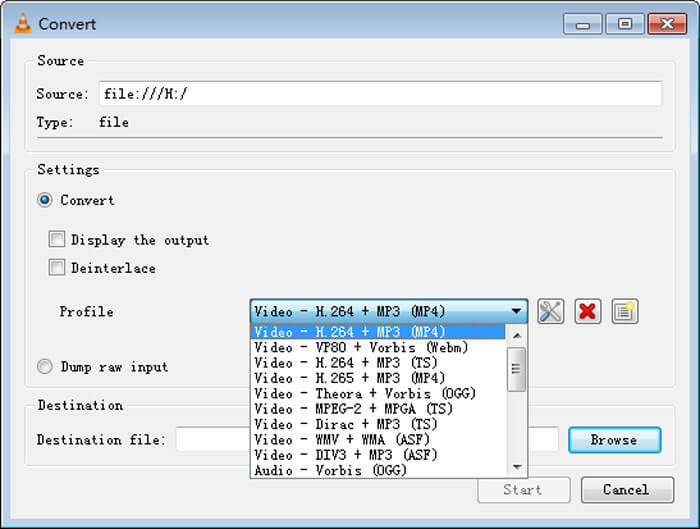
ขั้นตอนที่ 4. จากนั้นคุณจะเข้าสู่หน้าต่าง Convert ที่นี่ให้ไปที่ส่วน Settings เปิดเมนู Profile แล้วเลือก MP4 เป็นรูปแบบไฟล์ผลลัพธ์จากเมนูแบบเลื่อนลง สุดท้าย คลิก Start เพื่อแปลง RMVB ของคุณเป็น MP4 สำหรับการเล่นได้อย่างสะดวก.
ตอนที่ 3. วิธีการเปลี่ยน RMVB เป็น MP4 ออนไลน์
ตัวแปลงวิดีโอออนไลน์ยังรองรับการแปลงวิดีโอ RMVB เป็น MP4 ด้วยความเร็วสูง Free Online Video Converter เป็นตัวแปลงวิดีโอแบบเว็บเบสที่สามารถแปลงไฟล์วิดีโอหรือไฟล์เสียงยอดนิยมให้เป็น MP4, MOV, FLV, AVI, MP3, AAC และอื่น ๆ ได้ฟรี ผู้ใช้สามารถเปลี่ยนไฟล์จาก RMVB เป็น MP4 ผ่านเบราว์เซอร์ได้อย่างง่ายดาย.
ขั้นตอนที่ 1. ไปที่ https://www.free-videoconverter.net/free-online-video-converter/ แล้วคลิกปุ่ม Add Files to Convert เพื่อเปิดใช้งานตัวเรียกโปรแกรม (launcher).
ดาวน์โหลดเวอร์ชันเดสก์ท็อปเพื่อแปลงไฟล์แบบเป็นชุดได้.

ขั้นตอนที่ 2. หลังจากนั้น ให้นำเข้าไฟล์ RMVB ของคุณไปยังเครื่องมือออนไลน์นี้ จากนั้นเลือกไฟล์รูปแบบ MP4 ใต้แท็บ Video เมื่อพร้อมจะแปลงไฟล์แล้ว ให้กดปุ่ม Convert เพื่อเริ่มการแปลง เมื่อการแปลงเสร็จสิ้น ไฟล์ที่แปลงแล้วจะถูกบันทึกลงในคอมพิวเตอร์ของคุณโดยอัตโนมัติ.

RMVB เทียบกับ MP4
RMVB ซึ่งเป็นรูปแบบใหม่ของรูปแบบ Real Media มาตรฐาน (.RM) คือรูปแบบไฟล์วิดีโอ Real Media ที่บีบอัดโดยใช้บิตเรตแบบแปรผัน เป็นรูปแบบยอดนิยมสำหรับภาพยนตร์และอนิเมะในเอเชีย ไฟล์ RMVB มีขนาดเล็กกว่าและมีบิตเรตต่ำกว่า แต่คุณภาพดีกว่า
เผยแพร่โดยกลุ่มผู้เชี่ยวชาญด้านภาพเคลื่อนไหว (MPEG) ในปี 2544 รูปแบบ MP4 สามารถช่วยคุณบันทึกวิดีโอ เสียง คำบรรยาย และข้อมูลภาพในแทร็กแยกกัน ย่อมาจาก MPEG-4 Part 14 นอกจากนี้ยังเป็นหนึ่งในรูปแบบที่นิยมใช้มากที่สุดสำหรับการสตรีมและแชร์วิดีโอ
ส่วนที่ 4 คำถามที่พบบ่อยของ RMVB เป็น MP4
ไฟล์ RMVB คืออะไร?
RMVB (RealMedia Variable Bitrate) เป็นรูปแบบไฟล์วิดีโอ Real Media โดยใช้บิตเรตของตัวแปร ครั้งหนึ่งเคยเป็นที่นิยมในการเผยแพร่อนิเมะภาพยนตร์ตอนทอร์เรนต์และอื่น ๆ บนเว็บในเอเชียเนื่องจากขนาดไฟล์เล็กลงและคุณภาพดีกว่ามาก
วิธีการเปิดไฟล์ RMVB
RealPlayer รองรับการเล่นไฟล์ RMVB ใน Windows, Mac OS X และ Linux หรือคุณสามารถใช้ VLC เพื่อเล่นไฟล์ RMVB
HandBrake สามารถแปลง RMVB เป็น MP4 ได้หรือไม่
HandBrake เป็นเครื่องมือที่ยอดเยี่ยมสำหรับการแปลงวิดีโอให้ทำงานบนอุปกรณ์ที่รองรับจำนวนมาก เป็นทางเลือกที่ดีสำหรับทุกคนในการเปลี่ยน RMVB ให้เป็น MP4
นั่นคือวิธีที่คุณแปลงไฟล์ RMVB เป็น MP4 คุณพบปัญหาในการทำตามขั้นตอนข้างต้นหรือไม่? อย่าลังเลที่จะแจ้งให้เราทราบความคิดของคุณ
-
 3 ขั้นตอนง่ายๆในการเบิร์นไฟล์วิดีโอ _TS / โฟลเดอร์ลงดีวีดีบน Mac / Windows
 ฉันจะแปลงและเบิร์นไฟล์ TS ไปยังแผ่น DVD ได้อย่างไร คำแนะนำทีละขั้นตอนนี้จะแสดงวิธีคัดลอกไฟล์และโฟลเดอร์ TS ไปยัง DVD บน Windows / Mac เพื่อให้คุณสามารถรับชมไฟล์ TS บนเครื่องเล่นดีวีดีหรือทีวีได้
-
 6 วิธีง่ายๆในการแปลง TS เป็น AVI / MKV / MOV / WMV บน Windows / Mac
 ต้องการแปลงไฟล์ TS เป็น AVI / MKV / MOV / WMV อย่างรวดเร็วหรือไม่? บทความนี้แสดงตัวแปลงวิดีโอออนไลน์และออฟไลน์พร้อมคู่มือฉบับสมบูรณ์ บางทีคุณอาจได้รับตัวแปลง TS ฟรีที่ดีที่สุดที่นี่
-
 วิธีการแปลง MP4 เป็น M4A บน Windows / Mac (ฟรีและออนไลน์)
 ฉันจะแปลง MP4 เป็น M4A ออนไลน์ได้อย่างไร ฉันสามารถแยกเสียงออกจากไฟล์ MP4 ได้หรือไม่? อ่านโพสต์นี้และคุณจะได้รับคำตอบทั้งหมดเกี่ยวกับการแปลงจาก MP4 เป็น M4A

