


 Video Converter Ultimate
 บันทึกหน้าจอ
 ซ่อมวิดีโอ
 ดาวน์โหลดอย่างปลอดภัย
รายการเครื่องมือและแพลตฟอร์มที่พร้อมใช้งานบนเว็บสำหรับ 3GP Voice/Video Recorder
รูปแบบคอนเทนเนอร์มาตรฐาน ISO ที่เป็นที่รู้จักในด้านขนาดเล็กมาก จึงเหมาะอย่างยิ่งสำหรับการถ่ายโอนข้อมูลผ่านเครือข่าย 3G และเครือข่ายที่ใกล้เคียงกัน เครื่องบันทึกการโทรแบบ 3GP ขั้นสูงบางตัวใช้รูปแบบนี้เป็นฟอร์แมตตามมาตรฐาน ไม่นานหลังจากนั้น การเกิดขึ้นของรูปแบบ 3GP ก็ช่วยให้เราสามารถรับชมไฟล์ขนาดใหญ่บนสมาร์ตโฟนได้ แม้จะใช้อินเทอร์เน็ตความเร็วต่ำ ผู้ใช้ส่วนใหญ่นิยมใช้ไฟล์ชนิดนี้เพราะรองรับทั้งวิดีโอ เสียง และข้อความ ดังนั้นผู้ใช้จึงยังต้องการบันทึกวิดีโอ 3GP หรือบันทึกไฟล์เสียง 3GP แล้วแปลงเป็นรูปแบบใหม่ เช่น MP3 ในกรณีนี้ เครื่องบันทึกวิดีโอ 3GP หรือ เครื่องบันทึกเสียง 3GP จึงกลายเป็นเครื่องมือที่ขาดไม่ได้ ดังนั้นมาดูกันต่อและไปยังรายละเอียดด้านล่างกันเลย.

ส่วนที่ 1 เครื่องบันทึก 3GP ออนไลน์ที่ดีที่สุดในการจับภาพวิดีโอ 3GP ฟรี
FVC บันทึกหน้าจอฟรี
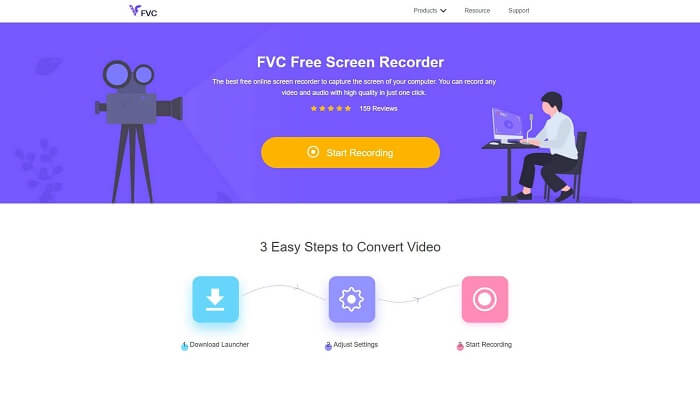
เครื่องมือที่เหมาะที่สุดสำหรับผู้ใช้ที่ไม่ต้องการดาวน์โหลดไฟล์ใด ๆ และมีการเชื่อมต่ออินเทอร์เน็ตที่เสถียรสำหรับการบันทึก หากคุณเป็นผู้ใช้ประเภทนี้ นี่คือโปรแกรมบันทึกหน้าจอออนไลน์ฟรีที่ดีที่สุดที่พัฒนาโดย FVC นั่นคือ FVC Free Screen Recorder เครื่องมือนี้ช่วยให้ผู้ใช้บันทึกทุกการเคลื่อนไหวที่แสดงบนหน้าจอคอมพิวเตอร์ของคุณ หากคุณต้องการบันทึกการเล่นเกม การประชุมธุรกิจ การสนทนา และอื่น ๆ นี่คือเครื่องมือที่เหมาะกับคุณที่สุด สำหรับข้อมูลและขั้นตอนโดยละเอียด โปรดอ่านอย่างตั้งใจและทำตามคำแนะนำที่ระบุไว้.
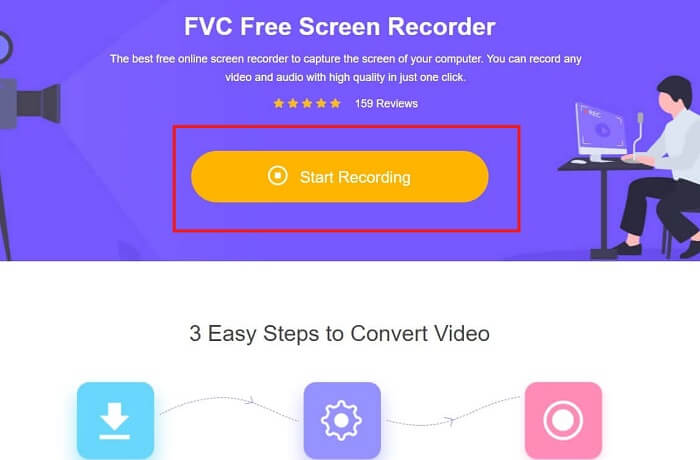
ขั้นตอนที่ 1. คลิก ลิงก์ นี้เพื่อไปยังส่วนติดต่อหลักของเว็บไซต์ คลิก Start Recording แล้วเปิดใช้งานเครื่องมือ.
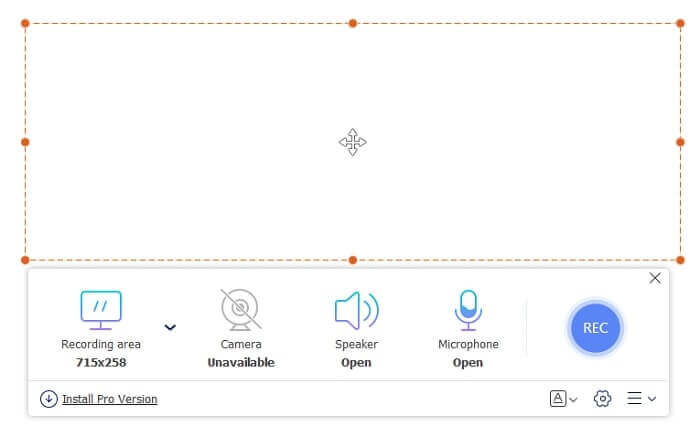
ขั้นตอนที่ 2. หากเครื่องมือเปิดอยู่แล้ว คุณจะเห็นหน้าจอลอยขึ้นมาแบบนี้.
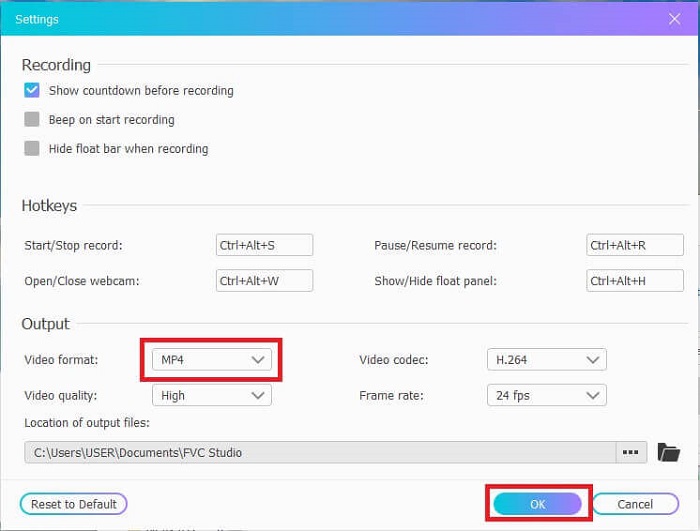
ขั้นตอนที่ 3. กดปุ่ม Settings เพื่อปรับรูปแบบไฟล์และการตั้งค่าอื่น ๆ ตามที่คุณต้องการ จากนั้นคลิก OK เพื่อบันทึก.
ขั้นตอนที่ 4. ในแถบเครื่องมือลอย คุณสามารถปรับขนาดกรอบ หรือคลิก Full Screen เพื่อบันทึกแบบเต็มจอ ถัดจากขนาดกรอบคือ Webcam เพื่อเพิ่มใบหน้าของคุณขณะบันทึก Speaker สำหรับเสียงระบบ และสุดท้ายคือ Mic เพื่อเพิ่มเสียงพูดของคุณ หากพร้อมจะเริ่มแล้ว ให้คลิกปุ่มรูปแผ่นดิสก์ เพื่อเริ่มบันทึก.
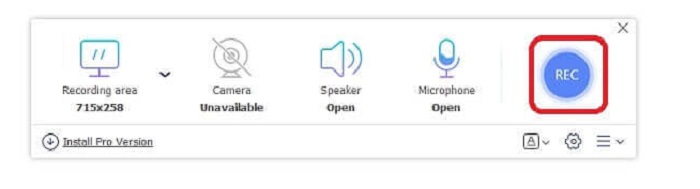
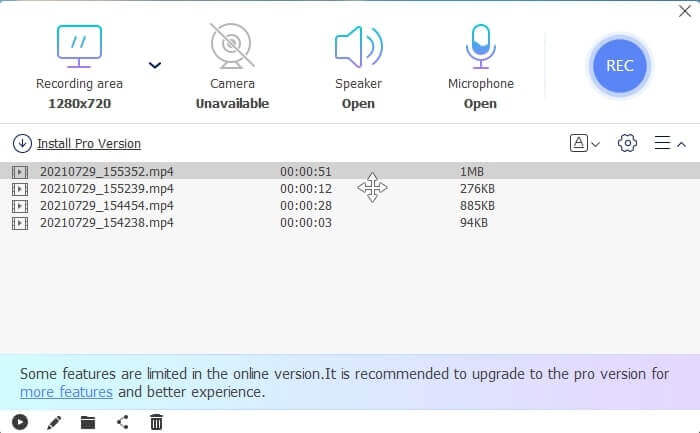
ขั้นตอนที่ 5. เมื่อบันทึกเสร็จแล้ว ให้คลิกปุ่มรูปสี่เหลี่ยม จากนั้นรายการ History จะปรากฏใต้แถบเครื่องมือลอย โดยเรียงจากไฟล์ใหม่ที่สุดไปหาเก่าที่สุด.
ข้อดี
- สุดยอดเครื่องมือออนไลน์ฟรีที่มีให้สำหรับทุกแพลตฟอร์ม
- ต่างจากเครื่องมือออนไลน์อื่นๆ ตรงที่ใช้งานง่ายและไม่มีโฆษณาปรากฏขึ้นขณะบันทึก
- ในการสมัคร คุณต้องใช้เครื่องมือนี้
จุดด้อย
- ขึ้นอยู่กับอินเทอร์เน็ต มันจะไม่ทำงานหากไม่มีการเชื่อมต่ออินเทอร์เน็ตหรือข้อมูล
- ไม่มีคุณสมบัติล็อคหน้าจอ มีเฉพาะในเครื่องมือรุ่นพรีเมียมเท่านั้น
ส่วนที่ 2 3GP Video & Voice Recorders ยอดนิยมอื่นๆ สำหรับ Windows และ Mac
1. เครื่องบันทึกหน้าจอ FVC
เคยได้ยินหนึ่งในเครื่องบันทึกหน้าจอที่ดีที่สุดที่ผู้ใช้ทั่วโลกเลือกหรือไม่? ถ้าไม่ใช่สิ่งนี้เหมาะสำหรับคุณ FVC Screen Recorder โปรแกรมบันทึกหน้าจอนี้มีให้ใช้งานบนแพลตฟอร์มที่รู้จักทั้งหมด ปัญหาที่พบบ่อยที่สุดที่คุณอาจพบกับเครื่องบันทึกหน้าจออื่น เครื่องบันทึกเสียง android บางรุ่น 3gp ไม่มีเสียงออก ขณะใช้เครื่องมือนี้ คุณจะไม่พบปัญหาประเภทนี้ตราบใดที่คุณไม่ได้ปิดลำโพงสำหรับเสียงของระบบและไมโครโฟนเพื่อเพิ่มเสียงของคุณ หากคุณต้องการทราบวิธีใช้เครื่องมืออเนกประสงค์นี้ โปรดอ่านอย่างละเอียดและปฏิบัติตามคำแนะนำด้านล่าง
ขั้นตอนที่ 1. ดาวน์โหลดเครื่องมือ เลือกระหว่างสองระบบปฏิบัติการที่คุณกำลังใช้งานอยู่ ติดตั้งโปรแกรม จากนั้นปรับ Preferences ตามที่คุณต้องการ แล้วคลิก Finish เพื่อไปต่อ.
ดาวน์โหลดฟรีสำหรับ Windows 7 ขึ้นไปดาวน์โหลดอย่างปลอดภัย
ดาวน์โหลดฟรีสำหรับ MacOS 10.7 ขึ้นไปดาวน์โหลดอย่างปลอดภัย
ขั้นตอนที่ 2. หลังการติดตั้ง แถบเครื่องมือลอยแบบนี้จะเด้งขึ้นมาบนหน้าจอของคุณ ซึ่งจะแสดงให้เห็นว่าแอปที่คุณใช้กำลังทำงานอยู่ผ่านโปรแกรมแล้ว คลิกที่ Video Recorder.
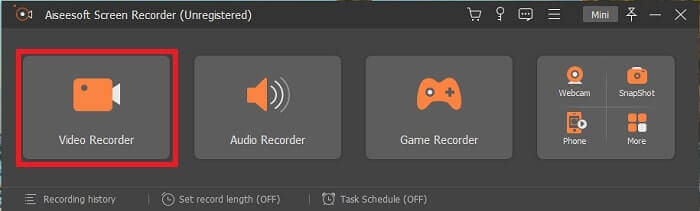
ขั้นตอนที่ 3. หลังจากคลิกแล้ว ให้ปรับการแสดงผลเป็นแบบเต็มจอ หรือเลือกเฉพาะบางพื้นที่ก็ได้ กด System Sound เพื่อเพิ่มเสียงจากคอมพิวเตอร์ของคุณ ตัวเลือกอื่น ๆ ขึ้นอยู่กับว่าคุณต้องการใช้หรือไม่ คุณยังสามารถเพิ่มใบหน้าและเสียงของคุณได้โดยเปิด Webcam และ Microphone.
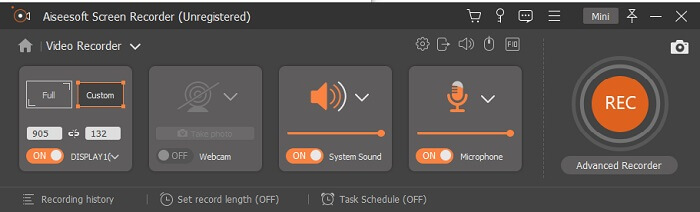
ขั้นตอนที่ 4. ก่อนเริ่มบันทึก ให้คลิกที่ปุ่มรูปเฟืองเพื่อปรับการตั้งค่าหากจำเป็น จากนั้นคลิก OK เพื่อบันทึกการตั้งค่า หลังจากเตรียมทุกอย่างเรียบร้อยแล้ว ให้คลิกปุ่มรูปวงกลม เพื่อเริ่มการบันทึก
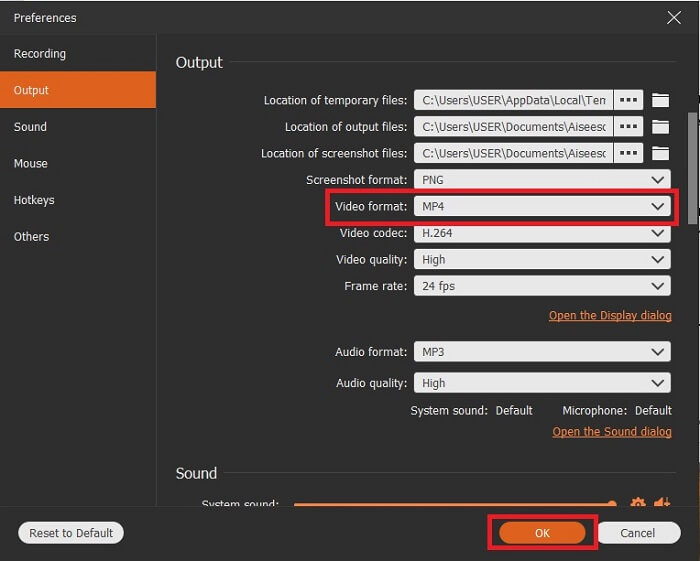
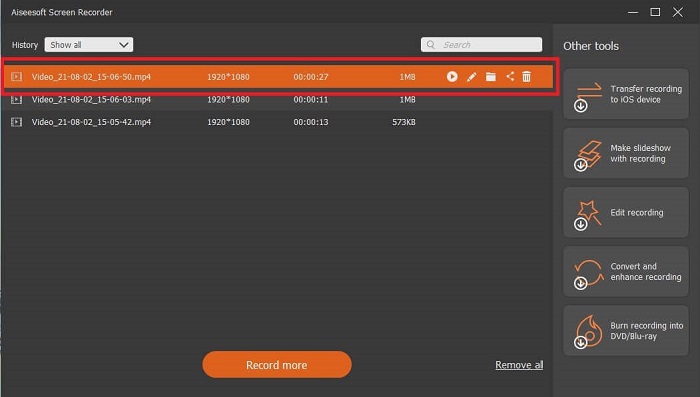
ขั้นตอนที่ 5. หากต้องการหยุดการบันทึก ให้คลิกปุ่มรูปสี่เหลี่ยมขนาดเล็กบนแถบเครื่องมือเพื่อหยุด จากนั้นคลิก Save และเลือกตำแหน่งที่ต้องการบันทึกไฟล์ จากนั้นจะมีรายการแสดงขึ้นมาบนหน้าจอของคุณ โดยเรียงจากใหม่สุดไปหาเก่าสุด คลิกวิดีโอแรกด้านบนสุดเพื่อรับชมวิดีโออีกครั้ง.
ข้อดี
- มันไม่ได้ขึ้นอยู่กับอินเทอร์เน็ต บันทึกได้มากเท่าที่คุณต้องการทุกที่ทุกเวลา
- เป็นมิตรกับผู้ใช้และเป็นตัวเลือกที่ดีที่สุดสำหรับผู้เริ่มต้นที่ต้องการผลงานระดับมืออาชีพหรือสำหรับมืออาชีพที่กำลังมองหาเครื่องบันทึกหน้าจอที่ใช้งานง่าย
- มีคุณสมบัติพิเศษนี้ คือ หน้าจอล็อคอิน
จุดด้อย
- เครื่องมือจ่ายต่อการใช้งาน แต่ผู้ใช้ยังคงใช้อยู่
- ต้องใช้พื้นที่เก็บข้อมูล 2.4MB เพื่อดาวน์โหลด
2. ScreenFlow
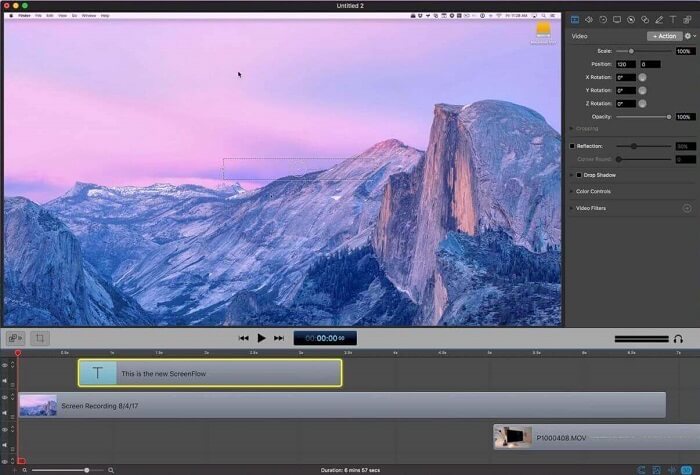
อีกหนึ่งเครื่องมือที่ดีที่สุดสำหรับผู้ใช้ Mac Screenflow เป็นเครื่องมือที่ถือว่าเป็นเครื่องมือบันทึกหน้าจอที่ดีที่สุดในระบบปฏิบัติการ Mac เป็นเครื่องมือจ่ายต่อการใช้งาน ดังนั้น หากคุณคิดว่าเครื่องมือนี้ราคาถูก คำตอบก็คือไม่ใช่ เครื่องมือนี้มีค่าใช้จ่ายเกือบเกินขีดจำกัดที่เครื่องบันทึกหน้าจอสามารถให้ได้ สามารถเสนอสิ่งที่เครื่องบันทึกหน้าจอแบบจ่ายต่อการใช้งานอื่น ๆ สามารถนำเสนอได้ และด้วยเหตุผลบางประการ ผู้ใช้ Mac จึงชอบสิ่งนี้เป็นเครื่องบันทึกหน้าจอส่วนตัว
ข้อดี
- เครื่องมือที่ใช้งานง่ายที่มีให้สำหรับ Mac
- เครื่องมือที่ทันสมัย
- ไม่มีปัญหามัลแวร์
จุดด้อย
- ใช้ได้เฉพาะบน Mac
- อาจมีราคาแพงเท่าที่คุณเลือก
3. Fraps
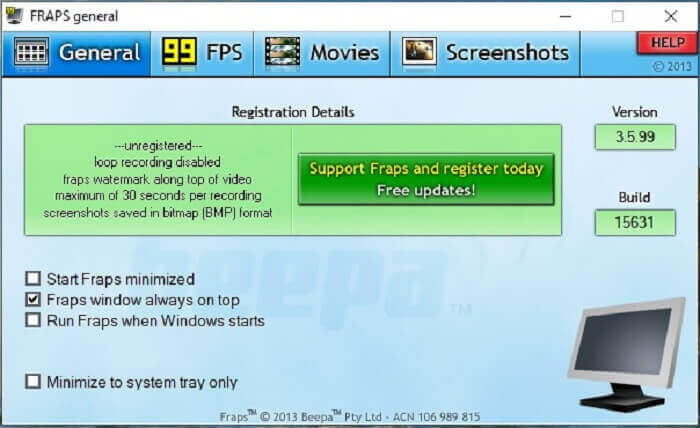
เช่นเดียวกับเครื่องมืออื่น Fraps สามารถอยู่ใน 10 อันดับแรกของโปรแกรมบันทึกหน้าจอที่ดีที่สุดได้อย่างง่ายดาย เครื่องมือนี้ทำให้การบันทึกหน้าจอของคุณง่ายที่สุด เนื่องจากการสอนตรงจุดของเครื่องมือ แต่เครื่องมือนี้ไม่อยู่ในการอัปเดต เนื่องจากมีการอัพเดทเครื่องมือน้อยลง ความนิยมจึงน้อยลงเรื่อยๆ แต่ก็ยังมีผู้ใช้บางคนชอบมันเหมือนเดิม
ข้อดี
- เครื่องมือพิเศษที่รองรับรูปแบบไฟล์ AVI
- ส่วนต่อประสานที่ใช้งานง่ายพร้อมคำแนะนำโดยละเอียด
- รองรับความละเอียดสูงสุด 7680x4800
จุดด้อย
- อินเทอร์เฟซดูน่าเบื่อ
- เนื่องจากรูปแบบไฟล์ AVI หากคุณบันทึกวิดีโอ 20 นาที จะต้องใช้พื้นที่จัดเก็บเกือบ 4 กิบ ไม่ใช่ตัวเลือกที่ดีที่สุดสำหรับการบันทึกแบบยาว
ส่วนที่ 3 แผนภูมิเปรียบเทียบ
| FFeatures | FVC บันทึกหน้าจอฟรี | เครื่องบันทึกหน้าจอ FVC | Screenflow | Fraps |
| การบันทึกหน้าจอวิดีโอ/เสียง |  | | | |
| ใส่คำอธิบายประกอบ | | | | |
| มัลแวร์ปลอดภัย | | | | |
| การเร่งฮาร์ดแวร์ |  | | | |
| หน้าจอล็อคอิน | | | | |
| ขนาดไฟล์ | ไม่กี่ kbps สำหรับตัวเรียกใช้ | 2.1mb | 85.3 mb | 2.4mb |
| ระบบปฏิบัติการที่ใช้ได้ | ในทุกแพลตฟอร์ม | ในทุกแพลตฟอร์ม | Mac OS | Windows XP, 2003, Vista และ Windows 7 |
| ช่วงราคา | เครื่องบันทึกออนไลน์โอเพ่นซอร์สฟรี | เป็นเวลา 1 เดือน: $25.00 หนึ่งปี: $31.20 สำหรับใบอนุญาตตลอดชีพ: $55.20 | SCREENFLOW(ราคาส่วนลดปริมาณ): $149 SCREENFLOWSuper Pak: $209 SCREENFLOWSuper Pak + รองรับพรีเมี่ยม: $239 | ฟรี แต่คุณสามารถลงทะเบียน $37 . ได้ |
ส่วนที่ 4. คำถามที่พบบ่อยเกี่ยวกับ 3GP Recorder
เหตุใดฉันจึงไม่สามารถเล่นรูปแบบไฟล์สื่อ 3GP บนเครื่องเล่นสื่อของฉันได้
สาเหตุอาจเป็นเพราะโปรแกรมเล่นสื่อของคุณไม่รองรับโค้ดเดกประเภทนี้ หากคุณต้องการดูไฟล์รูปแบบ 3GP ของคุณ คุณสามารถใช้ FVC Free Video Player โปรแกรมเล่นสื่อนี้ให้ใช้งานฟรีและรองรับรูปแบบวิดีโอ–เสียงที่หลากหลาย ตราบใดที่คุณมีอินเทอร์เน็ต คุณยังสามารถสมัครเวอร์ชันพรีเมียมที่มีตัวเลือกและฟีเจอร์มากกว่าเวอร์ชันฟรีได้ หรือคุณสามารถอ่าน Best 3GP Players เพื่อค้นหาโปรแกรมที่คุณต้องการ.
ฉันจะบันทึกไฟล์เสียง .3gp จากเครื่องบันทึกเสียง android เป็น mp3 ได้อย่างไร
ใช้โปรแกรมแปลงไฟล์ที่สามารถแปลง 3GP เป็น MP3 ได้ ตัวอย่างที่ดีคือ FVC Free Online Video Converter ซึ่งสามารถแปลงรูปแบบไฟล์มีเดียได้มากกว่า 200+ รูปแบบ และใช้ได้กับทุกแพลตฟอร์ม.
เป็นไปได้ไหมที่จะรวมไฟล์ 3GP ที่แตกต่างกันในเอาต์พุตสื่อเดียว?
ได้แน่นอน โดยอาศัยความช่วยเหลือจาก FVC Free Online Merger เครื่องมือออนไลน์นี้ทำให้สามารถรวมไฟล์ 3GP 2 ไฟล์หรือมากกว่านั้น ให้กลายเป็นไฟล์เดียวได้ นับเป็นอีกหนึ่งเครื่องมือที่ยอดเยี่ยมที่ผลิตโดย FVC คลิกที่ Merger เพื่อดำเนินการต่อ.
สรุป
เราสรุปได้ว่าผู้ใช้ส่วนใหญ่ยังคงทำการบันทึกเพื่อวัตถุประสงค์ประเภทต่างๆ ไม่ว่าจะเป็นเครื่องบันทึกสำหรับการตัดต่อ การประชุมทางธุรกิจ การอภิปรายของครู และอื่นๆ อีกมากมาย แต่ถึงกระนั้น ไม่ว่าเหตุผลที่คุณบันทึกหรือรูปแบบใดก็ตามที่คุณต้องการให้เป็นผลลัพธ์ของผลิตภัณฑ์ขั้นสุดท้าย เครื่องบันทึกทั้งหมดสามารถทำงานตามที่คุณต้องการ
แต่ท่ามกลางโปรแกรมบันทึกหน้าจอที่หลากหลายบนเว็บและในลิสต์นี้ คุณอาจยังสงสัยว่าแบบไหนถึงจะเหมาะกับคุณที่สุด ก่อนที่เราจะให้แนวคิดเกี่ยวกับสิ่งที่คุณควรเลือก คุณต้องพิจารณาให้ถี่ถ้วนเสียก่อน ว่าโปรแกรมบันทึกหน้าจอของคุณสามารถตอบโจทย์ความต้องการในวันนี้ และอาจรวมถึงในอนาคตได้หรือไม่ FVC Screen Recorder คือเครื่องมือที่ดีที่สุดสำหรับคุณ ต่างจากเครื่องมืออื่น ๆ ที่ระบุไว้ที่นี่ โปรแกรมนี้มีความโดดเด่นจนสามารถสร้างช่องว่างให้ต่างจากโปรแกรมบันทึกหน้าจอบนเว็บทั้งหลายได้ แต่ถึงอย่างนั้นก็ยังใช้งานง่ายเสมอ และให้ประสิทธิภาพระดับที่ทั้งมือใหม่และมืออาชีพต้องการ แล้วคุณจะรออะไรอยู่ล่ะ อย่าพอใจกับของฟรีหรือของราคาแพง ในเมื่อคุณสามารถซื้อเวอร์ชันราคาย่อมเยาที่ทำได้มากกว่านี้.
-
 4 เครื่องบันทึกการเปิดเว็บฟรีที่ดีที่สุดเพื่อจับภาพวิดีโอหน้าจอ
 กำลังมองหาวิธีที่ดีที่สุดในการบันทึกกิจกรรมบนหน้าจอบนเดสก์ท็อปโดยไม่ต้องเสียเงินใช่หรือไม่? นี่คือเครื่องบันทึกการเปิดเว็บฟรี 4 รายการที่ใช้บ่อยที่สุด
-
 เครื่องบันทึกเสียงรีวิว Cinch ที่เป็นกลางและทางเลือกที่ดีที่สุด
 Cinch Audio Recorder เป็นวิธีที่ดีที่สุดในการดาวน์โหลดเพลงจากเว็บไซต์สตรีมมิ่ง เพียงเรียนรู้เพิ่มเติมเกี่ยวกับบทวิจารณ์ที่เป็นกลางและทางเลือกที่ดีที่สุดจากบทความ
-
 เครื่องบันทึกเมาส์และคีย์บอร์ดที่ดีที่สุด 5 อันดับแรกสำหรับ Windows และ Mac
 ต่อไปนี้คือโปรแกรมบันทึกเมาส์และคีย์บอร์ดที่ดีที่สุดห้าอันดับแรกที่สามารถบันทึกการเคลื่อนไหวของเมาส์และการคลิกแป้นพิมพ์ของคุณและทำซ้ำเหตุการณ์ต่างๆ
