


 Video Converter Ultimate
 บันทึกหน้าจอ
 ซ่อมวิดีโอ
 ดาวน์โหลดอย่างปลอดภัย
เครื่องบันทึกวิดีโอสตรีม 5 อันดับแรกเพื่อบันทึกสตรีมสดที่รองรับโดยทุกแพลตฟอร์มอุปกรณ์
คุณพลาดการสตรีมสดที่คุณชื่นชอบเพราะตารางงานที่ยุ่งของคุณหรือไม่? คุณต้องการบันทึกสตรีมสดของดาราที่คุณชื่นชอบหรือไม่? วิดีโอสตรีมมิ่งเหล่านี้ส่วนใหญ่อยู่ในรูปแบบ M4V นั่นคือเหตุผลที่ง่ายต่อการบันทึกโดยใช้เครื่องบันทึกหน้าจอต่างๆ ขณะนี้คุณสามารถเล่นวิดีโอสตรีมมิงแบบสดได้แม้ว่าจะออฟไลน์อยู่ สิ่งที่คุณต้องมีคือเครื่องมือที่เหมาะสมซึ่งตรงกับแพลตฟอร์มของอุปกรณ์ของคุณ ไม่ต้องกังวลอีกต่อไป เราได้รับหลังของคุณ หากคุณไม่รู้ว่าจะเริ่มต้นจากที่ใดและควรใช้อะไร ให้อ่านบทความต่อไปและรับทราบ

ส่วนที่ 1 เครื่องบันทึก Steam M4V ออนไลน์: FVC เครื่องบันทึกหน้าจอฟรี
FVC Free Screen Recorder เป็นเครื่องบันทึกวิดีโอสตรีม M4V และเป็นเครื่องมือออนไลน์ฟรีที่ให้คุณอัดบันทึกการถ่ายทอดสดได้ สามารถบันทึกสตรีมสดด้วยความละเอียดระดับ HD ได้ใน 3 ขั้นตอนง่าย ๆ โดยไม่จำเป็นต้องดาวน์โหลดแอปมาใช้ เพียงแค่เปิดใช้งานผ่านออนไลน์เท่านั้น คุณเพียงต้องมีอินเทอร์เน็ตที่ใช้งานได้และเบราว์เซอร์ที่เครื่องมือนี้รองรับ นอกจากนี้คุณยังสามารถปรับบิทเรตและขนาดเฟรมได้ก่อนเริ่มบันทึก ซึ่งเป็นชุดฟีเจอร์ที่หาได้ยากมากในเครื่องมือออนไลน์ หากคุณกำลังมองหาเครื่องมือที่ใช้งานได้จริงโดยไม่ต้องจ่ายเงิน นี่เป็นตัวเลือกที่น่าสนใจ คู่มือแบบละเอียดด้านล่างจะแสดงให้เห็นว่าการใช้งานนั้นง่ายเพียงใด.
ขั้นตอนที่ 1. เข้าเยี่ยมชมเว็บไซต์อย่างเป็นทางการได้จากลิงก์นี้ https://www.free-videoconverter.net/free-screen-recorder/.
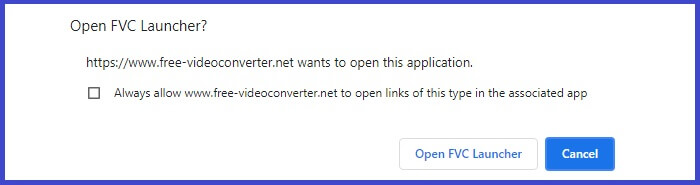
ขั้นตอนที่ 2. คลิก Start Recording เพื่อเปิดใช้งานเครื่องมือ ทำตามขั้นตอนการเปิดใช้งานและอนุญาตสิทธิ์ต่าง ๆ ที่จำเป็นจนกว่าระบบจะมีแถบลอยขึ้นมาให้ใช้งาน.
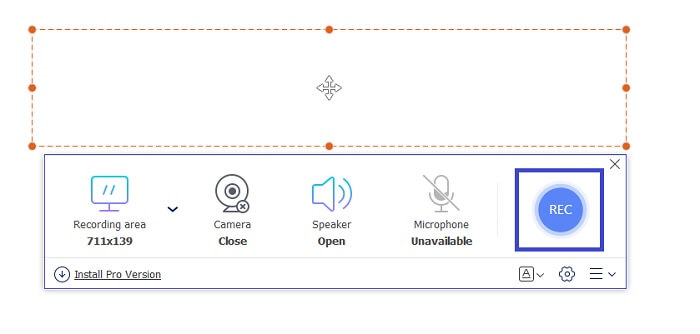
ขั้นตอนที่ 3. เมื่อเครื่องมือถูกเปิดใช้งานแล้ว ให้เริ่มบันทึกได้โดยการคลิกปุ่ม REC.
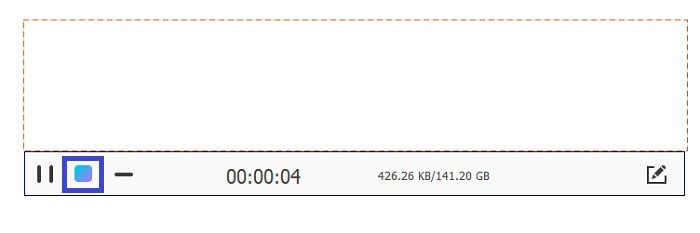
ขั้นตอนที่ 4. เมื่อคุณบันทึกเสร็จแล้ว ให้คลิกปุ่ม สี่เหลี่ยมสีน้ำเงิน เพื่อสิ้นสุดการบันทึก สามารถค้นหาไฟล์ที่บันทึกได้จากอินเทอร์เฟซของโปรแกรม โดยจะอยู่ที่ส่วนล่างของแถบลอย.
ส่วนที่ 2 เครื่องบันทึก M4V สตรีม 5 อันดับแรกสำหรับ Windows และ Mac
เครื่องบันทึกหน้าจอ FVC
ตอนนี้ หากคุณกำลังมองหาเครื่องมือที่เข้ากันได้กับคอมพิวเตอร์ Windows และ Mac FVC Screen Recorder คือเครื่องมือที่คุณกำลังมองหา เครื่องมือนี้สว่างขึ้น! เมื่อพิจารณาถึงคุณสมบัติของแอปแล้ว ถือว่าคุ้มค่าที่จะลอง คุณรู้หรือไม่ว่าเครื่องมือนี้มีสิ่งที่พวกเขาเรียกว่า Task scheduler ซึ่งคุณสามารถตั้งเวลาและวันที่ของสตรีมแบบสดและออกจากพีซีของคุณได้ หากคุณมีงานยุ่งมากพอที่จะอยู่หน้าคอมพิวเตอร์ นี่คือสิ่งที่คุณต้องการ กำหนดเวลาและปล่อยให้ส่วนที่เหลือไปที่ FVC Screen Recorder คุณสามารถรับชมการบันทึกได้ทุกบิตโดยไม่จำกัด ใช้งานง่ายมาก ทำตามคำแนะนำด้านล่างเพื่อทราบข้อมูลเพิ่มเติม
ดาวน์โหลดฟรีสำหรับ Windows 7 ขึ้นไปดาวน์โหลดอย่างปลอดภัย
ดาวน์โหลดฟรีสำหรับ MacOS 10.7 ขึ้นไปดาวน์โหลดอย่างปลอดภัย
ขั้นตอนที่ 1. ดาวน์โหลดและติดตั้งเครื่องมือนี้ลงบนคอมพิวเตอร์ Windows หรือ Mac ของคุณ.
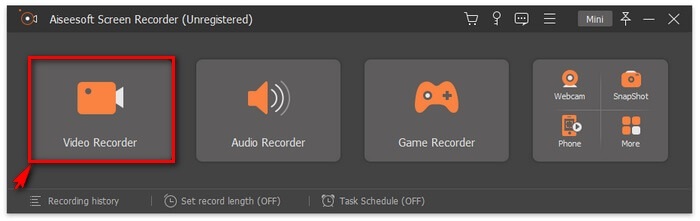
ขั้นตอนที่ 2. จากนั้นทำตามตัวช่วยติดตั้ง (Setup Wizard) จนแอปเปิดขึ้นมา แล้วคลิกที่ Video Recorder.
ขั้นตอนที่ 3. ตอนนี้ให้คลิกปุ่ม REC เพื่อเริ่มการบันทึก.
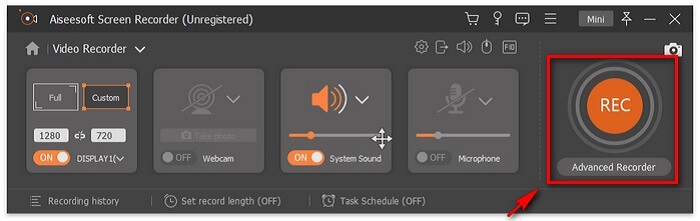
หมายเหตุ: คุณยังสามารถใส่คำอธิบายประกอบลงในวิดีโอขณะกำลังบันทึกได้ เพียงคลิกไอคอนรูปดินสอ (Pencil) แล้วตัวเลือกต่าง ๆ จะปรากฏขึ้น จากนั้นคุณสามารถเพิ่มรูปร่าง เปลี่ยนแบบอักษร เปลี่ยนสี และเพิ่มลูกศรได้.
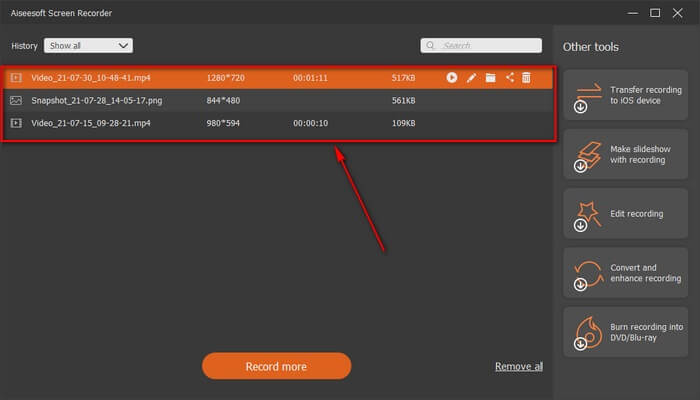
ขั้นตอนที่ 4. สุดท้ายให้คลิกปุ่มหยุดการบันทึก ซึ่งก็คือปุ่มสี่เหลี่ยมสีแดง (RED Square) ที่อยู่ทางด้านซ้ายของแถบลอย.

ขั้นตอนที่ 5. ตรวจสอบไฟล์วิดีโอภายหลังโดยดูตามภาพด้านล่าง.
Windows 10 Game Bar
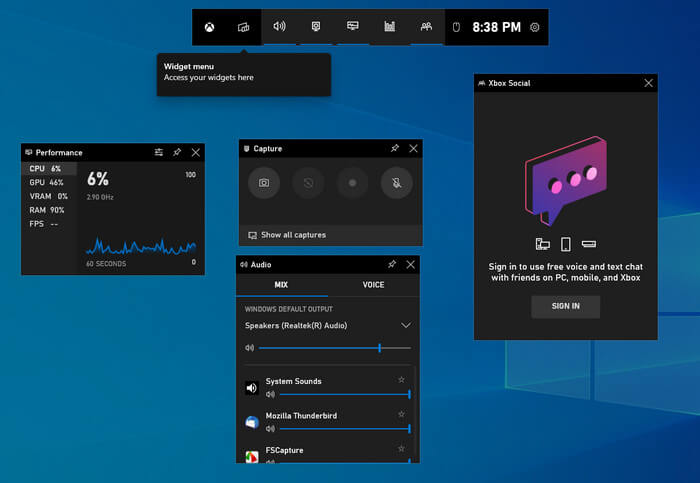
เครื่องมือถัดไปในรายการสำหรับใช้งานบนเดสก์ท็อปคือ Windows 10 Game Bar หากคุณเป็นผู้ใช้ระบบปฏิบัติการ Windows คุณอาจเคยเห็นหรือเคยเจอฟีเจอร์นี้มาก่อน Windows 10 Game Bar เป็นฟีเจอร์ในตัวของระบบปฏิบัติการ Windows 10 แล้วมันคืออะไร? มันคือโปรแกรมบันทึกหน้าจอ ถ่ายภาพหน้าจอ และบันทึกวิดีโอ/เสียงในตัว หลายคนอาจไม่รู้ว่าสามารถเปิดใช้งานได้โดยการพิมพ์คำว่า Xbox Windows 10 Game Bar
ส่วนที่ 3. เครื่องบันทึก M4V 2 อันดับแรกสำหรับ iPhone และ Android
โปรแกรมบันทึกหน้าจอ AZ
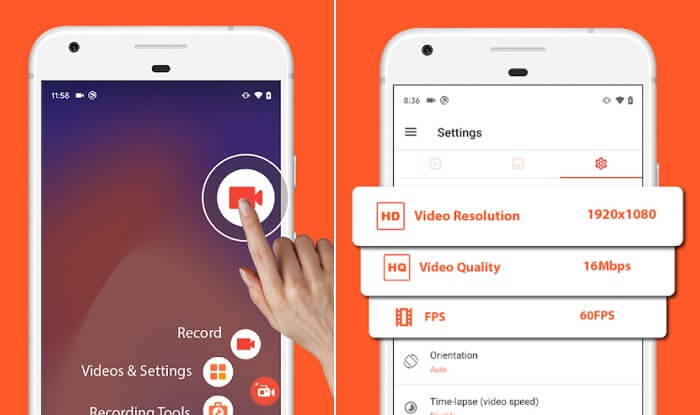
สองตัวเลือกแรกที่ระบุข้างต้นเป็นเครื่องมือที่ใช้งานได้กับ Mac และ Windows PC คราวนี้เราจะมาเรียนรู้เกี่ยวกับเครื่องบันทึกหน้าจอที่ใช้งานได้กับอุปกรณ์พกพา สำหรับอุปกรณ์ Android โดยเฉพาะ AZ Screen recorder เป็นหนึ่งในแอพที่ให้ประสิทธิภาพที่เสถียรยิ่งขึ้นเมื่อบันทึกการสตรีมสด คุณสามารถดาวน์โหลดเครื่องมือนี้ได้อย่างง่ายดายและฟรี ไม่มีการจำกัดเวลาในการใช้งาน และคุณไม่จำเป็นต้องรูทอุปกรณ์เพื่อให้ใช้งานได้ เช่นเดียวกับเครื่องบันทึกหน้าจออื่น ๆ สิ่งนี้ให้คุณภาพวิดีโอที่ดีที่สุดและวิดีโอหน้าจอที่คมชัด ด้วยคุณสมบัติมากมายที่จะค้นพบด้วยแอพนี้ คุณเพียงแค่ต้องสำรวจและลองใช้มัน
บันทึกมัน!
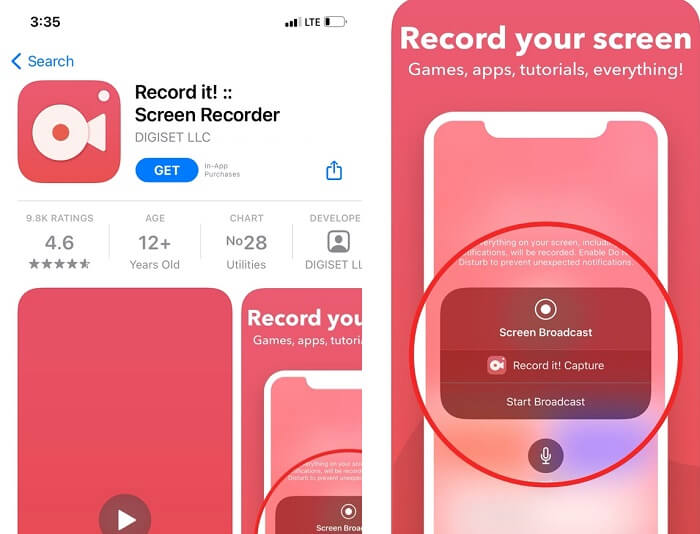
หาก Android มี Apple ก็เช่นกัน แอปบันทึกแตะครั้งเดียวของคุณเข้ากันได้กับ iPhone และ iPad ที่ใช้ iOS 12 ขึ้นไป เนื่องจากอุปกรณ์ iPhone ขึ้นชื่อว่ามีคุณภาพดี หมายความว่าคุณยังคงสามารถเพลิดเพลินและรับประสบการณ์ที่ดียิ่งขึ้นในการบันทึกวิดีโอโดยใช้ "บันทึก"! นอกจากนี้ยังสามารถบันทึกการโต้ตอบบน Facetime และม้วนฟิล์ม
ส่วนที่ 4 แผนภูมิเปรียบเทียบ
| คุณสมบัติ | เครื่องบันทึกหน้าจอ FVC พรีเมี่ยม | เครื่องบันทึกหน้าจอ FVC ฟรี | Windows 10 Game Bar | โปรแกรมบันทึกหน้าจอ AZ | บันทึกมัน! |
| รองรับรูปแบบวิดีโอ | WMV, MP4, MOV, F4V, TS, AVI, WMA, MP3, M4A, AAC, PNG, JPG/JPEG, BMP, GIF, TIFF, MXF W4V, | BMP, GIF, TIFF, MXF, MP4 W4V, | MP4 M4A, AAC, PNG, JPG/JPEG, WMV, MP4, MOV W4V, | NG, JPG/JPEG, BMP, GIF, TIFF, W4V, | W4V, MP4, MOV, F4V, PNG, JPG/JPEG, BMP, GIF, TIFF, MXF |
| ความต้องการของระบบ | ระบบปฏิบัติการ: Windows 10, Windows 8, Windows 7, Windows Vista, Windows XP (SP2 หรือใหม่กว่า) macOS 10.7 หรือสูงกว่า หน่วยประมวลผล: 1GHz Intel/AMD CPU หรือสูงกว่า RAM: 1G RAM | เว็บขึ้นอยู่กับ | ระบบปฏิบัติการ: Windows 10, Windows 8, | macOS 10.7 หรือสูงกว่า | macOS 10.7 หรือสูงกว่า |
| การบันทึกเสียงและวิดีโอ |  | | | | |
| คุณสมบัติการตัดต่อวิดีโอ | | | | | |
| คุณสมบัติล็อคอินหน้าต่าง | | |  | | |
| คุณสมบัติคำอธิบายประกอบ | | | | | |
| รองรับ M4V | | | | | |
| มัลแวร์ปลอดภัย | | | | | |
| อัตราบิตและอัตราส่วนภาพที่ปรับได้ | | | | | |
ส่วนที่ 5. คำถามที่พบบ่อยเกี่ยวกับ M4V Recorder
ทำไมเปิดไฟล์ M4V ไม่ได้
ขั้นตอนแรกที่คุณต้องทำคือ ตรวจสอบนามสกุลไฟล์ก่อน ทำไมต้องตรวจสอบ? เพราะถ้าไฟล์ M4V ใช้นามสกุลไฟล์แบบอื่น นั่นหมายความว่ามันเป็นฟอร์แมตที่ต่างออกไปโดยสิ้นเชิง ดังนั้นควรเช็กนามสกุลไฟล์ก่อน หรือคุณจะใช้ โปรแกรมเล่นไฟล์ M4V ที่ดีสักตัวเพื่อเพลิดเพลินกับวิดีโอ M4V ของคุณก็ได้.
MV4 ดีกว่า MP4 หรือไม่?
โดยทั่วไปแล้วมีความคล้ายคลึงกันในบางแง่ ทั้งสองรูปแบบเป็นไฟล์บีบอัด ผู้ใช้ iOS จำนวนมากพบว่า M4V เหมาะสำหรับพวกเขาเนื่องจากการป้องกัน DRM ของ FairPlay เราทุกคนทราบดีว่า Apple เข้มงวดเพียงใดในเรื่องความปลอดภัยของซอฟต์แวร์
ซึ่งมีขนาดไฟล์ที่เล็กกว่า MP4 หรือ M4V?
จริง ๆ แล้วแทบไม่มีความแตกต่างกันมากนัก ความแตกต่างค่อนข้างเล็กน้อยและอาจอยู่ที่ตัวโค้เดกที่ใช้ เนื่องจาก M4V ใช้โค้เดกวิดีโอ H.264 ส่วน MP4 มักใช้โค้เดก HEVC กล่าวโดยสรุปคือ MP4 ใช้พื้นที่จัดเก็บน้อยกว่า หากต้องการแปลง MP4 เป็น M4V ให้คลิก ที่นี่ เพื่ออ่านเพิ่มเติม.
สรุป
เครื่องมือทั้งหมดที่ตรวจสอบในบทความนี้ได้รับการทดสอบและทดสอบแล้ว คุณสามารถไว้วางใจในแต่ละขั้นตอนที่เขียนไว้เป็นขั้นเป็นตอนได้อย่างแน่นอน คุณคิดว่าเครื่องมือใดที่คุณจะใช้ในรายการ คุณมีเครื่องมือในใจหรือไม่? หรือยังงง? นี่เป็นเคล็ดลับเล็กน้อย พิจารณาอุปกรณ์และความต้องการของคุณ พิจารณาว่าแอปใดที่ให้คุณประโยชน์สูงสุดและลองใช้เอง
-
 หนังบู๊! รีวิวเครื่องบันทึกหน้าจอ - จุดด้อยข้อดีและทางเลือกที่ดีที่สุด
 Action Screen Recorder เป็นซอฟต์แวร์บันทึกเกมที่ต้องการเพื่อจับภาพวิดีโอการเล่นเกมหรือไม่? เพียงเรียนรู้รายละเอียดเพิ่มเติมจากบทวิจารณ์และทางเลือกอื่น ๆ จากบทความ
-
 3 เครื่องบันทึกการโทรบน Facebook ที่ดีที่สุดสำหรับคอมพิวเตอร์ iOS และ Android
 เมื่อคุณต้องการบันทึกการโทรบน Facebook เพื่อบันทึกสิ่งที่มีค่า มีเครื่องบันทึกการโทรบน Facebook ให้เลือกมากมาย ที่นี่คุณสามารถเรียนรู้ 3 เครื่องมือที่ดีที่สุดในการบันทึกการสนทนาทางวิดีโอบน Facebook สำหรับพีซี iOS และ Android
-
 เครื่องบันทึก WAV ฟรี 6 อันดับแรกสำหรับ Windows และ Mac
 ซอฟต์แวร์บันทึก WAV ที่ดีที่สุดที่เราแบ่งปันในบทความนี้มีคุณสมบัติที่มีประโยชน์มากมาย ซึ่งช่วยให้คุณบันทึกเสียงและเสียงได้เหมือนมืออาชีพ
