


 Video Converter Ultimate
 บันทึกหน้าจอ
 ซ่อมวิดีโอ
 ดาวน์โหลดอย่างปลอดภัย
เรียนรู้มาตรฐานความยาวของวิดีโอ Twitter, Instagram และ TikTok
คุณอยากรู้มาตรฐานความยาววิดีโอของแต่ละแพลตฟอร์มอย่าง TikTok, Twitter และ Instagram หรือไม่? ถ้าใช่ สิ่งที่ดีที่สุดที่คุณทำได้คืออ่านบทความให้ข้อมูลฉบับนี้ เราจะบอกรายละเอียดทุกอย่างเกี่ยวกับความยาววิดีโอสูงสุดที่แต่ละแพลตฟอร์มรองรับ นอกจากนี้ บทความนี้ยังจะแนะนำวิธีตัดความยาววิดีโอด้วยซอฟต์แวร์ตัดต่อวิดีโอ เพื่อที่คุณจะได้รู้วิธีตัดวิดีโอก่อนโพสต์ลงโซเชียลมีเดียต่าง ๆ หากต้องการเรียนรู้ทุกรายละเอียด โปรดอ่านบทความนี้ตั้งแต่ต้นจนจบ.

ส่วนที่ 1 มาตรฐานความยาววิดีโอสำหรับ Instagram
Instagram เป็นหนึ่งในแพลตฟอร์มโซเชียลมีเดียที่ใช้บ่อยที่สุดในปัจจุบัน เหมาะสำหรับการโพสต์รูปภาพ เรื่องราว และอื่นๆ นอกจากนี้ยังเป็นแพลตฟอร์มการสื่อสารที่ให้คุณสื่อสารกับผู้ใช้รายอื่น ในส่วนนี้ คุณจะได้เรียนรู้รายละเอียดทั้งหมดเกี่ยวกับมาตรฐานความยาววิดีโอ Instagram ดูข้อมูลเพิ่มเติมด้านล่าง
ความยาววิดีโอในโพสต์ IG
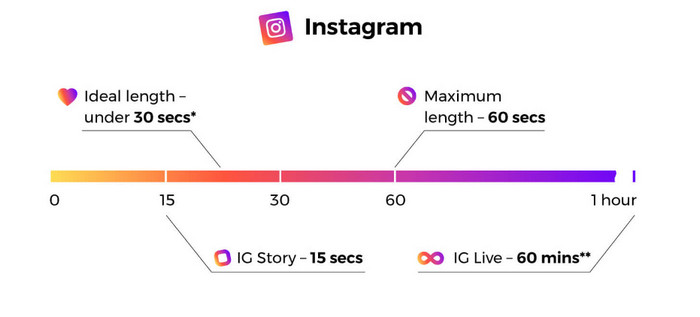
เมื่อเราพูดถึงโพสต์วิดีโอในฟีด คุณจะพบกับวิดีโอเหล่านี้ขณะเลื่อนดู ความยาววิดีโอ instagram มีความยาวสูงสุด 60 วินาทีหรือ 1 นาที
Instagram Stories
หากคุณต้องการอัปโหลดหรือโพสต์วิดีโอบนสตอรี่ Instagram ของคุณ คุณสามารถอัปโหลดได้โดยมีความยาววิดีโอสูงสุด 15 วินาที หากคุณต้องการโพสต์วิดีโอที่ยาวขึ้นในสตอรี่ Instagram ของคุณ คุณสามารถอัปโหลดคลิปวิดีโอความยาว 15 วินาทีได้หลายรายการ คุณสามารถโพสต์โฆษณาต่าง ๆ บนสตอรี่ IG ได้ แต่ความยาวของวิดีโอยังคงยาว 15 วินาที
Instagram Live Videos
คุณยังสามารถแชร์วิดีโอสดบน Instagram ความยาววิดีโอสดของ Instagram มีความยาวสูงสุด 1 ชั่วโมง
Instagram TV
ตอนนี้คุณสามารถใช้ฟังก์ชันล่าสุดของ Instagram ซึ่งก็คือ Instagram TV หรือ IGTV เป็นแพลตฟอร์มที่จะมาแทนที่ทีวีแบบเดิม ดังนั้นคุณจึงสามารถส่งวิดีโอที่มีความยาวได้สูงสุด 60 นาที ผู้ใช้สามารถเริ่มดูวิดีโอได้ทันทีที่เปิดใช้งานแอปย่อย นอกจากนี้ วิดีโอทั้งหมดบน IGTV ยังเป็นแนวตั้ง เนื่องจากรูปแบบดังกล่าวมีประสิทธิภาพมากที่สุดสำหรับแพลตฟอร์มเฉพาะมือถือ
นี่คือความยาววิดีโอสูงสุดของ Instagram ในสตอรี่ โพสต์วิดีโอในฟีด วิดีโอไลน์ และ IGTV
ส่วนที่ 2 มาตรฐานความยาววิดีโอสำหรับ TikTok
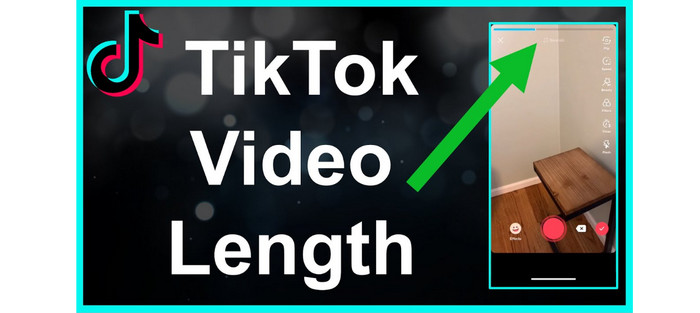
ก่อนหน้านี้ ความยาวเฉลี่ยของวิดีโอ TikTok อยู่ที่ 15 วินาทีเท่านั้น การอุทธรณ์ในช่วงต้นของแอปมีวิดีโอสั้น ๆ พวกเขายังคงเลื่อนเพื่อดูเพิ่มเติมเพราะมันให้วิดีโอที่รวดเร็วและน่าสนใจ อย่างไรก็ตาม การจำกัดเวลา 15 วินาทีมีไว้เพียงประมาณหนึ่งปีเท่านั้น แอปของบริษัท ByteDance ได้เพิ่มระยะเวลาวิดีโอสูงสุดเป็น 1 นาทีในปี 2560 และ 3 นาทีในปี 2564
ตอนนี้ TikTok มีความยาววิดีโอสูงสุด 10 นาที ด้วยวิธีนี้ ผู้ใช้สามารถอัปโหลดวิดีโอที่ยาวขึ้นได้ อย่างไรก็ตาม มีหลายสิ่งที่คุณต้องพิจารณา โปรดจำไว้เสมอว่าผู้ใช้ชอบเนื้อหาขนาดพอดีคำ หมายความว่าการโพสต์วิดีโอสั้นๆ ดีกว่าวิดีโอขนาดยาว
ส่วนที่ 3 มาตรฐานความยาววิดีโอสำหรับ Twitter
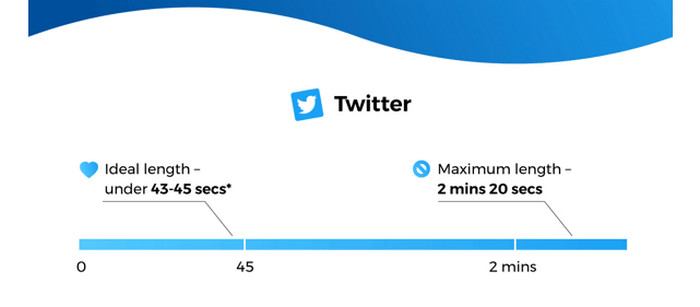
หากคุณชอบโพสต์วิดีโอสั้น ๆ แอปพลิเคชัน Twitter ถือเป็นแพลตฟอร์มที่เหมาะอย่างยิ่ง ความยาววิดีโอสูงสุดที่รองรับคือ 140 วินาที หรือ 2 นาที 20 วินาที และโฆษณาวิดีโอก็มีระยะเวลาเท่ากัน สำหรับข้อมูลเพิ่มเติม วิดีโอที่มีความยาวน้อยกว่า 7 วินาทีจะเล่นวนซ้ำโดยอัตโนมัติ ซึ่งหมายความว่าวิดีโอของคุณจะกลายเป็นGIF ได้ GIF ถือเป็นหนึ่งในกุญแจสำคัญที่เข้าถึงใจและความรู้สึกของผู้ชม นอกจากนี้ ความยาววิดีโอที่เหมาะสมที่สุดสำหรับ Twitter อยู่ที่ประมาณ 44 วินาที ซึ่งเพียงพอในการดึงดูดความสนใจของผู้ชม.
ส่วนที่ 4 วิธีตัดความยาววิดีโอสำหรับแพลตฟอร์มเหล่านี้
หลังจากรู้ความยาววิดีโอสูงสุดของแต่ละแพลตฟอร์มโซเชียลมีเดียแล้ว คุณก็จะทราบข้อกำหนดด้านความยาวเมื่อจะโพสต์วิดีโอ แต่คำถามคือ จะตัดวิดีโอให้ได้ความยาวตามต้องการอย่างไร? หากคุณกังวลเรื่องนี้ เราขอแนะนำ Video Converter Ultimate Video Converter Ultimate เป็นโปรแกรมสำหรับย่อความยาววิดีโอเพื่อใช้ใน TikTok, Twitter, Instagram และแพลตฟอร์มอื่น ๆ คุณสามารถตัดหรือครอปวิดีโอให้ได้ความยาวที่ต้องการ นอกจากนี้ โปรแกรมยังให้คุณตัดวิดีโอได้ด้วยวิธีที่ไม่ซับซ้อน ทำให้ทั้งผู้ใช้มืออาชีพและมือใหม่สามารถใช้งานซอฟต์แวร์ตัดต่อวิดีโอนี้ได้ อีกทั้งยังมีอินเทอร์เฟซที่เข้าใจง่าย ช่วยให้ใช้งานได้สะดวกยิ่งขึ้น.
ยิ่งไปกว่านั้น Video Converter Ultimate ยังใช้งานได้บนอุปกรณ์ทุกชนิด ส่วนใหญ่เป็นคอมพิวเตอร์ Windows และ Mac ดังนั้นไม่ว่าคุณจะเป็นผู้ใช้ Mac หรือ Windows คุณก็สามารถดาวน์โหลดและใช้สำหรับตัดวิดีโอได้อย่างง่ายดาย นอกจากนี้ โปรแกรมยังรองรับรูปแบบเอาต์พุตต่างๆ คุณสามารถบันทึกผลลัพธ์สุดท้ายของคุณเป็น MP4, MKV, AVI, MOV และอื่นๆ คุณยังสามารถปรับความละเอียดและคุณภาพของวิดีโอเพื่อให้น่าสนใจยิ่งขึ้น นอกเหนือจากนั้น เมื่อบันทึกวิดีโอที่แก้ไขแล้ว โปรแกรมจะไม่ใส่องค์ประกอบที่รบกวนลงในวิดีโอของคุณ เช่น ลายน้ำ โลโก้ สติ๊กเกอร์ และอื่น ๆ
ขั้นตอนที่ 1. คลิกปุ่มดาวน์โหลดด้านล่างเพื่อเข้าถึง Video Converter Ultimate บนคอมพิวเตอร์ Mac หรือ Windows จากนั้นเปิดโปรแกรมหลังจากติดตั้งเสร็จสิ้น.
ดาวน์โหลดฟรีสำหรับ Windows 7 หรือใหม่กว่าดาวน์โหลดอย่างปลอดภัย
ดาวน์โหลดฟรีสำหรับ MacOS 10.7 หรือใหม่กว่าดาวน์โหลดอย่างปลอดภัย
ขั้นตอนที่ 2. หลังจากนั้น อินเทอร์เฟซหลักจะปรากฏบนหน้าจอคอมพิวเตอร์ คลิกตัวเลือกกล่องเครื่องมือ (Toolbox)ที่ส่วนบนของอินเทอร์เฟซ จากนั้นจะมีเครื่องมือต่าง ๆ แสดงขึ้นมา ให้เลือกเครื่องมือVideo Trimmer.
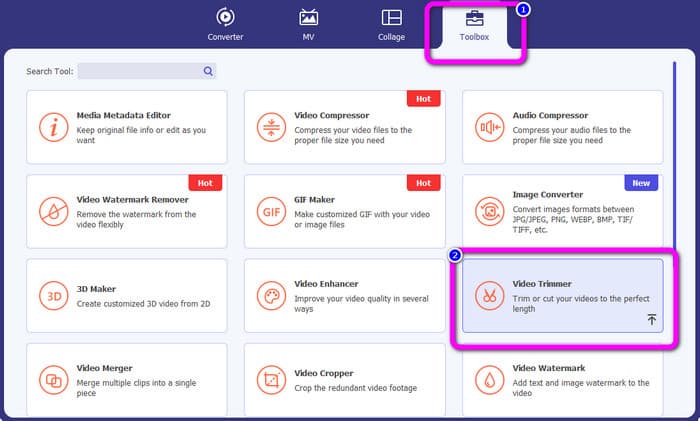
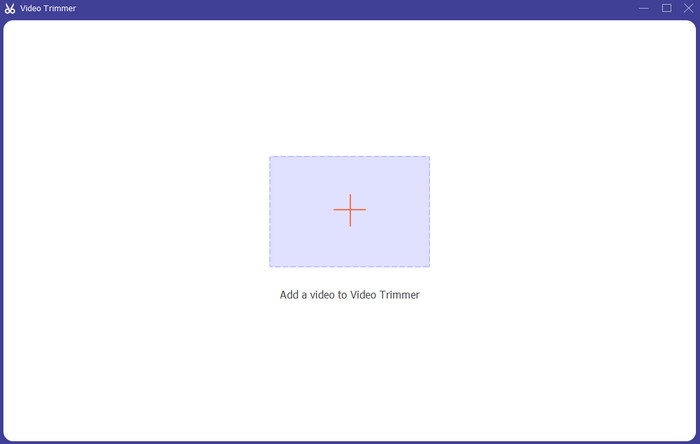
ขั้นตอนที่ 3. จะมีอินเทอร์เฟซอีกหน้าหนึ่งปรากฏบนหน้าจอคอมพิวเตอร์ เพื่อเพิ่มวิดีโอที่คุณต้องการย่อความยาว ให้คลิกไอคอนเครื่องหมาย + จากนั้นหน้าต่างโฟลเดอร์ไฟล์จะเปิดขึ้น ให้เลือกวิดีโอ.
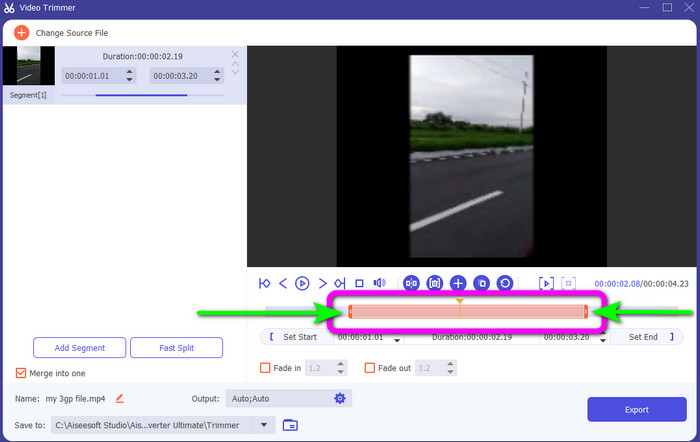
ขั้นตอนที่ 4. คุณสามารถตัดวิดีโอได้อย่างอิสระโดยการปรับหรือลากหัวเล่นวิดีโอ (play head) ปรับปลายวิดีโอตามความต้องการของคุณ.
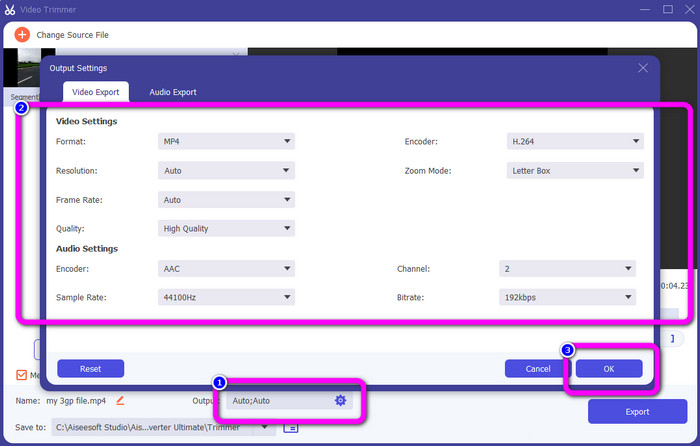
ขั้นตอนที่ 5. หากต้องการเปลี่ยนการตั้งค่าอื่นของวิดีโอ ให้ไปที่การตั้งค่าผลลัพธ์ (Output Settings) ส่วนนี้ช่วยให้คุณเปลี่ยนความละเอียด คุณภาพ อัตราเฟรม รูปแบบไฟล์เอาต์พุต และพารามิเตอร์อื่น ๆ ของวิดีโอ จากนั้นคลิกตกลง (OK).
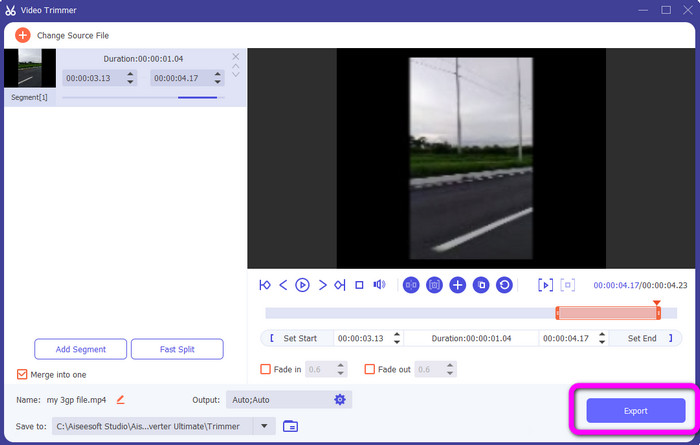
ขั้นตอนที่ 6. เมื่อคุณพอใจกับวิดีโอแล้ว ให้คลิกปุ่มส่งออก (Export) หลังจากกระบวนการส่งออกเสร็จสิ้น คุณสามารถบันทึกวิดีโอจากตัวตัดวิดีโอนี้ลงในคอมพิวเตอร์ได้ จากนั้นจึงนำวิดีโอไปโพสต์บนแพลตฟอร์มโซเชียลมีเดียต่าง ๆ.
ส่วนที่ 5 คำถามที่พบบ่อยเกี่ยวกับความยาววิดีโอของแพลตฟอร์มบริการโซเชียลเน็ตเวิร์ก
1. วิดีโอ Snapchat ควรมีความยาวเท่าใด
หากคุณหมายถึงโพสต์ปกติ 10 วินาทีคือความยาววิดีโอสูงสุด แต่ถ้าคุณต้องการซื้อโฆษณา วิดีโอที่มีความยาวมากที่สุดคือ 3 นาที
2. ความยาวสูงสุดของวิดีโอบน Facebook คือเท่าใด
ขีดจำกัดความยาวของวิดีโอสำหรับ Facebook รวมถึงโฆษณาคือ 240 นาที (4 ชั่วโมง) ในแง่ของความยาววิดีโอที่เหมาะสมคือ 15 วินาทีถึง 3+ นาที
3. ความยาวที่ดีที่สุดสำหรับวิดีโอ TikTok คือเท่าใด
ความยาวที่เหมาะสำหรับวิดีโอ TikTok คือ 10 ถึง 15 วินาที ก็เพียงพอที่จะเรียกความสนใจจากคนดูได้
สรุป
ด้วยความช่วยเหลือจากบทความนี้ คุณได้รู้มาตรฐานความยาววิดีโอของแต่ละแพลตฟอร์มโซเชียลเน็ตเวิร์กแล้ว ไม่ว่าจะเป็น TikTok, Twitter หรือ Instagram นอกจากนี้ บทความยังได้สอนวิธีตัดความยาววิดีโอโดยใช้ Video Converter Ultimate ดังนั้น หากคุณต้องการย่อความยาววิดีโอสำหรับโซเชียลมีเดีย ลองใช้โปรแกรมออฟไลน์ตัวนี้ อินเทอร์เฟซและขั้นตอนการใช้งานที่เรียบง่ายจะช่วยให้คุณตัดวิดีโอได้อย่างง่ายดายและรวดเร็ว.
-
 วิธีตัดต่อวิดีโอด้วย TikTok [คำแนะนำโดยละเอียด]
 คุณต้องการทราบวิธีย่อวิดีโอด้วย TikTok หรือไม่? แล้วเราจะมีวิธีง่ายๆ นอกจากนี้ คุณจะได้เรียนรู้วิธีการอื่นๆ โดยใช้แอปพลิเคชัน/โปรแกรมออฟไลน์
-
 วิธีตัดแต่งวิดีโอโดยใช้และสำหรับ Snapchat [ทีละขั้นตอน]
 โพสต์ที่ให้ข้อมูลนี้จะเสนอวิธีตัดแต่งวิดีโอด้วย Snapchat นอกจากนี้ เราจะแนะนำแอพที่โดดเด่นในการตัดวิดีโอสำหรับ Snapchat อ่านเพิ่มเติมเพื่อหา
-
 วิธีการที่โดดเด่นในการแบ่งวิดีโออย่างมีประสิทธิภาพ
 บทความนี้จะอธิบายวิธีแบ่งวิดีโอออกเป็นส่วนๆ ดังนั้นหากคุณสนใจ คลิกโพสต์นี้ เนื่องจากเรานำเสนอวิธีทดลองที่ตรงไปตรงมาที่สุดแก่คุณ
