


 Video Converter Ultimate
 บันทึกหน้าจอ
 ซ่อมวิดีโอ
วิธีแปลงไฟล์ 3GP เป็น DivX ด้วยเครื่องมือระดับมืออาชีพ & ฟรีเวย์
ไฟล์ 3GP เป็นรูปแบบไฟล์ที่ใช้กันอย่างแพร่หลายบนอุปกรณ์มือถือมาเป็นเวลานาน ใช้ได้ดีมากสำหรับการถ่ายโอนไฟล์ 3GP ไปยังโทรศัพท์รุ่นที่ 3 เครื่องอื่นหรือแม้แต่บนอินเทอร์เน็ต แต่ตอนนี้รูปแบบนี้ไม่ใช่ตัวเลือกที่ดีที่สุดในการแชร์ข้อมูลแล้ว เพราะปัจจุบันเราใช้โทรศัพท์ 4G หรือ 5G กันอยู่ ด้วยเหตุนี้คุณจึงจำเป็นต้องแปลงไฟล์ให้เป็นรูปแบบ DivX หรือรูปแบบสื่ออื่น ๆ ต้องการรู้วิธีทำหรือไม่? ถ้าอย่างนั้นมาอ่านกันเลยว่าวิธีแปลงไฟล์ 3GP เป็น DivX ทำอย่างไร ด้วยโปรแกรมแปลงไฟล์ทั้งบนเว็บและบนเดสก์ท็อปที่มีให้ใช้งาน.

ส่วนที่ 1 2 วิธียอดนิยมในการแปลง 3GP เป็น DivX ออนไลน์และออฟไลน์
วิธีแรก. ตัวแปลงวิดีโอระดับมืออาชีพ - ตัวเลือกที่ดีที่สุดสำหรับการแปลงเป็นชุด
FVC Video Converter Ultimate ใช้งานง่ายและเชื่อถือได้สำหรับผู้ใช้ทุกคน โปรแกรมนี้รองรับรูปแบบไฟล์หลากหลายที่คุณสามารถอัปโหลดหรือดาวน์โหลดเก็บไว้ในไดรฟ์ของคุณได้ นอกจากนี้ หากคุณต้องการรวมไฟล์ 3GP สองไฟล์หรือมากกว่านั้นเข้าด้วยกันก็ทำได้ที่นี่เช่นกัน และยังสามารถแปลงไฟล์ 3GP หลายไฟล์พร้อมกันได้ในครั้งเดียวอีกด้วย รายละเอียดต่อไปนี้จะช่วยให้คุณรู้จักฟีเจอร์อื่น ๆ เพิ่มเติม.

FVC Video Converter Ultimate
4,258,369+ ดาวน์โหลด- แปลงไฟล์ 3GP เป็น DivX, XviD, AVI, MOV, MP4 และรูปแบบอื่นๆ มากกว่า 200 รูปแบบที่มีให้
- ทำให้กระบวนการแปลงของคุณเร็วขึ้นด้วยการเร่งด้วยฮาร์ดแวร์และการแปลงที่รวดเร็ว
- มีให้ในโปรแกรม Windows & Mac ทั้งหมดเพื่อดาวน์โหลดและช่วยเหลือผู้ใช้ในวงกว้าง
- ฟีเจอร์การแก้ไขขั้นสูง เช่น การครอบตัด การผสาน การตัด การเพิ่มเอฟเฟกต์ ฯลฯ มีให้ที่นี่
- ตัวแปลงระดับมืออาชีพที่ใครก็ตามที่มีหรือไม่มีความคิดเกี่ยวกับการแปลงไฟล์ก็ควรใช้
ดาวน์โหลดฟรีสำหรับ Windows 7 หรือใหม่กว่าดาวน์โหลดอย่างปลอดภัย
ดาวน์โหลดฟรีสำหรับ MacOS 10.7 หรือใหม่กว่าดาวน์โหลดอย่างปลอดภัย
มันไม่น่าประทับใจเหรอ? ถ้าเป็นเช่นนั้น มาอ่านขั้นตอนโดยละเอียดทั้งหมดด้านล่างเพื่อทราบวิธีการแปลง 3GP เป็น DivX
ขั้นตอนที่ 1. ดาวน์โหลดซอฟต์แวร์ลงในไดรฟ์คอมพิวเตอร์ของคุณโดยคลิกปุ่มดาวน์โหลดที่แสดงด้านล่าง จากนั้นติดตั้งและตั้งค่าอย่างรวดเร็ว แล้วจึงเปิดเครื่องมือขึ้นมา.
ดาวน์โหลดฟรีสำหรับ Windows 7 หรือใหม่กว่าดาวน์โหลดอย่างปลอดภัย
ดาวน์โหลดฟรีสำหรับ MacOS 10.7 หรือใหม่กว่าดาวน์โหลดอย่างปลอดภัย
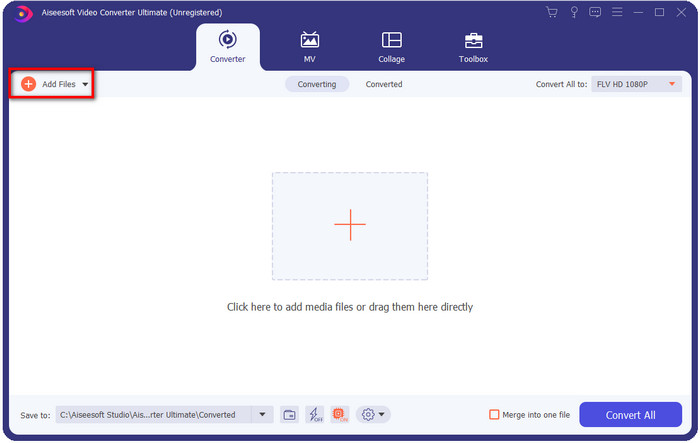
ขั้นตอนที่ 2. หลังจากเปิดโปรแกรมแล้ว ให้เริ่มอัปโหลดไฟล์โดยคลิกที่ Add file ตรงมุมบนซ้ายของหน้าต่างโปรแกรม.
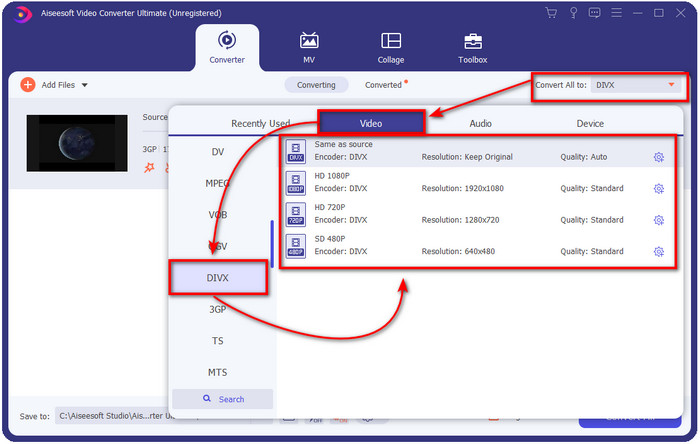
ขั้นตอนที่ 3. หากต้องการเปลี่ยนรูปแบบไฟล์ ให้คลิก Convert All to ที่อยู่มุมขวาบนของหน้าต่างโปรแกรม.
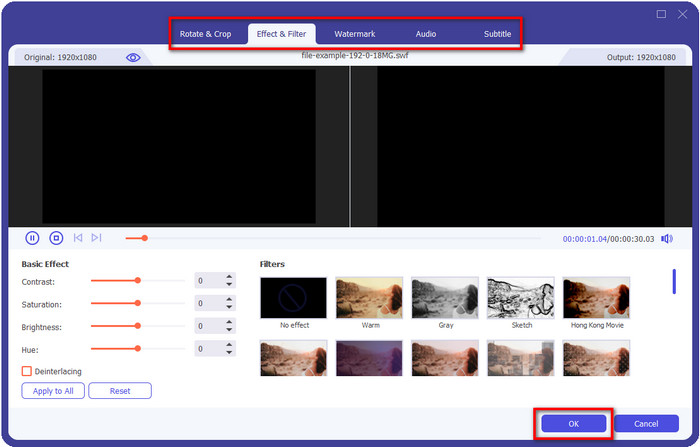
อยากเพิ่มลูกเล่นให้วิดีโอของคุณใช่ไหม? ถ้าอย่างนั้นให้คลิกปุ่มรูปไม้กายสิทธิ์เพื่อจัดการได้เลย เมื่อคลิกแล้วจะมีหน้าต่างใหม่แสดงขึ้นมา ซึ่งคุณสามารถใส่เอฟเฟ็กต์หรือแก้ไขวิดีโอตามที่ต้องการ เมื่อต้องการบันทึกการแก้ไขที่ทำไว้ให้คลิก OK.
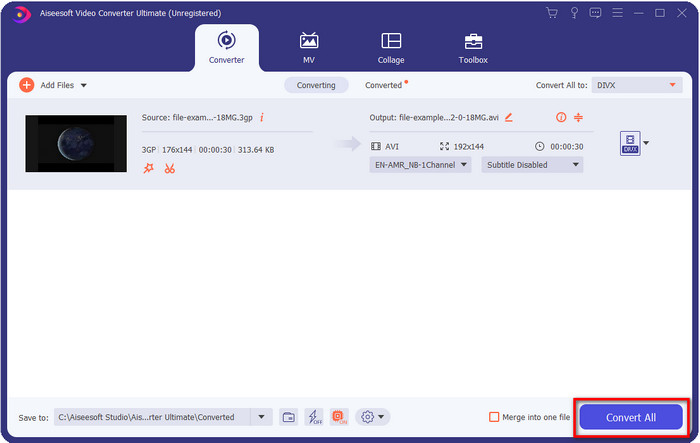
ขั้นตอนที่ 4. เริ่มกระบวนการแปลงไฟล์โดยคลิก Convert All แล้วหลังจากนั้นโฟลเดอร์ที่มีไฟล์ที่แปลงเสร็จแล้วจะปรากฏบนหน้าจอของคุณ.
วิธีที่สอง Free-Way Video Converter- เสนอการแปลงวิดีโอออนไลน์
FVC Free Video Converter Online คือโปรแกรมแปลงไฟล์ 3GP เป็น DivX ออนไลน์ที่เหมาะที่สุดตัวหนึ่งที่คุณสามารถใช้ได้ เว็บแปลงไฟล์ตัวนี้แตกต่างจากตัวอื่น ๆ ที่คุณเคยเจอบนเว็บอย่างมาก ทำไมถึงเป็นเช่นนั้น? อย่างแรก เครื่องมือนี้ไม่มีโฆษณาน่ารำคาญมากวนใจระหว่างที่คุณกำลังแปลงไฟล์ อย่างที่สอง เครื่องมือนี้รองรับรูปแบบไฟล์มากกว่าตัวแปลงไฟล์ออนไลน์หลายตัวที่คุณใช้งานได้ และหนึ่งในจุดเด่นของโปรแกรมนี้คือ คุณสามารถเปลี่ยนค่าต่าง ๆ ของวิดีโอและเสียงได้ในเมนูตั้งค่า อยากรู้วิธีใช้โปรแกรมนี้ไหม? ถ้าอย่างนั้นขั้นตอนด้านล่างจะช่วยแนะนำคุณ.
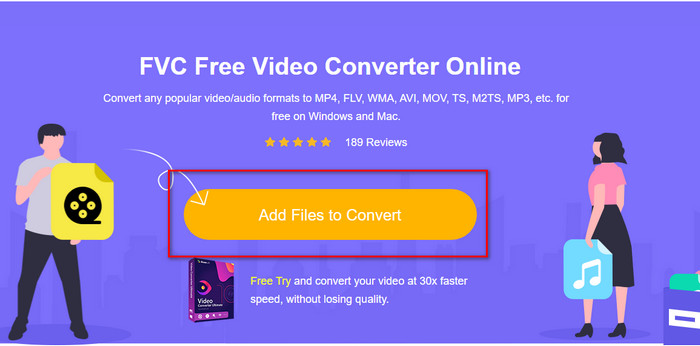
ขั้นตอนที่ 1. หากคุณคลิกที่ลิงก์นี้ เบราว์เซอร์หน้าต่างใหม่จะเปิดขึ้นไปยังหน้าหลักของเว็บแปลงไฟล์.
ขั้นตอนที่ 2. กดปุ่ม Add Files to Convert บนหน้าจอเว็บเพื่อเปิดโฟลเดอร์ในคอมพิวเตอร์ของคุณ จากนั้นหาไฟล์ .3gp ที่ต้องการแปลงแล้วกด Open.
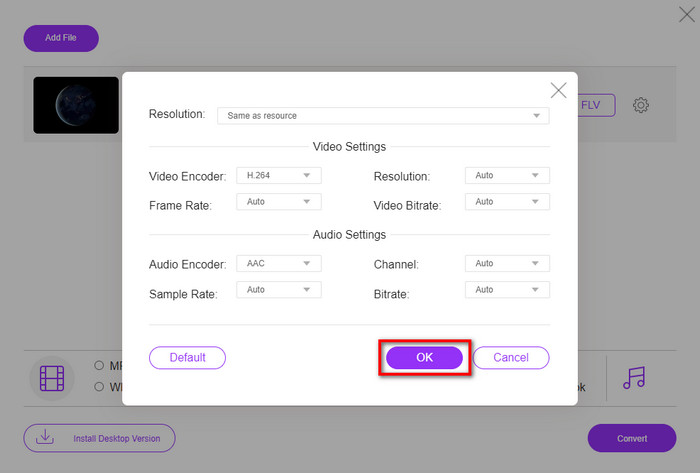
หากต้องการเปลี่ยนข้อกำหนด ให้คลิกปุ่มเกียร์ ที่นี่ คุณเปลี่ยนการตั้งค่าวิดีโอหรือเสียงด้วยตนเองได้ฟรี
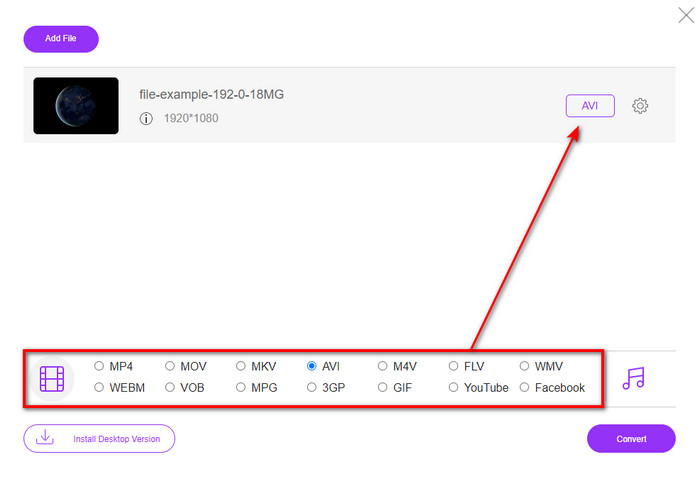
ขั้นตอนที่ 3. คลิกรูปแบบไฟล์ที่คุณต้องการจากตัวเลือกที่มีอยู่ด้านล่าง.
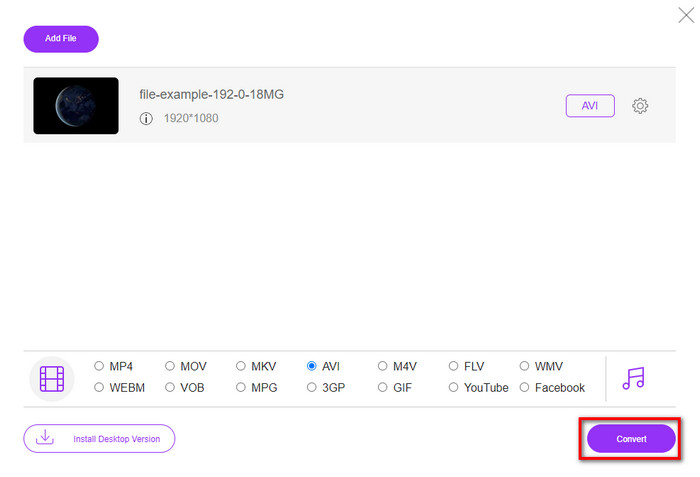
ขั้นตอนที่ 4. จากนั้นกด Convert เพื่อเริ่มแปลงไฟล์ของคุณ.
ข้อดี
- ฟรีและสามารถเข้าถึงได้ทุกคน
- ไม่มีโฆษณารบกวนบนอินเทอร์เฟซเพื่อให้ประสบการณ์การแปลงของคุณที่นี่ยอดเยี่ยม
- ทางเลือกที่ดีที่สุดสำหรับการแปลงเกือบทุกรูปแบบเป็นรูปแบบใหม่
จุดด้อย
- ไม่สามารถเข้าถึงได้หากไม่มีการเชื่อมต่ออินเทอร์เน็ต
- ไม่มีคุณลักษณะขั้นสูงที่นี่
ส่วนที่ 2 ความเข้าใจอย่างลึกซึ้งเกี่ยวกับ 3GP & DivX
3GP เป็นรูปแบบมัลติมีเดียมาตรฐานที่จับภาพวิดีโอและเสียงในโทรศัพท์ 3G รูปแบบนี้ยอดเยี่ยมสำหรับการถ่ายโอนวิดีโออย่างมีประสิทธิภาพบนโทรศัพท์มือถือ 3G และอินเทอร์เน็ต คำอธิบายเพิ่มเติมคือ มันถูกพัฒนาให้มีขนาดเล็กลงและไม่ใช้แบนด์วิดท์และการใช้ข้อมูลมากเกินไปสำหรับการส่งข้อมูล แม้ว่ารูปแบบนี้จะยังทำงานอยู่ในขณะนี้ แต่ประสิทธิภาพของรูปแบบกลับมีความสำคัญน้อยกว่า เนื่องจากรูปแบบใหม่แสดงโครงสร้างที่ดีกว่ารูปแบบนี้
DivX เป็นคอมเพรสเซอร์ประเภทหนึ่งที่ใช้เป็นหลักในการบีบไฟล์ให้มีขนาดเล็กลงโดยไม่ส่งผลต่อคุณภาพของวิดีโอ ตัวแปลงสัญญาณนี้พยายามที่จะเปลี่ยนวิธีการเช่าดีวีดีที่บ้านของเรา แต่มันล้มเหลว และตอนนี้ แทนที่จะพยายามเปลี่ยนแผ่นดีวีดี ตัวแปลงสัญญาณนี้ช่วยให้รูปแบบส่วนใหญ่บีบอัดและส่งผ่านอินเทอร์เน็ตได้เร็วยิ่งขึ้น
แม้ว่า DivX จะไม่เป็นที่นิยมในการอัปโหลดและเล่นในเครื่องเล่นสื่อหรือแก้ไขด้วยโปรแกรมแก้ไข แต่ก็ยังดีกว่า 3GP มีหลายแง่มุมที่เราสามารถแยกความแตกต่างระหว่างสองสิ่งนี้ แต่สาเหตุหลักประการหนึ่งคือ 3GP มีความเข้ากันได้และคุณภาพน้อยกว่าไฟล์ DivX
ส่วนที่ 3 คำถามที่พบบ่อยเกี่ยวกับการแปลง 3GP เป็น DivX
ฉันต้องการแอปพิเศษเพื่อเปิด .3gp หรือไม่
หากคุณกำลังพูดถึงการเล่นปลั๊กอินหรือตัวเข้ารหัส คำตอบก็คือไม่ รูปแบบนี้สามารถเล่นได้ในเครื่องเล่นสื่อเดสก์ท็อปส่วนใหญ่โดยไม่ต้องดาวน์โหลดปลั๊กอินหรือตัวเข้ารหัส อย่างไรก็ตาม หากคุณเล่นสิ่งนี้บนอุปกรณ์มือถือของคุณ ก็อย่าคาดหวังอะไรมากไปกว่านี้เพราะว่ามันจะไม่เปิดขึ้น แม้ว่าคุณจะสามารถบันทึกไฟล์ .3gp บนอุปกรณ์มือถือของคุณ แต่จุดประสงค์ในการเล่นก็เป็นไปไม่ได้ แทนที่จะลบไฟล์ ทำไมคุณไม่ลองแปลงไฟล์เป็น MP4, AVI, MOV และรูปแบบที่เข้ากันได้มากกว่านี้เพื่อเล่นบนอุปกรณ์ของคุณ
โทรศัพท์รุ่นใดที่รองรับ 3GP?
แม้ว่ารูปแบบนี้จะใช้กับอุปกรณ์ 3G คุณยังสามารถใช้ไฟล์นี้ใน 2G ส่วนใหญ่และ 4G บางส่วนได้ แต่ไม่ใช่ทั้งหมด
VLC รองรับ 3GP หรือไม่
VLC เป็นหนึ่งในเครื่องเล่นสื่ออเนกประสงค์ที่ดีที่สุดที่คุณสามารถดาวน์โหลดบนอุปกรณ์ของคุณในแง่ของการเล่นวิดีโอ ใช่คุณสามารถ; เครื่องเล่นสื่อนี้รองรับรูปแบบและตัวเข้ารหัสที่หลากหลายเพื่อให้เล่นวิดีโอได้ง่ายขึ้นโดยไม่ต้องดาวน์โหลดตัวเข้ารหัสหรือปลั๊กอินเพิ่มเติม
สรุป
เมื่อเรารู้วิธีแปลงไฟล์ 3GP เป็น DivX แล้ว หากคุณต้องการให้ไฟล์สามารถเล่นได้อย่างเข้ากัน คุณก็จำเป็นต้องแปลงไฟล์เสียก่อน เครื่องมือทั้งสองที่กล่าวมานี้ทำงานได้อย่างยอดเยี่ยม โดยเฉพาะในการแปลงไฟล์ .3gp แม้ทั้งสองตัวจะทำงานได้ดีมาก แต่ก็ยังมีมาตรฐานบางอย่างที่ทำให้แตกต่างกัน ตัวอย่างเช่น FVC Free Video Converter Online เป็นตัวแปลงไฟล์ออนไลน์ที่ดีที่สุดตัวหนึ่งที่คุณใช้ได้ฟรี แม้จะไม่มืออาชีพเท่าตัว Ultimate แต่ก็ยังถือเป็นเครื่องมือออนไลน์ระดับมืออาชีพ ในขณะที่ FVC Video Converter Ultimate เป็นโปรแกรมแปลงไฟล์ที่โดดเด่นไม่เหมือนใครซึ่งคุณสามารถดาวน์โหลดมาใช้บนเดสก์ท็อปได้ โปรแกรมนี้ถือเป็นตัวเลือกที่ดีที่สุดสำหรับการแปลงและตัดต่อวิดีโอ เร่งหรือลดความเร็ววิดีโอ กลับภาพวิดีโอ สร้างภาพ GIF และอื่น ๆ อีกมากมาย หากคุณต้องการผลงานที่ยอดเยี่ยมเป็นพิเศษ คุณควรดาวน์โหลดตัว Ultimate มาใช้ทันที.
-
 4 วิธีที่มีประสิทธิภาพที่สุดในการแปลงไฟล์ 3GP เป็นรูปแบบ AVI [2025]
 ฉันสามารถแปลงไฟล์ 3GP เป็น AVI ได้หรือไม่ คุณสามารถแปลงได้อย่างง่ายดายหากคุณลองใช้เครื่องมือเหล่านี้ในขณะที่เรารวบรวมวิธีแก้ปัญหาที่เป็นไปได้ทั้งหมดสำหรับปัญหาการแปลง 3GP เป็น AVI ของคุณ
-
 วิธีการแปลง 3GP เป็น MOV โดยใช้แนวทางที่แตกต่างกัน [2025]
 คุณพบว่ารูปแบบ 3GP ไม่สะดวกสำหรับเครื่องเล่นวิดีโอบางตัวในการเล่นรูปแบบวิดีโอประเภทนี้หรือไม่? พยายามแปลงเป็น MOV และบทความนี้พูดถึงเรื่องนี้เป็นอย่างมาก ดังนั้นอ่านต่อ
-
 ตัวแปลง 3GP เป็น FLV ที่ดีที่สุดสำหรับใช้ในการแปลง 3GP เป็น FLV [2025]
 คุณเคยพยายามแปลง 3GP เป็น FLV แต่คุณไม่รู้ว่าจะใช้ตัวแปลงประเภทใด? อ่านบทความนี้เพื่อเรียนรู้รายละเอียดทั้งหมดเกี่ยวกับการแปลง 3GP เป็น FLV
