


 Video Converter Ultimate
 บันทึกหน้าจอ
 ซ่อมวิดีโอ
คู่มือฉบับสมบูรณ์เกี่ยวกับวิธีการแปลง AMV เป็น WMV ด้วยขั้นตอน [แก้ไขแล้ว]
ต้องการสนุกกับการชมไฟล์วิดีโอ AMV บน Windows หรือใช้สำหรับสตรีมมิงออนไลน์หรือไม่? ถ้าใช่ คุณต้องอ่านบทความนี้เพื่อเรียนรู้วิธีแปลง AMV เป็น WMV ปรับปรุงคุณภาพ และทำให้ไฟล์เข้ากันได้กับอุปกรณ์ต่าง ๆ ในรายการนี้ คุณจะได้รู้จักซอฟต์แวร์ที่ใช้แปลงไฟล์ AMV ของคุณ ดังนั้นไม่ต้องรอช้า รัดเข็มขัดให้แน่นแล้วมาเรียนรู้เพิ่มเติมเกี่ยวกับรูปแบบ AMV และ WMV กันเลย.

ส่วนที่ 1 แปลง AMV เป็น WMV ด้วย FVC Video Converter Ultimate
FVC Video Converter Ultimate คือตัวเลือกแรกของเราในการแปลง AMV เป็น WMV เพราะช่วยให้คุณทรานส์โค้ดไฟล์มีเดียและรูปแบบเฉพาะอุปกรณ์ได้ และยิ่งไปกว่านั้น โปรแกรมนี้สามารถแปลงไฟล์พร้อมกันได้ไม่ใช่แค่หนึ่ง สอง หรือสามไฟล์ แต่ได้มากกว่านั้น นอกจากนี้ คอนเวอร์เตอร์ตัวนี้ยังมุ่งมั่นให้ผู้ใช้ได้รับประสบการณ์การแปลงไฟล์ที่ยอดเยี่ยมที่สุด อยากรู้ว่าทำไมใช่ไหม? งั้นอ่านฟีเจอร์เด่นด้านล่างนี้ต่อเลย.

FVC Video Converter Ultimate
4,355,888+ ดาวน์โหลด- สามารถช่วยแก้ปัญหาการแปลงไฟล์ AMV เป็น WMV, AVI, FLV, SWF, MP4, AVI ได้
- รองรับการแปลงที่รวดเร็วเป็นพิเศษเพื่อแปลงรูปแบบได้เร็วยิ่งขึ้น
- แก้ไขวิดีโอ AMV ของคุณด้วยคุณสมบัติการแก้ไขเฉพาะที่เครื่องมือนี้มีให้
- ช่วยให้คุณเป็นผู้เชี่ยวชาญได้ในไม่กี่คลิก
- รองรับทุกแพลตฟอร์มเช่น Windows และ macOS
ดาวน์โหลดฟรีสำหรับ Windows 7 หรือใหม่กว่าดาวน์โหลดอย่างปลอดภัย
ดาวน์โหลดฟรีสำหรับ MacOS 10.7 หรือใหม่กว่าดาวน์โหลดอย่างปลอดภัย
คุณทึ่งกับคุณสมบัติของเครื่องมือนี้หรือไม่? ถ้าเป็นเช่นนั้น มาอ่านขั้นตอนการแปลงไฟล์ AMV และคัดลอกขั้นตอนเพื่อให้การแปลงสำเร็จ
ขั้นตอนที่ 1. ดาวน์โหลด FVC Video Converter Ultimate ลงในไดรฟ์คอมพิวเตอร์ของคุณโดยคลิกปุ่มดาวน์โหลดด้านล่าง จากนั้นคลิกไฟล์ติดตั้งเพื่อติดตั้งโปรแกรม และกด Start Now เพื่อเปิดเครื่องมือ.
ดาวน์โหลดฟรีสำหรับ Windows 7 หรือใหม่กว่าดาวน์โหลดอย่างปลอดภัย
ดาวน์โหลดฟรีสำหรับ MacOS 10.7 หรือใหม่กว่าดาวน์โหลดอย่างปลอดภัย
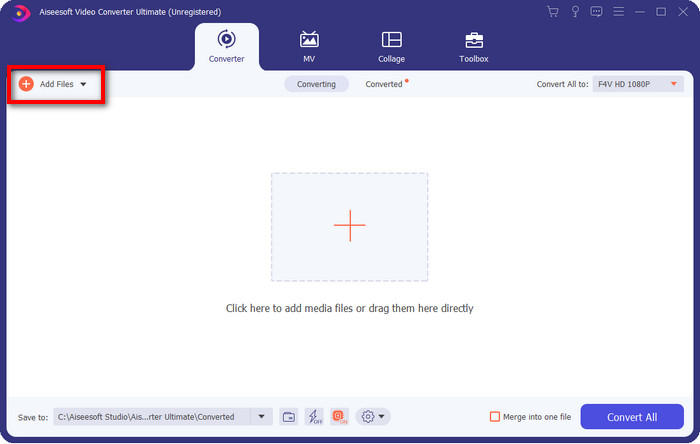
ขั้นตอนที่ 2. หลังจากเปิดซอฟต์แวร์แล้ว คุณสามารถเพิ่มไฟล์หนึ่งไฟล์หรือหลายไฟล์ได้โดยคลิกตัวเลือก Add Files จากนั้นโฟลเดอร์ในคอมพิวเตอร์จะปรากฏบนหน้าจอ เลือกไฟล์ AMV แล้วกด Open เพื่ออัปโหลด.
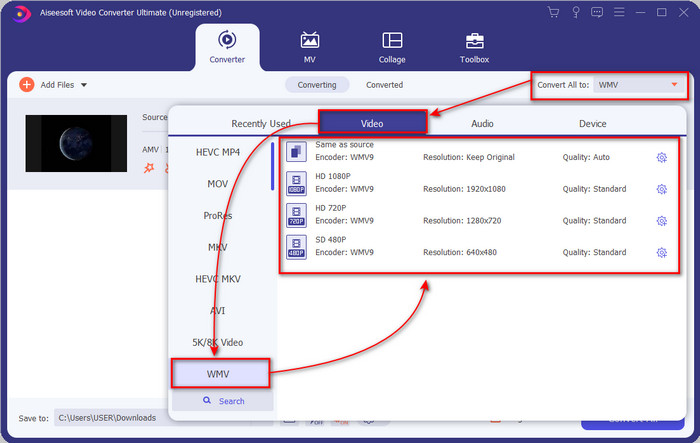
ขั้นตอนที่ 3. คลิกตัวเลือก Convert All to รายการรูปแบบไฟล์จะแสดงขึ้นมา ค้นหาไฟล์รูปแบบ WMV แล้วเลือกระดับความละเอียด (resolution) ตัวเข้ารหัส (encoder) และคุณภาพที่คุณต้องการ.
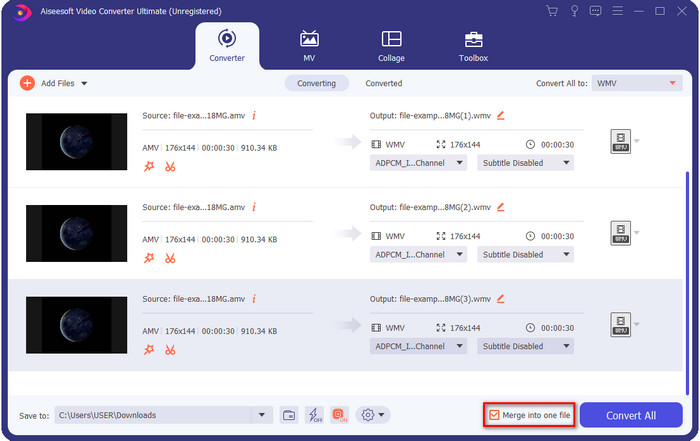
ตัวเลือกเสริม. อยากรวมไฟล์ AMV หลายไฟล์ให้กลายเป็นไฟล์ WMV เดียวใช่ไหม? ถ้าใช่ คุณควรติ๊กที่ช่อง “merge into one file”.
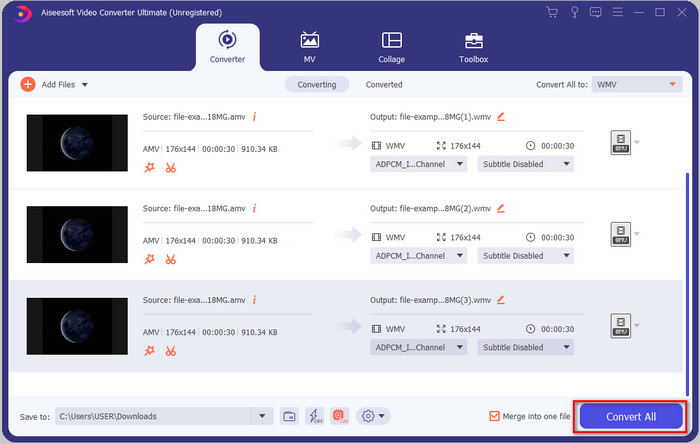
ขั้นตอนที่ 4. กด Convert All เพื่อเริ่มกระบวนการแปลงไฟล์ หลังจากเสร็จสิ้นขั้นตอนแล้ว จะมีโฟลเดอร์แสดงขึ้นบนหน้าจอของคุณพร้อมไฟล์ WMV ที่แปลงเสร็จแล้ว.
ส่วนที่ 2 แปลง AMV เป็น WMV ออนไลน์
ไม่อยากดาวน์โหลดโปรแกรมแปลงไฟล์สำหรับใช้งานแบบออฟไลน์เพราะพื้นที่จัดเก็บไม่พอใช่ไหม? งั้นให้ใช้ FVC Free Online Video Converter แทน เพราะคุณไม่จำเป็นต้องดาวน์โหลดโปรแกรมเต็มรูปแบบ แต่ต้องใช้เพียงตัว launcher ซึ่งมีขนาดเล็กมากและแทบไม่กระทบพื้นที่จัดเก็บบนคอมพิวเตอร์ นอกจากนี้ เว็บคอนเวอร์เตอร์นี้ยังสามารถแปลง AMV เป็น WMV พร้อมทั้งปรับความละเอียดได้ อย่างไรก็ตาม ความเร็วในการแปลงไฟล์จะขึ้นอยู่กับความเร็วอินเทอร์เน็ตของคุณ มีอินเทอร์เน็ตหรือไม่? ถ้ามี คุณควรลองใช้ตัวนี้และสัมผัสประสบการณ์การแปลงไฟล์ออนไลน์.
ขั้นตอนที่ 1. คลิกลิงก์นี้ link เพื่อเปิดหน้าเว็บไซต์หลักของตัวแปลงไฟล์.
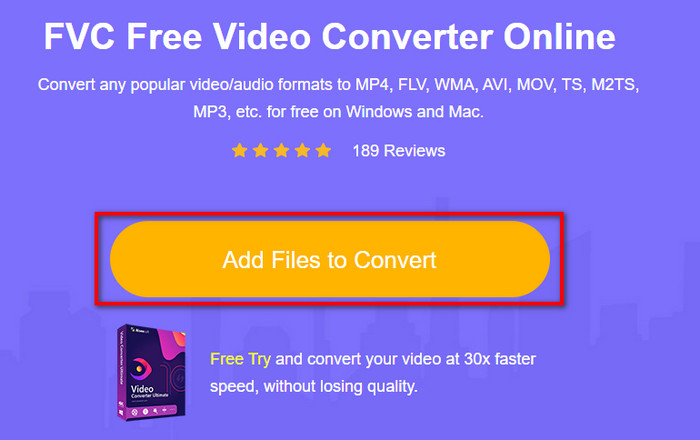
ขั้นตอนที่ 2. คลิก Add Files to Convert จากนั้นจะมีโฟลเดอร์แสดงขึ้นมาให้คุณค้นหาไฟล์ AMV แล้วกด Open.
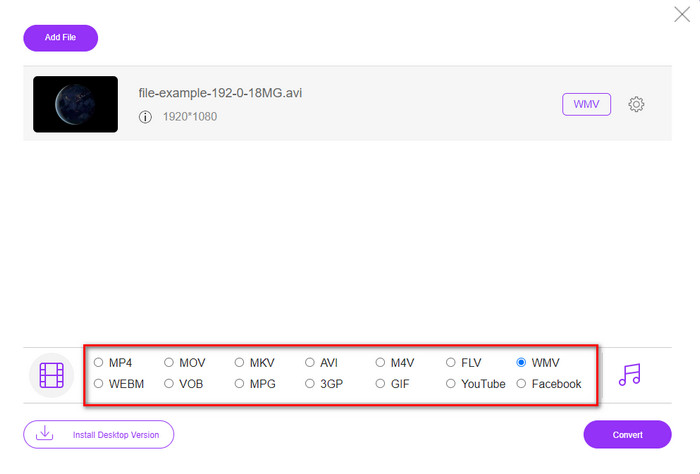
ขั้นตอนที่ 3. เลือกรูปแบบ WMV ที่แสดงอยู่บนหน้าจอ.
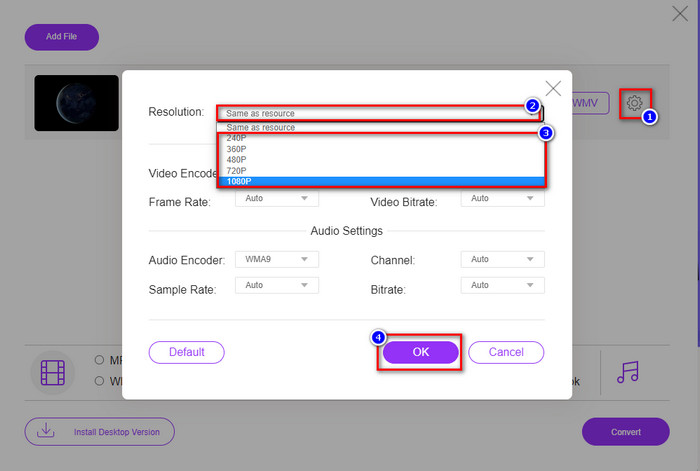
ตัวเลือกเสริม. อย่างที่เราได้กล่าวไปก่อนหน้านี้ คุณสามารถปรับความละเอียดได้ที่นี่ ดังนั้นตอนนี้ให้ปรับความละเอียดโดยการคลิกปุ่มรูปเฟือง ที่ด้านบนให้คลิกปุ่มดรอปดาวน์ จากนั้นจะมีรายการความละเอียดขึ้นมา เลือกหนึ่งรายการแล้วกด OK เพื่อดำเนินการต่อ.
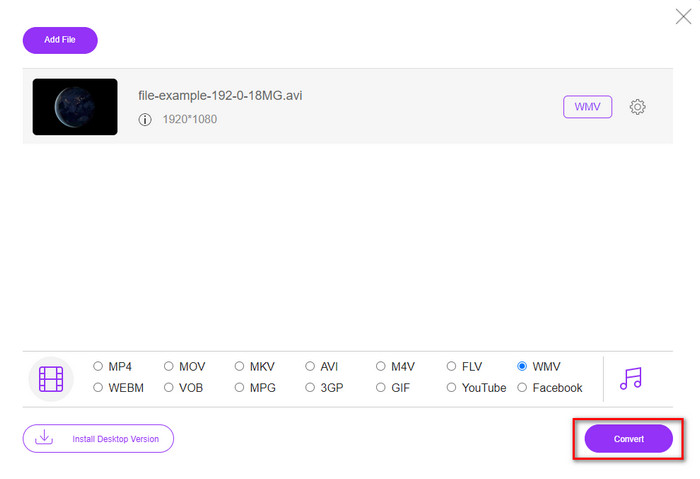
ขั้นตอนที่ 4. ตอนนี้หากต้องการเริ่มการแปลงไฟล์ ให้คลิกปุ่ม Convert จากนั้นกระบวนการจะแสดงผลทันที.
ส่วนที่ 3 อะไรคือความแตกต่างระหว่าง AMV และ WMV
อย่างแรกเลย คอนเทนเนอร์สื่อทั้งสองนี้ได้รับความนิยมเนื่องจากมีความสามารถเฉพาะตัวในรูปแบบ แต่วันนี้เราจะมาศึกษาว่าข้อดีข้อเสียของรูปแบบนี้เป็นอย่างไรกันบ้าง นอกจากนี้ เราจะระบุ 3 ประเด็นโดยตั้งคำถามเพื่อทราบข้อมูลเพิ่มเติมเกี่ยวกับ AMV และ WMV
รูปแบบใดมีความละเอียดสื่อที่ดีกว่า
ระหว่างทั้งสองรูปแบบ โดยไม่ต้องสงสัย WMV มีคุณภาพดีกว่า ไฟล์ WMV สามารถจัดเก็บและสตรีมวิดีโอที่มีความละเอียดสูงสุดถึง 300,000 พิกเซลเพื่อให้ได้ภาพที่ละเอียดยิ่งขึ้น แต่คุณสามารถกำหนดอัตราที่ความละเอียดหน้าจอ 528x576 ได้ และสำหรับ AMV คุณภาพที่สามารถบรรจุได้คือ 96x96 ถึง 320x240 ซึ่งค่อนข้างต่ำเมื่อเทียบกับความละเอียดต่ำของ WMV เหตุผลหนึ่งที่ AMV มีความละเอียดที่น้อยกว่าก็คือต้องติดตั้งให้พอดีกับหน้าจอของเครื่องเล่นสื่อจีน
รูปแบบใดมีขนาดไฟล์เล็กกว่า
ชัยชนะนี้จะไปกับ AMV เพราะรูปแบบนี้ถูกบีบอัดอย่างดีเยี่ยม แม้ว่า WMV จะมีคอมเพรสเซอร์ แต่ขนาดของ AMV ก็เป็นมิตรกับสิ่งแวดล้อมมากกว่า โดยเฉพาะในไดรฟ์คอมพิวเตอร์ของคุณ มากกว่า WMV
รูปแบบใดเข้ากันได้มากกว่า
เมื่อพูดถึงเรื่องความเข้ากันได้ เราสามารถบอกได้ว่าทั้งสองรูปแบบมีจุดเด่นที่ต่างกัน เพราะ WMV ถูกออกแบบมาสำหรับโปรแกรมบน Windows เท่านั้น หากคุณเป็นผู้ใช้ Mac คุณไม่สามารถใช้รูปแบบนี้เล่นบน QuickTime หรือแก้ไขใน iMovie ได้โดยตรง แต่คุณต้องแปลง WMV เป็น MOV เพื่อให้ใช้งานร่วมกันได้ ส่วนในกรณีของ AMV รูปแบบนี้ใช้เครื่องเล่นมีเดียพกพาจากจีนในการเล่นไฟล์ แต่ทุกวันนี้คุณสามารถใช้เครื่องเล่นมีเดียแบบพกพาทั่วไปแทนการซื้อเครื่องเล่น AMV โดยเฉพาะได้ อย่างไรก็ตาม การมองหาเครื่องเล่น AMV ถือว่าเป็นเรื่องยากมาก เพราะมีเครื่องเล่นเพียงไม่กี่รุ่นที่รองรับรูปแบบนี้และรองรับตัวเข้ารหัสดังกล่าว เราจึงพอจะบอกได้ว่า WMV มีความเข้ากันได้มากกว่า AMV โดยเฉพาะเมื่อต้องโอนย้ายไฟล์ไปยังระบบ Windows.
และตอนนี้เรารู้เหตุผลแล้ว ในกรณีนี้จำเป็นต้องแปลงไฟล์เป็นรูปแบบใหม่ ด้วยเหตุผลดังกล่าว คุณต้องเรียนรู้วิธีแปลง AMV เป็น WMV เพื่อให้ไฟล์สื่อเข้ากันได้กับซอฟต์แวร์ Windows
ส่วนที่ 4 คำถามที่พบบ่อยเกี่ยวกับ AMV และ WMV Conversion
จะเปลี่ยน AMV ของฉันเป็น MOV ได้อย่างไร
มีเทคนิคและวิธีการมากมายที่เราสามารถค้นหาและลองใช้ได้เมื่อค้นหาบนเว็บ แต่การเลือกเครื่องมือที่ดีที่สุดสำหรับการแปลง AMV เป็น MOV นั้นไม่ใช่เรื่องง่าย เพื่อไม่ให้เสียเวลา คลิกลิงก์นี้และทำความเข้าใจวิธีแปลง AMV เป็น MOV เพื่อให้ไฟล์ใช้งานร่วมกับ macOS ได้.
ฉันสามารถใช้เครื่องเล่นสื่อ VLC เพื่อดูและเล่น AMV ได้หรือไม่
แน่นอนว่าคุณสามารถดาวน์โหลด VLC media player บนเดสก์ท็อปของคุณเพื่อเล่นไฟล์ AMV ได้โดยไม่จำเป็นต้องดาวน์โหลดโค้ด็กเพิ่มเติม แต่ถ้าคุณอยากรู้เพิ่มเติมเกี่ยวกับ VLC และตัวเลือกอื่น ๆ ลองอ่านบทความนี้โดยคลิกลิงก์นี้ link.
ทำไมฉันต้องบีบอัด AMV
เราบีบอัดไฟล์มีเดียและไฟล์ AMV เพราะต้องการเพิ่มพื้นที่ว่างบนฮาร์ดไดรฟ์ของเรา ดังนั้นอยากเรียนรู้วิธีบีบอัดไฟล์ AMV หรือไม่? ถ้าอยาก ให้คลิกลิงก์นี้.
สรุป
โซลูชันทั้งสองนี้มอบความเป็นเลิศในการแปลงจาก AMV เป็น WMV ได้ง่ายและประสบความสำเร็จ นอกจากนี้ สิ่งเหล่านี้เป็นวิธีแก้ปัญหาที่ดีที่สุดที่เราหาได้บนเว็บ ดังนั้น ตอนนี้ คุณอยู่ในมือของคุณแล้วที่จะเลือกตัวแปลงที่คุณใช้ในการแปลงไฟล์ AMV ของคุณเป็น WMV เพื่อให้บรรลุความสำเร็จ คุณต้องใช้เครื่องมือ FVC ที่ให้ไว้ด้านบน
-
 วิธีที่ดีที่สุดที่จะใช้ในการแปลง AMV เป็น AVI [อนุมัติ]
 คุณประสบปัญหาในการแปลงไฟล์วิดีโอรูปแบบ AMV เป็น AVI หรือไม่? นี่คือเคล็ดลับบางประการที่คุณจะพบได้ในบทความนี้เท่านั้น
-
 [พิสูจน์แล้ว] 2 วิธีในการแปลง AMV เป็น FLV ออฟไลน์และออนไลน์
 คุณเคยพิจารณาลองใช้ตัวแปลงเพื่อแปลงไฟล์ AMV เป็นรูปแบบไฟล์ FLV หรือไม่ เพื่อแก้ปัญหาของคุณในการดูวิดีโอ AMV อ่านบทความนี้เพื่อทราบตัวแปลงที่เหมาะสมที่คุณควรใช้
-
 ฟรี | 3 วิธีที่ดีที่สุดในการแปลง MP4 เป็น WMV โดยไม่สูญเสียคุณภาพ
 โพสต์นี้แชร์วิธีการแปลงวิดีโอ MP4 เป็นรูปแบบ WMV บน Mac หรือ Windows นอกจากนี้เรายังมีตัวเลือกมากมายให้คุณรวมทั้งซอฟต์แวร์เดสก์ท็อปและตัวแปลงออนไลน์บนเว็บ พร้อมที่จะรู้จักเครื่องมือแปลง MP4 เป็น WMV ที่ดีที่สุดแล้วหรือยัง?
