


 Video Converter Ultimate
 บันทึกหน้าจอ
 ซ่อมวิดีโอ
เชี่ยวชาญศิลปะการแปลงไฟล์ OGV เป็นรูปแบบ AVI ผ่านออนไลน์และออฟไลน์
ไฟล์ OGV เป็นรูปแบบโอเพ่นซอร์สที่สร้างโดย Xiph.org ซึ่งมีโครงสร้างเหมือนกับ OGG Vorbis และรูปแบบนี้ยังสามารถบรรจุโค้เด็กได้มากกว่าหนึ่งตัวเพื่อใช้สำหรับสตรีมวิดีโอ อย่างไรก็ตาม การเล่นไฟล์ .ogv บน Windows Media Player หรือ QuickTime จะไม่รองรับโค้เด็กอย่าง Theora, Daala หรือ Dirac ดังนั้นคุณจึงไม่สามารถเล่นวิดีโอนี้ได้ด้วยเหตุผลด้านความเข้ากันได้ ทางออกในการแก้ปัญหานี้คือแปลงไฟล์ให้เป็นรูปแบบที่ได้รับการรองรับมากกว่า เช่น AVI บทความนี้จะแนะนำโปรแกรมแปลงไฟล์ที่คุณสามารถใช้และอธิบายวิธีแปลงไฟล์ OGV เป็น AVI.
ส่วนที่ 1 OGV และ AVI - ภาพรวม
ตามที่ข้อมูลระบุไว้ก่อนหน้านี้ OGV เป็นไฟล์โอเพ่นซอร์สที่เก็บสตรีมวิดีโอคุณภาพสูง แต่ถ้าคุณต้องการซิงโครไนซ์การเล่นไฟล์มีเดีย AVI ต้องเป็นตัวเลือก แม้ว่าภาชนะทั้งสองนี้ยังคงใช้งานได้ดี แต่ก็มีจุดประสงค์ มากำหนดวัตถุประสงค์โดยขุดหาข้อมูลเพิ่มเติมเกี่ยวกับทั้งสองรูปแบบ
OGV
จุดประสงค์อีกประการของ OGV คือการเล่นวิดีโอบน HTML 5 เนื่องจากเป็นรูปแบบที่ดีที่สุดรูปแบบหนึ่งที่ไม่มีการจดสิทธิบัตรที่คุณสามารถแทรกบนเว็บได้ เมื่อสร้าง HTML 5 ที่อัปเกรดแล้ว คุณไม่จำเป็นต้องมีปลั๊กอินเพื่อเล่นวิดีโอบนเว็บ อีกทั้งรูปแบบนี้ยังให้นักออกแบบเว็บไซต์ที่สนับสนุนมัลติมีเดียและความสะดวกอีกด้วย แม้ว่าไฟล์ OGV จะรองรับการสตรีมวิดีโอใน HTML 5 แต่รูปแบบดังกล่าวยังไม่รองรับเครื่องเล่นสื่ออื่นๆ ในการเล่นรูปแบบนี้
AVI
ในขณะเดียวกัน รูปแบบ AVI ได้รับการสนับสนุนอย่างกว้างขวางจากโปรแกรมเล่นสื่อและโปรแกรมแก้ไขทั้งหมดเมื่อเทียบกับ OGV และเนื่องจากรูปแบบที่ไม่บีบอัด ขนาดไฟล์ที่บันทึกในรูปแบบนี้จึงใหญ่กว่ารูปแบบสื่ออื่นๆ มาก แม้ว่าไฟล์จะมีขนาดกว้างขวางกว่า แต่คุณยังสามารถใช้ตัวแปลงสัญญาณประเภทต่างๆ เพื่อบีบอัดรูปแบบนี้และบันทึกให้มีขนาดเล็กลงได้ อย่างไรก็ตาม หากคุณบีบไฟล์ในรูปแบบนี้ ให้คาดหวังว่าคุณภาพของวิดีโอจะเปลี่ยนไป
และตอนนี้เรามีพื้นฐานเกี่ยวกับทั้งสองรูปแบบแล้ว ตอนนี้ก็เป็นเวลาที่เหมาะสมในการแปลง OGV เป็น AVI บน Linux, PC และ Mac ในการเล่นบนเครื่องเล่นสื่อท้องถิ่นของคุณหรือแก้ไขวิดีโอภายใต้ จะต้องแปลงไฟล์เป็น AVI
ส่วนที่ 2 Best Choice Offline Converter เพื่อแปลง OGV เป็น AVI
FVC Video Converter Ultimate
คุณต้องการรู้หรือไม่ว่าตัวแปลง OGV เป็น AVI ตัวไหนดีที่สุดที่ให้กระบวนการแปลงไฟล์รวดเร็วและปลอดภัยที่สุด หากใช่ FVC Video Converter Ultimate คืออีกหนึ่งตัวเลือก ในบรรดาตัวแปลงทั้งหมดที่เราได้ค้นหาและลองใช้บนอินเทอร์เน็ต เครื่องมือนี้โดดเด่นกว่าและให้ผลลัพธ์ที่ยอดเยี่ยม ซอฟต์แวร์นี้มีฟีเจอร์ระดับสูงมากมายในกล่องเครื่องมือ เช่น ตัวตัดต่อวิดีโอ การรวมไฟล์ การบีบอัดไฟล์ และอื่น ๆ นอกจากนี้ กระบวนการแปลงไฟล์ยังเร็วขึ้นถึง 30 เท่า เพราะซอฟต์แวร์นี้ใช้การเร่งด้วยฮาร์ดแวร์ ทำให้แปลงไฟล์ได้เร็วกว่าตัวแปลงอื่น ๆ ทั้งแบบออนไลน์และออฟไลน์ที่มีอยู่.
ยิ่งไปกว่านั้น หากคุณต้องการแปลงเป็นชุด คุณสามารถทำได้ง่ายๆ ที่นี่โดยไม่ต้องเหนื่อย นอกจากนี้ อินเทอร์เฟซและคุณลักษณะขั้นสูงยังมีให้สำหรับผู้ใช้ Windows และ Mac ตอนนี้ ไปที่ขั้นตอนในการแปลงไฟล์ OGV ของคุณเป็นรูปแบบ AVI ใหม่ภายในไม่กี่วินาทีโดยทำตามขั้นตอนด้านล่าง
ขั้นตอนที่ 1. ก่อนที่คุณจะแปลงไฟล์ OGV เป็น AVI บน Windows หรือ Mac คุณต้องดาวน์โหลดซอฟต์แวร์มาก่อน ติดตั้งซอฟต์แวร์ลงในไดรฟ์คอมพิวเตอร์ แล้วคลิก Start Now เพื่อรันซอฟต์แวร์บนระบบ.
ดาวน์โหลดฟรีสำหรับ Windows 7 หรือใหม่กว่าดาวน์โหลดอย่างปลอดภัย
ดาวน์โหลดฟรีสำหรับ MacOS 10.7 หรือใหม่กว่าดาวน์โหลดอย่างปลอดภัย
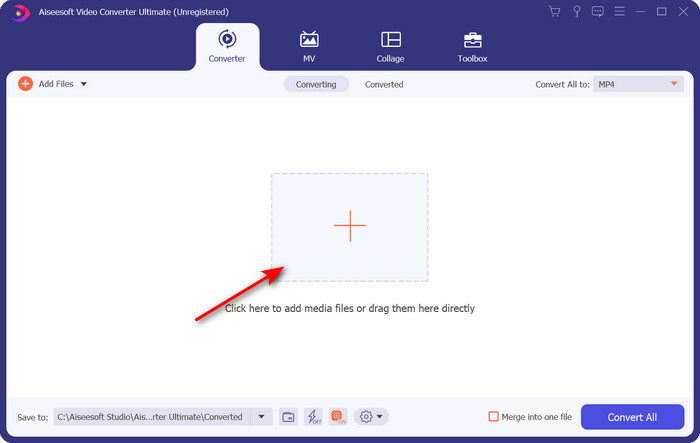
ขั้นตอนที่ 2. อัปโหลดไฟล์ .ogv โดยคลิกปุ่ม + จะมีหน้าต่างโฟลเดอร์แสดงขึ้นมาให้คุณเลือกไฟล์ จากนั้นคลิก Open.
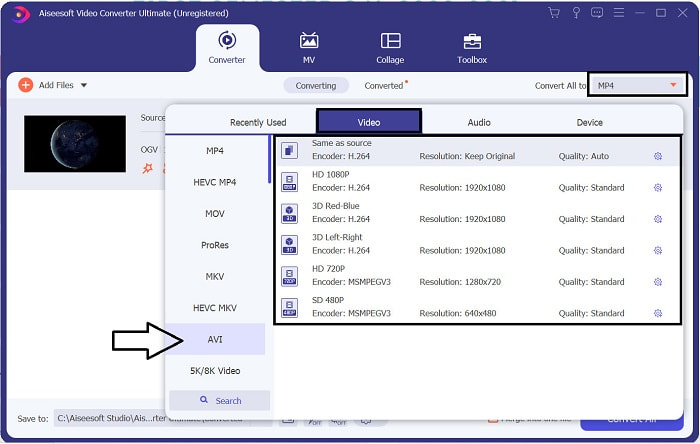
ขั้นตอนที่ 3. เมื่ออัปโหลดไฟล์เสร็จแล้ว ให้คลิก Convert All to แล้วเลือกเป็นรูปแบบ AVI หรือเลือกรูปแบบอื่นที่คุณต้องการให้ไฟล์เอาต์พุตเป็น.
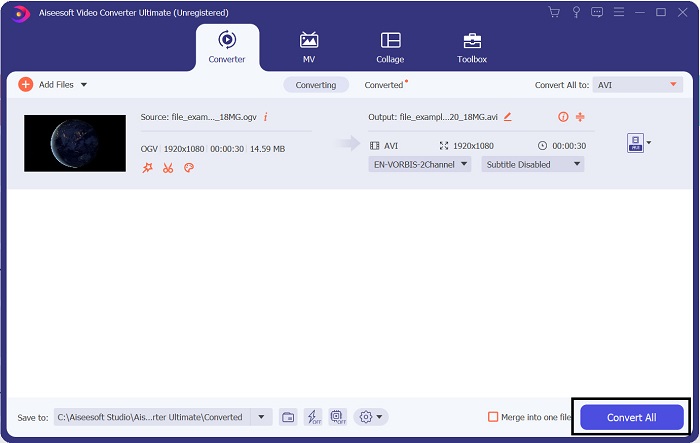
ขั้นตอนที่ 4. คลิก Convert All เพื่อเริ่มกระบวนการแปลงไฟล์ ขั้นตอนนี้จะใช้เวลาเพียงไม่กี่วินาทีเพราะเครื่องมือนี้รองรับการแปลงไฟล์ความเร็วสูง.
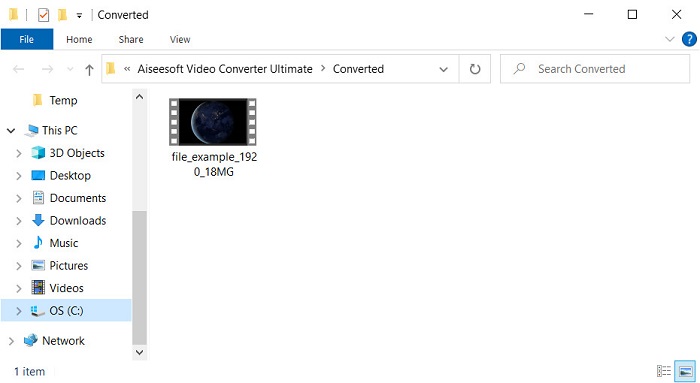
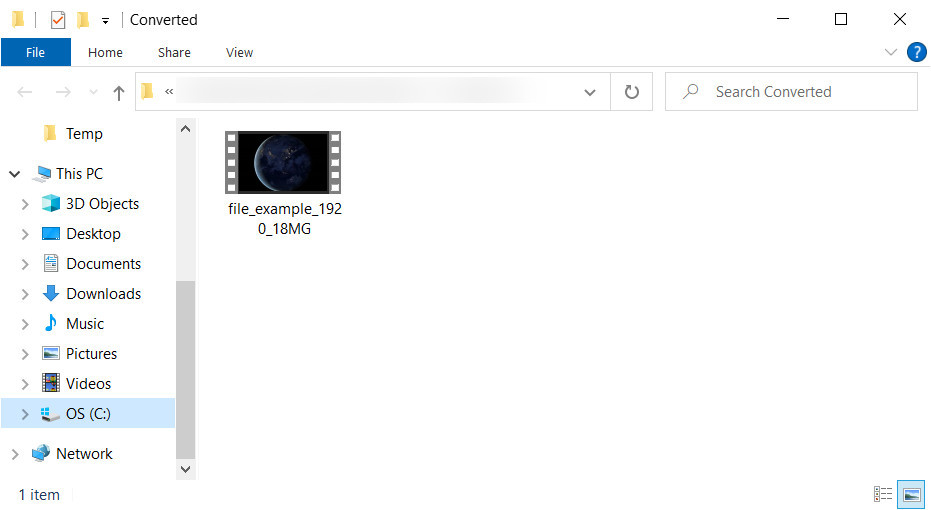
ขั้นตอนที่ 5. หลังจากแปลงไฟล์เสร็จแล้ว จะมีหน้าต่างโฟลเดอร์แสดงขึ้นมาบนหน้าจอซึ่งภายในมีไฟล์ .avi อยู่ ให้คลิกไฟล์นั้นเพื่อเปิดดูบนโปรแกรมเล่นสื่อของคุณ.
ส่วนที่ 3 ตัวแปลง OGV เป็น AVI ฟรีที่ดีที่สุดออนไลน์
FVC โปรแกรมแปลงวิดีโอออนไลน์ฟรี
ไม่อยากดาวน์โหลดโปรแกรมแปลงไฟล์ลงในเครื่อง แต่อยากแปลง OGV เป็น AVI แบบออนไลน์ฟรีใช่ไหม ถ้าอย่างนั้น FVC Free Video Converter Online คือทางเลือกที่เหมาะสม ทุกวันนี้คุณสามารถแปลงไฟล์ออนไลน์ได้เพียงค้นหาเว็บเครื่องมือที่ช่วยคุณได้ อย่างไรก็ตาม ไม่ใช่เว็บเครื่องมือทุกตัวที่จะรองรับรูปแบบไฟล์อย่าง .ogv แม้ว่าจะมีตัวแปลงที่น่าเชื่อถืออยู่บ้าง แต่ตัวแปลงออนไลน์นี้ถือว่าปลอดภัยที่สุด ไม่มีโฆษณา และเป็นที่ชื่นชอบของผู้ใช้หลายคน หากคุณต้องการแปลงไฟล์ OGV โดยไม่ต้องดาวน์โหลดโปรแกรมแปลงไฟล์ใด ๆ และไม่มีข้อจำกัด ให้ทำตามขั้นตอนต่อไปนี้.
ขั้นตอนที่ 1. ไปที่เว็บไซต์ทางการของ FVC Free Video Converter Online โดยคลิกที่ลิงก์นี้.
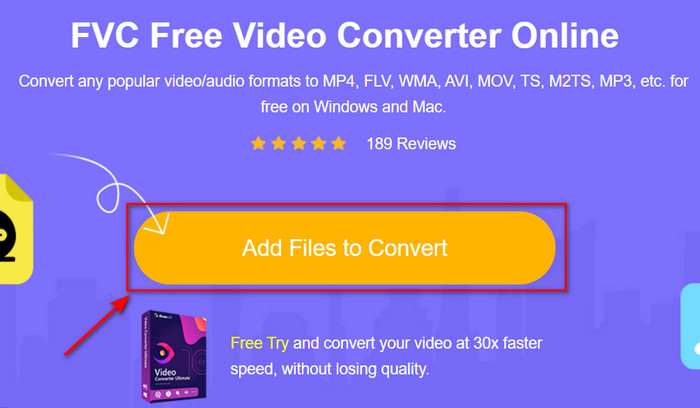
ขั้นตอนที่ 2. เมื่อเว็บไซต์เปิดแล้ว ให้คลิก Add Files to Convert เพื่อดาวน์โหลดตัวเรียกใช้งาน จากนั้นกดอีกครั้งเพื่อเปิดโฟลเดอร์เลือกไฟล์ .ogv แล้วคลิก Open เพื่ออัปโหลด เสริมอีกเล็กน้อย แม้ว่าคุณจะสามารถแปลงไฟล์ได้ไม่จำกัดที่นี่ แต่ก็ยังไม่รองรับการแปลงแบบกลุ่ม.
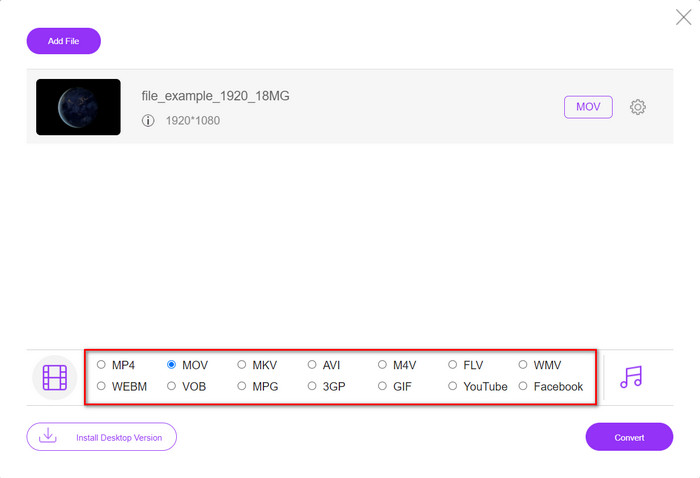
ขั้นตอนที่ 3. เลือกรูปแบบ AVI ในเมนูย่อยแล้วคลิก.
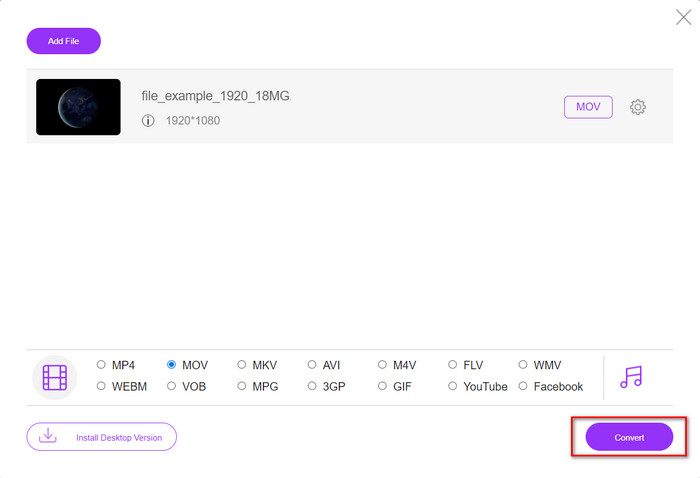
ขั้นตอนที่ 4. มาเริ่มแปลงไฟล์ OGV เป็น AVI โดยคลิกปุ่ม Convert.
ขั้นตอนที่ 5. การแปลงไฟล์จะเสร็จในเวลาไม่นาน จากนั้นจะมีโฟลเดอร์แสดงขึ้นมาพร้อมไฟล์ .avi.
ส่วนที่ 4 คำถามที่พบบ่อยเกี่ยวกับ OGV เป็น AVI Conversion
ฉันสามารถเล่น .ogv บน VLC ได้หรือไม่
คุณสามารถเล่นไฟล์วิดีโอ .ogv บน VLC Player ได้อย่างง่ายดาย และ VLC ยังเป็นหนึ่งในโปรแกรมเล่นมีเดียที่ได้รับความนิยมมากที่สุดซึ่งคุณสามารถดาวน์โหลดได้ฟรี แต่ถ้าคุณอยากรู้ว่าตัวเลือกอื่นที่ดีที่สุด 5 อันดับแทน VLC มีอะไรบ้าง ให้คลิกลิงก์นี้เพื่อดูตัวเลือกโปรแกรมเล่นมีเดียอื่น ๆ ทั้งบน PC และ Mac.
OGG และ OGV เหมือนกันหรือไม่
Xiph.org ก่อตั้ง OGG และ OGV ให้เป็นหนึ่งในรูปแบบที่ดีที่สุดที่คุณสามารถใช้ได้ซึ่งใช้ตัวแปลงสัญญาณเช่น Vorbis และ Theora แม้ว่า .ogg สามารถมีวิดีโอและเสียงได้ แต่ก็ยังเหมาะกับเสียงมากที่สุดเมื่อเทียบกับวิดีโอ ในทางกลับกัน .ogv เป็นรูปแบบที่ดีที่สุดในการมีทั้งไฟล์วิดีโอและไฟล์เสียง
หลังจากแปลง .ogv คุณภาพจะน้อยลงหรือไม่
ขึ้นอยู่กับว่าคุณใช้ตัวแปลงตัวไหน เพราะตัวแปลง OGV บางตัวไม่สามารถให้คุณภาพเอาต์พุตสูงได้ แตกต่างจาก FVC Video Converter Ultimate ที่ให้คุณปรับคุณภาพได้ทั้งระดับต่ำ กลาง หรือสูง เพื่อทำให้เอาต์พุตมีคุณภาพดีขึ้นและมีขนาดไฟล์เล็กลง.
สรุป
ตัวแปลงทั้งหมดที่กล่าวถึงในบทความนี้สามารถแปลง OGV เป็น AVI ได้โดยไม่ทำให้คุณภาพลดลง ควรเลือกตัวแปลงที่เหมาะสมที่สุดซึ่งให้วิธีการแปลงที่มีประสิทธิภาพที่สุด หากคุณต้องการแปลงไฟล์เดี่ยวโดยไม่เสียค่าใช้จ่าย ให้ใช้ FVC Free Video Converter Online แต่ถ้าคุณต้องการแปลงแบบเป็นชุดได้ง่าย ๆ และไม่ต้องกังวลเรื่องการหาอินเทอร์เน็ต คุณควรดาวน์โหลด FVC Video Converter Ultimate มาใช้.
-
 2 ทางเลือกที่ดีที่สุดของไฟล์ RMVB เป็น AVI Converter [ออนไลน์และออฟไลน์]
 ไม่ทราบวิธีการแปลง RMVB เป็น AVI? บทความนี้เน้นที่ตัวแปลงที่คุณสามารถใช้เพื่อแปลง RMVB เป็น AVI ไม่ว่าจะออนไลน์หรือออฟไลน์
-
 วิธีแปลง XviD เป็น AVI โดยไม่สูญเสียคุณภาพของวิดีโอ [2025]
 คุณต้องการแปลงไฟล์ XviD ของคุณเป็น AVI หรือไม่? หากเป็นเช่นนั้น โปรดอ่านบทความนี้ในขณะที่เราพูดถึง XviD เพิ่มเติมและวิธีแปลงไฟล์ XviD ของคุณให้อยู่ในรูปแบบ AVI
-
 กลยุทธ์ที่ดีที่สุดในการแปลงไฟล์ DV เป็นรูปแบบ AVI พร้อมขั้นตอนโดยละเอียด
 คุณต้องการแปลงไฟล์ DV ของคุณเป็น AVI หรือไม่? จากนั้นอ่านบทความนี้เพื่อทราบเครื่องมือเฉพาะที่คุณสามารถใช้ในการแปลงและโปรแกรมเล่นสื่อเพื่อเล่น DV ของคุณบนพีซีหรือ Mac
