


 Video Converter Ultimate
 บันทึกหน้าจอ
 ซ่อมวิดีโอ
 ดาวน์โหลดอย่างปลอดภัย
บีบอัดไฟล์ AVI เพื่อให้ได้ขนาดไฟล์ที่เล็กลงโดยไม่สูญเสียคุณภาพ
ไม่ว่าคุณต้องการส่งไฟล์ AVI ไปยังอีเมลหรืออัปโหลดไฟล์ AVI ไปยังเว็บไซต์การบีบอัด AVI นั้นสำคัญมาก มีโปรแกรมตัดต่อวิดีโอและตัวบีบอัดจำนวนมากที่สามารถย่อไฟล์ AVI ได้ เพื่อให้เฉพาะเจาะจงมากขึ้นคุณสามารถแปลงรูปแบบวิดีโอตัดคลิปวิดีโอที่ไม่ต้องการหรือรีเซ็ตพารามิเตอร์เพื่อทำให้วิดีโอ AVI ของคุณมีขนาดเล็กลง หากคุณต้องการคงรูปแบบและเนื้อหาวิดีโอ AVI ไว้คุณสามารถใช้โปรแกรมอัดวิดีโอเพื่อรีเซ็ตการตั้งค่าวิดีโอได้ นี่คือ 3 วิธีฟรีในการบีบอัดไฟล์ AVI โดยไม่สูญเสียคุณภาพ เพียงแค่อ่านและปฏิบัติตาม

ส่วนที่ 1: วิธีบีบอัดไฟล์ AVI ออนไลน์ฟรี
มีคอมเพรสเซอร์วิดีโอออนไลน์มากมายในตลาดเครื่องใดที่สามารถเป็นคอมเพรสเซอร์ AVI ออนไลน์ที่ดีที่สุดของคุณได้ สำหรับผู้ใช้ส่วนใหญ่มีปัจจัยสำคัญบางประการที่คุณต้องพิจารณา
ดาวน์โหลดฟรีสำหรับ Windows 7 หรือใหม่กว่าดาวน์โหลดอย่างปลอดภัย
ดาวน์โหลดฟรีสำหรับ MacOS 10.7 หรือใหม่กว่าดาวน์โหลดอย่างปลอดภัย
1. ฟรีและปลอดภัยในการใช้งาน
2. ไม่ จำกัด ขนาดไฟล์สูงสุด
3. แบทช์บีบอัดไฟล์ AVI
4. บีบอัดวิดีโอ AVI ขนาดใหญ่เกิน GB ให้มีขนาดไฟล์เล็กมาก
5. เปลี่ยนรูปแบบวิดีโอ AVI ความละเอียดและบิตเรตเพื่อย่อขนาดวิดีโอ
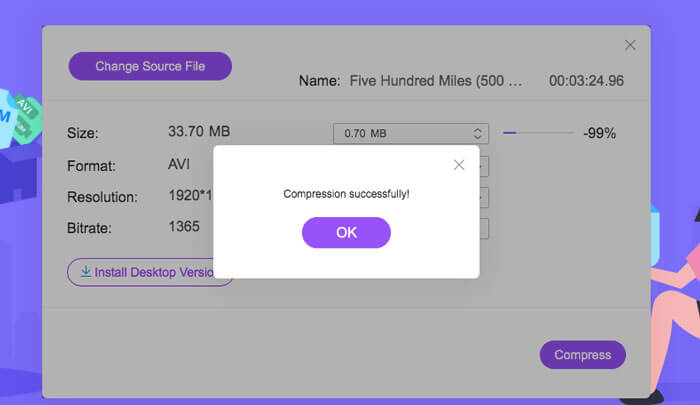
โชคดีที่คุณสามารถใช้ฟีเจอร์ทั้งหมดนี้ได้ใน FVC Free Video Compressor คุณสามารถบีบอัดไฟล์ AVI ขนาดใหญ่แบบออนไลน์ได้ฟรีบนคอมพิวเตอร์ Windows และ Mac โดยไม่ต้องสมัครสมาชิกหรือลงทะเบียน ความเร็วที่เร็วขึ้นถึง 30 เท่าทำให้การบีบอัดไฟล์ AVI เร็วกว่าคู่แข่งรายอื่นมาก ตอนนี้มาดูวิธีบีบอัดขนาดวิดีโอ AVI แบบออนไลน์กัน.
ขั้นตอนที่ 1: เปิดโปรแกรมบีบอัดวิดีโอฟรีออนไลน์นี้ คลิก Add Files to Compress เพื่อติดตั้งตัวเรียกใช้งาน (launcher).
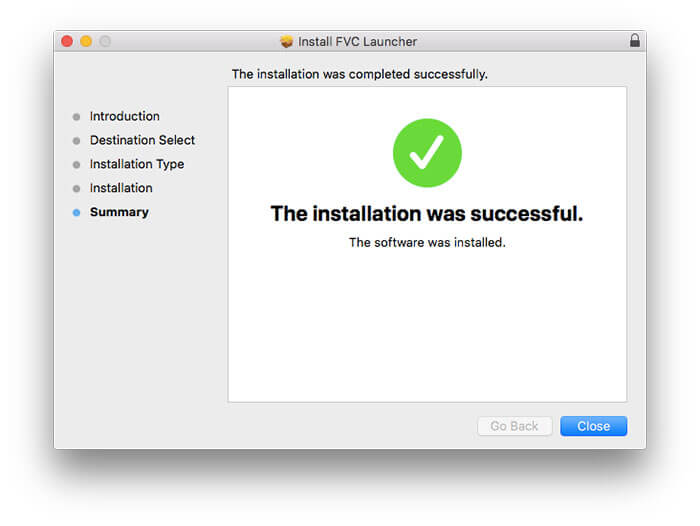
ขั้นตอนที่ 2: เรียกดูและเพิ่มวิดีโอ AVI ของคุณ คุณจะเห็นอินเตอร์เฟซที่เรียบง่ายและใช้งานง่ายสำหรับการบีบอัดไฟล์ AVI ต่อไป.
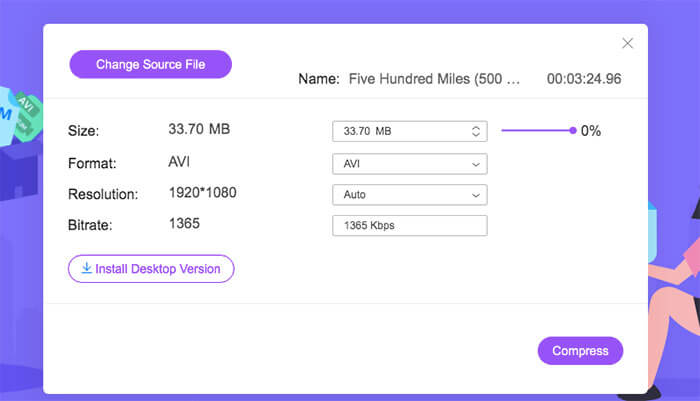
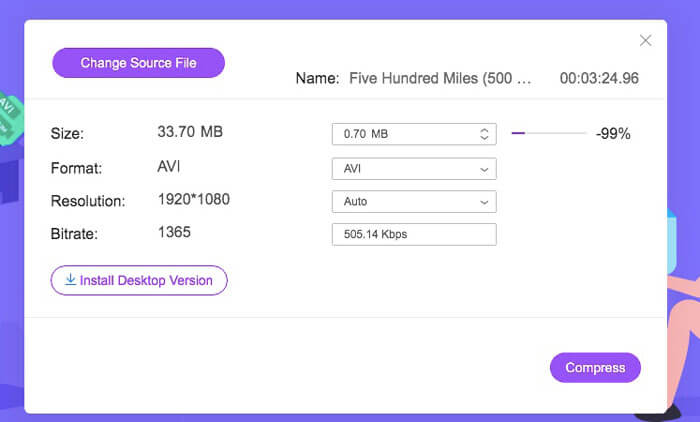
ขั้นตอนที่ 3: ในส่วน Size คุณสามารถลดขนาดวิดีโอ AVI ได้ด้วยการเลื่อนแถบเลื่อนด้านข้าง หรือคุณสามารถระบุขนาดไฟล์ AVI หลังบีบอัดได้ด้วยลูกศร Upside และ Downside.
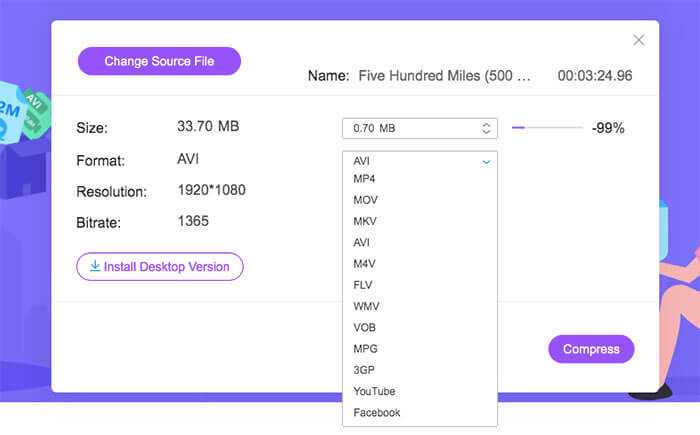
ขั้นตอนที่ 4: คลายเมนูรายการ Format คุณสามารถบีบอัดไฟล์ AVI ให้เป็น MP4, MOV และแม้แต่รูปแบบที่เหมาะกับ YouTube และ Facebook จากนั้นเลือกหนึ่งโปรไฟล์ Resolution เพื่อช่วยลดขนาดไฟล์ AVI.
ขั้นตอนที่ 5: คลิก Compress และตั้งค่าโฟลเดอร์สำหรับไฟล์เอาต์พุต เมื่อมีการแจ้งเตือน Compression successfully ปรากฏขึ้น คุณก็จะได้วิดีโอ AVI ที่ถูกบีบอัดแล้ว.
ส่วนที่ 2: วิธีการบีบอัดวิดีโอ AVI บน Windows
ในการบีบอัดวิดีโอ AVI บน Windows 10/8/7 ฟรีมีทางเลือกอื่นที่คุณสามารถใช้ได้ เป็น Windows Movie Maker ที่สามารถบีบอัดไฟล์ AVI บน Windows 10 และเวอร์ชันก่อนหน้า เพียงทำตามที่แสดงในย่อหน้าต่อไปนี้
ขั้นตอนที่ 1: เปิดโปรแกรม Windows Movie Maker คลิก Import Video ใต้หัวข้อ Capture Video เพื่อเพิ่มวิดีโอ AVI ของคุณ.
ขั้นตอนที่ 2: เลือกวิดีโอ AVI ที่นำเข้า จากนั้นลากและวางลงใน Timeline ด้านล่าง.
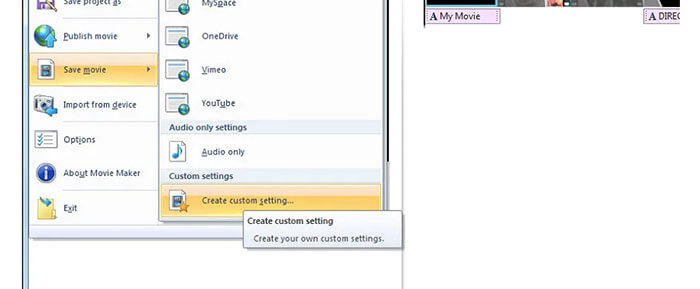
ขั้นตอนที่ 3: คลิก Save Movie File และเลือก create custom settings จากรายการ File.
ขั้นตอนที่ 4: ในส่วน Video settings คุณสามารถปรับความกว้าง ความสูง บิตเรต และเฟรมเรตของวิดีโอเพื่อให้ไฟล์ AVI นี้มีขนาดเล็กลง.
ขั้นตอนที่ 5: คลิก Save เพื่อย่อขนาดวิดีโอ AVI บน Windows ให้เป็นไฟล์ที่มีขนาดเล็กลง.
ส่วนที่ 3: วิธีการบีบอัดไฟล์วิดีโอ AVI บน Mac
iMovie สามารถเป็นซอฟต์แวร์บีบอัดวิดีโอ AVI ของคุณได้ฟรีเช่นกัน คุณสามารถใช้ iMovie เพื่อบีบอัดวิดีโอ. avi บน Mac ได้ฟรี ยิ่งไปกว่านั้นคุณสามารถครอบตัดขอบดำและส่วนที่ไม่ต้องการเพื่อลดขนาดวิดีโอภายใน iMovie ได้เช่นกัน มีเครื่องมือแก้ไขและบีบอัดวิดีโอที่มีประโยชน์มากมายใน iMovie
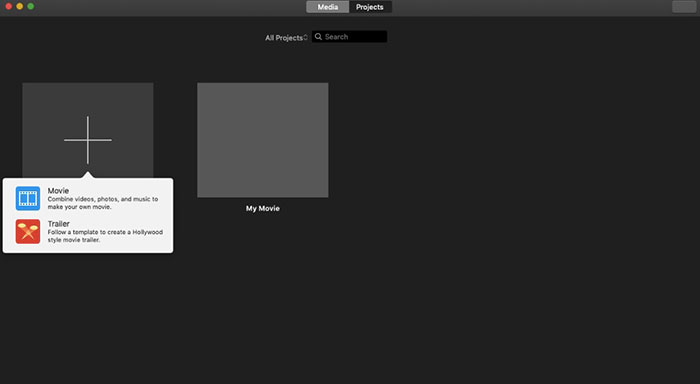
ขั้นตอนที่ 1: เปิดโปรแกรม iMovie เลือก New Movie จากเมนูแบบดรอปดาวน์ File.
ขั้นตอนที่ 2: สร้างโปรเจกต์ใหม่สำหรับไฟล์วิดีโอ AVI ที่ต้องการบีบอัดของคุณ.
ขั้นตอนที่ 3: คลิก Import ด้านบน เลือกและเพิ่มวิดีโอ AVI ขนาดใหญ่เข้าไปใน iMovie.
ขั้นตอนที่ 4: คลายเมนู File แล้วเลือก Share จากนั้นเลือก File… คลิกไอคอน Export มุมขวาบน แล้วเลือก File.
ขั้นตอนที่ 5: หากต้องการลดขนาดวิดีโอ AVI คุณต้องลดความละเอียดและโปรไฟล์คุณภาพของวิดีโอ คลิก Next แล้วตามด้วย Save เพื่อรับไฟล์ AVI ที่ถูกบีบอัด.
ส่วนที่ 4: คำถามที่พบบ่อยเกี่ยวกับการบีบอัด AVI
ทำไม AVI ใหญ่จัง?
คุณจะพบว่าไฟล์ที่จัดรูปแบบ. avi มักจะมีขนาดใหญ่กว่าไฟล์อื่น ๆ AVI ใช้การบีบอัดน้อยลงในการจัดเก็บข้อมูลวิดีโอและเสียง หรือคุณสามารถถือว่า AVI เป็นรูปแบบวิดีโอแบบไม่สูญเสียข้อมูล ดังนั้นไฟล์ AVI จึงมีขนาดไฟล์ใหญ่เสมอ
วิธีการบีบอัด AVI ด้วย After Effects?
เพิ่มวิดีโอ AVI ของคุณเข้าไปใน After Effects ไปที่เมนู Composition เลือก Add to Adobe Media Encoder Queue ใน Media Encoder ให้ค้นหาไฟล์โปรเจกต์ของคุณในเอนจินเรนเดอร์ จากนั้นสลับไปที่รายการ Video หรือ Audio ที่แถบด้านขวา ปรับคุณภาพวิดีโอ/เสียง บิตเรต และรายละเอียดอื่น ๆ คุณสามารถดูขนาดไฟล์โดยประมาณได้ที่มุมล่างขวา คลิก OK เพื่อบันทึกการเปลี่ยนแปลงและลดขนาดไฟล์ AVI ใน After Effects โดยไม่สูญเสียคุณภาพ.
บีบอัด AVI เป็นรูปแบบ MP4 ได้หรือไม่
ได้ คุณสามารถแปลงและบีบอัดไฟล์ AVI ให้เป็น MP4 เพื่อลดขนาดวิดีโอได้มาก AVI เป็นรูปแบบวิดีโอแบบไม่สูญเสียข้อมูล (lossless) ในขณะที่ MP4 เป็นรูปแบบวิดีโอแบบสูญเสียข้อมูล (lossy) นอกจากนี้คุณยังสามารถปรับการตั้งค่าวิดีโอเพื่อทำการบีบอัดไฟล์ AVI ให้สมบูรณ์ได้.
คุณสามารถใช้เครื่องมือข้างต้นเพื่อบีบอัด AVI ออนไลน์และออฟไลน์ได้ฟรี ไม่มีขีดจำกัดความยาววิดีโอหรือขนาดไฟล์ คุณสามารถลดขนาดวิดีโอและบีบอัด AVI สำหรับอีเมล Twitter Facebook และอื่น ๆ ได้โดยตรง อย่างไรก็ตามหากคุณต้องการบีบอัดไฟล์ AVI เป็นกลุ่มการใช้ FVC Free Video Compressor เป็นวิธีที่เร็วที่สุดของคุณ คุณสามารถบีบอัดไฟล์ AVI ขนาดใหญ่แบบออนไลน์ได้ฟรีด้วยความเร็วที่เร็วขึ้น 30 เท่า ฟรี 100% และปลอดภัยสำหรับผู้ใช้ทุกคน
-
 MKV กับ MP4 - การเปรียบเทียบระหว่าง MKV และ MP4
 จะเลือกระหว่าง MKV และ MP4 ได้อย่างไร? รูปแบบใดเป็นรูปแบบที่ดีกว่าสำหรับคุณภาพวิดีโอ ในบทความนี้เราจะทำการเปรียบเทียบ MKV กับ MP4 โดยละเอียดเพื่อช่วยคุณในการเลือก
-
 วิธีบีบอัดวิดีโอ MP4 ให้มีขนาดเล็กลง
 วิดีโอ MP4 ใหญ่เกินไปสำหรับการอัปโหลด? ต้องการลดขนาดวิดีโอหรือไม่? นี่คือ 3 วิธีที่มีประสิทธิภาพในการบีบอัดไฟล์ MP4 ให้มีขนาดเล็กลงโดยไม่มีขีด จำกัด
-
 MP3 VS MP4: อะไรคือความแตกต่างระหว่าง MP3 และ MP4
 MP3 หรือ MP4 อันไหนดีกว่ากัน? MP3 และ MP4 แตกต่างกันอย่างไร บทความนี้จะเปรียบเทียบ MP3 กับ MP4 จากทุกแง่มุมที่คุณสามารถวาดภาพได้
