


 Video Converter Ultimate
 บันทึกหน้าจอ
 ซ่อมวิดีโอ
2 วิธีฟรีในการบีบอัดไฟล์ WMV ออนไลน์
หากต้องการแชร์หรืออัปโหลดไฟล์ WMV ของคุณไปยัง YouTube, Facebook, Google Video หรือแพลตฟอร์มอื่น ๆ คุณจำเป็นต้องบีบอัดไฟล์ WMV และลดขนาดไฟล์ลง คุณรู้ไหมว่าต้องบีบอัดไฟล์ WMV อย่างไรบ้าง?

แน่นอนว่าคุณต้องการบีบอัดไฟล์ WMV โดยยังคงคุณภาพของภาพและเสียงดั้งเดิมเอาไว้ เพื่อให้ตรงกับความต้องการของคุณ บทความนี้จึงขอแบ่งปัน 2 วิธีง่าย ๆ ในการบีบอัดไฟล์ MKV ออนไลน์ได้ฟรี.
ส่วนที่ 1 วิธีการบีบอัดไฟล์ WMV ออนไลน์ฟรี
มีเครื่องมือบีบอัดและตัดต่อวิดีโอมากมายในท้องตลาดที่สามารถช่วยคุณบีบอัดไฟล์ MKV ได้อย่างสะดวก ที่นี่เราขอแนะนำ Free Video Compressor ซึ่งใช้งานง่ายเป็นพิเศษ เพื่อใช้ลดขนาดไฟล์ MKV ของคุณ.
ตัวบีบอัด WMV ออนไลน์ฟรีนี้สามารถบีบอัดวิดีโอในรูปแบบยอดนิยมต่าง ๆ ได้ เช่น WMV, AVI, MP4, FLV, MKV, MOV และอื่น ๆ นอกจากวิดีโอทั่วไปแล้ว ยังรองรับการบีบอัดวิดีโอ 4K UHD และวิดีโอความคมชัดสูง 1080p, 720p อีกด้วย เครื่องมือนี้มีฟีเจอร์บีบอัดแบบกลุ่ม ที่ช่วยให้คุณบีบอัดไฟล์ MKV ได้ทีละสองไฟล์หรือมากกว่านั้น คุณสามารถทำตามคำแนะนำต่อไปนี้เพื่อบีบอัดไฟล์ MKV ออนไลน์ได้ฟรี.
ขั้นตอนที่ 1: ไปยังเว็บไซต์ทางการของตัวบีบอัดไฟล์ WMV ออนไลน์ฟรีตัวนี้บนเบราว์เซอร์ของคุณ สามารถใช้งานได้กับเบราว์เซอร์ยอดนิยมทุกตัว รวมถึง Chrome, Safari, IE, Firefox และอื่น ๆ.

ขั้นตอนที่ 2: คลิกปุ่ม Add Files to Compress เพื่อติดตั้งตัวเรียกใช้งานขนาดเล็กสำหรับการบีบอัดไฟล์ WMV หลังจากนั้น คุณสามารถเลือกและอัปโหลดไฟล์ WMV ที่ต้องการบีบอัดจากหน้าต่างที่เด้งขึ้นมาได้.

ขั้นตอนที่ 3: คุณสามารถปรับความละเอียดวิดีโอ อัตราเฟรม และบิตเรตของวิดีโอ WMV ได้อย่างอิสระ นอกจากนี้ยังสามารถเลือกฟอร์แมตเอาต์พุตอื่นสำหรับไฟล์ที่บีบอัดแล้วได้ จากนั้นคุณเพียงแค่คลิกปุ่ม Compress เพื่อเริ่มบีบอัดไฟล์ WMV ออนไลน์ได้ฟรี.

เมื่อเทียบกับเครื่องมือบีบอัด MKV ออนไลน์อื่น ๆ Free Video Compressor นี้สามารถให้ความเร็วในการบีบอัด MKV ที่เร็วขึ้น ที่สำคัญจะไม่เพิ่มลายน้ำใด ๆ ให้กับวิดีโอที่ส่งออกของคุณ
ส่วนที่ 2. วิธีบีบอัดไฟล์ WMV ออนไลน์ด้วย Clideo
นอกจาก Free Video Compressor ด้านบนแล้ว คุณยังสามารถใช้ Clideo ซึ่งได้รับความนิยมสูงในการลดขนาดไฟล์ MKV ของคุณได้อีกด้วย Clideo รองรับวิดีโอหลายรูปแบบ รวมถึง WMV, MP4, MOV, VOB, AVI และอื่น ๆ มาพร้อมดีไซน์อินเทอร์เฟซที่เรียบง่าย ช่วยให้คุณบีบอัดวิดีโอได้อย่างสะดวกสบาย.
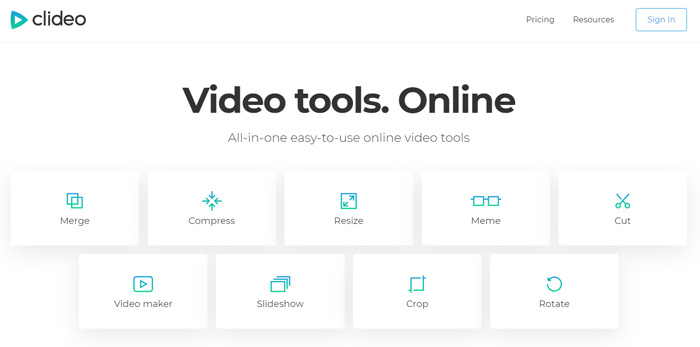
ขั้นตอนที่ 1: เปิดเบราว์เซอร์ของคุณแล้วไปที่เว็บไซต์ทางการของ Clideo เมื่อเข้าสู่หน้าเว็บแล้ว ให้เลือกตัวเลือก Compress.
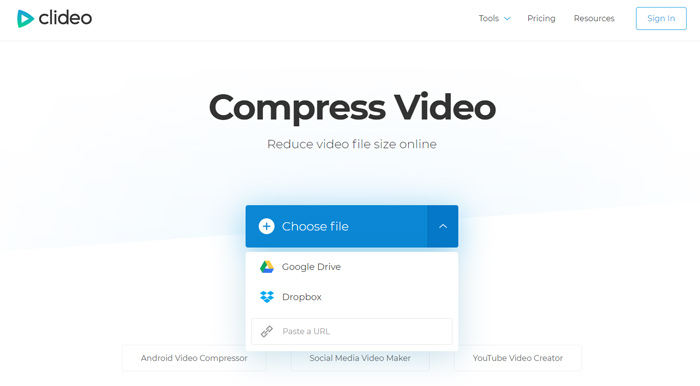
ขั้นตอนที่ 2: เมื่อคุณเข้าสู่หน้า Compress Video ให้คลิกปุ่ม Choose file เพื่ออัปโหลดวิดีโอ WMV ของคุณ นอกจากจากฮาร์ดไดรฟ์ในเครื่องแล้ว ยังสามารถเพิ่มไฟล์ MKV ผ่าน Dropbox, Google Drive หรือ URL ได้อีกด้วย กระบวนการอัปโหลดอาจใช้เวลาค่อนข้างนานกว่าจะเสร็จสมบูรณ์.
ขั้นตอนที่ 3: ตัวบีบอัด WMV ออนไลน์ฟรีนี้จะบีบอัดไฟล์ WMV ให้คุณโดยอัตโนมัติ คุณสามารถพรีวิวผลลัพธ์การบีบอัดได้ทันที หากต้องการแก้ไขเพิ่มเติมจำเป็นต้องลงชื่อเข้าใช้ หลังจากนั้น คุณสามารถคลิกปุ่ม Download เพื่อบันทึกไฟล์ WMV ที่บีบอัดแล้วลงในคอมพิวเตอร์ของคุณ.
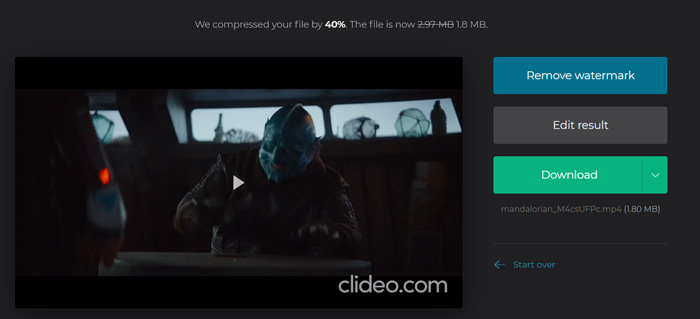
Clideo จะแทรกลายน้ำให้กับไฟล์ WMV ที่คุณบีบอัด คุณต้องลงชื่อเข้าใช้ด้วยบัญชี Facebook หรือ Google เพื่อลบลายน้ำ
ส่วนที่ 3 คำถามที่พบบ่อยเกี่ยวกับการบีบอัดไฟล์ WMV
คำถาม 1. รูปแบบ WMV หมายถึงอะไร?
Windows Media Video (WMV) คือชุดของตัวแปลงสัญญาณวิดีโอและรูปแบบการเข้ารหัสวิดีโอที่เกี่ยวข้องซึ่งพัฒนาโดย Microsoft เป็นส่วนขยายวิดีโอสำหรับรูปแบบคอนเทนเนอร์ ASF รูปแบบระบบขั้นสูง WMV ใช้สำหรับจัดเก็บวิดีโอบน Windows เป็นหลัก
คำถาม 2. จะแปลง WMV เป็น MP4 ออนไลน์ได้อย่างไร?
หากต้องการแปลงไฟล์ WMV เป็น MP4 แบบฟรี คุณสามารถใช้ซอฟต์แวร์แปลงวิดีโอยอดนิยมอย่าง Free Online Video Converter ได้ เครื่องมือนี้ช่วยให้คุณทำการแปลงไฟล์ WMV เป็น MP4 โดยไม่สูญเสียคุณภาพ.
คำถามที่ 3. WMV ดีกว่า MP4 หรือไม่?
เมื่อเทียบกับ MP4 ข้อได้เปรียบที่ใหญ่ที่สุดของ WMV คือขนาดไฟล์ที่เล็ก โดยทั่วไปไฟล์ WMV หนึ่งไฟล์มีขนาดเล็กกว่าไฟล์ MP4 ที่คล้ายกัน ด้วยเหตุนี้ไฟล์ WMV จะใช้ทรัพยากรน้อยลงในเครื่องของคุณและสามารถแชร์ผ่านแพลตฟอร์มเครือข่ายอีเมลหรือโซเชียลมีเดียได้ดีขึ้น แต่คุณไม่สามารถพูดได้ว่า WMV ดีกว่า MP4 รูปแบบ MP4 สามารถรองรับได้โดยอุปกรณ์เครื่องเล่นสื่อและบรรณาธิการอื่น ๆ
คำถาม 4. ยังคงใช้ WMV อยู่หรือไม่?
ตามที่กล่าวไว้ข้างต้นรูปแบบ WMV ได้รับการออกแบบโดย Microsoft และใช้กันอย่างแพร่หลายใน Windows ใช้ขนาดไฟล์เล็กและบีบอัดได้ดีกว่า MP4 จนถึงขณะนี้ WMV ยังคงเป็นที่นิยมสำหรับการสตรีมวิดีโอออนไลน์
-
 3 วิธีในการบีบอัดและแปลงไฟล์วิดีโอขนาดใหญ่สำหรับ WhatsApp
 จากบทความนี้คุณจะได้รับ 3 วิธีง่ายๆในการบีบอัดวิดีโอออนไลน์สำหรับ WhatsApp ทำไมคุณไม่สามารถส่งวิดีโอบน WhatsApp ได้? คุณสามารถแก้ไขข้อ จำกัด ขนาดวิดีโอ WhatsApp ได้อย่างไร เพียงแค่อ่านและตรวจสอบ
-
 บทแนะนำการบีบอัด GIF และลดขนาดไฟล์ด้วยคุณภาพสูง
 นี่คือ 2 วิธีง่ายๆในการบีบอัด GIF บนคอมพิวเตอร์หรือโทรศัพท์มือถือของคุณ คุณสามารถใช้ FVC Free Online Video Compressor และ Photoshop ลดขนาดไฟล์ GIF ในแง่มุมต่างๆ
-
 6 วิธียอดนิยมในการรวมไฟล์ MP4 บน Windows / Mac / ออนไลน์
 ต้องการรวมไฟล์ MP4 ดิบสำหรับโครงการของคุณหรือไม่? โพสต์นี้รวบรวม 6 วิธียอดนิยมที่จะช่วยให้คุณรวมวิดีโอ MP4 บน Windows, Mac และออนไลน์ได้อย่างง่ายดาย
